Skip to content
DevMeme
4880 of 7435
Kawaii Kubernetes: When You Ask a Chatbot for a 'Cute' Tutorial
Containerization Post #5341, on Aug 10, 2023 in TG

Kawaii Kubernetes: When You Ask a Chatbot for a 'Cute' Tutorial

Why is this Containerization meme funny?

Level 1: Big Task, Cute Style

Imagine you have a really big job to do – like building a mini city – but you’re trying to do it all on a tiny toy instead of in a big space. That’s what’s happening here. A Kubernetes cluster is like a big factory with lots of moving parts, and an Android phone is like a little toy workshop. It’s funny because someone is actually trying to run this big factory inside the little toy workshop! Now, normally if you explain how to build a factory, you’d do it in a serious way. But here, the explanation sounds like a children’s cartoon: everything is given a cute nickname, and there are hearts 💖 and sparkles ✨ everywhere. It’s as if a friendly anime character is teaching you how to do a very hard science project, using baby talk and fun faces like “OwO” (imagine big wide cartoon eyes) and “:3” (a cat smile). The reason it’s humorous is the mix of serious and silly – the task itself is super technical and complex, but it’s being described in an adorably playful way. Even if you don’t know what Kubernetes is, you can tell that putting something powerful on a phone and explaining it like a cute story is a bit absurd. It’s like someone telling you how to operate a spaceship using the voice of a giggling anime character – unexpected and giggle-worthy! In simple terms, this meme is funny because it turns a tough computer setup into a happy-cute adventure, making a very big task sound like a fun, cuddly playtime.

Level 2: Kubernetes in Your Pocket

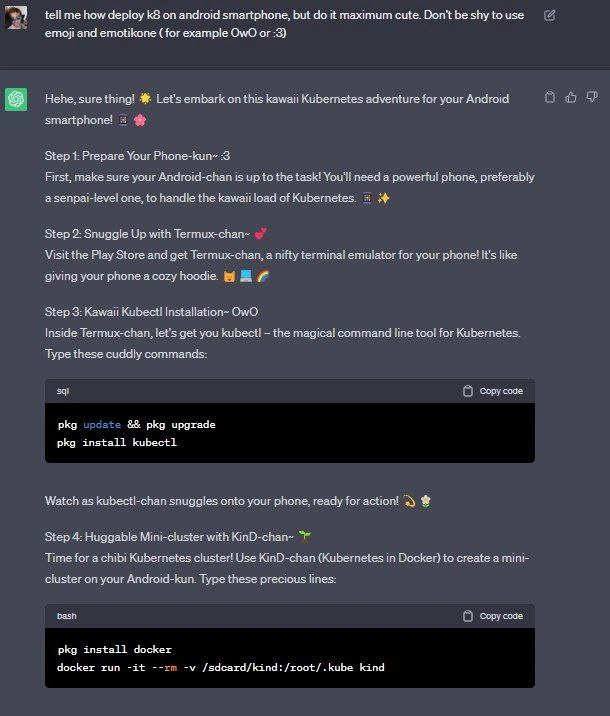
Let’s break down what’s actually happening in this meme, in more straightforward terms. The scenario is deploying a Kubernetes cluster on an Android smartphone using Termux and KinD. If that sounds wild, it kind of is – but here’s how it works step by step:

  1. Prepare Your Android Phone: The guide (in its cutesy way) starts by advising you to have a powerful Android device (“senpai-level phone” as they joked). This is because running something like Kubernetes, even a tiny version, requires a lot of resources – CPU power, memory, and storage. In plain terms, if you want to run a mini cloud on your phone, your phone needs to be relatively high-end (lots of RAM, good processor). It’s also a heads-up that your phone’s battery should be charged and you might need plenty of free space. The meme calling the phone “Phone-kun” is just a cute anthropomorphic way to say treat your phone nicely and make sure it’s up to the task! 📱

  2. Install Termux (Android Terminal): Termux is an application available on the Play Store that gives you a command-line interface (a terminal) on Android. Think of Termux as a little Linux environment running on your phone – it’s a command-line shell where you can install and run typical Linux packages. In the meme, they called it “Termux-chan” and described it like giving your phone a cozy hoodie. In real terms, installing Termux is like equipping your phone with a developer toolkit. Once Termux is installed, you have access to a package manager (pkg, which is like apt on Debian/Ubuntu) to download software. This is crucial because Android by itself doesn’t come with tools like kubectl or docker. The guide’s Step 2 says “Snuggle up with Termux-chan” – meaning open the Termux app (snuggle up = get comfortable) and prepare to use it. Termux is very popular for MobileDev enthusiasts who want to run Linux utilities on Android. No fancy GUI here – it’s all text-based commands (that’s what CLI tools are: Command Line Interface programs).

  3. Install Kubernetes CLI (kubectl): Once inside Termux, the meme’s Step 3 is installing kubectl. Kubectl is the Kubernetes Command-Line Tool – basically, the interface you use to interact with a Kubernetes cluster (deploy applications, check status, etc.). The cute guide calls it “kubectl-chan, the magical command line tool for Kubernetes”. In normal terms: you’d run pkg update && pkg upgrade (to update Termux’s package repository and packages) and then pkg install kubectl. This downloads a compiled version of kubectl that can run on your Android (likely an ARM64 build, since most modern phones use ARM chips). Now, kubectl by itself isn’t very useful without a cluster to talk to, but it’s a necessary tool if you’re going to control the cluster we’re about to set up. The meme says “Watch as kubectl-chan snuggles onto your phone, ready for action! :3” – translation: the kubectl installation will complete, and now you have the Kubernetes CLI available on your phone, all set to be used. The emoticon “:3” is meant to look like a cat face, signifying happiness with the installation. OwO

    # Inside Termux: update package lists and install Kubernetes CLI
    pkg update && pkg upgrade   # Update Termux packages to latest
    pkg install kubectl         # Install kubectl (Kubernetes control tool) on Android
    

    In the meme’s screenshot, they showed commands like the above in a code block (though amusingly labeled as “sql” language 😅). This is the real meat: your phone now has kubectl, the same tool you’d use on a PC to control Kubernetes.

  4. Create a “Kind” Kubernetes Cluster (with Docker): Now for the big step – actually running a Kubernetes cluster on the phone. The method shown uses Kind, which stands for “Kubernetes in Docker”. Kind is a development tool that lets you spawn a local Kubernetes cluster by running a Docker container that contains the Kubernetes control plane (and worker nodes as additional containers). In practice, Kind is often used by developers on their laptops to test Kubernetes quickly without needing multiple VMs or a cloud cluster. Here, they’re doing it on Android. That involves two things: installing Docker in Termux, and then running the Kind container. In a normal environment, Docker is the engine that runs containers (it’s what you use to run container images). On Android, installing Docker is tricky – Android kernels might not support all features unless the phone is rooted. But Termux does have a package for Docker (pkg install docker), which likely sets up a userland Docker or something like Docker’s client. Assuming it works, the next command is to run the Kind container:

    pkg install docker          # Install Docker engine (or a variant) in Termux
    docker run -it --rm -v /sdcard/kind:/root/.kube kind:latest
    

    Let’s break down that docker run command:

    • docker run -it --rm means run a Docker container interactively and remove it when it exits.
    • -v /sdcard/kind:/root/.kube is mounting a volume. It maps a directory on your phone’s storage (/sdcard/kind) to /root/.kube inside the container. This is likely done so that the Kubernetes kubeconfig file (which gets created in the container’s /root/.kube/config when the cluster is set up) will be saved onto the phone’s storage. That way, after the container stops, you can still access the config file via the /sdcard/kind folder. The kubeconfig is what kubectl uses to know how to connect to the new cluster (credentials, endpoint, etc.).
    • kind:latest is the Docker image for Kind tool (which contains the code to set up a Kubernetes cluster inside itself).

    When you run this, the Kind container will start up and internally it will create a Kubernetes control-plane node (and possibly worker nodes as additional containers inside the Docker daemon running in Termux). Essentially, your phone is now hosting a single-node Kubernetes cluster! It’s small and “kind” of slow, but it’s real. The meme calls this “a Huggable Mini-cluster with KinD-chan” and even uses the term “chibi Kubernetes cluster” (chibi means small and cute). They’ve effectively personified the cluster as a cute character. In straight terms, after Step 4, you can use the kubectl from Step 3 to talk to this cluster. For example, you might run kubectl --kubeconfig=/sdcard/kind/config get nodes on your phone, and it should list the single node (probably named something like “kind-control-plane”). It’s like having a tiny cloud in your pocket. The Android device is doing the job of a server, with Termux providing the Linux environment, Docker creating containers, and Kind setting up Kubernetes inside a container. This is a very unusual MobileDev setup, because mobile devices usually aren’t running container orchestration platforms! But it’s a fun experiment. Just keep in mind a phone has constraints: you wouldn’t run any serious workload on this cluster – it’s more for tinkering or development curiosity.

Throughout these steps, the original answer sprinkled tons of emoji and cute phrases. For instance, every step title had an emoji like “Step 2: Snuggle Up with Termux-chan~ 💕”. It also added little encouragements, like calling the commands “cuddly commands” to type in. The user specifically asked for “maximum cute” with emoticons like OwO or :3, which are emoticon faces. OwO kind of looks like wide excited eyes, and :3 looks like a cat face with a mischievous smile. These, along with the hearts (💗) and sparkles (✨), set a very playful tone. In normal documentation, you’d never see that – you might see an occasional 🙂 in a blog post, but here it’s every other sentence. The result feels like a mix between a tech tutorial and a script from a magical anime. And yes, it’s actually explaining how to do a real tech setup: installing kubectl and docker on Android and using Kind to create a cluster. So if you follow along (and your phone cooperates), you could genuinely end up with a working Kubernetes cluster on your phone! Just imagine showing that to your friends or colleagues – it’s a geeky party trick.

In summary, this meme’s scenario covers a lot of technical ground in a short span: an Android phone being used as a Linux server, installing CLI tools through Termux, running Docker containers, and orchestrating a Kubernetes cluster with Kind. Each of those terms – Android, Termux, kubectl, Docker, Kind, Kubernetes – are real technologies:

  • Android – the operating system of the smartphone, normally meant for apps, but here doing Linux-like things.
  • Termux – an Android app that gives you a shell and allows a Linux userland on phone, so you can run command-line programs.
  • kubectl – the command-line tool to control Kubernetes clusters (deploy apps, check cluster state, etc.).
  • Docker – a platform to run containers (lightweight, isolated environments for applications).
  • Kind (Kubernetes-in-Docker) – a tool that sets up Kubernetes clusters using Docker containers (commonly for testing and CI).
  • Kubernetes – the container orchestration system we’re ultimately running (even if just a single-node version).

For a junior developer or a student, this meme might introduce terms in a very unconventional way. But once we strip away the anime fluff, the core idea is: “You can run a small Kubernetes cluster on your phone by using a terminal app and container tools.” That’s both an interesting tech idea (showing the power of modern phones and portable tools) and a humorous one (because of the presentation). It also demonstrates the flexibility of command-line tools – you can invoke them in any environment, even mobile, if you can get the binaries running there. This whole thing is a lighthearted example of TechHumor in the developer community, but it’s also a tiny lesson: it introduces the concept of running servers on unconventional hardware (like a phone) and reminds us that even serious tech can have a fun side. If you’re new to these terms, don’t worry – in a normal setting you’d probably practice Kubernetes on a PC or cloud VM, not on your personal phone, and tutorials will usually be a lot more straightforward (and less pink and sparkly!). Still, now you know it’s possible – and you’ve seen perhaps the cutest tutorial ever written on the subject!

Level 3: DevOps Gets Kawaii

At first glance, this meme is a collision of two worlds: serious DevOps engineering and ultra-kawaii (cute) anime culture. The screenshot shows a chat where a user asks for instructions to deploy a Kubernetes cluster on an Android smartphone “in maximum cute” style – and the assistant delivers exactly that. For seasoned developers, the humor comes from this absurd juxtaposition. We have highly technical content about containerization (setting up Kubernetes using Docker and KinD on a phone) presented as if it’s an adorable anime tutorial. This isn’t your typical dry Kubernetes how-to from a vendor’s docs – it reads more like a magical girl guiding you through a coding adventure with sparkles and hearts. The experienced eye recognizes the DevOps_humor at play: something as heavyweight as Kubernetes, which usually runs on cloud servers or clusters of VMs, is being squeezed onto a single phone, and described with sweet, childlike enthusiasm. It’s like seeing a data center dressed up in a frilly pink cosplay costume – inherently funny because of the contrast to the usual tone of enterprise tech.

On a technical level, running a kind_cluster_on_android (a Kubernetes “Kind” cluster on an Android device) is both impressive and comical. Kubernetes is a complex container orchestration system meant for managing workloads across many machines. Here, the meme pares it down to a single machine – and not just any machine, but an Android phone! That’s unexpected: phones aren’t typical Kubernetes hosts. The very idea might make a senior SRE raise an eyebrow or chuckle. Android is Linux-based under the hood, so with enough tinkering (using an app like Termux to get a Linux CLI environment), it’s technically possible to run containers. But it’s definitely a hacky, “just-because-you-can” project. Seasoned developers know the challenges: limited memory and CPU on mobile, potential battery drain, and the lack of full root access or standard Docker support. In other words, phone hardware and OS restrictions make this a far cry from a stable Kubernetes cluster setup. The humor is partly in the absurd overkill – Kubernetes is designed to scale across data centers, yet someone is playfully trying to spin it up on their pocket-sized device. It’s a bit like trying to run a Ferrari engine in a go-kart: doable with tweaks, but why? Simply for the geeky joy of it (and internet points, of course). Experienced devs recognize that vibe – the “Will it run Doom?” tradition in tech, now transformed into “Will it run Kubernetes?” on the unlikeliest gadget, just for laughs.

What really sells the meme is the kawaii_devops_style of the explanation. The assistant’s answer is overflowing with anime-style cuteness. It anthropomorphizes everything: the Android phone becomes “Phone-kun”, the Termux app is “Termux-chan”, the Kubernetes CLI is “kubectl-chan”, and even the Kubernetes-in-Docker tool is “KinD-chan”. In Japanese, -chan is an affectionate suffix (like for a friend or cute character) and -kun can be a friendly suffix often used for boys or younger folks – here it’s used to personify the phone (perhaps as a trusty companion). The guide says things like “Give your phone a cozy hoodie” to describe installing Termux (a cozy hoodie = a comfortable environment for the phone). It’s hilariously emoji_laden_docs: every sentence has a flurry of sparkles ✨, hearts 💞, and happy faces OwO/:3. The assistant even squeals with excitement in text: “Hehe, sure thing! 🌸 Let’s embark on this kawaii Kubernetes adventure!” – not exactly the tone you expect from instructions on setting up a cluster! For a veteran developer, this dramatic change in tone is the punchline. It’s the TechHumor equivalent of a server room being narrated by an overly enthusiastic anime schoolgirl character. You can’t help but grin (or groan) at lines like calling the mini-cluster “chibi” (Japanese for tiny/cute) and saying “kubectl-chan snuggles onto your phone, ready for action! 🥰🐱”. It’s so over-the-top cutesy that it parodies itself.

By combining a termux_setup guide with emoji-laden narrative, the meme highlights how documentation or tutorials can be styled in wildly different voices. In standard IT documentation, you’d see something straightforward like “Install Termux. Update packages. Install kubectl. Then install Docker and run Kind to create a cluster.” In this meme’s version, the same content is re-imagined as an adorable journey with each component as a lovable character. This contrast is illustrated below:

Ordinary Kubernetes Guide Kawaii Meme Version 🎀
“Install Termux from the Play Store.” “Snuggle up with Termux-chan 🧸💻 (it’s like giving your phone a cozy hoodie).”
“Use the package manager to install kubectl.” “Inside Termux-chan, let’s get you kubectl-chan – the magical CLI tool. OwO”
“Install Docker, then run Kind to create cluster.” “Time for a chibi Kubernetes cluster! Use KinD-chan (Kubernetes in Docker) to create a huggable mini-cluster on your Android-kun. 💞”
(Tone: formal, technical) (Tone: playful, full of hearts ✨ and sparkles 🌸)

Reading the right column, an experienced dev can’t miss the humor: it’s essentially a normal kubectl_installation_mobile and cluster setup guide, but run through an “anime sparkle” filter. The content itself is legit technical instruction (you really are installing kubectl and using docker run to start a Kind Kubernetes cluster). It’s the presentation that’s totally unconventional. This kind of DeveloperHumor lands because it’s so specific: it assumes knowledge of Kubernetes, Docker, Android, etc., and then riffs on the cultural mashup. The fact it’s a chat exchange (likely with an AI assistant) adds another layer: someone literally requested this style, and the AI obediently went all in. The assistant didn’t hold back on the OwO faces or “-chan” honorifics, which is comedic in itself – it’s like watching a normally serious teacher start speaking like a bubbly anime character because a student asked them to. It’s both cringey and delightful, especially if you’re the kind of techie who’s seen one too many bland technical manuals. In essence, this meme is poking fun at how we usually approach CLI tools and cloud tech with a no-nonsense attitude, by showing the exact opposite approach: hyper-cute nonsense layered on top of real commands. And paradoxically, it might even make the daunting idea of running a Kubernetes cluster a little less scary – after all, it’s presented as a fun, cozy adventure. An old-hand developer gets the inside joke: no matter how you sugarcoat it with “kawaii” charm, Kubernetes is still a beast – but hey, if calling it KinD-chan helps you dive into it with a smile, why not? It’s a reminder that tech can be playful and that even DevOps_SRE folks have a sense of humor beneath all those 3AM on-call war stories.

Description

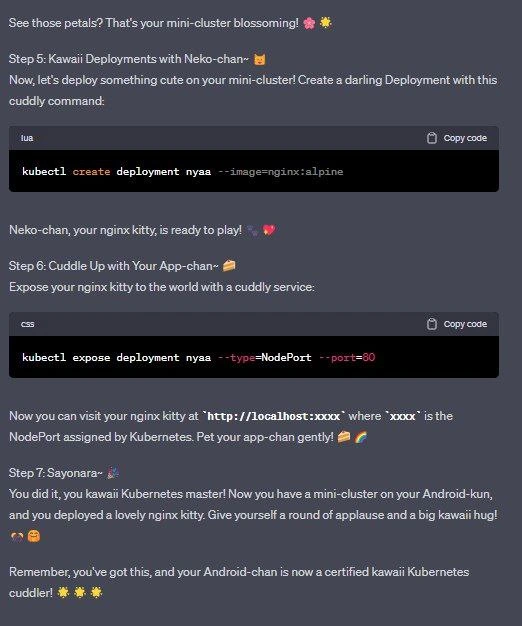
A screenshot of a conversation with an AI chatbot. The user's prompt at the top asks for instructions on how to deploy Kubernetes (k8s) on an Android smartphone, but with the specific and unusual request that the explanation be 'maximum cute,' including emojis and emoticons like 'OwO'. The rest of the image shows the AI's enthusiastic and literal fulfillment of this request. The resulting tutorial is a step-by-step guide for installing Kubernetes using Termux, kubectl, and KinD, but every instruction is framed in an exaggeratedly cute, 'kawaii' or 'uwu' style. Technical components are anthropomorphized with Japanese honorifics (e.g., 'Phone-kun', 'Termux-chan'), and the text is filled with phrases like 'kawaii Kubernetes adventure', 'snuggle up', and 'cuddly commands'. The humor derives from the extreme and absurd juxtaposition of a highly complex, technical topic like Kubernetes with the playful, childish, and niche 'uwu' internet subculture language

Comments

7
Anonymous ★ Top Pick I'm not sure what's worse: the fact that my phone now has a higher TCO than my laptop, or that the CrashLoopBackOff error message is going to be 'Oopsie woopsie, the pod went sleepy-weepy! >_<'
  1. Anonymous ★ Top Pick

    I'm not sure what's worse: the fact that my phone now has a higher TCO than my laptop, or that the CrashLoopBackOff error message is going to be 'Oopsie woopsie, the pod went sleepy-weepy! >_<'

  2. Anonymous

    Nothing says “enterprise-grade” like spinning up a KinD control plane in Termux, labeling the shell script as SQL, and trusting both etcd consensus and your coffee-shop Wi-Fi to hold charge longer than your phone battery

  3. Anonymous

    Nothing says 'I've solved all meaningful engineering problems' quite like running a container orchestration platform designed for distributed systems on a device that struggles with Chrome tabs. Next up: implementing a service mesh for your smartwatch's notification system

  4. Anonymous

    When your product manager asks if we can 'make the infrastructure more approachable,' they probably didn't mean deploying a Kubernetes cluster on Android with anime honorifics - but here we are, running kubectl-chan on Termux-senpai, because apparently 'cloud-native' now includes your pocket. The real question isn't whether you *can* run a mini-cluster on a smartphone, it's whether your on-call rotation is ready for 'Pod crashed because phone battery died' incidents at 3 AM

  5. Anonymous

    Spinning up KinD in Termux on Android: etcd on phone flash, kubelet suspended by Doze, iptables rewritten by the hotspot toggle - and the pager is the same device. Edge computing where the edge is your battery

  6. Anonymous

    K8s on phone: Infinite scalability, until thermal throttling enforces the ultimate pod eviction

  7. Anonymous

    Kubernetes in your pocket: KinD on Termux with kubeconfig bind‑mounted from /sdcard - where autoscaler means “scale to zero at 20% battery,” and every node ships with taint low_battery=true:NoSchedule

Use J and K for navigation