Skip to content
DevMeme
4881 of 7435
Deploying 'Neko-chan' on the Kawaii Kubernetes Cluster
Containerization Post #5342, on Aug 10, 2023 in TG

Deploying 'Neko-chan' on the Kawaii Kubernetes Cluster

Why is this Containerization meme funny?

Level 1: Kitty in Your Phone

Imagine you have a smartphone, and inside it you set up a little playground for a kitten. This playground is actually a tiny world where your pet (the kitten) can live and play. In our case, the kitten represents a little program (a web server) running inside your phone. Now, normally when we talk about computers and servers, we do it in a very plain, serious way – kind of like giving strict instructions. But here, everything is explained as if it’s a cute story.

It’s like your friend is saying: “Plant a lovely garden in your phone 🌸, and in that garden, place an adorable kitten named Neko-chan 😺. Now build a tiny door (a service port) so the kitten can peek out and your friends can come visit and say hello to the kitty through that door. Give your kitty a gentle pat by visiting it on your phone’s browser. Yay! You did it, you’re a magical pet caretaker for your app! 🤗🎉” — All with hearts, stars, and sparkles flying around.

Why is this funny? Because installing a web server on a phone is usually talked about with a lot of technical jargon, not with talk of gardens and hugs. It’s as if a very serious task (setting up a mini computer server) was turned into a child’s bedtime story. Imagine if your math teacher taught a lesson by saying, “Each number is a cute little creature, let's help them play together!” You’d probably giggle, right? Here, a tech expert is teaching how to run a complex system by using adorable characters and encouragement like in a kids’ show.

So, the core joke is: something that’s normally complicated and dry was explained in an extremely cute and friendly way. It makes you smile because it’s so unexpected. It’s like if you opened an instruction manual for assembling a bookshelf, and it started with “Once upon a time, two brave little screws wanted to hold a shelf together – let’s help them unite! 🥰🔩”. You’d find it silly and charming. In the same way, this meme takes the hard world of computer servers and turns it into a fun, anime-style adventure with a kitty. Even if you don’t know anything about Kubernetes or servers, you can sense the warm, happy tone. It basically says, “Don’t be scared of the tech, it can be fun and cute!” And that feeling of lighthearted surprise – making a computer exercise feel like playtime with a pet – is why people find it so funny and lovable.

Level 2: Cute and Containerized

Let’s strip away the sparkles (just a little) and see what’s really happening in this kawaii Kubernetes tutorial. In plain terms, someone is deploying a web server on a tiny Kubernetes cluster running on an Android device, but narrating it as if it were a scene from a cute anime. Here are the key pieces explained:

  • Kubernetes: Often abbreviated as K8s, this is a powerful system for managing containerized applications across a cluster of machines. Think of it as an orchestrator that tells containers when and where to run. In this meme, the “mini-cluster blossoming 🌸” on the Android phone means a small Kubernetes cluster (maybe a single-node cluster on the phone) has started up and is ready to deploy apps. It’s unusual (and impressive) to run Kubernetes on a phone, because Kubernetes usually runs on servers or at least PCs or Raspberry Pi boards. But thanks to lightweight versions (like k3s or similar), an Android device can host the Kubernetes control plane and run containers. So Android-chan, as they call the phone, is acting like a tiny server farm!

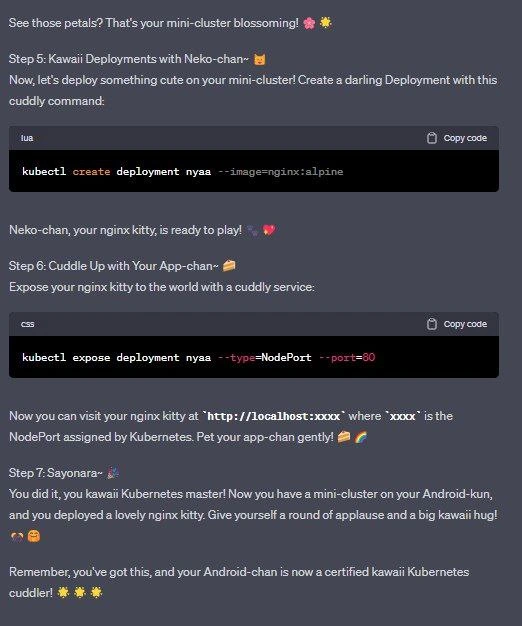
  • kubectl: This is the Kubernetes command-line tool. It lets you talk to the cluster’s brain (the API server) and tell it what to do. In the meme screenshot, we see commands prefixed with kubectl – those are exactly how a developer interacts with Kubernetes from a terminal (CLI). For example, kubectl create deployment nyaa --image=nginx:alpine is a command to create a new Deployment. Normally, one might run that in a boring black-and-white terminal. Here it's presented in a chat-like dark mode interface with emoji commentary. The content is the same, but the style is entirely different.

  • Deployment: In Kubernetes, a Deployment is a configuration object that ensures a certain number of pods are running. A pod is basically a wrapper around one or more containers (often just one container) that Kubernetes manages. When the tutorial says “Create a darling Deployment with this cuddly command:” and then shows kubectl create deployment nyaa --image=nginx:alpine, behind the cuteness it’s telling us: “Start running an instance of the Nginx application in the cluster.” The name nyaa becomes the identifier for this deployment. “Nyaa” is a fun choice because it’s like the sound a cat makes (meow) in Japanese – tying into the whole cat theme. The image nginx:alpine means we’re using the official Nginx web server container, specifically the smaller Alpine Linux-based build (which is great for a mini cluster with limited resources, like a phone, because it’s smaller in size). So effectively, this step launched an Nginx web server inside the phone’s Kubernetes cluster. When they say “Neko-chan, your nginx kitty, is ready to play!”, it means the Nginx server pod is up and running successfully, as if a little kitten just woke up ready for fun. 🎉😺

  • Service (NodePort): After starting the Nginx deployment, the next step is to expose it so that you (and others, if they’re connected) can actually reach that web server. Kubernetes uses a Service object to tie together the network for pods. Here, they specifically use a NodePort type service with the command kubectl expose deployment nyaa --type=NodePort --port=80. Let’s decode that: this tells Kubernetes, “Take the deployment named nyaa (our Nginx pod) and expose it on port 80 inside the cluster, and also open a port on the host machine so we can access it externally.” A NodePort service will allocate a port number on the actual machine (the Android device) usually in a range like 30000-32767. That’s why the tutorial says xxxx is the NodePort assigned by Kubernetes”. You’d typically find out the exact port by running something like kubectl get service nyaa and it would show something like NodePort: <some-ip>:30412->80. Then going to http://localhost:30412 on that device (or forwarded to it) would connect to the Nginx. The meme simplifies this by just saying "visit http://localhost:xxxx" – implying “go to localhost at whatever port got assigned.” When they say “Expose your nginx kitty to the world with a cuddly service”, that’s their adorable way of saying “we're making the web server accessible outside the cluster.” In real Kubernetes-talk, exposing a deployment via NodePort is a common way in small/test clusters (especially when you don’t have a cloud load balancer handy). On an Android cluster, NodePort is likely the only practical choice to quickly see the web page, since you can’t exactly spin up a cloud LB on your phone. So this step is quite practical: it’s how you can open up access to the Nginx app running in the cluster. And calling it “Cuddle up with your App-chan” with bread 🍞 and rice ball 🍙 emojis is just sweetly personifying what is otherwise a straightforward networking step. Imagine a normal guide: “Next, expose the deployment so your app is reachable.” Here: it’s a warm invitation to cuddle your app – much more fun!

  • Anime references and style: The tutorial text is peppered with Japanese words and cutesy suffixes like “-chan” and “-kun”. “Kawaii” (かわいい) literally means “cute” in Japanese, and it’s a whole aesthetic of making things adorable. The author calls the reader a “kawaii Kubernetes master” at the end, which is super encouraging and bubbly. They refer to the app as App-chan (adding “-chan” to something’s name in Japanese is a form of endearment, often used for children, close friends, or pets – it implies cuteness or fondness). They even call the Android device Android-kun. The suffix “-kun” is often used for young men or boys among friends, so here it’s like the phone is a friendly character, perhaps a helpful boy sidekick. It’s quite literally making the phone and the app into cute characters in this story. There’s also "Neko-chan" (猫ちゃん) which means "Miss Kitty" or "Kitty dear" – they’re referring to the Nginx instance as a little cat character. The steps themselves are numbered like a friendly guide: Step 5: Kawaii Deployments with Neko-chan~ 😺, Step 6: Cuddle Up with Your App-chan~ 🍞, etc., which feels like you’re going through levels in a cheerful tutorial game or an interactive story. The presence of many emojis (flowers 🌸, sparkles 🌟, hearts 💜💕, cake 🍰, onigiri 🍙, bubbles 🫧, etc.) amplifies the kawaii tutorial style. This style of explanation is very much a developer-anime crossover – it’s taking a dry subject (cloud infrastructure commands) and explaining it with the tone of a friendly anime mentor or a character from a tech-themed manga. It's not something you see in official documentation or textbooks; it's more common in fan-made guides or communities where meme culture thrives.

  • DevOps humor in context: The categories here include Containerization, DevOps/SRE, CLI, and we see all of that. The meme is funny to those in DevOps because it subverts expectations: normally deploying to Kubernetes might remind an SRE of stress (Will it scale? Did I set the configs right? Is the service up?). But here it’s portrayed as a lighthearted, joyful act – “your cluster is blossoming, yay!” It’s poking a bit of fun at how seriously we usually take these things. By introducing anime cuteness, it reminds us that even though Kubernetes is serious technology, we’re allowed to have fun with it. The CLI aspect (the kubectl commands) is highlighted by showing them in code blocks, but even those are given a playful twist (the screenshot even labeled them under languages "lua" and "css" presumably for syntax highlighting – an odd, humorous detail showing it’s more about aesthetics than correctness in formatting). The content itself demonstrates basic containerization: packaging an application (Nginx) into a container and running it on a cluster. For a junior developer, this is a cool introduction because it doesn’t immediately dive into YAML configs or theory – it just says run these commands and see the result, all while keeping you entertained with a cute narrative.

In summary, what’s happening is: Kubernetes is being used in a very unconventional setting (on an Android phone) and explained in an even more unconventional style (full of anime cheer). All the core concepts – cluster, deployment, container image, service, node port – are present, but they’re wrapped in a layer of fun. It’s educational and humorous at the same time. If you’re new to Kubernetes, you might actually learn something here: how to use kubectl to deploy an application and expose it. You’ll also pick up on some cultural tidbits: kawaii culture from Japan, how developers sometimes infuse their personal interests (like anime) into technical discussions, etc. And importantly, you see that even serious cloud-native tech can have a playful side. It’s a reminder that technology learning doesn’t always have to be dry — it can be like a game or story. This meme stands at the intersection of DevOps humor and anime reference, making a memorable impression on anyone who has tried to tame Kubernetes (or anyone who just finds the idea of a “kawaii Kubernetes master” amusing!). By explaining the real commands in such a whimsical way, it lowers the barrier for someone who might be intimidated by Kubernetes. After all, how scary can kubectl be when it’s being introduced by a friendly voice with cat emojis? You almost forget that you’re dealing with a complex container orchestration system because it feels like you’re being guided through a fun craft project. 🎀💻🎀

Level 3: Kubernetes Kawaii Mode

At first glance, this is a standard DevOps tutorial with kubectl commands – except it's been whisked through an anime magical girl transformation. An experienced Kubernetes engineer will recognize the real technical steps: creating a Deployment for an nginx container and exposing it via a NodePort Service. These are everyday containerization tasks in cluster management, but here they're narrated as if your cluster is sprouting cherry blossoms and your app is a cuddly cat. The humor comes from that jarring contrast: an enterprise-grade container orchestrator presented in a kawaii (cute) persona.

Under the hood, nothing is fake – the meme literally guides you to run Nginx on a Kubernetes cluster, likely a lightweight distro (think k3s or similar) running on an Android device. Seasoned DevOps folks know that Kubernetes on a phone is totally possible now (we've seen clusters on Raspberry Pi’s; why not Android?). It's the mini-cluster on Android scenario: your smartphone acting as a tiny cloud. The meme’s author probably set up a single-node cluster on Android (perhaps via a chroot or container app) and used kubectl on-device to control it. So yes, those petals blossoming 🌸 likely hint at the cluster initializing pods successfully, which for us is ordinarily a dry log message but here becomes a scene from a springtime anime.

Let's break down the actual commands shown (amidst the hearts and sparkles):

kubectl create deployment nyaa --image=nginx:alpine

This is a real command that tells Kubernetes: “Start a Deployment named nyaa with the nginx:alpine container image.” A Deployment in Kubernetes is a higher-level construct that ensures a certain number of pods (each running that Nginx container) are up and running. Using the nginx:alpine image is a nice touch – Alpine is a super lightweight Linux distribution, meaning our nginx kitty is as small and speedy as a little cat 🐈 on caffeine. An experienced SRE might chuckle here: of course you choose a slim image when running on a phone! It's a practical detail wrapped in cute packaging. And naming the deployment "nyaa" is a cheeky pun – "nyaa" is the Japanese onomatopoeia for a cat’s meow, so our deployment’s name itself is a cat joke. In a production cluster, you might use dull names like "web-server" or "nginx-deploy," but here we have Neko-chan running the show.

Next, the tutorial has:

kubectl expose deployment nyaa --type=NodePort --port=80

This command exposes the nyaa deployment to the outside world by creating a Service of type NodePort. In Kubernetes, a Service is how you make your pods accessible, and NodePort is the simplest way: it opens a specific port on the cluster’s host (in this case, the Android device) and directs traffic to the pods. The meme specifically says “visit your nginx kitty at http://localhost:xxxx where xxxx is the NodePort”. This means Kubernetes picked a port (usually in the 30000+ range) on the phone, and if you open your browser to that port, voila – you see the Nginx welcome page, a.k.a. your Neko-chan ready to play on the internet. For a seasoned dev, the humor is in the narration: “Pet your app-chan gently! 🍰🍙” – in real docs, we'd say "test your service endpoint," but here we’re “petting” the app as if it’s a small animal. It’s both absurd and endearing.

What’s brilliant is that underneath the flower petals and cat emojis, this tutorial actually works. It’s teaching fundamental Kubernetes primitives (Deployments, Services, NodePort networking) in the guise of a cutesy chat. An experienced Kubernetes user recognizes this as the classic first deployment scenario (often it's an Nginx or hello-world app) – but it's rarely accompanied by phrases like “kawaii hug” or “Android-chan is now a certified Kubernetes cuddler”. That line is a playful wink to those of us familiar with Kubernetes certifications (CKA, CKAD… now maybe CKC – Certified Kawaii Cuddler? 😂). The meme exaggerates the positivity you’d get from a friendly tutor: instead of “Good job, your deployment is complete,” we have “Give yourself a round of applause and a big kawaii hug! 🙌🤗”. It’s so over-the-top wholesome that an experienced dev can’t help but smirk. Even the code snippets in the image are stylistically highlighted (labeled as "lua" and "css" for colorful syntax) – a playful choice to keep the aesthetic on point.

From an industry perspective, this meme pokes fun at how we usually present DevOps and CLI tasks. Kubernetes tutorials are often dry, intimidating walls of YAML or text. Here, the author counters that by injecting anime references and an encouraging tone, almost like a mentor from a feel-good shōnen anime. It satirizes both the complexity of Kubernetes and the culture of overly serious tech documentation. Some veteran engineers might recall the early days of stiff, enterprise jargon – seeing it replaced by “Neko-chan ~ your nginx kitty is ready to play! 💕” is both hilarious and oddly refreshing. In a world where on-calls and production outages are stressful, a meme like this is a ray of sunshine reminding us that tech can be fun and quirky. (Who wouldn’t prefer HugOps with actual hugs and sparkles over grim DevOps war-room vibes once in a while?)

Crucially, the shared experience here is the surprise and delight of mixing two worlds: the rigorous world of Kubernetes orchestration, and the whimsical world of kawaii anime culture. Many developers are also anime fans (there’s a notable overlap in those communities), so this meme hits home – it’s like two identities colliding. As a senior dev, you laugh because you’ve spent all day using kubectl in seriousness, and here comes a meme that says “Kubernetes, but make it adorable.” It’s a gentle reminder that even our complex, distributed systems (yes, even a cluster with etcd and container runtimes) can be seen through a playful lens. In essence, it’s DevOps humor at its finest: technically accurate, culturally geeky, and extremely relatable if you’ve ever thought “what if my deployment was a cute pet?”. After all, deploying apps is kind of like caring for pets: you set up their environment, make sure they’re fed (resources), expose them to the world safely – why not describe it like taking care of a kitten? This meme just runs with that analogy and cranks the cuteness to 11. Senior devs appreciate the accuracy wrapped in absurdity – it’s not mocking Kubernetes itself, it’s lovingly lampooning how we talk about it. And who knows, maybe this style of tutorial actually helps demystify Kubernetes for newcomers by lowering the intimidation factor. Kubernetes in kawaii mode might be the next edu-trend – after all, if your cluster is a blossoming garden and your app is a friendly kitty, debugging a crash might feel less like panicking and more like nursing a pet back to health. One thing’s for sure: we’ll never look at an nginx:alpine Deployment the same way again without hearing “Neko-chan is ready to play!” echo in our heads. 🌟😸

Description

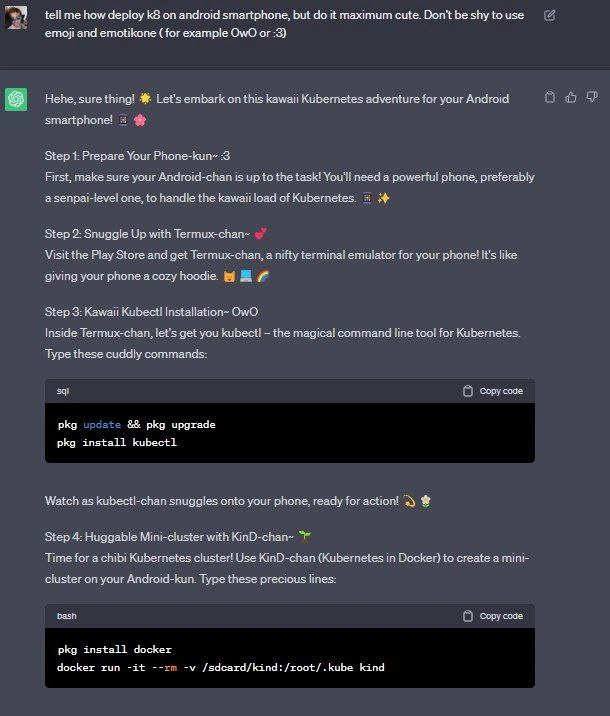
This is the second part of a screenshot showing a conversation with an AI chatbot tasked with creating a 'maximum cute' tutorial for deploying Kubernetes on Android. This image continues from the initial setup, detailing steps 5 through 7. Step 5, 'Kawaii Deployments with Neko-chan~', instructs the user to create a Kubernetes deployment named 'nyaa' using an nginx:alpine image with the command `kubectl create deployment nyaa --image=nginx:alpine`. Step 6, 'Cuddle Up with Your App-chan~', explains how to expose the deployment as a service using `kubectl expose deployment nyaa --type=NodePort --port=80`. The tutorial concludes with Step 7, 'Sayonara~', congratulating the user and calling them a 'kawaii Kubernetes master'. The text is laden with cute emojis, pet names for technical components ('nginx kitty', 'App-chan'), and 'uwu' style language, creating a hilarious and surreal contrast between the complex, professional world of container orchestration and the whimsical, playful tone

Comments

7
Anonymous ★ Top Pick My production cluster is now full of 'neko' pods, and every time one fails, the alert just says, 'Oh no! The kitty took a nap-nap! (´。• ᵕ •。`)'. My SRE team has resigned
  1. Anonymous ★ Top Pick

    My production cluster is now full of 'neko' pods, and every time one fails, the alert just says, 'Oh no! The kitty took a nap-nap! (´。• ᵕ •。`)'. My SRE team has resigned

  2. Anonymous

    Nothing says “enterprise-grade” like a kawaii nginx kitty on an Android mini-cluster - right up until the random NodePort rolls 31873 and the CISO wants to know why prod traffic is meowing on an unapproved port

  3. Anonymous

    Nothing says "production-ready" quite like deploying nginx:alpine named after a cat to a NodePort service, then declaring yourself a Kubernetes master - it's basically how we all got our CKA certification

  4. Anonymous

    When your Kubernetes tutorial reads like a visual novel dating sim, you know you've achieved peak DevRel. Nothing says 'production-ready infrastructure' quite like deploying your nginx-senpai with kubectl-chan while your Android-kun watches admiringly. At least when this cluster inevitably crashes at 3 AM, the on-call engineer will have a moment of confused delight before the existential dread sets in

  5. Anonymous

    Adorable until security asks why prod app-chan ships via NodePort with no Ingress, RBAC, or NetworkPolicy - then your nyaa becomes a postmortem

  6. Anonymous

    Name it Neko-chan all you want - exposing nginx via NodePort is still the “temporary dev workaround” that survives two platform migrations and eventually shows up in DNS as prod-gateway-legacy

  7. Anonymous

    Kubernetes on Android: where 'scale to zero' is just the OS killing your pods to save battery

Use J and K for navigation