Developer Deploys Decoy Keyboard to Thwart Feline Interrupts
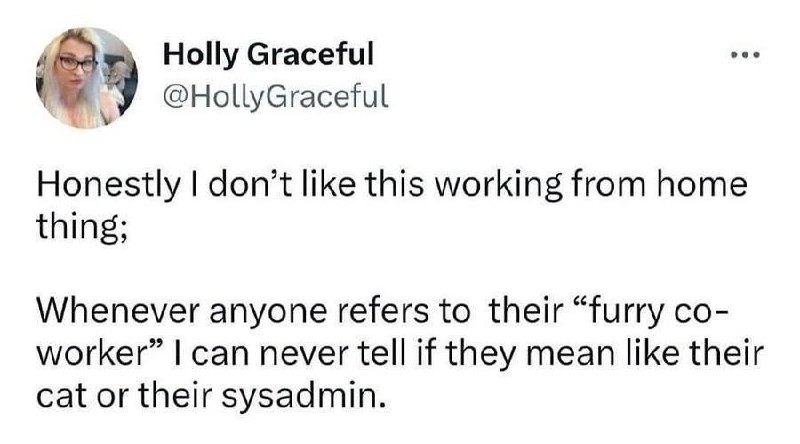
Why is this RemoteWork meme funny?
Level 1: Distract the Kitty
Imagine you’re drawing a picture, and your cat keeps jumping on your paper and messing up your drawing. What can you do? You don’t want to upset your cat, but you also want to finish your picture. One easy trick is to give the cat its own piece of paper or maybe a old notebook to sit on. That way, the cat feels like it’s right in the middle of what you’re doing, but it’s not actually on the paper you need. In this meme, the computer programmer did the same thing with keyboards. The cat loved sitting on the keyboard the person was using, which is like a cat’s way of saying “I want to be where your hands are!” So the person put out another keyboard just for the cat, like giving it a special toy. The cat happily sits on the fake keyboard, thinking, “I’m helping!” Meanwhile, the person can type on the real keyboard that’s hidden away, getting their work done. It’s a funny and sweet solution: the kitty is included and feels special, and the human can keep working without kitty pressing all the buttons. In simple terms, the developer tricked the cat in a nice way so that both of them are happy — the cat has a comfy spot, and the work doesn’t get interrupted by furry little paws.
Level 2: Sacrificial Hardware Hack
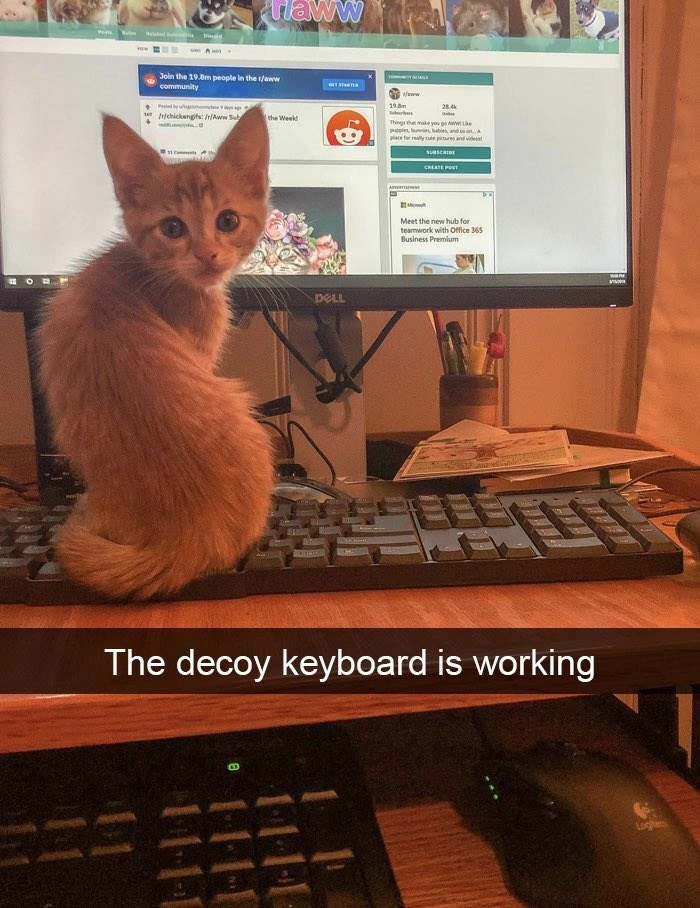
Let’s break down the scene in simpler terms. We have a programmer working from home (a common RemoteWork situation), and their pet kitten keeps trying to sit on the keyboard they use for coding. Anyone who’s had a cat knows these furry friends have a knack for plopping down right on your keyboard or laptop at the worst time – it’s like a magnet for them! In the photo, the developer has cleverly set up two keyboards: one is the real, functional keyboard (tucked away on a sliding tray with a Logitech mouse, likely the one actually connected to the computer), and the other is a decoy keyboard on the desk (an old full-size Dell keyboard that isn’t needed for actual typing). The cat is proudly seated on this top keyboard, staring back as if it belongs there. The Snapchat-style caption at the bottom saying “The decoy keyboard is working” means the trick is successful: the kitten is happily on the fake keyboard, and not on the one that the developer is actively using.
So, what exactly is a decoy keyboard? In this context, it’s basically a dummy keyboard set out purely to catch the cat’s attention. The word “decoy” means something that lures or distracts a target away from where you don’t want them. Think of it like a fake target. The developer noticed the kitten was interrupting their work by stepping on keys (imagine random letters “asdklfj;” appearing in your code or chat – annoying and potentially disastrous if you hit a shortcut like Alt+F4!). Instead of scolding the cat or locking it out of the room, the dev uses a bit of psychology and DeveloperExperience_DX know-how: give the cat its very own keyboard! This is often jokingly called “sacrificial hardware” – meaning an old piece of hardware you’re willing to sacrifice to paw presses, scratches, or even cat naps, in order to protect your main equipment. It’s a harmless bait: the kitty sits on the sacrificial keyboard believing it’s in the prime spot (because hey, it’s on the desk where all the action is), while the actual work keyboard remains safe and free for the developer to use.
This is a pretty well-known HomeOfficeSetup trick among pet owners. Just like baby-proofing a house, people cat-proof their workspace when they realize how often cats can be a distraction. Pet distractions are a real part of remote work life – you might have seen funny videos on work calls where a cat’s tail swishes across the webcam or kittens pounce on keyboards during important meetings. Here, the developer preemptively solved the issue. By having a dual-keyboard setup, they don’t have to constantly pick the kitten up off the main keyboard or worry about accidental emails being sent. The kitten can satisfy its curiosity and desire to be where the human’s hands are, but on a device that doesn’t do anything critical.
Look closely at the monitor in the image: it’s open to a Reddit page, specifically the subreddit r/aww (pronounced “R-aww”). For context, r/aww is an online community where millions of people share cute animal pictures and videos – basically an endless feed of adorable pets. It’s quite possible the developer was sharing this very photo there (since it’s both a tech humor moment and an adorable kitten moment). It’s a funny detail because the cat on the keyboard is literally looking at a screen full of other cute animals. It almost feels like the kitten is browsing Reddit! On the right side of the screen, there’s even an advertisement that says “Meet the new hub for teamwork with Office 365 Business Premium.” That’s probably just a random ad, but it ties in unintentionally with the theme: the developer and the cat have formed a little team and found a way to work together (or at least not work against each other). The Hardware being used (Dell keyboard, Dell monitor, Logitech mouse) are typical office tools, but here one keyboard has been creatively repurposed. This is definitely solid DeveloperHumor material: using a hardware solution for a pet problem. It shows that for developers, sometimes solving a non-software problem still involves a bit of hacker mindset and clever DeveloperProductivity tricks.
To sum up this setup: the cat was a major pet distraction by frequently jumping on the keyboard. The programmer fixed the issue with a decoy keyboard – an old keyboard that acts as a comfy cat bed and toy. Now the kitty can “help” by sitting on its keyboard, and the programmer can keep using the real keyboard tucked away safely. Both the human and the pet are happy. In a nutshell, the developer turned a potential day-long frustration into a win-win situation with one spare piece of Hardware. It’s cute, it’s smart, and it’s very relatable for anyone trying to concentrate at home with a curious cat around!
Level 3: Feline Fault Tolerance
In the world of RemoteWork, developers quickly learn to architect their workspace as carefully as their code. This meme captures a battle-hardened home office hack: deploying a decoy keyboard to handle a kitten on the keyboard scenario. The adorable brown-orange kitten perched on the Dell keys is essentially a benign denial-of-service attack on the developer’s primary input device. Every senior dev who’s done Work From Home with a pet has experienced this brand of chaos: one moment you’re crafting perfect code, the next your cat is QA testing it with random bug injections key presses. Instead of trying to fight nature (have you ever tried to stop a cat determined to sit somewhere?), this developer implements a clever sacrificial hardware pattern. By placing an old, expendable Dell keyboard on the desk as a lure, they've effectively sandboxed the cat’s disruptive energy. It’s akin to setting up a honeypot in cybersecurity: an attractive decoy system that draws attackers (or in this case, a mischievous kitten) away from the real target. The Snapchat-style caption “The decoy keyboard is working” is the punchline of victory — the cat is happily seated on the fake keyboard, leaving the actual one free for coding.
From a senior engineering perspective, this solution screams “separation of concerns: pet edition.” The developer has partitioned the HomeOfficeSetup into two distinct devices: one for the cat user and one for the human. This is essentially feline fault tolerance – the system (developer + real keyboard) continues to function smoothly even with the fault (cat interference) because redundancy was built-in. We often design software systems with failover components or load balancers; here the second keyboard load-balances kitty input load away from the critical path. It’s an excellent example of a real-world workaround that mirrors robust system design. Instead of the cat causing unpredictable downtime by stepping on keys mid-deployment, the dual keyboard setup ensures continuous uptime for the developer’s work. One could even joke that the cat has its own dev environment now – a /dev/cat device, if you will – completely isolated from the production environment (the real keyboard)!
Notice the monitor in the background: it’s open to Reddit’s r/aww (the cute-animal subreddit boasting “Join the 19.8m people in the r/aww community”). This detail is a meta-ironic cherry on top. It’s as if the kitten has navigated to a community celebrating adorable animal photos, becoming part of the meme in real time. Perhaps the developer left that page up intentionally — a little extra UX for the cat to keep it glued to the decoy keyboard, browsing pictures of fellow feline celebrities. Even the on-screen Office 365 ad about “the new hub for teamwork” feels hilariously apt: the teamwork here is between a coder and their cat, working together (with the help of some clever HardwareHumor) to maintain peace. In terms of DeveloperExperience (DX), this sacrificial device trick massively boosts Developer Productivity. It’s much like providing a toddler with a spare controller that isn’t plugged in while you play a video game – everyone’s happy because the illusion of participation is fulfilled. The cat feels involved in whatever its human seems to be doing, and the human avoids garbled code or accidental window closures triggered by furry feet.
This meme strikes a chord with veteran remote developers because it’s a humorous solution born out of necessity and experience. It highlights a universal truth: cats are inexplicably drawn to laptops and keyboards. Maybe it’s the warmth, maybe it’s the fact that those are what their human pays attention to, or maybe it’s just feline instinct to sit on whatever looks important. Seasoned WFH folks know you can’t change the cat’s behavior easily, so you engineer around it. In software, we talk about graceful degradation – if one component fails, the system still works using alternatives. Here, if the primary keyboard becomes cat-occupied (failure mode), the dev seamlessly switches to the secondary keyboard on the tray, maintaining flow. It’s a physical-world example of building resiliency: rather than trying to debug the cat (an impossible task, as any cat owner will attest), you add a layer of kitty-proofing to your hardware setup. This also exemplifies the pragmatic ingenuity in Developer Experience design: sometimes the best solution to a coding problem isn’t code at all, but creative Hardware fixes. As absurd as it looks, this pet distraction technique avoids a lot of frustration (and potential accidental emails full of “fffffffffff” from a cat nap on the keyboard). Senior devs are chuckling because they either have done this, or are adding “old keyboard for the cat” to their Amazon cart right now. In summary, the meme humorously illustrates how a simple decoy keyboard strategy can elegantly resolve the age-old cat-vs-keyboard conflict, letting the coder get back to writing bug-free code while the feline “assistant” handles the dummy keys. Problem solved, productivity restored.
# Pseudo-code illustrating the cat distraction algorithm:
try:
work_on_important_task()
except CatOnKeyboardInterrupt: # custom exception when feline presses keys
deploy_decoy_keyboard() # divert cat to fake keyboard
resume_coding() # continue work unhindered
Description
The image shows a classic work-from-home scenario. An adorable small orange tabby kitten is sitting squarely on a black keyboard placed on a wooden desk, directly in front of a Dell computer monitor. The kitten is looking over its shoulder towards the camera with large, innocent eyes. On the monitor screen, the Reddit community 'r/aww' is open, a forum for cute animal pictures, which adds to the wholesome context. A white text caption at the bottom of the image reads: 'The decoy keyboard is working'. The lower portion of the photo reveals the punchline: a second keyboard and a mouse are situated on a lower, pull-out tray, implying this is the actual workstation being used. This meme humorously illustrates a common problem for remote workers, especially developers, whose cats are notoriously fond of sitting on warm keyboards. The 'decoy keyboard' is a clever life-hack, a physical 'honeypot' to distract the pet and allow work to continue uninterrupted, showcasing a typical engineering-style solution to a domestic problem
Comments
9Comment deleted
My staging environment is a decoy keyboard that absorbs all the chaotic, fuzzy input. The production keyboard in the pull-out tray is where the real commits happen
Achieved five-nines WFH uptime by deploying a feline honeypot: a legacy PS/2 keyboard that absorbs all “eeeeeeee” input while the real USB one serves prod - finally, a canary deploy the cat actually enjoys
After years of implementing complex distributed systems and Byzantine fault tolerance, turns out the most effective redundancy strategy is just having a spare keyboard for the cat - because unlike microservices, you can't just horizontally scale your way out of a feline denial-of-service attack
Ah yes, the classic load balancer for feline traffic - implementing a sacrificial keyboard as a honeypot to redirect cat-based DDoS attacks away from production infrastructure. This is what we call 'paw-sitive engineering' - when your biggest deployment blocker has whiskers and the only rollback strategy is a laser pointer. Senior engineers know that the real architectural decision isn't microservices vs monolith, it's whether your decoy keyboard needs to be mechanical to properly simulate the satisfying clickiness that attracts cats in the first place
Decoy keyboard deployed: the ultimate hardware abstraction layer shielding prod from tail-induced merge conflicts
Deployed a feline honeypot: a USB-disconnected decoy keyboard that blackholes paw events - no more midnight “asdfasdf” deploys to main
Shipped input‑fault isolation: prod keyboard moved to a lower availability zone while the honeypot handles 100% of paw traffic - P99 keystroke errors are finally zero
I heard once that the reason that cats like keyboards is that they're trying to mimic their human's interest in them, and giving them a decoy keyboard (or even a tiny fake laptop of their own to lie on) solves the issue. Comment deleted
car parked Comment deleted