Why is this developer meme funny?
Level 1: Odd One Out
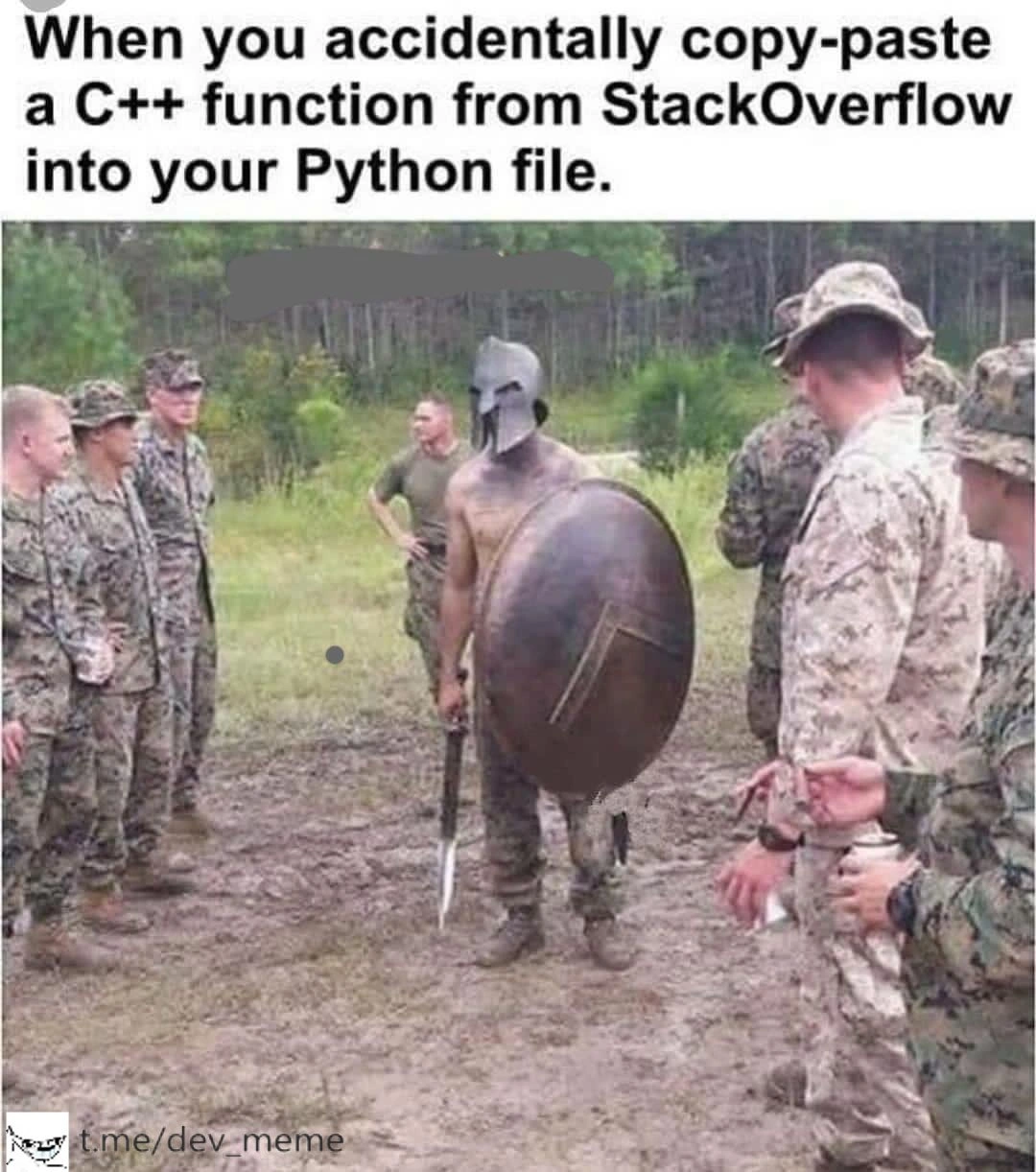
Imagine you’re playing with two different puzzle sets, one showing a scene with ancient warriors and another showing a modern army scene. If you take a piece from the ancient warrior puzzle and try to put it in the modern army puzzle, it just won’t fit – the shapes don’t match and the picture will look wrong. Everyone looking at it would say, “Hey, that piece doesn’t belong there!” In the same way, the meme is joking that a piece of code from one “puzzle” (the C++ language) was accidentally dropped into a different “puzzle” (a Python program). The result is confusing and obviously incorrect, just like the wrong puzzle piece. The picture shows it in a funny way: a group of modern soldiers are standing together, and suddenly there’s a shirtless old-time Spartan warrior with them. He’s the odd one out – not dressed like them, not from their time – and the soldiers are bewildered. That’s exactly how a Python program feels if you put C++ code inside it: super confused! It’s a silly image to remind us that things have to be in the right place. Just like you speak one language at a time or use the right puzzle pieces in the right puzzle, you should keep code in the language it belongs to. Otherwise, you get a funny mix-up that just doesn’t work. The humor comes from seeing something so clearly out-of-place and imagining the confusion – whether it’s those soldiers seeing a random ancient warrior, or a computer program seeing code that it just can’t understand.
Level 2: Brace for Impact
Let’s break down what’s happening in simpler technical terms. You have a file of Python code (maybe your .py module where everything uses Python’s syntax), and suddenly you paste a chunk of C++ code directly into it. That’s like mixing two different languages in one sentence. Python and C++ are programming languages with very different rules, especially their syntax (how code is written and structured).
In Python, if you want to define a function, you’d write something like:
def add(a, b):
return a + b
Python expects the keyword def to start a function definition, a colon : at the end of that line, and then an indented block for the function body. No need to specify data types for a or b (they can be any type), and definitely no curly braces { } anywhere. Python uses indentation (spaces or tabs) to figure out what’s inside a loop or function. It’s very strict about this whitespace. Also, lines in Python typically end just by a newline character – you don’t usually put a ; semicolon at the end (it’s optional and rarely used).
Now, C++ has a different style. To define a function that adds two numbers in C++, you might see:
int add(int a, int b) {
return a + b;
}
Here, int at the beginning means the function returns an integer. The parameters a and b are each declared as integers too. C++ requires specifying types like this. It also uses { } braces to enclose the function body. And notice the ; semicolon after the return statement (and actually, there would also be a semicolon after the } if it were a class method, but for a free function in C++ it’s not needed after the brace). In C++, semicolons are used to mark the end of statements. The #include <iostream> line you often see in C++ is there to include libraries (in this case, to allow using things like std::cout). And using namespace std; might appear to avoid typing std:: repeatedly. None of these concepts exist in Python in the same way.
So what happens if you take that C++ function and plop it into a Python file? Python’s interpreter (the program that runs Python code) will try to read your file top to bottom. The moment it encounters something it doesn’t expect, it throws an error and stops. Specifically, if your Python file suddenly has int add(int a, int b) { ... } in the middle, Python gets very confused. It sees int at the start of a line where it was maybe expecting a def or a variable name. In Python, int is actually the name of the integer type, but you can’t just put it at the start of a line like that – Python would interpret that as a variable named int (which is a bad idea to use because it overrides the built-in type, but that’s another story) and then it sees another name add immediately after. Two names back-to-back with no operator or punctuation is invalid syntax in Python. Then there’s a parenthesis ( – Python might think you were trying to call a function named int with something, but this whole structure doesn’t line up with any valid Python statement. And then the { brace appears – that’s completely not allowed in Python syntax for defining a function. Python uses indentation, remember? So a curly brace in that context is like a random unexpected character. The end result: Python throws a SyntaxError: invalid syntax and usually points to the spot it got baffled (often the int or the {).
Let’s compare the key differences in syntax between C++ and Python that are at play:
| C++ Syntax Element | Python Equivalent (or lack thereof) |
|---|---|
int (and other type names) before function/variable names |
No type name needed (types are dynamic and inferred) |
Curly braces { ... } to denote blocks (like function body) |
Indentation to denote blocks; a colon : introduces a block |
Semicolons ; at end of statements |
Newline ends the statement (semicolons optional but not typical) |
#include <...> preprocessor directives |
Use import statements (and # starts a comment in Python, not an include) |
// or /* ... */ for comments |
# for comments (everything after # on a line is ignored) |
Explicit memory management (new/delete) or pointers (e.g. * and &) |
Automatic memory management (no direct pointer syntax in Python) |
As you can see, the two languages have very different sets of rules. So mixing them leads to trouble. It’s like having a document where half is written with English grammar and half with French grammar – the reader (or compiler/interpreter) can’t parse that consistently.
When you run that mixed-up file, the Python interpreter acts like a strict grammar teacher catching a mistake. The error it throws, SyntaxError, basically means “I found something in the code that doesn’t make sense in Python.” This stops your program from running at all. Bugs come in many forms, and a syntax error is one of the most straightforward: it’s the computer immediately telling you “This line of code is not valid.” In our scenario, it’s not valid because it’s written in another language entirely! Debugging this is usually simple once you spot it – you’d remove or convert the offending code. But the meme is about that facepalm moment when you realize why you’re getting the error. If you’ve copied a snippet from Stack Overflow, you always need to make sure it’s in the same language you’re coding in, or adapt it. For example, to convert the above C++ function to Python, you’d write something like:
def add(a, b):
return a + b
No int keywords, no braces, no semicolons – now it’s valid Python. The logic (“add two numbers and return the result”) is the same, but the syntax (the way we express that logic to the computer) is completely adjusted for Python’s rules.
The soldiers-and-Spartan image is a great metaphor. The soldiers in uniform represent the consistent lines of Python code that all follow the same rules. The random Spartan warrior in their mix represents the C++ code that obeys a totally different set of rules and thus stands out. The soldiers look confused because, essentially, the Python parts of your program (and the Python interpreter) are confused by that strange code. This is a lighthearted poke at CopyPasteCoding gone wrong. It’s very relatable to newer developers (and even some experienced ones who might rush sometimes): grabbing code from the internet without fully understanding it or checking if it fits your situation can cause immediate errors.
In terms of troubleshooting, if you ever see a SyntaxError in Python, a good step is to look carefully at the line and maybe the few lines before it. Often it’s something simple like a missing colon or a mis-indented block. But if you ever see things like { or type names in a Python file, that’s a big clue that code from another language (like C, C++, or Java, which use similar syntax) has snuck in. The fix is to either remove it or translate it into proper Python code. This meme basically is an exaggerated example of a debugging scenario where the source of the bug is very obvious once you see it – it's an “id10t error” as some might jokingly call user errors. No fancy debuggers needed here, just a bit of language sanity check.
To summarize at this level: Python and C++ are different “languages” entirely, just like English and Spanish. You can’t just take a sentence from Spanish and plop it into an English paragraph without confusing everyone. Each language has its expected words and structure. When coding, if you accidentally mix languages, the computer won’t understand and will error out. The meme uses the funny image of a Spartan among soldiers to convey that sense of “one of these is not like the others” in a programming context, highlighting a simple but important lesson for developers: always use code in the correct language context (and be careful with those StackOverflow copy-paste solutions!).
Level 3: This Is Python!
For seasoned developers, this meme elicits a knowing laugh because it captures a scenario that’s ridiculous yet relatable: blindly copying code from the internet without regard for language differences. The top text sets the scene: "When you accidentally copy-paste a C++ function from StackOverflow into your Python file." Immediately, every experienced coder winces in sympathy (and maybe recalls an embarrassing incident early in their career). The image drives the point home with a brilliant analogy: a lone, shirtless Spartan warrior, straight out of ancient history, has somehow ended up in a lineup of modern camouflaged soldiers. He’s got a bronze shield and a short sword; they have rifles and uniforms. This absurd juxtaposition is exactly how out-of-place a chunk of C++ code looks inside a Python script. It’s as if the Python file’s orderly, uniform syntax (the soldiers) is suddenly confronted by an unruly foreigner (the Spartan C++ snippet) shouting in a different tongue. The modern soldiers in the meme – representing the Python interpreter, linters, or your development environment – are bewildered, maybe thinking: “What is this guy doing here?” just as your tools would throw errors and highlight the C++ code in glaring red.
The humor draws on our collective developer experience with StackOverflow. It’s the go-to Q&A site where developers copy solutions from, sometimes a bit too hastily. We’ve all been guilty of a little CopyPasteCoding when under pressure. The meme exaggerates it: copying not just the solution, but doing so recklessly without noticing it’s in the wrong programming language. This is a step beyond the usual StackOverflow sins! It pokes fun at that overeager moment where you think, “Yes! This code solves my exact problem,” and you slam it into your project, hit run, and... boom – immediate error. The Python interpreter probably yells something like:
File "script.py", line 1
int solve(int a, int b) {
^^^
SyntaxError: invalid syntax
The syntax error points at the very first token int, which in Python is totally unexpected in that context. It’s the coding equivalent of those soldiers going “Wait, you’re not part of our unit… you’re not even speaking our language!” The Spartanesque C++ code doesn’t wear the proper uniform of indentation and def keywords, so the Python environment outright refuses to cooperate with it.
Senior devs also appreciate the subtle references here. The Spartan warrior can be seen as a symbol of low-level, high-performance code (C++ is often seen as a more hardcore, bare-metal language, requiring manual memory management – hence the muscular, armor-clad warrior vibe). Python code, by contrast, is often described as high-level and more abstracted (like a coordinated modern military unit working with advanced gear). Dropping a warrior from 480 BC into a 21st-century squad is bound to cause confusion – just like injecting C++ syntax into a Python file. There’s also a tongue-in-cheek nod to the classic “THIS IS SPARTA!” meme from the movie 300. Here, the setting is reversed: it’s as if Python (the modern army) is informing the intruder, “Buddy, this is Python!” – you don’t belong here unless you adapt. In fact, one can imagine the Python interpreter channeling King Leonidas when encountering that foreign code: instead of kicking the Persian messenger into a pit, it kicks the C++ snippet out with a SyntaxError, declaring “This! Is! Python!” 👢🐍.
From a senior perspective, the meme also hints at the idea of language wars and incompatibilities. Python and C++ are often pitted against each other in terms of performance vs. ease-of-use, static typing vs. dynamic typing, etc. But no matter how much one debates which language is better for a task, everyone agrees you can’t just mash them together arbitrarily. This situation is a comically exaggerated example of a very real developer mistake: using code in the wrong context. It’s a relatable debugging story – perhaps a junior on the team checked in code they found online, and during code review or CI tests, it bombed, leaving seniors scratching their heads until they open the file and see that proverbial Spartan in the ranks. Cue the facepalm and a gentle lesson about using the correct syntax or finding the right library for Python instead of pasting C++ logic raw.
The shared trauma of syntax_error_in_python due to something silly resonates with devs. We’ve all seen cryptic errors when code is out-of-place. This meme just cranks the absurdity to eleven by making the out-of-place code as conspicuous as a nearly naked ancient warrior among Army cadets. It’s a cautionary tale wrapped in humor: always translate the code into the appropriate language. If you find a great algorithm in C++ on StackOverflow and you’re coding in Python, you either need to find an equivalent Python snippet or rewrite it yourself in Python syntax. Otherwise, you’ll face that “Spartan invasion” of errors.
One particularly clever detail is that the meme doesn’t show an actual code screenshot – instead, it uses this vivid real-world metaphor. That makes it instantly understandable: even if you don’t know exactly what C++ syntax looks like, you can infer that the Spartan’s archaic equipment is analogous to some “archaic” symbols in code that don’t match the modern gear of the others. The bewildered looks of the soldiers capture the essence of debugging such a mistake: utter confusion. And the Spartan’s defiant stance with sword and shield? That’s like the stubborn C++ code, refusing to run in Python, effectively saying “I stand by my form; I won’t change!” Meanwhile, the Python interpreter (the soldiers) won’t budge either – it’s a standoff until that rogue code is removed or converted.
In essence, the meme humorously reminds experienced developers of a core truth in debugging_troubleshooting: always check your assumptions (like, say, the language of the code you copied!). It also taps into the camaraderie of RelatableDeveloperExperience – many of us have pulled something from Stack Overflow that didn’t quite fit, though usually not as drastically as a completely different language. The laughter comes from recognizing that mixture of embarrassment and enlightenment that follows such an error. It’s funny because it’s an obvious mistake – one you make exactly once before learning to double-check. The image of a Spartan among soldiers perfectly captures that one-of-these-things-is-not-like-the-other moment when you stare at your screen and realize, “Oh… that StackOverflow answer was in C++, no wonder my Python program is acting crazy.”
To seasoned devs, there’s even a meta-joke: the Stack Overflow copy-paste anti-pattern is so notorious that it’s practically a rite of passage in programming. Usually it results in subtle bugs or misunderstood code, but here we see the most extreme outcome – a full syntax blow-up. It’s a lighthearted reminder to all of us: use StackOverflow wisely. As the saying goes (and one could imagine a cynical senior quipping), “One does not simply copy-paste foreign code into a Python project.” Without translation, you’ll have a battle on your hands, and Python will win – by refusing to run nonsense. This meme gets a chuckle in the team chat because it dramatizes a common pitfall in a way everyone can understand and learn from, uniting junior mistakes with senior sly humor.
Level 4: Interpreter vs Intruder
At the deep interpreter level, this meme highlights a collision of two fundamentally different language worlds. Python’s interpreter parses code according to Python’s grammar rules and expects a very specific structure – definitions with def, blocks delimited by indentation and : colons, and no dangling curly braces. When you drop a C++ function straight into a Python file, the Python interpreter behaves like a strict drill sergeant enforcing its own rulebook. It tokenizes the text and immediately encounters alien symbols: an int type declaration where it expects a def or variable, and a { curly brace where Python would normally see a newline or indent. These tokens simply don’t exist in Python’s grammar. The result? The interpreter raises a SyntaxError (basically waving a red flag saying “This code is gibberish to me!”) and refuses to execute any further.
Under the hood, this is a clash of context-free grammars. Each programming language is defined by its own grammar (often specified in BNF or PEG form) that tells the compiler or interpreter how to make sense of sequences of characters. C++ and Python have drastically different grammars. For example, the sequence int add(int a, int b) { return a + b; } can be parsed into a valid abstract syntax tree by a C++ compiler (which sees a function return type, name, parameters, and a block in braces). But the Python parser doesn’t have rules for an identifier (int) followed by another identifier and parentheses without an assignment or keyword – it’s a fatal syntax violation. The Python lexer might recognize int as a name (since int isn’t a reserved keyword in Python, just a built-in type), but then sees add( immediately after, and without an operator or newline it’s utterly confused. The curly brace { that follows is the final straw: in Python’s world, braces have no place in denoting code blocks (they’re used only in dictionaries or set literals), so seeing a { outside that context is like finding a Spartan sword in a high-tech lab – completely out-of-context and alarming. The interpreter essentially throws up its hands and halts.
This stark incompatibility also stems from how each language’s compiler or interpreter pipeline is designed. C++ is a compiled language – its code must be translated by a compiler (like g++ or MSVC) into machine code before it can run. During compilation, that int add(int a, int b) { ... } is checked against C++’s syntax rules and then turned into low-level instructions. Python, on the other hand, is interpreted (more precisely, bytecode-compiled and run on the fly by the CPython interpreter). When you run a Python script, the interpreter reads the code, compiles it to bytecode if syntactically correct, and then executes it. But if the code isn’t syntactically valid Python to begin with, the interpreter can’t even generate bytecode – it stops right there. In our case of a C++ snippet invading, Python doesn’t know what to do with type declarations and braces – there’s no translation or execution at all, just an immediate parse error. It’s as if you fed an ancient Spartan warrior’s battle cry to a modern voice-command system – the system would just respond, “Sorry, I didn’t catch that.”
Interestingly, even the simplest symbols take on different meanings in each language, which adds to the confusion. Consider the # character: in C++, #include <iostream> is a preprocessor directive that tells the compiler to include headers before actual compilation. But to the Python interpreter, a line starting with # is a comment, meaning “ignore the rest of this line entirely.” So if you blindly copy-paste a Stack Overflow C++ snippet complete with #include lines, Python will casually skip over those lines as harmless comments (a lucky fluke!), blissfully unaware that they were meant to pull in libraries in C++. But the moment Python hits int main() {, it chokes – int is not a keyword in Python, and a { in that spot is a showstopper. The core of the humor here is rooted in language semantics and design: each programming language is like a separate culture with its own rules and idioms. The Spartan warrior (C++ code) might be valiant in his own land (when compiled with a C++ compiler), but when he storms into Python territory (a different runtime environment), the fundamental mismatches in language definition turn him into an unintelligible invader.
From a theoretical standpoint, this scenario exemplifies why we can’t just mash languages together without a proper interface or translation. There are systems for mixing languages – for example, Python can call C/C++ code through foreign function interfaces or tools like Cython, SWIG, or Python’s C API – but these involve careful translation and compilation steps, not mere copy-pasting of source code. The meme humorously exposes that at a formal level, code is not a universal language: it’s precise and context-bound. Drop a snippet from one context into another, and you violate the very syntax contracts that make programming languages work. It’s a bit like violating the laws of grammar in natural language – the sentence falls apart. In software terms, you’ve created an infinite parse loop or a compiler panic, because the tools simply cannot reconcile the foreign structure. The Python interpreter stands there, much like those baffled soldiers, essentially saying "Error: I have no idea what this means." It’s a classic case of language interoperability gone wrong at the most fundamental level: the parse phase. So, on this deepest level, the meme underscores formal language theory in action – context-free grammars, parsing, and the strict boundaries of language definitions – all through the funny visual metaphor of a Spartan (ancient syntax) bewildering modern troops (a contemporary interpreter).
Description
This image could not be processed due to an error
Comments
7Comment deleted
I'd make a joke about this image, but I can't see it. Maybe it's a 404 error?
Pasted a C++ template into a Python module - black dutifully indented the braces, mypy had an existential crisis over ‘std::vector<int>&&’, and the interpreter just screamed: “THIS… IS NOT THE GIL WE DEFEND!”
The C++ code explaining pointer arithmetic to your Python interpreter while everyone else pretends the segfault in production was definitely not from that "temporary" FFI binding you wrote six months ago
The real tragedy isn't the syntax errors - it's when you spend 20 minutes debugging why your Python code won't compile before realizing you've been trying to use `std::vector` and wondering why pip can't find the 'iostream' package. At least the Spartan's shield has better memory safety than your raw pointers
If you want C++ in Python, ship a pybind11 extension; copy-paste isn’t an integration strategy - your linter can’t link against curly braces
Copy-paste one C++ function into a .py and watch your 'simple script' grow a CMake toolchain, pybind11, and the only Python service in prod that pages for segfaults
Python's interpreter meets C++: 'Duck typing? More like duck and cover from the semicolon apocalypse.'