Skip to content
DevMeme
6094 of 7435
The Frustration of Arguing With Your AI Pair Programmer
AI ML Post #6673, on Apr 22, 2025 in TG

The Frustration of Arguing With Your AI Pair Programmer

Why is this AI ML meme funny?

Level 1: Show and Tell

Imagine you have a helpful friend who’s really smart but not a mind-reader. You want them to help you draw a simple shape, say a circle. Instead of just drawing it, you start giving hints: “It’s round, kind of like a wheel...” and your friend draws an oval, then a spiral, getting a bit confused. You sigh and give more clues: “No, a perfect round shape, maybe use the compass…” This goes on and on. Finally, your friend throws up their hands and says, “Why don’t you just show me the circle you wanted me to draw?!” In the end, you grab the pencil and draw the circle yourself in one quick go.

That’s exactly the feeling this meme jokes about. The fancy AI helper (Copilot) is like that friend. It’s trying to help you write a line of code, but you’re having to describe what you want in a roundabout way. It would have been easier if you just wrote it yourself. The meme makes us laugh because we’ve all been in a situation where getting help turned out to be more work than doing the task solo. It’s like when you ask someone to fetch something from your room, and after a long time of them not finding it you just go, “Never mind, I’ll get it myself.” The bottom line: sometimes the quickest way is to just show or do it yourself, and that little frustration – when your high-tech helper needs help – is what makes this scenario funny and so relatable.

Level 2: Helper or Headache?

So, what’s actually going on here? Let’s break it down in simpler terms. GitHub Copilot is an AI-based coding assistant. Think of it like a supercharged autocomplete for code. You’ve probably seen how your IDE or text editor can sometimes guess the next few characters or suggest a variable name – Copilot takes that to the next level. It uses a type of AI called a Large Language Model (LLM), which has been trained on tons of public code (imagine it reading millions of GitHub repositories). Because of this training, it can generate new code that looks like it was written by a human. You might write a prompt like a comment or a function name, for example:

# Compute factorial of n
def factorial(n):
    pass

Immediately, Copilot might swoop in and suggest something to replace pass, perhaps:

def factorial(n):
    # Copilot's suggestion (expanded implementation)
    if n < 0:
        raise ValueError("Negative values not allowed.")
    result = 1
    for i in range(2, n+1):
        result *= i
    return result

That’s pretty cool – it wrote a full function! But here’s the rub: maybe you, the developer, knew there’s actually a one-liner way to do this (for instance, using Python’s built-in math.factorial). Copilot isn’t trying to deliberately ignore the one-liner; it just gave a common solution it “saw” in its training data. If you wanted the shorter solution, you’d have to sort of steer it: maybe by writing a more specific prompt or editing its suggestion and hoping it completes it your way. This steering process is what we call prompt engineering – basically, phrasing or rephrasing your request to guide the AI towards the answer you want. And it can be surprisingly tricky! Sometimes you feel like you’re playing a guessing game with the AI: “No, not quite. Okay, maybe if I add a hint like ‘using math library’… Hmm still not right. Let me undo and try a different comment…” This is the prompt_engineering_fatigue mentioned in the tags – getting tired because you spend more effort crafting the question than the question itself was worth.

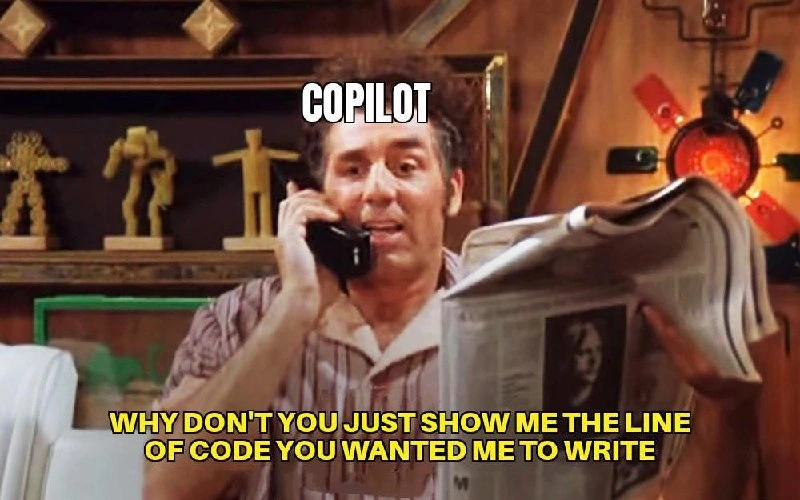
The meme shows exactly that feeling. We have text on the image where “Copilot” says, “WHY DON’T YOU JUST SHOW ME THE LINE OF CODE YOU WANTED ME TO WRITE.” It’s like the AI is frustrated right back at the user for being so vague! The humor here is that the AI assistant was supposed to save time, but now it’s almost sarcastically suggesting the user just give it the answer. It’s as if your GPS suddenly said, “Why don’t you just drive me to the destination?” Not very helpful, right? The tags like DeveloperFrustration and ToolingFrustration sum it up: this is a tool that’s meant to help developers, but in this scenario it’s causing a bit of a headache.

Let’s bring in the Seinfeld reference to clarify the tone. Seinfeld was a famous 90’s sitcom known for its humor about everyday frustrations. In one episode, Kramer ends up acting as an automated phone service for movie showtimes. The system (Kramer) can’t understand what the caller is saying due to all the button-pressing menus confusion, and he breaks character, exasperated, saying, “Why don’t you just tell me what movie you want to see?!” It’s a classic funny moment where technology (well, a human pretending to be tech) fails and just asks for the obvious input. The meme we have parallels this: Copilot is in Kramer’s role. Instead of movies, it’s about code. It’s as if Copilot is saying, “I can’t figure out that one line you’re hinting at... Just give it to me straight!” For a developer, this is funny because we often feel that way: I tried hinting, I tried describing what I want in natural language, and the AI just doesn’t get it. It would almost be easier if I could telepathically beam the solution into it – but at that point, I’m basically writing the code myself!

In day-to-day newbie terms, consider what using Copilot is like. You’re in VS Code or another IDE, and as you type, a gray suggestion might appear (that’s Copilot offering a completion). Many times, it’s super useful – like writing a loop or some boilerplate code for you. But other times, it might not do exactly what you intended. For example, you want a function to check if a number is prime. You write # check if number is prime as a prompt comment. Copilot might give you a full function with a loop checking divisors (which works), but maybe you just wanted to use a simpler approach or a library method. If you accept its suggestion, you should still test it and make sure it does what you need (because Copilot can and does make mistakes or assumptions). If it’s not what you wanted, you can reject it and try rephrasing your comment or just write the line yourself. The frustrating part is the time and mental energy spent in that back-and-forth. A senior dev might know the one-liner off the top of their head, whereas a newbie might not – ironically, the newbie might be happier with any working solution (so Copilot’s multiple lines are fine), but the senior is like, “ugh, I explicitly wanted this specific concise solution.” That’s why the meme is specifically titled as Copilot meeting a senior dev’s “just show me the code” moment. Senior programmers often have strong opinions on how to solve a problem (often the simplest, cleanest way possible). If the AI starts suggesting something else, the experienced dev quickly recognizes, “This isn’t what I had in mind – now I have to either guide it or ignore it.” It can feel like when a teacher knows the correct answer and is listening to a student talk their way to it – at some point you’re like, “Alright, let me stop you right there and just tell you.” Only here, the “student” is an AI plugin in your editor.

We should also clarify the “one line fix” context tag: Often in coding, especially when debugging or adding a small feature, you literally just need one line changed or added. A joke among programmers is that sometimes a bug-fix is just a one-line change that took hours to find. Here, presumably, the developer knows the one line they want but tried using Copilot to generate it by describing the problem. Perhaps the thought was “maybe Copilot will just output that one liner for me and I can save some typing.” Instead, they got something else and a bit of copilot_exasperation ensued. The DeveloperExperience here is ironically worse than if they’d just manually typed what they were thinking of. It’s a lesson many of us learn with these tools: they’re amazing at some tasks, but they’re not magic genies (not yet, anyway). You have to know how to work with their suggestions and when to cut your losses and do it yourself.

In summary, at this level: Copilot = AI helper in your coding software, supposed to make life easier. Meme = showing when it doesn’t, in a funny way. It’s relatable because every dev who’s used an AI like this has had that “ugh, never mind, I’ll do it” moment. AIAssistants are cool, but as this meme jokes, sometimes the quickest route is just your own brain and fingers coding that line directly.

Level 3: Prompt Purgatory

For those of us who’ve been coding long enough, this meme hits a nerve. It captures the DeveloperHumor around AI assistants perfectly. Imagine a senior dev who’s been through all the hype cycles – they survived the era of Clippy helpful paperclips, witnessed auto-complete get smarter, and now are experimenting with assistive AI codegen tools like Copilot. Initially, having an AI in your IDE sounds like a dream: “It’ll write code for me, hooray!” But fast-forward to the reality check: you’re spending 15 minutes tweaking an English prompt or comment trying to coax the AI into producing exactly the line you already intended to write. This is the prompt engineering fatigue folks joke about. You end up in a sort of prompt purgatory – not coding directly, but not getting what you need from the AI either, stuck iterating your request. The meme’s punchline, displayed in bold Seinfeld-esque subtitles, has “Copilot” (over Kramer’s face) effectively throwing up its hands: “WHY DON’T YOU JUST SHOW ME THE LINE OF CODE YOU WANTED ME TO WRITE.” It’s a hilarious role-reversal. The AIAssistant is basically telling the programmer, “Look, I can’t read your mind. Spare us both the agony and just write the solution yourself!”

This is funny because it rings true to anyone who’s wrestled with AI code suggestions. It highlights a classic DeveloperPainPoints: when your fancy tool creates more work instead of less. We’ve all been there: you try an “intelligent” automation but end up micromanaging it. In theory, Copilot should improve DeveloperExperience (DX) by offloading boring or repetitive coding tasks. In practice, if you’re an experienced dev with a clear picture of the solution, watching Copilot meander around that simple fix can be exasperating. It’s the equivalent of asking a junior dev to implement something quick, and then having to sift through an over-engineered 50-line solution they gave you, when all you wanted was a 1-liner. Senior engineers often quip that by the time you explain what you need, you could have just done it. Copilot sometimes turns you into a teacher giving hints to a very eager but somewhat clueless intern. AIHumor like this comes from that shared experience of “I spent more time guiding the tool than the task would’ve taken me to do from scratch.” The meme uses Kramer from Seinfeld – a show every ’90s kid (and plenty of later folks thanks to reruns) knows – to drive the point home with extra irony. In a famous Seinfeld scene, Kramer is running a movie phone line and struggles to understand the caller’s input, eventually blurting out, “Why don’t you just tell me what movie you want to see?” Here, that line is remixed for coding: the AI can’t parse the dev’s hints and effectively says, “Just tell me (or show me) the code you want!” It’s a nod to the absurdity that our cutting-edge coding assistant feels as obtuse as an old-school automated phone service.

Look at the visual details: Kramer (as “Copilot”) is on a land-line phone, reading a newspaper in a cluttered ’90s apartment. That’s gloriously retro, almost the opposite of cutting-edge software development. This contrast itself is a wink at the audience: dealing with a 2025-era AI coding tool can make a modern dev feel like they’re in a Seinfeld episode from 30 years ago, arguing with a clunky automated system. The shelves behind Kramer with their blocky wooden art and random gadgets resemble the clutter in a coder’s workspace (or the random clutter of features in an over-complicated tool!). It evokes the chaos of a “hacker apartment” which mirrors the mental clutter of sifting through Copilot’s verbose suggestions. In real-world terms, the meme is poking fun at tooling frustration: that specific flavor of developer frustration when high-tech tools (like advanced IDE plugins) don’t quite deliver the streamlined help you expected. Instead of flow-state coding, you’re now half a developer and half a prompt engineer, trying different phrasings, adjusting context, maybe even reading AI-suggested code as skeptically as you’d read a stranger’s Stack Overflow post.

There’s also an underlying commentary on how senior devs often prefer directness. A veteran coder thinks, “If you know what you want, just cut to the chase.” They might say, “Don’t give me a fluffy explanation or five alternatives – just give me the code.” Copilot, on the other hand, is a generative model that might produce a lot of extra. For example, if you wanted a function to calculate one specific formula, Copilot might start writing a whole generic utility with error handling and logging – technically correct, but overkill for your one-line need. The meme exaggerates this dynamic to comedic effect: the AI itself becomes self-aware enough to snap, essentially breaking character to ask for the answer key! This resonates because that’s how we feel – we want to grab the keyboard from Copilot and say “Ugh, let me do it.” The phrase “just show me the line of code” is exactly something a tired senior dev would mutter after the 5th weird suggestion pops up. It captures the developer frustration: after all the hoopla about intelligent assistants, sometimes you’re like “please, just cut the nonsense and give me the snippet I had in mind – or I’ll do it myself.”

From an industry perspective, this meme is also commentary on the current state of AI assistants in coding. We’re at this interesting point where these tools are powerful and often magical for boilerplate, but they’re not mind-readers. They shine when the task is well-defined or common (e.g., writing a loop or a known algorithm), but if you have a very specific solution in mind (like that one-liner using a particular API or trick), the AI might miss the mark. Seniors know the trade-offs here. To use Copilot effectively, you sometimes have to adapt your style: either accept its way (which might be longer or slightly different) or spend time steering it. Many experienced devs have discovered that if you’re not careful, you become the “human linters and debuggers” of the AI’s output, cleaning up after it – which is the reverse of what we want. It’s a classic assistive_ai_codegen scenario: great in theory, a bit messy in practice. And that messiness is prime material for DeveloperHumor: we laugh so we don’t cry about the hours lost tweaking prompts or scanning AI-written code for subtle bugs. The meme distills all that into one perfect scene of exasperation.

Level 4: Stochastic Parrot Predicament

At the cutting edge of AI/ML, tools like GitHub Copilot use massive Large Language Models (LLMs) to generate code. Under the hood, Copilot’s brain is essentially a giant statistical engine (a Transformer network) that’s been trained on billions of lines of code. It doesn’t truly understand code logic the way a human does – instead, it predicts what code likely comes next based on patterns in its training data. This can feel a bit like a stochastic parrot: the model cleverly regurgitates patterns without grasping the deeper intent. The meme highlights a predicament born from this setup. The developer’s intent – maybe a single specific line of code – is buried in a vaguely phrased prompt. The LLM tries its best, but without precise guidance it might produce a verbose generic solution or even misinterpret the task altogether.

From a theoretical perspective, this is an AI alignment hiccup in miniature. The human knows exactly the one-line fix they need, but getting a neural network to pinpoint that exact line is tricky. Why? Because natural language prompts are inherently ambiguous and an AI assistant has no direct way to ask clarifying questions (unlike a human pair-programmer who would just say “Hey, what result are you expecting from that line?”). The AI must infer context from what it’s given. If the prompt is broad or under-specified, the model’s probability engine might spin out several lines of code that usually accompany such requests in its training corpora. It optimizes for plausibility, not minimality. There’s a known concept in machine learning called the “Maximum Likelihood Objective” – basically the model is trained to continue code in a way that has the highest statistical likelihood. Nowhere in that objective is a rule like “prefer the shortest correct answer” or “double-check if this is what the user really wants.” That’s why Copilot might output five lines of boilerplate error-checking when all you wanted was a one-liner calling a well-known API function.

This tension between developer intent and AI output touches on fundamental computer science principles. We spent decades creating strict programming languages to precisely tell computers what to do, because regular language is too imprecise. Now with tools like Copilot, we’re sort of going backwards – using imprecise natural language (or a short comment prompt) to indirectly generate precise code. It’s almost a full circle: we abstracted away machine code with high-level languages for clarity, and today we’re abstracting even further by instructing an AI in plain English (or pseudo-English comments) to write our code. The meme humorously exposes the flaw in this approach: if your AI assistant needs an almost-complete spec (or example code) to give you the right answer, you might as well write the darn code yourself! It’s highlighting a core DeveloperExperience (DX) problem with current assistive AI— the cognitive load of prompt engineering and result-wrangling can outweigh the effort of the coding task itself. In theory, a code generation model could use something like semantic understanding or incorporate developer intent modeling to zero-in on that one perfect line. But today’s models are still largely guessers; very sophisticated guessers, but guessers nonetheless. The result? The supposed time-saving AIAssistant sometimes feels like an over-engineered auto-complete, leaving seasoned devs grumbling that the whole ordeal is just “No Free Lunch” in action: you don’t get that perfect solution for free – you either put the effort in writing code or in babysitting the AI.

Description

A meme featuring the character Cosmo Kramer from the TV show 'Seinfeld'. Kramer is on the phone, holding a newspaper, with a look of exasperated impatience. Text overlaid on the image identifies him simply as 'COPILOT'. Below, a caption in yellow text reads, 'WHY DON'T YOU JUST SHOW ME THE LINE OF CODE YOU WANTED ME TO WRITE'. This meme cleverly personifies GitHub Copilot, the AI coding assistant, as the eccentric Kramer. The joke captures the all-too-common developer experience of spending more time trying to prompt the AI to generate the correct code snippet than it would take to just write it themselves. It satirizes the meta-work of 'prompt engineering' within the IDE, where a developer knows the desired outcome but struggles to communicate it effectively to the AI, leading to a feeling of arguing with the tool


Comments

8
Anonymous ★ Top Pick Copilot is the ultimate intern: it's seen every line of code ever written but still needs a five-paragraph comment to write a simple for loop correctly
  1. Anonymous ★ Top Pick

    Copilot is the ultimate intern: it's seen every line of code ever written but still needs a five-paragraph comment to write a simple for loop correctly

  2. Anonymous

    Prompt engineering is now the only craft where you refactor English more than Java

  3. Anonymous

    After 20 years of writing code, I've learned that the most dangerous phrase in software development isn't 'it works on my machine' - it's 'Copilot has a suggestion' followed by 47 lines of AbstractFactoryBuilderStrategy when all you needed was array.filter()

  4. Anonymous

    GitHub Copilot: the pair programming partner who insists on playing 20 questions instead of just committing the damn code. It's like having a senior engineer who's read every Stack Overflow answer but refuses to give you the solution directly - instead offering you three slightly wrong variations and a comment explaining why your variable naming convention from 2019 is 'interesting.' At this point, I'm half-convinced it's just rubber duck debugging with extra steps and a subscription fee

  5. Anonymous

    Copilot has big stochastic-autocomplete energy - if it needs the AST and acceptance criteria to suggest the snippet, congratulations, you’ve reinvented a very enthusiastic Tab key

  6. Anonymous

    Copilot's dream user: pastes the exact code, asks it to add tests and deploy

  7. Anonymous

    Every Copilot session ends with trimming 98% of the diff - because the domain invariant needed a one-line guard clause, not a freshly scaffolded factory

  8. @azizhakberdiev 1y

    copilot when I try writing anything that remotely looks like political joke

Use J and K for navigation