The Cultural Divide: Computer Science vs. Network Engineering
Why is this DevCommunities meme funny?
Level 1: Fancy vs Functional
Imagine two friends with very different styles working on the same task. One friend loves to decorate and customize everything – their school notebook is covered in colorful stickers and doodles, and they write with glitter pens in every color. They even play their favorite songs while studying to set a mood. The other friend is super plain and practical – their notebook has no decorations except maybe their name on the cover, and they just use a regular pencil. They don’t care about fancy stuff; they just want to get their homework done.
Now, both friends sit down to do the same math homework. The first friend’s area is exploding with personality – cartoon stickers everywhere, music playing, fancy stationery. The second friend’s area is clean and simple – just the textbook, notebook, and pencil in silence. In the end, they might both solve the math problems, but the experience looks totally different. It’s funny to see side by side, right? One turned the workspace into a colorful personal playground, while the other kept it a no-frills work zone.
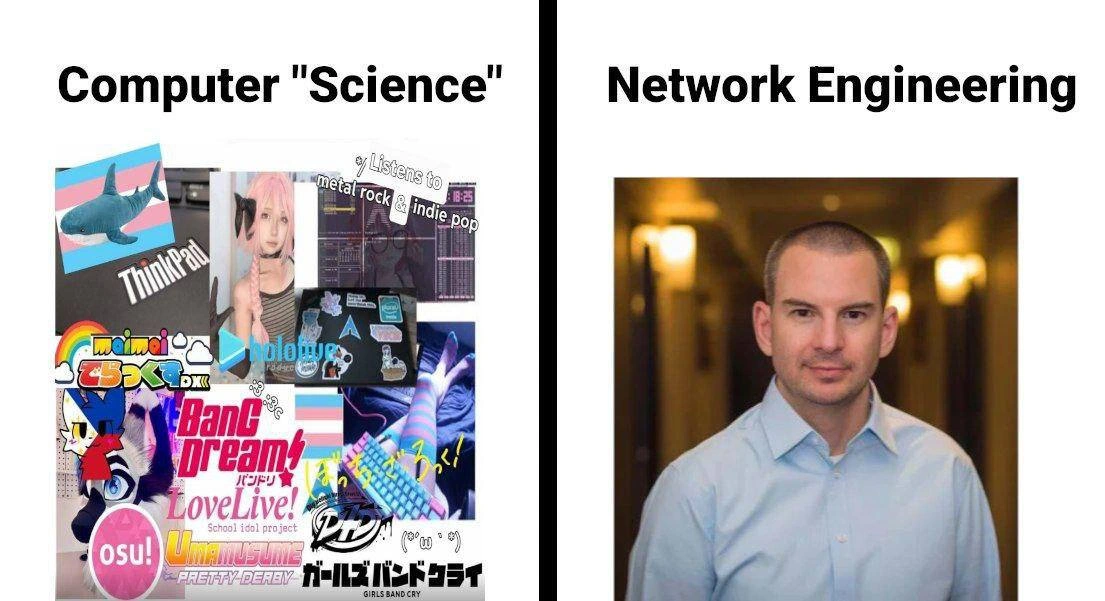
That’s exactly the joke of this meme. It’s like saying: one computer person made their computer super fancy (with anime cartoons, special setups, and cool visuals) – that’s the left side. The other computer person kept their computer totally functional and basic (no extra decorations, just using a simple test to do the job) – that’s the right side. We find it humorous because it’s a big contrast in style. It’s as if one is saying “I want my workspace to look fun and unique!” and the other is saying “I just want my work done, who cares how it looks.” Both are okay ways to be, but seeing them next to each other makes us chuckle. It reminds us how different people can be even when they work in the same field, and that contrast is what makes it light-hearted and relatable.
Level 2: Ricing i3 & Ping 101
Let’s break down what’s happening in this meme in simpler terms, especially for those newer to these concepts. On the left side, we have a portrayal of a Computer Science student (a CS major) who “rices i3.” In everyday words, ricing means customizing the look and feel of one’s computer system extensively. The term "ricing" originally comes from car culture slang – modifying cars with a lot of decorative (and sometimes performance) add-ons – and in tech, it’s used playfully to describe tricking out your desktop environment with visuals and tweaks. i3 refers to the i3 window manager, which is a program on Linux that controls how application windows appear and are arranged on your screen. Unlike the typical Windows or Mac desktop, a window manager like i3 is very minimal by default – it just tiles windows in a grid and doesn’t have things like start menus or taskbars unless you add them. People who use i3 often configure it via text files, deciding exactly what keyboard shortcuts do, how windows split on the screen, what the status bar looks like, etc. So when someone “rices i3,” they are tuning all those settings, often to create a very personalized and efficient setup. Think of it like customizing your smartphone’s home screen with widgets, live wallpapers, custom icons – but on steroids and requiring some coding/config skills.
Now, that CS student’s aesthetic: the meme description shows a collage of anime images, stickers, and even mentions striped thigh-high socks. This suggests the student is into anime and Japanese pop culture. Terms like weeb (short for “weeaboo”) are sometimes used to describe a non-Japanese person who is a big fan of Japanese anime/games/culture – it can be playful or derogatory depending on context, but here it’s basically indicating an anime enthusiast vibe. So the left side character has a “weeb developer aesthetic.” That means their computer is covered in anime-themed imagery: for instance, a ThinkPad laptop decked out in stickers of anime characters and logos of their favorite games (osu!, LoveLive!, etc.). ThinkPads are those classic black business laptops (originally by IBM, now by Lenovo) – funnily, they’re popular among Linux users and students because of their sturdy build and good Linux compatibility. Covering your laptop in stickers is common in developer communities – every sticker might show off a technology you use (like a Linux logo, or GitHub, etc.) or something from pop culture you love (video games, anime, memes). It’s a form of self-expression. If you’ve been to a hackathon or a college CS class, you’ll see lots of laptops adorned with stickers from various tech conferences or personal interests.
The collage also references the student’s music taste: “Listens to metal rock & indie pop.” This is adding to the stereotype that this person has a quirky, non-mainstream taste, aligning with their alternative style of computing. They might be coding while jamming out to some Japanese rock or indie music playlist (maybe some anime soundtracks thrown in). In summary, the left side is a young computer enthusiast who has customized everything about their environment – the operating system’s look, the laptop’s exterior, even the vibe (music) – to reflect their personality and interests.
On to the right side: Network Engineering. This represents a network engineer, basically an IT professional whose specialty is making sure that computer networks (like the internet, or a company’s internal network) run smoothly. A network engineer deals with things like routers, switches, IP addresses, and connectivity. The meme simplifies this by saying he “just pings.” Ping is a very common network utility/tool. When you ping an address (for example, ping google.com), your computer sends a small packet of data to the target and asks it to ping (respond) back. It’s like saying “Hello, are you alive over there?” and waiting for “Yes, I am, and it took X milliseconds.” The output of a ping command will tell you if the other machine is reachable and how long the round trip took. Network engineers use ping as a first-step test to diagnose network issues. If something isn’t working, they might ping the server to see if it’s online and reachable. If the ping fails, it means there’s a connectivity problem. If it succeeds, it means basic network is fine and the problem might be elsewhere. The phrase “just pings” here suggests that the network guy relies on this simple, no-fuss approach – implying he doesn’t bother with fancy graphical programs or eye candy, he just opens a terminal (a command prompt) and types ping. It’s a quick, pragmatic test.
The image for the network engineer is a stark contrast to the CS student’s collage: it’s just a single photo of a man in a button-down shirt with a neutral background. This suggests a professional, corporate setting. Network engineers, especially those in enterprises or data centers, often have a more traditional work environment. They might wear business casual clothes (like a collared shirt) and work in offices or server rooms that are plain and business-like. The absence of any stickers or personalization in his picture hints that unlike the CS student’s personal laptop, the network engineer’s equipment or workspace is plain and standardized. Network folks often use whatever the company provides – maybe a standard-issue Dell or ThinkPad with the company’s image, and they typically don’t decorate it (sometimes even to maintain a professional appearance, especially if they’re at client sites). Also, network engineering tools themselves are usually not visual. Configuring a router is often done in a text-based interface (imagine a black screen with white text). For instance, a Cisco router has a console where you type commands like show ip interface brief and get text output. It’s functional, not pretty, and that’s fine because it gets the job done reliably.
So, essentially, the meme contrasts two stereotypes:
- The CS major who is a tinkerer and tech enthusiast, treating their computer like a canvas – customizing the UI, adding anime visuals, maybe using a less common OS (likely some Linux distribution such as Arch or Ubuntu with i3 window manager) because it allows that level of customization. This person is hands-on with their personal tech in a playful way. They might spend weekends adding new widgets or changing their setup’s theme just for fun. They may also hang out in online communities where sharing a screenshot of your cool desktop is normal.
- The network engineer who is more of a practical specialist – treating computers and devices as tools to be configured and used with standard, proven methods. He’s likely concerned with network reliability, security, and performance. His creativity is channeled into designing a robust network rather than decorating a desktop. “Just pings” implies that when faced with a task, he chooses the simplest effective method (ping) rather than anything flashy. And culturally, network engineering circles care more about uptime and protocol standards than personalizing appearances. This person might chuckle at anime stickers but not feel any urge to put stickers on his own gear.
To give more context: Networking (the category of the meme) refers to that field of connecting computers. For example, when you load a website, network engineers have set up the routers and switches that make sure your request goes from your home to the website’s server and back. They use terms like bandwidth (how much data can flow) and latency (delay in communication), and they configure hardware to route traffic efficiently. A common stereotype or joke is that network engineers often say problems are not their network if they can ping the service successfully – implying the network is fine and the issue lies elsewhere (“Not my problem, I can ping it!”).
DevCommunities is another category here, which on the left side is represented by that vibrant subculture of developers who also share interests in certain games, music, or anime. In developer communities, it’s quite normal to see people show off quirky setups or share their favorite editor theme. The left image tosses in references like osu! (a musical rhythm game that many tech folks strangely get hooked on) and VTubers (Virtual YouTubers – essentially online entertainers who use anime avatars, like the hololive shark character in the image). This tells us that the CS student isn’t just coding; they’re also likely streaming a VTuber on a second screen or have anime music videos playing somewhere. It’s a mix of work and personal fandom – a very online, Gen-Z sort of vibe.
On the CS_Fundamentals side, it’s amusing: one would think a “computer science” student might be buried in algorithms and data structures, but this meme tongue-in-cheek implies they’re more occupied with customizing their desktop and playlist than with, say, solving math proofs. Meanwhile, network engineering is an applied field requiring solid fundamental understanding of how data moves in networks. For instance, a network engineer must understand things like the difference between TCP and UDP, how IP addressing works, what DNS is (the system that translates website names to IP addresses), etc. So the network engineer’s tasks are very fundamental in the sense of keeping the underlying tech working. He might run a ping to test connectivity, or configure BGP on a router to make sure data knows where to go – that’s hardcore network fundamental work. But none of that has any visual flair; if you look at him working, you might just see a bland terminal window with lines of config.
In simpler terms, imagine:
- The CS major's computer screen might look like something out of “The Matrix” but with a rainbow theme and anime characters on the side – multiple terminals open, system stats ticking in the corner, maybe a music player with Japanese song titles. It’s an eye-catching and personalized setup.
- The network engineer's screen might just be a single terminal window or perhaps a simple network monitoring dashboard with graphs. It’s plain but informative – and he’s fine with that.
The humor comes through even if you don’t catch every reference: you see “Computer ‘Science’” above a busy, colorful collage and “Network Engineering” above a plain portrait. Instinctively, you get that one is wild and one is tame. The text labels drive it home:
- “rices i3” – that indicates doing something very niche and complex (i3 configuration) presumably for aesthetics.
- “just pings” – that indicates doing something very simple and standard (ping) presumably for practical reasons.
It’s poking fun at how differently two tech folks approach their work/hobbies. Neither term is extremely common outside tech circles, but now you know:
- Ricing = heavy customization (especially on Linux desktops like i3, often associated with enthusiasts who might also be anime/indie culture fans).
- Ping = basic network test (associated with network engineers and IT professionals as a go-to move).
In summary, at a junior level of understanding: this meme highlights the contrast between a colorful, hyper-customized computing setup of a CS student and the straight-laced, default approach of a network engineer. It’s saying, “look how this computer science kid decks out his system in crazy anime themes, while this network guy over here keeps things so simple he practically only ever runs one command: ping.” It’s exaggeration for comedic effect, playing on stereotypes in a friendly way. If you’ve ever spent time around different groups in tech, you’ll notice these differences – and if you haven’t, now you’ll know why one coworker’s laptop looks like a sticker album and another’s is completely blank! It’s all about tech culture and personal style: some treat the computer as an extension of their personality, others treat it as an appliance to do a job. Seeing them side by side is funny because it’s such an extreme before-and-after kind of vibe.
Level 3: Ricing vs Routing
At the senior developer/engineer perspective, this meme is a nod to two tech subcultures that many of us recognize: the flamboyant “ricing” dev community and the no-nonsense network engineering crowd. The left side, labeled Computer "Science" (with quotes for irony), captures the stereotype of the CS student/hobbyist developer who has turned their computing environment into a personal art installation. We see a ThinkPad laptop absolutely sticker-bombed – plastered with anime characters, Japanese text, and logos from niche communities (osu! is a rhythm game popular with anime fans, BanG Dream! LoveLive! are titles of idol anime franchises, hololive is a VTuber group). This person’s Linux setup is running the i3 tiling window manager adorned with custom system monitors (likely a Conky or htop showing CPU/RAM in funky fonts). There’s even a glimpse of striped thigh-high socks and a colorful mechanical keyboard in pastel hues – it’s the quintessential weeb_developer_aesthetic. You can almost hear the music from here: the collage explicitly says “♪ Listens to metal rock & indie pop,” indicating this coder’s playlist is as eclectic and non-mainstream as their desktop. It’s a chaotic, vibrant personal world – the kind of setup you’d find posted on the r/unixporn subreddit for internet points. In dev communities, this kind of ArchLinux ricing is almost a bragging right: “Look at how I tuned every pixel of my environment!” It’s half about productivity (tiling window managers can be efficient) and half about self-expression.
Now pan to the right side: Network Engineering. The contrast could not be starker – a single, neat corporate headshot of a clean-shaven man in a light blue button-down. No stickers, no wild colors, just a neutral background with softly defocused office lights. He represents the archetypal enterprise network engineer or sysadmin who manages switches, routers, and firewalls. His “setup” isn’t covered in anime; it’s likely a standard-issue company laptop (probably running a stable OS with default settings) and maybe a rack of network gear in a back room. The joke “...the network guy just pings” encapsulates the stereotype that network engineers have a very straightforward, utilitarian approach to tech. While the CS major might be firing up three music streams and a custom desktop HUD, the network engineer is satisfied with a blinking cursor on a black screen – as long as he can $ ping and get a response, life is good.
Why is this funny? Because anyone who’s been around IT teams or online dev forums has seen this personality contrast. It’s an exaggeration of course, but rooted in truth. Developers (especially younger students or those in open-source communities) often love to personalize their gear and environment. They’ll have a mechanical keyboard with custom keycaps, a terminal that greets them with a colorful ASCII art (courtesy of tools like neofetch maybe), and yes, a laptop absolutely plastered with stickers from hackathons, anime conventions, and tech meetups. It’s practically a badge of identity. Many CS majors find joy in tweaking everything – from writing custom bash aliases to skinning their music player – even if those tweaks are more aesthetic flourish than functional necessity. Ricing one’s desktop can become a hobby in itself; there are entire communities sharing screenshots of their desktops, trading configuration tips on how to get the coolest translucent terminal or the slickest polybar theme. Senior engineers know that one intern or junior dev who spends half a day adjusting their IDE theme colors or adding anime mascots to their server monitoring dashboard. It’s endearing and a little amusing – we’ve either been that person or managed that person at some point.
Network engineers, on the other hand, are stereotypically all business when it comes to their tools. Their pride comes from stability and simplicity. If you peek into a network operations center, you won’t see anime wallpapers on the monitors – you’ll see dashboards of link statuses, ping graphs, maybe a scroll of syslogs. These folks often come from a background where downtime is unacceptable and flashy UI isn’t trusted. Many network devices are configured via a CLI (Command-Line Interface) – plain text on a black screen. In fact, veteran networkers often prefer the CLI because it’s scriptable, reliable, and fast. It’s common to hear them say, “GUIs can crash or misbehave; a CLI command does exactly what I tell it.” There’s a minimalism in network engineering culture: like the meme suggests, sometimes the simplest tool (ping) is the most powerful in their arsenal. If a server is down, the first question is inevitably “Did you ping it?” (Translation: check the basic connectivity). There’s a running joke in IT, “It’s always DNS,” highlighting that network issues are often the root cause – and the network guy often proves it by showing his pings and DNS lookups are fine, throwing the problem back to the devs 😉.
The meme plays on this by showing Computer "Science" vs Network Engineering almost like two species. The CS side is colorful, hobbyist, almost whimsical – implying maybe this “science” is a bit tongue-in-cheek; they might be coding, sure, but they’re also curating playlists and anime avatars. The quotes around "Science" suggest the meme is poking fun that this student’s focus is not exactly on serious scientific research at the moment – it’s on customizing their setup. Meanwhile, the Network Engineering side has no quotes – it’s presented as straight-laced engineering, emphasis on getting things working. The network engineer just cares if the packets get from A to B. The visual punchline is that these two could be working in the same tech universe but you’d hardly believe it by their outward styles.
Many seasoned professionals laugh at this because they’ve lived it. Picture a company office or a university lab: one corner has the CS club’s resident Linux enthusiast with his ThinkPad X220 running Arch, anime stickers all over the lid, multiple terminals and system monitors open, possibly wearing headphones blasting some obscure math rock or a Hatsune Miku song. Across the room is the networking lab guy or the IT admin: polo shirt or button-down, quietly checking router configs, maybe using a Windows laptop with a vanilla wallpaper or a corporate-issued ThinkPad with no stickers at all (gasp!). When something on the network goes awry, his approach is methodical: open a terminal, ping 8.8.8.8, check for packet loss, maybe run traceroute or log into a switch. No frills, just diagnostics. Meanwhile, the CS major might be the type to blame the network first (“Why is my anime stream lagging? Must be the network!”) but the network guy will dryly point out that everything’s fine from his end. It’s that classic dev vs ops dynamic, with a cultural twist.
The humor also comes from the disparity in effort vs result. The caption “When your CS major rices i3 but the network guy just pings” implies the CS student poured hours into customizing i3 (changing config files, picking color themes, integrating anime art, tuning every UI detail) – essentially a lot of work for a pretty interface. On the other hand, the network engineer’s approach to problems or even enjoyment is simple: he just runs a quick ping test. It’s almost a gentle jab: one side might be overcomplicating their personal workflow for fun, while the other sticks to the basics to get the job done. Neither is “wrong” – but seeing them side by side is comical because it’s so relatable. We’ve known brilliant programmers who have the most esoteric development environment (using something like i3, Emacs with anime themes, and custom scripts for everything) and we’ve known brilliant network engineers who might still use Notepad to save configs and think a fancy colored prompt is unnecessary fluff.
Historically, this split can be traced back to how the fields evolved. Computer science students and software devs often had personal Unix/Linux machines and a culture of openness – customizing your OS, sharing dotfiles, and demonstrating your prowess by how tricked-out your terminal is became a subculture (especially in forum and Reddit communities, where screenshots of your desktop are like a calling card). The venerable ThinkPad laptop became a symbol in these circles because it’s durable, Linux-friendly, and frankly its utilitarian black chassis looks cooler with stickers 😂. In contrast, network engineering has roots in the telecom/enterprise world where consistency and standards matter. Network folks often use vendor-provided systems (Cisco, Juniper, etc.) and those typically emphasize stability over customization. There’s no “skin your router OS with an anime theme” option – even firmware updates are done cautiously. And the personalities often reflect that: network engineers in large orgs might come from a more traditional engineering background – hence the button-down shirt in the meme – and they might play by corporate rules (no unauthorized software, no goofy desktop backgrounds when someone might screen-share during a meeting!).
To put it succinctly, the meme tickles us because it’s ridiculously true in many cases. It caricatures the divide: one side, the CS ricer, expressing individuality and perhaps youthful exuberance in tech; the other side, the network admin, expressing professionalism and pragmatic focus on fundamentals. It’s a loving roast of both: the CS major might be all flash, minimal substance (at least as the network guy sees it), and the network guy might be all substance, no flash. Of course, in reality there are flashy network engineers and substance-heavy CS majors, but stereotypes exist because they resonate. This image resonates with anyone who’s walked into a college CS department lounge and then into an enterprise networking team meeting – it’s almost like two different worlds that somehow orbit the same tech sun.
The side-by-side nature of the meme is exactly how a seasoned dev might jokingly compare two colleagues. It’s the same energy as comparing a hackathon hacker vs a data center manager. One is sipping Mountain Dew at 2AM while customizing their code editor theme, the other is sipping black coffee at 2AM while watching a switch reboot progress bar. Both are up late with computers, but what they consider a crisis or a success is entirely different. The shared pain points – maybe both have pulled all-nighters – get lost in the wildly different vibes. That dramatic juxtaposition is the heart of the humor.
Let’s actually break down a quick comparison between these two personas in engineering terms:
| CS Student (Left) 😜 | Network Engineer (Right) 😐 |
|---|---|
| Gear & OS: ThinkPad with Arch Linux + i3 WM, highly customized everything (themes, dotfiles) | Gear & OS: Company-issued laptop or console access to Cisco/Juniper devices, default configs (maybe Windows or a standard Linux) |
| Visuals: Anime wallpaper, terminal with translucent background, system monitor widgets, rainbow LED keyboard | Visuals: Plain background (maybe the default company logo), terminal is plain black-on-white or white-on-black, no extra widgets – maybe a Nagios dashboard on a second monitor |
| Personalization: Laptop covered in stickers (open-source projects, anime, memes), even the bash prompt has emoji and colors | Personalization: Possibly a label maker tag on the laptop with his name 😅, otherwise everything is clean. The rack cables are neatly labeled, though – that’s his form of “decorating” |
Favorite tools: Vim/Emacs with custom config, fancy shell aliases, neofetch (to show off system info with an anime ASCII art), music streaming in background |
Favorite tools: ping, traceroute, ssh into devices, maybe network monitoring systems. Background music? The sweet sound of fans humming in the data center – or silence. |
| Key concern: “Is my setup unique and optimized to my liking? Did I max out my DevExperience?” | Key concern: “Is the network up and meeting SLA? Did I minimize downtime and packet loss?” |
| Motto: "Check out my config! I can swap window layouts with a hotkey and my system sings (literally) when I compile code." | Motto: "If I can ping it, it works. And if it works, don't mess with it." |
Senior engineers reading this can probably recall real names to match each column. The humor isn’t about one being better – it’s about how two smart techies can operate so differently. In fact, sometimes these two have to work together: imagine the CS student interns at a company and asks the network engineer for a fancy shell on the server – the network engineer might grumble “Why? Just use the default bash, it’s on all systems!” Meanwhile, the network engineer might advise the intern “stop changing things that aren’t broken” – a philosophy that clashes with the tinkerer mindset. That clash is funny because it’s a benign culture clash. Each side secretly marvels (or rolls eyes) at the other: “How can Bob be so content with a plain terminal? Doesn’t he want it to look cool?” versus “Why does Alice waste time making her terminal pink? The packets won’t move faster!”.
All in all, this meme encapsulates a very relatable tech workplace humor: the divide between the creative, customization-loving developer culture and the pragmatic, standardization-loving IT/network culture. It’s a playful jab that likely caused many chuckles and maybe an elbow nudge to a coworker: “Hey, this is so you and Mike!” Everyone in tech knows a “sticker-covered laptop” person and a “just uses ping” person. Heck, sometimes they’re the same person on different days! But the extremes shown here make the joke land immediately. We laugh because we recognize the truth in the caricature – and perhaps we appreciate that it takes all types to make the tech world run, from the ones who make it pretty to the ones who make it possible.
Level 4: Packets vs Pixels
On a fundamental level, this meme contrasts two ends of the computing spectrum: low-level network packets versus high-level graphical pixels. The network engineer on the right operates in the realm of OSI model layers and command-line interfaces – he’s dealing with data packets, protocols, and real-time connectivity. For example, when he “just pings,” he's leveraging the ICMP protocol (Internet Control Message Protocol) at OSI Layer 3 to send an echo request packet and await an echo reply. It’s bare-metal networking: if those 64-byte packets get a reply, the network path is proven. His world revolves around latency, throughput, and routing tables – the unadorned essentials that keep the internet alive. Tools like BGP (Border Gateway Protocol) might be configured in plain text, using terse CLI commands to tweak how packets find their way across the globe. In that world, efficiency and reliability trump aesthetics; every extra process or GUI element on a router is just wasted CPU that could be routing data.
Contrast that with the left side’s Computer “Science” student customizing the i3 window manager – a playground of pixels and UI configurations at the very top of the stack. The i3 environment is part of the graphical user interface layer (far above the network layer), dealing with window placement, fonts, and color schemes rather than packet forwarding. “Ricing i3” means tweaking configuration files and scripts to change appearance and behavior of the desktop environment: from window transparency to anime-themed wallpapers. These changes live in user space: they don’t alter algorithmic complexity or network performance, but they provide visual dopamine. It’s an almost artistic manipulation of pixels on screen. There’s a delicious irony here: the CS major might spend hours writing a custom script to animate a CPU usage bar in real time with a neon anime aesthetic (perhaps using a system monitor like Conky), while the network engineer spends those hours writing a new BGP route-map to optimize real-time traffic flow between data centers. Both are highly technical endeavors, but one is optimizing visual experience and personal comfort, whereas the other is optimizing infrastructure efficiency.
Fundamentally, it highlights how different layers of computing attract different priorities. Network engineering deals with formal protocols, mathematical routing algorithms (like BGP’s path-vector logic or OSPF’s graph traversal) – it’s the science and engineering side ensuring that every pixel (or anime clip) you stream actually arrives over the wire. Meanwhile, customizing a window manager is more of a craft: it requires knowledge of configuration syntax and maybe some scripting (which is technically complex in its own right), but it’s unconstrained by rigorous protocols. It’s about bending a flexible system (like Linux’s X11 or Wayland) to the user’s will. In a way, both roles demand mastery: the network guy’s mastery is over deterministic systems (packets follow physical and logical laws), and the CS student’s mastery is over an aesthetic system (windows, colors, and sounds arranged for personal delight). One orchestrates routers with minimalist commands to shape internet traffic; the other orchestrates dotfiles and theme configs to shape their personal computing environment.
This dichotomy is rooted in technology’s design: routers and switches generally don’t have GUIs – historically, they run specialized OSes (like Cisco IOS or JunOS) built for speed and stability, often configured via serial console or SSH text interface. The devices might not even have GPU hardware for fancy graphics, because pushing packets is the priority. On the flip side, personal computers have abundant resources and an entire graphics stack, inviting users to customize and add bells and whistles. The meme humorously underscores that what counts as “productivity” or “improvement” differs by domain: a network engineer’s improvement might be reducing packet loss by 0.01% through a better route – invisible but crucial – whereas a CS geek’s improvement might be finding the perfect anime wallpaper or a slick vim color scheme – very visible, but with zero impact on computing fundamentals. It’s packets vs pixels: the invisible plumbing of connectivity versus the visible flourish of a personalized desktop. The humor emerges from appreciating how wildly different those priorities can be, even though both individuals ultimately work with computers.
Description
A two-panel comparison meme contrasting the cultural stereotypes of two tech disciplines. The left panel, labeled 'Computer "Science"', is a vibrant and chaotic collage representing a specific online subculture. It features a ThinkPad laptop with a Blåhaj shark plush sticker on a transgender pride flag, a person in pink-haired anime cosplay (Astolfo), a furry character, a mechanical keyboard, striped thigh-high socks, and numerous logos from Japanese rhythm games and anime such as 'osu!', 'BanG Dream!', and 'Love Live!'. The overall aesthetic is deeply rooted in anime, gaming, and queer/trans online culture. In stark contrast, the right panel, labeled 'Network Engineering', displays a single, generic corporate headshot of a middle-aged white man with short hair, wearing a simple blue button-down shirt. The humor is derived from the extreme and stereotypical portrayal of the expressive, individualistic software developer versus the bland, conventional, and buttoned-down network engineer
Comments
18Comment deleted
The person on the left can write a kernel driver in Rust but doesn't know what a subnet mask is. The person on the right can subnet in their sleep but thinks Rust is just a feature of old server racks
Proof that the farther up the OSI stack you live, the more RGB you need just to feel Layer 7 alive
The real difference between CS and Network Engineering: one debugs segfaults while watching anime at 3am, the other debugs spanning tree loops while explaining to C-suite why the entire campus network just formed a broadcast storm because someone plugged both ends of a cable into the same switch
Ah yes, the eternal dichotomy: Computer Science majors who can implement Dijkstra's algorithm in their sleep but communicate exclusively through anime reaction images and osu! beatmaps, versus Network Engineers who've memorized every RFC but whose idea of 'packet inspection' is checking if their business cards are properly aligned. One group optimizes their i3 window manager configs at 3 AM while listening to Japanese idol music; the other optimizes BGP routes at 3 AM while on a conference call explaining why 'have you tried turning it off and on again' is actually a valid troubleshooting methodology. Both are equally essential to keeping the internet running, just with vastly different Spotify playlists and desktop wallpapers
Left side optimizes r/unixporn; right side optimizes OSPF areas - both call it routing, only one gets blamed when someone says “the internet is down.”
CS: Infinite loops of identity politics. Networking: STP to break those loops before they flood the switch
CS tweaks i3 themes; network engineering tweaks route‑maps - only one brings down half the company when a stray 0.0.0.0/0 leaks into BGP
fellas, is it gay... Comment deleted
yes Comment deleted
Prefer 1st Comment deleted
What? Network-guys usually are assholes. Comment deleted
They are Comment deleted
True af (Network guy) Comment deleted
is that czech republic Comment deleted
i would be angry if it wasnt true... Comment deleted
They forgor Symphogear, but yeah Comment deleted
Network guys like "Married man with 2 children who is an active member of the society and has a lot of friends" Comment deleted
Thank God I studied Computer Engineering Comment deleted