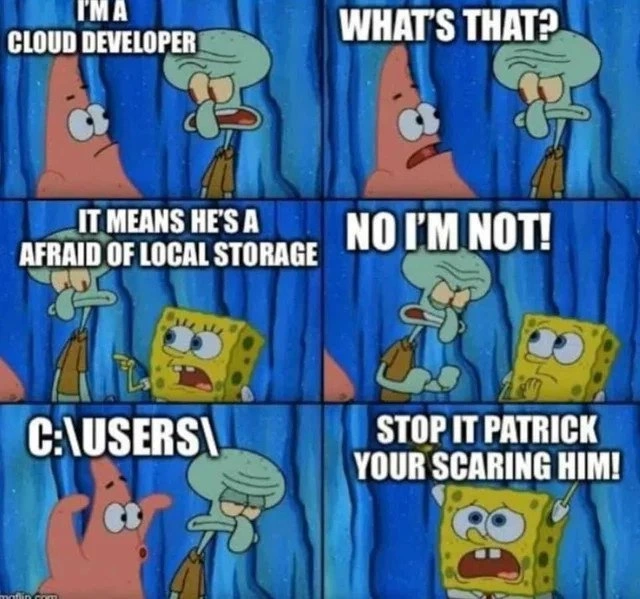
Cloud developer terrified when someone mentions the local C:\Users\ path
Why is this Cloud meme funny?
Level 1: Afraid of His Own Closet
Imagine you have a friend who always stores all his toys at school with the teacher because he thinks his closet at home is haunted. He calls himself a “cloud kid” because he keeps everything far away, up in the cloud (so to speak). One day, another friend jokingly leans in and whispers, “psst… what about your closet?” in a spooky voice. Your cloud kid friend jumps in fright and shouts, “Stop it, you’re scaring me!” 😀 It’s funny because a closet is normally a perfectly safe place to put your stuff, but he’s so used to keeping everything somewhere else that the simple idea of using his own closet feels like a horror story to him. The meme is just like that: it shows a character who works with things in the sky (the cloud) getting scared when someone mentions keeping things on the ground (in a local closet). Even though there’s nothing actually scary about a closet, the way the friend says it and the reaction makes it silly and humorous.
Level 2: Hard Drive? Hard Pass.
This meme is comparing cloud storage to local storage in a playful way. A “cloud developer” means a programmer who builds and runs applications on cloud platforms (like Amazon Web Services, Microsoft Azure, Google Cloud). Cloud developers typically store data in remote locations – for example, saving files in an AWS S3 bucket or a database managed by the cloud – rather than saving files directly on the machine they’re working on. Local storage, on the other hand, means storing data on a computer’s own drive (the hard drive or SSD inside the machine). The joke here is that our cloud developer character has a fear of using local storage, as if it’s something dangerous or taboo. Of course, in reality it’s not something to literally fear – it’s just less common or not recommended in cloud architectures to rely on local disk. But the meme exaggerates it: Squidward (the cloud dev) is depicted as if the simple mention of a local file path “C:\Users\” is like mentioning a scary ghost.
Let’s break down the scene. It’s a six-panel image using characters from SpongeBob SquarePants, a popular cartoon often turned into meme formats. In the first panels, Squidward proudly says “I’m a cloud developer,” and Patrick the starfish asks “What’s that?” SpongeBob (the yellow sponge) answers, “It means he’s afraid of local storage,” while Squidward defensively replies, “No I’m not!” This sets up the idea that a cloud specialist might be averse to using local disks. In the final panels, Patrick leans in and whispers “C:\Users,” which is a Windows path (the directory on Windows where user profiles and their files are stored). SpongeBob then shouts, “Stop it Patrick, you’re scaring him!” We see Squidward looking genuinely frightened. The text is in big bold white letters with a black outline (typical meme caption style), over the cartoon’s underwater background. Even without knowing much technology, one can tell from the format that Patrick is teasing Squidward with something he finds spooky.
Now, why is “C:\Users\” used specifically? On Windows computers, the main drive is usually labeled C:, and “Users” is the folder where each user’s personal files and settings live (like Documents, Pictures, etc., under C:\Users\[YourName]\...). It’s an example of a file system path on a local machine. For many developers who work in enterprise or older desktop apps, dealing with paths like these is normal. But a cloud developer stereotype is someone who works with cloud services and might rarely interact with raw file paths. They might prefer things like storing files in the cloud (imagine uploading a photo to Google Drive or iCloud rather than saving it on your C: drive). So, the meme humorously suggests that if you even mention a Windows file path to them, they get uneasy. It’s like telling a Linux-focused developer, “Hey, go find something in C:\Users\Administrator...”—they might groan or cringe because it’s out of their comfort zone or indicates a non-cloud approach.
For a junior developer or someone new to these terms, think of it this way: cloud storage means your data is kept on someone else’s computers (servers in a data center) and you access it over the internet. Local storage means the data is on the device you have in front of you (your PC’s own disk drive). Cloud developers design apps assuming things might run on many machines, start and stop, and therefore they avoid saving important data on just one machine’s local disk (because if that machine goes away, the data would be lost). Instead, they use services like databases or cloud file storage that survive individual machine failures. This approach is often called being “stateless” or cloud-native.
So, when SpongeBob says “it means he’s afraid of local storage,” he’s explaining (in a funny oversimplified way) that a cloud developer doesn’t like storing files on a single computer’s hard drive. Squidward saying “No I’m not!” is him denying that stereotype – just like a person might say “I’m not afraid, I just prefer not to do it.” Then Patrick testing it by saying “C:\Users\” is like saying the name of something scary to see if Squidward flinches. And indeed, Squidward does freak out in the next panel, which confirms the joke: apparently, he is afraid, as the stereotype predicts. SpongeBob yelling “Stop it Patrick, you’re scaring him!” is the final comedic punch, as if Patrick went too far by uttering that forbidden local path.
In plainer terms, this meme is CloudHumor or DeveloperHumor that resonates with IT folks. It jokes that cloud specialists treat the idea of saving data on a physical machine the way a cat might treat water – with great disdain or hesitation. The characters from SpongeBob make it light-hearted and easy to digest. After all, seeing a cartoon squid in panic is much funnier than a serious diagram of cloud architecture! But behind the humor, it’s referencing real tech practices: cloud environments (like when deploying apps on AWS or Azure) encourage keeping files in remote storage services and not relying on, say, C:\Users\Administrator\Documents\app\config.txt on one specific server. If you’ve just started in development, you might notice this when deploying a web app – you don’t manually put files on C: drive in the cloud; you use something like an Amazon S3 bucket or a database to hold your files and data. The meme exaggerates this preference into a phobia for comedic effect.
Also, notice that Windows vs. Linux aspect: Many cloud developers work with Linux servers (which use forward slashes “/” in paths, not backslashes “\” like Windows). A path like C:\Users\ exists only on Windows. So, the meme specifically picks a Windows path as the “scary thing,” possibly implying the cloud dev is not used to Windows environments or that Windows = old-school server to him. It’s a bit of an inside joke about cross-platform discomfort – even though any seasoned developer likely has seen a Windows file path, in the cloud world it’s less common to talk about them. Typically, you’d use environment-agnostic approaches (like relative paths, or better yet, no local path at all).
In summary, the meme is saying: “This cloud engineer is so cloud-focused that the idea of storing files on a local disk (like in C:\Users) spooks him!” It’s using a fun SpongeBob scene to highlight a tendency in tech culture. The categories Cloud and Storage are directly reflected here: it’s literally about a cloud person and storage fear. And the tags like c_users_path and local_storage_fear pin down the exact joke. If you’ve ever been advised “Don’t save that file to the server’s C: drive, put it in the cloud storage instead,” you’ll chuckle at how the meme dramatises that advice. Even if you haven’t, the image of someone being scared by a file path is absurd enough to be funny on its own.
Level 3: Local Storage Boogeyman
At the highest level, this meme pokes fun at the cloud-native mindset taken to an extreme. A self-proclaimed cloud developer (Squidward) is portrayed as being literally afraid of local storage. In real software terms, this reflects a common attitude in modern cloud computing: everything should be stored in the cloud (remote servers, managed services) rather than on a local disk. The dialogue uses the SpongeBob meme format to exaggerate this attitude for comedic effect. The punchline comes when Patrick whispers the Windows file path C:\Users\ like a scary campfire story, causing Squidward to panic. For seasoned developers, this is recognizable as classic **tech humor** — it’s absurd yet grounded in real trends. Cloud engineers often use **object storage** services (like AWS S3 buckets, Google Cloud Storage, etc.) and avoid touching the underlying server’s file system. So, hearing a hard-coded Windows path (C:\Users\...) can indeed send shivers down a cloud developer’s spine, both humorously and practically! It’s the boogeyman of cloud architecture: a sign that something isn’t as stateless or portable as it should be.
Digging deeper, the meme is highlighting an architectural principle of cloud computing. Modern applications, especially 12-factor apps, treat the local filesystem as ephemeral. In a containerized or serverless environment, if you write files to a local disk, those files vanish when the container is destroyed or the function resets. Seasoned cloud developers design around this by using external CloudComputingServices for persistence (databases, network drives, or cloud storage). They aren’t literally terrified of C:\Users 😊 – but they’ve learned that relying on such a path is a recipe for problems in distributed systems. It’s a marker of something non-portable and non-scalable. For instance, if an app tries to save user uploads to C:\Users\Photos, that won’t work when you deploy it to a Linux Docker container (where that path doesn’t even exist) or scale it across multiple machines. A senior developer will recognize this as an anti-pattern. The meme takes that serious best practice and turns it into a joke: imagine a cloud engineer breaking into a cold sweat at the mention of a local Windows directory. DeveloperHumor often thrives on this kind of hyperbole — taking a real concern (avoiding local file writes in cloud apps) and personifying it as a phobia.
The choice of the path C:\Users\ is particularly spot-on. It’s a very **Windows**-centric location (the root of user home directories on Windows PCs). Many cloud deployments run on Linux-based servers, where the equivalent path would be something like /home/user/. By invoking a Windows-specific path, the meme doubles down on the discomfort: not only is it *local disk*, it’s Windows local disk! To a cloud specialist who lives in Linux containers and orchestrations, that path looks archaic and out-of-place. You can almost hear him thinking, “What is that doing in my modern cloud app?!” The humor lands because **CloudHumor** often highlights the contrast between *old-school* development (manual servers, local files, carefully tending a single machine) and *cloud-native* development (distributed systems, everything as a service, pets vs cattle). Here, Squidward represents the cloud-native developer who considers servers as cattle (fleeting, replaceable instances) and any hint of treating a machine like a “pet” with personal files (like something under C:\Users) is spooky.
There’s also an underlying camaraderie in this joke. Anyone who’s been deep in cloud architecture can relate to a slight unease when encountering assumptions of a persistent local filesystem. We’ve been trained to ask, “Will this scale? What if this pod dies? Did someone just assume a single machine?” The meme captures that knee-jerk reaction in an exaggerated, laughable way. When Patrick whispers C:\Users\, SpongeBob yelling “Stop it Patrick, you’re scaring him!” mirrors how a team might playfully tease the cloud specialist who insists everything must go to the cloud. It’s a friendly ribbing among developers: “Hey, remember actual hard drives and filesystem paths? Boo!” Squidward’s reaction — denial then fear — is a caricature of the cloud developer stereotype: outwardly claiming “No, I’m not afraid of on-prem or local stuff”, but inwardly cringing at the thought of it.
From a senior perspective, this meme also hints at the evolution of software deployment practices. Not long ago, it was normal to read from and write to local disk paths like C:\Users\... or /var/www/... as part of an app’s logic. But with the rise of cloud computing, best practices shifted. Config files moved to environment variables or config services. Uploaded files moved to blob storages or CDNs. Sessions moved from in-memory files to distributed caches. The “fear” of local storage is really just a strong preference for designs that don’t depend on one machine’s state. It’s funny because it’s somewhat true: drop a hardcore cloud engineer into a legacy on-prem Windows server with files scattered in C:\Users\Administrator\Documents and they might feel uneasy or out of their element. They might joke “Not touching that with a 10-foot pole” – not because they literally fear it, but because it symbolizes technical debt and inflexibility. In essence, “cloud developer afraid of the C drive” is an exaggeration of cloud-first ideology clashing with old-school methods. The meme gets tech laughs by dramatizing a common cloud developer stereotype: head in the clouds, trepidation on the ground.
To illustrate the contrast, consider how a cloud-heavy developer vs a traditional approach might handle saving data:
# Cloud-native approach: store config in a remote cloud bucket
upload_to_cloud("s3://my-app-config/settings.json", config_data)
# Old-school local approach that might spook our cloud dev:
with open("C:\\Users\\Squidward\\app\\settings.json", "w") as f:
f.write(config_data)
# Patrick: "Look, he's writing to the C: drive..." 👻
In the snippet above, the first part uses a cloud storage URI (s3://...) which is normal for a cloud dev. The second part writes to a file under C:\Users\Squidward\..., which in a cloud context might trigger that “this is wrong!” instinct (and in our meme, sheer horror 😅). The code comment mimics Patrick’s teasing whisper. A veteran cloud engineer reading this will chuckle because it’s a real consideration wrapped in a joke. We’ve all been in code reviews where someone exclaims, “Uh oh, writing to disk here – what happens if the server goes down?” This meme simply personifies that concern as Squidward physically trembling. It’s a great example of DeveloperHumor where only those in the know will fully appreciate why C:\Users is used as the scare phrase. Essentially, the meme humor comes from shared experience: cloud folks do avoid local state, so much that we joke they might scream at the sight of a C: drive. It’s silly, it’s hyperbolic, and it’s hilariously relatable if you’ve lived through the shift to cloud-first development.
Description
Six - panel SpongeBob SquarePants meme. Panels 1-2: Squidward declares, “I’M A CLOUD DEVELOPER,” and Patrick asks, “WHAT’S THAT?” Panels 3-4: SpongeBob points and explains, “IT MEANS HE’S AFRAID OF LOCAL STORAGE,” while Squidward protests, “NO I’M NOT!” Panels 5-6: Patrick whispers the Windows path “C:\USERS\,” and SpongeBob yells, “STOP IT PATRICK, YOUR SCARING HIM!” The joke plays on cloud-native engineers who prefer remote object stores and get uneasy when confronted with traditional on-disk file paths. Visually, the text is in bold white uppercase with black outline over cartoon characters; backgrounds are underwater blues and oranges typical of the show
Comments
7Comment deleted
I whispered “C:\Users\” in stand-up and our Kubernetes guru pulled the fire alarm - apparently any path with a drive letter violates the Twelve-Factor Geneva Convention
The same developer who confidently deploys to 47 different regions has a panic attack when asked to debug why their Node app can't find a config file in the parent directory
The real horror isn't the Windows path - it's realizing your entire microservices architecture depends on S3 being up, and you've forgotten how to write to disk without wrapping it in three abstraction layers and a Terraform module
Whisper “C:\Users” to a 12‑factor purist and a simple copy becomes a Terraform module with S3, lifecycle policies, and three IAM roles
To a cloud dev, “C:\Users\” is basically S3 with zero nines of durability, no IAM, and a disaster recovery trigger called “Windows Update.”
C:\Users\: the original serverless storage with infinite latency and zero HA
you scare me too if you use Windows Comment deleted