A Nostalgic Nod to the TON Blockchain
Why is this Blockchain meme funny?
Level 1: A Surprise Party of Helpers
Imagine you want to fix a small problem in your house, like hanging a picture on the wall. You call one friend who’s good with a hammer to help you out. But when you open the door, that friend has brought along five other people you didn’t expect – one brought a drill, another has a toolbox, someone else even brought a ladder, and so on. Now your living room is filled with people and tools for just hanging one picture! You’re a bit shocked and thinking, “I only asked for one helper, not a whole crew!” It’s kind of funny because it’s so over-the-top.
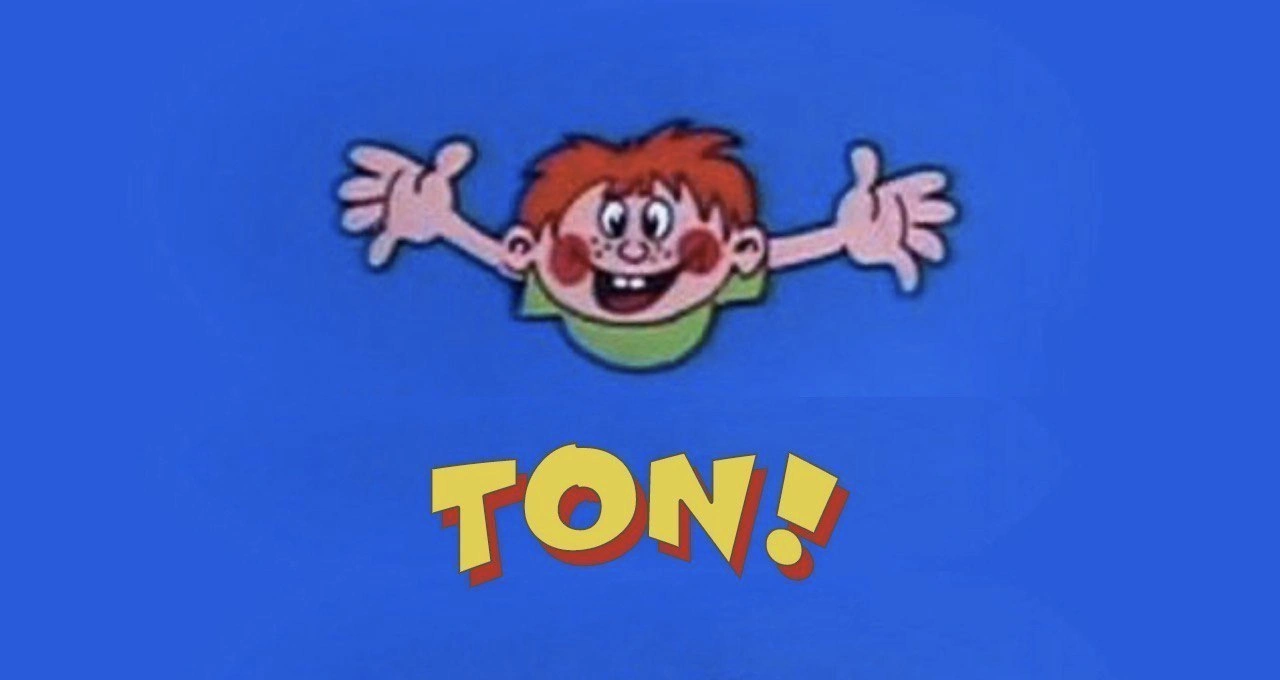
This meme is joking about the same idea, but with computer code. A programmer adds one little piece to a project, and suddenly it’s like a whole party of extra helpers showed up uninvited. The picture of the cartoon kid stretching his arms and shouting "TON!" is like the programmer saying, “I got a TON of extra stuff!” It’s a silly way to show the surprise and frustration when something small turns into something really big unexpectedly. The feeling is a mix of amusement (because wow, that’s a lot more than expected) and overwhelm (because now you have to deal with all that extra stuff). In simple terms: you asked for one thing and got a whole bunch more, and that giant pile of unexpected help is both funny and a little frustrating – that’s why developers find this meme so relatable and humorous.
Level 2: So Many Packages
Let’s break down what this meme is talking about in simpler terms. In software, a dependency is any piece of code that your project needs to work – usually an external library or package that someone else wrote and you include so you don’t have to write that functionality yourself. Now, a transitive dependency means a dependency of a dependency. For example, imagine your app needs a library to handle dates, called DateMaster. You add DateMaster to your project. But DateMaster itself might rely on another library, say TimeCore for time zones, and maybe a formatting library like PrettyPrint to display dates nicely. Those are transitive dependencies – you didn’t explicitly add TimeCore or PrettyPrint yourself, but they got pulled in automatically because DateMaster needs them. And it doesn’t stop there: PrettyPrint might depend on yet another library (maybe ColorText for colored output, for instance). When you installed one library, you actually got a whole chain of libraries. All these relationships form what we call a dependency graph or dependency tree – think of it like a family tree of packages, with your project at the top, branching out to the packages you directly use, then branching further out to the ones they use, and so on.
Modern developers use package managers to handle this. A package manager (like npm for Node.js/JavaScript, pip for Python, Maven/Gradle for Java, etc.) is a tool that automates the process of fetching and installing these libraries (packages). When you run a command like npm install some-library, npm looks at some-library’s own list of dependencies, fetches those, then fetches the dependencies of those, ad infinitum, until the whole tree is downloaded and installed in your project. That’s super convenient – you type one command and the package manager does all the heavy lifting. But this convenience can lead to the scenario the meme jokes about: DependencyHell, where you end up with a huge number of packages without realizing it.
Dependency Hell is a tongue-in-cheek term developers use for the headaches that come with too many dependencies. It can mean "ugh, my project won’t run because two libraries each require a different version of a third library – which one do I choose?" or simply "I have so many dependencies that updating anything is terrifying because it might break something else." Even if there’s no direct conflict, having an excessive number of packages can make your project heavy and complex. For instance, more packages means a larger download for anyone setting up the project (bad for DeveloperExperience_DX when onboarding new team members or running continuous integration builds). If it’s a web project, more dependencies can mean a larger bundle size (the final files that get sent to the browser), which can slow down your website for users. That’s often referred to as FeatureBloat when you have way more code and features included than you actually use. It’s like carrying a toolbox full of every tool imaginable when you only needed a simple hammer – all that extra weight is just bloat.
Sometimes developers joke about over-engineering, which in this context might mean using an overly complex library or framework to solve a simple problem. For example, if you just needed to format one line of text, but you pulled in a massive text-processing library (that brings along ten other libraries), that’s over-engineering. You solved the problem, sure, but at the cost of adding a lot of unnecessary stuff. Each additional dependency is also something you have to maintain indirectly. If a bug is found in one of them, you’ll need to update it. If one of them changes in a new version, you might need to adjust your code. This ongoing effort is what we call TechDebt: it’s like taking on a “loan” of convenience now (using the library to save time) that you’ll have to “repay” later (by dealing with updates, fixes, or even replacement if the library is abandoned).
Let’s visualize the situation. Suppose your project’s dependency tree looks like this:
my-app
└─┬ AwesomeLib 1.0 <-- (You added this)
├── HelperLib 2.5 <-- AwesomeLib added this
├─┬ UtilKit 3.1 <-- AwesomeLib added this
│ └── TinyTool 1.2 <-- UtilKit added this
└── HelperLib 2.5 <-- (already listed above, sometimes repeats)
In this diagram, my-app depends on AwesomeLib (that’s the one you consciously chose). But AwesomeLib depends on HelperLib and UtilKit. And then UtilKit in turn depends on TinyTool. When you install AwesomeLib, you’ll automatically get UtilKit, HelperLib, and TinyTool as well. Notice HelperLib is listed once here, but if two different parts of your tree needed different versions, you’d end up with duplicates (like HelperLib v2.5 and HelperLib v3.0 both in your project, which can happen in some ecosystems like npm). This can lead to a lot of files. If you’ve ever opened the node_modules folder in a Node.js project, you might see hundreds of folders inside – each one is a package that got pulled in. Often developers are shocked: “I only wrote 100 lines of my own code, but there are thousands of files in node_modules!” That contrast is exactly what the meme is exaggerating for comedic effect.
The bright blue meme image with the cartoon child and the huge word "TON!" is basically saying: “Look how huge this thing is!” In developer terms, it’s “I just installed something and it brought in a TON of stuff!” This is a common joke when working with tools like npm. For a concrete example, if you run npm install react, you don’t just get React (a popular UI library); you also get a bunch of other packages React depends on. Or if you run npm install gulp (a build tool), it might output something wild like:
$ npm install gulp
+
added 270 packages from 180 contributors in 10.5s
That line “added 270 packages” surprises people who aren’t used to it. You wanted one tool (gulp), and you got 270 things! It can feel overwhelming. It’s funny in a "this is absurd" way, but it also teaches a lesson: always be aware of what you're adding to your project.
In summary, this meme is making a light-hearted joke about how package management can lead to an explosion of dependencies. It’s showing the shock of a developer who’s just realized their simple action has enormous side effects – a feeling of “Whoa, that’s a ton of stuff!” Any coder who has watched a progress bar fill up with loads of modules or has scrolled through a long list of installed packages can relate. It reminds us that, under the hood, a modern software project isn’t just the code we write, but also the huge amount of supporting code we pull in, sometimes unintentionally. And while that can be frustrating, it’s also a bit hilarious when you visualize it with a cartoon expressing pure astonishment.
Level 3: Dependency Avalanche
This meme strikes a chord with experienced developers because we’ve all been there: you add one seemingly innocent library to your project and suddenly your build is pulling in an avalanche of dependencies. The cartoon kid with arms stretched wide yelling "TON!" perfectly captures that oh no, look how huge this is moment. It's poking fun at the transitive_dependency_shock we experience when our build starts downloading the entire internet. The humor comes from exaggeration: the image communicates "I expected a little, but I got a TON!" – a feeling any developer recognizes after running npm install or a gradle build and seeing a torrent of packages flood in.
Why does this happen? In modern development, it’s common (and often wise) to reuse code by pulling in libraries via package management tools. But each of those libraries might itself rely on other libraries. These are transitive dependencies: you didn’t ask for them directly, but they come along for the ride. It’s like installing a smart home light and the installer bringing an electrician, a carpenter, and an interior designer into your house without you realizing they were part of the deal. In the Node.js world (npm), this is especially notorious – many JavaScript packages are tiny, single-purpose modules, so a single high-level library could include dozens of these micro-packages under the hood. The result? A node_modules folder so large it becomes a meme of its own. Developers joke that <your-project>/node_modules sometimes contains a forest of folders bigger than the actual application code you wrote. NPMPackages can multiply fast: one minute you have a simple web app, the next minute your dependency tree includes 500 packages (and perhaps one of them is literally named is-odd or left-pad doing something as trivial as checking if a number is odd or padding text with spaces).
We find this funny because it highlights a DeveloperExperience_DX pain point we all know: bloated dependency trees lead to longer install times, huge bundle sizes, and that sinking feeling of "What did I just bring into my project?". This is often referred to as Dependency Hell. In "Dependency Hell," you might struggle with conflicts (library A needs v1.2 of something, but library B needs v2.0 of the same thing), or you’re just stuck maintaining a ton of stuff you didn’t write. It’s a form of TechDebt too: every dependency is code you didn’t write but now you’re implicitly responsible for. If a security vulnerability or bug is discovered in one of those deep-down packages, guess who has to patch or update things? You. More dependencies means a wider attack surface for security issues. Seasoned devs have war stories of running npm audit and seeing dozens of flagged vulnerabilities because one sub-sub-dependency had an issue. Suddenly, your simple app requires a flurry of patches and version bumps.
From an architectural perspective, this scenario is often a side effect of over-engineering or just the convenience-driven culture of modern development. Need a simple utility function? Sure, you could write 5 lines yourself, but why not npm install a package that does it… which drags along 5 other packages... which each bring more. It’s the path of least resistance and it speeds up development initially, but you pay the price in bloat. Developers talk about FrameworkFatigue and ToolingOverload – not only are there always new frameworks to learn, each framework often comes with its own DependencyGraph of supporting packages, plugins, and polyfills. For example, adding a popular front-end framework might implicitly install a bundler, a compiler, a polyfill library, a state management library, etc., each of those with further dependencies. That’s how a fresh project using a modern framework can start with hundreds of files before you’ve written a single line of your own code.
The image’s huge “TON!” text is a spot-on visual punchline. It's actually a known ton_reaction_template in dev circles – people slap that image into chat when someone complains about how massive their npm install was or how their Docker image includes half of Debian’s package repository. The cartoonish exaggeration mirrors our internal screaming when we realize our simple request pulled in a flood. One moment you innocently run a build, the next you’re staring at a download counter climbing into triple digits (and your coffee gets cold while you wait). There’s also build_time_regret: “Maybe I shouldn’t have added that fancy logging library, because now every build takes an extra 5 minutes fetching stuff.” We've learned to be careful about adding new dependencies, kind of like being cautious which party guest you invite – some come alone, and some bring their entire entourage.
And let's not forget the TechDebt aspect: all those packages are third-party code that might become obsolete or unmaintained. A funny but real example – you might have a dependency chain where one library hasn’t been updated in 5 years, but you still rely on it because it’s buried in your tree. Updating any major library risks breaking something in that mess of transitive dependencies (who has time to run through all those changelogs?). This can leave projects stuck on older versions, accumulating deprecated code, which is pretty much the definition of tech debt. Senior engineers see the meme and chuckle because it’s too real – we’ve seen projects where the pom.xml or package.json (files listing dependencies in Maven or npm) reads like a small novel.
Despite the humorous gripe, there’s an underlying truth: modern software development is built on the shoulders of countless open-source contributors. That “TON!” of packages includes a lot of functionality we get for free without reinventing the wheel. The flip side (and the joke here) is that sometimes we inadvertently invite the whole wheel factory when we just needed a tire. The result is unwieldy and comical – exactly what this meme is teasing. The next time you run a build and see an endless scroll of [Downloading…] or [Installing…] messages, you might remember this meme and think, “Yep, I just pulled in a TON of stuff 😅.”
Level 4: Combinatorial Explosion
At the deepest technical level, this meme highlights a combinatorial explosion in software dependency graphs. The seemingly simple act of adding one library to your project can trigger a cascade of transitive dependencies – each dependency pulling in its own dependencies, and so on, like an exponentially branching tree. In computer science terms, if each package, on average, depends on m other packages, then one layer down you have m dependencies, two layers down you have about m², and it can keep growing multiplicatively. This is essentially the transitive closure of a dependency graph: starting from your project at the root, you include not just the packages you chose directly, but all packages reachable through the "depends on" relationship. What begins as a modest tree can balloon into a dense graph with hundreds of nodes (packages) before you know it.
This isn’t just annoying – it’s a real computational challenge. Modern package managers (like npm, Maven, or pip) must resolve version constraints across all those dependencies. In the worst cases, finding a set of package versions that all satisfy each other is akin to solving a complex constraint satisfaction problem. It’s famously similar to a SAT (Boolean satisfiability) problem, which is NP-Complete. Essentially, the package manager has to perform a search through possible version combinations to avoid conflicts (like when two libraries need different versions of the same sub-library – a classic cause of DependencyHell). This is why package managers often implement clever algorithms or use heuristics to navigate the DependencyGraph. For example, some use a BFS-like approach to gradually build the set of acceptable versions, while others employ backtracking search. The problem can be so tough that tools like Gradle or yarn introduced lockfiles: a way to snapshot a known-good resolution of all transitive dependencies so you don’t have to solve the whole puzzle from scratch every time. This is a safeguard because theoretically, if you had to recompute an optimal solution for a huge graph with conflicting constraints, you could be in for a very slow algorithmic ride.
Beyond pure algorithms, there’s also a systems design aspect: downloading a TON of packages means dealing with network I/O, cache management, and storage. For instance, npm install might retrieve hundreds of tarballs in one go. Package managers mitigate the strain with local caches and parallel downloads, but you can still hit diminishing returns. A notorious example was the "left-pad incident": a trivial 11-line utility was a dependency of many popular packages. When it was unpublished unexpectedly, it broke a large chunk of the Node.js ecosystem. This incident revealed how fragile a richly-connected dependency graph can be – one tiny node removed and the graph integrity collapses. It’s reminiscent of a single point of failure in distributed systems, except here the failure was an open-source maintainer unpublishing a package. As academic as it sounds, it taught the community about dependency resilience (even prompting npm to change policies on un-publishing).
In summary, the humor of the meme belies some serious computer science underpinnings: graph theory, algorithmic complexity, and even elements of network and caching strategy. The weight of all those transitive dependencies – literally measured in hundreds of megabytes of code or thousands of package files – gives a physical metaphor to the word "TON". It humorously visualizes the idea that the simple act of adding one dependency can unleash a combinatorial avalanche of code, a phenomenon grounded in the mathematics of exponential growth and the realities of modern software engineering.
Description
The image features a simple, colorful cartoon against a solid blue background. In the center, a cheerfully drawn boy with red hair, freckles, and a green shirt has his arms spread wide in a happy, welcoming gesture. Below this character, the word 'TON!' is written in a large, bold, yellow font with a red drop shadow, styled like a title card from a children's television show. This image is a direct and simple reference to 'The Open Network' (TON), a high-profile blockchain project initiated by Telegram. Given the post date of May 12, 2020, this meme was posted on the very day Telegram's CEO, Pavel Durov, officially announced the end of the project due to a protracted legal battle with the U.S. Securities and Exchange Commission (SEC). The use of a nostalgic, child-like image to represent a multi-billion dollar tech project at the moment of its demise creates a sense of ironic, understated commentary on the event
Comments
7Comment deleted
Remember TON? It was the project that aimed to put crypto in every chat, but all it really did was put Telegram's lawyers on speed dial with the SEC
Added one “lightweight” JSON parser; Gradle fetched a TON of shaded Guavas, bytecode weavers, and five Commons-Langs - our SBOM now needs a table of contents
When you finally migrate that 15-year-old monolith to microservices and now you have 47 repos, 12 different auth mechanisms, and somehow the latency got worse
Ah yes, the classic 'ton' problem - where your spacecraft crashes into Mars because someone's imperial ton met someone else's metric tonne in production. This is why senior engineers advocate for strongly-typed unit systems (looking at you, F# units of measure) rather than treating everything as a float. Because when your load balancer thinks it's handling 2000 pounds but the backend calculated 2000 kilograms, you're not just off by a factor of 2.2 - you're off by a factor of 'we're all getting paged at 3 AM.' The real tragedy? Most languages still treat physical quantities as primitive numerics, forcing us to encode dimensional correctness in variable names and prayer
CAP theorem? One TON TON delivers perfect consistency, availability, and partition tolerance
We shipped behind isFeatureDisabled (default: true), added a kill switch and canary guard, then someone removed a single ‘!’ in a hotfix - marketing calls it the TON! release
Every task that starts with “just tweak auth” ends in TON!: rotating keys, backfilling scopes, schema changes, and pretending six services are eventually consistent