
Skip to content
DevMeme
6381 of 7435
Enforcing Pool Safety Rules, the SysAdmin Way
CLI Post #6995, on Aug 5, 2025 in TG

Enforcing Pool Safety Rules, the SysAdmin Way

Why is this CLI meme funny?

Level 1: Magic Command at the Pool

Imagine you’re at a swimming pool, and the lifeguard really doesn’t want anyone to run around and slip. Now, instead of just yelling “No running!,” suppose the lifeguard has a magic remote control. With one button, they make it so that anyone at the pool simply cannot run – as if your legs just won’t go faster than a walk. In the computer world, we kind of have a trick like that for programs. It’s a command that can say, “this program isn’t allowed to start anymore.” The meme jokes that the sysadmin (a computer lifeguard, in a sense) used that special command on the “pool.” In plain terms, the lifeguard used a techie spell to guarantee nobody can run at the pool, literally. It’s funny because it takes a normal everyday safety rule and imagines enforcing it with computer logic. Even if you don’t know the command, the idea is silly and charming: a lifeguard who writes code to stop kids from running!

Level 2: No Running = No Exec

Let’s break down the joke in simpler terms. The meme shows a command-line snippet: chmod -x ./pool/*. This is something you’d type into a Linux or Unix terminal (the command-line interface, or CLI). Here’s what each part means: chmod is a command short for “change mode,” and it’s used to change file permissions on Unix/Linux systems. File permissions control who can do what with a file – specifically reading it, writing to it, or executing (running) it. There are special flags for these: r for read, w for write, and x for execute. Now, chmod -x means “take away the execute permission.” If you remove the execute permission from a file, it means the system will no longer let that file be run as a program. It’s like flipping a switch to say “this file can’t start anymore.”

The next part, ./pool/*, is specifying which files to affect. In Unix-like shells, * is a wildcard that means “everything.” So ./pool/* means “all files inside the folder named ‘pool’ (which is in the current directory .).” Imagine you have a directory (folder) called “pool” and inside it maybe some scripts or programs – this command goes through that folder and for each file, it removes the execute permission bit. By doing so, none of those files can be run. If someone tries to run any of them, the operating system will respond with an error like “Permission denied,” effectively stopping the execution.

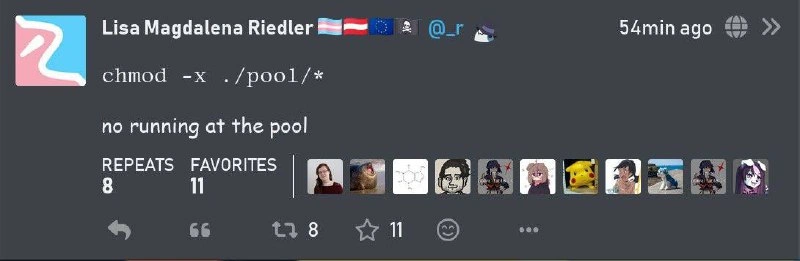
Now, the humorous part: the text under the command says “no running at the pool.” In real life, at a swimming pool, you often see signs or hear lifeguards say “No running!” – it’s a safety rule to prevent accidents on slippery tiles. The meme plays on the word “run.” In computing, to run a file means to execute a program. So “no running at the pool” becomes a geeky double meaning: no running (physically) near the swimming pool, and no running (executing) programs in the “pool” directory. By using the chmod -x command on the pool directory’s files, the meme pretends that the sysadmin (system administrator) enforced the rule in the computer-y way: by making it impossible to run anything in that location. It’s a mashup of a common Systems Administration task with a common public safety rule, turning the latter into a CommandLineInterface snippet.

For a newer developer or someone just learning the command line, a few extra points make this clearer:

  • On Linux/Unix, if you write a shell script (say a file with some Bash commands), you often need to run chmod +x your-script.sh to give it permission to execute. Without that, even if the script is perfectly written, the system won’t let you run it directly – it will say “Permission denied.” This meme does the opposite (-x instead of +x), essentially revoking the permission to execute.
  • The directory name “pool” is arbitrary – it could be any name, but the joke specifically uses “pool” so that the phrase after the command forms a sentence. In a way, the meme creator treated the pool like a folder in a computer. This is very much in line with the UnixPhilosophy idea that you can represent lots of things as files or directories. It’s a form of wordplay and conceptual playfulness that’s common in the tech community.

Visually, the meme is styled to look like a social media post (specifically, it resembles Mastodon or a Twitter-like interface with “repeats” and “favorites” instead of retweets and likes). The text is in a monospace font for the command, signaling “this is code.” This helps clue in tech-savvy readers that a joke is coming. The numbers (8 repeats, 11 favorites) show that others have shared and liked it – a sign that many people found the pun enjoyable. In summary, what’s happening is a sysadmin joke: convert a real-world instruction (“no running by the poolside”) into a BashScripting/Linux command that literally accomplishes that by changing file permissions. It’s a fun way to remind us that in the land of Linux and Unix, even everyday actions can be imagined as tweaks to file settings!

Level 3: Permission Denied at the Pool

This meme packs a clever UnixPhilosophy twist: it turns a lifeguard’s rule into a terminal command. The core joke hinges on file permission bits and the double meaning of “run.” In a Unix-like system, running a file means executing it as a program. The command chmod -x ./pool/* is a TerminalCommands one-liner that literally removes the execute permission (the -x flag) from every file in the “pool” directory. In other words, it makes all files in ./pool/ non-executable. To seasoned developers and SystemsAdministration veterans, this instantly reads as “no executing files in the pool directory” – which sounds just like “no running at the pool.” It’s a classic bit of unix_wordplay. The sysadmin in the joke is essentially acting like a digital lifeguard: instead of blowing a whistle to stop kiddos from running near the water, they’ve invoked a command to ensure nothing can run in the /pool folder. It’s a geeky pun where an everyday safety rule is enforced by an access control tweak!

This kind of file_permission_puns tickles the fancy of anyone familiar with the command line. Chmod (short for “change mode”) is a staple of the CLI on Linux/Unix systems – it’s how you change who can read, write, or execute a file. The -x here specifically means “remove the execute bit.” By default, chmod -x without specifying user/group/other will remove execute permission for all classes of users on those files. So chmod -x ./pool/* means no user can execute any file in ./pool. If those files were scripts or binaries, trying to run them would yield the dreaded “Permission denied” error. It’s as if the sysadmin preemptively gave everything in that directory a big “DO NOT START” sticker. The humor hits home for developers who’ve wrestled with permissions: we’ve all seen how forgetting to chmod +x a deploy script leads to a “not allowed to run” error. Here the effect is intentional – a tongue-in-cheek way to literally enforce a no-running policy using tech.

What makes this extra satisfying is the Unixy notion that “everything is a file.” Even a swimming pool can become ./pool/ in the imagination of a terminal guru. Need to stop people from running in the pool area? Just treat the pool as a directory and strip execute rights from its contents! It’s absurd yet perfectly logical in a sysadmin’s world. Notice the attention to detail: the command targets ./pool/* (the files inside the pool directory) rather than the directory itself. This is important because in Unix, directories use the x bit as the “search/traverse” permission. If the admin had done chmod -x ./pool on the folder, it would have made the pool directory inaccessible (no one could even open it to see files). That’s like chaining the pool gate shut – effective, but overkill. Instead, by removing execute permission on the files within the pool, they specifically prevent any programs in that location from running, without blocking access to the folder or reading files. It’s a nuanced detail that true Linux aficionados appreciate: the lifeguard sysadmin disables running inside the pool area while still letting you step into the directory (walk around the pool, so to speak). This subtlety shows the meme creator’s command of Unix mechanics, adding an extra wink to the insiders.

The social media format (it looks like a Mastodon post in dark theme) adds to the charm. You can imagine a grin spreading across the face of every Bash-scripting, terminal-loving reader who scrolls past this in their feed. It’s concise — just one line of monospace command and a punchline — yet it conveys an entire scenario. In the *nix community, jokes like this are a rite of passage. They blend dry technical reference (here, the chmod syntax) with everyday context. It’s the kind of joke you groan at and then immediately share with your fellow developers or system administrators. After all, who hasn’t daydreamed about using shell commands to solve real-world problems? It’s Linux logic applied to life: “If you don’t want something to run, just remove its execute privileges.” Problem solved, whether it’s unruly scripts or rowdy swimmers.

Description

A screenshot of a social media post from a user named Lisa Magdalena Riedler. The post, set against a dark grey background, contains a clever technical pun. The first line is a Unix/Linux command: `chmod -x ./pool/*`. Below it, the punchline is written in plain English: 'no running at the pool'. The humor is derived from a literal interpretation of the command. In Unix-like operating systems, `chmod` is the command to change file permissions, and the `-x` flag removes the 'execute' permission. Since executable files are 'run', the command `chmod -x ./pool/*` effectively prevents any files within the 'pool' directory from being 'run'. This technical action is brilliantly equated to the common real-world safety rule, 'no running at the pool,' creating a joke that resonates deeply with developers, system administrators, and anyone familiar with the command line
Comments

14
Anonymous ★ Top Pick A junior admin uses `chmod -x` for pool safety. A senior admin uses `setfacl` to ensure the lifeguard can still run, but only in emergencies
  1. Anonymous ★ Top Pick

    A junior admin uses `chmod -x` for pool safety. A senior admin uses `setfacl` to ensure the lifeguard can still run, but only in emergencies

  2. Anonymous

    Lifeguards 2025: just strip the execute bit on prod binaries - no more 3 AM splash alerts

  3. Anonymous

    After 20 years of explaining file permissions to juniors, I finally understand why pools have lifeguards - someone needs to enforce access control when users keep trying to execute dangerous operations in production

  4. Anonymous

    A perfect example of defensive programming in recreational facilities - when your pool's security model requires revoking execute permissions to enforce safety policies. Though I suspect the lifeguards still have sudo access for emergencies

  5. Anonymous

    Enforce “no running at the pool” with chmod -x, but remember: on POSIX directories x is the search bit - disable it and you’ve built a pool nobody can even cd into

  6. Anonymous

    chmod -x pool/*: Thread pool's new vibe - perpetual idle, no execution drama

  7. Anonymous

    OPA is overkill; chmod -x ./pool/* enforces “no running” with one syscall - until someone runs it via bash

  8. @NickNirus 11mo

    people are not real, stop lying

    1. @RiedleroD 11mo

      wat

  9. @RiedleroD 11mo

    it's meeee :3

  10. Deleted Account 11mo

    eh , my friend!

  11. @patsany_horosh_mne_v_dm_pisat 11mo

    No way sis is known on two websites at once

    1. @RiedleroD 11mo

      …I would not consider telegram to be mainly a website

      1. @patsany_horosh_mne_v_dm_pisat 11mo

        Yeah, it's mainly just an app, the website version is just an option

Use J and K for navigation
