
Skip to content
DevMeme
120 of 7435
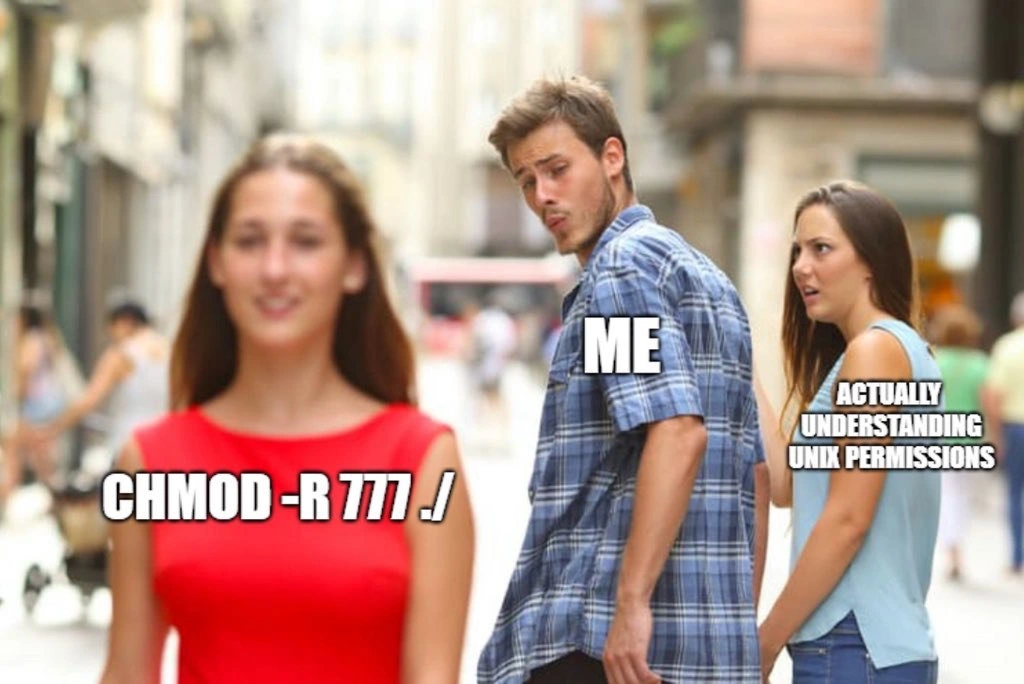
Developer distracted by chmod 777 instead of learning real Unix permissions
CLI Post #153, on Feb 21, 2019 in TG

Developer distracted by chmod 777 instead of learning real Unix permissions

Why is this CLI meme funny?

Level 1: Leaving Every Door Unlocked

A guy is walking with his girlfriend — who represents learning how the locks in your house actually work — when someone struts by representing just removing all the doors entirely. He can't help staring. Why? Because figuring out locks is boring and fiddly, and ripping the doors out means nobody is ever locked out again — including him! Problem solved! Of course, it also means the neighbors, raccoons, and burglars can wander in whenever they like, and someday they will. The joke is that everyone knows the careful way is right, but when you're tired and locked out of your own room, "no more doors" looks gorgeous walking by.

Level 2: Reading the Number 777

Every file in Unix/Linux has three permission sets — for its owner, its group, and other (everyone else) — each containing three bits: read, write, execute. Each trio encodes as one octal digit:

Digit Bits Meaning
7 rwx read + write + execute
5 r-x read + execute
4 r-- read only
0 --- nothing

So chmod 777 file means everyone on the system can read, write, and execute it, and chmod -R 777 ./ applies that recursively to the current directory and everything beneath it. The sane equivalents you'll actually want: 755 for directories and executables, 644 for ordinary files, and chown when the real problem is that the wrong user owns the files — which it usually is.

The rite of passage goes like this: your first deploy fails with Permission denied, a forum post from years ago says "just chmod 777 it," it works, and you feel like a wizard. Later someone reviews your setup script, makes a sound like a deflating balloon, and you learn the actual triage: who is the process running as (whoami, ps), who owns the path (ls -la), and is the directory traversable. Fix ownership first, permissions second, and treat 777 the way electricians treat bypassing a fuse with a coin — it technically completes the circuit.

Level 3: World-Writable, Audit-Ready

The Distracted Boyfriend format is perfect casting here. ME in the plaid shirt swivels toward the red dress labeled CHMOD -R 777 ./ while ACTUALLY UNDERSTANDING UNIX PERMISSIONS stares in horror — and every person who has ever administered a Linux box knows exactly which way that head turns at 6 PM on a Friday with a Permission denied blocking the deploy.

Let's be honest about why the red dress wins. The Unix permission model is one of those things that's simple to describe and tedious to reason about under pressure. The error says EACCES; the actual cause could be the file's owner, its group, the user your service runs as, the parent directory missing the execute bit (the one everybody forgets — you need x on a directory just to traverse it), the umask that silently shaped permissions at creation time, or — modern bonus rounds — SELinux contexts and ACLs that make rwxrwxrwx lie to your face. Diagnosing that chain properly takes ten minutes of ls -la, id, and stat. chmod -R 777 ./ takes four seconds and always works. The incentive structure is the villain; the meme just photographs it.

The cost arrives later, itemized. World-writable means any local user or compromised process can replace your binaries, inject into your scripts, or plant a cron payload — 777 on the wrong directory converts a contained breach into full lateral movement. It also breaks things outright: sshd refuses keys living in permissive directories, and a 777'd web root is an invitation engraved in octal. And the -R is the silent multiplier — recursion turns one bad decision into fifty thousand bad files, faithfully captured forever in the deploy script, where it metastasizes from "temporary unblock" into load-bearing technical debt. Six months later a security audit finds it, the incident report writes itself, and somewhere a girlfriend in a light blue top mouths "I told you."

The meme's sharpest truth is the labeling: the boyfriend isn't ignorant — he's choosing. Most engineers who type chmod 777 know it's wrong. They do it anyway, because understanding is a relationship and 777 is a fling, and the sprint ends Friday.

Description

Classic “Distracted Boyfriend” stock-photo meme: A city street scene shows a man in a blue plaid shirt (captioned “ME”) turning his head to stare at a woman in a bright red dress walking past. The red-dress woman is labeled with white bold text “CHMOD -R 777 ./”. Beside the man, his displeased girlfriend in a light blue top is captioned “ACTUALLY UNDERSTANDING UNIX PERMISSIONS”. Faces are blurred but body language is clear: the man is enamored with the brute-force recursive chmod command while ignoring the more responsible understanding of Unix file permission bits. Technically, the meme highlights how some engineers reach for unsafe, all-access permissions (777) from the command line rather than investing time in proper POSIX permission models, a shortcut that creates security and operational risks familiar to CLI-heavy DevOps and backend teams


Comments

7
Anonymous ★ Top Pick chmod -R 777: the one-liner that makes the build pass, the auditors cry, and future-you wonder why SELinux is glaring at you
  1. Anonymous ★ Top Pick

    chmod -R 777: the one-liner that makes the build pass, the auditors cry, and future-you wonder why SELinux is glaring at you

  2. Anonymous

    Twenty years in, and I still catch myself typing 777 first, then reluctantly backspacing to figure out which specific user actually needs write access to that one config file that Jenkins touches once a quarter

  3. Anonymous

    chmod -R 777 doesn't fix permissions, it abolishes them - the filesystem equivalent of solving authentication by deleting the login page

  4. Anonymous

    Every senior engineer has been there: staring at a permission denied error at 2 AM, knowing that chmod 777 will make it work instantly, while the proper solution requires actually reading the man page, understanding user/group/other permissions, considering the principle of least privilege, and maybe even diving into ACLs or SELinux contexts. It's the systems administration equivalent of 'git push --force' - technically it solves your immediate problem, but your future self (and your security team) will have some strongly worded feedback during the post-incident review

  5. Anonymous

    chmod -R 777 is the filesystem equivalent of "curl | sudo bash" - the postmortem writes itself

  6. Anonymous

    CHMOD -R 777 /: The sysadmin's 'it just works' that upgrades permission errors to full-system compromise in one glorious stroke

  7. Anonymous

    chmod -R 777 . is the filesystem’s git push --force - it unblocks today and schedules tomorrow’s postmortem

Use J and K for navigation
