Skip to content
DevMeme
4019 of 7435
Cloud-Native Complexity vs. The Almighty Bash Script
DevOps SRE Post #4376, on May 11, 2022 in TG

Cloud-Native Complexity vs. The Almighty Bash Script

Why is this DevOps SRE meme funny?

Level 1: Keep It Simple

Imagine you want to solve a simple problem, like watering a small plant. One person goes and buys a high-tech automatic sprinkler system with moisture sensors, timers, and even a smartphone app to control it. They have a whole shopping cart full of gear: pipes, sensors, a control computer – the works. Another person just picks up a watering can. When asked, “Are you sure that’s all you need to water your plant?” the person with the watering can just says, “Yes.” It’s funny because obviously the watering can might be completely enough for one little plant, while the other person’s complicated sprinkler setup is like using a huge solution for a small task.

This meme is making the same kind of joke, but with computer stuff. It’s showing how sometimes people use a lot of complicated tools when a simple tool would do. It’s like using a big fancy kitchen machine with 10 attachments to butter a piece of bread, whereas someone else just uses a butter knife. The core idea is “Why use so many things when just one little thing is enough?”

So the reason it’s funny is because of the contrast: one side is complete overkill (way more stuff than necessary), and the other side is super simple. Everyone can relate to a situation where someone complicates things too much. Maybe you’ve seen a friend set up a crazy elaborate system for a basic task – it’s a bit silly and makes you smile. Here, the “bash script” is like the simple solution (the watering can, the butter knife), and the Kubernetes cart full of tools is the over-the-top solution (the sprinkler system, the kitchen machine). The emotional core of the joke is basically: sometimes, less is more. And when someone goes all-out with a complex solution unnecessarily, it can be both funny and a little absurd.

Level 2: Tool Sprawl 101

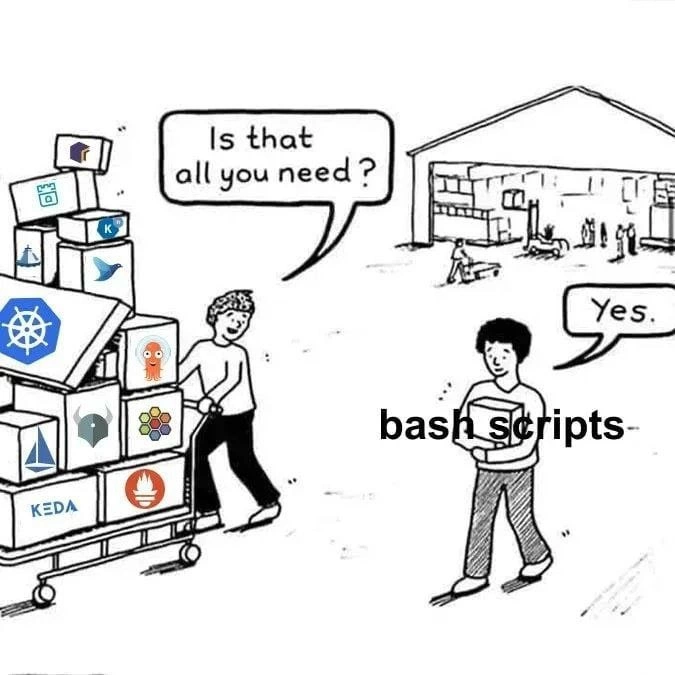
Okay, let’s break down what’s going on here in simpler terms, as if explaining to someone newer to the DevOps and container world. The meme shows two people in a kind of warehouse store. One person’s shopping cart is stacked high with boxes that each have logos of popular Kubernetes ecosystem tools (basically all the add-ons and software that people often use alongside Kubernetes). The other person, standing off to the side, is labeled “bash scripts” – representing the idea of just using plain old Bash scripting to do tasks. The person with the cart asks, “Is that all you need?” and the bash scripts person says “Yes.” This scene is highlighting the contrast between a minimalist approach (just use a straightforward script to do what you need) and a complex, full-stack approach (use Kubernetes and every related tool under the sun to accomplish the task).

Let’s define some of these terms and tools to make it clear:

  • Bash scripts: Bash is a Unix shell (command line) and scripting language. A “bash script” is basically a text file with a series of command-line instructions that automate tasks. For example, a bash script could deploy an application by copying files and starting a program, or it might check the health of a service and restart it if needed. It’s one of the simplest forms of automation – just writing the steps out and running them. It’s been around forever (since the early days of Unix), and it’s very powerful for what it is, but it’s also quite low-level and runs on a single machine unless you specifically make it do stuff on others via SSH or so.
  • Kubernetes (K8s): Think of Kubernetes as a system to manage and run applications in containers across a bunch of computers (machines or virtual machines). Containerization (like using Docker containers) is a way to package applications along with their environment so they run reliably anywhere. Kubernetes helps you if you have, say, 10 machines and you want to run 50 copies of your app across them, ensure each machine isn’t overloaded, replace apps that crash, and handle network traffic for them. It’s like an orchestrator or a traffic controller for your applications. Instead of running things directly with scripts on specific machines, you tell Kubernetes “please run 5 copies of this app somewhere” and it figures out where to put them and keeps them running. It’s much more advanced than a bash script solution – it handles a lot automatically (which is great for big systems). But learning Kubernetes and all its YAML configuration files is a big task. It has its own complexity.
  • Helm: This is often called “Helm charts.” Helm is a package manager for Kubernetes. If Kubernetes is the engine, Helm are the blueprint templates you feed into it. Writing raw instructions for Kubernetes (in YAML files) can get repetitive and hard to manage, especially if you have many apps or environments. Helm lets you templatize those instructions. For example, you can have a chart (a template) for a web service and just change values like the number of replicas or the image version. Helm basically helps manage Kubernetes configurations. If we compare to bash script: in a script you might use variables and loops; Helm gives you that kind of templating but specifically for Kubernetes configs.
  • Istio: This is something called a service mesh. Imagine you have not one but many microservices (small applications) all talking to each other in your system – like one service for users, one for payments, one for notifications, etc. Istio is an extra layer that manages the communication between these services. It can do things like encrypt the traffic between services, route calls from one service to another (maybe for A/B testing or version rollouts), and provide a lot of observability (knowing what call failed, how long things take, etc.). In practical terms, Istio typically works by adding a sidecar proxy (a tiny helper program) next to each service in Kubernetes, which intercepts all network calls in and out. This is advanced stuff – in the bash script world, services might just call each other directly or via simple load balancers, without this fancy routing layer. Istio’s great for reliability and security in a complex microservice architecture, but it’s definitely an extra complication that simpler setups wouldn’t bother with.
  • Argo: The Argo project has a few tools; common ones are Argo CD and Argo Workflows. Argo CD is about continuous deployment (automatically deploying your app whenever there’s new code, using Git as the source of truth – a practice called GitOps). Argo Workflows is for running complex job workflows on Kubernetes (like a pipeline of tasks). Essentially, Argo tools automate CI/CD pipelines and other tasks inside Kubernetes. In the bash world, you might just have a script that runs tests and then deploys a new version. Argo is a more robust, declarative way to do that inside the cluster, often visually and with more control. It’s part of automating deployments so humans don’t have to manually run scripts for each update.
  • Prometheus: This is a monitoring system. Prometheus collects metrics (numerical data about systems, like CPU usage, memory usage, number of requests, error counts, etc.) from various applications and systems. It stores them and allows you to query them. It’s often used with Kubernetes to keep an eye on all those apps running: you want to know if something is using too much memory or if requests are slowing down. In ye olde bash script days, you might not have something as fancy; maybe you’d just log info to a file or use a simpler monitoring tool. Prometheus is pretty much the standard in the cloud-native world for metrics. It also has an alerting component – you can set rules like “alert me if CPU stays above 90% for 5 minutes” or “alert if my web service returns errors more than 1% of the time”.
  • Grafana: Where Prometheus holds the data, Grafana is the dashboard builder that visualizes that data. Grafana can take metrics from Prometheus (or other sources) and create graphs and charts. For example, you can have a dashboard showing request rates, error rates, and latency (response time) for your app, updated in real-time. It’s super useful for engineers to see what’s happening in the system at a glance. Without Grafana/Prometheus, a bash-based system might rely on manually checking logs or using simpler tools like top, or maybe a rudimentary script that emails you when something is wrong.
  • KEDA: This stands for Kubernetes Event-Driven Autoscaling. It’s an add-on to Kubernetes that allows scaling of services based on external events or custom metrics. Kubernetes by itself can autoscale based on basic metrics like CPU usage or memory (that’s the Horizontal Pod Autoscaler). KEDA extends this so you can scale on things like the length of a message queue, or number of events, etc. So if you have a job queue and suddenly 1000 tasks arrive, KEDA can trigger more workers to start. In a simpler setup, you might just have a cron job or script check the queue and then launch more processes (or send an alert to a human to start more). KEDA automates that inside Kubernetes. It’s another specialized tool that solves a particular scaling problem, without human intervention.

All these tools are part of what we call the “cloud native stack” – technologies designed to run applications in modern cloud environments (especially using containers and microservices). They are often represented in the CNCF (Cloud Native Computing Foundation) landscape, which is basically a huge diagram of dozens upon dozens of such tools. A common reaction to the CNCF landscape is overwhelm – people joke that it looks like a cluttered supermarket of logos (just like the meme’s shopping cart!).

Now, why would anyone replace a single bash script with all this stuff? The answer usually is scale and maintainability. A bash script might work fine for a one-off task or a single server, but if your product grows, you might end up needing more robust solutions. For example, if you need to run your app on 10 servers for more users, you could write more scripts, but coordinating them gets tricky – at that point using Kubernetes might make it easier (it handles distribution and failover and so on). If you want zero-downtime upgrades, a script might fail if something goes wrong in the middle, whereas Kubernetes can do rolling updates (gradually replacing containers). Monitoring and logging with Prometheus/Grafana gives you insight that ad-hoc scripts might not. So each tool has a purpose.

The humor, however, comes from the fact that in some cases, projects adopt this whole arsenal needlessly – maybe because it’s trendy or “enterprise-grade”, even if their use-case could have stayed simple. It’s like using a rocket ship to deliver a pizza. Sure, it will get the pizza there fast, but the preparation and launch sequence might be overkill compared to a bike delivery! Tech folks find this funny because we’ve all seen scenarios where someone brings in a super complex solution that is massive over-engineering for the problem at hand. It also resonates because learning and managing all these tools can be a job in itself. There’s a tongue-in-cheek expression: “I configured Kubernetes to replace my 100-line deployment script, and now I have 100 YAML files to manage instead.”

So in simpler terms: The meme is joking that sometimes we accumulate a huge pile of fancy DevOps tools (the whole Kubernetes-based toolchain) when perhaps a straightforward bash script could do the job. It’s like teasing the modern trend of doing things the “cloud-native way” even when it might not be strictly necessary. This is common in DevOps humor: acknowledging that sometimes simple is enough, and that adding more tools can make things more complex rather than better.

From a junior developer or newcomer’s perspective, the message is: Don’t always assume the most high-tech solution is the best solution. It’s important to understand what each tool is for. Kubernetes and its friends solve problems that appear at a larger scale or in specific scenarios. If you have a small app or a one-off task, a good old bash script (or a simple solution) might actually be the smarter choice. The meme encourages a bit of critical thinking about tool choice – and it does so by exaggeration: obviously pushing an entire cart of tools for one little script’s job. The emotional undertone is a mix of amusement and caution – seasoned devs laughing, “Yep, seen that,” and juniors thinking, “Wow, do we really use that many tools? Maybe keep it simpler when possible.”

In summary, this level (Tool Sprawl 101) explanation would say: the meme depicts how in modern DevOps, people sometimes use a huge array of Kubernetes-related tools (for automation, scaling, monitoring, etc.) when in contrast, an older or simpler approach would be just to write a quick bash script to handle the task. It’s funny because the difference is so stark, and it comments on the tendency to over-complicate setups in the tech world.

Level 3: Toolchain Overload

For seasoned engineers, this meme hits close to home. It pokes fun at the tool sprawl in the modern Kubernetes ecosystem. We’ve all seen it: a simple problem that ballooned into a full-blown cloud-native stack deployment. The left side of the comic – the person happily pushing a shopping cart piled high with logos – represents a team (or that one enthusiastic architect) who went on a Cloud Native Computing Foundation shopping spree. They’ve grabbed Kubernetes for container orchestration, Helm for packaging configurations, Istio for a service mesh, Argo for CI/CD or workflow automation, Prometheus for monitoring, Grafana for dashboards, KEDA for event-driven autoscaling, and who knows what else (maybe Throw in Linkerd, ** FluxCD**, or even a Service Mesh Interface – why not, the cart has wheels!). The shopper asks, “Is that all you need?” which is ironic because clearly they’ve already taken nearly everything off the shelf! It’s a cheeky way to say: “Look at this over-engineered setup – need anything else? A side of Kafka? Some Fluentd logs with that?”

On the right, we have another character labeled “bash scripts”, effectively the old school, no-frills approach to automating tasks. This person has nothing but a content smile (we assume) and maybe a simple script in their hand. When asked if that’s all they need, they just reply, “Yes.” This one-word answer carries a mix of smugness and simplicity. It’s the punchline: after all those flashy tools, all I really needed was a little script! The humor resonates with developers who have experienced over-engineering: times when a straightforward solution was passed over in favor of an elaborate framework that ended up doing basically the same thing. It’s a “been there, done that” nod to the tendency of tech folks to introduce an entire suite of tools to accomplish something that arguably could have been done with a few lines of Bash or a single Cron job. Why schedule with Cron or run a shell loop when you can deploy KEDA with custom metrics to auto-scale pods based on queue depth, right? The senior engineers reading this are likely chuckling (or groaning) remembering a project where the infrastructure took more effort than the actual application logic.

One real-world scenario: imagine a small startup with a simple web app. Originally, deploying new code was handled by a bash script: scp the new build to the server, restart the service – done. It’s manual, maybe clunky, but it worked. Fast forward a year: the startup’s now “all in” on microservices and containers. They containerized the app with Docker, stood up a Kubernetes cluster on AWS, and now use Helm charts to define deployments. They added Istio for traffic management (because service mesh is the hot new thing), and of course Prometheus and Grafana so they have pretty graphs of request rates and error counts. Deployments are now done via Argo CD pipelining from their Git repository – no more simple script pushes, it’s GitOps all the way. Autoscaling? That simple one-liner script that launched a new process when load was high has been replaced with Kubernetes Horizontal Pod Autoscalers, and maybe KEDA to scale on custom events (like jobs in a queue). Now, here’s the kicker: the app still fundamentally does the same thing as it did when it was a monolithic script-run service, but the operational complexity around it has exploded. Instead of one person who knows how the bash script works, you might need a DevOps team to manage YAML files, Helm charts, TLS certs for Istio, PromQL queries for Prometheus alerting, and so on. It’s both impressive and absurd. As a seasoned dev or SRE, you laugh because you’ve lived the “from one script to one million moving parts” transformation.

The meme is also a commentary on DevOps culture and how tooling can overshadow actual productivity. In DevOps and SRE circles, there’s a constant pressure to automate everything, use the “best-of-breed” tools, and adhere to infrastructure as code, observability, and other modern practices. All good ideas! But taken to an extreme, you end up with what we see in the comic: a full kitchen sink solution for a problem that might not have needed it. This is akin to using a chainsaw to cut butter – sure, it’ll do the job, but was it worth the setup and cleanup? Experienced engineers know the joke: “Yesterday we solved it with a script. Today we have Kubernetes solving it... plus issues that require three other tools to monitor and fix Kubernetes.” There’s even an axiom, half-joking, in the community: if you have a problem, first try a shell script. If you have the same problem at scale or repeatedly, you might reach for Kubernetes – but be prepared, you’ll now have Kubernetes problems. (And yes, there are whole memes about Kubernetes is the answer, but what was the question? 😜)

Let’s break down some of those logos in the cart and why they’d appear in a K8s-heavy environment:

  • Kubernetes (K8s): The big blue wheel logo. It’s the core container orchestrator that schedules and manages containers across a cluster of machines. It’s powerful, but introduces its own ecosystem of YAML configs, deployments, services, ingress rules – complexity that a plain bash script (which might just start a process with ./run.sh) doesn’t have.
  • Helm: The helm (ship wheel) icon on a box. Helm is a package manager for Kubernetes resources – basically a way to templatize and deploy multiple YAML files. People grabbed Helm when they realized maintaining dozens of YAML files by hand is a nightmare. The irony is that using Helm means learning Helm syntax and dealing with its gotchas, so it’s another layer of abstraction on top of K8s.
  • Istio: The logo looks like a paper boat/ship (white triangle sort of). Istio is a service mesh – it injects sidecar proxies alongside your app containers to manage traffic between services, handle retries, encryption (mTLS), etc. It’s like an overlay network with superpowers. Why have it? In a complex microservice architecture, it can provide reliability and security. The joke: setting up Istio and debugging it can be as complex as the rest of the system combined. It’s a running gag that “Is the service down? No, it’s Istio messing up.” A humble bash script wouldn’t even know what to do with Istio – that’s far beyond its world.
  • Argo: Often an orange octopus-like logo (Argo Project). Argo could refer to Argo CD (for continuous deployment via GitOps) or Argo Workflows/Events. In any case, it’s about automating complex pipelines or deployments in Kubernetes. This replaces, say, a chain of bash scripts that deploy and verify an app. Argo CD will watch a Git repo and auto-apply changes to K8s. It’s great for large teams, but again, it’s another piece that a small project might not need if a script and a manual deploy suffice.
  • Prometheus: The orange flaming torch logo. This is the monitoring system scraping metrics from every component. In old setups, maybe your bash script printed logs or times, and you manually watched things. In K8s, Prometheus scrapes metrics from exporters and your apps, so you can alert on issues (“CPU high”, “service down”). It uses a custom query language (PromQL). So now you aren’t just running your app; you’re running a time-series database and query engine too.
  • Grafana: The multicolored swirl logo. Grafana sits on top of Prometheus (and other data sources) to provide dashboards and visualization. Sure, in simpler times maybe you’d just check a log file or use basic Linux top for metrics. Now we have beautiful Grafana dashboards. They are genuinely useful – when something’s wrong at 3 AM, a Grafana graph can show you exactly which metric spiked. But again, someone has to set up and maintain those dashboards. More moving parts.
  • KEDA: The KEDA logo (Kubernetes Event-Driven Autoscaling) is on a box too. KEDA listens to event sources (like Azure queue length, Kafka topics, etc.) and automatically drives the scaling of Kubernetes deployments based on those. So if a queue has 1000 messages, it might upscale your consumer pods via KEDA. Before, a bash script might have just been run via cron every minute to check a queue and launch another script or service instance if needed. KEDA formalizes that into the cluster. It’s powerful, but a niche add-on.

So the cart is basically an entire microservices platform worth of stuff. This is the full DevOps/SRE toolkit that big companies like to brag about at meetups. The humor is, if you asked the person pushing that cart “Do you really need ALL of that just to run your app?”, often the honest answer is “Not really, but we already invested in it,” or “Yes, because our system is that complex now.” Meanwhile, the bash-scripts guy could represent an old-timer or just a pragmatist who says, “I have a 50-line script and it works, I don’t see the need for all those layers.” It’s the classic minimalism vs. complexity debate in engineering. We often joke that “modern problems require modern solutions,” but sometimes modern solutions feel like swatting a fly with a cannon.

Another layer to this joke is the zeitgeist: Kubernetes and cloud-native tools are extremely popular (some would say hyped). There’s a bit of satire here about the FOMO (fear of missing out) that teams have – nobody wants to be the one still using “just a script” when the cool kids are using service meshes and whatnot. The comic implies that perhaps we’ve lost sight of the goal (solve the problem effectively) and instead focus too much on the means (adopting tools for their own sake). Seasoned devs have seen this pattern before: whether it was over-architecting with design patterns, or adopting microservices for a tiny app that would’ve been fine as a monolith, or insisting on using every AWS service under the sun when a simple server would do. There’s a wry saying: “A senior engineer knows how to solve a problem in the most complicated way; a veteran knows how to solve it in the simplest way.” Here, “bash scripts” might be that wise veteran who remembers that sometimes simplicity wins.

To put it in perspective, let’s humorously contrast how a task might be done the simple way versus the Kubernetes way. Say we want to run 3 instances of a web service for reliability:

Old School – Bash script way: You might just write a script like:

#!/bin/bash
# Simple loop to start 3 instances of my web service on different ports
for i in {1..3}; do
    PORT=$((8000 + i))
    echo "Starting instance $i on port $PORT"
    ./my_web_service --port $PORT &
done
echo "All 3 instances started."

This one script launches three processes, maybe that’s our “cluster”. Logging, monitoring, restarting them if they crash? Perhaps not covered, or maybe another simple script or cron job could check and restart if needed.

Cloud-Native – K8s way: You’d write a Kubernetes Deployment YAML and use kubectl or Helm to apply it:

# deployment.yaml
apiVersion: apps/v1
kind: Deployment
metadata:
  name: my-web-service
spec:
  replicas: 3
  selector:
    matchLabels:
      app: my-web-service
  template:
    metadata:
      labels:
        app: my-web-service
    spec:
      containers:
      - name: web
        image: my-web-service:latest
        ports:
        - containerPort: 80

Then you might apply it with kubectl apply -f deployment.yaml (or package it into a Helm chart and do helm install). Kubernetes will ensure there are always 3 pods running. If one crashes, a controller notices and spins a new one. If you want to update the service, you might update the YAML (or Helm values) and do a rolling update. For monitoring, you’d add Prometheus rules to watch if all 3 are up. For network access, maybe define a Service or Ingress. For scaling triggers, perhaps Kibana… you get the picture. We’ve replaced a few lines of shell loop with a whole suite of configs and controllers.

As experienced devs, we don’t hate these tools – in fact, each exists because it solved pain points we had with “just scripts”. The bash script is quick and easy until the server goes down at 2 AM and it doesn’t automatically fail over to another machine – whereas Kubernetes would have scheduled the pod elsewhere. The bash approach doesn’t automatically collect metrics or handle network routing between a growing roster of microservices. So the tools in the cart are there for valid reasons: scalability, resilience, maintainability, observability. The joke is just how disproportionate it can feel. It’s that absurdity of needing (or choosing) a Formula 1 race car to go get groceries, when a Honda Civic (or even a bicycle) would do. The veteran engineers laugh with a bit of “been burned before” cynicism – they know that with great power (K8s) comes great responsibility (and many configuring YAML files, RBAC rules, and cryptic error messages when something in the chain breaks). The phrase “Is that all you need?” dripping with irony, is something a tired SRE might say after provisioning an entire cluster with monitoring and CI/CD, when a newbie dev asks for one more component (“Hey, can we also install ElasticSearch for logs?” Sure, why not add another box to the cart…).

In summary, the senior perspective sees this meme as a commentary on over-engineering vs pragmatism. It’s funny because it’s exaggerated but also uncomfortably familiar. We laugh, then we sigh, because we recall those massive Kubernetes migrations or the endless DevOps toolchain meetings, and how sometimes one little bash script saved the day when the fancy stuff failed.

Level 4: Orchestration Overdose

At the deepest level, this meme highlights the inherent complexity of distributed systems and the almost comical gulf between a simple script and a full cloud-native platform. Modern infrastructure like Kubernetes isn’t just a fancy wrapper around a bash script – it’s a distributed operating system. The control plane of Kubernetes uses components like etcd (a distributed key-value store using the Raft consensus algorithm) to maintain a consistent cluster state across multiple nodes. Achieving consensus in a cluster is a non-trivial problem: fundamental results like the CAP theorem remind us you can’t have perfect Consistency, Availability, and Partition tolerance all at once in a distributed setting. So Kubernetes makes its trade-offs – opting for strong consistency in etcd, which means occasionally sacrificing availability (e.g. if enough master nodes fail, the cluster’s brain freezes). Bash scripts, on the other hand, run largely in a simpler context – often a single machine or a handful of servers where such distributed consensus isn’t a concern. No need for Raft consensus when your script is pushing files on one box or looping over a few local processes; the state is just the state of that one machine.

There’s also the notion of declarative vs imperative paradigms at play. A bash script is typically imperative: it tells the system step-by-step what to do (“start process A, then B, then check C”). Kubernetes leans declarative: you declare a desired end state (e.g. “there should be 5 instances of this app running”) in YAML, and a swarm of controllers and operators constantly converge the real world toward that state. Under the hood, this involves continuous feedback loops and reconciliation processes – concepts drawn from control theory and backed by algorithms that ensure eventual consistency. It’s fundamentally more complex because the system is designed to handle dynamic changes and failures automatically. The humor here is that all these sophisticated algorithms and protocols – container scheduling algorithms, health checks, autoscaling logic – are employed to achieve something that might sound as simple as “keep my app running” which a 20-line bash script could also attempt.

But the bash script can’t magically teleport your app across machines, heal it when hardware dies, or optimize resource usage across a cluster – Kubernetes can (at least it tries to). The meme exaggerates this contrast: to replace one “humble” script, we’ve pulled in the big guns of computer science. We’ve gone from a world where launching a program is fork() and maybe a cron job, to a world of virtualized clusters orchestrated by a Byzantine General of sorts. Each box in that shopping cart (Helm, Istio, etc.) exists because of some hard distributed computing problem that needed solving. Need dynamic service discovery and traffic splitting? That’s why Istio (and its sidecar proxies and mTLS and complex config) was born – essentially implementing advanced networking logic that simple scripts wouldn’t handle. Need to reconfigure applications without downtime and manage dozens of microservices configs? Helm charts to the rescue, templating your YAML because writing raw YAML for hundreds of services is error-prone (though sometimes Helm feels like writing a programming language inside YAML – the irony!). Every added tool represents an abstraction to manage complexity, but as Joel Spolsky famously noted, “all abstractions are leaky”. Each new cloud-native component introduces its own failure modes and learning curves. The cynical veteran in us chuckles because we know each box with a friendly logo hides weeks of debugging, tuning, and maybe a late-night outage or two (ever seen an Istio sidecar eat all the memory, or Helm rollback go awry?). In theoretical terms, the system’s overall complexity is the composition of all these parts – arguably super-linear, as interactions grow. If we humorously quantify it: a single script might be an $O(1)$ complexity solution for deployment (one unit of mental overhead). Adopt Kubernetes and friends, and you’ve got something like $O(n)$ or worse, where n is the number of distinct components, each with its own API and failure modes. The cognitive load can feel exponential: in a microservices environment, even if each service/tool is simple, the interactions can approach an $O(n^2)$ integration complexity in the worst case. This meme lands as deeply funny because it’s technically true: we built an orchestration empire to automate what we used to cobble together with some shell scripting. On paper, it’s ludicrous; in practice, it’s the price of solving hard scaling and reliability problems. The shopper’s cart is overflowing with the distilled innovations of distributed computing, while the other character – the “bash scripts” – stands there like a caveman holding a humble stone tool, which still works for his needs. The extreme contrast is a reminder of the YAGNI principle (“You Aren’t Gonna Need It”) clashing with the reality of modern DevOps: sometimes you do need it, and sometimes you really, really don’t.

Description

A black-and-white cartoon meme, set in front of a warehouse, contrasting two approaches to system administration and automation. On the left, a developer pushes a cart piled high with boxes, each bearing the logo of a complex cloud-native or DevOps tool, including Kubernetes, Istio, KEDA, Argo CD, Knative, Prometheus, and others. Another character asks, 'Is that all you need?'. On the right, a second developer stands calmly, holding a single, small box labeled 'bash scripts' and replies confidently, 'Yes.'. The meme satirizes the perceived over-engineering and immense complexity of the modern cloud-native and DevOps landscape, particularly the Kubernetes ecosystem. It champions the minimalist and powerful philosophy of using simple, fundamental tools like shell scripts to accomplish tasks. The humor resonates with experienced engineers who have witnessed the high operational overhead of these complex systems and appreciate the raw utility and simplicity of a well-written script, suggesting it's often a more pragmatic solution than adopting a massive stack of technologies


Comments

26
Anonymous ★ Top Pick The Kubernetes stack is great until a certificate expires in the service mesh and brings everything down. Meanwhile, my bash script just keeps running, blissfully unaware of what a 'sidecar proxy' even is
  1. Anonymous ★ Top Pick

    The Kubernetes stack is great until a certificate expires in the service mesh and brings everything down. Meanwhile, my bash script just keeps running, blissfully unaware of what a 'sidecar proxy' even is

  2. Anonymous

    It’s still a single “cp” in a while-true loop - just wrapped in Helm, Argo, Istio, Prometheus and KEDA so we can invoice it as a self-healing, cloud-native, GitOps-driven microservice

  3. Anonymous

    The same bash script that's been running in production since 2008 has outlived three Kubernetes migrations, two microservice rewrites, and the entire team that originally complained about it

  4. Anonymous

    One of them will spend Q3 migrating service meshes; the other will still be running the same cron job that's had five nines since 2014

  5. Anonymous

    After 15 years in the industry, you realize that 90% of 'cloud-native microservices orchestration' problems can be solved with a well-written bash script, cron, and rsync. The other 10% probably didn't need solving in the first place - but good luck explaining that to the team that just spent six months setting up their Kubernetes cluster with service mesh, observability stack, and GitOps pipeline to deploy a static website

  6. Anonymous

    Provisioned half the CNCF landscape so one bash script could run with a sidecar and GitOps - congratulations, we invented enterprise cron

  7. Anonymous

    Bash: because who needs a Kubernetes cluster when 'for i in *; do ...' scales to prod?

  8. Anonymous

    Dragging in Kubernetes, Istio, KEDA, Prometheus and Helm to solve a cronjob is peak platform energy; a 12‑line bash with set -euo pipefail and a systemd timer would’ve shipped yesterday

  9. @SamsonovAnton 4y

    To be honest, pure shell scripts are rare - they always rely on many external utilities.

  10. @LonelyGayTiger 4y

    For anything more than the simplest use cases I would generally prefer to build a tool in C++ or Java. But for simple things bash is great, though honestly I'd prefer powershell for scripting, even if there's some really stupid quirks in powershell.

    1. @CcxCZ 4y

      Powershell is fairly sensible language core (I see hints of ML in there) trying to wrap a dozen incompatible and incoherent ways MS came up with to componentize code and provide interfaces, efectivelly becoming yet another competing way to do things with impedance mismatches all over increasing the overall complexity. I wish unix shells had less footguns but obviously this is not the way.

      1. @RiedleroD 4y

        unix shells have footguns?

        1. @CcxCZ 4y

          Well, the whole error handling thing is PITA, the way parameter expansions work is generally not what you want (though zsh fixes that for most part, though not completely), and there's lot of tedium in general in making sure the things you are passing around really are what you think they are.

          1. @LonelyGayTiger 4y

            I do generally have a much better time dealing with zsh than bash, but it also seems like it's got some performance overhead.

            1. @CcxCZ 4y

              What are you doing with shell that you need to fine-tune it's performance?

              1. @LonelyGayTiger 4y

                I dont need to, it's just something I've noticed.

                1. @CcxCZ 4y

                  I've noticed people having issues with random scripts from the internet supposed to increase the bling of your prompt and such (usually of questionable quality) Outside of that and calling external tools like in vcs_info I don't see difference interactively. I'd suspect that for running POSIX sh scripts it might be not as fast (I'd probably use mksh for that) but those do a lot of work with external tools for which zsh has builtins and proper data structures, so actual rewrites run way faster IME. But I can't really recall using any too intensive scripts lately.

      2. @LonelyGayTiger 4y

        My biggest complaints are how non-class functions output basically everything in one big mess, and how loops have inconsistent syntax. For example, in a for loop a continue statement functions like you'd expect in any other language, but in a foreach-object loop a continue statement functions like a break. It's dumb, they should be consistent.

        1. @RiedleroD 4y

          aight, but those aren't really footguns, just generally bad design, no?

          1. @LonelyGayTiger 4y

            Bad design is exactly what I'm complaining about.

            1. @RiedleroD 4y

              fair

        2. @CcxCZ 4y

          Would F# work for you instead? I don't know how easy it's to use it as a script / REPL but in concept it feels quite close to what PS wanted to be while being programming language with some actual design.

          1. @LonelyGayTiger 4y

            The syntax annoyance is pretty minor, it's just a gotcha you've got to be aware of. The non-class function issue is resolved by only using class functions unless you really need to do otherwise. Class functions also have the added benefit of types.

  11. @Araalith 4y

    I think it is possible to replace KEDA and Helm by bash scripts, but whole K8s? And how to replace Docker?

    1. @CcxCZ 4y

      I do my cobntainers with mix of unshare, execline scripts and patched s6 (because CLONE_PIDNS semantics are braindead). For more turnkey component you may use runc.

  12. @ishyfishy 4y

    ha ha serverless.yaml go brr

Use J and K for navigation