Cyberpunk Aesthetics for Mastering the Command Line
Why is this CLI meme funny?
Level 1: Casting Computer Spells
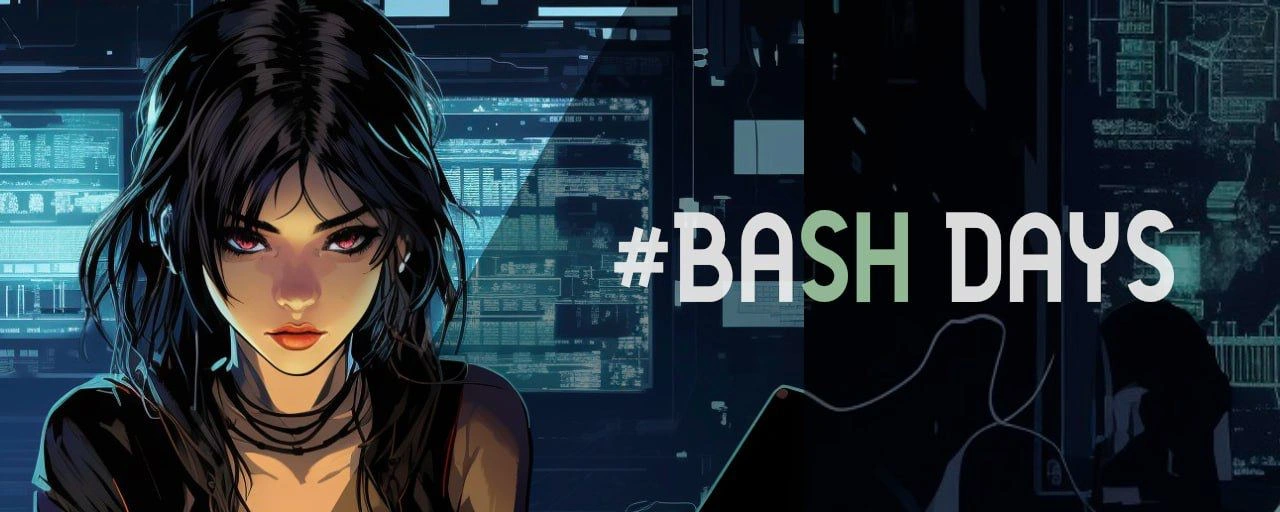
Imagine you could tell a computer what to do just by typing words. Using the command line is kind of like that – it’s as if you’re casting spells in a magic language the computer understands. In this picture, a developer is typing away in a dark, cool-looking room with green text glowing on the screens. That green text is the computer obeying commands. Spending “nonstop days” doing this is like having a super long play session where you’re the wizard and the computer is your friendly dragon doing tricks. It’s funny and cool because usually people click on icons and use the mouse, which is pretty ordinary. But here, the person is just typing secret instructions on a black screen to make things happen – just like in a sci-fi movie! The joke is that they make it look stylish and futuristic (with neon lights and a cyberpunk vibe) even though it’s something developers really do at work. It’s both celebrating how powerful you can feel when you control a computer with text, and poking a bit of fun that someone might spend days in that zone, totally absorbed, like a hero on an epic quest in cyberspace.
Level 2: Bash to Basics
Let’s break down what’s going on in this scene and why it’s exciting for developers. Bash is a popular shell, which means it’s a program that lets you type commands to interact with your computer using a text interface – the Command Line Interface (CLI). Instead of clicking icons and buttons (that’s the GUI – Graphical User Interface), you write text commands like ls (to list files) or git status (to check code changes). The screens in the image full of green text are what we call terminal windows or consoles. This is where a developer types those commands and where the computer prints out responses, logs, or results. The terminal_green_text aesthetic (glowing green characters on black) is a classic look, made famous by old-school monitors and movies like The Matrix. It immediately tells us “hacker vibe” or “techie at work.”
Now, “#BASH DAYS” suggests a period of diving deep into Bash and shell scripting. Shell scripting is basically writing a sequence of CLI commands in a file (usually ending in .sh) so you can execute them all together, like a program. This is super useful for automation: you can automate tasks that you would otherwise have to do manually step by step. For example, instead of every morning going through folders and copying backups by hand, you could write a shell script to do all that and run it in one go (or even schedule it to run automatically every day). A “Bash day” might be when a developer says, “Alright, I’m going to spend all day in the terminal writing scripts to automate our setup.” It’s both a learning practice and a way to build useful tools.
The post’s message invites people who work with Linux or Windows, developers, DevOps, testers – basically anyone technical – to improve their command-line skills. Why? Because being comfortable in the CLI can significantly simplify your daily workflow. Think about common tasks: searching for a specific error in thousands of log lines, renaming 1000 files, deploying an application, checking which servers are online – all these can be done quickly with the right commands or short scripts. For instance, a single line command with grep can scan many files for a keyword in seconds, which might take ages to do by opening each file manually. That’s DeveloperProductivity in action: use the powerful tools built into the operating system to get more done with less effort. It’s like learning shortcuts or power moves in an application, but here the “application” is your entire OS.
The meme’s imagery of a “terminal control room” with multiple monitors exaggerates what working in the CLI feels like: when you get good at it, you might have several terminals open, each doing something – one might be running a server, another watching logs update in real-time, another editing a script or running tests. It can make you feel in control of a whole lot at once. The cyberpunk_aesthetic contributes to that feeling: dark environment, neon glow, high-tech overlays. It dramatizes what is usually just a person at a desk running scripts, turning it into an edgy scene. The female coder character with intense focus represents any developer engrossed in the task; the anonymity (blurred face) implies it could be you. It’s saying: you can be this cool operator in your own coding story.
Also, notice the tag bash_days_hashtag – by putting the word BASH after a #, it mimics a social media trend or event name. It implies there’s a community or series of sessions called “Bash Days” (perhaps by the @bashdays mentioned). This is inviting because it sounds like “hey, join the fun learning Bash together”. Many of the other terms dropped in the message (Linux, GitLab, Kubernetes (k8s), Docker, etc.) are indeed topics where knowing the command line helps. For example, Docker is often managed with docker commands in a terminal, Kubernetes with kubectl commands, GitLab CI pipelines are defined in text files and often involve running shell commands to build and deploy software. So Bash is like a common foundation for all those tools – if you know how to script in Bash, you can glue these technologies together, automate interactions with them, and understand what’s happening under the hood.
In short, at this basic level, the meme is highlighting the cool factor of working in the command line. ShellScriptingLanguages like Bash might seem intimidating to beginners who are used to graphical interfaces, but they unlock a lot of power. The post text even says “forget about boring documentation, we focus on practice.” That’s an encouragement: don’t worry, you don’t have to slog through dry manuals to learn this – you can jump in and start typing commands, building things, and you’ll pick it up as you go (with guidance from that channel/community). The little “🤟” emoji reinforces that it’s a fun, rock-n-roll approach to skill-building, not a stuffy class. By learning these console tricks and seeing them in action, you’ll improve your hard skills and likely feel pretty awesome doing it. After all, who doesn’t want to feel like the hero in a hacker movie while getting real work done?
Level 3: Pipe Dreams & Terminal Realities
For the experienced developer or DevOps engineer, the phrase “nonstop #BASH days” triggers a mix of excitement and war stories. This meme humorously glorifies those marathon sessions of shell scripting that many of us know all too well. The multiple monitors teeming with terminal windows and scrolling system logs: that’s the on-call life or the final day of a deployment crunch. We’ve all had pipe dreams of automating every tedious task with a clever Bash script – and the terminal realities of debugging those scripts at 3 AM when one unescaped space breaks the whole thing. The image’s cyberpunk aesthetic – dark blues, neon greens – winks at how we imagine ourselves during these coding binges. Sure, in reality you might be in sweatpants with bloodshot eyes, but in your mind you’re Trinity from The Matrix, infiltrating a mainframe with elegant keystrokes. The truth is, mastering the CLI can make a developer feel like a movie hacker hero.
This meme’s text, “#BASH DAYS,” stylized as a social-media hashtag, is especially amusing to seasoned shell users. In Bash (and many shells), # starts a comment. So if you literally typed #BASH DAYS into a script, the shell would ignore it completely. It’s a playful irony: the very label celebrating Bash mastery would be a no-op in Bash itself. It’s like a hidden joke for those fluent in the syntax. And speaking of hashtags, there’s a bit of community humor here — the meme is riffing on what feels like a hackathon or a recurring event (“Bash days”) where developers push their command-line skills to the limit. We’ve seen trends like #100DaysOfCode; why not #BASHdays for shell aficionados?
Behind the cool look, there’s real developer life being referenced. CLI culture is strong among those of us who manage servers, deploy applications, or sift through logs. GUIs can fall short when you’re SSH’d into a remote data center at midnight trying to figure out why the database crashed. That’s when these TerminalCommands and one-liners become lifesavers. Ever used grep and awk to parse a 2GB logfile for errors? It’s not glamorized in movies, but the meme dresses it up as a cyberpunk adventure. The silhouette coder could very well be a DevOps engineer tailing logs (tail -f) on one screen, monitoring server metrics on another, and editing a deployment script on a third. Cables dangling overhead and circuit diagrams in the background hint at the automation infrastructure they’re plugged into — maybe a tangled CI/CD pipeline or a fleet of Docker containers across cloud servers. It’s a high-tech war room vibe, and any senior dev who’s pulled an all-nighter to script away a production issue will connect with it.
The humor also lies in the phrase “forget about boring documentation, we only focus on practice.” Seasoned devs smirk at this because we know skipping the docs often leads to creative (read: frantic) troubleshooting later. There’s an implied rebelliousness: an experienced Bash user often has the man pages (man bash) bookmarked, yet we’ve all RTFM’d after hours of trial and error that we swore would save time. The meme’s invitation to dive in and “significantly simplify your daily workflow” and “increase your market value” pokes gently at tech’s constant upskilling culture. Yes, being fluent in Bash and CLI tools absolutely boosts productivity (and looks great on a resume, even decades after UNIX was born). A senior dev reading this might recall how learning to script deployments or parse logs with Bash felt like unlocking a superpower. That first time you replace a manual 30-step process with a 5-line shell script – pure bliss. And then the first time that script fails silently because you forgot set -e – pure chaos. That rollercoaster of triumph and "oh no, what did I break?" is exactly what #BASHdays encapsulates. It’s a celebration of the grind and glory of ShellScriptingLanguages in daily developer life.
Importantly, the meme ties into a broader reality: modern DevOps toolchains, from Docker to Kubernetes (k8s), still heavily rely on CLI commands and configuration files. Even with flashy dashboards, sooner or later you end up in a terminal generating an SSH key, tailing logs, or running kubectl. The mention of topics like GitLab CI/CD, Ansible, or Nginx in the post text reinforces that if you peel back their slick interfaces, underneath, it’s text configuration and command lines. This resonates with the seasoned folks – no matter how advanced the ecosystem gets, knowing your way around a shell is timeless. It’s both funny and true that a “#BASH DAYS” marathon might prepare you better for real-world DevOps than hours of reading about it. After all, production doesn’t demand we recite theory; it demands we string together commands to fix and automate things now. This meme is essentially tipping its hat to that reality, draping it in a cool cyberpunk style to say: we know this isn’t easy, but isn’t it kind of badass?
Level 4: Ghost in the Shell Script
At the deepest level, this meme taps into the fundamental Unix philosophy and the almost cybernetic link between a programmer and the machine via a terminal. In a literal sense, a shell like Bash is the outer layer of the operating system – it’s where humans send commands into the void and the kernel (the core of the OS) obediently executes them. The cyberpunk imagery of a glowing green terminal hints at how Bash scripting can feel like hacking reality: each command is a low-level invocation, causing the OS to fork processes and exec programs in a ballet of system calls. This is the realm of text streams and pipes, where data flows from one process to another like neon-lit highways between mega-cities in a futuristic world. The humor here is subtle and almost reverent: spending days in Bash means you’re essentially plugged into your computer like the protagonist of Ghost in the Shell, directly interfacing with the digital underworld. Seasoned devs know that behind those teal-green characters lies serious machinery – file descriptors, I/O redirection, process scheduling – yet it’s all controlled with simple keystrokes. The meme glorifies that power. We see faint circuit-board diagrams overlaying the scene; it’s a nod to the kernel and hardware-level operations that a shell can manipulate. Every grep, awk, or curl typed is like a neuron firing in the matrix of the system. In a way, a Bash marathon is a form of mind-meld with the machine: you think an instruction and see it materialize in real-time logs across multiple monitors. It’s both technical and philosophical – a reminder that even in an age of slick GUIs, containers, and Kubernetes clusters, the command-line interface (CLI) remains a direct conduit to computing’s core. The meme’s hashtag “#BASH” even carries a cheeky double meaning: in social media it flags a trending topic, but in a script # denotes a comment, an ironic wink that all this flashy hacking text could just be non-executable annotation from the shell’s point of view. Shell scripting languages are Turing-complete, and in the hands of a master they orchestrate complex workflows; the depicted developer isn’t just typing random commands, they’re conducting an orchestra of processes. This is why seasoned engineers get a thrill from the terminal – it’s where high-level human ideas meet the gritty reality of bytes and processes. The meme elevates that concept to sci-fi coolness, suggesting that diving into Bash’s intricacies (from quoting rules to subshells) is akin to exploring the dystopian back-alleys of a cyberpunk city: arcane, challenging, but empowering for those who know the way.
Description
A promotional banner with a distinct cyberpunk and anime-inspired art style. On the left, a stylized illustration of a woman with black hair and intense red eyes stares directly at the viewer. Her image is set against a dark, high-tech background filled with glowing blue computer screens displaying lines of code and data visualizations. Superimposed over the right side of the image is the text '#BASH DAYS' in a large, clean, sans-serif font. The '#BASH' portion is in white, while 'DAYS' is in a light green. The overall image serves as an advertisement, using a 'hacker' aesthetic to appeal to a technical audience. The accompanying caption clarifies that it promotes a channel focused on practical command-line skills for developers and DevOps professionals, covering topics like Linux, Kubernetes, Docker, and CI/CD
Comments
15Comment deleted
The ad promises you'll look this cool using the command line, but in reality, you'll spend three hours debugging a single line of a bash script you wrote six months ago
After a 48-hour #BASH DAYS sprint, my “temporary” deployment script starts with set -euo pipefail, ends with | xargs -I{} bash -c '{}', and in between re-implements enough orchestration logic to make Kubernetes file a feature request
After 15 years of writing enterprise bash scripts, you realize the real pipe operator isn't | but the one connecting your coffee maker directly to your bloodstream while debugging that 3000-line deployment script someone wrote in 2008 with no error handling
When you've been writing Bash scripts for so long that you start dreaming in pipes and redirects, and your idea of a good time is optimizing your .bashrc for the 47th time this month. Those were the days when 'exit 0' meant success in code and life, before Kubernetes made us all question our career choices
Bash Days: where one perfect pipeline outshines a Kubernetes YAML war, but good luck versioning it
Senior SRE translation of “#BASH DAYS”: the sprint when a 200-char grep|awk|sed one-liner quietly replaces three microservices and becomes the official runbook - documented as `history | tail -1`
Bash Days: where five-nines hinge on whether someone typed set -euo pipefail - and remembered to quote $1
good content, thanks admin! Comment deleted
It's a Russian platform Comment deleted
So is there an English one? Comment deleted
the only thing I'm interested in, is the lady on banner Comment deleted
AI my guy, you can run it on your machine and make anything you want to wank to Comment deleted
I promised them they promoted dem_meme Comment deleted
Channel admins trying to make money from posting memes be like: Comment deleted
it was crosspromotion afaik, no money involved Comment deleted