A Backend Developer's First 24 Hours with JavaScript
Why is this Learning meme funny?
Level 1: Not as Easy as It Looks
Imagine you’re really, really good at something – say, you’ve been building with LEGO bricks for 10 years. You can make huge castles and cool robots with those little bricks because you know all the tricks. Now, one day, you decide to try making a sculpture out of clay for the first time. Sounds fun, right? But as soon as you start, you realize clay is nothing like LEGO. It’s mushy, it sticks to your hands, and when you try to build a tower, it just blobs and collapses. After a few frustrating attempts, you might throw your hands up and shout, “What the heck is going on?!”
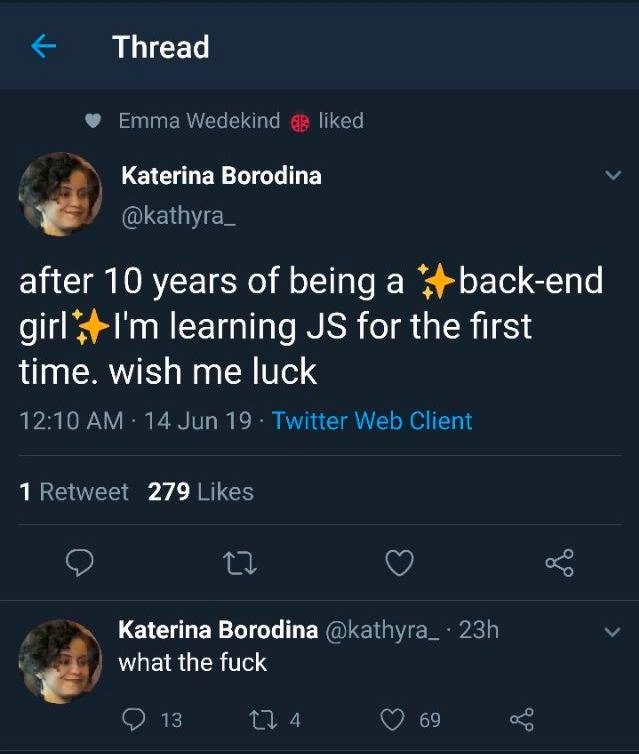
In this meme, that’s basically what happened to a programmer. She was an expert in one kind of programming (the backend, which is like the engine of a website), and then she tried a new kind of programming (JavaScript for the front-end, which is like the part of the website you see and click on). She thought, “Hey, I’ve been coding for years, this should be fine,” just like our LEGO master thought clay would be easy. But JavaScript turned out to have a bunch of unexpected rules and surprises – it wasn’t as straightforward as she assumed. After one day, she was so confused and shocked that all she could say was “what the f...,” basically a strong way of saying “What on earth is happening?!”
The funny part is that we expect an expert to handle anything, but here even a pro got flustered right away. It reminds us of a simple truth: learning something new can be really challenging, even if you’re experienced in a related area. It’s like watching a champion swimmer try to surf for the first time – you’d think it’s all water skills so they’ll be great at it, but then a big wave knocks them over and they come up sputtering, looking completely bewildered. We can’t help but smile because we’ve all felt out of our depth at some point. In the end, the meme is humorously saying, “Even the best of us feel lost when we try something new. JavaScript might look easy, but day one can surprise you!” It’s a little comforting lesson wrapped in a joke: no matter how skilled you are, starting fresh can be tough – and that’s okay (and even a bit funny).
Level 2: From Back-End to Browser
Let’s break down what’s happening in this meme in simpler terms. We have a backend developer (someone who typically works on the parts of a software system that run on servers, behind the scenes) who is trying to learn JavaScript for the first time. The back-end (or backend) of an application is like the engine of a car – it handles data, business logic, databases, and server-side operations that users don’t directly see. Common back-end languages include Java, C#, Python, or Ruby – each often has a strict structure and, in many cases, uses a statically-typed system (meaning you have to specify and stick to data types for your variables, like integers, strings, etc., and the system checks those types for errors before running the program).
On the other side, front-end typically refers to the part of an application that runs in the user’s browser – basically everything a user sees and interacts with on a website: buttons, text, images, forms. And the primary language to program this front-end behavior is JavaScript (JS). JavaScript is what makes web pages dynamic and interactive (for example, checking a form input in real-time or updating the content on the page without needing a full reload). Unlike the backend languages our developer is used to, JavaScript is dynamically-typed and very free-form: you don’t have to declare what type of data a variable holds, and that variable’s type can change as the program runs. JavaScript was designed to be easy for beginners to pick up quickly to do small tasks in web pages, so it’s more flexible about how you write things – but that flexibility can also cause unexpected behavior if you’re not familiar with it.
So, in the meme, this experienced engineer announces: “I’ve been a backend girl for 10 years, now I’m learning JS for the first time, wish me luck!” She’s essentially saying, “I have a decade of coding experience, but I’m new to JavaScript – here goes nothing!” It’s a mix of confidence (because of her general programming background) and acknowledged learning curve (hence asking for luck). The little ✨sparkle emojis✨ around “back-end girl” in her tweet show a playful pride in her identity as a backend developer – she’s jazzing it up like a special title. This is something folks on tech Twitter do to emphasize or celebrate their role humorously.
Now, fast forward just 23 hours later, and she replies to her own tweet with a simple “what the fuck”. That blunt, shocked response tells us everything: her first day with JavaScript did not go as expected. It’s like she’s saying “I have no words, except... what on earth did I just experience?!” The humor comes from that dramatic contrast – in less than a day, she went from hopeful to completely floored by confusion. But what exactly likely confused her? Let’s outline some key concepts that often trip up new JavaScript learners, especially those coming from a strict backend background:
Loose Typing: In JavaScript, a variable can hold any type of value at any time, and the language will try to make sense of operations even if the types don’t match. This is very different from languages like Java or C#, where if you declare
int x = 5;,xcan only ever be a number unless you intentionally convert it. In JS, you could do:let x = "hello"; // x is a string right now x = 42; // now x is a number, and that's perfectly okay in JavaScriptIn a language like Java, doing something similar would be illegal without an explicit conversion:
String x = "hello"; x = 42; // ❌ Error: you cannot assign an integer to a String variable in JavaAs you can see, JavaScript doesn’t enforce the type; it assumes you know what you’re doing and just goes with it. This might have surprised our backend dev – she’s used to the computer yelling at her for mixing types. In JS, the computer quietly tries to convert and continue, which can lead to weird results. For example, she might have seen something like:
5 == "5"; // true in JavaScript 😮 5 === "5"; // false in JavaScriptIn the snippet above,
5 == "5"is true because JavaScript says, “hey, you’re comparing a number to a string, let me kindly convert the string"5"into the number5for you.” So it feels like 5 equals "5", which is wild because they’re different types! That’s why JavaScript also has the===operator which is stricter –5 === "5"is false, since 5 is a Number and "5" is a String, and it doesn’t do any conversion. Learning these two different equality behaviors (==vs===) is one of the first JavaScript quirks newcomers face. Many of us have had that “WTF” face when we realized the double-equals was doing sneaky behind-the-scenes magic.JavaScript Quirks and Warts: There are lots of little things in JavaScript that can confuse anyone at first. For example, the concept of truthy and falsy values – some non-boolean values when used in a boolean context act as true or false. An empty array
[]is considered “truthy” (treated like true), but when you use it in a comparison with==to false, it actually can be considered equal to false (as shown in the advanced section above). Also, special values likeundefinedandnull(which represent “no value”) behave a bit differently than anything she might have seen in, say, Java (wherenullexists butundefineddoesn’t). And a classic gotcha:typeof nullin JavaScript gives "object", which is just wrong –nullisn’t an object. This is actually a known bug from the early days of JS that never got fixed because too many websites depended on it. Coming from another language, seeing something like that would definitely make her say “what the...?!”. It’s as if the language breaks its own rules.Different Environment & Tools: As a backend dev, she probably works in an environment with robust tools like an IDE, debuggers, compilers, etc., compiling code and running it on a server. Front-end development is a different world. She had to run her JavaScript in a browser or maybe Node.js. If it’s the browser, maybe she wrote some JS and opened up Chrome’s DevTools console to see what’s happening. That’s a new workflow if you’ve never done it. She might not be used to the browser’s debugging messages or how to track errors in the browser console. Also, if she tried to use modern JavaScript features, she might have had to deal with setting up a build tool or transpiler (since in 2019 not all browsers supported the latest JS syntax). Setting up tools like npm (Node’s package manager), configuring a simple project structure, or dealing with module imports could all be new to her. It’s a bit like being fluent in one operating system and suddenly using another – everything from running a program to organizing files feels unfamiliar. That first day with all new tools and terminologies (npm, Node, Babel, etc.) can be really overwhelming.
Asynchronous Programming: Backends often deal with concurrency through threads or synchronous calls to databases (depending on the language). In JavaScript, especially in browsers, things are event-driven. Code doesn’t always execute in a top-down order if some parts are waiting for events (like a user click or a data fetch finishing). If she wrote a piece of code expecting it to run one line after the other, but one part was actually asynchronous (like a
fetchcall to an API), she might have been confused why her variables weren’t updated or why her function returned before the data was ready. JavaScript uses callbacks, Promises, and async/await to handle these asynchronous actions, which is a bit of a learning curve on its own. Many newbies get tripped up with, “Why is this variable empty? I just set it in that API call!” – not realizing the API call hadn’t finished yet when the next line ran. This new way of thinking (wait for it… asynchronously) can cause plenty of “WTF” moments until you get the hang of it.
Given all these potential stumbling blocks, it’s no wonder she tweeted a big "WTF" after a day. In developer-speak, "WTF" is a common reaction meaning "what the heck is going on?!" (to put it politely). It often escapes our mouths (or keyboards) when we hit a bug or behavior we just can’t fathom. The tweet’s popularity shows other developers found it funny because they share that feeling. It’s a bit of schadenfreude (finding humor in someone else’s minor misfortune) mixed with empathy. Everyone learning something new hits that wall of confusion, and it’s comforting and humorous to see even a 10-year veteran hit that wall. The meme basically says: No matter how experienced you are, starting fresh with a new technology or language can make you feel like a newbie all over again. And that’s okay – in fact, it’s pretty funny when observed from the outside (since we’ve been there too).
To a junior developer or someone outside the field, the takeaway is that different programming languages can have vastly different rules and behaviors. JavaScript isn’t “harder” in a general sense than back-end languages, but it has its own set of rules that you have to learn separately. Our back-end pro had a decade of knowledge, but mostly in a different realm – so in JavaScript land, she’s basically a beginner. It’s like being fluent in Spanish and then trying to learn Japanese – your general language skill helps a bit, but Japanese will still feel very foreign on day one. Here, her programming skill helped her start JavaScript, but JavaScript still felt very foreign initially. The meme is a light-hearted reminder of the humility every developer faces when learning something new. The “wish me luck” was almost prophetic – turns out she needed that luck, and maybe a stiff drink, after tussling with JS for a day!
Level 3: Back-End to Front-End Whiplash
This meme taps into a classic bit of developer humor: the moment a confident, veteran backend engineer dips their toes into the frontend pool (specifically JavaScript) and instantly experiences whiplash. It’s a comedic rite of passage in the tech world. The tweet screenshot format – in dark-mode Twitter UI that developers love – perfectly captures this as a mini-story. First, we see the enthusiastic proclamation with sparkle emojis:
after 10 years of being a ✨back-end girl✨ I'm learning JS for the first time. wish me luck
23 hours later...
what the fuck
The contrast is hilarious and painfully relatable. In the span of less than a day, our seasoned back-end dev (with a decade of experience building robust server logic) went from optimistic “Wish me luck, I got this!” to a blunt “WTF”. That fast 180º turn is where the humor lives – it implies JavaScript hit her like a ton of bricks, shattering her expectations. Those of us in the industry immediately nod because we’ve either gone through this ourselves, or gleefully witnessed colleagues go through it. It’s common to joke that no matter how many years you’ve coded in other languages, JavaScript can still make you feel like an absolute beginner on day one.
So, why is moving from back-end to JavaScript such a shock? For starters, the cultural and technical gap between back-end and front-end development can be huge. Our protagonist likely spent 10 years in a world of structured frameworks, SQL queries, API endpoints, and maybe languages like Java, C#, or Python. Those environments emphasize reliability, type safety, and often have mature tooling and clear design patterns. Enter JavaScript, the primary language of browsers – a language that evolved from tiny scripts making buttons click, into a sprawling ecosystem running complex web applications. It’s a bit like a master architect of brick-and-mortar buildings stepping into a chaotic theme park where all the rides are held together with zip-ties and whimsy. The backend_to_frontend_transition often feels jarring because:
Language Quirks Galore: JavaScript is infamous for its language quirks. Seasoned devs have entire joke lists of “WTF JS” moments. For example, encountering that
[] == ![]is true (as we saw above) or that"0"is truthy but0is falsy can make a newcomer’s eyes go wide. Our back-end dev probably hit something as silly as anundefined is not a functionerror or sawNaN(Not-a-Number) propagate through calculations without any compile-time warning. These little landmines (like using==instead of===and getting bizarre results) are frontend pain points every JavaScript coder eventually learns, but to a newcomer they seem absurd. It’s like learning the hard way that in this new language, common sense doesn’t always apply.Toolchain Overload: Modern front-end development isn’t just writing a
<script>tag and some code. There’s build tools and transpilers (hello, Babel), module bundlers (Webpack, rollup), and hundreds of npm packages for even trivial tasks. A back-end dev accustomed to a simpler compile-run cycle might be overwhelmed by the sheer amount of setup and config just to get “Hello World” on a webpage. Imagine her installing Node.js, runningnpm init, wrestling with package.json, and thinking, “I just wanted to write some JavaScript, why am I configuring a build pipeline?!” The learning curve here is steep and filled with yak-shaving. This tooling jungle is another common frontend humor theme: the joke that to center a div or use new JS syntax in older browsers, you end up pulling in half the npm registry. Our meme’s star might have indeed tweeted that initial line naively, and by the next day she’s knee-deep in Stack Overflow threads about webpack configs, hence the existential dread.Asynchronous Mindset: Back-end tasks (especially in older imperative languages) often follow a straightforward sequence: do A, then B, then C. In the JavaScript everywhere world, especially in the browser, many operations are asynchronous (executing later, not blocking the main flow). Fetching data from a server, for example, doesn’t return a result immediately – you handle it with a callback, Promise, or
async/await. To someone new, this can be deeply confusing: you console.log some data and it’sundefinedbecause the real work hasn’t completed yet. It feels like the code is out of order. Back-end devs also deal with async (threads, tasks, etc.), but JavaScript’s single-threaded event loop with its callback queue is a unique model. Missing a callback or misunderstanding event timing can lead to that classic “WTF why isn’t this working?!” moment at 3 AM. Day one with JS could have easily presented such a puzzle, especially if she was playing with AJAX or a UI event – nothing drives a WTF reaction faster than your code running but not doing what you think because it’s waiting on an event you didn’t realize was asynchronous.Different Bugs, Different Debugging: Every platform has its bugs, but front-end bugs can be especially weird. Maybe our back-end guru encountered the notorious “undefined is not a function” error by calling something that wasn’t there, or got a cryptic NaN in her calculations. In a statically typed environment, those issues often would be caught or simply impossible. In JS, you only find out at runtime, often in the browser’s dev console. It’s a humbling experience: seeing something blow up in the browser with no compiler screaming beforehand is new for someone used to strict languages. It’s an existential crisis indeed — suddenly they question, “Have I lost my programming mojo, or is this language just insane?”
All these factors combined explain why the tweet resonated with 279 Likes and numerous replies (including notable figures like Emma Wedekind showing support). The developer community on Twitter found it hilarious because they’ve been in those exact shoes. It’s common to see jests about how “JavaScript will eventually make a fool of every developer, no matter how experienced.” In fact, there’s a famous lightning talk called “WAT” that went viral in programming circles, where the speaker shows a series of JavaScript (and Ruby) oddities to an audience that laughs and groans in equal measure. The punchline of that talk and the punchline of this meme are the same: JavaScript can be utterly bewildering.
Another dimension to this humor is the light-hearted Backend vs Frontend rivalry. Developers often jokingly argue about which side is harder or more “real” programming. A backend dev might tease that frontend work is “just making things pretty in the browser,” while a frontend dev might retort that backend folks have no clue how complex and finicky the client-side can be (CSS, browser quirks, and yes, JavaScript). Here, the meme gives the frontend camp a win: even a backend “pro” was reduced to a stunned “WTF” after one day in the JavaScript jungle. It’s a fun reversal of expectations. The use of the ✨sparkle emojis✨ around “back-end girl” in the original tweet is actually a bit tongue-in-cheek – it’s like she’s proudly wearing her backend badge with glitter, only to have that confidence knocked flat by JavaScript’s reality by the next day. The sparkles vanish in the follow-up tweet; all that’s left is raw, unfiltered disbelief. That comedic contrast – from glittery optimism to plain exasperation – is something any developer can chuckle at.
And we have to mention the format: it’s a tweet_screenshot_meme in dark mode, which has become a staple of online dev humor. The dark theme (white text on navy/black background) is not only easier on the eyes for code geeks, it’s practically an inside joke that “real developers use dark mode” – seeing that UI immediately tells us this is a tweet likely aimed at tech-savvy folks. The screenshot captures the mini-story in two acts: Act 1, hopeful announcement; Act 2, existential crisis. Even the numbers at the bottom (1 Retweet, 279 Likes for the first tweet; and 13/4/69 for the reply’s stats) add a bit of flavor – 69 likes on the “what the fuck” reply? The community clearly liked her pain, not in a mean way, but in that empathetic “omg same” way. It’s proof that this scenario is a shared experience. We’ve all been there, scratching our heads at some JavaScript behavior or tooling issue, muttering things that would earn a “language!” scolding from our mothers. The meme works because it’s precisely the collision of two worlds – a back-end expert stepping on a very infamous frontend rake. The result? A cartoonish smack in the face, and us laughing (and sympathizing) at the Wile E. Coyote-style tumble that follows.
In summary, the humor here comes from insight that no amount of programming experience completely shields you from JavaScript’s curveballs. It’s humbling and funny that someone who’s battled database deadlocks and mastered API design can be flustered by a “simple” web language in under 24 hours. This tweet-meme distilled that humbling moment into just two words: “what the fuck”. It’s the perfect WTF reaction GIF in textual form. Every developer who has fought with an unexpected bug or a new technology has felt this, which is why we find it so comically cathartic. As the saying (only half-jokingly) goes, “JavaScript is the language that can bring even the most experienced engineers to their knees, rocking and whispering ‘it’s not a bug, it’s a feature’.” Our back-end girl’s immediate existential crisis isn’t a failure – it’s a baptism. Welcome to the club; JavaScript has officially initiated another soul.
Level 4: Type Identity Crisis
At its core, this meme highlights a deep type system clash between traditional back-end languages and JavaScript. After a decade in strictly typed server-side worlds, our developer is suddenly plunged into JavaScript’s dynamically-typed chaos. In computer science terms, she’s experiencing a paradigm shock: a shift from strong, static typing to loose, dynamic typing. This is more than just syntax differences – it’s a fundamental change in how the language interprets and coerces data types on the fly, often leading to bizarre outcomes that can rattle even a veteran programmer’s understanding of logic.
In many back-end languages (think Java, C#, or Go), every variable’s type is explicit and checked at compile time. The code won’t even run if you try to assign a wrong type – it’s like a strict contract. JavaScript, by contrast, is the wild west of typing: variables are just containers that can hold any type at any moment, and the language will blithely coerce types to make an operation work. This design stems from JavaScript’s origins as a simple scripting tool for browsers – it was meant to be forgiving and easy for beginners, automatically converting strings to numbers, or vice versa, as needed. But that flexibility comes at the cost of predictability. The academic perspective here is fascinating: JavaScript’s type system is weakly typed enough to allow implicit conversion (making it easy to mix types) yet also dynamically typed, meaning type checks happen at runtime rather than beforehand. This combination creates an environment where what should happen and what actually happens can diverge in non-intuitive ways, leading to “WTF” moments like the one our back-end dev encountered.
Let’s peek under the hood with a few notorious examples of JavaScript’s type coercion and quirks that likely contributed to the existential crisis:
console.log(typeof null); // "object" — null is NOT an object, but JS quirks say it is
console.log("5" + 2); // "52" — plus concatenates here (string + number -> string)
console.log("5" - 2); // 3 — minus forces numeric conversion ("5" -> 5 -> 5-2 = 3)
console.log([] == ![]); // true — an infamous WAT: [] becomes 0, ![] becomes false (0), so 0 == 0
Every line above is a head-scratcher if you come from a strict language background. For instance, typeof null returning "object" is a well-known bug from the early days of JavaScript (the language’s designers intended null to be its own type, but a mistake in the implementation resulted in this odd behavior, now locked in forever for backward compatibility). Similarly, with "5" + 2 vs "5" - 2, JavaScript is applying different internal rules: the + operator triggers string concatenation if either operand is a string (resulting in "52" like gluing text), whereas the - operator only makes sense for numbers, so it coerces the string "5" into the number 5 to perform subtraction. The fact that [] == ![] evaluates to true is a mini horror story in itself – under the covers, JavaScript converts both sides of the == into numbers: an empty array [] becomes 0 and ![] (the "not" of a truthy empty array) becomes false, which then becomes 0 as well. So we get 0 == 0 which is true. This kind of abstract equality algorithm is defined in the ECMAScript specification with a flowchart of conversions, and it’s anything but intuitive. A seasoned back-end engineer encountering these rules is essentially having their understanding of logic upended. It’s like being told that in this new universe, sometimes "apple" plus "banana" equals "applebanana", but "apple" minus "banana" might throw away the fruit and give you NaN! No wonder our back-end guru is reeling.
From a theoretical standpoint, this highlights the trade-off between safety and flexibility. Statically typed languages act as a safety net – they won’t compile code that doesn’t make sense type-wise (preventing many runtime errors). Dynamically typed languages like JavaScript give you more rope to do things quickly (no upfront type definitions, rapid prototyping), but with enough rope you can also hang yourself with confusing bugs. Our developer’s existential dread stems from encountering the chaos of a weakly enforced type system after years in the orderly world of compile-time checks. It’s a bit like a mathematician suddenly playing Calvinball – the rules are made up as you go! The academic beauty (or horror) here is that JavaScript’s design embodies a different philosophy: “be permissive, do something sensible (or seemingly sensible) with whatever the programmer gives you.” Over the last two decades, the language has evolved (with strict mode, === for strict equality, and newer additions like TypeScript to rein in chaos), but those early quirky decisions remain part of JavaScript’s DNA. And each of those decisions – from truthy/falsy evaluations to the single-threaded event loop – can provoke a “what the heck?!” moment when seen through fresh eyes. Yes, even the event loop model (where operations that appear sequential actually aren’t, due to asynchronous callbacks and the task queue) contributes to mind-bending surprises. Fundamentally, the joke is pointing out a real phenomena: when an experienced dev first confronts JavaScript’s rambling rulebook of type conversions and odd behaviors, it can feel like the ground truth of programming just shifted. The existential crisis isn’t just theatrical – it’s the genuine disorientation from realizing that in JavaScript land, reality operates on a whole new set of (often counter-intuitive) principles.
Description
A screenshot of a Twitter thread from user Katerina Borodina (@kathyra_). The first tweet, posted at 12:10 AM, reads, "after 10 years of being a ✨back-end girl✨i'm learning JS for the first time. wish me luck". It conveys optimism and a new challenge. The second image is a reply from the same user 23 hours later, which simply says, "what the fuck". This stark, frustrated response captures the humorous and often painful experience many seasoned developers, particularly from strongly-typed backend environments, have when first encountering JavaScript's quirks, type coercion, and unique ecosystem. The dramatic shift from cheerful anticipation to raw exasperation in less than a day is a highly relatable narrative in the developer community
Comments
7Comment deleted
The JavaScript initiation ritual: Day 1, you write 'Hello, World!'. Day 2, you discover `[] + {}` results in `[object Object]` but `{} + []` gives you `0`, and you start questioning the nature of reality
Spent a decade preaching ACID; two hours into JavaScript and I'm explaining why [] == ![] is true - turns out even the type system is eventually consistent
After a decade of writing strongly-typed code with predictable behavior, discovering that '0' == false but '0' == [] is false while [] == false is true really makes you appreciate why your frontend colleagues have trust issues
After a decade of strongly-typed backend bliss with predictable behavior and sensible error messages, discovering that JavaScript considers `[] + []` to be an empty string, `[] + {}` to be '[object Object]', but `{} + []` to be 0 (depending on context) is the exact moment every backend engineer questions their life choices. The 23-hour gap between 'wish me luck' and 'what the fuck' is actually impressive restraint - most of us hit that realization around the third time `==` does something inexplicable
Nothing humbles a backend veteran faster than learning that in JavaScript, Abstract Equality is negotiated by ToPrimitive at runtime and that 'this' is whoever called the meeting
After a decade of ACID and static types, JavaScript greeted me with “==” as eventual consistency, “this” as leader election, and NaN being a number - turns out “wish me luck” was under-provisioned
10 years backend bliss: strong types, predictable GC. JS Day 1: 'typeof NaN === "number"' - reality's plot twist