AWS vs. The Humble Static Webpage
Why is this AWS meme funny?
Level 1: Too Much for One Little Page
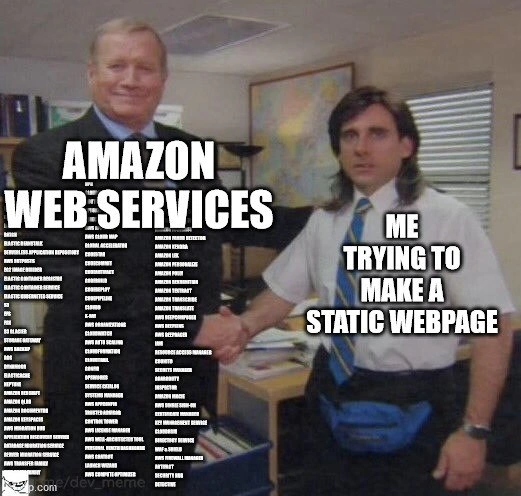
Imagine you want to hang up one small poster on your wall, but when you ask for help, a construction crew shows up with cranes, bulldozers, and enough tools to build a whole house. That’s what’s happening in this meme. The developer only wanted to show a simple webpage (like a single poster), but Amazon Web Services brought hundreds of fancy tools (way more than needed) to help. It’s funny because it’s a huge overreaction – like using a massive fire hose to water a tiny houseplant. The big suited guy (AWS) offering a handshake is basically saying, “Hello, I’m here to help with EVERYTHING!” while the smaller guy is a bit overwhelmed, thinking, “Uh, I only needed something very simple.” We laugh because we understand that feeling: sometimes you ask for something small and get far too much in return, and you don’t even know what to do with it all. The joke here is just showing how silly and over-the-top it is to bring in an entire store’s worth of solutions for one little webpage – it’s like trying to kill a mosquito with a cannon. Even a kid can see that’s a funny mismatch!
Level 2: So Many Services for So Little
For a junior developer or someone new to AWS, the meme’s humor comes from a real feeling of overwhelm. Amazon Web Services is a huge cloud platform offering hundreds of different services. Each service has a name (often an acronym) and a specific purpose. In the image, AWS is represented by the big boss with a wall of service names on his suit, leaning in to shake hands. The other guy labeled “me trying to make a static webpage” represents a developer with a very simple goal: putting a basic website online (just some HTML/CSS files, no fancy server code or databases – that’s what we call a static webpage). The joke here is that AWS greets this simple task with all its complex offerings at once. It’s like asking “Can I host this one page?” and AWS responds, “Sure, which of our 100+ products will you be using?”
Let’s break down a few of those service names to see what they actually are:
- Amazon S3 (Simple Storage Service) – a place to store files. Conveniently, S3 can host static website files (HTML, images, etc.) directly. This is probably all you really need for a static site.
- Amazon EC2 (Elastic Compute Cloud) – virtual servers in the cloud. Think of renting a computer in AWS’s data center. You could run a whole web server on EC2 to serve a static site, but that’s overkill if you have S3.
- AWS Lambda – a “serverless” compute service where you run code without managing servers. Cool tech, but a static HTML page doesn’t need any code running on the server, so Lambda isn’t necessary here (though AWS might still mention it, just in case you want contact forms or processing).
- Amazon RDS (Relational Database Service) – managed SQL databases. Completely unnecessary for a static site because static pages don’t use a database. Its presence in the list just adds to the absurdity.
- Amazon CloudFront – a Content Delivery Network (CDN) that speeds up delivery of your site globally. Useful if you expect visitors from around the world; it can sit in front of S3 to cache your static files. Not strictly needed for a tiny personal page, but often recommended for performance.
- Amazon Route 53 – AWS’s domain name service (DNS). If you want a custom URL like
www.myhomepage.comto point to your static site, Route 53 can do that. Again, one more service in the mix if you go the AWS route. - IAM (Identity and Access Management) – this isn’t mentioned in the meme text but is inevitably involved. It manages permissions for all these services. To make S3 publicly host a site, you must fiddle with IAM policies or bucket policies. For a newbie, that’s another confusing step (“Why can’t everyone see my index.html? Oh, right, permissions…”).
Now, AWS listing dozens of these services in the meme (from well-known ones to very niche ones) is intentionally overwhelming. It reflects how a newcomer might feel logging into the AWS console: greeted by an intimidating list of categories and services for things like machine learning, analytics, blockchain, satellite ground stations – all when they really came just to deploy a little website. This ties into the idea of complexity_for_simple_task: using AWS can sometimes feel like using a supercomputer to do basic math. The term over-engineering means designing a solution that's far more complex than needed. Here, the static site is a simple problem, but AWS’s vast toolkit is total overkill for it (hence the tag cloud_overkill).
It’s worth noting that AWS does have easier ways for static sites – for example, AWS Amplify or Lightsail are services aimed at simplifying web app and website hosting. But even those are additional names a beginner has to learn. The meme pokes fun at this steep learning curve. It’s a common early-career experience: you just learned basic web development (HTML, CSS, maybe a little JavaScript) and now you want to put your site online. You turn to AWS because it’s popular and powerful, and suddenly you’re faced with a puzzle of “Pick the right services, configure them correctly, and oh by the way, mind the billing!” It’s easy to feel lost. Many of us have been that junior dev, thinking “Maybe I need EC2? Or is S3 enough? What’s CloudFront? Do I need all these?” In reality, to host a static page on AWS, you might use AmazonS3 to store the files and enable static website hosting on that bucket. Then you might use CloudFront to distribute it fast worldwide, and Route 53 if you want a custom domain name. That’s already three different services you must learn to set up. No wonder people joke that Amazon’s answer to everything is a new service offering!
Another concept here is vendor lock-in. This means once you’re using a vendor’s many services, moving away becomes harder. If our simple site uses just HTML files, it could be hosted anywhere. But if you’ve tied it into, say, AWS’s proprietary features (maybe you decided to add a contact form backed by AWS Lambda and store data in DynamoDB), you’re now relying on AWS-specific stuff. The meme hints at this subtly: AWS’s “handshake” could be seen as pulling you into its vast ecosystem – once you shake that hand, you’re holding on to a lot of Amazon services. That can be both amazing (lots of capabilities at your fingertips) and daunting (learn and manage them all, and hope the pricing doesn’t surprise you).
And of course, the image is a scene from The Office (a popular TV show) known for its awkward, funny moments – which mirrors how awkward and funny it feels when a tiny personal project meets a giant enterprise platform. The short-sleeved office worker with the fanny pack (Steve Carell’s character, Michael Scott) represents the everyday developer in over their head, while the big boss with endless text on his suit is the corporate giant (AWS) over-enthusiastically “welcoming” him. In summary, this level unpacks the meme’s elements: the absurdly long list of AWS services, the simple goal of static web development (WebDev 101), and the humor of Deployment tech getting unnecessarily complicated. It’s a lighthearted warning: just because you can use every AWS service, doesn’t mean you should.
Level 3: Cloud Overkill Handshake
At the highest level, this meme satirizes cloud overkill – using a sledgehammer to crack a nut. The image shows Amazon Web Services (the suited man) enthusiastically shaking hands with “me” (the humble dev) who just wants to host a simple static webpage. Instead of a straightforward solution, AWS brings a deluge of acronyms and services. Seasoned engineers recognize this as a commentary on overengineering and analysis paralysis in modern web deployment. Why spin up a dozen managed services for a single HTML file? Yet, in big companies and complex projects, it happens more often than we’d like to admit. The wall of service names (from mainstream ones like EC2, S3, Lambda to esoteric offerings like Ground Station for satellite comms or Snowmobile for hauling data on trucks) is intentionally absurd. It highlights the cognitive overload of navigating AWS’s ever-expanding catalog. There’s a shared eye-roll here: every senior dev remembers that first time they opened the AWS console to a buffet of services and thought, “Do I really need all of this for static_site_hosting?” The humor lands because we’ve seen the pattern: a trivial task ballooning into a full cloud architecture. That handshake represents AWS’s eager “Welcome, have it all!” attitude – which can feel like drinking from a firehose when all you wanted was a sip. We joke about cloud_overkill not only because it’s real, but because it’s ironically fostered by cloud providers themselves (vendor incentives, best-practice guides, endless features). The meme resonates with anyone who’s been swamped by AWS’s too_many_services, nodding in recognition of the gap between a minimal use case and the enterprise arsenal AWS greets it with.
In practice, experienced devs avoid this trap by carefully cherry-picking the few services that matter (say, S3 + CloudFront + Route 53 for a static site) and ignoring the rest. But the joke’s on all of us when corporate policy or well-meaning architects insist on “leveraging the platform” to its fullest. It’s the classic tale of simple requirements meeting complex solutions. One could have just FTPed the files to a $5 server used a basic static host, but where’s the fun (or cloud vendor revenue) in that? The senior perspective understands both the power and the paradox of AWS: you can build nearly anything – even reinvent the wheel with AI and blockchain on top – but YAGNI (You Ain’t Gonna Need It) often holds true. This meme’s dark comedy comes from those war stories of projects that went off the rails: the one-page site that somehow ended up with a full CI/CD pipeline, multi-region failover, autoscaling groups, and five AWS services you didn’t know existed. As insiders, we laugh because we’ve lived it – the handshake where a simple idea gets embraced by a corporate cloud behemoth and suddenly you’re neck-deep in IAM roles, VPC configurations, and service bills. It’s a gentle reminder (with a heavy dose of irony) that in tech, more capability often means more complexity – and that “Hello, world” doesn’t need a quantum ledger database, no matter how shiny it looks in the service catalog.
# CloudFormation snippet (simplified) to deploy a "simple" static website on AWS:
Resources:
StaticSiteBucket:
Type: AWS::S3::Bucket
Properties:
WebsiteConfiguration:
IndexDocument: index.html
CloudFrontDistribution:
Type: AWS::CloudFront::Distribution
Properties:
DistributionConfig:
Origins:
- DomainName: !GetAtt StaticSiteBucket.DomainName
DefaultCacheBehavior:
ViewerProtocolPolicy: redirect-to-https # Yes, we need HTTPS even for hello world
# ... Many more settings for caching, error pages, etc. ...
SiteDNSRecord:
Type: AWS::Route53::RecordSet
Properties:
ZoneName: example.com.
Name: www.example.com.
Type: A
AliasTarget:
DNSName: !GetAtt CloudFrontDistribution.DomainName
HostedZoneId: "Z2FDTNDATAQYW2" # CloudFront's fixed zone ID
# Three services (S3, CloudFront, Route53) just to host one static page – and this is the "simple" setup!
Description
This meme uses the handshake scene from 'The Office' to illustrate a common developer experience. On the left, a confident man representing 'AMAZON WEB SERVICES' has his arm and hand covered in a comically long and dense list of actual AWS service names (like ElastiCache, Redshift, Lambda, etc.). On the right, a nervous and overwhelmed Michael Scott character is labeled 'ME TRYING TO MAKE A STATIC WEBPAGE'. The humor derives from the stark contrast between the simple goal and the overwhelming complexity and sheer number of services offered by AWS. It perfectly captures the feeling of choice paralysis and the steep learning curve developers face when navigating the massive cloud ecosystem for even the most basic tasks
Comments
7Comment deleted
I just wanted to host one index.html, and now I have a 3-tier VPC, IAM roles with least-privilege policies, and a CloudWatch alarm that emails me every time my static site gets one hit
“Uploaded index.html; CloudFormation answered with a 400-line YAML, IAM demanded a trust policy, and the Well-Architected tool congratulated me on my ‘serverless micro-landing-page.’ ”
Remember when hosting a static site meant FTPing three HTML files to a shared host for $3/month? Now you need a solutions architect certification just to figure out which combination of S3, CloudFront, Route 53, Lambda@Edge, and WAF rules will serve your index.html without accidentally racking up a $10,000 bill from a misconfigured data transfer policy
When you just want to serve index.html but AWS presents you with 200+ services and a solution architecture that requires three certifications to understand. Meanwhile, your static site could've been on GitHub Pages in 30 seconds, but now you're deep in a CloudFormation template debating whether you need Lambda@Edge for your three-page portfolio
Hosting index.html on AWS: S3 + CloudFront + ACM (us-east-1, naturally) + Route53 ALIAS + OAI + Terraform backend - and still a 403 because the only IAM policy that works has a blast radius you can see from space
Static site on AWS: S3 for files, CloudFront for CDN, IAM for permissions - because index.html deserves enterprise orchestration
AWS says “just upload to S3” and suddenly I’m provisioning Route 53, an ACM cert in us‑east‑1, CloudFront OAC, a bucket‑policy exception, and a billing alarm - my page is static; the architecture isn’t