AWS SigV4: Simple auth turns into a ten-step HMAC circus
Why is this AWS meme funny?
Level 1: One-Key vs Ten-Key Circus
Imagine you have a cookie jar that you want a treat from. Normally, getting a cookie is simple: you just ask your mom for a cookie, she says “okay,” and hands you one. Easy, right? 🍪 Now picture another household – let’s call it the AWS household. In the AWS house, if you want a cookie, you can’t just ask nicely. First, you have to get permission from Dad to even approach the cookie jar. Then Dad says, “Alright, but only if you do these chores.” So you do a chore to get a permission slip. Then you take that slip to your teacher to sign off that you did it correctly. The teacher gives you a special code. You enter that code into a locked box that’s on top of the cookie jar. Inside the box is a key, but uh-oh, it’s not the final key – it’s a key to another smaller box! You use it to open the next box, which gives you another key for yet another box, and so on… After a whole series of puzzles and keys 🔑🔑🔑, you finally unlock the last box that lets you actually open the cookie jar. By the time you’re ready to grab your cookie, you’re also praying you did everything exactly right – if you messed up even one little step (like wrote the wrong date on the permission slip), the jar won’t open at all. Phew! It’s way more complicated than just asking Mom. It’s funny in a face-palming way, because normally getting a cookie (or in the real world, access to a service) shouldn’t feel like a big treasure hunt. But in the AWS house, that over-the-top process is “just how it’s done” to make sure only the right person gets the cookie. The meme makes us laugh because it’s showing just how silly and exhausting that difference is – like turning a simple snack time into a ten-step circus performance! 🎪
Level 2: So Many Steps
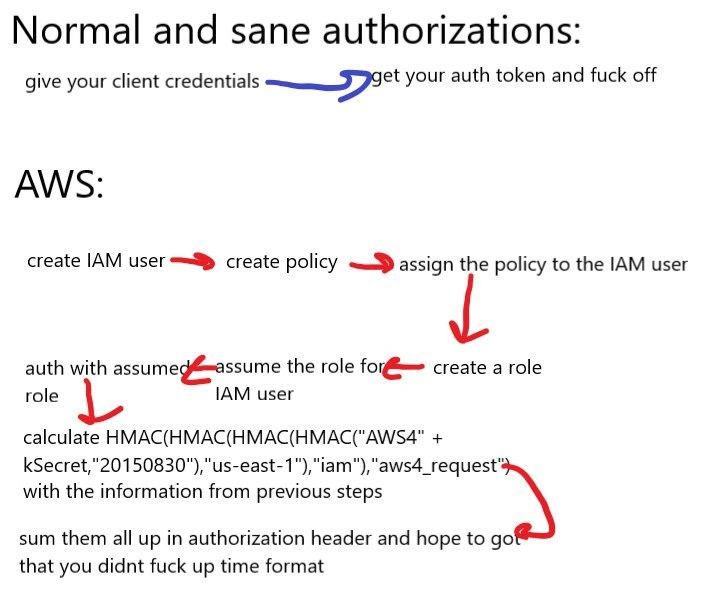
If you’re newer to AWS or web APIs, this meme might look overwhelming. Let’s decode it piece by piece. It’s contrasting a typical API authorization process with the more complicated AWS process.
Normal scenario (non-AWS): Usually, if you want to use some web service’s API, you do something straightforward. For example, you might send your client credentials (like a username & password, or an API key) to the service and it returns an auth token. That token is basically proof that you’re allowed in. After that, every request you make just includes this token (often in an HTTP header like
Authorization: Bearer <token>), and the server accepts it. It’s one simple exchange: “Here’s who I am” → “Okay, here’s a token, you’re in.” The meme summarizes this as, “give your client credentials -> get your auth token and f** off.”* (Pardon the language, it’s part of the joke – implying “and you’re off to go use the API, nothing more to do here.”) This is what we’d call a sane authorization flow – it's simple and easy to follow. It might use something like OAuth under the hood, but as a developer you just worry about that token.AWS scenario: Amazon Web Services doesn’t quite work that way. AWS is a huge platform of cloud services, and instead of simple tokens, it uses a system of IAM Users, Roles, and Policies plus a custom request signing process (SigV4). The meme lists a whole series of steps (with red arrows drawn between them to show the order). Let’s break those down:
Create IAM user – In AWS, an IAM User is like an account identity you create under your master AWS account. Think of it as making a new login, often for someone or some application that needs to call AWS APIs. When you create an IAM user, you can generate an Access Key ID and Secret Access Key for them. Those are like that user’s username and password for AWS’s API. But unlike a normal system, just having a username and secret isn’t enough to do things… which leads to the next step.
Create policy – A policy is a document that states what this user is allowed to do on AWS. For example, a policy might say “User X can read from S3 buckets” or “User Y can start and stop EC2 instances.” AWS won’t let your IAM user do anything unless a policy explicitly grants permission. This is a security measure (the principle of least privilege). So, after making the user, you define a policy that includes the actions/resources needed. Writing these can be tricky for newcomers because it’s a specific JSON structure with the right service names and actions (AWS has tons of services, each with many actions).
Assign the policy to the IAM user – Once you have a policy document, you must attach it to the user. Attaching the policy is like handing the user their permission slip. If you skip this, the user remains effectively powerless. So at this point, the user finally has credentials and some permissions.
Create a role – Now, this extra step might confuse people. Why create a role when we already have a user? In AWS, roles are a way to give temporary permissions and are often used for granting access across different contexts (like one AWS account to another, or an EC2 instance to S3). A role has its own policies (permissions) attached, kind of like a user, but nobody “logs into” a role directly. Instead, one assumes a role. Think of a role as a costume or uniform with certain powers – any user who puts on that uniform gets those powers, but only as long as they’re wearing it. One reason to use a role is if you don’t want to give a user permanent permissions; instead you create a role that’s powerful, and let the user wear that role when needed and otherwise they have no power. It’s an extra security step.
Allow the user to assume the role – Creating a role isn’t enough by itself; you have to specify which users are allowed to wear that role (assume it). This is controlled by the role’s trust policy. In our analogy, if the role is a special uniform, you decide which people are allowed to put it on. So you configure the role to trust the IAM user (from step 1) or maybe a whole group of users. Now the user can switch into that role programmatically.
Assume the role for the IAM user – This means the IAM user actually uses the role. In AWS terms, the user calls the
AssumeRoleAPI (often via some AWS SDK or CLI). When they do this, AWS verifies they’re allowed (from step 5) and then returns a set of temporary credentials for the role. These credentials consist of:- a new Access Key ID,
- a new Secret Access Key,
- and a Session Token (a kind of extra key that proves these are temporary role creds).
These are usually valid for a short time (maybe an hour). The user will use these to make API calls from now on, instead of their original long-term key. It’s like they put on the uniform and in the pocket are new keys that only last a while.
Auth with assumed role – Now the user (really our client program) has temporary credentials from assuming the role. This step means we are going to use those creds to authenticate with AWS services. But AWS doesn’t just accept the Access Key and Secret Key directly with each request in a simple way. Instead of a simple token, AWS requires a request signature. This is where it gets very technical: you can’t just say “here’s my key, let me in,” you have to prove you know the secret key by mathematically signing the request.
Calculate HMAC(... etc.) – This part of the meme text is describing the SigV4 signing process. To sign a request, you perform a series of cryptographic hash operations (HMAC using SHA-256) with your secret key and specific strings (like the date, region, and service). It’s a bit like a recipe:
- Start with your Secret Access Key (from the assumed role).
- Prepend the constant string
"AWS4"to it (AWS does this as a quirk in their algorithm). - Use that as a key to HMAC the date (in YYYYMMDD format). That gives you a date-key.
- Use the date-key to HMAC the region string (e.g.,
"us-east-1"). Now you get a region-key. - Use the region-key to HMAC the service string (e.g.,
"iam"if you’re calling IAM service). Now you have a service-key. - Use the service-key to HMAC the string
"aws4_request". Now you have the final signing key for that request. - Separately, you take the HTTP request you’re about to send (including headers like host, content type, the request body hash, etc., and a timestamp) and format all that into a special "String to Sign".
- Use the signing key to HMAC that string. The result is a signature – basically a bunch of hex characters.
All of that gets you a signature that proves you have the secret key and ties the request to a specific time and conditions. This is what the meme jokingly shows as a crazy nested HMAC function: it’s highlighting how involved it is compared to just sending a token.
Sum them all up in Authorization header – Finally, you gather all the pieces into an HTTP header. An AWS
Authorizationheader using SigV4 looks something like:Authorization: AWS4-HMAC-SHA256 Credential=<AccessKeyID>/<date>/<region>/<service>/aws4_request, SignedHeaders=<list of headers>, Signature=<the hex signature you calculated>You also include a
x-amz-date: <timestamp>header (andx-amz-security-token: <token>if using a temporary role credential). All these must match exactly what you used when calculating the signature (for example, if you signed five headers, you better list those five in SignedHeaders and actually include them in the request). The meme’s last red arrow points to this culmination where you “sum up everything in the auth header.”“Hope to god that you didn’t fuck up time format.” – This colorful language is basically saying: double-check everything, especially the time stamp format. AWS signatures are very sensitive. If the timestamp isn’t in the precise format AWS expects, or if the authorization header is slightly off, the request will fail with an authentication error. Many newcomers run into an issue where their local system clock is off by a few minutes, or they formatted the date like “2022-11-24T18:30:00Z” instead of “20221124T183000Z”. AWS will consider the signature invalid if the time is not within a few minutes of their servers’ time or if the format is wrong. It’s a common stumbling block – hence the meme jokingly prays you got it right.
In summary, the meme is funny (especially to AWS developers) because it’s exaggerating but also accurately listing what you often have to do for AWS API calls. For a newcomer, these terms are a lot to digest:
- AWS – Amazon’s cloud platform where nothing is as simple as it first appears.
- IAM User – an account identity in AWS with its own credentials.
- Policy – a permission slip defining what an identity can or cannot do.
- Role – a set of permissions that someone can assume (like a temporary identity with certain rights).
- Assume Role – the act of a user putting on that role to get temporary keys.
- HMAC – a cryptographic hash function with a secret key, used here to sign data.
- Authorization header – an HTTP header where you put your credentials info for the request.
- Time format – the specific timestamp format (and correct time) needed for the signature to be accepted.
All these pieces fit together in AWS’s security model. The end result is secure – AWS is very strict and thorough about authentication and authorization – but from a developer’s point of view, it feels like jumping through a lot of hoops. The meme gets its punch by showing how a task that is one line in other systems becomes an entire checklist in AWS. If you’ve ever felt overwhelmed by AWS’s complexity, this meme validates that feeling in a humorous way. It says, “Yes, to do something basic like auth, AWS makes you basically write an essay and solve a puzzle.” And knowing other developers go through the same circus makes it a shared joke in the community.
Level 3: Rube Goldberg Authentication
This meme hits home for many developers because it hilariously contrasts a simple auth flow with the elaborate obstacle course that is AWS authentication. The top part of the image shows “Normal and sane authorizations:” with a straightforward two-step dance: give your client some credentials, → get back an auth token, and you’re done (or as the meme crudely puts it, “get your auth token and fuck off.” 😅). It’s depicting the common experience of, say, calling a standard web API: you might post a username/password or API key and get a bearer token (like a JWT or session token) which you then include in future requests. Easy peasy – your client holds a token that says “I’m allowed,” and the server trusts it. This is the kind of Authentication flow that feels intuitive and low-friction.
Then comes the AWS section – and the meme visually prepares you for chaos. The word “AWS:” introduces a list of steps that just keeps growing, linked by a tangle of red hand-drawn arrows as if someone is scribbling “and then… and then…” repeatedly. By the end of it, the arrow looks like it’s doing loops. Each step is a familiar (and sometimes frustrating) part of setting up AWS credentials and making a signed request. When a seasoned developer sees this, they likely chuckle (or groan) because they’ve been through this IAM gauntlet before.
Let’s break down that red-arrow sequence and why it resonates:
“Create IAM user” – First, in AWS you rarely just get a simple API token. Amazon Web Services operates on IAM (Identity and Access Management), which means you create a user entity under your account. This user could be a real person or a service identity, but either way, it starts with no permissions by default. Already, it’s more involved than a one-click key generation: you’re in the AWS console or CLI defining a new user.
“Create policy” – Next, you must craft a policy. This is a JSON document specifying what actions are allowed or denied for that user (for example, the user can
ListBucketson S3, or canPutItemon DynamoDB). AWS is all about granular permissions (“SecurityBestPractices” in action), which is great for least privilege – but it means nothing is implicit. So you, the dev, have to write or attach a policy, which can feel like navigating a minefield of JSON syntax and AWS’s enormous list of actions. Many of us have experienced policy hell: one wrong permission and your request fails later with a cryptic “not authorized” message. The meme alludes to this overhead by listing policy creation as its own step – something absent in “normal” auth flows elsewhere.“Assign the policy to the IAM user” – Having a policy written is not enough; you must attach it to the user. This is basically clicking “OK, these are the permissions this identity should have.” It’s an extra linking step that, if forgotten, leaves your user capable of… absolutely nothing. A senior dev reading the meme might recall the time they created a user and forgot to attach the policy, resulting in mysterious AccessDenied errors later. It’s a classic AWS gotcha: so many moving parts that missing one connection breaks the whole chain.
“Create a role” – This is where outsiders to AWS really start getting lost. Why a role now? In AWS, a role is like a set of permissions that can be assumed temporarily by a user or service. Instead of handing out long-term credentials with broad powers, you create a role (let’s call it PerimeterGuardRole) that has the privileges you ultimately want the entity to have. Roles are often used so that you can grant temporary credentials or let an EC2 instance, for example, assume permissions without storing a user’s secret keys. In our context, the meme implies that even after making the user and policy, AWS best practice says: don’t use the user’s credentials directly for high-privilege tasks. Instead, go through a role. This adds another layer of indirection (and confusion).
“Assume the role for the IAM user” – Now you have to allow that IAM user to assume (take on) the role you created. This often involves tweaking trust policies – essentially telling the role “this user is allowed to pretend to be you.” Once that’s set, the user can perform an AssumeRole operation (via AWS STS, the Security Token Service). That call returns a set of temporary credentials (Access Key, Secret Key, and a Session Token) that have the privileges of the role, not the original user. Why do all this? Because those temporary creds can be time-limited (say, valid for an hour) and automatically expire, which is more secure than static credentials floating around. It’s a powerful feature for security – but for a developer seeing it the first time, it’s like needing a hall pass for your hall pass. 😖 It’s a lot of ceremony to end up with basically another credential in hand, which other platforms might have issued to you in one step.
“Auth with assumed role” – Now, finally, you have credentials you can actually use to authenticate API requests. This step means taking those temporary Access Key ID and Secret Key (and that session token) and using them as your client’s credentials. In a normal API, this would be where you just put a token in the header. But in AWS, these aren’t bearer tokens – you can’t just send the Secret Key outright. Instead, AWS requires you to sign each request with that secret using the SigV4 algorithm. So “auth with assumed role” isn’t as simple as login and done; it means you’re now going to compute a signature for every request using those creds.
“Calculate HMAC(HMAC(HMAC(HMAC('AWS4' + kSecret,'20150830'),'us-east-1'),'iam'),'aws4_request') with the information from previous steps” – Whew! 😅 This mouthful is the meme’s tongue-in-cheek way of describing the SigV4 signature computation. It’s essentially the pseudo-code we elaborated in Level 4, presented as one giant nested function call (which looks absurd especially next to the one-liner in the “normal” flow). The meme writer even plucked a specific date (
20150830) and service (iam) as examples to highlight just how specific and convoluted this gets. This is the part of the process that feels like a mini-cryptographic puzzle every time you make a request. The humor here comes from the dramatic contrast: instead of “present token, get access,” AWS makes you do math with your secrets. A seasoned AWS developer chuckles (perhaps painfully) because they know if any part of that HMAC chain or the “string to sign” is done incorrectly – say, you included a header in the signature that you didn’t actually send, or you mis-ordered the query parameters – AWS will reject the request. It’s not uncommon to “fuck up the time format” or some small detail and bang your head against the wall trying to figure out why your signature is invalid. The meme’s red arrow pointing at this giant HMAC chain emphasizes it as the climax of the absurdity. It’s literally drawn like the pinnacle of a crazy flowchart.“Sum them all up in authorization header and hope to god that you didn’t fuck up time format.” – This final line in the meme is chef’s kiss for anyone who has hand-rolled AWS signatures. After deriving the signing key and computing the signature, you have to assemble the
Authorizationheader exactly as AWS expects: it has an Access Key ID, a credential scope (which includes that date/region/service info), a list of which headers you signed (SignedHeaders), and the Signature itself (a long hex string). Oh, and you also need to include ax-amz-dateheader (the timestamp) and if using temporary creds, ax-amz-security-tokenheader for the session token. There are so many little pieces to include. The meme’s punchline about hoping you didn’t mess up the time format is a nod to one of the classic pitfalls: AWS expects timestamps in a very specific format (ISO 8601 basic format, e.g.YYYYMMDD'T'HHMMSS'Z'in UTC). If your clock is off or you formatted the date like2022-11-24T18:30:00Z(with dashes and colon) instead of20221124T183000Z, the signature won’t match. Countless developers have spent hours debugging auth errors caused by a subtle timestamp issue or a minor mismatch between the string they signed and the request they sent. That feeling of “Dear god, please let this work” as you fire off the request is very real.
In essence, the meme is poking fun at AWS for turning a task that developers expect to be straightforward (authenticating to an API) into a complex multi-step bureaucratic process – the “ten-step HMAC circus” as the title brilliantly puts it. Seasoned engineers appreciate the irony because AWS, more than maybe any other platform, often trades simplicity for flexibility and security. There’s an implicit understanding: Yes, this over-engineered dance has security advantages and is incredibly powerful... but seriously, did it have to be this painful? It’s funny because it’s true – most of us would rather just get an Auth token and move on, but when you’re in AWS-land, you find yourself juggling IAM policies, roles, and crypto-hashes like a clown at a carnival. 🤹♂️
From an architectural perspective, Amazon’s approach stems from an earlier era and particular needs: stateless, signature-based authentication was preferable for a distributed cloud where you don’t want to manage sessions on the backend for every request, and where credentials might be long-lived and need strict scope limiting. It’s a bit of an old-school approach (somewhat reminiscent of how APIs were signed in the pre-OAuth days) that AWS has held onto and refined (SigV4 is actually the new and improved version – if you can imagine!). Many modern APIs instead use OAuth 2.0 or other token-based systems that offload most of this complexity to an identity provider. But with AWS, the developer (or the AWS SDK on the developer’s behalf) has to implement the spec each time. That’s why AWS provides SDKs – to save you from this insanity – but the meme suggests an underlying truth: as soon as you step outside those comfortable SDKs (or they misbehave), you’re on your own in a jungle of bytes and hashes.
Ultimately, this meme is senior-dev humor gold because it highlights the contrast between principle and practice. In principle, AWS’s security is top-notch and professionally rigorous – no naive “just trust this token” here! In practice, getting it to work involves so many arcane steps that it borders on comedy. The shared pain is almost bonding: “Remember the first time you tried to call an AWS API and got ‘SignatureDoesNotMatch’? Ha, welcome to the club.” It’s a mix of exasperation and respect – we laugh because it’s absurd, and because we survived it. After all, nothing brings engineers together like war stories of wrestling with AWS IAM authorization at 3 AM, heads hung low muttering “it was the damn time format, wasn’t it?”
Level 4: HMAC Matryoshka Magic
In AWS’s Signature Version 4 (SigV4) scheme, authentication isn’t just passing a token – it’s performing a miniature cryptographic ceremony. At its core is a key derivation ritual using nested HMAC (Hash-based Message Authentication Code) functions, almost like a set of Russian matryoshka dolls where each hash unveils the next key. This multilayered design is intentional: each HMAC step binds your secret credentials to specific context – date, region, service – ensuring that the final signing key is locked down to just that sliver of time and purpose. The goal is to achieve strong request authenticity and integrity without ever directly sending your secret key over the wire. It’s a clever application of cryptographic primitives: by hashing in stages, AWS creates ephemeral sub-keys that limit the blast radius if one were compromised. For example, deriving a key with the date (say 20150830) means the resulting key can’t be used for any other date. Chaining another HMAC with the region (like "us-east-1") ties it to that region alone, and so on. The final signature is essentially tamper-proof proof that “this request really came from someone holding the secret, and hasn’t been altered in transit.”
This process relies on SHA-256 hashes under the hood, and the math ensures that even a small change in the request or a tiny time discrepancy will produce a completely different signature (the hallmark of a good cryptographic hash). Here’s a glimpse of how AWS SigV4 key derivation works in pseudo-code:
// Starting with your main secret key (never sent directly)
kSecret = "wJalrXUtnFEMI/K7MDENG/bPxRfiCYEXAMPLEKEY"
// Derive a series of scoped keys using HMAC with SHA-256
kDate = HMAC("AWS4" + kSecret, "20150830") // Bind to date YYYYMMDD
kRegion = HMAC(kDate, "us-east-1") // Bind to region
kService = HMAC(kRegion, "iam") // Bind to service (IAM here)
kSigning = HMAC(kService, "aws4_request") // Final signing key constant
// Now compute the request signature with this derived key
signature = HMAC(kSigning, StringToSign) // 'StringToSign' includes timestamp, etc.
Each HMAC(k, data) operation is like applying a secure one-way function with a key: only someone with k can produce or verify the result. By the end, kSigning is a short-lived key tied to a specific date-region-service triad, and signature is calculated over a canonical representation of the request (including headers, payload hash, and a timestamp). AWS’s servers perform the same steps to verify your signature – if even one byte is off (say, you formatted the date wrong or omitted a header in the signing process), the signatures won’t match. This is cryptographic HMAC chaining in action, giving AWS a very high confidence that a request is legitimate. It’s ingenious from a security standpoint – essentially a custom-tailored Key Derivation Function (KDF) that’s reproducible by the server – but for the developer holding the Access Key ID and Secret in hand, it feels like performing a complex magic spell just to prove identity. The meme’s exaggeration of SigV4 as a “ten-step HMAC circus” isn’t far off – it captures the almost ritualistic complexity of these calculations. And indeed, the final act of this ritual is packaging everything into the Authorization header (with the credential scope, signed headers list, and the signature) and sending it off, praying that all those cryptographic incantations were done exactly right down to the timestamp. In the unforgiving math of HMACs, there’s no partial credit: it either perfectly matches what AWS expects or you’re cryptographically out of luck.
Description
Meme on a white background with black text compares two authorization flows. At the top it says "Normal and sane authorizations:" followed by the line "give your client credentials" (with a blue arrow) pointing to "get your auth token and fuck off." Below, the heading "AWS:" introduces a longer sequence: "create IAM user" → "create policy" → "assign the policy to the IAM user" → "create a role" → "assume the role for IAM user" → "auth with assumed role" → "calculate HMAC(HMAC(HMAC(HMAC("AWS4" + kSecret,"20150830"),"us-east-1"),"iam"),"aws4_request") with the information from previous steps" → "sum them all up in authorization header and hope to god that you didnt fuck up time format." Red hand-drawn arrows connect each AWS step, emphasizing the escalating complexity. Technically, the image mocks AWS Signature Version 4, IAM roles, and multi-stage HMAC signing versus a straightforward bearer-token workflow, highlighting real-world developer pain around API authentication and security

Comments
17Comment deleted
Writing a SigV4 client feels like building AWS-branded IKEA furniture: 18 steps, four different HMAC hex keys, the clock has to be NTP-perfect, and if one dowel is off the whole thing collapses - then bills you by the millisecond
The real AWS certification test isn't multiple choice - it's successfully authenticating to an API endpoint on the first try without consulting the 47-page signature v4 documentation while your PM asks why 'just adding an API key' is taking three sprints
AWS IAM authentication is what happens when you let cryptographers design your API without adult supervision. While the rest of the world moved to 'here's a token, now leave me alone,' AWS decided that calculating nested HMACs with region-specific secrets and praying your ISO8601 timestamp doesn't drift by a millisecond was the path to enlightenment. It's the only auth system where 'time format' is a legitimate production incident category, and where 'assume role' means 'assume you'll spend three hours debugging signature mismatches.' The real security isn't in the encryption - it's that attackers give up before figuring out the signing process
Simple auth: one JWT header. AWS SigV4: Canonicalize your life, HMAC it with UTC millis, or enjoy eternal 403 enlightenment
AWS auth is the only place where a 401 can be fixed by adding an IAM user, a role, an STS hop, four HMACs, and a lecture on ISO-8601 clock skew
AWS auth isn’t login; it’s a cryptographic escape room - nested SigV4 HMACs to kSigning, an STS trust ceremony, and a final boss called “request time too skewed.”
And pay for authorization $6500 Comment deleted
«normal and sane» totally fails when you have a company of more than ten users. On larger scale it is not manageable Comment deleted
open window Comment deleted
but i'm running linux Comment deleted
Go touch the grass Comment deleted
it's just a meme Comment deleted
I absolutely agree. And I even hate^w slightly dislike^w^w secretly love to be that guy. Still when you quite often use these features it sounds pretty much like the “Wait for the green light to cross the street? Ain't Nobody Got Time for That” meme. Comment deleted
That's why ppl use libraries and SDK-s. Comment deleted
i, too, pray to Got Comment deleted
https://www.npmjs.com/package/monkey Comment deleted
https://www.npmjs.com/package/hmm Comment deleted