Skip to content
DevMeme
6049 of 7435
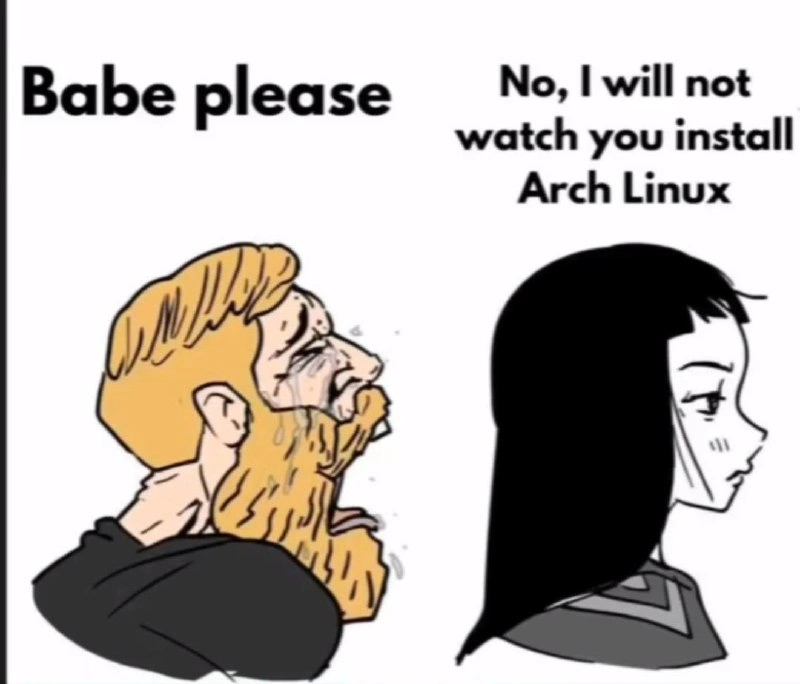
The Arch Linux User's Plea
DevCommunities Post #6624, on Apr 4, 2025 in TG

The Arch Linux User's Plea

Why is this DevCommunities meme funny?

Level 1: Watching Paint Dry

Imagine your friend is super proud of building something really complicated, like a model toy or a huge puzzle, and they want you to sit and watch every single step of them doing it. They’re geeking out, thinking “This is so awesome, I bet everyone will love seeing me do this!” But to you, it’s just a long, boring activity that you don’t understand. Watching someone install Arch Linux is like watching paint dry if you’re not into it. In the meme, the guy basically says, “Pleeease, this means a lot to me,” and the girl is like, “No way, this is boring.” He’s treating installing an operating system (a very nerdy, text-heavy process) like it’s a cool magic show, but for her it’s as dull as sitting in a class you have no interest in. The joke is funny because we all know that feeling: when you’re excited about something but the person you want to impress just doesn’t care. It’s like trying to show off a secret talent that only you think is cool. The poor guy is in tears begging, and the girl is calmly refusing. In simple terms, he wants to do a boring thing and have her applaud, but she’d rather not waste her time. That’s why it’s humorous — we feel a bit sorry for him, but we also totally get why she says no. It’s a silly reminder that not everyone finds the same things fun, and that’s okay!

Level 2: No GUI, Only CLI

Let’s break this down in simpler terms. Arch Linux is a popular (some say infamous) Linux distribution that doesn’t hold your hand when you install it. Most operating systems (like Windows, macOS, or user-friendly Linux distros such as Ubuntu) have graphical installers – you click next a few times, maybe choose a language or time zone, and the rest happens automatically. That’s the GUI (Graphical User Interface) approach. Arch Linux, on the other hand, says "Nah, you do it yourself". There’s no GUI installer by default; you have to use the command line for everything. The command line, or CLI, means you’re typing text commands into a terminal (a text-only interface) to tell the computer what to do. It’s powerful, but it requires you to know the right commands.

In the meme, the guy wants his date to watch him install Arch. Why is that a big ask? Because installing Arch is a technical, time-consuming process. You’re essentially building your operating system from the ground up. Here’s roughly what an Arch install involves (for a newcomer, each step has a learning curve):

  • Partitioning the disk manually: You have to split the computer’s storage into sections (partitions) yourself. For example, creating one partition for the main system and maybe one for swap (virtual memory). This is done with tools like fdisk or cfdisk in the terminal. One wrong move here and you could wipe a drive or fail to make the system bootable.
  • Formatting and mounting: After partitioning, you format each partition with a filesystem (like EXT4, a common Linux file system) using commands such as mkfs.ext4. Then you “mount” them, which means attaching those partitions to specific directories (for instance, mounting your main partition at /mnt so you can put files there).
  • Pacstrap – installing the base system: pacstrap is an Arch-specific command (part of Arch’s installation tools) that essentially grabs the core packages of Arch Linux and installs them onto your mounted partition. It’s like saying, “put the basic operating system files onto my new drive.” Pacstrap uses Arch’s package manager (called pacman – yes, named after the video game character) under the hood to fetch these packages.
  • genfstab – generating fstab: After installing, you use genfstab to create an fstab file, which stands for file system table. This file tells the OS about your disk partitions and where to mount them every time the system boots. Arch doesn’t set this up for you automatically; you run this command and redirect its output into /mnt/etc/fstab (which will be part of your new system’s configuration) as shown in the code snippet above. If you skip this, your installed system might not know how to find its own hard drive partitions on reboot.
  • chroot and configuration: chroot stands for “change root”. It’s a way to jump into the new system you just installed as if you’ve booted into it, while actually still running from the installer environment. Think of it like stepping through a door into the house you’re building. Inside the chroot, you then manually configure things like setting up a bootloader (the program that actually takes over when your computer starts and loads your new OS – examples are GRUB or systemd-boot), creating a user account, setting your timezone, and installing any extra things you want (like a desktop environment, if you don’t want to stick to command line forever).

All these steps are done in the terminal, with commands, one by one. There’s no friendly progress bar or wizard holding your hand. For an experienced user or a sysadmin, it’s a normal SysadminHumor kind of task – something they might even enjoy doing, because it gives total control. But for someone watching who doesn’t know what all this means, it’s like watching someone write pages of a book in a language you don’t understand.

Now, the meme specifically jokes that the guy wants his date to watch him do this. Imagine you’re excited about something super nerdy you learned – say you figured out how to solve a really hard puzzle – and you insist your friend or partner watch every step as you do it. That’s what’s happening. The dude is basically saying, “This manual OS install is so cool, you’ve got to witness it!” He likely thinks it’s impressive – showing he’s a “1337” (leet, i.e., elite) hacker type who can tame the computer with just text commands.

Why Arch Linux, specifically? Arch has a bit of a reputation. In the Linux world, Arch users are sometimes teased for being proud of running a system that takes more effort to maintain. Arch is a rolling release distro, meaning it doesn’t have big versioned releases (like “Ubuntu 20.04” or “Fedora 38”). Instead, Arch updates continually, so you’re always on the latest software versions. That sounds great, but it also means you have to update often and occasionally deal with unexpected breakages. The term rolling_release_bravado refers to the bravado (bold pride) of folks who run such a system – like saying “yeah, my system is edgy and always up-to-date, and I can handle any issues that come up.” It’s part of the Arch attitude.

Another part of that culture is customization and “ricing.” Ricing in computing slang means obsessively customizing the look of your desktop (like choosing cool themes, arranging system monitors, using a tiling window manager, etc.) – basically making your system look unique and flashy, often by writing configuration files by hand. Arch users, who build their system from scratch, often also rice their setups and then show screenshots to the internet for kudos. That’s hinted at with the tiling_window_rice_showoff tag – it’s the idea that after installing, this guy might also show off his super minimalistic but highly customized desktop environment as a flex.

Let’s decode the emotional side: The woman in the meme says, "No, I will not watch you install Arch Linux." She’s establishing a boundary, probably after being asked one too many times. It implies this isn’t the first time he’s tried to rope her into some nerdy computing stunt. Maybe earlier it was “Hey babe, come look at my new custom kernel compilation” or “Babe, please, just watch me set up this Kubernetes cluster.” 😅 She’s not having it. And honestly, from her perspective, what he’s asking is not normal date stuff. Most people would rather watch a movie, go out for dinner, or literally do anything else other than watch text scroll on a screen for an hour.

For someone new to tech or early in their career, the take-away is: Arch Linux is powerful and educational, but it’s a hands-on project. You learn a ton by doing a manual install – about filesystems, configuration, how Linux fits together. It’s almost like a mini bootcamp in Linux internals. Many junior devs or IT students try installing Arch (or its even more hardcore cousin, Gentoo) as a learning exercise. When you finally succeed, you do feel proud! So proud that you might want to tell all your friends... but as this meme shows, choose your audience wisely. Your tech buddies might give you a high-five, but your non-tech date? They’ll be bored out of their mind.

In summary, Arch’s install process = great personal learning, not so great as spectator entertainment. The meme is exaggerating a real sentiment: “I did something tough and nerdy, why won’t you appreciate how cool it is?” The humor is in recognizing both sides – the Arch user’s passion (or obsession) and everyone else’s apathy.

Level 3: The Cult of Pacstrap

This meme hits on the arch_install_flex culture in the Linux world. On the left, we have the stereotypical Arch Linux enthusiast—a bearded Wojak crying "Babe, please". On the right, his unimpressed date refuses: "No, I will not watch you install Arch Linux". The humor is that installing Arch is treated like some sacred ritual (the pacstrap ritual) by those who've spent countless late-night hours in the CLI (Command Line Interface). Seasoned developers recognize the scenario immediately: one person is showing off their shell-fu (fancy command-line skills) while an unwilling audience couldn’t care less. It’s poking fun at that rolling_release_bravado—the pride some techies take in running bleeding-edge systems and doing everything the hard way, just to flex their expertise.

In reality, performing a manual Arch Linux install is a rite-of-passage among certain Operating Systems geeks. You’ve got to manually partition your drive, format filesystems, run the pacstrap command to bootstrap the base system, genfstab to generate file system tables, and then chroot (change root) into your new install to configure it. Each of those steps is typically handled automatically by user-friendly installers on other Linux distributions, but Arch makes you do it all yourself. Experienced sysadmins chuckle because they know how mundane (and fragile) these steps really are — but the Arch user is treating it like high drama. This meme exaggerates that dynamic: the Arch user practically begging for validation, tears in eyes, while the date has zero interest in watching lines of packages scroll by on a black terminal screen.

The unspoken subtext here: installing Arch isn’t really about quickly getting a working machine; it’s about the process and the bragging rights. The phrase “I use Arch, btw” has become an inside joke because some Arch users can’t resist slipping that fact into conversations for geek credibility. In this case, our bearded friend isn’t just saying it — he’s actually trying to demonstrate it live, like a performance art piece: "Behold, as I manually invoke mkfs.ext4 and summon GRUB from the darkness!" He expects his date to marvel at the complexity, but of course, she’s completely unimpressed. It’s hilariously relatable to anyone who’s seen a technically obsessed person misjudge what others find fun. We’ve all known that engineer who treats obscure technical chores as if they’re magic tricks for party guests (spoiler: the “guests” are bored out of their minds).

To seasoned Linux users, the term “pacstrap ritual” is comedic because pacstrap is just a script that installs packages – there’s nothing mystical about watching base packages download. Yet, in the Arch community, doing it all manually is almost a point of pride, a cult ritual. Much like a chef insisting on making pasta from scratch every single time while their friends just want to eat, the Arch user insists on this elaborate setup in front of an audience. The date’s refusal is the punchline: No one outside this nerdy circle wants to watch your hour-long OS installation ceremony. It’s a gentle jab at the Arch crowd’s tendency to romanticize what is essentially a tedious Sysadmin task.

And let’s be honest, even as veteran devs who appreciate the beauty of a command line, we recognize the absurdity. The humor comes from contrast: one person thinks a Terminal full of scrolling text is as exciting as a blockbuster movie, while the other person sees it as watching gibberish output or waiting for paint to dry. It’s extra funny to those of us in tech because we might cringe in self-awareness — have I ever gotten too excited about showing someone a nerdy process? Probably. This meme is essentially a mirror and a good-natured roast of that inclination.

(As a side note for the truly initiated: be glad he’s not asking her to watch him compile Gentoo from source — now that would be a relationship endurance test! 😉)

# Example snippet of the Arch install "ritual"
# (This is run from the live USB environment)
fdisk /dev/sda            # 1. Partition the disk manually (MBR/GPT and all)
mkfs.ext4 /dev/sda1       # 2. Format the root partition with ext4 filesystem
mount /dev/sda1 /mnt      # 3. Mount the new root partition at /mnt
pacstrap /mnt base linux linux-firmware    # 4. Install base system packages into /mnt
genfstab -U /mnt >> /mnt/etc/fstab         # 5. Generate file system table for the new system
arch-chroot /mnt                         # 6. Change root into the new system to configure it
# ... then set up users, bootloader (grub), network config, etc.

Above is a taste of the manual_partitioning and setup steps involved. Each command has to be run by the user. Miss a step or mis-type a command, and your system might not boot. It’s easy to see why completing this feels like a triumph to the geek doing it. But watching someone else do it? That’s like sitting through a deploy log scrolling on someone’s screen – neat if you understand it, utterly yawn-inducing if you don’t. The meme perfectly captures this disconnect.

Description

This is a Wojak comic meme depicting a classic relationship dynamic, repurposed for a tech audience. On the left, a crying, bearded Wojak (representing a stereotypical male tech enthusiast) is shown begging, with the text 'Babe please' above him. On the right, a calm, unimpressed female character with black hair looks away, stating firmly, 'No, I will not watch you install Arch Linux.' The meme humorously captures the niche pride and perceived complexity associated with installing Arch Linux, a notoriously manual and challenging operating system. It plays on the stereotype of the Arch user who sees the installation process as a significant, impressive feat that they want to share with their partner, who, in turn, sees it as a boring and pointless technical exercise. For experienced developers, the joke is relatable because it highlights the social disconnect that can happen when deep, niche technical interests clash with the expectations of a non-technical or simply uninterested partner
Comments

15
Anonymous ★ Top Pick He just wants her to see him partition the drives manually. It's the modern equivalent of showing off by lifting a heavy rock
  1. Anonymous ★ Top Pick

    He just wants her to see him partition the drives manually. It's the modern equivalent of showing off by lifting a heavy rock

  2. Anonymous

    Arch users treat `pacstrap /mnt base linux` like a TED talk - even the partition table needs an audience

  3. Anonymous

    The real relationship test isn't meeting the parents - it's explaining why you need to manually partition disks, configure systemd-boot, and compile your AUR packages from source while your partner questions why Ubuntu isn't good enough

  4. Anonymous

    The real test of a relationship isn't meeting the parents - it's whether your partner will sit through you explaining why you need to manually partition with fdisk, configure your own bootloader, and compile your AUR packages from source. Bonus points if they stay when you inevitably have to troubleshoot why your WiFi drivers aren't loading after the first reboot

  5. Anonymous

    She’s applying SRE 101: don’t attend change windows with no rollback - your pacstrap+mkinitcpio date night is a Friday rolling release

  6. Anonymous

    She'd rather handle a 3AM prod alert than watch your pacstrap yak shave into eternity

  7. Anonymous

    Arch installs are relationship load tests: parted, pacstrap, genfstab, chroot, and a systemd‑boot vs GRUB bikeshed - mirror ranking is what finally violates the SLO

  8. @mlengahm 1y

    🤣

  9. @Vlasoov 1y

    https://youtu.be/8utpbbdj0LQ?si=J7F-eSOT6hdwJ3Fb

    1. @ZgGPuo8dZef58K6hxxGVj3Z2 1y

      Damn

  10. @Vlasoov 1y

    it's just a minute, babe, please, wait

    1. dev_meme 1y

      That’s what she said

  11. @ZgGPuo8dZef58K6hxxGVj3Z2 1y

    Lmfao

  12. @Wolfstead0 1y

    Thats how I see most soy geeks

  13. @Sp1cyP3pp3r 1y

    i had a date like this he had the biggest d yet

Use J and K for navigation