Skip to content
DevMeme
6462 of 7435
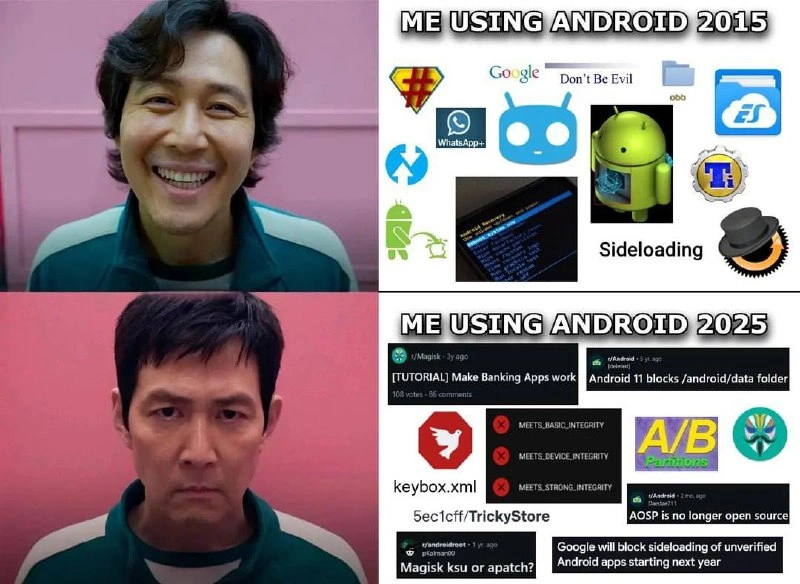
Android 2015 Freedom vs Android 2025 Locked-Down Dystopia Comparison
MobileDev Post #7085, on Aug 28, 2025 in TG

Android 2015 Freedom vs Android 2025 Locked-Down Dystopia Comparison

Why is this MobileDev meme funny?

Level 1: Locked Toy Box

Imagine back in 2015 you had a toy box that was all yours. You could open it whenever you wanted, take any toy out, swap their parts, repaint them – nobody stopping you. You even had a special key that opened every compartment of the toy box, so nothing was off-limits. That felt great, right? Now jump to 2025: you still have a toy box, but it’s got lots of locks and seals on it. There are stickers saying “tampering detected” if you try to use your old key. Some compartments are glued shut; you can see your toys inside but you’re not allowed to reach in without asking the manufacturer. If you try to use a cheat code or a trick to get a toy out, alarms go off and certain toys (like your shiny new “bank” toy or “pay” toy) simply refuse to work because they know you’ve been fiddling. In 2015 you felt happy and free playing with your Android phone – it was like an open playground. By 2025, using the same phone feels like visiting a strict theme park with lots of rules: you must stay in line, keep your hands inside the ride, no sneaking behind the scenes. The meme is funny because it shows how your expression changes: first picture, you’re grinning because you have total freedom with your device (like a kid with unlimited playtime and a key to every candy jar). Second picture, you’re frowning, looking frustrated because now your device is all locked up (like a kid whose favorite toy is put on the top shelf behind glass). It’s comparing the past and future to say: using Android used to be carefree and fun, and now it’s become a lot more restricted and serious. Even if you don’t get the technical details, you can understand that feeling – nobody likes it when something that used to be wide open starts having tons of padlocks. That’s the simple truth this meme jokes about: freedom vs. rules, and how our faces (and hearts) react to that change.

Level 2: Rooting vs Integrity Checks

Let’s break down what’s going on here in simpler terms, especially for those newer to Android development or who weren’t part of the 2010s Android scene. The meme shows two snapshots of an Android user’s life:

  • Android in 2015 (Top panel): Imagine you just got an Android phone and you’re curious to tinker. Back then, you could root your phone easily. “Rooting” means obtaining administrative access to your device – the name comes from Linux, where the root user can do anything. With root, you could uninstall pre-loaded apps, tweak system settings, or run powerful apps that need deeper access (like firewalls or backup tools). One popular way to root was using an app called SuperSU (represented by that shield icon with a #). SuperSU would manage which apps get root privileges in a friendly way.

    Getting root often went hand-in-hand with unlocking the bootloader – a process that allows you to load custom firmware on the device. In 2015, many devices (like Google’s own Nexus phones) allowed this via a simple command (fastboot oem unlock). Once unlocked, you could install a custom recovery like TWRP (Team Win Recovery Project). Think of a custom recovery as a mini-operating system that can run on your phone before Android boots. TWRP’s job is to let you install or backup system images easily. People used it to flash custom ROMs – basically custom versions of Android made by the community. CyanogenMod was the superstar custom ROM back then (its cute blue mascot icon is in the meme), offering new features and updates on phones whose manufacturers had abandoned them. In short, Android was very hackable, in a fun way.

    You also had full access to the phone’s folders. The mention of the “obb” folder and showing the ES File Explorer icon refers to the fact that earlier Android versions let you explore and manipulate all sorts of files on the device storage. obb files are where big app data (like game assets) are kept, and a third-party file manager app like ES File Explorer could be used to move, copy, or even edit these files. If you were learning Android dev or just curious, you might poke around these folders to see how apps store data. Want to mod a game by editing its files? In 2015, sure – go to /sdcard/Android/obb/<game> and swap files. The system wouldn’t stop you.

    There’s also the term “sideloading” shown with an arrow in the meme. Sideloading means installing apps from outside the official Google Play Store. Android has traditionally allowed this: you could download an .apk file (the package file for Android apps) from the web or receive it from a friend, and install it manually. For a junior developer, sideloading is actually essential for testing apps (you compile an app and install it on your device via USB, etc.). In 2015, Android made this easy – just enable “Unknown Sources” in settings, and you had the freedom to install anything. This openness was a big attraction for independent developers and users alike, especially compared to Apple’s locked-down approach where you can’t easily install apps outside the App Store.

    All these icons and terms in the top panel essentially say: Android used to let you do whatever you wanted with your device. It was like having a computer where you had admin rights by choice. For someone starting out in development or tech then, it was awesome because you could experiment freely, learn from the system, and customize your experience heavily.

  • Android in 2025 (Bottom panel): Now, fast forward. Many things that were easy or possible in 2015 have become difficult or outright blocked in the name of security and stability. The bottom panel’s references might seem a bit daunting, so let’s clarify them:

    • Magisk: This is a tool that became popular around 2017 and is effectively the modern way to root devices. Instead of modifying the core system files (which modern Android won’t allow easily), Magisk works by modifying the boot process (it patches the boot image) to grant root access in a “systemless” way (meaning it doesn’t alter the system partition). One huge feature Magisk had was MagiskHide, which helped mask the presence of root from apps that try to detect it. The tutorial “Make Banking Apps work” in the meme references the common use of Magisk: to hide root so that apps like banking apps, Google Pay, or certain games will continue to function. It’s basically a cat-and-mouse game: Magisk gives you root and tries to fool integrity checks, and Google updates SafetyNet to catch Magisk’s tricks. Newcomers might find it surprising that rooting your phone could disable apps – but that’s indeed the case now. Many apps perform root detection or use Google’s SafetyNet Attestation service to ensure the device isn’t compromised. From a security perspective, it makes sense (rooted devices could be more susceptible to malware or cheating tools), but it’s frustrating for users who root for legitimate reasons. Magisk is the hero tool trying to let users have their cake (root) and eat it too (use all apps normally).

    • SafetyNet Attestation / Device Integrity: This is a Google service that apps can use to check if a device appears secure and untampered. The screenshot with MEETS_BASIC_INTEGRITY and others is likely from an app or a test that shows whether SafetyNet checks pass. Basic integrity might pass on a device that’s slightly modified but not too obvious, whereas Device Integrity and Strong Integrity are stricter (requiring stock state and even hardware-backed proof, respectively). When you root your phone or unlock the bootloader, these checks typically fail. For example, if you unlock your bootloader, the device might fail Strong Integrity because the hardware knows the bootloader is unlocked. If you install a custom ROM that isn’t Google-certified, it fails CTS profile match (part of integrity). Apps see these fails and can decide “Nope, we won’t run.” A junior dev might encounter this if they try to use Google Pay on a custom ROM – it will say something like “Your device is not allowed to use this feature” due to failing SafetyNet. It’s a big change from earlier times when apps mostly trusted the OS environment. Now the OS has to prove itself to apps.

    • /android/data folder restriction: Starting in Android 11, Google enforced scoped storage fully. This means your app can only freely access its own dedicated folder (and a handful of shared media folders for things like photos or documents). As a user or developer, you can no longer just browse to /storage/emulated/0/Android/data/ and see all app folders. If you try with a file explorer, you’ll just get an empty list or a permission error. This was done for privacy (one app shouldn’t snoop on another app’s data) and cleanliness (to prevent apps from cluttering shared storage). For developers, it required adopting new APIs to read files that aren’t your own, and for users it was a loss of control. The meme explicitly calling out “Android 11 blocks /android/data” highlights how surprising (and annoying) that change felt. Many power users and even developers used to manually fix issues by going into those folders; post-Android 11, you often have to use the command line (adb with special flags) or rely on the app developer to provide an export/import function. It’s a trade-off: more security and privacy vs. less user control.

    • A/B partitions: This is a technical change in how Android handles updates. Without diving too deep: if a phone has A/B partitioning, it has two copies of the core system (slot A and slot B). When an update comes, it installs on the inactive slot and then the phone switches to that slot on reboot. If something goes wrong, it can fall back to the old slot. Great for seamless updates – you no longer have a long “installing update” downtime. However, for installing custom recoveries or ROMs, it’s an extra complexity. For instance, on these devices, to use a custom recovery like TWRP, you often have to boot it temporarily via fastboot (instead of permanently flashing it), and installing custom ROMs might require installing on both slots or using the specialized installers. The badge “A/B Partitions” in the meme is basically shorthand for “Android’s update system got more complex to hack around.” If you’re new to Android modding in the era of A/B, it can be confusing why the usual steps don’t work – this meme acknowledges that.

    • AOSP and open source: AOSP stands for the Android Open Source Project, which is the base Android code anyone can use. The meme text “AOSP is no longer open source” is a sarcastic exaggeration. What it’s hinting at is that even though the project is open source, Google has taken more and more control. Many features of modern Android (like Google Play Services, or things like the new permission modules, etc.) are closed source or Google-controlled. Also, manufacturers add their own closed bits. So while you can get AOSP code, a lot of what makes a phone actually usable isn’t open anymore. For instance, you can’t get source for Google’s SafetyNet servers or their Machine Learning modules, etc. For a junior dev, the key takeaway is: early Android was heralded as fully open-source (modify it as you like!), but contemporary Android is a mix of open core and closed add-ons. If you ever tried to build AOSP from scratch and run it on your phone, you’d find many things missing compared to the stock software it came with.

    • Sideloading restrictions: The meme mentions Google possibly blocking sideloading of unverified apps. This implies a future where you can’t just install an APK unless it’s been approved or signed by a known entity. In current Android (up to 2025), you can sideload – but even that has a new hoop: you have to grant permission to a specific app (like your file manager or browser) to install other apps. So there’s already a controlled flow (to prevent malware from auto-installing apps). A further step could be requiring online verification of the APK’s signature. As a developer, especially if you’re building internal apps or distributing on alternative app stores (like F-Droid or Amazon’s store), such a restriction would be huge. The meme is basically warning (half-jokingly) that at the rate things are going, Android might kill off one of its hallmark freedoms.

    • Magisk, ksu or apatch: This line is the meme capturing a current discussion among enthusiasts: what’s the next solution to get root and go unnoticed? KernelSU (KSU) is a newer project that offers root by loading a kernel module (if the kernel is prepared for it). It might avoid some detection because it doesn’t change the system partition or boot image in the usual way. “apatch” could refer to some kind of patching method (maybe manually patching the Android framework). For a junior dev, these specifics might not matter, but the underlying theme is: the community is actively innovating to keep up with Google’s defenses. It’s like an ongoing competition – Google secures, modders find a hole, Google patches that, and so on. This part of the meme is basically showing you the technical jargon of the current year’s rooting scene. Ten years ago it was “flash SuperSU”; today it’s “maybe try this experimental root method with a patched kernel, or apply this hacky patch to fool checks”. It shows how getting what used to be simple (root access) now involves navigating a labyrinth of highly technical options.

    • Keybox.xml & TrickyStore: keybox.xml likely refers to a system file related to the device’s keystore or DRM (digital rights management) keys. It’s not something a casual user would ever touch, but it could hold clues to the device’s cryptographic identity. The meme might be referencing it to imply “we might have to dig into config files like this to get around safety measures.” TrickyStore could be a playful name the community gave to a mod or workaround (for example, maybe a mod that tricks the Play Store or something along those lines). Think of it like an inside reference: the meme maker assumes people in the rooting scene will nod and think “ah yes, TrickiStore (or TrickyStore), our latest toy to outsmart Google’s checks.” If you’re new, just know it stands for yet another hack/tweak one has to consider to bypass restrictions.

In plainer terms, the bottom panel is showing that in 2025, to use Android the way we used to (with total control and freedom), one has to become a bit of a hacker. You have to read tutorials, join forum discussions, and use specialized tools just to get around all the safety mechanisms. The experience for a developer who loves tinkering is now full of roadblocks: you want to change a config or access a file, but the system says “No.” You try to run your app that does something advanced, but Google’s APIs say the environment is not trusted. It can feel like you’re fighting the OS that you’re developing for or using.

For someone early in their career, this meme is a peek into why senior Android devs sometimes reminisce about the “old days.” It’s also educational: it names many concepts you might want to read about. Terms like SafetyNet attestation, bootloader unlocking, Magisk, A/B partitions, etc., are all part of the modern Android landscape that a developer eventually encounters when dealing with device compatibility or custom development. If you’ve ever tried to install a custom ROM or root a phone in recent years and wondered “Why is this so much harder than I expected?”, well – this meme is summing up exactly why. The ecosystem changed, priorities shifted towards security, and Google as well as manufacturers put up fences where there used to be gates.

On the flip side, if you started with Android more recently, you might be thinking “Isn’t all this hacking dangerous? Was it really that open before?” The answer is yes – earlier Android was more open but also less secure. People did accidentally brick devices or compromise their data sometimes. The changes (like verified boot, privacy restrictions) were introduced for valid reasons – to protect the average user who doesn’t want their phone hijacked by malware. But the meme underscores how those protections also made the lives of advanced users and devs much harder.

In essence, by 2025 Android has moved closer to the philosophy of a locked-down operating system (like iOS), whereas it started closer to a PC-like open platform. Tech history often swings like a pendulum: open vs closed, convenience vs control. This meme captures that swing through well-known symbols. It’s educational to look at each piece and understand its role in Android’s story. If you’re a developer, it’s a reminder that the landscape you code on is always evolving, sometimes in ways that demand you learn new tricks (or mourn the loss of old ones).

Level 3: Jumping SafetyNet Hoops

This meme strikes a chord with veteran Android developers and power users by contrasting two eras: the “root and mod” paradise of 2015 versus the “locked-down” gauntlet of 2025. The top panel (2015) shows a happy, carefree Android user surrounded by icons of the golden age of Android modding. Back then, if you were a developer or enthusiast, you could unlock your phone’s bootloader with minimal fuss and dive into endless customization:

  • SuperSU (that shield with a # symbol) was the go-to app for managing root access. Gaining root on your phone in 2015 often meant simply flashing SuperSU in a custom recovery and voilà – you had full administrator control over Android. Apps could call su to do anything, and SuperSU would politely ask, “Grant root to this app?” It was all very user-empowering.
  • The blue cartoonish android icon is CyanogenMod’s mascot, representing the popular custom ROM that thrived in that era. Installing CyanogenMod (or other custom ROMs) was common practice. You’d replace the phone’s stock Android OS with a community-built version that often ran faster, unlocked new features, or delivered the latest Android version unofficially. The meme alludes to this to remind us how custom ROMs were abundant and relatively easy to apply – a hallmark of the 2015 Android experience.
  • The TWRP recovery icon (that blue circle with arrows) signifies Team Win Recovery Project, a custom recovery environment. In 2015, you’d reboot to TWRP to flash anything from custom ROM .zip files to system tweaks. It was like having a mini-OS outside Android specifically for modding. We all had that one SD card filled with flashable zips and maybe a nandroid backup or two. The presence of TWRP in the meme screams how accessible modding was: the recovery wasn’t locked, so you could easily replace it and thereby gain full control of the device’s storage.
  • There’s a little blue folder labeled obb – that’s the directory where large app data (like game files) are stored (/Android/obb). In 2015, if you wanted to mod a game or back up data, you could just plug your phone into a PC or open a file explorer and manipulate these files directly. The meme includes this to emphasize that even app storage was an open book. Similarly, the ES File Explorer icon (the classic file manager app) in the collage reminds us that file explorer apps could roam virtually anywhere on the device’s file system. Back then, you could use ES File Explorer to poke around system directories or external storage freely (with root, even the protected directories were yours to open). Newcomers to Android development around that time often cut their teeth by editing an app’s files or tweaking an apk by copying it out of /data/app. It was truly a sandbox where the walls had doors, if not completely down.
  • The WhatsApp and Google "Don’t Be Evil" logos in 2015’s panel are interesting touches. WhatsApp’s presence might simply signify a popular app that one might sideload or mod (for instance, some folks used to run WhatsApp mods or multiple WhatsApp accounts using root tools). The “Don’t Be Evil” phrase next to Google’s logo drips with irony – it was Google’s famous unofficial motto, prominently touted in the early 2010s. By including it in the 2015 side, the meme hints that in those days Google was seen as more friendly to user freedom (or at least had a public ethos of not restricting users), whereas by 2025 that motto has vanished (Google removed "Don’t be evil" from its code of conduct around 2018) and the company is perceived as far more authoritarian about Android’s ecosystem. It’s a cheeky nod to how the community’s trust and relationship with Google has changed.
  • That black hat icon is a classic symbol for hacking. In 2015, doing things like root or custom ROMs felt a bit like “hacking” your device – but it was almost celebrated. Many Android developers got their start by tinkering in this “grey area” of hacking your own device to add features. The hat in the meme underscores that earlier rebellious, fun spirit: you could be a little mischievous with your phone, and it was okay.

All of this paints 2015 as a time when Android was a playground for those willing to tinker. The meme’s top image shows the protagonist smiling brightly – that joy is something many of us felt when we realized, “Wow, I own this device and I can do practically anything with it!” Sure, there were some risks (you could “brick” your phone if you messed up flashing, and manufacturers would void your warranty for unlocking), but the barriers to entry were low. The community on forums like XDA was booming with guides on bootloader unlocking, installing TWRP recovery, rooting with SuperSU, and flashing CyanogenMod nightly builds. It was an era of MobileDev experimentation with Android as an open canvas.

Now fast-forward to the bottom panel: 2025. The mood is grim (the character’s face is now stern and exhausted) and the collage of images is less logos and more like forum error messages and warnings. Each item in this 2025 panel points to the obstacles and headaches that modern Android enthusiasts face, especially around security and restrictions:

  • Front and center is a screenshot of a Magisk thread: “[TUTORIAL] Make Banking Apps work”. This encapsulates the 2025 struggle. Magisk is the modern replacement for SuperSU – it’s a powerful tool developed by John Wu that not only roots your device (systemlessly, by patching the boot image) but also allows modules and — formerly — hiding root from apps. By 2025, simply having root means many apps (especially banking apps, Google Pay, and some games) will refuse to run, citing security concerns. That tutorial with “108 votes · 86 comments” is likely from a forum like XDA or Reddit’s r/Magisk, and it’s essentially a hacky guide to bypass banking app detection of root. This is an everyday scenario now: the average user isn’t trying to cheat banks, but maybe you want root for legitimate reasons (like blocking ads system-wide or using a backup tool) and suddenly your banking app declares your device “unsafe” and won’t work. So you end up diving into threads and installing Magisk modules or configuration tweaks to hide any trace of rooting (Magisk’s now-removed MagiskHide feature used to do this, and successors exist since Google’s countermeasures kept evolving). The meme highlights this to show how something as simple as using your banking app becomes a cat-and-mouse game because you exercised root freedom. For a seasoned dev, it’s a poignant “IYKYK” moment – we’ve all combed through those long forum posts, tweaking fingerprints and toggling settings to appease SafetyNet.
  • Right next to that is an ominous headline: “Android 11 blocks /android/data folder”. This refers to Scoped Storage, a massive change in Android’s file system access that rolled out around Android 10 and became fully mandatory in Android 11 (around 2020). In practical terms, apps were prevented from freely reading/writing files in each other’s directories. The once accessible Android/data and Android/obb folders on shared storage became off-limits except to the app that owns them (without special user-granted permission or ADB tricks). For developers and power users, this was a blow: you could no longer plug in your phone and dive into an app’s data or use your favorite file explorer to rummage through app caches or config files. The meme explicitly calls this out to represent how filesystem lockdown shattered a lot of use cases – from simple tasks like backing up game saves, to more advanced tricks like swapping files for mods. This also affected developers who used to manually inspect app data; now they had to use Android’s official backup tools or debug modes. The inclusion of this in the meme signals “one more freedom gone by 2025.” Early-career devs who started post-2020 might never have known a time when /Android/data was a free-for-all, but us old-timers reminisce how easy it was pre-Scoped Storage to fix an app problem by just deleting or editing a file in its directory.
  • Then there’s that SafetyNet style checklist with red X’s: MEETS_BASIC_INTEGRITY, MEETS_DEVICE_INTEGRITY, MEETS_STRONG_INTEGRITY. This is essentially the result of a SafetyNet Attestation (or its newer incarnation) failing on a rooted/unofficial device. It means the phone failed Google’s tests for being on an unmodified, secure OS. Basic Integrity is a light check (your device isn’t obviously rooted or messing with API results), Device Integrity likely implies a CTS (Compatibility Test Suite) profile match – i.e., your software matches a certified Android build, and Strong Integrity as mentioned is the hardware-backed attestation. Seeing all red X’s is a modder’s nightmare: it means no level of trust passed. Many apps that care about security will simply refuse service in this state. The meme shows this to emphasize how pervasive and strict these integrity checks have become by 2025. Back in 2015 no app checked such things (there was nothing like SafetyNet outside of maybe some early beta). Now, even some phone games won’t run if your device is rooted because they fear cheating, and corporate apps might not run for “security policy” reasons. For an experienced developer, those red X’s bring a sigh: it’s the hallmark of the ongoing war between modders and Google’s Security team.
  • A big red fox head logo appears in the 2025 panel – interestingly, that’s not the usual Magisk logo (Magisk’s logo is a yellow mask). This fox might be the icon of a third-party utility or repository in the rooting scene. One possibility is it’s related to Fox’s Magisk Module Manager (a community app that provided a UI for Magisk modules after the official Magisk app removed that feature). It could also allude to some crafty workaround tool (foxes are cunning, after all). The meme likely includes it to represent the new tools and hacks you need in 2025 just to maintain the same level of control. Rather than a single official app, you might be juggling various community forks and mods (Magisk forks like Magisk Delta or new projects like KernelSU – hinted by “Magisk ksu or apatch?” at the bottom). It captures the fragmentation and complexity: no one-size-fits-all root solution anymore, you have to pick your flavor of hacks.
  • Speaking of “Magisk ksu or apatch?”, that line indicates the kind of discussion happening in 2025: enthusiasts debating which root approach will work this year. Magisk KSU refers to Magisk with KernelSU, a new method where root is achieved via kernel modules (assuming the device kernel is built to allow it) rather than the traditional boot image patching. It’s a novel attempt to bypass detection, because if the kernel itself grants root in a stealthier way, maybe the system won’t flag as tampered. On the other hand, “apatch” could mean a patched version of something – possibly a patch to Android’s IntegrityChecker or some framework so that SafetyNet checks always return true (essentially patching the system to lie to apps). This is bleeding-edge tinkering: the community is actively exploring whatever cracks they can find in the fortified walls. For a senior developer, this is both fascinating and exhausting: we’re basically reverse-engineering each Android update to keep root accessible. The meme calling out those terms shows just how arcane it’s become – comparing to 2015 where the big debate was maybe “SuperSU vs CyanogenMod’s built-in root – which to use?”, now it’s “which fork of Magisk or which new exploit chain do we need?”
  • The A/B Partitions badge in the meme is another nod to how Android’s evolution made life trickier for custom ROM enthusiasts. Around Android 7.0, Google introduced A/B partitioning (seamless updates). Instead of one set of system partitions, devices have two slots (A and B). While great for consumers (updates install in the background and you have fallback if one fails), it complicated the flashing process. Classic devices had a single recovery partition you could replace with TWRP; A/B devices often don’t have a separate recovery partition at all – recovery is part of the boot image. This means installing something like TWRP became harder (you often can only temporarily boot it, or you must flash it every time, since the active slot can change). ROM installation is also different: you have to ensure you flash to both slots or use special installers. The meme including A/B hints that by 2025, even the OTA update mechanism is at odds with customization – the system is literally designed to assume full control of partition flipping, leaving modders to work around yet another hurdle. Many a seasoned developer recalls the first time they encountered an A/B device and realized their usual flashing routine needed an update (and how we all had to learn about fastboot --slot commands).
  • There’s text stating “AOSP is no longer open source” – an exaggeration, but with a kernel of truth. AOSP (Android Open Source Project) is the public repository of Android’s code. Technically, AOSP is still open-source in 2025, but the meme is pointing out that practically, Google has been closing off more and more control. Key components of Android (like Google Play Services, or new features in Pixel phones) are kept proprietary. Also, Google has increasingly delayed AOSP releases or added features that depend on proprietary bits. In spirit, the meme is saying “Android isn’t the open playground it once was.” A senior dev knows that even if AOSP code is available, running a phone on pure open-source build has become infeasible for average users (no Google apps, many hardware drivers are closed, etc.). The joke here is bitter: open source? Sure. But good luck using that open source without Google’s lock-and-key.
  • Another headline snippet: “Google will block sideloading of unverified Android apps starting next year”. This taps into a recurrent fear (and possible future reality): sideloading means installing apps from outside the official Google Play Store, and it’s been one of Android’s defining freedoms (just check a box in settings to allow “Unknown Sources”, and you can install any .apk file). The meme suggests that by 2026, even this may be restricted — perhaps requiring apps to be cryptographically signed by trusted authorities or verified via some Google server check. Whether this is an actual announced policy or a satirical exaggeration, it resonates because it fits the pattern: each year, Android imposes a new fence in the name of security. For developers, especially in MobileDevelopment, the ability to sideload is crucial for testing apps or distributing apps outside the Play Store (think internal enterprise apps or apps in regions where Play Store isn’t accessible). A future where Google blocks unverified installs sounds a lot like Apple’s walled garden, shudder. The meme using this headline signals the community’s anxiety that the last avenue of openness might get gated. It’s the final boss of lockdowns: you wouldn’t even be able to install your own compiled app on your own device without Google’s approval. For experienced Android folks, that is a dramatic (and dystopian) shift from the early days.

All combined, the 2025 panel imagery evokes a feeling of weariness. The protagonist’s expression in the meme is exactly how many of us feel in 2025 when trying to do anything “unorthodox” on Android. Every step is a new hoop to jump through (hence the title’s mention of “SafetyNet hoops”). The meme is funny because it’s painfully true: using Android as a power user in 2025 sometimes feels like playing a Squid Game of its own – one wrong move and boom, you’re out (either bricking the device, or tripping SafetyNet and losing app functionality). It satirizes the joy vs. frustration: 2015 me is grinning with limitless possibilities, 2025 me is glum after being smacked by a dozen restrictions and countermeasures. It’s a shared joke among the tech community, especially those who lived through this tech history of Android’s evolution. The humor also has a dark edge: it’s almost a lament. We laugh, but only to keep from crying about how something once so open-ended has become a locked box.

To put the contrast in a concise form, consider how things changed from a developer’s perspective:

Android 2015 (Freedom) Android 2025 (Lockdown)
Unlock bootloader with OEM command, go wild. Unlock bootloader triggers tamper flags, safeties kick in.
Flash custom ROMs (e.g. CyanogenMod) at will. Custom ROMs rare; OEMs and SafetyNet make it non-trivial.
Full file system access (browse obb, data folders). Scoped storage: critical directories sealed off (/Android/data now forbidden territory).
Easy root with SuperSU, system mounts r/w. Root requires Magisk and constant tweaks; system is read-only with dm-verity.
Apps trust the device (no checks). Apps distrust rooted devices (use SafetyNet attestation to check integrity).
Google’s ethos: “Don’t be evil” (open to user tinkering). Google’s stance: “Don’t be foolish” (lock down for user’s own good, whether they like it or not).

(The last line is a bit tongue-in-cheek: Google doesn’t literally say “don’t be foolish,” but their justification for these restrictions is often phrased as protecting users from malware or themselves.)

For a senior developer or anyone who has worked in OperatingSystems or security, this transformation of Android is striking. The meme brilliantly compresses that decade-long journey into two images: the innocence of a free system versus the sobering reality of fortified security. We recognize each reference: the tech history of Android’s rise and clampdown is encapsulated in those icons and posts. The humor comes from recognition – “yep, been there, struggled with that.” It’s a form of collective commiseration. The meme exaggerates a bit (e.g., AOSP technically still is open source, and sideloading isn’t yet blocked as of 2025), but those exaggerations serve to underscore the direction things have been heading. The once open-source haven has been gradually fenced in by proprietary requirements and security-driven limitations.

Anyone who’s maintained an app or developed on Android through this period can attest to this shift. In 2015, MobileDevelopment on Android meant you could ask users to do adventurous things (install Xposed modules, tweak settings) and many would. By 2025, you design apps assuming the device is stock and unmodifiable; if you’re a user, you keep your device stock if you want trouble-free usage, or you accept that you’ll be living on the edge with unofficial patches. The contrast is practically cultural: a decade ago, “rooting your phone” was almost mainstream among enthusiasts; now it’s almost an underground activity again.

The meme’s dark humor also highlights an unintended side effect: the more Android has tried to secure itself against bad actors (malware, hackers, cheating apps), the more it has alienated good actors (enthusiasts, developers, power users who just want control of devices they own). It’s a security vs. freedom trade-off writ large. The shared laugh here is a bit bittersweet: we see why these changes happened (to stop fraud, to improve privacy, etc.), but living through it, one can’t help but feel nostalgia for the earlier days. “Me using Android 2015” was like a kid in a candy store, whereas “Me using Android 2025” is like a person trying to open a child-proof medicine bottle – sometimes you wonder if it’s intentionally made frustrating.

In summary, Level 3 dissects why the meme is so relatable to experienced Android folks. It’s not just random images; it’s a tableau of inside jokes about Android’s journey from an open hacker-friendly OS to a tightly secured platform. The humor lands because every element is a callback to something we’ve struggled with or debated over the years. It’s the kind of meme that makes you smirk, then sigh, nodding in agreement. Yes, we asked for better security and stability – but dang, we miss the fun and freedom that got lost along the way.

Level 4: Hardware Keys to the Kingdom

At the deepest technical level, this meme highlights a fundamental shift in Android’s security architecture over the last decade. In 2015, Android’s security model was comparatively lax – users (and apps) could attain root (administrator privileges) easily, and the OS would mostly trust you if you unlocked things. By 2025, Android devices enforce a rigorous chain-of-trust from bootloader to OS, underpinned by cryptographic hardware attestation. Modern Android phones have a dedicated secure enclave (e.g. ARM TrustZone) that holds secret keys and certificates. When the device boots, each stage (bootloader, OS, etc.) is cryptographically verified (think Verified Boot using RSA/ECC signatures). If you unlock the bootloader or alter the system, that chain-of-trust is broken – a bit flips in secure storage or a fuse (like Samsung’s Knox e-fuse) blows, indelibly marking the device as “tampered.” This is where SafetyNet attestation (now evolving into the Play Integrity API) comes in: it asks the device’s secure hardware, “Are you running unmodified, approved software?” The hardware either provides a cryptographically signed yes or (if it detects changes) refuses to sign, resulting in a failure report. The meme’s red X’s next to MEETS_BASIC_INTEGRITY, MEETS_DEVICE_INTEGRITY, MEETS_STRONG_INTEGRITY indicate that the device failed these checks – in particular, Strong Integrity typically requires an untampered, hardware-verified system. These integrity checks rely on secrets burned into the device at manufacture (often stored in files like keybox.xml or the keystore), which are used to sign attestation data. Unless the modder can somehow extract or spoof those cryptographic signatures (practically infeasible), any modification or unlocked state is mathematically provable and gets flagged. Essentially, Android’s security in 2025 treats the user almost like a potential adversary, using cryptographic proofs to enforce that the system stays in a known-good state. From a theoretical viewpoint, this is Android embracing a “zero-trust” hardware model: nothing outside the secure enclave is trusted to report device integrity honestly. It’s the same kind of heavy-handed security found in game consoles or iPhones, now brought to Android – the bootloader and OS form a signed puzzle, and if you try to swap a piece (like rooting or custom ROM), the puzzle no longer validates. The irony is rich: the open platform now employs closed-box cryptography to keep itself secure from its own users. This is a direct evolution of operating system design, where security (against malware, cheating, etc.) is achieved by locking down control using mathematical guarantees. In other words, those carefree root mods of 2015 are being defeated not by some policy alone, but by the laws of math and silicon; unless you have the private keys (which you never will), the system will know you tampered. The meme’s mention of “TrickyStore” hints at how far enthusiasts must go – trying to trick the secure system or the app store by injecting shims or altering store logic – but even clever software hacks run up against the unblinking guard of cryptographic attestation. In 2015, root was a simple on/off software flag; by 2025, it’s an arms race against a tamper-evident hardware fortress. It’s a perfect storm of Security vs. Openness in computing philosophy: Android has traveled from the wild-west freedom of a general-purpose computer (# prompt and all) to a tightly sealed appliance model where the keys to the kingdom (literally cryptographic keys) determine who’s truly in charge of your device.

Description

A two-panel meme using the Squid Game actor (Lee Jung-jae) showing contrasting expressions. Top panel labeled 'ME USING ANDROID 2015' shows a smiling face alongside icons representing the open Android ecosystem: Google's 'Don't Be Evil' motto, WhatsApp+, custom ROMs, sideloading, xposed framework, and root access. Bottom panel labeled 'ME USING ANDROID 2025' shows a grim expression alongside screenshots of increasingly restrictive Android policies: Reddit posts about making banking apps work with Magisk, Android 11 blocking /android/data folder, keybox.xml integrity checks failing (MEETS_BASIC_INTEGRITY, MEETS_DEVICE_INTEGRITY, MEETS_STRONG_INTEGRITY all failing), TrickyStore, A/B Partitions, 'AOSP is no longer open source', 'Google will block sideloading of unverified Android apps starting next year', and 'Magisk ksu or apatch?' discussions
Comments

25
Anonymous ★ Top Pick Android 2015: 'Here's the source code, do whatever you want.' Android 2025: 'Here's the source code, but if you compile it yourself your banking app won't open.'
  1. Anonymous ★ Top Pick

    Android 2015: 'Here's the source code, do whatever you want.' Android 2025: 'Here's the source code, but if you compile it yourself your banking app won't open.'

  2. Anonymous

    By 2025, flashing a custom ROM will require more attestations than deploying to prod - at least prod still trusts our CI, SafetyNet doesn’t

  3. Anonymous

    Remember when we complained about Android fragmentation? Now we're nostalgic for the days when we could actually fragment our own devices without Google's SafetyNet throwing a tantrum every time we tried to access our own file system

  4. Anonymous

    The Android developer's journey: from 'Don't Be Evil' and unlimited /data access to explaining to your architect why the banking app won't run because your bootloader was unlocked three phones ago. We went from rooting phones for fun to needing a PhD in attestation bypass just to install an APK from F-Droid. At least we still have... wait, AOSP isn't fully open source anymore? *checks if Magisk still works* Time to update the resume with 'Expert in navigating Google's integrity API labyrinth' as a skill

  5. Anonymous

    Android's glow-up: from AOSP playground to hardware-backed attestation fortress, where even Magisk needs Zygisk to hide from Play Integrity's all-seeing eye

  6. Anonymous

    2015: flash zip, reboot, profit; 2025: write an attestation shim, tango through A/B, and pray your bank app doesn’t escalate to Compliance

  7. Anonymous

    2015: flash TWRP, sideload APKs, ship yourself to prod; 2025: negotiate with Verified Boot, Zygisk, and Play Integrity while banking apps treat you like the red team - A/B partitions made rollback easier for OEMs than for power users

  8. 扇子 10mo

    yeah that's true but why are a/b partitioning and magisk on the bad list

    1. @Algoinde 10mo

      Magisk symbolizes the effort to avoid touching the system partition (and I guess magiskhide too) had both titanium backup and link2sd, what a great era of no bullshit

  9. Алексей 10mo

    The Austrian artist was right

    1. @RiedleroD 10mo

      how did you know that I sent this in? /j

      1. @callofvoid0 10mo

        coincidence?

      2. @ZgGPuo8dZef58K6hxxGVj3Z2 10mo

        Is this fedi?

        1. @RiedleroD 10mo

          yep

          1. @ZgGPuo8dZef58K6hxxGVj3Z2 10mo

            Have you digged into fedi protocol? Does it have "optional flags", "tags" or "custom feature query"?

            1. @RiedleroD 10mo

              I haven't looked at activitypub yet, sorry

    2. @RiedleroD 10mo

      anyway I'm not sure what you're insinuating but for being vaguely antisemitic:

      1. dev_meme 10mo

        Literally 1984 🤣

        1. @RiedleroD 10mo

          jawohl :P

      2. @bad94e81 10mo

        How the hell is bashing Google over Android enshintification vague antisemitic?

  10. @anonusernametg 10mo

    I HATE GOOGLE WITH A PASSION

    1. @ZgGPuo8dZef58K6hxxGVj3Z2 10mo

      Same

  11. @ZgGPuo8dZef58K6hxxGVj3Z2 10mo

    I have been saying this for years

  12. @notterra 10mo

    damn i miss /obb

    1. Deleted Account 10mo

      SpongeBob?

Use J and K for navigation