The Save Icon Finally Gets a Capacity Upgrade
Why is this Hardware meme funny?
Level 1: Jet Engine on a Horse Cart
Imagine you have a really old horse-drawn cart from a long time ago, and you decide to power it by attaching a modern jet engine to it. đ Itâs a crazy idea, right? The cart is old and slow, and the jet engine is super new and powerful â they donât really fit together. This meme is showing something like that, but with computer stuff. A floppy disk is like an old-timey cart for data â it was used in your parentsâ or grandparentsâ time to store tiny amounts of information. An SD card is like a futuristic engine â it can hold tons of information in a tiny thing. The picture jokes that someone tried to put that new powerful SD card inside the old floppy disk to âupgradeâ it. Visually, itâs like seeing a rocket stuck onto a classic car.
Why is it funny? Because itâs mixing very old and very new in a way thatâs just absurd. It reminds us how far technology has come. Itâs silly and charming â a floppy was huge and could barely hold a few pictures, while an SD card is tiny but can hold entire movies. By putting them together, itâs as if the floppy disk is dreaming it can be young and strong again with a transplant from the new generation. Even a kid can chuckle at the mismatch: itâs like trying to play a DVD on a record player or plugging a Minecraft cartridge into a Game Boy â a playful impossible combo. The feeling the meme gives is a mix of âHaha, thatâs ridiculous!â and âAww, old things can be cool with a little help.â Itâs a fun way to appreciate old gadgets while laughing about how clunky they were compared to what we have now.
Level 2: Old Disk Meets New Card
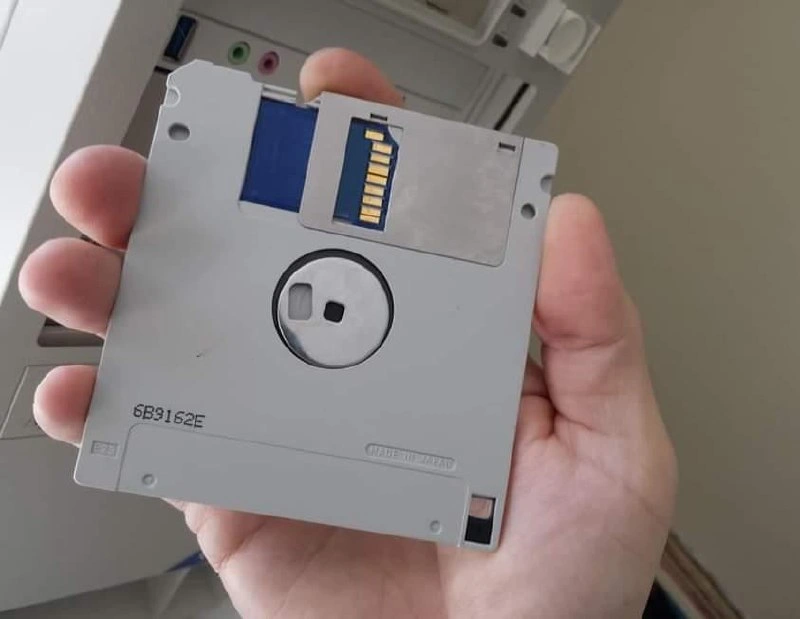
Letâs break down whatâs happening in this image for those newer to hardware. In the photo, someone is holding a 3.5-inch floppy disk that has been modified to include an SD card connector. A 3.5-inch floppy disk is a square, thin piece of plastic (about 9 cm across) that was used in the 1990s to store computer files. Itâs called âfloppyâ because inside the hard plastic shell thereâs actually a flexible magnetic disk that spins. These disks hold a very small amount of data by todayâs standards â usually 1.44 megabytes (which is about one MP3 song or a few high-resolution photos at most). They were state-of-the-art in the early PC days for transferring files and loading software. Youâd insert the floppy into a floppy disk drive (like the one visible as a slot in that beige PC tower in the background), and the computer could read/write data to it magnetically.
Now, an SD card (Secure Digital card) is a much more modern storage device â these are the little flat cards we still use in things like cameras, some laptops, the Nintendo Switch, or smartphones (microSD). SD cards use flash memory, and even a tiny one can hold gigabytes of data (for perspective: 1 gigabyte is about 1000 megabytes, so literally thousands of times a floppyâs capacity). They are also physically much smaller than a floppy disk â you could fit an SD card in the corner of a floppy with lots of room to spare (and thatâs exactly what the image shows: a blue SD card peeking out of the top-right corner of the gray floppy). SD cards use an entirely different method to talk to the computer: instead of a big floppy drive with motors and magnets, an SD card has electronic circuits and you usually plug it into an SD card slot or USB adapter so the computer can access it like a fast disk drive.
In the memeâs picture, the creator literally cut a hole in the floppy diskâs shell and inserted the SD cardâs contact edge (the gold strips) into it. Itâs a visual joke â as if the floppy disk had an âupgradeâ to use modern storage. The text says, âWhen your 3.5-inch floppy gets upgraded with an SD card connector,â highlighting the mash-up. This is funny because in reality you cannot just shove an SD card into a floppy and expect it to work. They are not electrically or logically compatible at all. A floppy drive expects to read data by spinning the disk and sensing magnetism through a read head, whereas an SD card expects a direct digital conversation over a very different interface. The meme is basically saying, âWhat if we tried to adapt old tech to new tech in the laziest way possible â by physically splicing them together?â It pokes fun at the idea of extreme backward compatibility: making something from the 2020s work with a computer from the 1990s by brute force.
For a newcomer: backward compatibility means new technology that can still work with or interface with older systems. Usually, companies achieve backward compatibility in more elegant ways (for instance, a PlayStation 2 could play original PlayStation 1 games â but it did that by including compatible hardware or software emulation, not by duct-taping a PS1 disc to a PS2 disc!). In the hardware hacking world, there are actually devices that let old computers use new storage. For example, there are floppy drive emulators that you can plug into an old computerâs floppy cable â they present themselves as if they were a floppy drive, but actually store the data on a USB stick or SD card. From the old computerâs perspective, it still thinks itâs writing to a slow 1.44MB floppy, but behind the scenes the emulator is saving those files on modern storage. This is super useful for LegacyHardware that canât be easily modified â for example, an old synthesizer or sewing machine that only knows how to save to floppies can be tricked into using a USB flash drive through one of these adapters. The meme, however, isnât showing a proper adapter; itâs a playful hardware_humor visual gag. Itâs like a tech prank: âLook, I glued the new thing into the old thing!â
Key terms:
- Floppy Disk (3.5"): An old removable disk for PCs, storing 1.44 MB via magnetic film. It requires a floppy drive to read/write, with that distinctive whirring and clicking sound. Truly a staple of RetroComputing.
- SD Card: A modern removable storage card using flash memory. Common in cameras and gadgets, sizes like 4 GB, 16 GB, 64 GB, etc. Requires an SD card reader or slot; much faster and more storage capacity.
- Legacy System: An older computer or device still in use, which might only support old media or ports. (E.g., a 90s computer with Windows 95 that only has a floppy drive for external storage.)
- Backward Compatibility: The ability of new tech to work with old standards. Companies sometimes provide this (like a new video game console playing old games). Here itâs joking about doing it in a crude way yourself.
- Hardware Modding: Physically modifying hardware for fun or utility. Enthusiasts do things like put a modern SSD inside an old Commodore 64, or as this joke shows, sticking an SD card into a floppy disk shell. It often involves custom circuits or adapters, not literally just superglue, but the meme simplifies it for comic effect.
So, when you look at this meme, understand that itâs highlighting the huge gap in storage technology between then and now. The floppy disk represents the then (limited storage, slow, but nostalgic), and the SD card represents the now (vast storage, tiny size). By combining them, the creator is joking, âWhat if we simply upgrade our ancient tech by slotting in some modern goodness?â Itâs funny because hardware doesnât work that way so cleanly â you canât normally just connect a 2023 device to a 1993 port without a lot of smart conversion logic in between. But the image gives the illusion that you can just plug an SD card into a floppy disk drive. Itâs a playful nod to the creativity (and sometimes desperation) of tech folks who deal with old systems. If youâve ever struggled to get data out of an old computer, the idea of literally fusing a new storage device into the old disk is both amusing and oddly satisfying to imagine, even if itâs impractical.
Level 3: Frankenfloppy Lives
This meme had seasoned developers and hardware tinkerers smirking, because itâs the ultimate retrocomputing hardware_modding gag: physically grafting a modern SD card into a 3.5-inch floppy disk. Itâs a tongue-in-cheek portrayal of backward compatibility taken to an absurd level. Why is it funny? Because anyone whoâs dealt with LegacySystems knows the pain of trying to upgrade old tech. Weâve all heard something like, âCan we just stick a modern part into it and call it a day?â â well, hereâs that idea made literal. The floppy disk (a proud 1.44 MB megabyte-and-a-half of capacity) is being âupgradedâ with an SD card that likely holds thousands of times more data. The visual is a capacity_mismatch on the order of a few orders of magnitude! Itâs like seeing an ancient Fiat with a Ferrari engine sticking out â comical and awesome in equal measure.
Behind the humor is a dose of TechHistory. Floppy disks were the dominant portable storage through the 80s and 90s for PCs. If you wanted to install software or share files, youâd shuffle a stack of these disks (remember installing Office with 20 floppies?). By the late 90s and 2000s, floppies were superseded by CD-ROMs, then DVD, then USB flash drives â and eventually tiny SD cards and cloud storage. Storage_evolution has been dramatic: from 8-inch floppies holding a few hundred KB, to 5.25-inch then 3.5-inch floppies at 1.44 MB, to zip disks, to CDs (700 MB), to modern SD cards with gigabytes. This meme collapses that timeline, jamming 2020s flash memory into 1980s media. The floppy_sd_hybrid photo screams âTechNostalgia!â â the grey plastic, the metal hub stamped âMADE IN JAPANâ, and the beige PC tower in the background (with a floppy drive bay and even 90s-style colored audio jacks) transport us to a time when that floppy was state-of-the-art. And yet, poking out of the floppy is the blue plastic of an SD card, a 21st-century intruder. Itâs an anachronistic sight gag that any geek can love.
From a senior engineer perspective, thereâs also an implied âwe've done crazier things to keep legacy systems runningâ nod. Honestly, this isnât entirely fantasy â industrial and retro PC enthusiasts do create floppy drive emulators that use USB sticks or SD cards to stand in for floppies. They usually come as little devices that sit in the floppy drive slot or attach to the floppy cable, tricking the old system into thinking itâs spinning a real disk when itâs actually reading a file. In fact, products like the Gotek floppy emulator or DIY projects with Arduino/Raspberry Pi have made this a reality (albeit not by literally cutting an SD card into a disk!). These solutions are lifesavers when the LegacyHardware must be preserved but the original disks or drives have failed. Picture a factory machine or aircraft diagnostics computer from 1995 that only accepts floppies â you canât exactly install Dropbox on it. So engineers find creative hacks like this to bridge eras. The meme just takes that to comic extremes by implying someone literally performed surgery to sew new tech into old.
The comedic tension also lies in imagining the capacity mismatch and underutilization. A modern SD card can easily be 32 GB. If you actually wired that into a floppy interface, the poor old PC BIOS and FAT12 filesystem wouldnât even know what to do with so much space â typically, a 1.44MB floppy is formatted with FAT12 which maxes out at that size. It might only ever use a tiny fraction of the SD card, like using a supercomputer to do a pocket calculatorâs job. And speeds? The floppy interface is snail-slow (data transfers under 100 KB/s) whereas SD cards are used to tens of MB/s. Thatâs like funneling a fire hose through a coffee stirrer. Below is a cheeky comparison that senior tech folks will appreciate:
| Feature | 3.5" Floppy Disk | SD Card (Modern) |
|---|---|---|
| Introduced | Late 1980s PC era | Early 2000s digital era |
| Storage Medium | Magnetic disk (1.44 MB) | NAND Flash (gigabytes) |
| Typical Capacity | 1.44 megabytes | 32 GB (â33,554 MB) |
| Form Factor | Rigid disk, 90Ă94 mm square | Tiny card, ~24Ă32 mm |
| Interface | Floppy controller (ribbon cable, IBM Shugart standard) | SDIO or SPI bus (digital lines) |
| Data Rate | ~250 Kbit/s (0.25 Mb/s) | ~50 Mb/s (UHS-I, vastly higher) |
| Access | Sequential tracks/sectors (motor seeks, heads move) | Random access blocks (solid-state) |
| Backward Compat | PCs used floppy drives until early 2000s | Often requires USB adapter for PCs |
This table underlines the absurdity: weâre combining a device from a time when megabytes were huge with one from the era of terabytes. The meme pokes fun at this gulf of progress. Yet, it also lovingly acknowledges how some of us canât let old tech die â weâll perform hardware Frankenstein surgery just for the satisfaction (or the challenge) of making a square peg fit a round hole. Itâs a celebration of TechHumor and innovation born out of necessity. After all, ânecessity is the mother of invention,â and sometimes necessity says âIâve got an old machine that only knows floppies, but I want it to load All The Data⢠from this SD cardâ. The result? A contraption like this, equal parts ingenious and insane.
Floppy Drive: "Wait... I feel different, am I holding gigabytes now?"
Mad Engineer: "Yes, dear floppy. Weâve given you an organ transplant. Now donât freak out, just act normal and feed the data through..."
In summary, Frankenfloppy lives â and it humorously reminds seasoned tech folks of both how far weâve come and the extreme lengths we go to bridge the past to the present.
Level 4: Legacy I/O Alchemy
At the deep hardware level, this meme mashes together two utterly different storage technologies, highlighting the insane complexity of making them speak to each other. A 3.5-inch floppy disk from the 1980s uses magnetic storage and an analog read/write mechanism: a tiny electromagnet head physically senses magnetic flux reversals on a rotating plastic disk. It communicates through a low-level Shugart bus interface (the floppy drive connector) with signals for motor control, track stepping, and a raw data stream encoded in formats like MFM (Modified Frequency Modulation). In stark contrast, an SD card (Secure Digital) is a fully digital flash memory device. It expects high-speed serial commands (like SPI or the proprietary 4-bit SD protocol) and reads/writes data in fixed-size blocks, with an onboard controller handling wear leveling and error correction.
Bridging these two is nothing short of digital sorcery. To actually make a floppy drive bay read an SD card, youâd need a custom microcontroller inside that floppy casing. This microcontroller would play double agent: on one side impersonating a floppyâs magnetic disk timing (spitting out data bit-by-bit at ~250 kilobits/sec in sync with a pretend 300 RPM rotation), and on the other side fetching and writing data in bulk from the SD cardâs flash memory at modern speeds. This involves real-time signal processing â the microcontroller must generate a stream of pulses that the vintage floppy controller in the PC will accept as legitimate data. Essentially, it performs on-the-fly format conversion: translating the PCâs requests for âtrack 17, sector 5â into an SD card file lookup, then clocking out the bytes as if they came from magnetic media. Precision is key: if the timing is off by microseconds, the old floppy controller could mis-read the bits or throw a drive error.
This improbable protocol necromancy highlights a fundamental truth: old hardware has hard-coded expectations about data rates and formats, which modern storage completely bypasses. The memeâs hybrid floppy-SD illustrates the concept of a backward compatibility shim taken to extremes â it's like implementing a tiny embedded computer inside a floppy, solely to MIMIC a floppy for the host PC while actually storing data on a silicon chip. The humor is rooted in this absurd complexity hidden behind a simple retro facade. In theory, thanks to the universality of computation, itâs possible to emulate a floppy drive with a modern microcontroller (Turing completeness in action â even a modest MCU can simulate the finite-state behavior of a floppy). In practice, it's a hilariously convoluted task: ensuring the legacy floppy disk controller is satisfied, down to every index pulse and sector gap, while the SD cardâs gigabyte capacity is throttled and translated into a format from the DOS era. This is computing archaeology meets cutting-edge tech â a literal and figurative interface between magnetic nostalgia and flash futurism.
Description
A close-up photo of a person's hand holding a standard grey 3.5-inch floppy disk. The metal shutter at the top of the disk is slid open, but instead of the usual magnetic disk, it reveals a modern SD card cleverly fitted inside. The gold contact pins of the SD card are clearly visible. In the blurred background, the corner of an old, beige desktop computer tower can be seen. The image is a humorous and clever hardware modification that physically combines obsolete and modern storage technology. It plays on the fact that the floppy disk is the universally recognized 'save' icon in user interfaces, creating a real-life, high-capacity version of this iconic symbol
Comments
32Comment deleted
The original 'save' icon held 1.44MB. This version can hold the entire node_modules directory. Progress
The CIO said, âKeep the legacy interface, just add storage.â So we shipped a 512 GB SD card throttled through a 1.44 MB flap - finally, a hardware analogy for every âthin adapter layerâ weâve written since â99
Finally, a floppy disk that can hold more than half a modern npm install - though at this rate, node_modules will still find a way to exceed even this upgraded capacity
When your legacy industrial CNC machine from 1995 still demands floppy disks but you refuse to maintain a stockpile of degrading magnetic media, you get this beautiful abomination - a 1.44MB interface pretending to understand gigabytes. It's the hardware equivalent of running a modern microservice architecture behind a COBOL API facade. The real kicker? This adapter probably has more storage capacity in its controller firmware than the original floppy could hold, and it'll outlive the machine it's servicing by decades. Nothing says 'technical debt' quite like physically bridging four decades of storage technology evolution just to load G-code
Entire production DB fit on this bad boy - no sharding, no replicas, just pure, unpartitioned bliss
Backwards compatibility is the Adapter pattern in plastic: wrap a 64GB SD in a 3.5" shell so the mainframe still writes to /dev/fd0 - then act surprised when throughput is 300KB/s
Because the PLC bootloader only speaks FAT12 on A:, we shipped an SD card dressed as a 3.5-inch disk - an MCU faking CHS and 300âRPM vibes; management calls it modernization
flashpy disk Comment deleted
me waiting for people to come here to ask "what's that?" đ Comment deleted
Same Comment deleted
Thatâs save icon duh Comment deleted
đž Comment deleted
đ¤¨đ¤¨đ¤¨đ¤¨ Comment deleted
What's that? Comment deleted
As if the SD card were modern. Comment deleted
what's next? tape CDs? wait's that's HDDs nvm Comment deleted
What do you mean HDD? Scroll a bit above to the first post on 27tg of November ;) Comment deleted
flash sticks with disks Comment deleted
micro flopSD Comment deleted
That SD card case looks like save icon, huh... Comment deleted
https://youtu.be/8IZcP0oP0OU Comment deleted
That 3 1/2 is unicode. You canât name your floppy like that afaik. Ofc you can modify the language pack (.mui) to have unicode string in place of unnamed drive. Comment deleted
Isnât that the default name? Comment deleted
I doubt. At least it wasnât before unicode translations Comment deleted
Unicode is a thing since Windows NT ever existed Comment deleted
And this string is default name on OS when such disk is unnamed Comment deleted
Try it in XP Comment deleted
Donât have a vm with me atm Comment deleted
I just tried you are right Comment deleted
But I am also right in hungarian version Comment deleted
Iirc Turkish one had that 1/2 too Comment deleted
Yeah translation and adaptation took a while Comment deleted