Claude CLI Alias for Automated Git Commit Review in Terminal
Why is this CLI meme funny?
Level 1: Robot Spots the Difference
Imagine you have two drawings that look almost the same, and you need to find what’s different between them. Normally, you’d stare at them yourself or maybe ask a friend to help point out the changes. Now suppose you have a little robot buddy who can do it for you. You tell the robot, “Look at these two drawings and tell me everything that changed, and whether those changes are good or bad.” While you sit back, the robot compares the drawings and then explains, “Okay, I found that in the new drawing you added a sun in the corner, you erased the tree, and you changed the house’s color from blue to red. Overall, the picture now feels brighter with the sun, but maybe a bit empty without the tree.”
This meme is like that, but with code instead of drawings. The programmer didn’t feel like hunting for all the tiny differences in their code or thinking about what those differences mean. So they basically built a one-click (or rather one-word) solution by asking a smart computer program to do it. It’s funny because it’s a mix of clever and lazy – clever to make the computer do the work, lazy because the person didn’t want to do a basic review themselves. It’s as if a student didn’t want to read their own homework changes and asked a robot to summarize them. The heart of the joke is that feeling we all know: wouldn’t it be nice if someone (or something) else could do this tedious part for me? Here, that “something” is an AI, acting like a super helpful friend who spots the differences and even comments on them, while the programmer relaxes for a moment. It makes us smile because, well, who wouldn’t want a robot helper to take care of the boring bits?
Level 2: Lazy Code Review Bot
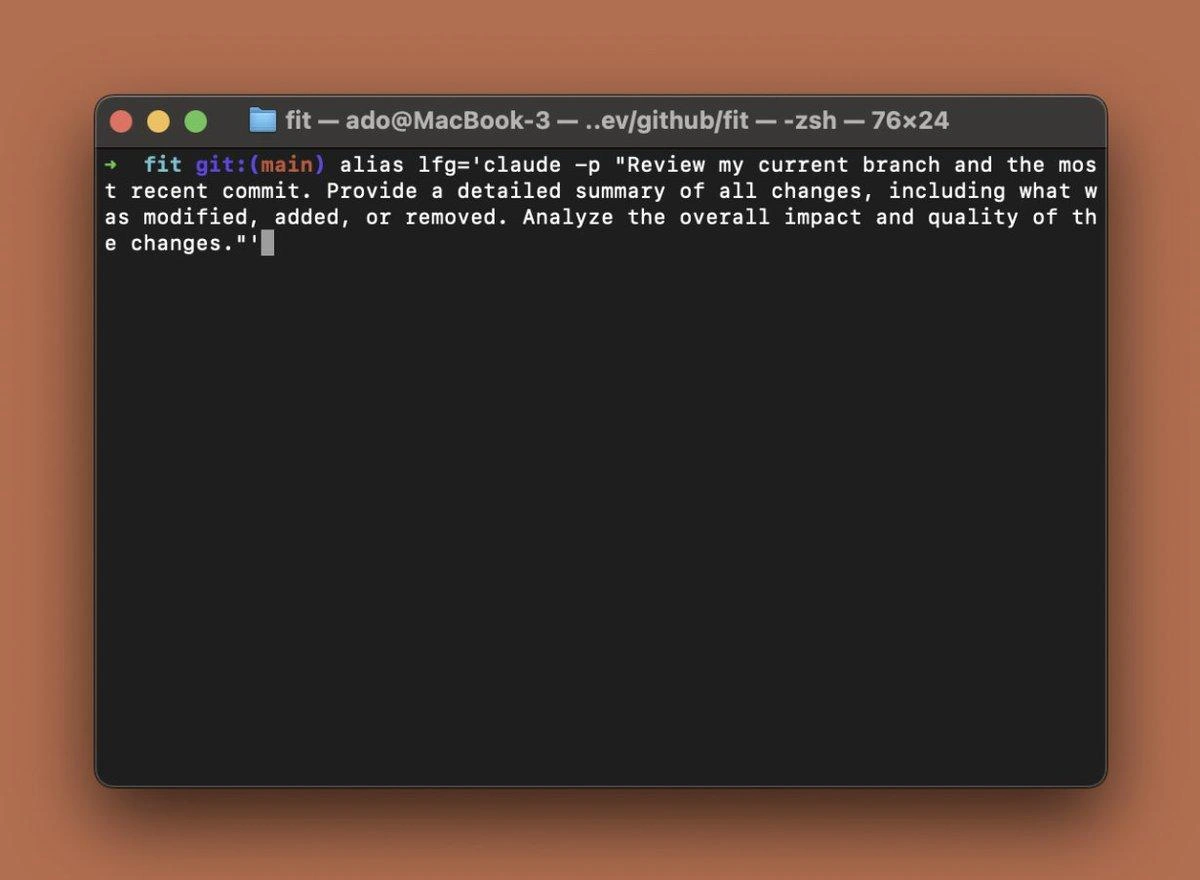
Stepping down to a simpler explanation: this meme is about using an AI to do a code review for you via a shortcut command. In the image, we see a Mac terminal window with a prompt that shows fit git:(main) – that means the user is in a directory (perhaps a project folder named "fit") which is a Git repository, currently on the main branch. In Git (the popular version control system), a branch like main holds the latest code. Developers often create new branches to work on features or fixes, and then compare changes using commands like git diff. The command git diff shows the differences between your current code and something else (like another branch or the last commit). It’s basically how you see what changed in your code – what lines were added, removed, or modified.
Now, normally after writing some code, you might look at the diff yourself and then ask a teammate to do a code review, where they also look at the diff and give feedback. What’s happening in this meme is the programmer made a shell alias called lfg to automate that review process using an AI. A shell alias is like a custom nickname for a longer command in your terminal. For example, if typing out git status is too much work, you might do alias gs='git status' so that typing gs does the same thing. It’s a common productivity trick for developers who live in the command line (CLI). Here, the alias is lfg and it’s set equal to a command that calls claude with a prompt. So whenever the developer types lfg, it runs:
$ alias lfg='claude -p "Review my current branch and the most recent commit..."'
# The alias is defined; the part in quotes is the prompt sent to the AI.
$ lfg # run the alias to perform an AI-based code review
Changes Summary:
- Modified 2 files (`user_controller.js`, `user_service.js`)
- Added new function `updateUserEmail` in `user_service.js`.
- Removed old email validation code from `user_controller.js`.
Impact & Quality:
The logic for updating user emails is now centralized in the service layer, which simplifies maintenance. Overall, this change improves code organization. Just double-check that all parts of the app now use `updateUserEmail` so nothing breaks.
(In the example above, the first line defines the alias. After that, when the user runs $ lfg, the alias invokes Claude. The AI’s output is shown as a summary of changes with some analysis.)
So, basically the developer has wired up Claude, which is an AI assistant similar to ChatGPT, to act like a code reviewer. The -p option likely stands for “prompt”, meaning we’re providing a prompt string to Claude. The prompt string is written in natural language: "Review my current branch and the most recent commit. Provide a detailed summary of all changes, including what was modified, added, or removed. Analyze the overall impact and quality of the changes." This is exactly what you’d tell a human reviewer: “Hey, look at what I just committed, tell me what changed and if it’s good.” Claude (the AI) will read that instruction, presumably read the actual code changes (the alias would have to feed those in, possibly by piping git diff output into Claude’s input, though the meme shorthand doesn’t show the entire command), and then it will generate a response: a summary of the changes and some commentary on them.
The funny part is the idea of a “lazy code review”. Code review normally means another programmer (or yourself) carefully examining the diff. It can catch bugs, ensure coding standards, and help share knowledge. Here, instead of doing that manually, the person just types one short command and gets an instant report. It’s lazy in a comedic sense: the heavy lifting (reading and explaining the diff) is handed off to the computer. For a junior developer, imagine you finish an assignment and instead of checking it yourself or asking a friend to check it, you press a button and a smart assistant instantly tells you what’s different and whether it seems right. That’s what’s happening. The developer created a bot friend to do the boring review step.
Let’s break down some terms and tools in this scenario:
- CLI (Command Line Interface): That’s the text-based interface where you type commands (like the black Terminal window with
zshshown in the image). Many developers use the CLI to interact with Git and other tools because it can be faster and scriptable. - Git: A version control tool that tracks changes in code. Knowing what branch you’re on (here
main) and what changed (git diff) is part of everyday use of Git. - Alias: A shortcut for commands. By defining
lfgas an alias, the dev doesn’t have to retype the long prompt every time – they just typelfg. - Claude: This is the AI being used. Claude is an AI chatbot (created by Anthropic) similar to others like ChatGPT. It understands prompts and returns answers. Here it’s being used to interpret code changes and produce a summary. You can think of Claude as a really advanced automation tool that can read and write natural language about your code.
- Prompt engineering: That’s the act of writing your question or instructions for the AI in a precise way to get the answer you want. In the alias, the prompt is engineered to be quite specific so that Claude will act as a thorough code reviewer, not just a brief change logger. The prompt explicitly says “what was modified, added, or removed” and asks for analysis of “impact and quality,” which nudges the AI to give a detailed and structured answer (as opposed to a very high-level or generic answer).
For a newer developer, the cool factor here is pretty high. It shows how tools like AI are being woven into programming tasks. If you’ve ever struggled to understand a large git diff or to summarize your changes for a commit message or pull request description, imagine having an AI do that summary for you. It’s like having an assistant who’s really good at reading code quickly. There’s even a practical upside: if you’re not yet great at reading diffs, an AI summary could help double-check that you didn’t miss anything. It might point out “hey, you removed that function call, which could affect feature X,” acting like a second pair of eyes. Of course, it’s also a bit tongue-in-cheek because relying on an AI to do something so fundamentally human (judging code quality) feels a bit like a student having a robot write their book report. It’ll get the job done in a factual sense, but it might miss the deeper understanding. The meme is essentially showcasing a mix of DeveloperTooling and humor: even code reviews, a task traditionally done person-to-person, can be automated with a clever hack. And as a developer, it’s both funny and intriguing to see that in action.
Level 3: Rubber Duck 2.0
Now let’s step down to a senior developer’s perspective. The meme shows a dev who has basically turned an AI into their personal code reviewer with a shell alias. In the terminal screenshot, the user defines alias lfg='claude -p "Review my current branch and the most recent commit…"'. To a seasoned programmer, this is both impressive and hilariously absurd. It’s impressive because, wow, we can actually do this now – just fire off a one-liner and get a comprehensive summary of code changes. But it’s absurd (in a tongue-in-cheek way) because it screams “I’m so lazy I wrote code to review my code!”. A lot of us have spent late nights meticulously running git diff and poring over each line changed, either reviewing a teammate’s code or double-checking our own before committing. That ritual is almost sacred in software teams: the code review. And here comes someone replacing the careful buddy system of peer review with, essentially, an AI-powered rubber stamp. It’s as if the classic rubber duck debugging technique got a 2025 upgrade: Rubber Duck 2.0, now with actual talking points. Instead of explaining your code changes to a silent rubber duck to spot issues, you explain nothing – you just ask the AI duck to quack out a critique for you.
The humor really lands with those of us who’ve been around the block because it highlights a mix of Automation and irony. Developers have a well-known habit: if something is annoying or repetitive, script it away. Hate manually typing the same commands? Write a bash alias. Tired of merging huge pull requests? Automate part of the workflow. But here it’s taken to the extreme: the “annoying” thing is reading your own code diff or writing a summary for a peer. So of course, someone automated that with an AI assistant. It’s the ultimate manifestation of dev laziness (or efficiency, depending how you see it). We joke that a good programmer is lazy in a productive way — they’d rather write a program to do a task than do it manually twice. This alias lfg is a perfect example. You can almost hear the inner dialogue: “Why waste my brain parsing these changes when I can have a bot do it and just read the Cliff’s Notes?”. It’s funny because it’s relatable — plenty of senior engineers have fantasized about tools to handle the boring parts of the job. Now that fantasy is real, living right in the terminal.
There’s also a layer of shared skepticism in the joke. Experience teaches you that code reviews aren’t just about listing what changed — tools can do that (even Git itself tells you what lines were added or removed). The real value is in the why and how – context, deeper issues, implications. So an seasoned dev might chuckle and think, “Sure, go ahead and let a robot tell you your code is perfect…” knowing full well that an AI might miss the nuance. In a darkly comic way, we imagine how this plays out in a real team:
"Sure, let a robot praise your code, and let's see who gets paged at 3 AM when something breaks."
That’s the cynical veteran outlook: great, the AI said the changes look fine – until they’re not, and then who shoulders the 3 AM emergency? The meme lightly pokes at this potential folly. It exaggerates the scenario where a dev might trust an AI’s “LGTM” (Looks Good To Me) and merge without proper scrutiny. Veterans have been bitten by “obvious” changes that weren’t so obvious, so the idea of blindly leaning on a bot reviewer is both funny and cringe-inducing.
On the flip side, it’s hard not to marvel at how far tooling has come. AI/ML has infiltrated our development process in a few short years. Not long ago, the idea of an AI code reviewer would sound like sci-fi or a joke. Now we have things like GitHub’s Copilot suggesting code, and experimental features that draft pull request descriptions or find potential bugs. This meme rides that wave of hype: hooking up a powerful AI (Claude, from Anthropic, which is a real AI like OpenAI’s ChatGPT) directly into the Git workflow via the command line. It’s both bleeding-edge and tongue-in-cheek. The alias basically says, “hey Claude, here’s my repo, do the needful.” It blends the old-school hacker vibe (command-line power user forging custom tools) with cutting-edge tech (an AI writing English summaries of code). To a senior dev, that contrast is amusing: we’ve gone from using simple tools like diff and grep to involving anAI that uses advanced language models – just to tell us what changed in our code. It’s like using a rocket ship to cross a street. Overkill? Maybe. Cool? Absolutely, a little.
There’s also a cultural nod here: the alias is named lfg, which in gamer slang stands for "Looking For Group" (like when you need teammates for a quest). But in developer (and internet) slang, LFG is short for "Let's F***ing Go!" – a very enthusiastic “heck yeah, let’s do this”. Naming the alias lfg is the meme-maker’s sly way to convey excitement or bravado about this shortcut. It’s like the dev is so pumped about offloading code review to AI that they’re shouting “let’s go!” each time they use it. There’s an irony here: usually code review is a moment of caution and care, but hitting lfg is more like a dare, as if saying “I trust you, AI, let’s roll with it!” It encapsulates that mix of hype and reckless trust that can come with new tech. Seasoned engineers recognize this pattern: new tools come, folks get overenthusiastic, and sometimes skip traditional safeguards because hey, this new thing is awesome. The meme captures that sentiment in one tiny alias.
From an industry perspective, it’s also poking fun at the AI hype cycle in developer tooling. We’ve seen waves of tools promising to eliminate drudgery: first it was high-level languages, then GUI builders, then test automation, etc. Now it’s AI everywhere. Got writer’s block writing unit tests? Ask AI. Don’t feel like documenting your code? AI can do it. And here: don’t even want to review your changes? Just alias an AI to do it. It’s funny because it imagines a slightly exaggerated but not implausible future where no part of the development lifecycle is safe from automation. The term yak-shaving comes to mind: developers doing a bunch of side tasks (like setting up API keys, writing prompt scripts, configuring CLI tools) just to avoid some main task (reading diffs). In the end, they’ve done a lot of work not doing the work, which is comedic in itself. The meme exaggerates it to great effect: a one-liner that replaces the human interaction of code review. It’s a combinational humor of VersionControlHumor and AIHumor – the clash of Git habits with AI trends. For those of us who remember laboring over code diffs in plain text, seeing it condensed to alias lfg='claude -p "...review my commit..."' is both a facepalm and a laugh. It’s like saying “We’re so advanced (or lazy) now that even our diligence can be delegated.” The end result might be useful or it might be a terrible idea, but as a meme, it perfectly captures the zeitgeist: developers are chatting with AI bots in the terminal, and nothing – not even code review – is sacred anymore.
Level 4: Ghost in the Shell (Script)
At the highest technical level, this meme hides a ghost in the shell script – an invisible AI reviewer lurking behind a simple alias. Under the hood, Claude is a Large Language Model (LLM), essentially a sophisticated text-inferring engine built on the Transformer architecture. When you ask it to “Review my current branch and the most recent commit…”, you’re invoking a complex machine learning model that treats code diffs as just another sequence of text tokens. It’s pretty wild: an enormous neural network with billions of parameters gets pulled into action by a one-line shell command. This is effectively piping your code changes into a predictive text engine that’s been trained on vast swathes of the internet (likely including tons of open-source code). That one-liner alias is bridging your local CLI with a cloud-based AI model – turning a casual terminal command into a heavyweight remote computation.
From a theoretical standpoint, what’s happening is akin to an NLP (Natural Language Processing) task being applied to software engineering. The AI doesn’t really understand the code in a compile-run sense; it isn’t building an abstract syntax tree or performing static analysis like a compiler or linter would. Instead, it’s leveraging pattern recognition. The model has seen countless examples of code and human-written summaries or discussions about code during training. So it predicts a plausible explanation of the diff: “X lines added here, Y removed there, function A changed to B, likely impact is Z,” based on statistically likely continuations. We’ve replaced painstaking manual diff comprehension with what is essentially a very educated guess by a machine. It’s a bit like using a sledgehammer to crack a nut – extraordinary computational power to automate a tedious human task – but that’s the era we’re in. When you have a magic hammer (a giant pre-trained model), every problem starts to look like a nail.
One intriguing aspect is the context window these modern LLMs offer. Claude is known for a large context window (tens of thousands of tokens in 2025), which means it can ingest a whole commit diff, or even multiple files worth of changes, in one go. The alias is presumably feeding the model the content of the current branch’s diff (perhaps via piping git diff output into the prompt, though the meme doesn’t show the whole mechanism). With a huge context, the AI can consider the entire change set at once, maintaining coherence in its summary. In earlier generations of AI, you’d be limited by token length – a big commit would overwhelm the model or require chunking – but now you can dump a massive diff and get a single, holistic review. This increase in capacity makes the one-liner possible in practice; the AI won’t just summarize the first 100 lines and ignore the rest, it can actually chew through a substantial code delta.
However, there’s an inherent limitation rooted in how these models work. They predict text; they don’t verify code logically. When the prompt asks Claude to “Analyze the overall impact and quality of the changes,” the AI will comply by generating an analysis that sounds credible. It might say the refactor is improving performance or that the new code is well-structured – but it’s basing that on patterns (e.g., recognizing certain changes as common bug fixes or refactors it has seen before). There’s no guarantee its analysis is correct in a factual sense; it’s not actually running the code or proving the design’s soundness. In formal software engineering terms, we’ve swapped out any hope of formal verification or guaranteed correctness for a probabilistic oracle. The AI is like a highly knowledgeable parrot: it can repeat wisdom it’s seen about code that looks similar to yours. It’s impressively good at this, but it operates on correlations, not actual comprehension or intent. This is where the satire kicks in for the experts – they know that code reviews are about understanding intent and context, something an AI can approximate but not truly grasp. The whole setup is a marvel of prompt engineering: the user carefully worded the request to steer the AI into producing a thorough-sounding review. It shows how even automating laziness requires skill, because you must know how to ask the AI the right way. The end result is an AI-powered code reviewer that feels like a ghost in the machine: incredibly knowledgeable, eerily helpful, but ultimately just imitating the role of a human reviewer without the genuine accountability or insight that a real developer would have.
Description
A screenshot of a macOS terminal (zsh) in a directory called 'fit' on the 'main' branch. The command shown is: alias lfg='claude -p "Review my current branch and the most recent commit. Provide a detailed summary of all changes, including what was modified, added, or removed. Analyze the overall impact and quality of the changes."' This shows a developer creating a shell alias that pipes a prompt to Claude CLI to automatically review their latest git changes, demonstrating the integration of AI coding assistants directly into terminal workflows
Comments
12Comment deleted
We've gone from 'git log --oneline' to 'please summarize my own code changes back to me because I wrote them at 2 AM and genuinely have no idea what I did.'
The 'lfg' alias is the modern dev's equivalent of pinging '@here' in the pull-request channel. The main difference is the AI responds in seconds and never complains about your lack of comments
Who needs a second set of senior-eyes when your alias spawns a sleepless LLM that nit-picks whitespace, explains the trade-offs, and never bikesheds over tabs vs spaces?
After 15 years of crafting commit messages, you realize the AI writes better prose about your code than you ever did - but it still can't explain why you thought that regex was a good idea at 3 AM
When you're so tired of writing detailed commit messages that you outsource your code reviews to an AI, only to realize Claude now knows more about your codebase's technical debt than your entire team combined. At least when the AI judges your 'quick fix' commits, it doesn't passive-aggressively mention them in standup
Nice alias, but without piping git diff you’ve built prayer‑as‑a‑service - an LLM blessing a commit it can’t see
Finally automated LGTM: a zsh alias that summons Claude without piping git show - enterprise-grade, context-free approval
Git alias to Claude: Because human reviewers block on 'LGTM' while AI hallucinates approvals at inference speed
"powered by * AI" in a nutshell Comment deleted
Soy dev Comment deleted
Dev can't just do the duck method in his git commits Comment deleted
lfg="let's fkn go"? Comment deleted