
VPN Google Analytics Dependency Meme Explained
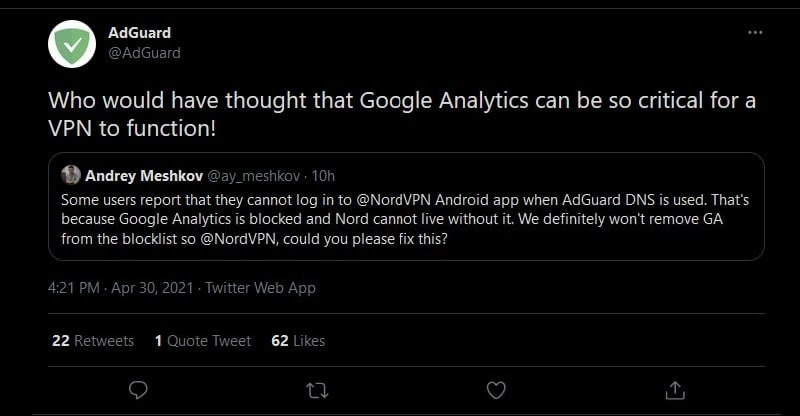
A tweet roast shows NordVPN’s Android app failing login when Google Analytics is blocked by AdGuard DNS. The dive explains hard third-party tracking dependencies, single points of failure, and why telemetry must never gate authentication.
Level 1: The Silly Lock and Key Analogy
Imagine you have a house with a high-tech lock on the front door. This lock is like a VPN app – it’s there to keep you secure. Now, you go to unlock your door with your key (just like logging into the app with your password). But here’s the catch: this peculiar lock always tries to make a phone call to its company right before it lets you in. It’s as if the lock wants to tell the manufacturer, “Hey, John is opening the door now!” Pretty weird, right? Now, suppose you really value your privacy, so you set up something that blocks the lock’s phone from calling out (just like AdGuard DNS blocking Google Analytics). You’re basically saying, “I don’t want my lock tattling to the company every time I open my door.” Reasonable enough. But – because of the way this lock was built – if it can’t make that call, it refuses to unlock the door for you. 😮 You’re standing outside your own house with the right key, but the door won’t open just because it couldn’t gossip to the manufacturer. How silly is that!
This is exactly what happened in the meme’s story, but with software: The NordVPN app (the door lock) wouldn’t let users log in (unlock) because it couldn’t talk to Google Analytics (make its little data call). People find it funny (in a head-shaking way) because the VPN’s job is to let you in and protect you, not to stop you because it can’t send out some unnecessary report. It’s like a coffee machine that refuses to brew coffee unless it can first send your usage data to the company; if you disconnect the wifi to keep your use private, the coffee machine says “No coffee for you!” It’s absurd. In simple terms, the thing that was supposed to serve you won’t do its job because it can’t do a completely unrelated tracking task. That’s why developers and tech-savvy folks are chuckling – it’s a ridiculous design mistake that even a non-tech person can find goofy: imagine if your car wouldn’t start because it couldn’t send a status update to the factory. You’d probably say, “That’s a bad car design!” Exactly – and in our case, it was a bad app design, and everyone hopes it gets fixed so the VPN (like the lock or car) works independently, as it should.
Level 2: Tracking Dependency 101
So what exactly happened here? Let’s break it down in simpler terms. We have a mobile app – specifically the NordVPN Android app. NordVPN is a service that provides a Virtual Private Network, meaning it helps keep your internet connection private and secure. You’d think its login process would be straightforward: you enter your username/password, and it connects you to the VPN. However, the app also includes a piece of code from Google called Google Analytics (GA). Google Analytics is a very common web analytics service that developers embed in apps and websites to track usage stats – things like “how many users logged in today” or “which features are used most.” It’s basically a third-party tracking tool: third-party because it’s provided by Google, not by NordVPN themselves, and tracking because its job is to collect data on user actions.
Now, enter AdGuard DNS. DNS stands for Domain Name System – think of it like the phone book of the internet, translating human-friendly names (like google-analytics.com) to the numeric addresses computers use. AdGuard DNS is a special kind of DNS service that, besides doing the normal lookups, also blocks known tracking and advertising domains. It has a blocklist – a list of servers it will refuse to give an address for, effectively nullifying any requests to them. Google Analytics is on that blocklist, because many people consider analytics tracking an invasion of privacy or just don’t want their data sent to Google.
So we have the NordVPN app trying to talk to Google Analytics, and AdGuard DNS saying “Nope, I’m not letting you reach that tracker.” The surprising result: the VPN’s login fails. Users reported that when they use AdGuard DNS on their phone (to block trackers and ads system-wide), they suddenly couldn’t log in to their NordVPN app. At first, this sounds bizarre – why would logging into a VPN depend on Google’s tracking service? In theory, it shouldn’t! Analytics is supposed to be optional. But in practice, it looks like the app was written in a way that expected Google Analytics to respond. Maybe the app’s logic was like, “log this login event to GA, then proceed to connect,” and it didn’t anticipate a situation where GA was unreachable. Because AdGuard DNS blocked GA, the app never got a response, possibly got stuck or hit an error, and thus the login process didn’t complete.
This is essentially a bug in the app. In software terms, NordVPN’s Android client had a dependency on GA – meaning it relied on GA being available. And that dependency was handled poorly. Good practice is that if analytics fails, you silently move on. Here, instead, the app couldn’t function without it. As the tweet jokingly said, “Nord cannot live without it.” For a junior developer or someone new to MobileDev, the lesson is: be cautious with your app’s dependencies. A dependency is any external component or service your app uses. If that component isn’t available, what happens? Always code defensively: if the analytics service is down or blocked, the app should still work for the user. The user might notice that maybe their actions aren’t being recorded, but it shouldn’t stop them from logging in or using the app.
Let’s clarify some of the terms and concepts involved in this meme:
- Google Analytics (GA): A popular analytics SDK (Software Development Kit) by Google used in apps/sites to gather data about user behavior. It’s often used to track events like app installs, screen views, button clicks, etc. Companies use it to understand usage patterns or for marketing insights.
- NordVPN: A VPN provider. Their app lets users connect to a VPN server to encrypt their internet traffic and hide their IP. Essentially, it’s a privacy tool – people use VPNs for secure browsing, to evade eavesdropping, or to access region-blocked content.
- VPN login: The process where you enter credentials in the app to authenticate with NordVPN’s servers before it connects you. This should typically just involve NordVPN’s own servers checking your account.
- AdGuard DNS: A DNS service that blocks trackers/ads. When you use it, any app that tries to reach a known advertising or analytics domain (like Google’s
analytics.google.comor similar) will be prevented, as if that domain doesn’t exist. It’s like a filter at the network level. - Blocklist: The list of domains AdGuard DNS will block. It’s maintained by AdGuard (or the community) and includes thousands of trackers, ad servers, and malicious sites. Google Analytics is on that list since it’s considered a tracking domain.
- Dependency: In coding, if your code relies on something else – another service or library – that something is a dependency. Here the NordVPN app’s login flow had a dependency on the GA service (through the GA library).
- Privacy vs functionality: This refers to the trade-off or conflict between protecting user privacy and delivering features. In this case, the user’s attempt to enhance privacy (using AdGuard to block trackers) clashed with the app’s functionality (logging in), because the app wasn’t designed with that privacy scenario in mind. Ideally, using privacy tools shouldn’t break core functionality, but sometimes developers make choices (or oversights) that cause this kind of conflict.
- Tracking SDK overreach: This is a way of saying the tracking tool is affecting more than it should. A tracking SDK like GA is supposed to quietly collect data. If it “overreaches,” it means it’s impacting the app’s behavior in a noticeable way. Here, GA overreached by becoming so entangled with the app that blocking it crashed the login – definitely more effect than a tracker is meant to have.
For a junior dev, this story might be an eye-opener. It shows why separating concerns in your code is important. Analytics (concern: collecting data) should be separate from authentication (concern: logging the user in). Combine them incorrectly, and you get weird bugs. It’s also a reminder to handle failures gracefully. If you’re writing an app and call out to some external service (say, an API or a tracking service), always ask: What if this call fails? If the answer is “my app can’t proceed,” reconsider that design unless it’s truly unavoidable. In many cases, like logging analytics, the app can and should proceed without waiting. Modern best practices in mobile development encourage making analytics calls asynchronous and non-blocking. That way, if they fail (network issues, user is offline, or using something like AdGuard DNS), the user experience is unaffected.
To sum up this meme’s scenario in plain terms: NordVPN’s Android app had a hidden tripwire. If the app couldn’t reach Google’s analytics servers – which happened when users used a privacy-friendly DNS – the login process tripped on that wire and fell flat. This little technical flub became public when AdGuard’s team noticed and jokingly called NordVPN out on Twitter. It’s both a funny and educational moment: funny because of the irony (a privacy app depending on a tracker), and educational because it teaches why making core features depend on outside services (especially ones that might be blocked for privacy) is a bad idea.
Level 3: No Analytics, No Service
At first glance, this scenario looks like a textbook DependencyHell moment: an app’s core functionality faceplants because a third-party tracking service got blocked. In the meme’s tweet, even AdGuard (the DNS privacy tool) is poking fun at NordVPN: “Who would have thought that Google Analytics can be so critical for a VPN to function!” 😬 Seasoned developers immediately recognize the dark humor here. A VPN app – software meant to safeguard privacy – fails to log in if it can’t reach Google Analytics (GA), of all things. It’s the ultimate irony: a privacy tool rendered useless by a tracking SDK being unavailable. This is the kind of brittle design that makes senior engineers do a double-take (and maybe a facepalm 🤦♂️). We’ve all seen bizarre production bugs, but a VPN client breaking because analytics is blocked is one for the books.
From a senior perspective, the issue boils down to a critical dependency on analytics. The NordVPN Android app appears to treat GA as a single point of failure during user authentication. In other words, if the app can’t phone home to Google’s analytics servers, it refuses to let you log in. It’s as if the code says, “No tracking? No access!” This resonates as a cautionary tale in MobileDev and beyond: never tie essential features to non-essential services. Why is this funny to experienced devs? Because it satirizes a real anti-pattern: letting a third_party_tracking library (meant for marketing or telemetry) interfere with the app’s primary function. It’s like discovering the bank vault login mechanism won’t open unless the security camera (operated by someone else) is online – absurd and a bit scary.
Digging deeper, it highlights a privacy_vs_functionality conflict. Many NordVPN users are privacy-conscious; they might use something like AdGuard DNS specifically to block trackers (including GA) for better privacy. AdGuard’s DNS blocklist essentially gives a polite “nope” when the app tries to reach google-analytics.com. A well-behaved app would shrug and carry on. Instead, NordVPN’s app throws a silent tantrum and refuses to authenticate the user. This “Nord cannot live without [GA]” dependency (as AdGuard’s CTO Andrey Meshkov phrased it) exposes questionable design priorities. It suggests that someone in the development chain put Google’s analytics telemetry on the critical path. Perhaps a dev tied the login flow to a GA event (like logging a “user_signed_in” event before completing login), and if that call fails, the whole login process aborts. It could even be an initialization step: maybe the GA SDK is initialized at app startup or login, and if it can’t reach the mothership, it returns an error that wasn’t handled properly. Either way, it’s a tracking_sdk_overreach – the analytics code reaching far beyond its remit and breaking things.
To industry veterans, this smells of a familiar problem: poor separation of concerns in software design. Analytics should be a background task – fire-and-forget logging that never impacts user-facing functionality. But here we have tight coupling: the app’s logic is coupled to the success of a network call to Google. It’s an architectural faux pas. We can imagine two likely causes: either a logical misstep (e.g., treating a failed analytics call as a login failure) or simply a bug where an exception from the GA library isn’t caught, thereby halting the login process. This could be as trivial as a missing try/catch around a telemetry call. In code, it’s almost like:
// Hypothetical: the app foolishly treating Analytics as mandatory
if (!canConnectTo("https://www.google-analytics.com")) {
    throw new RuntimeException("Analytics unreachable, abort login!");
}
authenticateUser(username, password); // Only runs if GA call succeeded
😅 Obviously, we hope no one wrote it exactly like this, but the outcome sure feels that way. The humor (and horror) for devs is that this isn’t a far-fetched scenario – many of us have seen something similar. Remember those web pages that wouldn’t load because a JavaScript analytics script was blocked by an ad-blocker? Same energy, except here it’s a security app doing it. It’s a comical example of Dependency gone wrong: an optional component became a non-optional choke point.
Why is this situation so relatable? Because it’s a perfect storm of enterprise pressures and oversight:
- Product Management/Marketing likely insisted on “metrics everywhere” – even at login – to track user engagement. The devs integrated GA to capture that sweet usage data. 📊
- Engineering probably assumed GA is ubiquitous and hardly ever truly unreachable (“who blocks Google?” they might have thought 🙄). They might not have accounted for DNS-based blocking or offline scenarios in testing.
- There’s an implicit trust in third-party SDKs to fail gracefully. Perhaps they assumed the GA SDK would timeout silently. But assumptions are the mother of all bugs.
- Users in this case did something absolutely reasonable for privacy (using AdGuard DNS), accidentally becoming testers of an edge case the developers didn’t consider. And boom – vpn_login_failure.
The tweet going viral puts a spotlight on this as a public bug report cum roast. AdGuard essentially said, we’re not changing our privacy stance (we’ll keep blocking GA), so hey NordVPN, fix your app. Developers in the know chuckle because it’s a bit of a “🍵 sip and watch” moment: one privacy company calling out another company’s sloppy reliance on a tracker. It’s also a learning moment. Robust systems design tells us to avoid hard dependencies on network calls, especially third-party ones, during critical workflows. As a senior dev, you design your login to succeed whether or not the analytics endpoint is available. Log the event if you can, but if not, oh well, user still gets in.
In broader context, this scenario underscores how dependency management and respect for user DataPrivacy go hand in hand. If your app respects privacy, it shouldn’t freak out when trackers are blocked — it should welcome it. The meme’s humor has a bit of a bite: it reveals how even a VPN provider (which sells trust) might internally prioritize tracking just a tad too much. And that’s both funny in an ironic way and concerning. Seasoned engineers laugh, then immediately think, “Time to double-check none of our critical features secretly depend on something like that.” Because nobody wants to be on call at 3 AM finding out “it was blocked analytics causing the outage”. In summary, the critical_dependency_on_analytics here became a real-world footgun, and the developer community’s dark laughter is half “I can’t believe they did that” and half “there but for the grace of God go we.”



NordVPN's login flow is the Schrödinger's cat of privacy: it simultaneously protects your identity and reports it to Google Analytics, and you don't know which state it's in until you check your DNS logs
The privacy stack, in prod: tap “Connect” → POST to google-analytics.com → wait for 204 → begin ‘zero-log’ tunnel - because nothing says security like a tracking pixel as your single point of failure
Nothing says 'we protect your privacy' quite like a VPN that literally won't let you log in without phoning home to Google Analytics first. It's like a bank vault that requires you to livestream yourself entering the combination
A VPN company - whose entire value proposition is privacy and blocking trackers - ships an Android app that literally cannot authenticate without Google Analytics. It's the architectural equivalent of a locksmith who can't open their own front door without first checking in with the neighborhood watch. This is what happens when product analytics become so deeply embedded in your auth flow that your privacy tool becomes a tracking dependency. The real kicker? Users discovered this by using *another* privacy tool. It's turtles blocking turtles all the way down
If blocking Google Analytics breaks your VPN login, you’ve put telemetry in the auth hot path - zero trust, except for Google
If blocking GA bricks auth, you didn’t add observability - you shipped Single Point of Failure as a Service; move telemetry off the critical path and let it fail open
NordVPN's auth flow: OAuth optional, but GA pings mandatory - because in privacy engineering, the tracker is the trusted root CA
jazz music stops
Reads like satire. Dayum
Поясните плз
Впн приложение не работает когда блокировщик рекламы выключает гугл аналитику внутри впн приложения... Не надо так... делать приложения...
Пф, так я в итоге и свалю. Не ожидал что подобные картинки такой клоун выкладывает. Предупреждения он мне делает... Не переоценивай себя, программист-неудачник который свой потенциал слил в телеграм канал и пытается тут поднять своё эго
Есть нормы ответа. Человек задал вопрос на русском - на том же языке ему дали ответ
and for the record: if anyone here isn't good at english, please just start practicing it. Asking over and over for translations isn't the way. You can start by translating stuff you don't understand with google translate (or something similar) and get better from there.
Do you really think there is at least one non-slavic member?
So he does this because he can't understand us?
Gooduck with that
It's just funny how here and on some other channels the comment section is just a bunch of slavs speaking english hoping it will attract international audience. This usually doesn't work
But of course if those are the rules...
Would that even be an en chat