
DevCommunities Post #3862 · source on Telegram
Why search tabs when Google will relink you to Stack Overflow again
Description
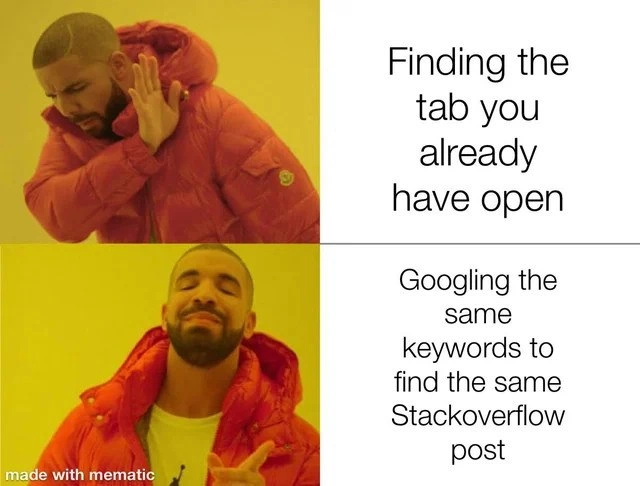
The image uses the well-known two-panel orange-puffer-jacket meme template. Top panel: a person in a bright orange jacket turns away in rejection; the adjacent text says, "Finding the tab you already have open." Bottom panel: the same person smiles and points approvingly; the adjacent text says, "Googling the same keywords to find the same Stackoverflow post." Faces are blurred, background is solid yellow, and the meme was generated with the "mematic" app (small watermark in the lower left). Technically, it pokes fun at developers who keep countless browser tabs open yet still rerun the same search query to reach the identical Stack Overflow solution, highlighting habitual workflow friction and knowledge-retrieval inefficiency
More like this
More like this in DevCommunities →


Use J and K for navigation
Comments
28Comment deleted
Chrome tabs are my immutable event log - appending a fresh Google search for the same Stack Overflow answer is way cheaper than running the ‘find existing read model’ query
The 247 tabs in my browser are a distributed cache with eventual consistency - I just prefer the lower latency of a fresh Google search over implementing proper indexing
Senior engineers know the real productivity metric isn't lines of code per day - it's the ratio of Stack Overflow tabs opened to tabs actually closed. We've all achieved that zen state where Googling the same error message feels more natural than Ctrl+F through our 47 open tabs, because let's face it: Google's search algorithm is better than our memory, and Stack Overflow's purple links are the only documentation we trust
Browser tabs are like microservices: they proliferate uncontrollably, defy orchestration, and nuke your RAM when the monolith crashes
My brain's tab index is O(n), but Ctrl+L -> retype is O(1) to the same Stack Overflow canonical, eventually consistent after every context switch
Finding the existing tab is a linear-time search across a distributed monolith called Chrome; re-Googling the same StackOverflow post is an idempotent request with better p99 latency
That's why everyone keeps 9999+ tabs opened Comment deleted
Why do I relate so much Comment deleted
XDDD Comment deleted
Modern browsers search in opened tabs too. And yes. Sometimes I find out that I already have my question opened somewhere. Comment deleted
Usually if you have all that much tabs browsers would just offload most of them or put to sleep mode, so depending on the level of snappiness of your computer it may actually be faster to open the page again than to reactivate that tab Comment deleted
I think no workflow ever makes it actually faster to keep more than 15 tabs open Comment deleted
Oh? I have an extension to destroy them completely after 10 minutes of inactivity. So I load it again every time. The speed is not a problem for me. Comment deleted
reading this and seeing the history search function in modern browsers being a default makes me sad Comment deleted
That's a feature I use quite a lot and would relly miss. I can open most sites I use regularly by typing just two letters. And that's an easy way to find back something I read a while ago, usually easier and more reliable than to try to remember specific keywords to search or the path I took to find that page Comment deleted
Of course you can disable it if you don't like that Comment deleted
I have >600 tabs. And I can't remember jtc1 sc22 wg21 p2996r13 in https://www.open-std.org/jtc1/sc22/wg21/docs/papers/2025/p2996r13.html Comment deleted
the browser indexes the page title too Comment deleted
Good. But I don't want to rely on it. I want to have it be 100% reachable. Bookmarks will do better. But I just don't have a habbit to use them. Comment deleted
In my experience firefox's history search has been very reliable, better than searching again with Google. Thanks to that I can close tabs I don't need right now and be confident I'll reopen them when needed. I don't need to ask myself whether to bookmark a page, as it's already in the history index anyway. The only case where I use bookmarks is for lists of pages I'll want to all open at the same time Comment deleted
oh yeah, I do that pretty often. I'm pretty sure that it forgets visited URLs sometimes tho, I guess it occasionally cleans old history? Comment deleted
But I've just had a bad experience with Chrome, which is more or less imposed at work. Because it deletes history older than a few months (not sure if that's by default or a company policy). Comment deleted
maybe have less tabs and instead use bookmarks? idk Comment deleted
to each their own I suppose Comment deleted
oh wait I misread, my b. I guess searching page contents in bookmarks wouldn't work. Comment deleted
You can use raindrop or some other bookmark utility. Comment deleted
oh, that sounds neat. maybe I'll take a look at raindrop, thanks for the recommendation Comment deleted
Scrape it and search with fzf? Comment deleted