
The Art of Linux 'Ricing', Taken Literally
Description
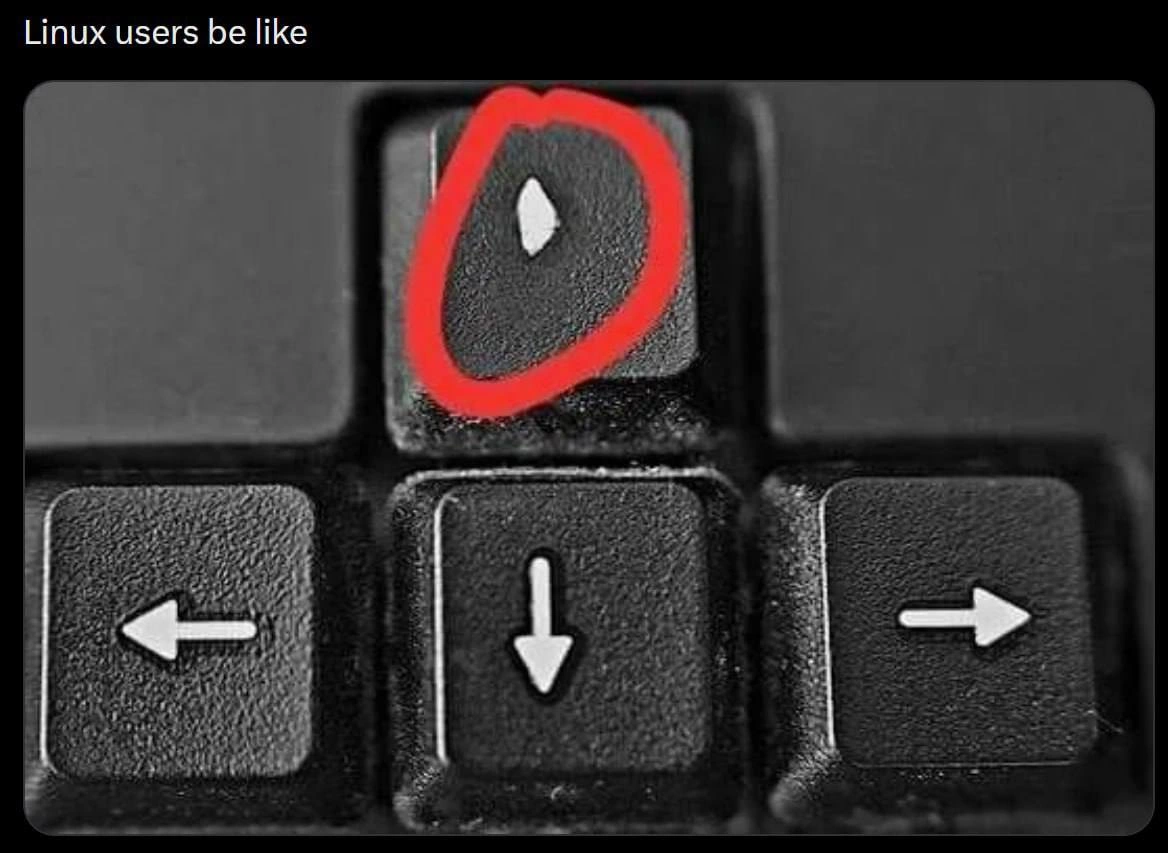
A close-up, black-and-white image of a keyboard's arrow keys, with the text 'Linux users be like' displayed at the top. The 'up arrow' key is circled in red, and sitting on it is a single, small, white grain of rice. This meme is a clever and literal visual pun on the term 'ricing,' which, in the Linux and open-source communities, refers to the process of heavily customizing a desktop environment's user interface for aesthetic or functional purposes. The joke contrasts the technical, often complex act of software customization with the simple, absurd act of placing literal rice on a keyboard. It's a niche, inside joke that resonates deeply with experienced Linux users who are familiar with the community's slang and obsession with personalization



Comments
31Comment deleted
Some people think 'ricing' is about compiling a custom kernel and patching dwm for a 2% performance gain. The true enlightened know it's about achieving the perfect aesthetic balance between your keycaps and your choice of grain
In our threat model, the only critical resource without redundancy isn’t the database - it’s the up-arrow key holding our entire runbook in ~/.bash_history
After 15 years of explaining to junior devs why hjkl is superior, you realize the real productivity gain wasn't the 50ms saved per navigation, but the 500ms of compile time you get to blame on not reaching for the arrow keys
The worn up-arrow key is the physical manifestation of every Linux user's relationship with `history | grep` - we know it exists, we know it's more efficient, but there's something deeply satisfying about mashing that up arrow 47 times to find the `docker-compose` command we ran three days ago. It's not laziness, it's *muscle memory optimization*. Meanwhile, that pristine down arrow sits there judging us, completely unaware that in the terminal, time only moves backward
Linux keyboards evolve: the down arrow achieves asymptotic frictionlessness after a decade of 'less +F' tail-chasing
Our MTTR proxy is microns of ABS missing from the ↑ key - every sudo !! shaved off another incident
On my Linux box the arrow cluster is decorative - navigation lives in hjkl, up arrow is just reverse‑i‑search bait, and the rest got remapped to tmux panes and i3 workspaces
history | grep part-of-command Comment deleted
Ctrl+r Comment deleted
shell completion Comment deleted
I keep forgetting that and just grep .zsh_history The fluff is wrong with me? Comment deleted
it is always more efficient to search for the command 50 lines above rather than typing 5 characters Comment deleted
I don't get this... any examples? Comment deleted
you're about to type a command, but you remember typing it earlier and you start vigorously searching through for it, thinking it is recent enough (it isn't) for example clear or smth Comment deleted
I see... thanks Comment deleted
Clear -> Ctrl+L Comment deleted
I use arch btw Comment deleted
I don't get it Comment deleted
(explain) Comment deleted
Pressing up in terminal pastes the previous command Comment deleted
I didn't know. Have to try this, arrow is never a good idea Comment deleted
I think vim user will map ctrl + j/k to arrow up/down Comment deleted
zsh works with ESC+jk by default I think Comment deleted
Damn Idk thanks Comment deleted
for fish like shell it's -> Comment deleted
I use arch btw Comment deleted
Not with a backlit keyboard Comment deleted
fzf Comment deleted
Idk if it's built into zsh or I'm using an addon, but that's the behaviour of my terminal. Comment deleted
it's "k" key acktually. this comment is sponsored by Vim gang. Comment deleted
C-p Comment deleted