
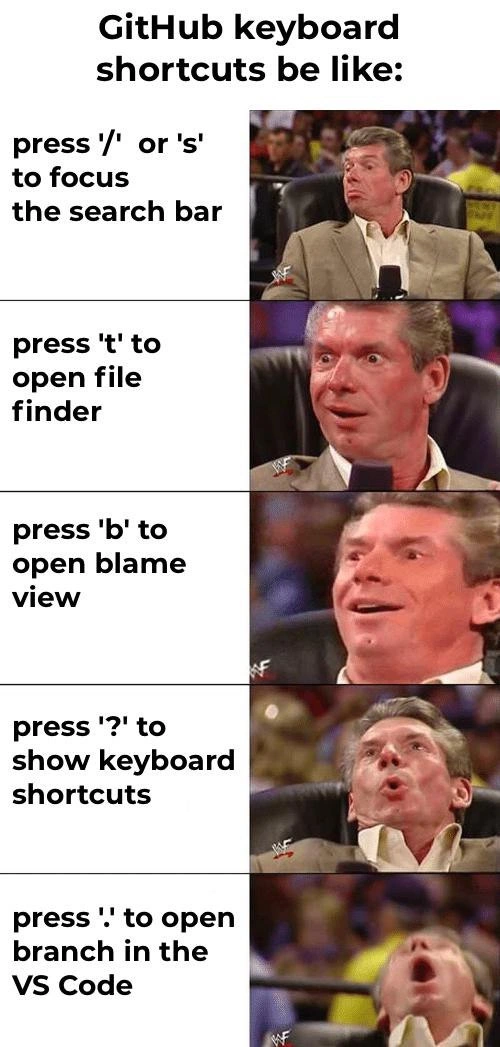
Each GitHub shortcut escalates developer excitement from useful to mind-blowing
Description
A five-panel vertical Vince McMahon reaction meme is headed by the sentence "GitHub keyboard shortcuts be like:". In the left column, black text on white rectangles lists shortcuts: "press '/' or 's' to focus the search bar", "press 't' to open file finder", "press 'b' to open blame view", "press '?' to show keyboard shortcuts", and "press '.' to open branch in the VS Code". Each corresponding right-hand panel shows the same suited man sitting in a wrestling-arena chair, his blurred face progressing from calm interest to eyes-wide, slack-jawed euphoria, culminating in an almost airborne scream of delight in the final frame. The meme humorously dramatizes how power users discover GitHub hotkeys that accelerate repository navigation, Git blame analysis, and instant browser-based VS Code editing, highlighting small DX improvements that feel revolutionary. It plays on familiar version-control workflows and keyboard-centric productivity revered by experienced engineers

Comments
16Comment deleted
Senior dev hierarchy of GitHub shortcuts: '/' to search tech-debt, 't' to locate the file, 'b' to nominate the scapegoat, '?' to flex your mastery, and '.' for the inevitable Friday hotfix-from-the-airport that reappears in next year’s blame
The real power move is explaining to your PM why you spent three hours configuring vim keybindings in the GitHub web editor after discovering the '.' shortcut, only to realize you could've just cloned the repo and used your local setup with 15 years of muscle memory intact
The real GitHub power move isn't knowing these shortcuts - it's the existential crisis when you realize you've been clicking through the UI like a caveman for years while '.' could've opened VS Code in the browser this whole time. That final panel perfectly captures the moment a senior engineer discovers they've been manually navigating file trees when they could've been pressing 't' like a civilized human. It's the developer equivalent of learning your IDE has had a 'Go to Definition' shortcut all along while you've been grep-ing through codebases
Pressing 'b' for blame in our blameless postmortems is peak irony; meanwhile '.' is the highest‑ROI key this quarter - github.dev launch, zero installs, near-zero context switch
GitHub shortcuts map the panic curve: '/' optimistic search, 't' monorepo archaeology, 'b' locating the Friday merge, '?' pretending there’s documentation, and '.' accepting you’ll ship the hotfix from github.dev
GitHub hotkeys: where ? shows you ?, proving even the help needs help after 20 years of repo wrangling
Press Ctrl + K to open the command palette Comment deleted
Press Ctrl + Backspace to delete word Comment deleted
Press Alt + F4 for memes Comment deleted
Am I the only one who edits code in Vim and then pushes to the repo!? Comment deleted
no Comment deleted
Yes, only you are using vim and then pushes to the repo Comment deleted
LOL, I know I'm not, I just don't find it useful to code in a browser!! Comment deleted
Apparently it's actual VS Code, but in a real browser. You can install plugins here. Of course with it's limitations: Comment deleted
Ohh, I see, I tried compilling VS Codium with no success, I don't have VS Code installed yet!! Comment deleted
also, there is vim key bindings plugin for vs code 👀 Comment deleted