
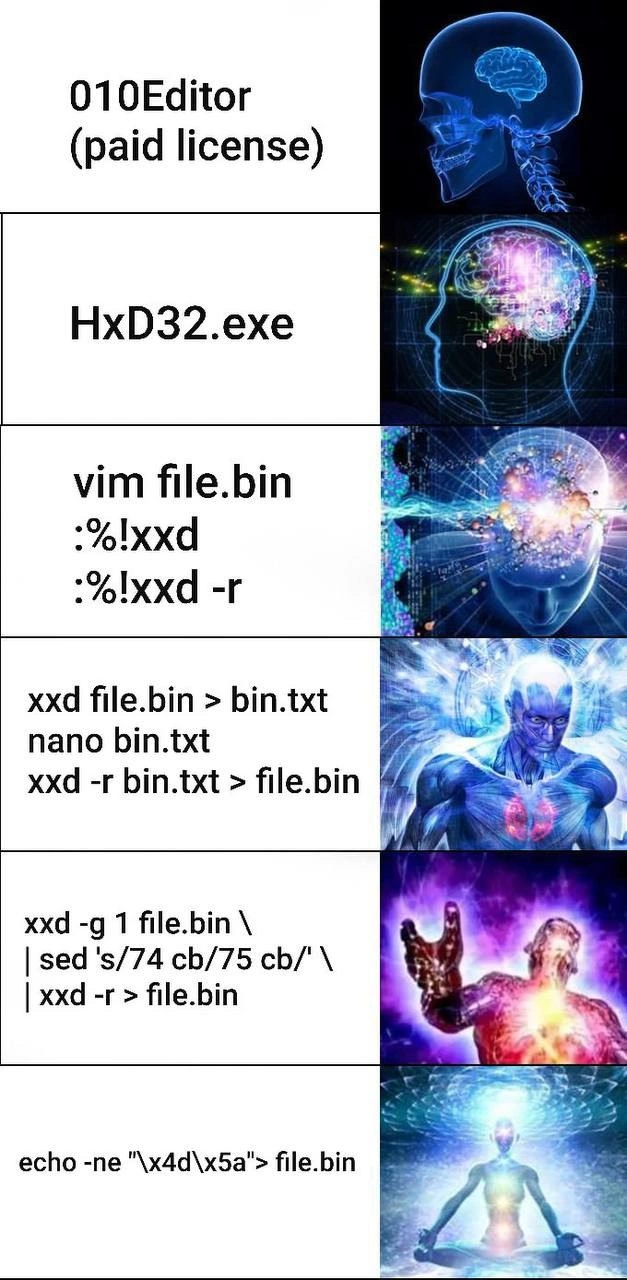
The Ascended Path of Binary File Editing
Description
This is a multi-panel 'expanding brain' meme, illustrating a progression of methods for editing binary files, from simple to esoteric. Each panel on the left shows a command or tool, while the right shows a corresponding image of an increasingly enlightened or powerful being. It starts with user-friendly GUI tools like '010Editor (paid license)' and 'HxD32.exe'. It then moves to using standard command-line tools in clever ways, such as converting a binary to hex in 'vim', or dumping hex to a text file to edit with 'nano' and then converting it back. The complexity escalates to a convoluted pipeline using 'xxd', 'sed', and back again. The final, most 'enlightened' stage shows the simplest and most direct command: `echo -ne "\x4d\x5a" > file.bin`, which directly writes the magic bytes for an executable file. The humor lies in the irony that the most complex-looking solutions are often not the most elegant, and true mastery is in the simplest, most direct command, a journey of discovery familiar to many senior engineers



Comments
32Comment deleted
The junior dev uses a GUI hex editor. The mid-level dev builds a 5-stage pipeline with sed and awk. The senior dev just uses echo. The principal engineer has a co-worker who knows how to do it
Real dev zen is realising your entire hex editor can fit in an echo pipe and still pass the company’s ‘no new dependencies’ mandate
The same engineer who writes a 47-step sed pipeline to change one byte is now architecting your microservices mesh with 200 dependencies to serve a contact form
Patching 74 to 75 with sed - turning JZ into JNZ via regex is how license checks die and how seniors prove they never actually needed the debugger
The real galaxy brain move is spending 3 hours crafting the perfect sed one-liner to patch a single byte instead of just opening the file in a GUI hex editor and clicking once. But hey, at least you can put that pipeline in your dotfiles and pretend you'll need it again someday - right next to that awk script you wrote in 2019 that you're absolutely certain will be useful 'eventually.'
Real senior move: treat binary patching as text processing - xxd -g1 | sed 's/74 cb/75 cb/' | xxd -r - and save the license budget; enlightenment is remembering echo -ne "\x4d\x5a" can be a perfectly acceptable recovery plan
Hx32.exe for mortals; echo -ne '\xDå' for those who've transcended the GUI
Peak senior move: turn hex edits into a reproducible xxd | sed | xxd -r target, commit it to git, and let CI review the bytes
I understand 0 from that Comment deleted
Same Comment deleted
Seems like converting text files to binary Comment deleted
4th is so familiar Comment deleted
Is meme about different ways of editing/saving as binary files? Comment deleted
I laughed at paid license but I didn't understood the purpose. I'm just the men you gonna call when you don't know how to press that simple button. 🥲 Comment deleted
This is different ways to edit binary file. But the last one not edit file, but fully replace its content. IDK is it by purpose or not Comment deleted
Things I don't know here: - 010Editor - HxD32.exe - xxd - the meaning of "\x4d\x5a" so yeah I get this meme 👍 Comment deleted
Paid hex editor Free hex editor vim in hex editor mode Binary<->hex encode decode program with GUI editor for bytes replacements Binary<->hex encode decode program with stream editor for bytes replacements Output entire patched file byte by byte with echo hex encoded strings (incomplete solution) Comment deleted
I wouldn't call Nano GUI editor. It's terminal equivalent of notepad.exe, something as dumb that the controls fit on the bottom line of the screen. (Of course it wouldn't be software if it didn't bloat to the point of now having a syntax highlighting engine. It's editing capabilities are still as sharp as a spoon though.) Comment deleted
TUI, if you like. The point was it's interactive editor, not stream. Comment deleted
Yeah. A CLI editor such as sam or ed would actually make sense here though for non-interactive use. As would dd invocations with precise byte offsets. But it would be less galaxy brain approach. Comment deleted
In addition, sed will make too many incorrect replacements on such a short pattern. dd is the more efficient way if you know the exact offset. Comment deleted
Yeah, it kind of reminded me of CRISPR. AKA why we don't allow genetic editing of human embryos. You have no clue what places the edits might end up affecting. Comment deleted
xxd is a tool that ships with Vim that allows you to encode and decode hexadecimal formats. The -r flag is "reverse", that is it converts hexadecimal representation of a file back to normal. https://linux.die.net/man/1/xxd It's rather simplistic. If you need actual binary patch format there is plenty to choose from. Even the Intel .HEX format can be used as one. Comment deleted
What is :%!xxd ? Comment deleted
launch external executable, xxd Comment deleted
Yuuki and @CcxCZ thanks! On what platforms does this work? Comment deleted
i think every platform which supports vim and xxd Comment deleted
Any capable of running Vim Comment deleted
xxd is part of Vim technically. But you may need to tweak executable path which IIRC is optional step during install on Windows. Comment deleted
It's even in drop-down menu in gvim, unless they changed that in last decade. It's a pretty standard feature. Comment deleted
https://cdn.arstechnica.net/wp-content/uploads/archive/vim0509/gvim_ars.png Comment deleted
: run ex command % select all of the file ! filter through external executable, writing to it's standard input and reading from it's standard output xxd hexdump, explained in comments above Comment deleted