
IDEs Editors Post #7923 · source on Telegram
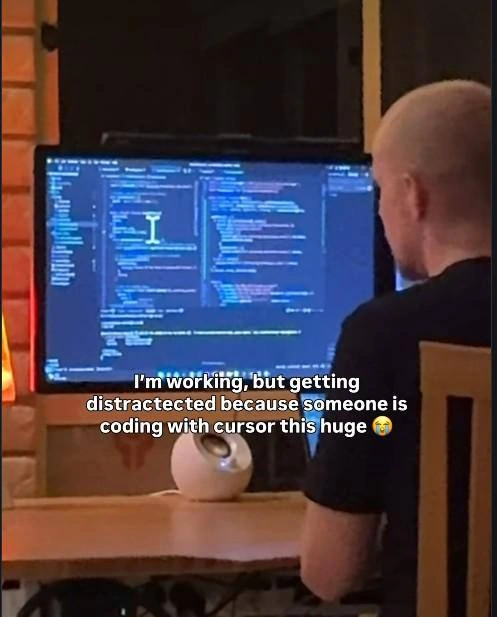
Distracted by Someone Coding With a Cursor This Huge
Description
A candid photo taken from behind shows a man with a shaved head in a dark t-shirt sitting at a wooden desk, facing a large monitor displaying a dark-themed IDE full of code; a comically oversized text cursor (I-beam) is visible in the middle of the editor. A small white spherical speaker sits on the desk and warm lamp light glows at the left against a brick wall. Overlaid white caption text reads: "I'm working, but getting distractected because someone is coding with cursor this huge 😭" (typo 'distractected' included). The joke is a double entendre on the AI coding editor 'Cursor' versus the literal giant text cursor on screen, riffing on the wave of AI-assisted coding tools
More like this
More like this in IDEs Editors →

Use J and K for navigation
Comments
12Comment deleted
Twenty years in and the most disruptive thing Cursor shipped is making 'check out my huge cursor' a legitimate standup update
The cursor has more pixels than the feature it’s pointing at.
He was told that coding with cursor will speed up his work massively Comment deleted
He was told that cursor is a big thing in the development space recently Comment deleted
His senior said "I'm a big cursor fan" Comment deleted
kde plasma cursor zoom Comment deleted
enlargement™ it's actually called magnification Comment deleted
cursor-oriented development or smth Comment deleted
I rather spend hours searching for it... No wait. Mine is big, too. And red. Comment deleted
Finding cursor at a random place is annoying, so I'm using this size too... Comment deleted
how tf do you point Comment deleted
just normally, It's hard for macos since the point is inside the cursor, but for Windows, it's not that hard... Comment deleted