
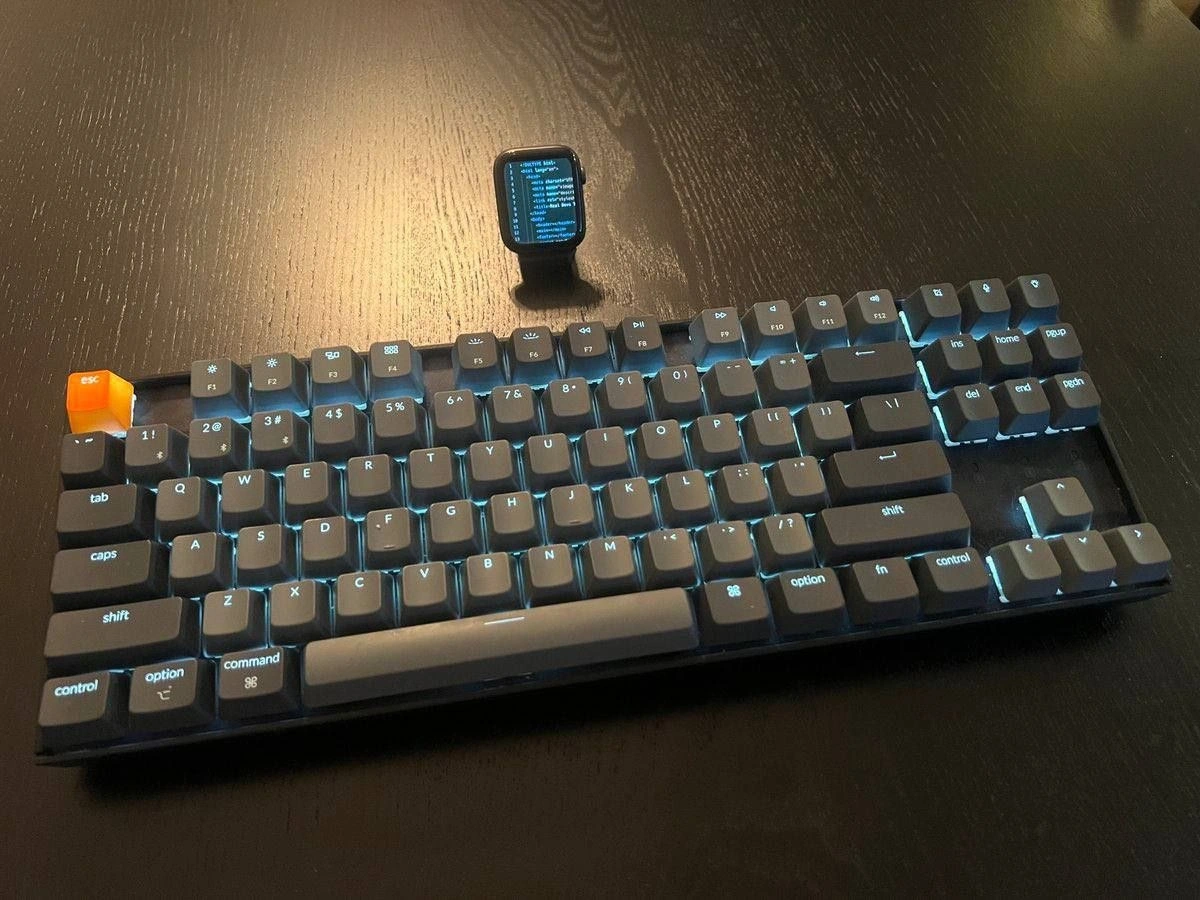
Developer desk flex: glowing keyboard with orange ESC and smartwatch task monitor
Description
A dark wooden desk hosts a compact back-lit mechanical keyboard whose legends glow cyan. Every key is labeled, including the orange translucent “esc” key, the function row (f1 - f12), number row “1 !”, “2 @”, “3 #”, “4 $”, “5 %”, “6 ^”, “7 &”, “8 *”, “9 (”, “0 )”, navigation cluster “ins”, “home”, “pgup”, “del”, “end”, “pgdn”, and modifier keys “tab”, “caps”, “shift”, “control”, “option”, “command”, and “fn”. Letter keys “q w e r t y u i o p”, “a s d f g h j k l”, and “z x c v b n m” are also visible. Behind the board an Apple Watch stands upright, its tiny blue-on-black screen headed “task list:” followed by unreadably small bullet lines, implying a live dev checklist or CI status feed. The bright custom keycap and macOS-style legends nod to the mechanical-keyboard subculture and developer ergonomics, while the watch doubles as a miniature dashboard - an inside joke about squeezing productivity metrics onto every surface
Comments
32Comment deleted
Achieved peak DevOps minimalism: swapped in an orange ESC for one-stroke rollback and compressed the entire Grafana board onto a 44 mm watch face - our SEV-1s are now literally too small to see
After 20 years of optimizing build times and reducing Docker images to mere kilobytes, you finally achieve peak efficiency: your entire development environment now fits on your wrist, but you still need a mechanical keyboard because let's face it, typing 'git push --force' on a 44mm screen would violate the Geneva Convention
When your Apple Watch has better syntax highlighting than your production monitoring dashboard, but at least you can debug on your wrist during standup meetings. The orange ESC key is perfectly positioned for those moments when you realize the 'quick fix' you deployed at 4 PM Friday is now paging you at 2 AM - though with that keyboard, you're probably already awake optimizing your keybindings anyway
Made ESC hi-vis because at 3 a.m. it’s the only idempotent API I trust - exits Vim, exits Zoom, exits that “low‑risk” kubectl apply while PagerDuty is buzzing on my wrist
The only code that fits on my watch: everything else accrues technical debt by the millisecond
Incident response optimized: tail -f on the smartwatch; Esc bound to ‘rollback --now’. MTTR is now measured in thumb travel
When other devs are looking: I use wim on my 69 core 1TB RAM machine, with 5K ultra-wide monitor used in portrait mode Every developer when nobody is looking: Comment deleted
Vim? Comment deleted
Nah kim Comment deleted
Finally, Mini PC Comment deleted
please use English in this chat Comment deleted
https://t.me/dev_meme/3667 tr(ru>en) "Is this how development for watch looks like? I know nothing about this" Comment deleted
I suppose, it's almost the same as android development — programm is written on a computer, launched on an emulator, but tested on the device Comment deleted
Keychron K8? Comment deleted
seems so Comment deleted
where are keypad alt and window keys? Comment deleted
This is a TKL keyboard with mac layout, option = alt, cmd=win, google 60% keyboards, you'll be surprised. I personally love working on a 60% but it's always a question of preference. Comment deleted
Why do you need a keypad? Are you an accountant? Comment deleted
Someone with 3D software actually might need that Comment deleted
i have a bunch of keybinds on it Comment deleted
So you do not use it as a keypad, i see... Comment deleted
Numpad is the most ergonomic and error-free way to enter numbers. Not only accountants do that. ("Decimal numbers, mf, do you use them?") Not to mention that these keys are also very useful for gaming, even more so that they are placed regularly rather than staggered like letter keys. Comment deleted
Left numpad would be much better. And not a lot of people really need it. Also, you can make numpad-layer under YUIHJKNM, and with orto keyboard it would be even more ergonomic than left numpad Comment deleted
Left numpad would be much better. If you are left-handed, then yes, perhaps. Otherwise it will be nearly useless. You can make numpad-layer under YUIHJKNM, and with orto keyboard it would be even more ergonomic than left numpad. If you are fond of undersized laptop keyboards (and maybe tiny on-screen keys of cell phones) with their screwed layouts and Fn combos, then why don't you just use one and leave desktop keyboards in peace for those who are totally comfortable with them? Comment deleted
No, if you are right-handed. You use mouse with main hand and using mouse, numpad and keyboard with one hand is very unoptimal. Comment deleted
When gaming — yeah, sure. But even then I need it to the right of cursor keys, not elsewhere. When entering numbers with numpad — nah, I use the right hand. Comment deleted
For what? Left hand is not so useless. And about numpad-layer - if it is under letters, you dont need to move hand somewhere from keyboard and position it. Thats not about compactness, thats about ergonomic Comment deleted
left hand for wasd eq shift ctrl alt tab right hand for numpad mouse enter home and others Comment deleted
Are you a vim user? 😁 Comment deleted
No, laptop keyboards are very bad for me. But why do I need to use standart desktop keyboards if I can buy comfortable and ergonomic keybpard? Comment deleted
Rate my setup? ©️ Comment deleted
imagine coding using clock's on-screen keyboard Comment deleted