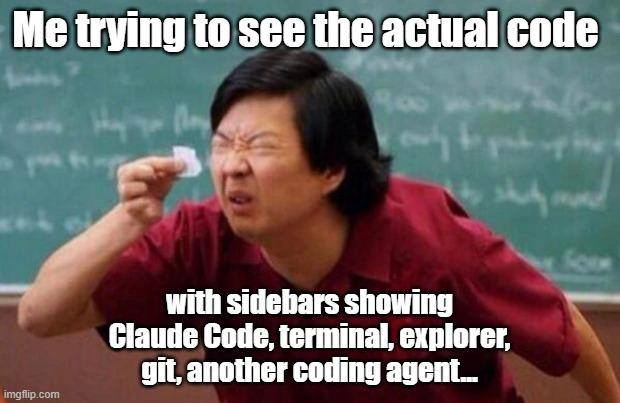
Squinting at the Tiny Code Strip Between Five IDE Sidebars
Why is this IDEs Editors meme funny?
Level 1: The Sticker-Covered Window
Imagine looking out a big beautiful window, except people kept slapping stickers on it — a map, a calendar, a walkie-talkie, a robot helper, then a second robot helper — until only a strip of glass the width of your finger still shows the outside. Now you're pressing your face to that strip, squinting like the man in the picture at his tiny scrap of paper. That's the joke: a programmer bought a giant screen to look at their work, filled it with helpers, and now can't see the work the helpers are helping with.
Level 2: A Tour of the Panels Eating Your Screen
Each item in the bottom caption is a real fixture of a modern development setup. The file explorer is the tree view of your project's folders — useful, but mostly idle while you type. The integrated terminal is a command line embedded in the editor for running builds, tests, and servers without switching windows. The git panel visualizes version control: staged changes, diffs, branches. Claude Code is Anthropic's AI coding agent — a chat-driven assistant that can read your repository, edit files, and run commands, typically living in its own pane or terminal. And "another coding agent" nods to the now-common habit of running multiple AI tools side by side because each is good at different things.
Every panel earns its place sometimes; the trap is leaving them all open always. Juniors usually hit this wall during their first screen-share, when a senior asks "can you make the code bigger?" and the only honest answer is closing four panels. The practical escape hatches are worth learning early: keyboard toggles to hide the sidebar and panel, zen/fullscreen modes that show only the file, and the realization that the explorer is redundant once you learn fuzzy file-jumping (Ctrl+P). Screen real estate is a budget, and like any budget, the default is to overspend it on things that feel productive rather than things that are.
Level 3: Forty Columns of Glory
Ken Jeong squinting furiously at a microscopic scrap of paper held between two fingers — the canonical "tiny piece of paper" template, here stamped with an imgflip watermark — captioned:
Me trying to see the actual code
with sidebars showing Claude Code, terminal, explorer, git, another coding agent...
The joke documents a genuine regression in developer experience that arrived with the agentic-coding era. For twenty years the IDE wars were fought over editor ergonomics: font rendering, minimaps, whether 80 or 120 columns was the One True Line Length. Then AI assistants arrived as panels, and the economics of screen real estate inverted. A modern VS Code-style layout now routinely stacks a file explorer on the left, a Claude Code or Copilot chat on the right, an integrated terminal across the bottom, a git/source-control view, and — the caption's best detail — "another coding agent," because apparently one wasn't enough. The source file, the ostensible point of the entire apparatus, survives as a 40-column sliver in the middle, soft-wrapping like a haiku.
There's a sharper observation underneath: the layout reflects a real shift in where the work happens. When an agent writes most of the diff, the human's job migrates from authoring code to supervising it — reading chat transcripts, approving tool calls, watching terminal output scroll. The editor shrinks because, in this workflow, it genuinely is becoming the least-used panel. The meme's squint is the discomfort of a profession noticing that its primary artifact has been demoted to a peripheral widget in its own tooling. The traditional cope — buy an ultrawide monitor — just gives the panels somewhere larger to metastasize; sidebars, like work, expand to fill the pixels available. Anyone who lived through the Eclipse era, where perspectives and views could swallow a 1024×768 display whole, will recognize the cycle: we periodically rediscover minimal editors (hello, zen mode), then re-encrust them with chrome until only the squint remains.
Description
A meme using the still of Ken Jeong (as Mr. Chow in Community/Hangover-era 'tiny piece of paper' template), in a red shirt before a chalkboard, squinting hard at a minuscule scrap of paper held between his fingers. Top caption: 'Me trying to see the actual code'. Bottom caption: 'with sidebars showing Claude Code, terminal, explorer, git, another coding agent...'. An imgflip.com watermark is visible. The meme mocks the modern AI-era IDE layout where editor real estate is devoured by panels - AI agent chats, terminals, file explorers, git views - leaving a sliver of actual source code visible
Comments
9Comment deleted
We spent two decades arguing 80 vs 120 column line limits, then solved it by shrinking the editor to 40 columns so the agents could watch us work
on a tiny 13" laptop the company provides, with 125% scaling Comment deleted
see actual code? why tho? Comment deleted
Code should not be accessable to a coder. It is a security threat. Most bugs in history were produced by a coder. Let AI do it's memory safe Rust. This actually improved our security incidents by 1500%. Comment deleted
So you now have 16x more? Very effective, a junior team wouldn't be as successful Comment deleted
visual studio lore Comment deleted
https://fixupx.com/Vrklvch/status/2042504560103616651 "All that's left of programming today" Comment deleted
If the code doesn't comfortably fit in the remaining space, it's too complicated Comment deleted
Me with an ultrawide and 250 character width files Comment deleted