Skip to content
DevMeme
4705 of 7435
Slack adds settings to recreate office chaos for lonely work-from-home developers
RemoteWork Post #5155, on Apr 29, 2023 in TG

Slack adds settings to recreate office chaos for lonely work-from-home developers

Why is this RemoteWork meme funny?

Level 1: Imaginary Coworkers

Imagine you are at home by yourself and you start feeling a little lonely. You remember how, at school or when your family is around, things were noisy and even a bit annoying (like your brother playing with the thermostat and making the house too cold, or your friends talking loudly when you’re trying to read). Now pretend there’s a computer program that tries to make your room feel like those busy places again. It would do funny things like change the temperature in your room to match your friends’ rooms, answer video calls all by itself so people can pop up and talk to you anytime, and even play fake sounds of people chatting in the background so it’s not so quiet. Sounds silly, right? This meme is joking that Slack (a chat app grown-ups use for work) added those kinds of pretend features. It’s funny because normally being at home means you can enjoy peace and quiet and control your own space, and nobody really wants to give that up. It’s like saying: “Hey, I’m alone… I kind of miss my noisy friends bothering me – maybe I’ll have a machine pretend to be my noisy friends!” Of course, it’s all make-believe. The joke makes us laugh because it reminds us that sometimes we don’t know how good we have it until we jokingly ask for the annoying stuff back. In other words, it’s poking fun at the idea that someone working from home might actually miss the chaos of being in a busy office (even the annoying parts) enough to fake it – which is a pretty funny thing to think about!

Level 2: Simulated Office 101

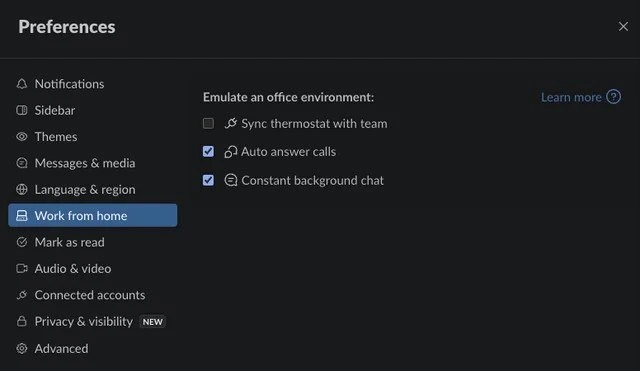
Let’s break this meme down in simpler terms. Slack is a popular chat and communication app that many companies use for team collaboration, especially when people are working remotely (from home). Slack normally has settings for things like notifications, themes, or how messages appear. The meme jokes that Slack added a new section called “Work from home” with an option to “Emulate an office environment.” This is funny because it suggests Slack can simulate (pretend to create) the feeling of being in a real office, even when you’re at home. It’s poking fun at both remote work culture and typical office life annoyances. Each of the fake settings listed is a reference to something office workers know well:

  • Sync thermostat with team – In a real office, everyone shares the same thermostat (temperature control). People often disagree about the temperature: some are too cold, others too hot – it can become a silly office argument. At home, you set your own thermostat however you like. This fake setting implies Slack would connect everyone’s thermostats together so your room’s temperature matches your coworkers’ rooms. If one teammate likes it cold, suddenly everyone’s home gets cold! It’s a joke about missing even the goofy conflicts of office life. Of course, Slack can’t really do that (and nobody truly wants their coworker controlling their heater!), but it highlights how some folks jokingly miss even the office chaos when they work from home alone.

  • Auto answer calls – Normally in Slack (and other work apps), if someone calls you (like a voice or video call), you have to click “Answer.” You can also ignore it or set yourself as “busy.” In a real office, if a coworker walks up to your desk or calls your name, you’re sort of forced to respond – you can’t just hide. This setting would make Slack automatically answer any incoming call from your team, without giving you a choice. That means a teammate could start talking to you at any moment, just like they might surprise you in person at your desk. This is funny and a bit scary because one big benefit of working from home is having control over interruptions. The meme imagines giving up that control, which nobody really wants. It’s poking fun at the idea of being constantly available, a common expectation in some corporate cultures. The humor comes from taking the idea of “staying connected” to an extreme level that is clearly a bad idea in real life (no developer wants their boss dropping in on a video call while they’re still in pajamas!).

  • Constant background chat – Offices are noisy. You hear coworkers chatting, phones ringing, keyboards clacking, maybe the coffee machine gurgling. At home, it’s usually quiet (unless you have kids or pets making noise). Sometimes remote workers feel it’s too quiet and a bit lonely. This setting suggests Slack would play continuous background noise of people talking, so it sounds like you’re back in a busy office space. Think of it like those “coffee shop background noise” videos people play for ambiance, but specifically office chatter. It’s a silly idea because while some background noise can be comforting, actual office chatter can also be very distracting (imagine trying to concentrate while two people nearby loudly discuss their weekend plans). The meme is exaggerating the idea that a remote worker might miss the office so much they’d even want the annoying parts of it back. It’s ironic: we often complain about office noise, so it’s funny to pretend we’d add it back in on purpose. Slack, of course, doesn’t have a “background chat noise” feature, but the joke lands because feeling connected is a big theme in remote work – and this takes that to a ridiculous extent.

In summary, the meme shows a fake Slack preferences dialog with these options to highlight the contrast between working in an office and working from home. It’s referencing well-known office experiences (temperature fights, surprise interruptions, constant noise) and joking that Slack could bring those experiences into your home office. The humor is pretty straightforward: it’s funny to imagine a serious work tool like Slack offering features that nobody would realistically want. It’s making fun of how companies sometimes try very hard to recreate “office culture” for remote teams. Developers and other folks who use Slack daily find it extra funny because Slack does keep us connected all day (with message pings, calls, and channels), so in a way it already provides some “office atmosphere” – this meme just takes it to a comical extreme by adding physical and audio annoyances. For a junior developer or someone new to remote work, the meme is saying: working from home can be isolating, but do we really miss everything about the office? Nope – but it’s fun to joke about it!

To put it simply, Slack is portrayed as adding a virtual office simulator. Here’s a quick comparison of real office vs. home vs. Slack’s joke features:

Office Experience Home (Remote Work) Reality Slack’s “New Feature” (Joke)
Shared thermostat (some freezing, some sweating) 😓 You set your own comfy temperature 😊 Sync thermostat with team so everyone shares the discomfort
Coworker pops by your desk unannounced 👋 You can ignore or schedule calls, you have privacy 🔕 Auto answer calls so any coworker can barge in anytime via video
Constant background chatter and noise 🎧 Quiet environment (or chosen music/background noise) 🤫 Constant background chat noise to recreate that office buzz (whether you like it or not)

As you can see, the meme highlights how remote work changes these experiences and then makes a joke that Slack might give them back. It’s a playful jab at both the things we don’t miss about offices and the sometimes over-the-top efforts to make remote teams feel “together.” In reality, Slack helps with team communication but thankfully it doesn’t mess with your thermostat or force you to take calls. This meme just imagines what that would look like, and it’s funny because it’s so over-the-top. Developers who have experienced both office life and WFH can relate to each item and get a good laugh out of how true (and ridiculous) it is.


Level 3: Chaos as a Service

Slack has essentially become the virtual office for many remote-first teams, and this meme cranks that idea to absurd heights. In the screenshot of Slack’s preferences (in ominous dark mode), there’s a tongue-in-cheek new category called “Work from home” with an option to “Emulate an office environment.” It’s as if Slack is offering Chaos-as-a-Service to lonely remote developers. The humor hits experienced devs right in the feels pain points of office life and remote work culture. We’ve spent years refining our workflows to escape office distractions, only for Slack to jokingly hand them back on a silver platter. Let’s break down these features and why they’re hilarious to anyone who’s survived corporate office culture:

  • Sync thermostat with team: Every veteran dev knows the office thermostat wars – that endless battle between those who love arctic air conditioning and those wearing sweaters in July. In a physical office, one thermostat setting tries to satisfy everyone (and fails). The meme imagines Slack extending team collaboration to your smart home by synchronizing your thermostat with your coworkers’. If one coworker sets their heater to sauna-mode, suddenly everyone’s home office heats up in unison. It’s satire of course – remote developers usually relish controlling their own workspace climate (finally, no one else turning the office into an icebox!). The idea that Slack would intentionally recreate that shared discomfort is both absurd and darkly funny. It pokes fun at corporate culture’s notion of “togetherness”: Sure, we’re all apart, but at least we can all shiver or sweat together! From a technical perspective, this is far-fetched but perversely conceivable – Slack would have to integrate with IoT thermostats (via APIs) to propagate one person’s setting to everyone. It’s a parody of how deeply entwined work tech could get with our personal lives, raising an eyebrow for any senior developer who’s seen invasive corporate policies.

  • Auto answer calls: If you’ve done heads-down coding in an open-plan office, you know the dreaded shoulder tap or the desk phone that rings at the worst time. In a real office, when a coworker calls out your name or rings you, you’re basically auto-answered – you can’t pretend you’re not there. Remote work gave developers a blissful buffer: you can ignore a Slack call or hit “Do Not Disturb” when you need focus. This meme setting nukes that peace: it implies Slack will force-accept every incoming call. Imagine you’re deep in debugging a production issue and suddenly your webcam and mic go live because Bob from Marketing decided to “drop by” virtually – horror! 😱 It lampoons the loss of boundaries in WFH: your home is your castle, but auto-answer would turn it into a cubicle with no door. Senior folks chuckle (and cringe) because we’ve all been ambushed by surprise meetings or calls. The “Auto answer calls” option highlights a real tension in remote work culture: the expectation to be constantly available. It jabs at those managers who want instant responses on Slack, as if saying, “Why not just barge in on me 24/7? Here, let’s enable that!” From an engineering standpoint, implementing an auto-answer feature would be trivial – a few lines of code to accept calls automatically – but the real cost would be developer sanity. This is meme-level dystopia, and we can’t help but laugh at the exaggeration (while double-checking Slack hasn’t actually added it).

  • Constant background chat: Ah, the soothing ambience of office noise – said no coder ever. Yet, work-from-home veterans sometimes admit the silence at home can be eerie. In bustling offices, there’s a constant din: keyboard clacks, distant laughter, coworkers chattering about the latest meeting or the infamous “stand-up meeting humor” from that morning. Many devs fled to WFH specifically to escape those distractions, or they don headphones to drown them out. Now Slack is parodying the idea of pumping fake office noise into your home. It’s like a white noise machine, but instead of rain or waves it’s “murmuring coworkers and copy machine sounds.” The meme’s “Constant background chat” checkbox suggests Slack would keep a perpetual audio channel of office chatter running, just so you don’t feel alone. For a senior dev who’s endured noisy open-plan offices, the idea is both comical and nightmarish. It reminds us of how far remote culture tools try to go to simulate in-person camaraderie. (Who knows, maybe some extroverted devs actually play café noise while coding – Slack is just one step away from offering “OfficeSoundScape.mp3” built-in!) Technically, Slack could stream an audio file or live channel as background noise. But the absurdity is the point: it exaggerates the lengths one might go to fight WFH loneliness. We laugh because it’s a dramatic illustration of remote_work_irony: we escaped the noise and interruptions, yet here we are joking about bringing them back because we miss human contact. It’s a knowing laugh, because balancing focus and isolation is a real issue in distributed teams.

In essence, this meme cleverly satirizes RemoteWork culture and the extremes of Slack communication. It’s riffing on how Slack has become the center of team collaboration in the remote era – so much that it’s now (in jest) reaching out from the screen to meddle with your physical environment and personal space. This strikes a chord with seasoned developers: we’re intimately familiar with Slack’s constant pings, the blurred lines between work and home, and the corporate tendency to try and recreate “office culture” online. The fact that the Slack Preferences dialog looks perfectly normal except for these ridiculous options makes it chef’s kiss perfect. It’s a developer humor meme that says: “Feeling lonely at home? Don’t worry, Slack’s got your back – it will gladly annoy you like a real office!” The corporate culture joke is that tech companies often tout how they’re improving remote work life, while inadvertently (or deliberately) reintroducing the old office chaos we thought we’d left behind.

Subtle punchline: If this were real, the Learn more link might lead to a satirical Slack blog post about “optimizing distributed work by sharing thermostat settings for team cohesion.” It’s the kind of half-genius, half-insane product idea that makes devs smirk. We’re laughing because we’ve all been there: whether it’s the battle for the thermostat, the unending barrage of Slack notifications, or the nostalgic (yet maddening) hum of an office, the meme wraps up those contradictory feelings into a single, hilarious Slack screenshot. In true cynical veteran style, one might say: Slack has finally implemented the ultimate productivity booster distraction suite. Now excuse me while I go double-check my Slack settings… just in case.


Description

Dark-mode Slack Preferences window is shown. The left sidebar lists: Notifications, Sidebar, Themes, Messages & media, Language & region, and a highlighted item “Work from home,” followed by Mark as read, Audio & video, Connected accounts, Privacy & visibility (NEW), and Advanced. The main panel headline reads “Emulate an office environment:” with three checkbox options: unchecked “Sync thermostat with team,” checked “Auto answer calls,” and checked “Constant background chat.” A small “Learn more” link sits to the right of the heading. The absurd options parody how remote workers miss (or don’t miss) real-office annoyances, poking fun at corporate culture and Slack’s role in nonstop communication for distributed engineering teams

Comments

13
Anonymous ★ Top Pick Turned on “Sync thermostat with team” - now my apartment runs Raft elections every time someone in sales gets cold; at least the consensus latency is lower than our PR reviews
  1. Anonymous ★ Top Pick

    Turned on “Sync thermostat with team” - now my apartment runs Raft elections every time someone in sales gets cold; at least the consensus latency is lower than our PR reviews

  2. Anonymous

    Finally, a feature that simulates the one guy who insists the office is too cold while you're debugging a memory leak in production and Karen from accounting is loudly discussing her weekend plans

  3. Anonymous

    Finally, a settings panel that lets you recreate the authentic office experience: random interruptions you can't control, ambient noise you didn't ask for, and someone else deciding the temperature. The only thing missing is a 'Randomly break your focus every 11 minutes' toggle and a 'Microwave fish smell notification' feature. At least with remote work, you can uncheck these boxes - unlike in the actual office where these are mandatory system processes running with root privileges

  4. Anonymous

    Slack’s “Emulate an office environment” is chaos engineering for humans: thermostat consensus that always converges to freezing, auto‑answer as PagerDuty→Zoom, and constant chat to keep the noise floor above the signal

  5. Anonymous

    Slack's WFH CAP theorem: Consistency (thermostat), Availability (auto-answer), Partitioned hell (background chat) - pick cold over calm

  6. Anonymous

    We spent a decade decomposing monoliths, then rebuilt the open floor plan as a managed service - auto‑answer as the liveness probe, background chat as the noisy canary, and thermostat sync as a globally misconfigured feature flag

  7. @ashutka 3y

    what about smell of fish from microwave?

  8. @DavidGarciaCat 3y

    And what tool is supposed to be this one? I don't recall seeing this option in any of the software I use

    1. @pulsar_sp 3y

      I think this is, unfortunately, just a photoshop(( 'cause by every item in the side menu it's just slack, except the "Work from home" one

      1. @RiedleroD 3y

        most likely inspect, not photoshop. slack is an electron frontend, so that's way easier to do.

        1. @pulsar_sp 3y

          oooh, I got you. makes sense to me, though I have no idea how to do something like this)

          1. @RiedleroD 3y

            oh well I guess it's only easier for a webdev. Looks convincing though, so I still think it's that.

  9. @DavidGarciaCat 3y

    Makes sense

Use J and K for navigation