My Docker Container is a Dumpster Fire
Why is this Containerization meme funny?
Level 1: The Burning Box
Imagine you have a special toy box where you put all your toys that make a mess, like glitter or paint sets, so they won’t get your whole room dirty. You expect that box to keep everything bad inside it, right? Now picture this: one day you put a messy toy (maybe a chemistry experiment set) into the box, and suddenly the box catches on fire 🔥! Instead of containing the mess, the box itself becomes the biggest problem. Your room was supposed to stay safe and clean, but now you’ve got a burning box of toys – which is a much bigger mess (and danger).
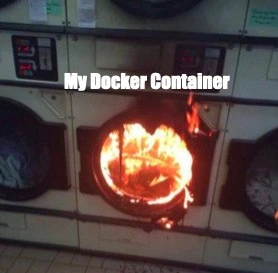
That’s exactly the funny idea in this picture. Developers use “containers” (kind of like virtual boxes) to keep software problems isolated so they don’t spread. It’s a way to run an app so that if it has issues, those issues stay in its little box and don’t crash the whole computer. The joke shows a washing machine or dryer that’s on fire, labeled “My Docker Container.” A washing machine is supposed to safely clean clothes, keeping water and soap contained inside. You’d never expect to open the laundry room door and see one machine blazing, right? It’s a surprise and a bit absurd – that’s why it’s funny in a silly way. The developer in the joke expected their container (their safe box) to handle any problems quietly, but instead it burst into flames, just like a laundry machine that was supposed to help with cleaning ends up causing a fire.
For someone not into computers, you can think of it like this: You trusted something to keep troubles small and managed, but it completely backfired. It’s the contrast that makes it humorous. On one side, we have this calm row of laundry machines (everything should be fine), and on the other, one of them is dramatically on fire (things have gone very, very wrong!). Even a child can get the silliness here – it’s like a cartoon scenario. The emotional core is the feeling of “Oh no! That wasn’t supposed to happen!” It mixes panic with a kind of ironic laughter.
So the meme is basically a techie way of saying: sometimes the tools we use to prevent problems can have crazy problems of their own. It’s funny because it’s a little true and very exaggerated. No actual Docker container will ignite like a fire, but to a stressed developer, it might feel that way when everything goes wrong. Even if you don’t know Docker, you know a fire in the wrong place is bad. The meme uses that simple idea to make us laugh and maybe remember not to be too confident – always be prepared, because even the “safe box” can surprise you!
Level 2: The Uncontained Fire
Let’s break down what’s going on in this meme for those newer to Docker and DevOps. Docker is a popular tool for containerization, which is a way to package an application with everything it needs (code, libraries, system tools) and run it in an isolated environment called a container. Think of a container like a separate box or, as the image jokes, like a separate laundry dryer for each task. The idea is that containers keep applications from interfering with each other, just as each dryer keeps each person’s laundry separate so your red socks don’t dye someone else’s white shirts pink. In tech terms, if one container (one app) has a problem – say it crashes or uses too much memory – it shouldn’t mess up the other apps running on the same machine. This is what we mean by “isolating issues”: containment of a failure so it doesn’t spread.
Now, the meme shows one dryer in a laundromat literally on fire, labeled “My Docker Container.” This is a humorous exaggeration of a production incident: something has gone very wrong inside that container. Instead of just quietly failing and stopping (which is what we hope will happen when an app crashes in a container), it’s dramatically burst into flames. In real life, a Docker container won’t have actual flames, of course – the “fire” represents a major failure or crash. It’s the kind of deployment failure where your new version of the app didn’t just have a tiny bug; it had a huge problem that caused it to go haywire in production. Maybe it’s consuming 100% CPU, maybe it’s spamming error messages, or maybe it’s completely unresponsive. That’s the developer’s equivalent of seeing a fire: an urgent, scary problem you have to fix immediately.
For a junior developer or someone just learning about DevOps/SRE, the key concepts here are:
- Docker container: a lightweight, isolated environment for running applications. It’s isolated but not completely separate from the host machine (unlike a full virtual machine). Multiple containers can run on one host, just like multiple dryers in one laundromat.
- Isolation: the idea that each container’s problems stay in that container. If one has a bug, it ideally doesn’t crash the whole server or affect other containers. This isolation is achieved by Docker using Linux features (namespaces to separate processes, and control groups to limit resources). But that isolation has limits, and misconfiguration can break it.
- Production: this refers to the environment where the application is live and being used by real users or customers. Bugs in production are serious because they affect real people (and the company’s reputation or revenue). It’s the opposite of your local development environment or a testing environment.
- Incident / “fire”: in a metaphorical sense, a “fire” in DevOps means an urgent problem in production (site down, service unavailable, etc.). Teams often call sudden critical issues “fires” and solving them “firefighting”. The meme takes that literally with a fire in the dryer.
- DevOps/SRE on-call: In many modern teams, developers or dedicated SREs (Site Reliability Engineers) take turns being “on-call”. This means if something breaks in the middle of the night, an alert goes to the on-call person who must respond. When the meme shows a burning container, every DevOps engineer can imagine the PagerDuty alarm going off at 2 AM with that image as the mental picture. It’s funny now, but at the time it’s pure debugging frustration.
- Deployment failure: This happens when you deploy (release) new code or a new service and instead of running smoothly, it fails. Maybe a config was wrong or a piece of code that wasn’t tested with real data freaks out. In a container context, a deployment failure could mean the new Docker container crashes right after starting, or behaves badly (using too much memory/CPU, etc.).
- Debugging frustration: When something goes wrong inside a container, figuring out why can be tricky. You usually have to check the container’s logs (
docker logs <container_name>) or even “go inside” the container (docker exec -it <container_name> /bin/bash) to poke around, much like a mechanic opening up a machine to see what broke. If the container has caught “fire” (crashed hard), you might only find charred clues – limited or no logs – which is very frustrating. This meme resonates with that feeling: “Great, my app’s in Docker for easy deployment, but now I have to jump through hoops to see why it’s burning up.”
The laundromat analogy helps illustrate containerization in simple terms. Each dryer = one container running an app. All dryers share the same building infrastructure (that’s like containers sharing the same operating system kernel). If one dryer is overloaded or something flammable was left in a pocket, that dryer can catch fire. Ideally, the metal walls of the dryer contain the fire for a while (that’s isolation), and the other dryers keep on spinning normally. But you still have a serious situation: one container is in trouble and needs immediate attention or it could damage the whole laundromat (the host machine). In tech, if a container “catches fire”, you might have to stop that container, deploy a fix, or failover to a backup – essentially put out the fire.
The white text “My Docker Container” in the image is what makes it unmistakably a developer joke. Without it, it’s just a photo of a dryer fire. With it, we instantly map the scenario to a software context. It’s saying: this is what it feels like when the Docker container I expected to isolate problems instead blew up. It satirizes the blind faith newcomers sometimes put in containers. Docker simplifies a lot but doesn’t remove the need for good practices. If you don’t set proper resource limits, monitor your apps, and test your container in conditions similar to production, you can still end up with a production bug so bad it’s as if the whole thing went up in flames.
To a junior dev, the lesson (wrapped in humor) is: containers help with consistency and isolation, but they’re not foolproof. If you deploy something awful in a container, it can fail just as spectacularly as on a normal server. The surrounding machines (other containers) might be fine, but your users using that service won’t be. You still have to do the hard work of debugging, monitoring, and resource planning. The meme simply exaggerates the failure to remind us: don’t get complacent just because you’re using Docker. Always have a way to deal with a “fire” even inside a container – whether that’s good logging, alerts, or automatic restarts. And as any DevOps person will tell you with a wry smile, always keep the metaphorical fire extinguisher handy (be ready to rollback or patch quickly).
Level 3: Isolation vs Immolation
This meme strikes a chord with experienced DevOps and SRE folks because it perfectly captures the dark comedy of a production incident in a containerized world. We tout containers as these safe, isolated sandboxes – “It works on my machine, and now it’ll work in any machine, trust us.” They’re supposed to simplify deployment and isolate issues, like each microservice running in its own little dryer so that a soggy mess or a minor spark doesn’t spread to others. But the humor here is that moment when reality laughs last: instead of containing the problem, your container itself becomes the problem, bursting into metaphorical flames.
Why is that funny (in a laugh-while-you-cry kind of way) to a senior engineer? Because it’s a scene straight out of on-call nightmares and shared war stories. Picture a quiet night: all your Dockerized services humming along, each neatly in its container (just like those tidy dryers). Then suddenly, an alert: high CPU usage on container X or Out of memory error. By the time you SSH in or check your dashboards, that container is crash-looping, logs spitting out errors like flames. Maybe the new deployment had a memory leak, or some genius forgot to set --restart=always so it just died outright. In the meme, only one dryer is visibly on fire – the other containers (dryers) look fine – but anyone who’s been on-call knows you can’t just ignore a burning microservice. Even if the other services still run, that one fire can mean a partial outage, unhappy customers, and an all-hands-on-deck scramble. It’s funny because it’s true: containers are supposed to isolate failures, yet here we are, firefighting a container conflagration at 3 AM.
The combination of elements is comedy gold for the tech crowd: Docker (the poster child of modern deployments) and a literal fire (the poster child of urgent disaster). Docker was sold as a way to avoid the classic “it works on my machine” problem and to prevent one app’s issues from taking out others. And indeed, in a well-orchestrated microservices setup, one service failing doesn’t automatically fell the whole system. But here’s the rub: just because the fire is confined to one dryer doesn’t make it any less of a fire. The meme acknowledges a truth many senior devs learn the hard way – you can containerize legacy code, wrap it up in all the Kubernetes YAML you want, but if that code is a ticking time bomb, it will still explode. Now it just explodes inside a container (and hopefully just one). Congrats, you’ve achieved distributed failure: instead of one big monolithic app going down, you have micro-disasters in individual containers. 🥁
There’s an unwritten shared trauma here. Perhaps you’ve been through the “just dockerize it” initiative at your company. The promise was fewer deployment headaches and easy scaling. The reality? You spend your weekends chasing weird bugs that only show up in the containerized production environment. The meme’s flaming dryer is a stand-in for that one container everyone dreads – the one that crashes unpredictably or eats all the RAM. It’s always the Java service with a memory leak, or the analytics job that someone forgot to cap, or the database container that didn’t flush logs. Suddenly the host’s disk is full or the CPU is pegged at 100%, and other containers start slowing down (so much for isolation!). The bold white text “My Docker Container” labeling the fire is exactly how it feels in the moment: all eyes on your container as the source of chaos.
Let’s talk systemic issues: why do these fiery scenarios keep happening? One reason is misconfiguration and unrealistic expectations. Containers are often treated as a silver bullet. New developers might think “I put my app in Docker, so it’s safe and won’t affect anything else.” Seasoned engineers know that’s not automatic. You have to configure resource limits, health checks, logging – otherwise, a container can consume everything or fail silently. A classic mistake is deploying a container without memory limits on a Kubernetes cluster. It works fine under light load in testing, but when real traffic hits, it gobbles memory like Pac-Man until the node is starved. Kubernetes will valiantly try to restart it (CrashLoopBackoff, anyone?), essentially doing the “unplug it and plug it back in” dance while the underlying issue rages on. Meanwhile, your pager is buzzing incessantly. The isolation became immolation: the container isolated the issue from others maybe, but now it’s a contained bonfire you need to put out.
Another aspect is observability. Debugging a burning container can be frustrating as hell. In a classic server (or a VM), if something went wrong, you’d RDP/SSH in, poke around, maybe run top or check system logs. In a containerized setup, that’s like trying to inspect a dryer mid-cycle. You might docker logs to see what happened, only to find the logs stop abruptly at the crash – akin to staring at a pile of charred clothes and guessing what caused the fire. If the container restarts or is ephemeral, the evidence might be gone unless you had proper centralized logging. Many of us have exclaimed, “Why on earth is this container crashing?!” while sifting through sparse logs at ungodly hours. It’s darkly humorous later, though at the time you’re just one step away from pulling the fire alarm (or your hair out).
The meme also pokes fun at the DevOps culture and its often ironic outcomes. DevOps preaches automation and resilience. We make CI/CD pipelines to deploy with confidence. Yet, a misconfigured CI pipeline might deploy a buggy container image to production, and voila – instant bonfire. All the cool infrastructure as code in the world won’t save you if, say, an environment variable for memory limit was missing or a new version of your app has a thread that never returns. Senior engineers grin at this image because they’ve lived through it: the beautifully containerized microservice architecture that still ends up with someone shouting, “Rollback! Rollback!” as one service goes nuclear.
And let’s not forget the on-call exhaustion underpinning the humor. The phrase “burst into flames” isn’t in our runbooks, but it might as well be for how it feels. This is solid DevOps/SRE humor because dealing with production fires is literally in the job description. The laundromat on fire scenario exaggerates how an incident can feel huge and startling even if technically “contained.” Surrounding machines look ordinary and calm – just like a status page where all services are green except one red blinking microservice. You can almost hear the post-incident retrospective: “Well, the issue was contained to the checkout service container… which proceeded to consume all CPU on the node and crash itself spectacularly, but at least the other services were fine.” Cue half-chuckles, half-groans.
In essence, the humor emerges from the contrast between expectation and reality. We expected isolation; we got immolation. We thought containers would give us stress-free deployments, but sometimes they just give us new kinds of stress. It’s an ironic reminder that even the shiniest tech can’t eliminate failures – it can only shuffle them around or, in this case, tuck them neatly into a box. And when that box catches fire, it’s both terrifying and a tiny bit funny in retrospect, because of course the container caught fire. As a seasoned engineer might dryly quip: “The container’s on fire? At least it’s not a VM this time… progress?”
Level 4: CGroup Catastrophe
At the deepest level, this meme touches on operating system isolation mechanisms and how they can spectacularly fail when misused. A Docker container isn’t a magic firewall against failure; it’s just processes running under the hood of the same Linux kernel, constrained by cgroups (control groups) and namespaces. In theory, cgroups are like the circuit breakers of the system: they’re supposed to limit a container’s CPU, memory, and I/O usage so one misbehaving service doesn’t take down the whole machine. Namespaces partition off things like process IDs, network interfaces, and file system views, isolating the container’s world from the host and other containers. It’s a bit like each dryer in a laundromat having its own dedicated exhaust and power line. In a perfect world, one dryer bursting into flames shouldn’t scorch the others because of those safety boundaries.
However, in practice, if you don’t configure those boundaries, a container can run wild and burn through resources. By default, Docker containers often have no strict memory limit (-m flag) or CPU quota unless you set it. That means a bug — say an infinite loop or memory leak — inside a container can consume all the host’s RAM or CPU. It’s as if one dryer draws unlimited power and overheats, because no one set a thermostat or fuse for it. The kernel’s OOM killer (Out-Of-Memory killer) might then swoop in like a panicked laundromat manager and start killing processes (possibly even unrelated containers) to snuff out the fire. In our fiery dryer analogy, that’s like sprinklers dousing every machine because one overheated – collateral damage the container was supposed to avoid.
Consider how Docker uses a unified kernel: if a container triggers a kernel panic (perhaps via a bad driver or a syscall mishap), it’s game over for the entire host. The isolation is not as absolute as a full VM or separate hardware. This is why we have projects like gVisor and Kata Containers – they’re attempts to put an extra safety wall (lightweight VMs or user-space kernels) around the container, essentially double-wrapping the package to avoid a single point of failure. And then there’s the security aspect: a poorly isolated container (say running with --privileged or sharing the Docker socket) can potentially escape its sandbox. That’s akin to a fire not just staying in one dryer but leaping onto the laundry room walls. Real-world CVEs (security vulnerabilities) have shown container escapes where malicious code within a container achieved code execution on the host. It’s rare, but it’s the nightmare scenario: the thing we trusted to contain a problem becomes the Trojan horse carrying the problem outside.
In summary, the meme’s dramatic inferno highlights a kernel-level truth: containers rely on fine-tuned kernel settings (cgroups, namespace limits, seccomp filters) to contain chaos. If those fail or aren’t enforced, one container’s meltdown can cascade into a host-level incident. It’s a CGroup Catastrophe when the safeguards meant to limit the blast radius aren’t in place – the container process can fork bomb or allocate memory like there’s no tomorrow and poof 🚒, you’ve got a 3 AM page. In code-and-fire terms, imagine something like this running inside a container with no limits:
# Pseudo-code: runaway memory bomb inside a container
data = []
while True:
data.append("🔥" * 10**6) # keep allocating chunks of "fire"
Given enough time, that little script will consume all memory it can. Instead of just isolating the issue inside the container, it will drag the whole host down with it (the host starts swapping, other containers starve for RAM, and eventually everything crashes). The joke lurking in the flames is that containerization – often advertised as a containment solution – still fundamentally runs on a shared kernel. Without careful limits, a container is like a supposedly safe dryer that someone overloaded with gasoline-soaked rags: the kernel can’t magically prevent the resulting blaze. The advanced humor here comes from recognizing the gap between containerization theory and gritty reality. Even at this low-level, bitter experience has taught engineers that “lightweight” doesn’t mean “idiot-proof.” The meme’s burning dryer says it all: so much for sandboxing, time to break out the fire extinguisher.
Description
The image shows a front-loading washing machine in a laundromat, but instead of containing laundry, its drum is engulfed in bright orange flames. The fire is intense and clearly visible through the glass door. Superimposed over the image in a simple white font is the text 'My Docker Container'. This meme uses hyperbole to visualize the feeling of a containerized application failing in a catastrophic and unmanageable way. For developers, a 'broken' container is usually just a process that has exited with an error code. This image humorously translates that abstract software failure into a tangible, raging dumpster fire, perfectly capturing the sense of chaos and helplessness when a critical service crashes spectacularly in production
Comments
7Comment deleted
Orchestrator: 'Container is unhealthy, restarting.' The container: 'I am become death, the destroyer of logs.'
“Containers give you isolation,” they said - then the runaway one turned itself into a space heater and Kubernetes helpfully replicated the inferno to three AZs for “high availability.”
After 15 years of explaining to executives why we need proper resource limits and health checks, I've realized the only difference between this washing machine and our production containers is that the washing machine probably has better observability - at least you can SEE when it's on fire
When you forget to set memory limits in your docker-compose.yml and your container decides to consume all available RAM like it's running a Chrome browser with 47 tabs open. The OOM killer arrives fashionably late, but by then your container has already achieved nuclear fusion and taken down three neighboring services that were 'totally isolated' on the same host
Good news: the incident is containerized - cgroups neatly contain the blaze, and Kubernetes ensures three healthy replicas
Forgot the cgroup limits - now it's a full pod inferno
Kubernetes still shows Ready 1/1 because the liveness probe curls /health, and the sidecar returns 200 while the JVM OOMs and overlayfs is a bonfire