The 'guthib.com' typo: a developer rite of passage
Why is this VersionControl meme funny?
Level 1: Wrong Number
Imagine you’re trying to call your friend on the phone, but you dial the wrong number by one digit. Instead of your friend picking up, a stranger answers. You’d probably hear something like, “Sorry, you have the wrong number.” That’s exactly what’s happening in this meme, but with websites. The developer wanted to go to the GitHub website (which is like calling your friend’s number), but they typed one letter wrong in the web address (just like dialing one digit wrong). They ended up at a different place on the internet – basically a stranger’s site – and that site said “You spelled it wrong,” which is just a cheeky way of saying “Oops, you got the wrong address.” It’s funny because usually computers don’t talk to us so directly. It’s also a gentle poke at how one tiny mistake (just one wrong letter!) can completely change the outcome. Just like a postal worker can’t deliver a letter if the address is spelled incorrectly, a web browser can’t find the website if you don’t spell its name exactly right. In simple terms: the meme is joking that the computer is acting like a snarky friend, telling the developer, “Hey, I can’t find GitHub because you spelled it as Guthib. Better check your spelling!” It’s a lighthearted reminder to be careful, because even small typos can lead you to the wrong place.
Level 2: No Autocorrect Here
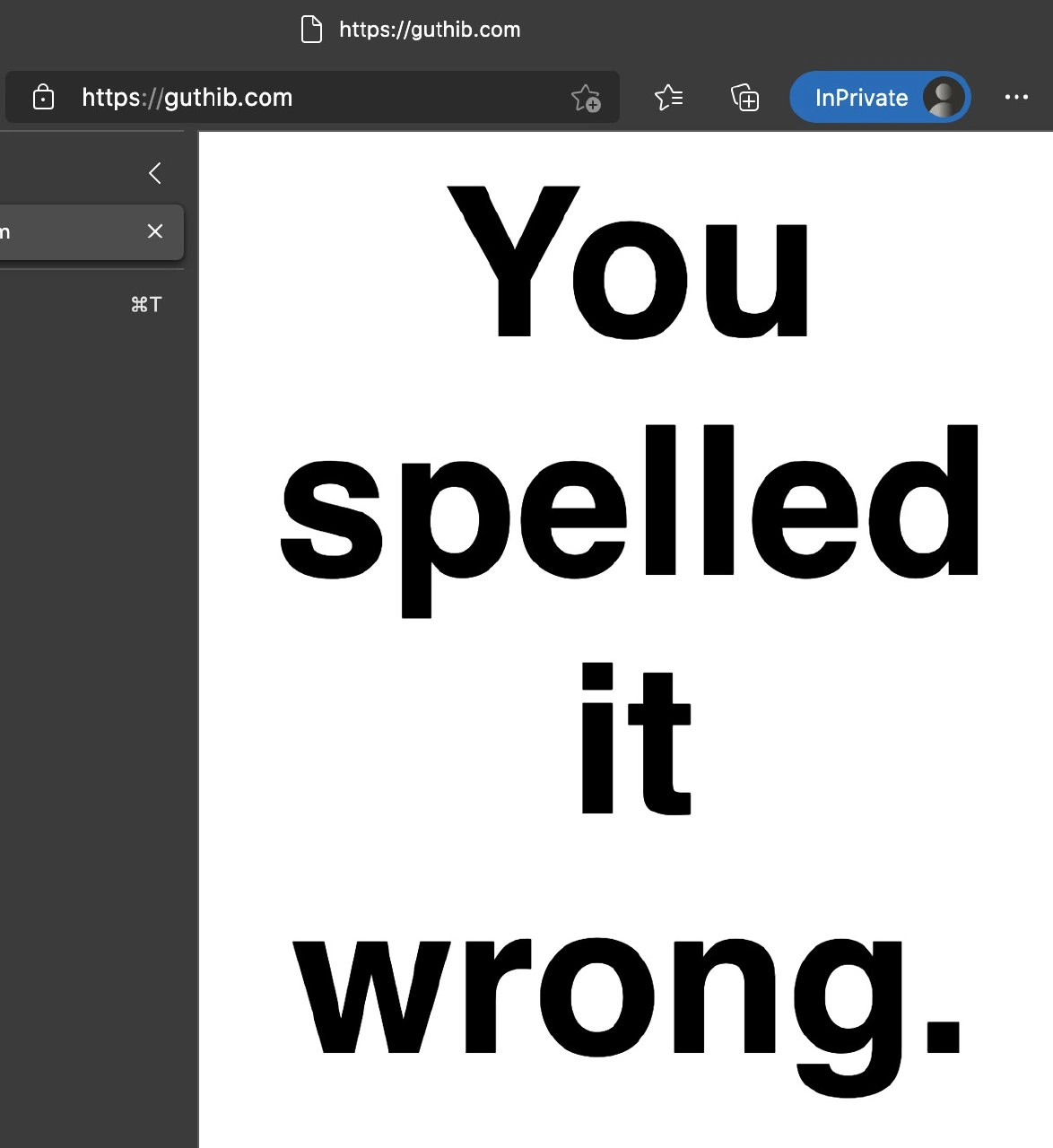
Let’s break down what’s happening in simpler terms. The meme shows a web browser with a URL typed slightly wrong: GitHub’s address is supposed to be github.com, but it was misspelled as guthib.com. In the browser’s display, we see a big message saying “You spelled it wrong.” Essentially, the browser tried to go to a website, couldn’t find the real GitHub at that address, and ended up at a page that scolds the user for the typo. This is a playful way to highlight how computers require exact spelling for things like web addresses, file names, and commands. Unlike your phone’s texting app or Google search, a web address bar has no autocorrect and no mercy for a typo. One wrong letter, and the computer has no idea you meant “GitHub” – it treats guthib.com as a completely different destination.
GitHub is a hugely popular website used by developers to store and share code (it’s a service for version control, specifically Git). Many developers visit GitHub every day, often multiple times. It becomes muscle memory to type “github.com” when you need to check code or download a repository. But if you’re typing fast (or haven’t had your coffee yet), it’s easy to swap a couple of letters. The meme’s situation is very relatable: you go to open your project on GitHub, but suddenly nothing loads because you accidentally typed the address wrong. The page in the meme spelled out the mistake in plain English (“You spelled it wrong.”) – that’s unusual, because normally you’d just get a generic error like “Site not found.” It turns out someone likely registered the misspelled domain (guthib.com) and put up that message as a joke or a warning. In many other cases, a misspelled domain might show an error, some random advertisement page, or even a fake site.
This is where the term typosquatting comes in. Typosquatting is a tactic bad guys use where they buy domain names that are common misspellings of popular sites. They know people make typos. For example, someone might register microsft.com (missing the “o” in Microsoft) or gooogle.com (with an extra “o”), so that anyone who accidentally types that ends up on their site instead of the intended one. Best case, they show you ads to make money from your misclick; worst case, they create a phishing site – a fake version of the real site – to trick you into entering your password or personal info. In the GitHub scenario, a malicious typosquatter could design guthib.com to look exactly like GitHub’s login page. A rushed developer might not notice the URL is wrong and attempt to log in, thereby handing over their username and password to the attacker. It’s a serious security risk, which is why this seemingly silly meme actually carries a reminder: double-check the address bar, especially if something feels off.
For newer developers or those not as familiar with these terms: DNS (Domain Name System) is basically how your computer finds websites on the internet. Think of DNS as the internet’s address book. When you type github.com, your computer asks a DNS server for the numeric IP address of GitHub’s server (something like 140.82.114.4). If you misspell the name, DNS will try to look up that exact name. guthib.com isn’t in the address book (unless someone added it with their own IP), so DNS comes up blank – meaning your browser can’t find the server. It’s similar to looking up a friend in your contacts: if you have them saved as "John Smith" but you search for "Jon Smyth", you won’t get a result because it’s not an exact match. Computers are very literal this way.
This literal nature also applies to coding and commands. A bug is often just a tiny mistake in your code. For example, maybe you wrote a variable name slightly wrong. Consider this simple JavaScript snippet:
let userName = "Alice";
console.log(userNam);
// Uncaught ReferenceError: userNam is not defined
See the typo? The variable is userName, but the code tries to print userNam without the “e”. The computer doesn’t assume “oh, you probably meant userName” – it throws an error saying that thing isn’t defined, because as far as it’s concerned, userNam and userName are completely different identifiers. There’s no autocorrect in programming either; the compiler or interpreter won’t guess what you meant, it will just complain or do something unexpected. In version control with Git, similarly, if you type git status as git staatus by accident, Git isn’t going to magically run the right command – it will just tell you it doesn’t understand. (In fact, modern Git is a bit friendlier: it might say “did you mean ‘git status’?” if it recognizes a close match. This kind of suggestion feature is an exception rather than the rule.)
So, the meme uses the GitHub typo as a concrete example of a broader lesson: spelling matters in coding and computing. The browser in dark theme, the bold black text on white saying “You spelled it wrong.” – it’s visually simple, almost like the computer is yelling at you in a monotone. For developers, it’s both funny and painfully familiar. It reminds us that unlike humans, who can often infer meaning from context or minor errors (“Oh, I see you wrote ‘teh’, you meant ‘the’.”), machines do exactly what they’re told. One character out of place, one letter off, and you might as well be speaking gibberish to them. And when that happens, things break: your code doesn’t run, your website doesn’t load, or your command fails.
Lastly, why is this categorized under Security as well as Bugs and VersionControl? Because, as mentioned, a typo in something like a URL isn’t just a harmless bug – it can expose you to security risks. Misnaming a website can lead you to phishing sites or downloads of malicious software. It’s a common hacker trick that banks, software repositories, and yes, developer platforms guard against. Many of us have a habit of trusting that whatever we typed or clicked is correct, so the meme is a funny wake-up call: even something as small as swapping “i” and “u” in a web address can have significant consequences. In summary, at this level we learn that computers, browsers, and programming languages take your input literally. They don’t read minds and they don’t fix typos – that’s on you (the developer) to get right. And when you don’t, best case you get a snarky message teasing you, worst case you open a security hole. Either way, it’s a lesson every new developer quickly learns: always check your spelling, because the computer won’t.
Level 3: One-Character Catastrophe
For seasoned developers, this meme hits a nerve: the smallest mistakes often cause the biggest headaches. We’ve all been there – one character off and everything breaks. In the image, a developer tried to navigate to GitHub (the widely-used code hosting and version control platform), but instead of github.com they typed guthib.com. Instantly, the workflow derails. The humor comes from the browser roasting the user with a blunt message: “You spelled it wrong.” No sugar-coating, just a direct call-out of the typo. It’s funny because it’s true – in development, computers have no qualms about telling you you messed up, often in far less human terms. Usually you’d get a cryptic error like “404 not found” or “DNS_PROBE_FINISHED_NXDOMAIN”. But here, the error page practically has an attitude, as if the browser itself is facepalming and saying “Bruh, that’s not even a thing. Check your spelling.” This sassy honesty is something developers wish they got more often from tools. How many times has a build failed or a command been rejected for some obscure reason, when the real cause was a simple typo? If only our CI pipelines would just come out and say, “hey, there’s a stray semicolon on line 42” instead of throwing vague exceptions!
The shared experience among devs is that typos break everything. A single-character bug can introduce weird, hard-to-trace errors in code or configurations. Version control systems and other dev tools are particularly stringent: if you mistype a branch name by one letter, git will bluntly tell you that branch doesn’t exist. Mistype a commit hash and you’re referencing nowhere. Even a minor slip in a command can have outsize effects – consider the notorious case of an AWS engineer accidentally bringing down a chunk of S3 by mistyping a maintenance command. Or that time you rm -rf’d the wrong directory because of one extra / in the path 😱. It’s the stuff of on-call nightmares: one moment of inattention, one character off, and now production is on fire. Senior engineers trade war stories of incidents at 3 AM triggered by something as dumb as a misspelled config key. It’s equal parts tragic and comic how often “all-hands-on-deck” outages boil down to a freakin’ typo. There’s a gallows humor in it – we laugh because otherwise we might cry.
In the context of version control, GitHub is essentially our code collaboration hub, so a lot of our daily routine involves typing that URL or copying it for git clone operations. Muscle memory is strong, but so are fat-finger errors. Picture a dev hurriedly pushing a hotfix on Friday evening:
$ git remote add origin https://guthib.com/myOrg/myRepo.git
$ git push origin main
fatal: unable to access 'https://guthib.com/myOrg/myRepo.git/': Could not resolve host: guthib.com
Suddenly Git can’t reach the remote, and the dev is cursing the “network” or “GitHub downtime”. Five panicked minutes later they notice the typo in the URL. Facepalm. It’s a cocktail of relief and annoyance – relief that the mistake is simple, annoyance that it happened at all. This meme’s joke plays on exactly that scenario: the obvious-in-hindsight mistake. The browser spelling-shames you immediately, saving you from ten minutes of troubleshooting why “GitHub is down” when in reality you were trying to contact the wrong host. In a sense, we laugh because we’ve wasted time on this exact kind of silly error before.
The meme also carries an undercurrent of security awareness that senior devs will appreciate. The humorous roast is a benign outcome; it could have been worse. Misspelling a domain sometimes lands you on a page full of ads, or a sketchy domain parking site, or a convincing fake login page. A senior dev knows to be wary: “Alright, who owns this typo-domain? Are they just trolling me, or attempting something nefarious?” In fact, big companies often buy up common misspellings of their domain to prevent bad actors from doing so. It wouldn’t be surprising if GitHub (or an ethical individual) preemptively grabbed guthib.com to display this lighthearted message rather than let a scammer have it. This is classic phishing risk mitigation in action. A seasoned security engineer sees “You spelled it wrong” and gives a little nod of approval – that’s one less phishing site to worry about. But they’ll also chuckle, imagining the thousands of developers who have made this exact typo and momentarily thought GitHub had suddenly turned cheeky and opinionated.
From an organizational standpoint, the meme underscores why teams put emphasis on code reviews, linters, and tests – we know humans are prone to typos, so we put safety nets to catch them. But outside of code, when you’re dealing with something like a URL or a command, the only safety net is your own carefulness (or luck). There’s a running joke in dev circles: “It’s always DNS.” Many bizarre production issues do end up being DNS misconfigurations. Here, it looks like a DNS failure at first glance (“site can’t be reached”), but the veteran dev quickly suspects user error – “Wait, check the address… oh of course, one letter off.” So in this case, it was DNS – because of a human typo. The meme brilliantly merges that hard truth with humor: even the browser is basically rolling its eyes at us for making a rookie mistake. It’s a comforting kind of ridicule though, because it reminds every overworked developer that everyone screws up simple things sometimes, and you’re not alone. We’ve all been roasted by reality for a dumb typo, just maybe not as literally as guthib.com does it!
Level 4: No Mercy in DNS
At the deepest technical level, this meme highlights how computers handle identifiers with absolute precision – there’s zero tolerance for typos. The Domain Name System (DNS), which acts as the internet’s phonebook mapping domain names to IP addresses, is a strictly deterministic protocol. When you type guthib.com instead of the correct github.com, DNS doesn’t gently ask “Did you mean GitHub?” – it simply fails (or in this case, directs you to whoever owns guthib.com). There’s no built-in error correction or fuzzy matching in DNS; a domain name is either an exact match in the global directory or it’s essentially nonexistent. This design is by intent: the internet’s routing infrastructure demands unique, exact addresses for reliability and security. But it also means one-character deviations send you into the void or, worse, to an unintended destination.
From a security standpoint, this precision is a double-edged sword. Typos aren’t just harmless mistakes – they can be exploited. The term typosquatting refers to attackers registering common misspellings of popular domains (like swapping the letters in “github”) to catch wayward visitors. Instead of a friendly roast saying “You spelled it wrong,” a typosquatting site might display a convincing fake login page, silently harvesting your credentials. Technically, it’s trivial for an attacker to obtain a valid TLS certificate for a lookalike domain (services like Let’s Encrypt automate domain verification), so the browser will still show the secure padlock icon 🔒. That padlock simply means “you have a private, encrypted line to this domain” – it does not mean “this domain is the one you intended to reach.” In other words, HTTPS guarantees confidentiality and integrity of the connection, but not that you’re talking to the right party. Phishing sites abuse this by looking legit in the address bar except for a subtle spelling difference. The meme’s image even shows a padlock next to guthib.com, emphasizing how a bogus domain can appear perfectly “secure.”
Under the hood, when you press Enter on that URL, the browser’s resolver asks the DNS root servers for guthib.com’s records. Since guthib.com is a completely different key than github.com in the DNS hierarchy, you’ll either get a NXDOMAIN response (non-existent domain) or an address for guthib.com if someone has registered it. There’s no concept of “close enough” – one bit or character off and you’re essentially querying a different namespace entry. This is akin to cryptographic hash functions where a tiny change in input yields a completely different output; here a one-letter change yields a completely different domain resolution path. Fundamentally, the internet’s architecture prioritizes explicit correctness over user-friendly autocorrection, because guessing could be dangerous or misroute traffic. Some modern browsers do maintain lists of popular sites to warn about lookalikes (Chrome, for instance, might warn if you visit go0gle.com that it resembles google.com), but these are afterthought safeguards, not core DNS behavior. The brutal truth: the programming and networking world is case-sensitive and typo-intolerant by design. This meme humorously exposes that unforgiving nature – one stray character and the system gives you nothing or, in this lucky case, just a snarky rebuke. It’s a reminder rooted in technical reality: the infrastructure won’t bend to human error, and that has both serious security implications and a sort of dark comedy to it.
Description
A screenshot of a web browser visiting the URL 'guthib.com'. The browser is in 'InPrivate' mode, and the webpage itself is stark white with large, centered black text that reads, 'You spelled it wrong.'. This is a classic, long-running joke in the developer community. 'github.com' is a vital daily tool for most software engineers, and in a moment of haste, it's very common to mistype it as 'guthib.com'. The owner of the 'guthib.com' domain created this simple, direct message as a humorous nod to fellow developers who make this exact typo. It's a gentle, relatable ribbing about a shared, minor frustration, turning a common mistake into a moment of amusing self-recognition
Comments
21Comment deleted
The only thing that travels faster than light is a developer's fingers typing 'guthib' when a PR deadline is looming
Six months hardening the supply chain to SLSA-3, then I fat-fingered “guthib.com” and instantly demoed why our real single point of failure is the keyboard
The beautiful irony of GitHub's typo-squatting protection page telling you about spelling errors while you're on 'guthib.com' - it's like your linter catching a bug in its own error message. This is what happens when you deploy on Friday and the QA team has already mentally checked out for the weekend
Ah yes, the classic 'guthib.com' - where developers go when their muscle memory fights with their keyboard layout. Props to whoever registered this domain and turned a common typo into a gentle roast. It's the digital equivalent of a senior engineer watching a junior dev struggle with the URL bar for 30 seconds before quietly suggesting 'try github with an H.' At least they didn't register 'githubb.com' for the double-tap crowd, or we'd need a whole CDN just for typo redirects. This is what happens when your fingers are faster than your autocorrect, and honestly, if you've never mistyped GitHub's URL at 2 AM during an incident, are you even in production support?
guthib.com: the cheapest pen test - one character to see if your org actually enforces FIDO2 and blocks typosquatted OAuth callbacks
HTTPS dutifully proves you’re talking to guthib.com; the exploit is your muscle memory, not the PKI
GitHub's TBAC (Typo-Based Access Control): outsmarts MFA, scales infinitely, and keeps even 20YOE architects humble
The more funny thing is that GitHub actually bought guthub.com Comment deleted
What's that browser? Comment deleted
Must be Edge Comment deleted
^ Comment deleted
chromium Comment deleted
Ah Comment deleted
The old one is Edge Legacy Comment deleted
Never used edge, but the ui looks nice Comment deleted
Join the group Comment deleted
[GWS-38041] The issue is reproducible. @PM should we assign our @TraineeFullstack to it? Comment deleted
? Comment deleted
It's Remove-AppxPackage Comment deleted
And no one asked how to uninstall Edge Comment deleted
You wrote Remove-AppPackage Comment deleted