The Mute Button: A Trust Exercise We All Fail
Why is this RemoteWork meme funny?
Level 1: Not One Damn Bit
Imagine you have a toy that sometimes starts playing loud music by itself, even when you think you turned it off. Every night, you flip its OFF switch, but you’re still not sure if it might suddenly make noise. So, just to be safe, you not only turn it off, but you also take out its batteries and maybe even stuff it under some pillows. You don’t trust that toy at all to stay quiet, right?
That’s exactly how a developer feels about the “mute” button during an online meeting. The mute button is supposed to be like the toy’s OFF switch for your voice – when it’s on, no one else in the meeting can hear you. But developers have seen and heard accidents where someone’s microphone picked up something embarrassing because it wasn’t truly off. So now they act like that cautious kid with the noisy toy: double-checking and never fully relaxing. When the computer or app asks “Hey, is it okay to unmute and let people hear you now?”, the developer is thinking, “I don’t trust you one bit!” In simple terms, it’s a funny way to say the developer has zero trust in the mute button doing its job – just like you have zero trust in that misbehaving toy. The bottom line: sometimes it’s hard to believe the “quiet” button will really keep you quiet, so you treat it with serious doubt… not one damn bit of trust given!
Level 2: Unmute Anxiety
For a less experienced developer or someone new to remote work, let’s break down what’s happening. This meme is about remote stand-up meetings – those quick daily check-in meetings (often part of Scrum or other agile processes) where each team member shares what they did and what they will do. In the era of Remote Work, these meetings happen over video calls using tools like Zoom, Microsoft Teams, or Google Meet. Everyone typically keeps their microphone muted unless it’s their turn to speak, to avoid background noise chaos. Now, the unmute button is the control in these apps that lets you turn your microphone on or off. When it’s off, a little mute icon (the symbol of a microphone with a slash through it) is shown, often in red. That icon is basically a promise: “You are now silent to others.”
So why the drama with trust? Well, after months (or years) of daily calls, people have developed video call anxiety around whether they are truly muted or not. Maybe you’ve seen someone start talking passionately, only for others to say “Hey, we can’t hear you, you’re muted” – that’s one side of it (forgetting to unmute when you want to talk). The other side (the one this meme jokes about) is worrying that you didn’t mute when you meant to. Picture this: You think you pressed the mute button, you see the icon, but you still hesitate to curse at the bug in your code out loud, just in case your team can hear. That hesitation, that slight fear, is unmute anxiety. It’s the nervousness that the technology might betray you and broadcast something to your colleagues that you didn’t intend to share.
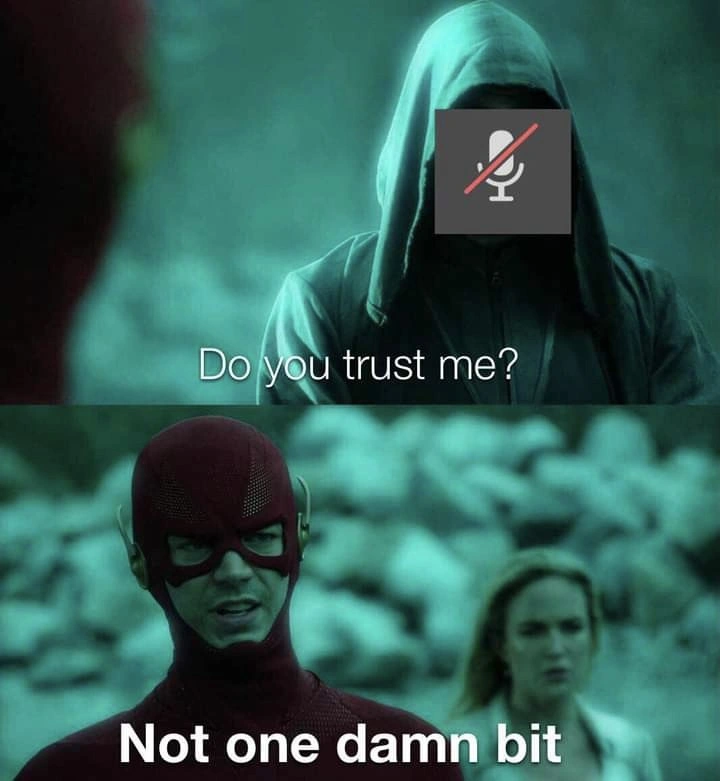
The meme itself shows a well-known format: a two-panel dialogue using a scene from a TV show. In the first panel, there’s a hooded mysterious figure, and the meme creator has placed the muted microphone icon over its face. Under it is the caption “Do you trust me?”. In the second panel, we see a masked superhero (the red suit is recognizable as a popular speedster hero) replying, “Not one damn bit.” This is a humorous way to personify the mute button (or the video app asking for mic access) as a character asking for the user’s trust, and the user (the developer) firmly saying “No way!”
Let’s decode some terms and why they’re funny here:
Zero-trust mindset: In general tech terms, this means assuming nothing is safe without verification. For example, a coder with a zero-trust mindset treats any data coming from a user or another system as potentially harmful until it’s validated. Here, the developer has that mindset towards the microphone toggle. They assume “I am muted” is a state that could fail, so they don’t relax or say anything private until they’ve verified for sure the mic is truly off (sometimes by checking multiple times).
Voice permission prompt: This refers to those pop-ups like “Zoom wants to access your microphone: Allow or Deny?” The meme’s text “Do you trust me?” is just a dramatic way of phrasing what a computer is essentially asking when it wants mic access. Many of us instinctively click “Don’t allow” unless we’re about to speak, because granting that permission feels like handing over a live microphone. The dev in the meme treats that ask with extreme suspicion, as if the program itself were a shady hooded figure.
Virtual stand-up: A stand-up meeting that happens via video call rather than in person. The dynamics are a bit different from a physical meeting – primarily because of the mute/unmute dance. One person talks while everyone else is on mute, then the next person unmutes to talk, and so on. It’s meant to keep the meeting orderly. But it means a lot of toggling the mic and a lot of trust that people’s microphones behave. As you can imagine, there’s plenty that can go wrong (speaking while accidentally muted, or background noises coming through because someone thought they were muted but weren’t).
Now, the communication overhead in all this is the extra little effort and stress these things add. It’s already a bit awkward taking turns in an online meeting – add to that the worry of “Is my mic definitely off? Can they hear my toddler screaming in the other room right now?” and you can see why it’s comedic in hindsight (if not in the moment!). The meme pokes fun at how developers (who are used to methodically checking everything) extend that habit to something as simple as a mute button. It’s a form of developer humor because it takes a routine aspect of our work life – conference calls – and frames it in the dramatic, technical terms we’re more used to seeing in serious contexts like security or debugging. Essentially, the dev is treating the mute button like code that might fail or an input that might be harmful.
In summary, for a newer dev: it’s highlighting the almost paranoid caution experienced folks have developed with remote meeting tools. They won’t trust that they’re muted until they’ve triple-checked, similar to how they wouldn’t trust a piece of user input without validation. It’s both a tech joke and a nod to the shared experience of RemoteWork mishaps. The bold reaction “Not one damn bit” is just an exaggerated way of saying, “Nope, I absolutely do not trust that thing at all.” And honestly, after a few surprise hot-mic incidents or hearing a colleague’s embarrassing background noise, you might start to feel the same way!
Level 3: Never Trust, Always Mute
On a more day-to-day level, the humor comes from a seasoned developer treating a simple video call feature with the same cynicism they’d use for critical infrastructure. The meme’s two panels frame a familiar two-panel dialogue: in the top image, a hooded figure with the muted mic icon for a face asks, “Do you trust me?”; in the bottom image, a red-suited superhero (standing in for the developer) flatly replies, “Not one damn bit.” This template (often used in memes for comedic Q&A exchanges) is applied here to the context of a virtual stand-up meeting. The mute icon – that little crossed-out microphone symbol present in Zoom, Teams, or any video app – is personified as a shady character asking for trust. And the developer (or seasoned engineer) is the skeptical hero who’s been burned before and has zero trust to spare. It’s a perfect depiction of remote-work paranoia: the same zero-trust policy we apply to production servers and unknown user input, we now jokingly apply to the Unmute button in a daily team call.
Why is this so relatable? Because every developer with a year of remote meetings under their belt has experienced video call anxiety around the mute/unmute function. It’s practically a running joke of the pandemic era: “You’re on mute!” and its flip side, the terror of “Oh no, was I just talking with my mic on?!” We’ve developed almost a reflexive distrust of that little microphone toggle. In the world of RemoteWork, an open mic at the wrong time can be the equivalent of a production bug deploying in front of all your users. Think about it: having your mic unmuted unintentionally during a stand-up can broadcast all kinds of “unvetted output” – from a stray curse under your breath about the latest ticket, to your dog barking furiously at the mailman. That’s the developer humor here: we treat an innocent lapse in a meeting with the same dread and gravity as a severe code exploit. The question “Do you trust me?” might as well be your conferencing app asking “Are you sure I’m not quietly betraying you right now?” and the dev response is “Not a chance, pal.”
Seasoned engineers are known for their skepticism – whether it’s skepticism about an “it’s just a small config change” on Friday or, in this case, skepticism that the mute button will behave. This meme exaggerates that mindset for effect. The zero_trust_mindset in security says trust no one and nothing by default, and here the dev indeed trusts not one damn bit of the software UI. They likely double-check that their mic is off the way a paranoid sysadmin might double-check firewall rules after an update. It’s funny because it’s true: many of us do perform little rituals to verify we’re really muted. Maybe you hover your cursor over the mute icon to see the “Muted” tooltip pop up one more time. Maybe you keep an eye on the little microphone LED on your laptop (those little lights some devices have that glow when your mic is live) – if it’s on, your heart skips a beat. Some of us even go as far as using a physical mute switch or an external mute button on a mic, essentially adding a hardware fail-safe. That’s the engineering equivalent of “defense in depth” for conference calls: two layers of mute are better than one!
Let’s talk about that voice permission prompt aspect too. Often when you join a meeting or open a video conferencing app, it might pop up a message: “This site/app wants to use your microphone: Allow or Deny?”. That is literally your computer asking “Do you trust me with the mic?” The meme’s hooded figure can be seen as that somewhat ominous dialog box. And any veteran dev, who has read one too many security bulletins, instinctively clicks “Deny” unless absolutely necessary. Zero trust even for the app’s intentions – you assume it’ll capture audio at the worst time, perhaps sending your private comments to the void if you slip. Experienced developers carry the scars of countless meetings and a general awareness that if something can go wrong, it eventually will. So the unmute button becomes this almost villainous entity: sure, it says you’re muted, but are you really? We laugh because we’ve had that tiny spike of panic after saying something to someone in the room and quickly glancing at the screen to confirm the mic icon is red and slashed out. It’s like a reflex born out of embarrassment that either has happened or almost happened (and those “almost” moments train us just as much).
In a real-world scenario, this “zero trust” approach might manifest as habits and safeguards:
- Constant double-checks: Before venting about the build failing, you quickly flick your eyes to the corner of the screen to ensure the mute icon is indeed on. The UI says muted, but as an engineer you know UIs can lie if the state hasn’t synced – so you double-check again after a few seconds, just to be sure.
- Never trusting the network: You know the mute status has to travel over the network to the meeting server. Given the motto “the network is reliable – said no senior developer ever”, you operate under the assumption that somewhere between your click and the server, that mute signal might not get through immediately. So you wait a beat before saying anything confidential, effectively doing an internal propagation delay to let the “mute” state take hold globally.
- Backup measures: Some developers use headsets with physical mute switches or press the keyboard shortcut (like
Alt+Ain Zoom for mute/unmute) and then confirm visually. Others will outright mute their whole system mic input in the OS settings as a second layer. It’s comparable to having two locks on your door – if one fails, the other still keeps you safe. - Paranoia of self: Let’s be honest, we don’t even fully trust ourselves. Who hasn’t accidentally hit the spacebar and suddenly realized that the push-to-talk temporarily unmuted them? A seasoned dev knows “there’s always a chance I’ll fat-finger a key”. So what do they do? They stay ultra aware and maybe even avoid touching the keyboard during sensitive rants altogether. Trust nobody, not even your own hands. 😉
All of this might seem over-the-top, but it’s played for laughs because it resonates. In an age of endless Zoom meetings and daily virtual stand-ups, the mute button has become sacrosanct. And like any sacred thing, we approach it with reverence and a healthy dose of fear. The meme capitalizes on that shared feeling: it’s basically saying “We’ve all been burned enough that we treat the mute button with the same distrust an old-school coder treats user input.” The result is a collective chuckle of recognition from developers: Yup, I don’t trust that unmute one iota either. In summary, it’s humor drawn from the collision of serious engineering caution with the absurd mundanity of a remote team meeting. The stakes feel high (our dignity on the line), so we act like even our communication tools are potential adversaries. After all, as any jaded engineer will tell you: anything that can go wrong, will go wrong – and probably at the worst possible moment, like when your mic is “supposedly” muted.
Level 4: Never Trust, Always Verify
At the highest level, this meme taps into the zero-trust mindset – a principle from cybersecurity that says: assume no part of your system is safe by default. In classic network terms, Zero Trust Architecture means every request, even from inside your network, must be authenticated and validated. No more naive faith in the “secure internal network” – you treat internal traffic as warily as external. Here, our battle-hardened developer is applying that exact philosophy to their microphone during a remote stand-up meeting. Just like a server treats all incoming data as potentially malicious unvalidated input, this engineer treats the unmute button as a potential liar until proven otherwise. It’s a tongue-in-cheek parallel: never trust, always verify – even when it comes to your own conferencing app’s mute status.
Deep down, this is about trust boundaries in computing. Traditionally, we had a “perimeter” (say, your office network) and everything inside was implicitly trusted. But experience (and many breaches) taught us that trust is a vulnerability. The more you trust a component without verification, the juicier target it becomes and the more catastrophic its failure can be. By adopting a zero trust policy on the microphone, the dev is essentially saying: “I treat my own audio device as if it could betray me at any moment.” This mirrors how robust systems treat even internal processes with suspicion, requiring checks at each interaction. If it sounds paranoid, remember that paranoia is a virtue in infosec. Just as a secure system might require re-authentication for every sensitive action, our cautious coder re-confirms that mute status every single time before speaking freely off the record.
There’s also a subtle nod to reliability theory here. In a distributed system (which a video call essentially is), one of the classic “fallacies of distributed computing” is assuming the network is reliable. The audio mute state has to travel from your device to the conference server to everyone else – a chain of messages. A veteran engineer knows packets can drop, states can desynchronize, and UI indicators might not reflect reality immediately. So they operate as if there’s no guarantee the “muted” flag is truly synchronized across the system at all times. It’s like the Byzantine Generals Problem but for your mic: you can never be 100% sure all parties agree you’re muted, so the safest strategy is act as if an open mic leak (a Byzantine fault in this context) is always possible. This is security and distributed-systems thinking taken to a comical extreme: assume failure by default. The result? Our dev gives the unmute button literally 0 bits of trust – not one damn bit, mathematically and metaphorically.
Description
This two-panel meme, using a scene from 'The Flash' TV series, captures the universal anxiety of remote work. In the top panel, a mysterious hooded figure, whose face is obscured by a 'microphone muted' icon, asks ominously, 'Do you trust me?'. In the bottom panel, the superhero The Flash looks directly at the figure with a deeply skeptical expression and replies, 'Not one damn bit'. The humor stems from the widespread and relatable paranoia among professionals, especially in tech, that video conferencing software's mute button might not actually be working. It highlights a fundamental distrust in the UI to accurately represent the system's state - a skepticism well-honed in anyone who has ever had to debug a complex application. The fear of a 'hot mic' incident makes this a universally understood joke in the age of remote meetings
Comments
11Comment deleted
I have more trust in a junior dev's 'it works on my machine' than I do in the mute button's UI state during a performance review
After twenty years of hard-won prod scars I follow one rule: never trust user input, never trust the network, and definitely never trust the mic checkbox labelled “auto-unmute.”
After 20 years in tech, I've learned that 'tested locally with mic muted' has the same energy as 'works on my machine' - both are technically true statements that somehow always precede a P0 incident and an emergency rollback at 3 AM
When your security architecture finally embraces zero-trust and treats every request like it's coming from a hooded figure in a dark alley - because in 2024, it probably is. The only thing we trust is our distrust, and even that gets verified twice with MFA
The mute button is an eventually consistent boolean that reaches strong consistency only after a career-limiting comment
I trust mute about as much as a distributed consensus across the headset switch, OS privacy API, WebRTC, and the meeting app - eventual consistency, immediate embarrassment
When the muted architect swears their 'resilient' monolith refactor won't cascade into prod outages - not one damn bit
Especially in an electron web app Comment deleted
yea Comment deleted
> open teams web > doesn't work at all in firefox > open it again in chrome > requests access for camera, microphone, and 20 different things… in the menu very trustful Comment deleted
Use your device hotkey for microphone and a sandbox for these disgusting apps. Comment deleted