Skip to content
DevMeme
3038 of 7435
Observability Theater: Logging Everything, Monitoring Nothing
Observability Monitoring Post #3353, on Jun 30, 2021 in TG

Observability Theater: Logging Everything, Monitoring Nothing

Why is this Observability Monitoring meme funny?

Level 1: No One’s Watching

Think of it like a smoke alarm in your house. Logging without monitoring is as silly as a smoke detector that senses smoke and quietly writes “there’s a fire in the kitchen” in a little notebook, but never makes a sound. The device technically noticed a problem, but it didn’t alert anyone. So the fire keeps burning and nobody knows until the house is full of smoke. In the meme, the team made sure to “write down” everything that was happening in the system (like the silent smoke detector writing notes), but they didn’t set up any alarm or notification. Padme’s question “And monitor it, right?” is like someone asking, “Your smoke detector will ring loudly, right?” and realizing with horror that it won’t. The joke is funny because it’s obvious in everyday life that a warning system is useless if no one hears the warning. We can all laugh at the idea of an alarm that doesn’t actually alert anyone. In simple terms: the team bragged about doing the first easy part (recording problems), but forgot the crucial second part (letting someone know when there’s a problem). It’s a bit like writing a note that says “The boat is leaking!” and then placing it in a bottle — the message exists, but it doesn’t help if nobody sees it in time. The meme makes us laugh and nod because every builder knows: a silent alarm might as well not be there at all.

Level 2: Logging vs Monitoring

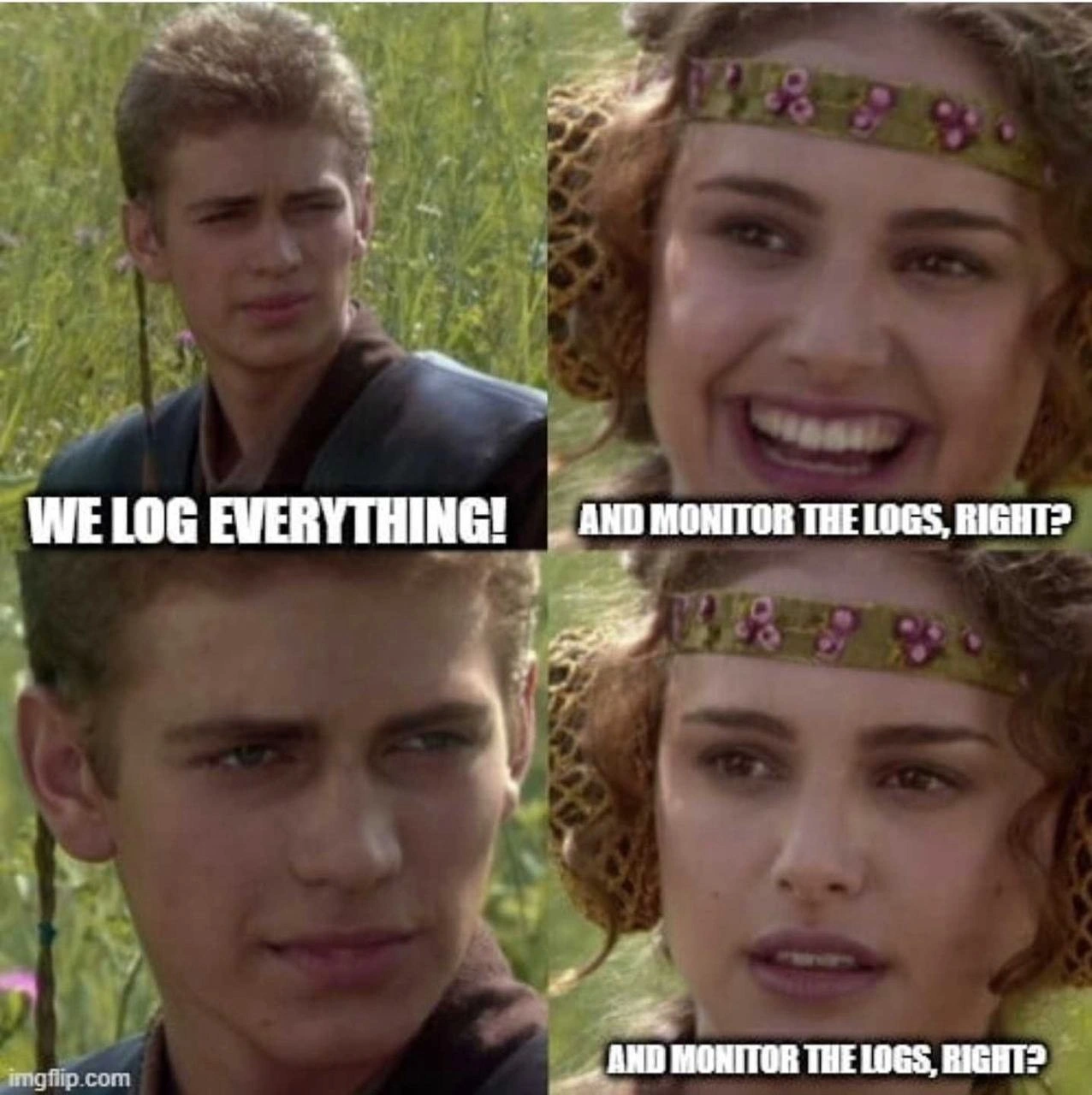
Let’s break down the joke in simpler terms. This meme highlights a common issue in DevOps and Observability_Monitoring: the difference between logging and monitoring, and why doing one without the other leads to trouble. In the panels, Anakin (the developer team) says “We log everything!” — meaning they configured the application to record every little event and error. Logging is when an application keeps a running diary of what it’s doing. It writes messages to a file or console, like “User X logged in” or “Error: couldn’t connect to database.” These messages (logs) are very detailed and can help engineers diagnose problems after they happen. Padme then asks, “And monitor the logs, right?Monitoring is the practice of actively watching those logs (and other system signals) as things happen to catch issues early. It usually involves tools or services that scan logs or track metrics and then scream for attention if something looks wrong. When Padme asks that, she’s expecting that of course the team would also have set up dashboards or alerts (some kind of monitoring system) to go along with all those logs. Anakin’s awkward silence in the third panel implies they did not set that up. That’s why Padme repeats “...right?” with a worried face — it dawns on her that the team is collecting tons of data but nobody is actually looking at it proactively. This scenario is a facepalm moment in real software teams: they have all the information about errors sitting in a log file, but no one finds out until much later because there was no alert or indication system in place. It’s like having a security camera recording everything but never checking the footage until weeks later.

To understand the terms better: logging by itself just creates data. It’s very useful for digging into what happened after you notice a problem. For instance, if an app crashed overnight, you’d open the log file in the morning and see what errors were recorded. Monitoring, on the other hand, is what would ideally tell you during the night that the app was crashing, so you can fix it before users wake up to a broken app. “Wired up monitoring” means setting up all the connections and tools so that those log entries (or metrics derived from them) are being actively watched. It’s like wiring an alarm bell to a sensor – you connect the output (logs/errors) to an alarm system (monitoring alerts). If nobody wires that up, the sensor might detect a problem (the log knows about an error) but the alarm never rings.

Here’s a quick comparison to clarify the difference:

Logging 📝 Monitoring 🔔
What it is: Recording events and data to files or log streams (like the app’s diary of everything happening).
Example: an application writes “Error: Payment service timeout at 12:00 PM” to a log file.
What it is: Actively observing system metrics and logs, often with dashboards and alerts (the system’s alarm system).
Example: a monitoring tool tracks how many errors occur per minute and notices a spike in “Payment timeout” errors.
Purpose: Detailed information for troubleshooting after the fact. You read logs to understand why something went wrong or to debug an issue. Purpose: Early detection of problems as they happen. The monitor will notify the team (email, text, pager) as soon as a problem is detected, so they can respond.
Data format: Usually unstructured or semi-structured text entries (lines in a log file, often very verbose). Can be huge in volume if “everything” is logged. Data format: Often structured metrics (numbers, counters) or specific log keywords. Focuses on key indicators (error counts, response times, CPU usage). It might turn raw logs into graphs or alerts.
When used: After something goes wrong. For example, you check logs in an incident post-mortem to find the error message and stack trace. It’s reactive. When used: Continuously, even when everything seems fine. For example, an alert triggers at 12:01 PM when that payment error happened 100 times in a minute. It’s proactive.
If missing: If you don’t log, you might have no clue what happened inside the app after a crash. (It’s like having no black box in a plane – no record of the event.) If missing: If you don’t monitor, the system can be failing and no one knows until users report it or things fully break. (It’s like a fire alarm that stays silent – you find out about the fire way too late.)

In the meme’s story, the team did the logging part (left side 📝) very thoroughly — “We log everything!” — but completely dropped the ball on the monitoring part (right side 🔔). A junior developer learning about Observability might think, “Well, if we log all the errors, isn’t that enough?” This meme is a funny lesson: No, it’s not enough! You also need to surface those errors to people or systems that can act on them. Logging creates the information, but monitoring carries that information to your attention. It’s a bit like collecting all the books in a library but having no catalog or librarian; the info is there, but effectively lost until someone manually searches for it. In real DevOps practice, teams use monitoring tools to watch log streams or, more efficiently, to watch metrics (like a count of errors, or the rate of requests, etc.). They set up alerts — for example, an email, Slack message, or pager notification — when a certain pattern happens or a threshold is exceeded. That way, if the application starts spitting out error log entries by the thousands, someone gets pinged immediately and can respond. In our meme, Padme assumed this sensible step was in place (“...you do monitor it, right?”), because any experienced person knows logging without visibility is futile. The punchline is that the team hadn’t done it. It’s a gentle jab at those who focus on one half of ObservabilityAndMonitoring and overlook the other. For a newcomer: always remember to both log and watch those logs (or metrics)! Otherwise, all that data you painstakingly collect might as well not exist until it’s too late.

Level 3: If a Log Falls

In a seasoned DevOps engineer’s eyes, this meme underscores an observability gap so wide you could fly a starship through it. The team proudly proclaims “We log everything!” as if sheer volume of logs equates to actual insight. Any DevOps/SRE veteran will smirk (or cringe) here, because we’ve all seen teams treat exhaustive logging like a safety net, only to realize too late that nobody bothered to monitor those logs. It’s the classic scenario: endless log lines scroll by in some file or centralized store, but without monitoring hooked up, they’re basically screams into the void. The humor lands darkly: If a critical error logs in production and no one’s around to see it, does it cause an outage? (Spoiler: it absolutely does, and it’ll page you at 3 AM — if you had a page set up, that is.)

This meme nails a common DevOps cultural folly. Panel 1’s boast “WE LOG EVERYTHING!” captures that overconfident team culture where developers instrument every nook and cranny with debug statements. They might even be using fancy logging frameworks, dumping JSON logs, traces, the works. But Panel 2’s question “AND MONITOR IT, RIGHT?” is where any experienced engineer raises an eyebrow. It’s essentially Padme (representing the sensible ops/SRE voice) asking, “Great, you’ve got data… but did you set up any alerting or dashboards? Are those logs wired into an observability system that actually notifies humans when things go south?” The silence in Panel 3 — Anakin’s sheepish wide-eyed stare — says it all: Nope. They turned on the firehose of logs and walked away. By Panel 4, Padme’s smile fades as she repeats the question, driving home the punchline: the team did half the job and is bravely pretending it’s fine. It’s a DevOps humor gut-punch because we recognize that optimistic disconnect: “We did the easy part (logging), skipped the hard part (monitoring), but we’ll still sleep soundly… right?” Sure, good luck with that.

From a senior perspective, the absurdity lies in how observability was misunderstood. Proper observability in a system means not just emitting data (logs, metrics, traces) but actually observing it in real-time. The term observability comes from control theory – a system is “observable” if you can determine its internal state from its outputs. Here the system is technically emitting outputs (tons of log entries), but if no one and no tool is actively watching those outputs, the internal state might as well be invisible. It’s like they built a state-of-the-art security camera system for a bank but hired no security guard to watch the monitors. All the footage in the world won’t stop a heist as it happens. In software terms, those voluminous logs become forensic data for post-mortems rather than a live early-warning system. A veteran SRE has likely endured the fallout of this mistake: an app crashes or a key service goes down, errors dutifully written to log files all night long, and not a single alert until users are screaming and the business is on fire. The meme’s silent panel is basically that sinking feeling during a retro meeting when someone asks, “Why didn’t we catch this sooner?” and the only answer is a guilty shrug: “Well... we had logs...”.

Technically, wiring up monitoring would mean connecting those logs to something useful: maybe parsing them into metrics, setting up dashboards, and defining alerts. For example, you’d feed logs into an ELK stack (Elasticsearch/Logstash/Kibana) or a cloud logging service, and configure triggers (like “if error message X appears 50 times in an hour, page the on-call”). Monitoring is all about actively tracking the system’s health and getting alerted when a threshold is crossed or an anomaly occurs. But here, clearly no such pipelines or alerts exist. The team’s boast “we log everything” without an alerting system is almost bragging that they installed 100 smoke detectors but never put batteries in them. It’s a perfect encapsulation of cargo-cult DevOps: adopting the form (lots of logs!) without the substance (actually using those logs to improve reliability). The humor has that painful ring of truth — it’s DevOpsCulture satire. Everyone touts observability and monitoring, but implementing it properly? That’s the unglamorous part often neglected until a disaster forces their hand. Padme’s final deadpan “...right?” is basically the voice of reason echoing in every on-call engineer’s head, hoping their team didn’t forget the most important step. The meme is funny because it’s true: too many of us have been Anakin, confidently logging away, until reality (and Padme) check us with, “You did set up the monitoring... right?!” Cue the nervous silence.

Description

This meme uses the four-panel 'For the Better, Right?' format, featuring Anakin Skywalker and Padmé Amidala from Star Wars. In the first panel, Anakin looks proud and declares, 'WE LOG EVERYTHING!'. In the second, a smiling Padmé follows up with the question, 'AND MONITOR THE LOGS, RIGHT?'. The third panel shows Anakin's confident expression replaced by a silent, blank stare. The final panel shows Padmé's smile has vanished, replaced by a look of dawning horror as she repeats, 'AND MONITOR THE LOGS, RIGHT?'. A watermark for 'imgflip.com' is visible in the bottom-left corner. The humor targets a common organizational anti-pattern in software engineering and operations. Teams often put immense effort into generating vast quantities of logs, creating a false sense of security that their systems are observable. However, the crucial step of setting up effective monitoring, alerting, and analysis on those logs is often neglected. For experienced engineers, this is a painfully familiar scenario where logs exist but provide no real-time insight, rendering them useless during an actual production incident. Anakin's silent panic perfectly captures the moment of realization that the 'observability' is just for show

Comments

37
Anonymous ★ Top Pick Our logging strategy is simple: we write everything to a distributed, highly-available, and infinitely scalable black hole called /dev/null
  1. Anonymous ★ Top Pick

    Our logging strategy is simple: we write everything to a distributed, highly-available, and infinitely scalable black hole called /dev/null

  2. Anonymous

    “We log everything” - translation: our alerting pipeline is the CFO pinging Slack when the S3 bill doubles

  3. Anonymous

    Somewhere there's a 10TB Elasticsearch cluster with perfect log retention, zero dashboards, and one alert: disk space at 95%. The logs will tell us exactly what went wrong... if anyone remembers the Kibana password from 2019

  4. Anonymous

    Ah yes, the classic 'we have observability at home' scenario - petabytes of logs dutifully shipped to S3 at $0.023/GB, zero alerts configured, and a Grafana dashboard that hasn't been opened since the proof-of-concept. When the 3am page comes in, you'll grep through CloudWatch Insights with a rate limit, discover your retention policy deleted last week's data, and realize the only person who knew the log format left six months ago. But hey, at least you're GDPR compliant with that 90-day retention policy, right? Right?

  5. Anonymous

    “We log everything.” Cool - who monitors it, who redacts it, and who pays the ingest bill when cardinality pages Finance before on-call?

  6. Anonymous

    “We log everything” usually means DEBUG in prod, zero sampling, PII confetti, and a CloudWatch invoice that pages finance before SRE

  7. Anonymous

    Logs: our single source of truth, buried under 99.9% cat photos from debug spam

  8. @ZgGPuo8dZef58K6hxxGVj3Z2 5y

    😂😂😂😂😂

  9. @scout_ca11sign 5y

    - We log everything! - And do not erase monthly old logs to make up space? - We dont erase older logs to make up space, don't we?

    1. @RiedleroD 5y

      my school does the opposite - keep courses (including attached images and everything) from every year since 2014 - our servers have run out of space twice this year.

      1. @RiedleroD 5y

        note: we have a lot of teachers that write stuff in latex, parse it to an image and put it into the course like that

        1. @scout_ca11sign 5y

          a w e s o m e

        2. @Roman_Millen 5y

          Not the worst case scenario. Imagine if they actually stuffed the big-size (Full HD-like) pictures into the document shrunk to tiny images, but with original size maintained.

          1. @RiedleroD 5y

            uhm… I don't understand, please elaborate?

            1. @Roman_Millen 5y

              Here's the deal. You take the big size image that takes some big space. You insert it into a document and shrink it on the page to some tiny size. You save the document. The document won't actually shrink the image per se — instead it will maintain its original size, just displaying it minified. In other words, put such big images into a document and it will bloat drastically, no matter how these images are shrunk visually.

              1. @RiedleroD 5y

                ahh I get what you meant. Well, they already do this to some degree. The images have like four times the resolution they have to be, and then insert them into moodle at (for my screen size) ~200% of the screen's resolution.

                1. @RiedleroD 5y

                  although my screen size is only 1366x768, so there's that

                2. @Roman_Millen 5y

                  Oh dear. I'm afraid to even ask how much server space did it all take, if those "eggheads" were actually doing this all the way since 2014.

                  1. @RiedleroD 5y

                    I have no idea, that info isn't accessible to students.

                    1. @RiedleroD 5y

                      but I imagine it's at least several terabytes

        3. @prirai 5y

          🤣🤣 Why not directly in pdf?

          1. @RiedleroD 5y

            because they usually embed it on our website - you can't embed pdfs (afaik)

            1. @sylfn 5y

              But you can use js-based pdf viewer like Mozilla's pdf.js

              1. @RiedleroD 5y

                you can also use js to embed latex directly into html, but the point is that they're incapable

                1. @p4vook 5y

                  mathml

                  1. @RiedleroD 5y

                    yes, that

            2. @prirai 5y

              For embedding, they could use mediawiki or mathjax or mathml. There are many more nowaday.

              1. @RiedleroD 5y

                yes, if they had like 2 minutes of IT experience, they could do that

                1. @prirai 5y

                  Why? It's the same as latex editing.

                  1. @RiedleroD 5y

                    I believe they have a word-like frontend to latex, and you do need to include some javascript libraries (which they can't)

              2. @sylfn 5y

                mathml is supported by Opera Presto (partial) One of old Chromes (partial) Firefox Safari So using mathml for everyone is not good at all

  10. @prirai 5y

    If you know either, you can easily do the other.

  11. @prirai 5y

    Also, some latex editors support exporting as html

    1. @RiedleroD 5y

      look, can we just agree that my teachers are fucking stupid? Thanks

      1. @prirai 5y

        You in HS?

        1. @RiedleroD 5y

          the austrian of equivalent of it, yes

  12. @VlP_AI_TG 5y

    I be like:

Use J and K for navigation