The Immersive Reality of iCloud Upselling
Why is this AR VR meme funny?
Level 1: Some Things Never Change
Imagine you have magic glasses that turn your whole room into a video game or a fantasy world. You could be sitting on your couch and suddenly see dinosaurs walking around, or have a giant virtual movie screen hovering in front of you. Cool, right? Now imagine you’re enjoying this amazing high-tech experience, and all of a sudden a big sign pops up right in front of your eyes saying, “Your stuff is full, you can’t save more!” In real life, this is like when your toy box is completely filled up and you try to add one more action figure – it just won’t fit. The sign in your magic glasses is basically telling you the same thing: “No more space! You need to clean up or get a bigger box.” It’s funny in the picture because you’ve got this super futuristic gadget showing you incredible things, but it still gets stopped by a very normal problem (running out of space for your things). In other words, no matter how advanced or magical something is, you still have to deal with the same old everyday issues. Even in the future, some things never change – you have to tidy up (or pay for extra space) before you can keep having fun.
Level 2: New Device, Old Problem
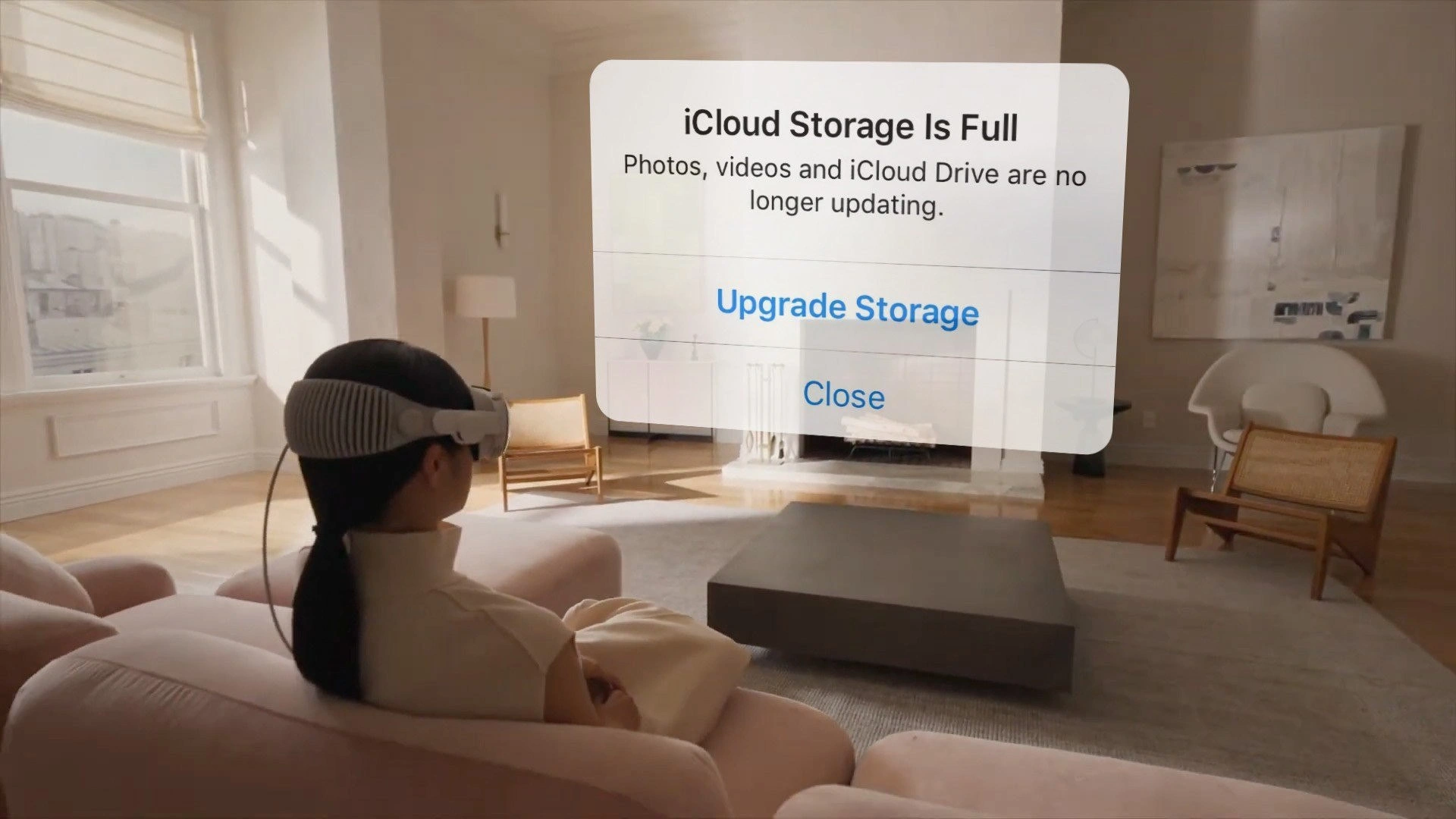
Let’s break down the joke in simpler terms. We have a person wearing an advanced Apple AR headset (think of something like the Vision Pro, Apple’s new mixed-reality goggles). This headset lets you see digital images and windows as if they’re part of your real-world space – that’s what Augmented Reality (AR) is all about. In the image, the user is relaxing in a real living room, but she can see a virtual message hovering in front of her. That floating rectangle with text is not a physical object in the room; it’s an AR overlay – basically a computer-generated screen that only she can see through her headset.
Now, what does the big text say? “iCloud Storage Is Full.” Below it, it also says, “Photos, videos and iCloud Drive are no longer updating.” If you’ve used an iPhone, iPad, or Mac, this might sound familiar. iCloud is Apple’s online storage service (a type of cloud storage). It keeps your stuff – like photos, documents, and app data – backed up and synchronized across all your Apple devices via the internet. Every Apple user gets a small amount of iCloud storage for free (only about 5 GB, which isn’t much these days). When you exceed that limit by taking too many photos or adding lots of files, your device will complain that iCloud is full. Essentially, it’s telling you that it can’t save any more of your data to the cloud until you either delete some stuff or buy more storage space. The options “Upgrade Storage” and “Close” in the dialog are the two choices the user has: either upgrade (pay Apple for a higher storage plan) or just dismiss the warning for now (which doesn’t solve the problem, so the warning will likely come back).
This warning is extremely common in the Apple ecosystem. New developers or users might discover it after, say, a few months of snapping photos or after their device tries to do a full backup. You’ll get a pop-up on your phone or a notice in Settings that your iCloud is full. It’s practically a ritual of owning Apple devices at this point – so much so that it’s a bit of a running joke. Apple hasn’t increased that free 5 GB since iCloud launched over a decade ago, even though our cameras and apps now consume way more space. So inevitably, many people see that “iCloud Storage Full” alert and roll their eyes because they know Apple is nudging them to subscribe to a paid plan. This is related to what we call vendor lock-in: Apple makes it really convenient to use iCloud (it’s built right into all your apps and automatically keeps things in sync). Once you rely on it, running out of space becomes a big annoyance, and many users feel “locked in” and end up paying for more iCloud space rather than trying to move everything to some other service.
Now, why is it funny to see this in AR? The headset (like Vision Pro) is a super advanced piece of technology. It’s designed for spatial computing – which means you can place apps and content in the 3D space around you, not just on a flat screen. Imagine using it to watch movies on a virtual 100-inch screen, or to have multiple web browser windows floating around your desk, or to play an AR game where creatures run on your living room floor. It’s high-end, futuristic stuff. So you’d expect experiences on it to feel like science fiction. However, here we have this very down-to-earth system alert interrupting everything. It’s as if despite all the innovation (eye-tracking, hand gestures, 3D graphics), the device still throws a basic “please give us more money for storage” message at you. It’s a collision of future and present.
For a junior developer or anyone starting out in tech, there’s a relatable lesson: no matter how cool or new a technology is, it still relies on fundamental resources like storage, memory, and internet. When those run out or hit a limit, the experience can grind to a halt. In our meme, the fundamental resource is cloud storage space. The user might be exploring AR apps, maybe even taking photos or recordings with the headset’s cameras. Those likely get saved to iCloud automatically (since Apple loves syncing everything). But if iCloud can’t accept more data, the device has to warn the user. So the fancy AR device is forced to act just like a phone or computer would in that scenario – by popping up an alert. It’s a bit like if you had a sleek sports car and suddenly a dashboard light comes on saying “Oil change required” – it’s a mundane maintenance issue appearing in a not-so-mundane context.
Also, think about user experience: AR is supposed to be immersive, blending in with real life. A giant alert panel is the opposite of blending in; it’s intentionally grabbing your attention. Apple’s design philosophy usually tries to minimize obnoxious interruptions, but when it comes to iCloud storage, they make an exception to be sure you notice 😅. As a developer, you usually want to handle errors or limits gracefully. Here, the system’s solution to a storage limit is basically to put a big roadblock in front of the user’s eyes until they acknowledge it. It’s functional, but not exactly elegant. The meme is poking fun at this little break in the “magic” of the AR world.
To put it simply: the person in the picture has one of the most advanced gadgets on the planet strapped to their face, yet they’re dealing with a very ordinary tech problem that even folks with a basic smartphone face regularly. It’s that contrast that makes it funny. For developers, it’s also a nod to how problems scale with technology — we solve one thing (like how to put computer graphics into real space) but we still have to solve another (how to manage data and not annoy the user when something fills up). A junior dev who has deployed an app might have felt a mini version of this, for example, if their app’s free tier on a service got exhausted and suddenly users saw error messages or prompts to upgrade. It’s a rite of passage to realize that behind every shiny app or device, there are quotas, limits, and costs that need attention.
So, new device, old problem sums it up: You can project digital windows into the air and compute in 3D, but an “out-of-storage” notification can still come along to bring you back to Earth. It’s a humorous reminder that some challenges in tech persist no matter the platform.
Level 3: Augmented Upsell
In a serene living room bathed in sunlight, a developer wearing an Apple Vision Pro-like headset lounges on a sofa. Through these futuristic goggles, she sees a floating translucent panel stating, “iCloud Storage Is Full”. Beneath that ominous header, it warns that Photos, videos, and iCloud Drive are no longer syncing, offering two familiar options: Upgrade Storage or Close. This scene perfectly collides spatial computing with a classic cloud annoyance. The most advanced AR interface imaginable is intruded upon by the eternal bane of modern Apple users: the iCloud nag screen. It’s as if cutting-edge augmented reality met a 2010s iPhone pop-up, creating a holographic paywall in mid-air. Seasoned engineers can’t help but smirk at this juxtaposition of high-tech and low-level hassle.
On a technical level, the meme highlights how even visionary user experiences must bow to the same old backend rules. Apple’s visionOS (the operating system for Vision Pro) extends traditional UI into 3D space. That floating alert is essentially a standard iOS/macOS system modal, now rendered as an AR overlay. Under the hood, the headset’s software likely uses frameworks akin to ARKit/RealityKit combined with SwiftUI to place a window in your environment. In plain terms, the OS takes what would normally be a 2D dialogue box and pins it into the room in front of you. The humor is that this magical AR interface – capable of transforming a living room into a digital playground – is still running up against a very mundane limit: cloud storage quota. It’s like discovering your ultra-modern electric car still has the same old “low battery” ding; the medium evolved, but the message didn’t.
From the cloud side of things, consider what iCloud is doing here. iCloud is Apple’s cloud storage service that keeps your photos, files, and app data synced across devices. However, Apple famously provides only 5 GB of free iCloud space per user – a paltry amount by today’s standards. That space gets eaten up quickly by high-resolution photos, 4K videos, device backups, and now potentially AR recordings. Once you hit that cap, Apple’s servers refuse to accept more data, and the devices trigger this very alert. In our meme scenario, the user’s fancy AR headset is dutifully obeying a simple rule: “if no cloud space, tell the user.” The result? A VR-esque nagware modal floating before your eyes. It’s the same dialog iPhone users have groaned at for years, now upgraded to 3D. A developer sees this and immediately recognizes the hallmark of vendor lock-in: Apple’s gentle but persistent push to make you pay for more storage within their ecosystem. After all, if you’re deeply tied into the Apple ecosystem (photos, files, notes all on iCloud), that “Upgrade Storage” button is the easiest way out. Even in augmented reality, there’s no escape from the upsell.
Why is this so relatable (and funny) to experienced developers? Because it underscores a software truth: no matter how innovative the interface or hardware, the same fundamental issues and business models lurk beneath. We’ve spent decades solving hard problems in computing, yet “out of storage” errors never died; they just moved to the cloud. Apple’s state-of-the-art headset is essentially a powerful computer for mixed reality, yet it must contend with a resource limit designed as a monetization strategy. It’s an absurd reminder that behind the glossy “it just works” magic, someone’s S3 bucket or server drive is filling up. In dev-ops terms, “the cloud is just someone else’s computer” – with finite disk space and a credit card attached. The seasoned devs chuckle because we’ve all been there: deploying a slick new microservice only to have the app crash due to a full disk, or building a groundbreaking feature that gets disabled until the user upgrades their plan. The meme takes that shared pain and literally projects it into the room.
Consider how a snippet of pseudo-swift logic might look for this scenario:
// Check remaining iCloud quota before saving more data
let remainingSpace = iCloud.quotaRemaining()
if remainingSpace <= 0 {
displayAlert(
title: "iCloud Storage Is Full",
message: "Photos and data are no longer syncing.",
actions: ["Upgrade Storage", "Close"]
)
// In visionOS, this alert might appear as a floating panel in the AR view.
}
Even without real code, the logic is clear: if storage is exhausted, nag the user. Apple has essentially carried this logic into AR. For developers, seeing a displayAlert("Storage Is Full") happen inside an immersive spatial app is both absurd and totally believable. It’s a reminder that an AR headset isn’t an island; it’s tied into the same cloud services as your phone. So when that service has an issue (like being full), your $3500 headset dutifully pops up the equivalent of a low disk space warning — except now it’s literally in your face.
There’s also an element of gallows humor about user experience here. AR and VR are supposed to be seamless and immersive. Best practices say: don’t break the user’s immersion. Yet a system-driven modal alert is the ultimate immersion-breaker. It’s the spatial computing equivalent of a Windows 10 notification ping during a VR game, or a smartphone update dialog popping up in the middle of a presentation. No matter how much Apple refined the Vision Pro’s interface (eye-tracking, gesture controls, 3D app windows), a crude storage quota alert can bulldoze through, flattening the magical experience with a blunt reminder of reality (and revenue). Engineers who have worked on UI/UX or product design can appreciate the irony: after investing countless hours to craft revolutionary UX, a basic “Please subscribe” dialog still takes center stage. It’s almost poetic that the first widely relatable mixed-reality moment envisioned by this meme isn’t flying whales or virtual desktops — it’s a paywall notification.
Historically, this scenario has roots in patterns we’ve seen for years. Back in the day, software trials would nag you to purchase after 30 days, and shareware apps would pop up “Please register” screens. Today’s equivalent is the free cloud tier nag: use a bit too much, and you start getting polite demands to pay. Apple has persistently kept iCloud’s free tier low, so much that “iCloud storage full” memes regularly circulate in tech circles. Seasoned Apple developers recall every WWDC hoping Apple will finally bump that free storage (especially as device cameras and now AR content generate ever-larger files), only to be disappointed. This persistence is why the meme calls it the “eternal” upgrade screen – it feels eternal indeed. It’s a running joke that transcends a single product; it’s part of living in the Apple world.
In the end, Spatial computing meets the eternal iCloud nag is both a punchline and a small caution. It reminds senior devs that even the most futuristic gadget has to deal with prosaic issues of storage, quotas, and vendor lock-in tactics. And it teaches newcomers that no abstraction truly eliminates underlying limits – you can put your interface in the cloud (or in the room around you), but you can’t make the need for storage space disappear. The meme gets its comedic kick by highlighting this truth with a visual sucker-punch: high-tech goggles presenting a low-tech problem. It’s equal parts facepalm 🤦 and told ya so.
Description
A meme depicting a person from behind wearing an Apple Vision Pro headset while sitting on a couch in a modern living room. Superimposed over their view is a large, semi-transparent augmented reality notification box. The notification prominently displays the message: 'iCloud Storage Is Full. Photos, videos and iCloud Drive are no longer updating.' Below the message are two buttons: 'Upgrade Storage' and 'Close'. The humor arises from the juxtaposition of a highly advanced, futuristic spatial computing device with the mundane and perpetually annoying problem of insufficient cloud storage. It satirizes the idea that no matter how futuristic our technology becomes, we can't escape common frustrations like upselling and storage limitations, a pain point well-known within the Apple ecosystem
Comments
7Comment deleted
The Vision Pro's most immersive feature is the 'Upgrade Storage' modal, which projects the soul-crushing reality of Apple's 5GB free tier directly onto your retina with sub-12-millisecond latency
We finally broke the reality-renderer pipeline - turns out your scene graph now has a hard dependency on the 200-GB plan
After spending $3,500 on a Vision Pro to escape reality, you discover Apple's iCloud storage notifications have achieved quantum superposition - existing simultaneously in both physical and virtual realms. The only true augmented reality is the one where your 5GB free tier somehow needs to accommodate 15 years of uncompressed RAW photos
Finally achieved true immersion in VR, only to discover that Apple's iCloud storage notifications have achieved cross-dimensional persistence. Turns out the real metaverse was the subscription upsells we encountered along the way - now rendered in glorious spatial computing at 90Hz refresh rate
Vision Pro renders infinite worlds at 90Hz - until iCloud's 5GB free tier reminds you storage is still a commodity
Infinite screens, zero bytes: VisionOS meets the CAP theorem when the partition is 5GB - restore availability with credit‑card autoscaling
In mixed reality, modals aren’t just blocking - they become furniture; iCloud backpressure renders a living‑room dialog, and the only retry policy is OPEX: Upgrade Storage