Skip to content
DevMeme
3176 of 7435
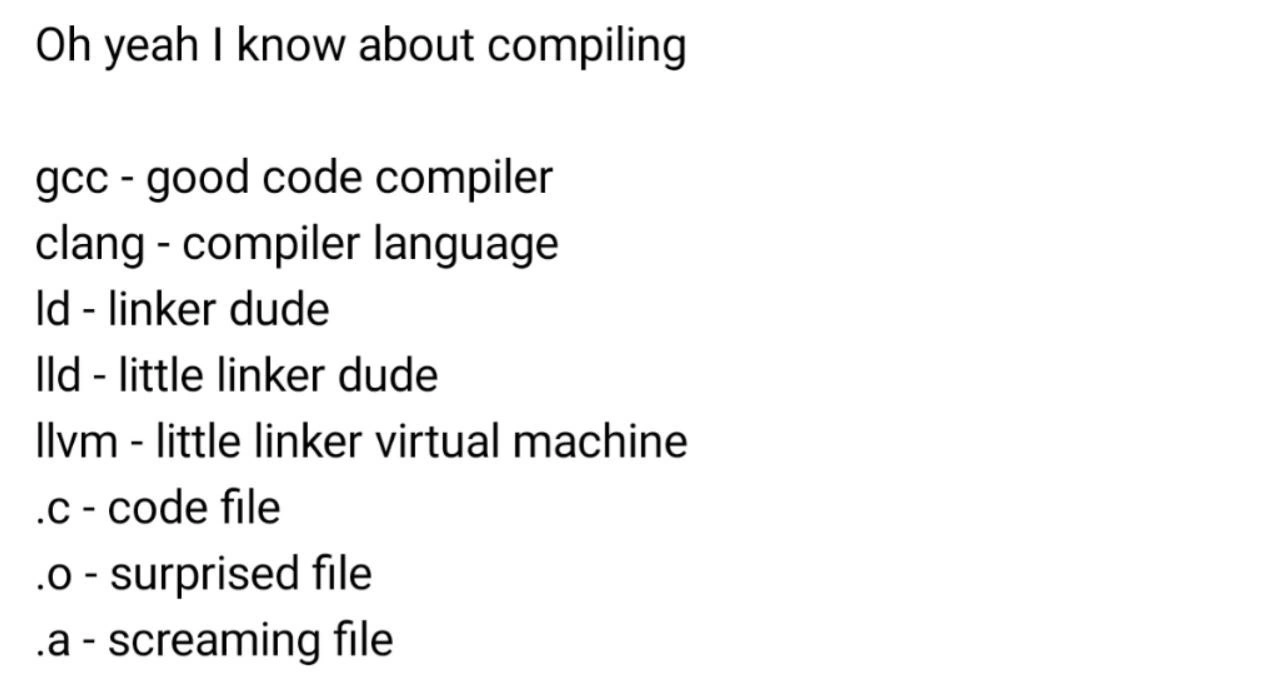
When gcc -Wall turns your codebase into a battlefield of warnings
Compilers Post #3497, on Aug 3, 2021 in TG

When gcc -Wall turns your codebase into a battlefield of warnings

Why is this Compilers meme funny?

Level 1: So Many Red Flags

Imagine you hand in a homework assignment and ask the teacher to mark every single mistake or unclear bit in red pen. When you get it back, almost the entire page is covered in red marks and comments! You’d probably feel shocked and overwhelmed, like “Whoa, I had that many things wrong?” This meme paints that same feeling with a coding twist. The programmer turned on a setting (-Wall) that tells the computer to point out all the little issues in the program. Suddenly, a ton of warning messages appear, kind of like getting your homework back full of corrections. The picture of the dog with big frightened eyes in the middle of a war scene is a silly way to show how startling and chaotic that moment feels. It’s like the poor dog (the programmer) is thinking, “I just wanted some help, but now I’m under attack!” The reason it’s funny is because it’s an exaggeration we can relate to: sometimes asking for all the feedback at once (whether from a teacher or a computer) leaves you feeling besieged by problems. The meme takes that to the extreme, joking that turning on all compiler warnings is akin to plunging yourself into a battlefield – a dramatic, comical way to say “brace yourself, you’re about to see a lot of issues!”

Level 2: Wall of Warnings

Let’s break down the meme’s ingredients. First, GCC stands for GNU Compiler Collection, a popular open-source compiler that turns C and C++ source code into executable programs. When you compile code with GCC, you can provide compiler flags (special options) to change its behavior. The meme specifically highlights the flag -Wall. Despite its name, -Wall doesn’t mean “build a wall” – it means “enable all (common) warnings.” In other words, it tells the compiler: “Please notify me about every little thing in my code that looks suspicious or could lead to problems.”

Now, what are these warnings? In compiled languages like C/C++, there are two main types of messages the compiler can emit: errors and warnings. Errors are serious issues that violate the language rules – for example, a missing semicolon or an undefined variable – and they stop the compilation. You have to fix those for the program to even compile. Warnings, on the other hand, are cautionary messages. They don’t halt the build, but they alert you to potential bugs or bad practices. For instance, if you declared a variable and never used it, the compiler might issue a warning: “hey, you have an unused variable here – did you forget to use it, or can you remove it?” Similarly, if you compare a signed integer with an unsigned integer, it might warn you that the comparison could behave unexpectedly. With default settings, GCC is fairly quiet about minor issues, only showing the most important warnings. But with -Wall turned on, it’s like you’ve said, “give me everything you’ve got.” The compiler will dump out a long list of all these cautionary notes for every file.

In the meme’s image, the text at the top says $gcc -Wall. The dollar sign ($) is a common way to denote a shell prompt (basically showing a command being run in a terminal). So it implies the developer ran “gcc -Wall” on their project. The result? The developer’s face (represented by the Doge dog) is shown with wide, frightened eyes against a backdrop of a Vietnam war scene. This is a popular meme format used to jokingly convey “PTSD” or flashbacks – as if the person is suddenly reliving a traumatic battle. Here’s why that imagery fits: seeing your screen fill up with a relentless stream of compiler warnings can indeed feel overwhelming, especially if you’re not expecting it. It’s like calm one moment, and then WHAM! – you’re in the middle of a warning warzone. The helicopters, soldiers, and smoky jungle imply chaos and panic, mirroring how a developer might feel under a bombardment of warning messages. The Doge’s anxious expression says it all: “What did I just unleash?!”

This touches on code quality concerns. Good code hygiene in C/C++ often means keeping the number of warnings at zero, because each warning might point to a real problem (or at least unclear code). Many experienced programmers regularly compile with -Wall (and even -Wextra, which adds even more warnings) to catch issues early. They treat warnings as potential bugs that should be fixed. However, if you’ve never done that and suddenly turn on -Wall for an older project, you might discover an intimidating wall of warning messages. It can include things like:

  • Unused variables or functions – indicating parts of the code that aren’t doing anything (which could be dead code or a mistake in logic).
  • Implicit type conversions – for example converting a long to an int might throw a warning if data could be lost, or converting a signed number to unsigned could misbehave if the value is negative.
  • Deprecated or dangerous functions – the compiler might warn if you use old functions that are known to be risky (like gets() in C, which is unsafe).
  • Missing returns – e.g. a non-void function that doesn’t return a value on all code paths will trigger a warning because that’s likely a bug.
  • Unused results – calling a function and not using its return value (like ignoring an error code) can produce a warning, nudging you to handle it.

Each of these warnings is basically the compiler saying, “Are you sure you meant to do that?” When you have dozens or hundreds of such messages, it implies the code has a lot of these questionable spots. It’s overwhelming for a developer, especially a newer one, to see error-like messages flooding the screen, even if the program still runs. That’s why the meme is funny: it exaggerates this situation to an absurd extreme (war flashbacks!), but the core scenario is real. Many of us have had that moment of debugging frustration when a seemingly innocent change (like adding a new flag or updating the compiler) suddenly reveals pages of warnings.

One more thing happening in the meme text: they specifically wrote an alias command in the post’s message (the echo "alias gcc='gcc -Wall -Wextra -Werror -O3 -flto' ... >> .bashrc" part). This suggests adding a permanent setting so that every time you use gcc or g++, it automatically includes all the strict flags (-Wall -Wextra -Werror) and even optimization flags (-O3 for high optimization and -flto for link-time optimization, plus -ftemplate-depth=1024 for C++ which allows extremely deep template code). In simpler terms, that’s like telling your compiler: “Never give me a break – always be in ultra-strict mode.” It’s a bit of a joking dare. For a newcomer, doing this might be scary (because even tiny issues will stop the compile due to -Werror treating warnings as errors). But some seasoned developers do this to force themselves into writing very clean code from the start. It’s the no-pain-no-gain philosophy of coding: tough at first, but it ensures you address problems early. The meme’s context uses this suggestion to amplify the joke — as if the original warning barrage wasn’t enough, let’s permanently set our compilers to panic mode!

So, summarizing the whole gag: Using gcc -Wall on a codebase is likened to dropping yourself into a war zone of compiler warnings. The dog’s freaked-out face and the war helicopters dramatize how it feels to be bombarded by all those messages. It’s a mix of developer humor and a little bit of truth about software best practices. After the laughter, you might even think, “Hmm, maybe I should slowly fix those warnings… but where to even start?” And that blend of amusement and anxious realization is exactly what the meme is going for.

Level 3: Legacy Code Crossfire

For anyone who’s inherited a legacy C/C++ codebase full of questionable constructs, running gcc -Wall on it for the first time can be a traumatic experience. The meme nails this feeling by portraying a developer as a shell-shocked soldier (Doge’s wild eyes superimposed on a Vietnam war scene). Why is this funny? Because enabling all compiler warnings often transforms a calm compilation into a torrent of ominous messages. Each compiler warning is like a little enemy soldier popping up: “warning: unused variable x,” “warning: comparison between signed and unsigned,” “warning: control reaches end of non-void function,” — pew pew pew, they keep coming. In a huge project, you might get hundreds or thousands of warnings scrolling by, turning your terminal into a chaotic battleground of yellow or red text. Seasoned developers have been there: that moment when you turn on strict compiler flags and suddenly you’re pinned down under heavy fire from a battalion of previously silent issues. It’s both grotesquely comical and horrifying, hence the war flashback imagery.

This meme speaks to shared developer trauma. C and C++ give you a lot of rope to hang yourself, and for years teams might compile with minimal warnings just to keep the noise down. The code “works” in production, so they ignore the nags. But one day a brave soul says, “Let’s improve our code quality; time to enable -Wall.” Immediately, it’s like uncovering a minefield: every file triggers multiple warnings, many of them repeated across dozens of modules. The sheer volume feels like being under siege. The joke is that a simple compiler flag turns a routine task into a full-blown debugging firefight.

The sarcasm and dark humor here come from how painfully true this can be. We all know we should fix warnings. Each warning is a hint of something that could bite us later — maybe an uninitialized variable that could lead to undefined behavior, or a deprecated function that might vanish in a future update. Yet, when faced with 500 of them, what do many teams do? They sigh, maybe fix a handful, and then add a // TODO: clean up warnings somewhere (which itself gets forgotten). The war analogy fits because tackling a massive warning list is exhausting and demands a triage mindset: which battles (warnings) must be won now, and which can we survive ignoring?

There’s also an inside joke about turning warnings into errors. Hardcore projects (or overly ambitious team leads) sometimes enforce -Werror so that any warning halts the build. It’s like commanding the troops: “Not a single shot fired (warning) shall be tolerated!” Great in theory for discipline, but if you retrofit this onto a warning-riddled codebase, nothing compiles until you fix them all. That’s akin to a cease-fire order where your code can’t advance until every sniper is eliminated. In the meme’s Facebook comments (and the provided post message), someone quips about adding an alias in your shell startup script so that every time you run GCC or G++, it automatically uses ultra-strict flags:

# Force GCC to always enable all warnings and optimizations by default (extreme tactic):
alias gcc='gcc -Wall -Wextra -Werror -O3 -flto'
# And for g++ (C++ compiler), include a ridiculous template depth in case of heavy C++ metaprogramming:
alias g++='g++ -Wall -Wextra -Werror -O3 -flto -ftemplate-depth=1024'

Imagine inheriting a machine with that setup—every compile is a full-on no-mercy audit of your code. Talk about anxiety-inducing! It’s both a tongue-in-cheek suggestion and a masochistic one. The DeveloperHumor here lies in the absurdity: only a battle-hardened programmer (or a prankster mentor) would drop those flags as default and watch a junior dev’s face as warnings erupt like gunfire. The DebuggingFrustration tag fits because this scenario turns a simple debug/compile cycle into a prolonged campaign.

Ultimately, the meme gets a laugh (and a groan) from experienced developers because it hyperbolically captures a real scenario: enabling thorough compiler warnings on a dusty codebase unleashes a warning apocalypse. It’s a comedic way to commiserate about code quality challenges. We’ve all had that “it’s raining warnings” moment. The wide-eyed Doge superimposed on wartime chaos perfectly personifies the PTSD-like flashbacks we get from past battles with intractable code. It’s funny because it’s true — sometimes writing or maintaining code feels like surviving a war, and flags like -Wall are the loud sirens that make sure you don’t forget the technical debt still lurking in the trenches.

Level 4: From Lint to -Wall

In the primordial days of C programming, a separate tool called lint (from 1979) was used to sniff out suspicious code patterns that the compiler itself wouldn’t catch. This was essentially early static analysis: examining source code for potential errors without running it. Over time, compilers like GCC (the GNU Compiler Collection) began integrating these checks directly. The -Wall flag (whose name humorously suggests “Warn All”) is GCC’s broad-brush way to enable a barrage of compiler warnings. Under the hood, when you compile with gcc -Wall, the compiler’s front-end performs additional analyses on the Abstract Syntax Tree (AST) and the code’s semantics, looking for anything fishy. It’s as if you told the compiler, “Be extra vigilant, call out every questionable thing you see in my code.”

What happens next is a static analysis onslaught. The compiler inspects each function, variable, and pointer with scrutiny: Are there implicit type conversions that might truncate data? Did the code use a variable that was never initialized? Is a function’s return value being ignored? These patterns (and many more) are flagged as warnings. Technically, they aren’t show-stopping errors — the program can still compile — but each warning is a potential bug shrapnel fragment. A veteran C/C++ developer knows that today’s ignored warning can become tomorrow’s segmentation fault or memory corruption.

Historically, code quality culture evolved to treat warnings as second-class citizens: nice to clean up if you have time, but not mandatory. However, as projects grew in size, ignoring hundreds of warnings became untenable and dangerous. This gave rise to practices like enabling all warnings (-Wall and even -Wextra) and even treating warnings as errors (-Werror) to enforce zero-warning policies. It’s a double-edged sword: you’re effectively declaring war on undefined behavior and sloppy code, but the first battle is often against an overwhelming army of existing warnings. The meme exaggerates this with the Doge’s thousand-yard stare, but there’s truth underneath: turning on comprehensive compile-time checking in a large legacy codebase can feel like triggering every alarm in a minefield simultaneously. It reflects a fundamental reality of software engineering — the more rigorous your static analysis, the more ghosts and skeletons you uncover in the code’s closet.

Description

The meme shows the text "$gcc -Wall" in bold white letters centered at the very top. Below, a dramatic composite image overlays a wide-eyed Doge (white Shiba Inu face) with a sepia-toned Vietnam-war scene: Huey helicopters swoop in from both sides while weary soldiers in helmets advance across a smoky jungle. The dog’s anxious eyes dominate the frame, giving a shell-shocked expression that blends into the combat footage, evoking the classic "war flashback" meme format. Technically, it jokes that enabling the -Wall flag in the GCC compiler unleashes a barrage of warnings that make seasoned C/C++ developers feel like they’re under heavy fire. The humor relies on compiler flag culture, code-quality anxiety, and the overwhelming volume of warnings in large legacy codebases
Comments

14
Anonymous ★ Top Pick Alias gcc to “gcc -Wall -Wextra -Werror -O3 -flto” and the build log turns into a war diary: “Day 1,003 - still pinned down by signed/unsigned artillery, morale low, template depth maxed at 1024… send reinforcements.”
  1. Anonymous ★ Top Pick

    Alias gcc to “gcc -Wall -Wextra -Werror -O3 -flto” and the build log turns into a war diary: “Day 1,003 - still pinned down by signed/unsigned artillery, morale low, template depth maxed at 1024… send reinforcements.”

  2. Anonymous

    That moment when you've been shipping 'production-ready' C code for years, then someone suggests adding -Wall to the build pipeline and suddenly your terminal looks like a CVE database having an anxiety attack while your imposter syndrome whispers 'I told you so' in undefined behavior

  3. Anonymous

    Enabling -Wall on a 'working' legacy C codebase is like opening Pandora's box, except instead of releasing all the evils of the world, you're releasing 847 warnings about implicit int declarations, unused variables, and that one pointer arithmetic operation that's technically undefined behavior but has 'worked fine for 15 years.' The real horror isn't the warnings themselves - it's realizing your entire production system has been running on compiler optimizations that could legally transform your code into a program that orders pizza

  4. Anonymous

    gcc -Wall: the after-action report that turns “it works in prod” into 600 lines on UB, shadowed locals, and implicit conversions your ’90s C code has been getting away with

  5. Anonymous

    Enable -Wall on a decade-old C repo and discover 'all' means reconnaissance; -Wextra and -Wpedantic are the helicopters, and the first -Werror turns your CI into a siren

  6. Anonymous

    gcc -Wall after a decade of -w bliss: every unused variable suddenly a war crime, choppers inbound for code evac

  7. @nuntikov 4y

    Maybe -0d?

  8. @NiKryukov 4y

    -Woof

  9. @PeGa041 4y

    this smells of gentoo ricing 183% (https://forums.gentoo.org/viewtopic-t-309752.html) edit: adds source

    1. @RiedleroD 4y

      got a question (for you or anyone else that understands CFLAGS) do those flags make sense? CPPFLAGS="-D_FORTIFY_SOURCE=2 -march=native -O2 -pipe -fno-plt -fuse-ld=lld" CFLAGS="-march=native -O2 -pipe -fno-plt -fuse-ld=lld" CXXFLAGS="${CFLAGS}" LDFLAGS="-Wl,-O1,--sort-common,--as-needed,-z,relro,-z,now" RUSTFLAGS="-C opt-level=2 -C target-cpu=native -C link-arg=-fuse-ld=lld -C debuginfo=0" half of those are default arch flags (for pkgbuilds), but I just wanted an opinion on the ones I added.

      1. @RiedleroD 4y

        asking here bc I picked the ones that sounded good, but I really don't understand much of the technical jargon

    2. @RiedleroD 4y

      just noticed that this forum thread is from 2005 - that's why they're talking about Pentiums and Athlons like they're the creme de la creme lol

  10. @PeGa041 4y

    my take on that was always stick to "safe cflags" (they're a thing, really, they're on the gentoo wiki)

  11. @PeGa041 4y

    yep, that was the golden age in gentoo... no idea how it goes today

Use J and K for navigation