Apple M1 Chip Crushes Intel in Developer Benchmark
Why is this Hardware meme funny?
Level 1: The Cheetah and the Turtle
Imagine two friends are having a race to build a very big Lego castle. One friend is like a cheetah – they have a super new set of tools and can snap those Lego bricks together really quickly without getting tired. The other friend is like a turtle – they’re using older, heavier tools and they get tired and slow down sometimes, so they take a lot longer to finish the castle. In our story here, the cheetah-friend finishes the Lego castle in about 20 minutes, while the poor turtle-friend is still working and working, taking almost 45 minutes to do the same job!
This meme’s chart is showing something similar, but with computers building software instead of friends building a castle. The fast green bars are the speedy new computer (the cheetah) and the slow gray bars are the older computers (the turtles). It’s funny and exciting because you’d expect the big, expensive computer (like a big strong turtle) to win, but the small new one (the cheetah) zooms ahead and finishes first. The feeling you get from this is kind of like watching a tiny car beat a big truck in a race – it makes you go “Whoa, I didn’t see that coming!” 🐆🐢
For a programmer, this is super happy news. It means with the new fast computer, they don’t have to wait so long for their work to finish. Think of it like this: if doing your homework usually takes an hour on your old computer (you’re waiting for it to load and process), but then you get a new computer that does it in 20 minutes, you suddenly have a lot more free time to play! You’d be pretty excited, right? In the same way, developers are excited because the new Apple M1 computers (the speedy cheetahs) let them finish their coding tasks much faster than the old Intel ones (the plodding turtles). It’s a simple race story: fast vs slow, and who wouldn’t be happy to be on the fast team?
Level 2: Fast vs Slow Macs
Alright, let’s break down what’s going on here in simpler terms. This image is basically comparing how fast different Apple computers can compile code – specifically the code for WebKit, which is Apple’s web browser engine (the guts of Safari). Compiling code is what happens when developers take the human-readable source code they’ve written (in languages like C or C++) and run it through a program called a compiler to turn it into an application or executable that the computer can run. It’s kind of like translating a book from one language to another – and for something as big as WebKit, that “translation” takes a lot of work! We measure that work in time, so shorter bars in the chart mean faster compile times (which is better).
In the chart, we have six different Macs from around 2019–2020. Three of them are using Apple’s new Apple Silicon M1 chip (those are the green bars), and the other three are using older Intel chips (gray bars). Apple used Intel’s processors in Macs for years, but in 2020 they introduced their own homemade chip called M1. This was a huge deal in the tech world. The M1 is based on a different CPU architecture (ARM, which is used in iPhones and iPads) whereas Intel chips use the x86 architecture. What matters for us here is that the M1 turned out to be really fast. The bars show how many minutes it took each machine to compile the whole WebKit project from scratch:
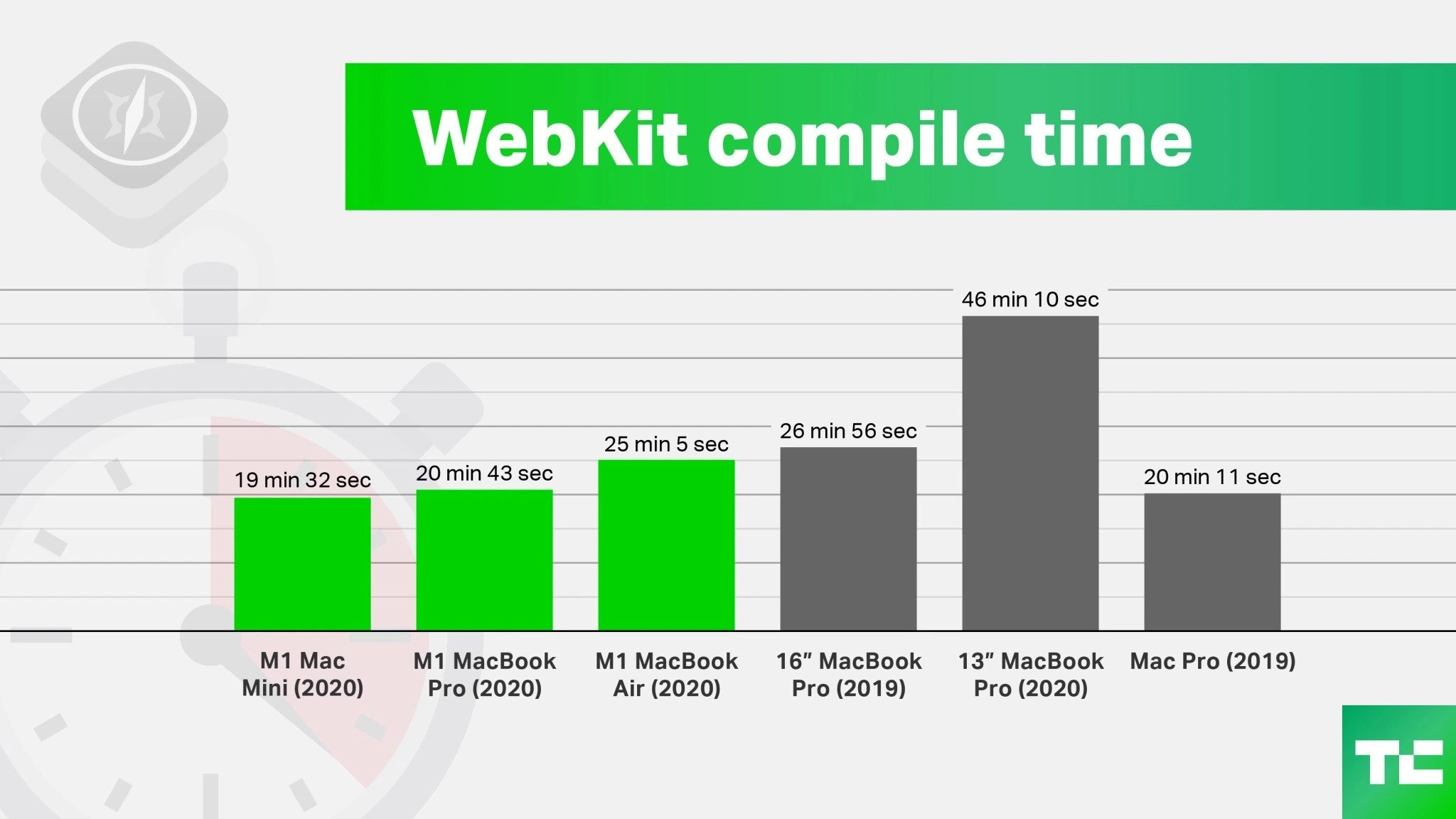
- M1 Mac Mini (2020) – ~19 minutes 32 seconds
- M1 MacBook Pro (13″, 2020) – ~20 minutes 43 seconds
- M1 MacBook Air (2020) – ~25 minutes 5 seconds
- 16″ MacBook Pro (2019, Intel) – ~26 minutes 56 seconds
- 13″ MacBook Pro (2020, Intel) – ~46 minutes 10 seconds
- Mac Pro (2019, Intel) – ~20 minutes 11 seconds
You can immediately spot that the bright green M1 machines are on the left with much shorter bars (around 19–25 minutes), while the gray Intel machines on the right took longer (about 27–46 minutes), except the Mac Pro which was around 20 minutes. The Mac Pro is a bit of a special case – it’s a desktop tower meant for professionals, and it had a very powerful Intel processor (and a very high price tag!). Even so, in this particular test, the Mac Pro only just matched the M1 MacBook Pro and Mac Mini. And the poor 13″ MacBook Pro (2020 Intel) took almost twice as long as the M1 machines – 46 minutes is a lot of waiting 😅.
So why do we care about compile times and these differences? For developers, time is productivity. If it takes 45 minutes to compile your software, that’s 45 minutes of potentially sitting idle or context-switching to other tasks. Faster compile times mean you can test changes sooner and iterate quicker. It’s the difference between, “Make a change, then go grab lunch while the computer builds the program,” versus “Make a change, and within the same coffee break, it’s done building and ready to run.” That’s huge for performance optimization in a workflow sense.
Now, the M1 being so fast is partly due to hardware and partly due to how software can use that hardware. The M1 chip has more efficient cores and can run cooler and at higher speed for longer. Those Intel chips, especially in laptops, often slowed themselves down when they got too hot (to avoid overheating) – this is called thermal throttling. The M1 MacBook Air in the chart is fanless, so it’s actually designed to slow down a bit if it gets too warm (which is why it’s a tad slower at 25 min). The M1 Mac Mini and M1 MacBook Pro have fans, so they stayed cool and finished faster (around 20 min each). Meanwhile, the 13″ Intel MacBook Pro likely got really hot and had to throttle a lot, which might be a reason it was so slow (46 min – ouch!). The 16″ Intel MacBook Pro has a bigger chassis and better cooling, so it did better (27 min) but still not as good as the M1 machines.
Another factor is how many CPU cores these machines have and how fast each core is. Compiling WebKit can use multiple cores – meaning it can compile a bunch of files in parallel. The M1 has 8 cores (4 high-performance and 4 efficiency cores). Many Intel chips in MacBook Pros around 2019 had 4 to 8 cores (with up to 16 threads if you count Hyper-Threading, which is like virtual extra cores). The Mac Pro tower could have even more cores (8, 12, or more in high-end configs). But even with lots of cores, if each core isn’t as fast or if parts of the build can’t use all cores at once, you won’t see a perfect speedup. For example, maybe linking all the compiled pieces into the final program can only use one core – then a super-fast single core (like on the M1) could outperform a slightly slower single core on an Intel, no matter how many extra cores are twiddling their thumbs. This is a classic case of diminishing returns when scaling up cores.
In simpler terms: Apple’s M1 chip brought a huge leap in speed for everyday tasks like coding, without needing a loud fan or a lot of electricity. Benchmarking tools and tests (like the one making this bar chart) were used to measure these build times meticulously. The results convinced a lot of developers that Apple’s move to custom AppleSilicon was the right call. In late 2020, seeing these numbers, many programmers and tech enthusiasts realized “Whoa, if I get an M1 Mac, I can compile my projects way faster.” It directly affected developer laptop choice for anyone doing heavily compiled languages. Suddenly the 2020 MacBook Air/Pro with M1, even as first-generation devices, became the hot laptop for coding because of charts like this.
So this image is both an illustrative bar_chart_visualization and a bit of a brag. It says: look, our new Apple chips are crushing it. It resonates with developers because waiting for code to build is a common bottleneck. By comparing these Macs side by side, the chart tells a clear story: Apple M1 Macs are really fast at compiling code compared to Intel Macs. Even if you’re not super technical, it’s easy to see green bars are shorter (better) than gray bars. And if you are a bit technical, you now know that’s due to things like chip design, cooling, and how compilers work. In summary, faster computers (especially with a good CPU) = faster compiling = happier, more productive programmers. 🎉
Level 3: Compiling at Ludicrous Speed
For seasoned developers, this bar chart is both astonishing and a bit hilarious. It’s highlighting a performance optimization story that we rarely see at this scale: a cheap Mac Mini with Apple’s first-gen laptop chip beating a ~$6000 Mac Pro tower in a heavyweight task like compiling WebKit. The humor here is subtle and rooted in shock value – kind of an “I can’t believe my eyes” moment common in tech when a newcomer leaps past the old guard. We have three neon-green bars (the Apple M1 machines) sprinting ahead of their gray-bar Intel counterparts. The M1 Mac Mini (2020) finishing a WebKit compile in about 19 minutes versus the 13″ Intel MacBook Pro (2020) slogging for 46 minutes is the most striking comparison – that’s more than twice as fast! It reads like a role reversal: the ultra-portable fanless MacBook Air outpacing a beefy Intel MacBook Pro, and a mini desktop matching a high-end workstation.
Why do devs find this funny or noteworthy? Because it upends the usual assumptions. Traditionally, if you wanted faster compile times, you shelled out for the biggest, “Pro” machine with the highest specs. Here, the developer laptop choice paradigm is flipped. A senior engineer might chuckle, “So my junior teammate’s tiny MacBook Air builds our entire app faster than my fully-specced 16-inch MBP? What is this sorcery?” It’s the kind of friendly ribbing you’d see in an office: the person with the shiny new M1 Mac gets to tease the person with last year’s Intel machine – “Need me to compile that for you? I’ll be done before you even finish your coffee.” ☕
This chart also speaks to real productivity pain points. Anyone who’s dealt with large codebases (like a web browser engine, game engine, or big backend service) knows that long compile times suck the momentum out of development. We’ve all sat there watching a progress bar or a scrolling log of files being compiled, estimating how many ☕ coffee refills we can squeeze in. A nearly 20-minute difference (46 vs 26 or 25 vs 19) is huge in a day’s work. Shaving off that time can mean getting feedback from tests sooner, catching bugs earlier, or simply not losing your train of thought waiting for a rebuild. In CI environments (Continuous Integration servers that build and test code automatically), those minutes translate to shorter queues and happier dev teams. So the meme isn’t a traditional joke, but it brings a smile to developers’ faces because it promises a world with fewer “go get a coffee” moments during builds. It’s like an inside nod to the eternal quest for faster build pipelines.
The bar_chart_visualization itself is stylized almost like a tech event slide or a magazine infographic (notably, it’s stamped with a TechCrunch logo in the corner, confirming this was big tech news). The bright green “WebKit compile time” banner and those green bars subtly imply “green = GOOD/fast”. It’s a visual high-five to Apple’s performance engineering team. The gray bars look drab and tired by comparison – that’s the old Intel line-up feeling a bit like yesterday’s news. There’s even a faint stopwatch and a WebKit logo ghosted in the background, reinforcing the theme: it’s a race against time, and WebKit’s code compilation is the race track. The M1 machines cleared the finish line in record time. A senior dev might jokingly say the gray bars are “the remains of Intel’s pride”. It’s a classic benchmarking spectacle that’s almost meme-worthy on its own: new tech demolishing old expectations.
Historically, developers have often been skeptical of bold performance claims. But here in late 2020, Apple’s AppleSilicon transition made believers out of cynics. This chart is evidence that Apple’s move from Intel to their own ARM-based chips wasn’t just about controlling their ecosystem – it directly benefits tasks developers care deeply about. There’s a bit of schadenfreude for those who remember struggling with hot, slow Intel laptops: seeing the mighty Intel-based Mac Pro (2019), which could cost as much as a car, getting edged out by a Mac Mini that cost a fraction of that, feels almost like poetic justice for years of thermal throttling trauma. It’s as if Apple’s saying, “Remember how your laptop’s fans sounded like a jet engine every time you built your app? Those days are over.”
One can almost hear the collective gasp in developer communities and on tech Twitter when these numbers hit. Threads with titles like m1_vs_intel popped up, full of incredulous comments: “Is the M1 really that fast or is this compile benchmark cherry-picked?” The consensus soon formed that Apple’s claim of high performance per watt was absolutely true. Seasoned engineers started re-evaluating their upgrade plans. A common trope emerged: “You know you’re a programmer when you consider buying new hardware just to cut down compile times.” Given these build_time_metrics, it wasn’t hyperbole. Companies running big builds on MacStadium or their own Mac build farms began eyeing the M1 Mac Minis to replace aging Intel mini servers. Why pay more for electricity (or time) when the new kid on the block does it faster and cooler?
In essence, the meme encapsulates an industry inflection point. The performance gains are so absurdly good that it becomes a bit funny – like if someone told you a MacBook Air could outperform a Mac Pro, you’d laugh until you see the proof. It’s a nerdy kind of humor born from genuine surprise. The technical community loves an underdog story, and here Apple’s ultra-efficient mobile chip was the underdog that beat the heavyweight champ. So, experienced devs are nodding and grinning at this image: it validates years of griping about Intel Macs being furnace-hot and only okay fast. Now, at last, there’s a solution that doesn’t involve juggling ice packs under your laptop or hitting CompilerOptimization voodoo – just use better hardware. The future (circa 2020) suddenly looked bright green and incredibly fast.
Level 4: ARM’s Race for Speed
At the deepest technical level, this meme highlights a dramatic CPU architecture showdown. Apple’s M1 chip (based on the ARM instruction set) goes head-to-head with Intel’s x86 processors, and the results are eye-opening. The bar chart is essentially a benchmark of how fast different Mac hardware can compile a huge C++ codebase (WebKit, the engine behind Safari). For compiler performance, microarchitecture details like instruction pipelines and cache hierarchies suddenly become very relevant. Apple’s M1 achieves these compile times thanks to a cocktail of architectural innovations:
Wide Out-of-Order Execution: The M1’s performance cores can decode and execute more instructions in parallel per clock cycle than most Intel cores of that era. It’s like having a wider highway for instructions – more lanes mean more cars (instructions) can drive through simultaneously. This wide design yields high IPC (Instructions Per Cycle), letting the M1 crunch through C++ template expansions and optimization passes swiftly. Intel’s laptop chips (especially the 13″ MacBook Pro 2020’s Intel Core) had narrower execution widths and often hit decoding bottlenecks due to the complex x86 instruction set. The ARM RISC architecture in M1 uses simpler fixed-length instructions which are easier to pipeline efficiently. The result? Fewer pipeline stalls and a higher throughput when compiling code.
Deep CPU Pipelines & Branch Prediction: Modern compilers like Clang (which is used to build WebKit) perform many conditional operations and loops. The M1’s microarchitecture includes very advanced branch prediction and a deep pipeline that can handle mispredictions gracefully. Apple expended silicon budget on large branch predictor units and a massive reorder buffer. These let the M1 “speculatively” execute compiler code paths without slowing down when the code’s logic twists and turns. In contrast, Intel’s architectures (like the Skylake/Coffee Lake family likely in those 2019 Macs) were a bit more prone to pipeline flushes when the branch predictor guess went wrong. That means the Intel chip sometimes had to pause and refill its pipeline, wasting cycles during a big compile job. The M1’s knack for keeping its pipeline fed and busy contributes to the faster compile times.
Memory Hierarchy and Unified Memory: Compiling a large project like WebKit thrashes memory with millions of C++ headers and intermediate files. The M1 chip was built as a SoC (System on a Chip) with a unified memory architecture, where the CPU, GPU, and other components share a low-latency, high-bandwidth memory pool. Crucially, the M1’s L2 cache (the fast on-chip memory) is huge (on the order of 8–12 MB for the performance cores) compared to many Intel consumer chips. This means the M1 can keep more of the working set of the compiler in super-fast cache, reducing the times it needs to fetch data from slower main memory. The Intel chips in the 2019 MacBook Pro or 2020 13″ Mac likely had smaller caches and relied on more frequent main memory access, which is slower. The gray bars (Intel machines) getting left behind by the green bars (M1 machines) is a story partly about memory access speed. The M1’s memory bandwidth and on-chip integration help feed the hungry compiler threads efficiently.
Many Cores vs Efficient Cores: Interestingly, the Mac Pro (2019) in the chart is a workstation with a high-core-count Intel Xeon CPU. You’d expect it to dominate, but it posted ~20 min, only on par with the tiny M1 machines (~19–25 min). Why? Compiling can be parallelized (you can compile many files concurrently with
make -jor similar), but it isn’t perfectly parallel. There are parts like linking or single-threaded file I/O that don’t scale with more cores. This is where Amdahl’s Law kicks in: if a portion of the build is serial (cannot be parallelized), throwing more cores at the problem gives diminishing returns. The M1’s approach was fewer cores (4 high-performance cores, plus 4 efficiency cores) but each core is blazingly fast on single-thread tasks. The Mac Pro’s Intel Xeon might have, say, 8 or 12 big cores (plus Hyper-Threading), but each individual core had lower single-thread performance and an older microarchitecture. So during the build process, whenever there’s a bottleneck on one thread (for example, generating a huge final linked binary or running a single-threaded script in the build), the M1’s per-core speed shines. The performance per core of the M1 was so high that it narrowed the advantage of having many cores on the Intel side. In essence, Apple Silicon won through per-core efficiency and sufficiently good parallelism, outpacing an Intel chip with sheer brute core count in this real-world task.Thermal Throttling and Sustained Performance: The difference between the M1 MacBook Air (25:05) and the M1 Mac Mini (19:32) hints at how cooling affects compile times. All M1 chips are similar silicon, but the MacBook Air (2020) is fanless. Under a heavy load like a full WebKit compile, the Air’s chip likely heats up and has to throttle (slow down its clock speed) slightly to stay cool. The Mac Mini and M1 MacBook Pro have fans, so their M1 chips can sustain peak performance longer – hence ~20 minutes vs 25. Meanwhile, the Intel 13″ MacBook Pro (2020) in gray likely suffered severe thermal throttling. Intel chips of that generation in slim laptops would quickly hit high temperatures and then reduce clock speed dramatically. A long 46-minute compile would mean that poor 13″ Intel MBP was probably running much of the build at a reduced GHz, like a sprinter forced to jog because it’s overheating. The 16″ MacBook Pro (2019) with a beefier chassis and cooling did better (26:56) but still not as cool (pun intended) as the M1 machines. This tells us the M1’s 5nm process node and power efficiency let it maintain high frequencies without breaking a sweat, whereas Intel’s 14nm (or 10nm for some 2020 chips) had higher heat output. For developers, this translates to consistent performance throughout the build – no surprise slowdowns halfway through compiling due to heat.
From a compiler optimization perspective, it’s almost as if Apple’s hardware gave us a free -O3 flag in silicon. The image’s stopwatch graphics and WebKit logo backdrop reinforce that we’re talking about time – specifically, how these CPU design differences manifest in real-world build time metrics. It’s a bit of a shock to long-time engineers that a mobile-derived ARM chip in a MacBook Air can beat or match a desktop-class Intel Xeon in a compiling code race. But this is exactly what happened, thanks to the fundamental efficiencies baked into Apple Silicon. This level of detail is usually hidden under the hood, but developers keen on performance engineering know that things like cache coherence protocols, branch misprediction penalties, and memory latency can all add up to minutes of difference in a large build. The meme slyly captures that complex reality in a simple chart: new silicon architecture isn’t just marketing – it’s tangible time saved for those of us who build massive codebases.
Description
A bar chart from November 2020, titled 'WebKit compile time', which compares the performance of various Apple computers. The chart is set against a white background with a faint WebKit (Safari compass) logo. It features six vertical bars representing different Mac models. Three bright green bars on the left represent the new M1-chip-based Macs: 'M1 Mac Mini (2020)' at 19 min 32 sec, 'M1 MacBook Pro (2020)' at 20 min 43 sec, and 'M1 MacBook Air (2020)' at 25 min 5 sec. Three grey bars on the right represent Intel-based Macs: '16" MacBook Pro (2019)' at 26 min 56 sec, '13" MacBook Pro (2020)' at a staggering 46 min 10 sec, and 'Mac Pro (2019)' at 20 min 11 sec. The chart serves as a powerful technical benchmark, demonstrating the dramatic performance gains of Apple's first-generation ARM-based M1 architecture over the established Intel x86 CPUs for a real-world, CPU-intensive developer task. It highlights that even consumer-grade M1 machines could outperform expensive professional Intel hardware, marking a significant turning point in the industry and validating Apple's move to its own silicon
Comments
7Comment deleted
My old Intel Mac's fan during a WebKit compile sounded like a 747 taking off. With the M1, it's so quiet I have to check if the build is actually running or if I just forgot to save the file
After years of tweaking clang flags and ninja targets, the most effective WebKit build optimization was apparently a $699 M1 Mac Mini humiliating the $15k cheese-grater Finance still insists we keep depreciating
The Mac Pro costs $6,000 to compile WebKit 39 seconds faster than the M1 Mac Mini, which is exactly the kind of performance-per-dollar calculation that gets you promoted to management where you'll never compile anything again
When your M1 MacBook Air - the one without a fan - compiles WebKit faster than a thermal-throttling Intel MacBook Pro that sounds like it's preparing for takeoff, you realize Apple didn't just change architectures, they fundamentally altered the 'compile time = coffee break duration' equation that's been a constant since the PDP-11 era
According to this WebKit chart, the cheapest compiler optimization is swapping Intel for a $699 M1 Mini - turns out -O3 is called Apple Silicon
WebKit compile times: the M1 mini does in 19 minutes what the 13" Intel MBP needs 46 - turns out the best build flag was “arm64,” not “-O3.”
13" MacBook Pro's 46min WebKit build: ample time to spec out an M1 upgrade before it finishes