Apple M1's Astonishing Power Efficiency Benchmark
Why is this Hardware meme funny?
Level 1: Energy to Spare
Imagine you and a friend each have to do a big chore, like carrying a whole library of books up a bunch of stairs. You have a lot of energy and are very efficient, so when you’re done, you’re only a tiny bit tired – you’ve still got 91% of your energy left! But your friend has an older, clunkier way of doing the work. By the time your friend finishes hauling the same stack of books, they’re exhausted and have barely any energy remaining – say only 24% energy left. You’re both done with the chore, but one of you did it while hardly using any energy, and the other used almost all their energy.
This meme is making a similar comparison with laptops and their batteries as the “energy.” The new Apple M1 MacBook is like the super efficient person who can do a big task and still feel fresh – it compiled a huge piece of software and only used a tiny slice of its battery (ending with about 91% charge remaining). The older Intel-based MacBook is like the tired friend – it got through the same big task but used up most of its battery to do it (ending around 24% charge).
We find it funny and amazing because usually doing something that hard drains a lot of battery (just like a tough chore would normally make someone very tired). Seeing one laptop do the work and hardly lose any charge is like seeing a person finish a marathon and not even need a drink of water, while another person is collapsing at the finish line. It’s a simple way to show how efficient the new technology is. The M1 MacBook has “energy to spare,” meaning it can keep going and going, whereas the older laptop is practically out of breath and needs to rest (or rather, be plugged in to recharge). That contrast – one still full of pep, the other running on empty – is what makes the picture both funny and a wow moment. It’s saying the new MacBooks are real battery-life champions: they can work really hard and still stay charged, which flips our expectation of what should happen.
Level 2: The ARM Advantage
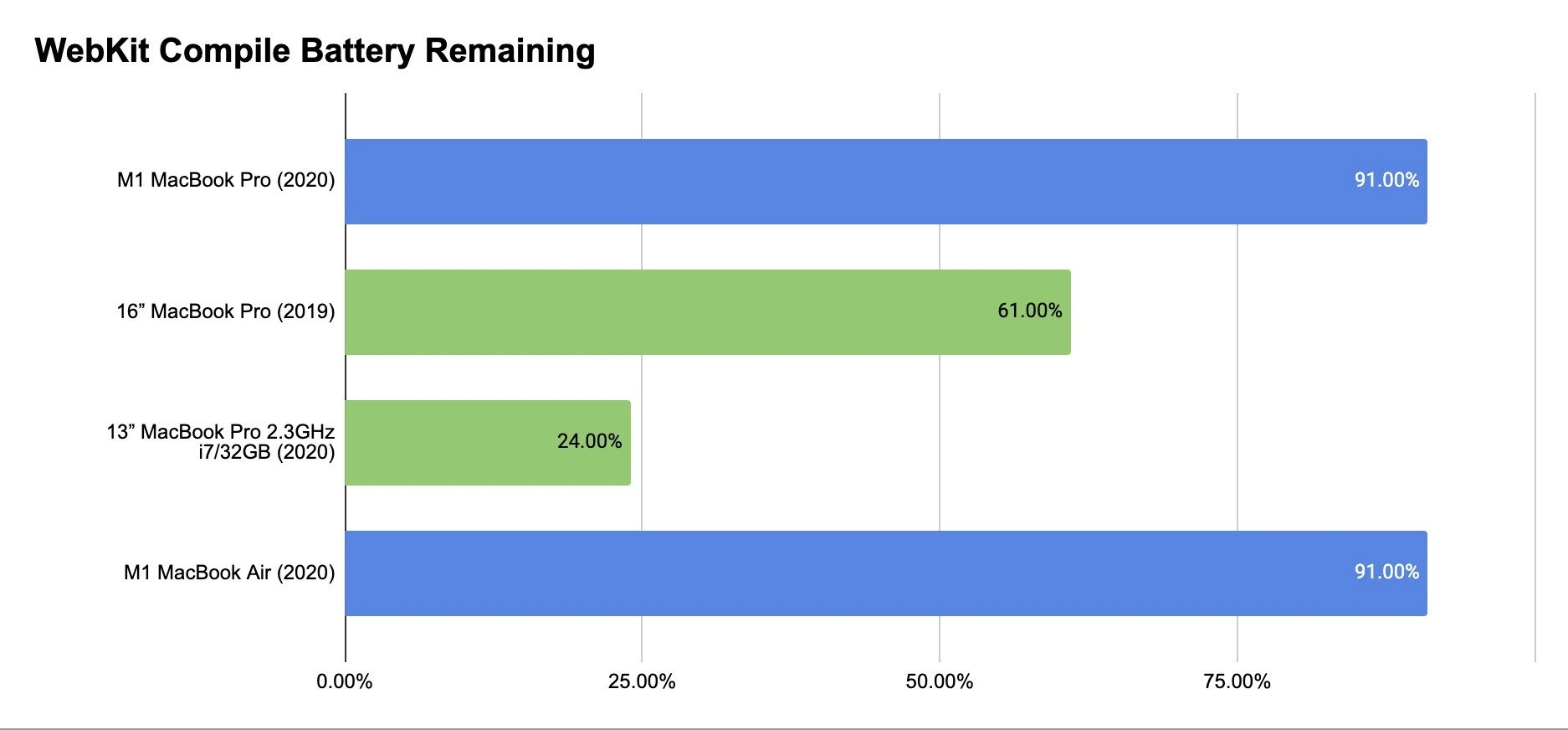
This meme’s image is basically a bar chart comparison of how much battery is left after compiling a huge piece of software on different MacBook models. There are four bars, each representing a laptop model, and the length of the bar shows the percentage of battery remaining after the task. Longer bar = more battery left, which is better here. The task they all did was a full WebKit compile, meaning each laptop started from 100% battery and built the entire WebKit code (the engine that Safari uses to render web pages). Once the build finished, they checked how much battery was still remaining on each laptop and put those percentages on the chart.
The results? The two 2020 MacBooks with Apple’s new M1 chip (one MacBook Pro and one MacBook Air, colored in blue) each still had 91.00% of their battery left. In other words, they only used about 9% of their battery to compile WebKit from start to finish. On the other hand, the 16-inch MacBook Pro from 2019 (with an Intel processor, green bar) was left with 61.00% (so it used 39% of its battery). And the 13-inch MacBook Pro (2020 model, but with an Intel Core i7 processor and 32GB RAM, also in green) fared the worst: only 24.00% battery remaining – meaning it gobbled a whopping 76% of its battery to do the same job. The x-axis of the chart has tick marks at 0%, 25%, 50%, 75% to give a sense of scale, and you can see the Intel 13″ bar doesn’t even reach the 25% tick (since it’s at 24%). Meanwhile, the M1 bars stretch almost all the way to the 100% mark (just shy of it at 91%). This visual makes it really clear how dramatically more efficient the M1 Macs are at this task compared to the Intel Macs.
Now, let’s break down why the M1 laptops performed so much better in terms of battery life:
Apple M1 vs Intel Chips: The M1 is Apple’s own processor (often referred to as Apple Silicon). It’s based on something called ARM architecture, which is the type of CPU design used in iPhones, iPads, and many other smartphones and tablets. ARM chips are known for being very power-efficient – they can do a lot of work with little battery usage. Apple took this mobile-friendly design and beefed it up for laptops and desktops, starting with the M1 in 2020. The Intel chips (like the Core i7 and i9 in those older MacBook Pros) use a different design called x86 architecture, which has powered most PCs for decades. Intel’s focus historically was on maximizing performance, even if it meant using more power. In a nutshell, the M1’s design lets it give you high performance without drawing a lot of power, whereas the Intel chips provide high performance but at the cost of a lot more power consumption. This is why the M1 can compile the same huge project while barely denting the battery, when the Intel machines drain so much. It’s like two cars driving the same distance: one is a new electric car that uses very little charge, and the other is an older gasoline car that burns through most of its fuel tank to go the same distance.
Efficiency in Practice: When you compile software (especially something as large as WebKit, which is the core of a web browser), you’re asking the computer to do millions of calculations, organize a ton of data, and create an optimized program out of human-written code. It’s a very CPU-heavy task – kind of like a long exam for the computer’s brain. On the M1 MacBooks, this exam barely made them sweat, energy-wise. The M1 chip is efficient at crunching numbers and managing work, so it could handle the compile while sipping power slowly. On the Intel MacBooks, the same task makes them work harder relative to their efficiency, so they guzzle power quickly. The fact that one of the Intel laptops was left at 24% means it probably nearly drained its battery to finish the compile – that’s a huge use of energy. The M1 finishing the task with 91% left is practically unheard of before these Apple Silicon Macs came out.
What’s inside the M1 that helps?: The M1 chip introduced a few key things to Macs:
- It has 8 CPU cores, but they’re not all the same. Four are high-performance cores (very fast, used for heavy tasks) and four are high-efficiency cores (slower but super power-efficient, used for light tasks). During a big compile, macOS (the operating system) can direct all the heavy work to the big cores, and if some minor background task needs to run, it can use an efficiency core. This way, none of the energy is wasted on running background processes at full power. Intel Macs at that time had only high-performance cores, so even trivial tasks used a comparatively higher amount of power.
- The M1 is made with a very advanced manufacturing process that allows more computing with less electricity (5nm tech, which basically means the transistors on the chip are extremely small and efficient). The Intel chips were built on a less efficient process (14nm), meaning they inherently use more power for the same work.
- Everything is integrated in the M1 (CPU, graphics, memory management, etc.), which lowers the overhead of these components talking to each other. Less overhead = less energy wasted. On Intel systems, the CPU, RAM, and other parts are separate; communicating between them is slower and uses more power.
Real-world impact: For a junior developer or student, the takeaway is that an M1 MacBook will last significantly longer on battery for heavy programming tasks than an older Intel-based MacBook. If you’re compiling code, running tests, or doing other intensive work on an M1, you’ll notice the laptop stays cool, quiet (often the fan doesn’t even need to spin up in the MacBook Air, since it doesn’t have one, and the Pro’s fan rarely kicks in), and the battery hardly moves. On an Intel MacBook, doing the same could cause the fans to howl and the bottom of the laptop to get pretty warm, all while the battery level visibly falls. This meme illustrates that in a simple graphic form. It’s highlighting an enormous gain in performance per watt – meaning the M1 delivers a lot of computational work for each watt of power it uses, much more than the Intel chip could.
Why is this funny or noteworthy? Developers found this result almost unbelievable. We’re used to new laptops being only a bit better than the last generation. Maybe the battery life improves by 10-20%, or a task finishes 20% faster. But here, we’re seeing something like a 3x or 4x improvement in efficiency for a real task. That’s the kind of leap you might see once in many years. It made a big splash in the tech community. People were joking that the battery meters on the M1 must be broken because they’d never seen such slow battery drain under a heavy workload. The meme’s tone is essentially: “Look, the new MacBooks are so efficient it’s almost comical – compiling a whole browser barely made a dent!” For anyone who has suffered waiting on a laptop that’s dying mid-build, this feels almost like a superpower.
Continuous work without charging: The description even hints at “CI laptop choice and build-time productivity.” CI (Continuous Integration) refers to automatically building and testing code, often on dedicated servers or machines. While we usually don’t run CI pipelines on battery, what it means here is that developers can rely on these new laptops to handle long build processes without being tethered to power. So imagine you’re a developer who likes working in a park or on a commute – with an M1 Mac, you could potentially compile your whole app multiple times and still have battery left to, say, stream music or join a video call. Previously, that scenario was tough; an Intel MacBook might run out of juice or need a charge after one big compile. So, in choosing a laptop for development, seeing “91% battery remaining after a huge compile” is a massively attractive point. It implies you get both performance and all-day battery life.
To sum up in simpler terms: Apple’s M1 chip made their laptops super efficient. In this meme’s case, two new M1-powered laptops did a really big, demanding computing task and used almost no battery doing it, whereas the older Intel-based laptops used a lot of battery for the same task. It’s a night-and-day difference. The chart is exaggeration for effect (those exact percentages are real from a benchmark, but they’re so extreme that it looks almost humorous), and it drives home how big a deal the Apple Silicon transition was. If you’re not deeply technical: just note that blue bars (new Macs) staying high means these laptops can handle tough jobs without needing much battery, which is a great advancement. That’s why people in tech found this worth turning into a meme – it captures a revolutionary improvement in a single simple graphic.
Level 3: Big Build, Small Drain
For experienced developers, this meme’s bar chart is both hilarious and a jaw-dropper, because it turns our long-held expectations upside down. It shows four MacBook models after compiling the entire WebKit codebase (that’s the browser engine behind Safari – a huge C++ project). The new M1-based Macs (blue bars) still have 91% battery remaining after the build, while the Intel-based MacBook Pros (green bars) are left with a fraction of their charge (61% and a pitiful 24%). In dev lingo, that’s insane. We’re used to builds being battery hogs — the kind of task that makes you plug in your laptop or risk an emergency shutdown. Seeing a nearly full battery after such a heavy build feels like witnessing a cheat code in action. It’s funny because it’s so implausible by yesterday’s standards.
Any coder who’s sat through long compile times on a laptop knows the routine: hit “build”, then hear the fans spin up like a jet engine, watch your CPU temperature climb, and notice your battery percentage ticking down like a timer on a bomb. If you were on an older 13″ Intel MacBook Pro, a full rebuild of a large project could easily consume half or more of your battery – exactly like that green bar showing 24% remaining (translation: 76% of the battery drained). The laptop would get uncomfortably warm, maybe throttle its speed to avoid overheating, and you’d be praying that you didn’t also need to start a Zoom call before finding a power outlet. This was just accepted developer life: compiling = battery drain + heat.
Now here comes Apple’s M1 MacBook and basically says, “That old rule? Not anymore.” The meme exaggerates it by showing 91% battery left – which is almost like the battery meter hasn’t moved. It’s like your car’s fuel gauge staying near full after a long highway drive – you’d tap the gauge to check if it’s stuck! (It’s the kind of result that would make any developer double-check the battery indicator: “No way… 91%? Did the compile even run correctly?!”) The humor lies in this almost absurd contrast: the mighty 16″ Intel MacBook (which was the top-of-the-line workhorse) looks humbled, while the fanless M1 MacBook Air nonchalantly handles the same task without breaking a sweat. It’s a bit of role reversal comedy: normally the big 16″ Pro would be the one finishing tasks easily, but here it is shown huffing and puffing at 61%, while the slim new kid on the block still has 91% like it’s no big deal.
This resonates with senior devs because it encapsulates a real breakthrough we all felt around late 2020. Apple’s transition to ARM for Macs (the move to their in-house Apple Silicon chips) wasn’t just some marketing fluff – it fundamentally changed our day-to-day experience. We went from “bring your charger if you plan to compile or run Docker” to “wow, I can run builds on battery and I might not even notice the battery drop.” The meme’s data likely came from an actual test or blog post around that time (developers were benchmarking the new M1 Macs with things like Xcode compile tasks to see if the hype was real). Sure enough, it was real, and it felt almost comical how stark the improvement was. Developers were sharing graphs like this with giddy disbelief: it’s the kind of thing you show your coworker while saying, “Dude, look at this – it’s like science fiction.”
A few points that make this especially meaningful in dev culture:
End of the “Plugged-In” Era: We used to plan our heavy dev work around outlets. For example, if you had to rebuild a large project or run all your unit tests, you’d often plug your laptop in, because such tasks would slurp battery power ferociously. On Intel Macs, even simple things like running a few Docker containers or a local CI job could drain you fast. The M1 comes along and suddenly you can compile WebKit on battery while maybe also browsing the web, and you’re still at above 90%. It’s a liberating feeling. The meme highlights this sea change in a humorous way. Those nearly full blue bars are basically taunting: “Go ahead, compile all you want, I can do this all day.”
Shared Pain, Shared Laugh: The reason developers laugh at this is because we remember the pain. It’s almost cathartic. We’ve all heard our laptops’ fans blast off like a rocket when building something big. We’ve felt that heat and watched the battery percentage free-fall. It was practically a joke how quickly a “Pro” machine could go from 100% to 50% during a tough compile. Now, seeing 91% remaining flips that script so hard it’s funny. It’s like an inside joke for those who suffered through slow, battery-killing builds: “Hey, remember when a full rebuild meant you were stuck near a power socket for an hour? Not anymore, apparently!” There’s a sense of relief mixed with humor. We’re laughing because we’re happy to say goodbye to that particular hardship.
Bragging Rights and Tech Flexing: Let’s be honest, there’s also some friendly ribbing involved. Early adopters of M1 Macs were flexing these kinds of results to their friends still on Intel. A graph like this was basically posted with a bit of “LOL, look at how my new Mac crushes yours” energy. The 91% remaining became a bragging point on forums and Twitter among developers. It’s good-natured, but it also validated people’s decision to switch to M1. This meme’s chart is practically an advertisement (unintentionally or intentionally) for upgrading your dev laptop. It says: if you value battery life and cool, quiet operation, the M1 is a no-brainer. So when devs see this, there’s that knowing chuckle – “Yup, time to retire the old Intel clunker.” It’s funny because it’s true, and perhaps a touch smug in the way geeks like to one-up each other with new gear.
Historical “WOW” Moment: From a broader perspective, this chart captures a historical moment in computing. Long-time tech folks recall previous big transitions: e.g., in the mid-2000s, laptops going from single-core to dual-core (suddenly you could do more at once without the machine crawling). Or the move from hard drives to SSDs (everything got faster). Or when Apple went from PowerPC to Intel in 2006 (Macs suddenly ran cooler and faster). The Apple M1 launch was one of those moments. The insane battery life + strong performance combo was like a once-in-a-decade leap. The meme highlights this by using a tangible task (compiling code) that techies care about. It’s not a synthetic benchmark number, it’s something practical. That’s why it hits home – it’s saying this isn’t just marketing, this actually affects you, the developer, in a big way. So the laughter here is the kind you get when something exceeds your expectations so much you almost think it’s a joke.
Too Good to Miss the Joke: The numbers are so skewed (91 vs 24) that humor was inevitable. Developers started quipping things like “did Apple accidentally ship a nuclear reactor in this laptop?” or “my M1 MacBook Air is cooler than my idle Intel MacBook was.” There’s a joke underlying the meme that the new Macs feel almost unfair. They changed the game so much, it’s like bringing a superhero to a regular folks’ fight. The chart exaggerates it in a meme-friendly way – big blue bars dwarfing the little green bar – which is visually comedic. It reminds me of those memes where one character is tiny and another is super buff; here the Intel is the scrawny weakling and the M1 is the buff hero that hasn’t even broken a sweat.
The bottom line for a seasoned dev is: this meme isn’t just funny, it’s factual. It’s funny because it’s true – almost hyperbolically true. We’re laughing at how Apple’s engineering made a mockery of our past experiences. And under the laughter, there’s genuine excitement. If you develop software, especially on macOS, the M1 meant fewer interruptions, less fan noise, and not living hunched by an outlet. The meme manages to celebrate that with a simple, punchy visual. It’s the kind of thing you’d post in your team chat with the message, “Apple wasn’t kidding about the battery life, look at this 😂.” Everyone who’s ever watched their Mac battery die mid-build gets the joke instantly. The shared reaction is half laughter, half “I need one of those M1 Macs, like, yesterday.” In sum, M1 Macs still showing 91% battery after a WebKit build is an engineer’s version of a tall tale – except we all know it actually happened, which makes it all the more satisfying and humorous.
Level 4: Performance-per-Watt Wizardry
At the microarchitecture level, Apple’s M1 chip is performing something close to silicon magic to achieve that 91% battery remaining result. The dramatic efficiency gap between the M1 Macs and the Intel Macs stems from fundamental design differences in their hardware and how they handle a heavy task like a full WebKit compile. Here’s a deep dive into why the blue bars (M1 machines) barely budged, while the green bars (Intel machines) got drained:
RISC vs CISC Architecture: The M1 is built on the ARM architecture (a RISC design), whereas the 2019 Intel MacBook Pros use x86_64 chips (a CISC design). RISC (Reduced Instruction Set Computing) simplifies instructions so they execute with fewer micro-operations. The M1’s ARM cores can decode and execute many simple instructions in parallel, very efficiently. CISC (Complex Instruction Set Computing) like x86 can do more per instruction, but those instructions are more complex to decode and typically require more power to process. In practice, the M1’s Firestorm high-performance cores are extremely wide and advanced – they can handle a large number of instructions each cycle with deep out-of-order execution and excellent branch prediction. This means during the compile, the M1 is crunching through code with minimal wasted work. Intel’s architecture, while powerful, spends more energy managing its more complex instruction pipeline and higher clock speeds. The M1 essentially does more with less, extracting maximum work from each watt of power.
Cutting-Edge Silicon Process: Apple’s M1 is manufactured on a 5nm process by TSMC, which at the time was state-of-the-art. This means transistors on the M1 are incredibly small and power-efficient. Smaller transistors switch faster and leak less current, so the chip can run high loads without burning much energy as heat. By contrast, the Intel Core i7 and i9 chips in the 2020-era MacBook Pros were built on Intel’s 14nm process (a much older node). That difference is huge: the Intel chip needs higher voltage and more power for the same work, simply due to less efficient transistor technology. It’s a bit like the M1 is made of lightweight, super-advanced components, and the Intel is using bulkier, older components – the end result is the Intel expends more effort (power) to keep up. The nearly 3x improvement in remaining battery (91% vs 24% on the 13″ models) tells us that Apple’s leap in fabrication tech translated directly into better battery life for heavy workloads.
System-on-Chip Integration: The M1 isn’t just a CPU – it’s a SoC (System on a Chip), packing CPU, GPU, and numerous specialized engines (like for neural networks, video encode/decode, image processing, etc.) on one piece of silicon. Crucially, it has a unified memory architecture, meaning all these components share the same memory pool. For something like a WebKit compile, most of the work is on the CPU, but this unified design still helps reduce energy overhead. The CPU cores can access data and system libraries from memory without going off-chip or through a slow bus – everything is tightly integrated on the die. Less traveling of data means less energy wasted. The Intel MacBooks, on the other hand, have a more traditional PC design: separate CPU, separate RAM chips, discrete GPU (in the 16″ model) – data has to move around the motherboard through longer pathways (like the DDR memory bus, or PCIe bus to GPU, etc.), which is slower and costs power. Apple’s integration is akin to having all your components in one efficient office, versus Intel’s parts being in different buildings and sending messages back and forth – one of those scenarios uses a lot more energy and time.
Big vs Little Cores: The M1 introduced a big.LITTLE architecture to Macs: it has 4 high-performance “Firestorm” cores and 4 high-efficiency “Icestorm” cores. During the WebKit build, the heavy compilation threads run on those big Firestorm cores – which are very fast but also engineered to be power-thrifty for their performance level – while background tasks (say, an email fetching in the background or Spotlight indexing) can run on the efficiency cores without disturbing the main workload. This separation means the M1 doesn’t need to waste power on ancillary tasks while it’s compiling; it can dedicate just the right kind of cores to each job. Intel’s laptop chips at the time had only homogeneous high-power cores. Even if a task was lightweight, an Intel core still draws a relatively high baseline power. And when all cores are active for a big compile on the Intel, they’re all scorching power simultaneously. The M1’s efficiency cores are so sip-thrifty that even if some parts of the compile (like compile helpers or smaller files) run on them, they barely dent the battery. It’s as if the M1 has both marathon runners and sprinters on the team, using each when appropriate, whereas the Intel chip only has sprinters who get tired (use power) even on easy jogs.
Cache and Memory Efficiency: Compiling a huge codebase like WebKit involves re-reading a lot of common code (headers, libraries) and doing many repeated operations. The M1 is armed with large caches (fast small memory on the chip) – e.g., each performance core has a big L2 cache (≈12 MB shared among cores) and there’s also a sizable system-level cache that all cores can use. These caches let the M1 keep frequently used data on-chip close to the compute units. During the build, this might mean frequently included header files or common objects are fetched from super-fast cache memory rather than the slower main RAM. Accessing cache uses much less power than going out to RAM. Intel CPUs also have caches, but the M1’s are notably large and its memory subsystem is ultrawide and efficient (thanks to that 5nm design and smart cache hierarchy). The net effect: the M1 spends fewer cycles waiting on data and more time doing useful work per clock cycle, wasting less energy on stalled cycles. It’s executing the compilation in a way that minimizes costly memory access operations. Think of it like having a lot of tools on your belt (M1) vs having to run to the toolbox for each tool (Intel) – the one with the toolbelt gets the job done with less running around (energy) spent.
Dynamic Power Management and Thermal Headroom: Apple’s M1 chip is extremely aggressive at power optimization in real-time. It has sophisticated power gating – unused parts of the chip can shut off nearly completely when not in use, even if that idle time is just milliseconds. And it can rapidly scale the frequency and voltage of the cores up or down (a technique known as DVFS – Dynamic Voltage and Frequency Scaling) to meet the demands of the moment. During a multi-file compile, there are bursts of intense activity (compiling source files in parallel) and brief pauses (thread synchronization, linking, waiting for I/O). The M1 responds to these changes by modulating its power draw almost instantaneously. Intel’s chips do have turbo boost and power-saving states, but historically they aren’t as finely tuned – an Intel might stay at a higher power state a bit longer or not drop to truly low consumption between bursts. Moreover, the M1 MacBook Air has no fan and the Pro rarely needs to use its fan; the chip is designed to sustain high performance within a tight power envelope (~10-15W for the whole M1 SoC during a heavy load). The Intel 16″ MacBook Pro had a much higher thermal envelope (it could draw ~40W-50W or more just for the CPU under load, spiking even higher briefly). On battery, that Intel will hit thermal limits and draw down the battery very quickly when running all cores flat out. The M1, consuming far fewer watts for the same work, doesn’t hit thermal throttling as soon and doesn’t drain the battery nearly as much. In essence, the Intel is running hot and hard (fans blaring, battery hemorrhaging energy) to compile WebKit, whereas the M1 is breezing through with power to spare, never breaking a sweat.
To put some math to it: think of the energy used as Energy = Power × Time. All four laptops ultimately compiled the same code (same “work” done), but the M1 did it with much lower Power and possibly in less or equal Time. That means it consumed dramatically less total energy from the battery. If the Intel 13″ used ~76% of its battery, and the M1 used ~9%, the energy ratio is on the order of 8:1 for that task – a huge difference. Some of that is because the Intel might have taken longer to finish too (more time drawing power) and because each second it was drawing more watts. The M1’s high efficiency flips the script: it likely completed the build faster than the poor Intel i7 (which may have been throttling due to heat), and it was drawing fewer watts the whole time. Lower P and lower T both – a double win for energy usage. The result is those ridiculously high 91% battery figures that look like a mistake at first glance.
From a theoretical perspective, this is a triumph of performance optimization at the hardware level. It illustrates real-world impact of things like pipeline efficiency, instruction scheduling, and thermal design that computer architects have been refining for years. We’re seeing the payoff of decades of research (from efficiently picking instruction sets to designing better branch predictors and cache coherence protocols) in one stark comparison. The meme underscores that Apple didn’t just make a slightly better chip – they changed the rules of the game for laptops by leveraging an architecture (ARM) traditionally used in low-power scenarios and scaling it up expertly.
Finally, it’s worth noting that Apple’s control of the whole stack (hardware + OS + compiler) means they could do compiler optimizations tailored to the M1 as well. The WebKit build uses Apple’s clang/LLVM compiler, which Apple tuned to generate code that runs especially well on their chips. Even the build system (Xcode or xcodebuild for WebKit) is likely optimized to leverage all those cores without unnecessary background drain. The synergy between the Apple Silicon design and software is an underlying factor that isn’t visible in the graph but contributes to it. By transitioning during 2020’s Apple ARM move to an in-house chip, Apple aligned the compiler toolchain and macOS to fully exploit the M1’s capabilities (for instance, using the vector units when possible, optimizing memory allocation to fit in unified memory, etc.). All of this technical harmony results in the almost comical outcome shown in the meme: two slim M1 laptops performing a Herculean compile job while barely sipping their battery, next to their Intel predecessors that are left panting and half-drained. It’s a testament to how far efficient hardware architecture can take us, when every level of design – from silicon physics to OS scheduling – is geared towards energy-efficient performance. The humor of the meme (“91% remaining – is this even real life?”) comes backed by very real engineering achievements under the hood.
Description
A horizontal bar chart titled 'WebKit Compile Battery Remaining' comparing the power efficiency of four MacBook models after a CPU-intensive task. The chart displays four bars against a percentage scale on the x-axis. The top bar, for the 'M1 MacBook Pro (2020)', is blue and extends to show 91.00% battery remaining. The second bar, for the '16" MacBook Pro (2019)', is green and shows 61.00% remaining. The third, for the '13" MacBook Pro 2.3GHz i7/32GB (2020)', is also green and shows only 24.00% remaining. The bottom bar, for the 'M1 MacBook Air (2020)', is blue and also shows 91.00% battery remaining. This graphic provides a stark visualization of the superior performance-per-watt of Apple's first-generation M1 silicon. It demonstrates that after completing the same heavy compilation task, the ARM-based M1 laptops consumed a fraction of the power used by their Intel-based counterparts, making a powerful case for the new architecture's efficiency and its benefit for developers seeking long battery life without sacrificing performance
Comments
7Comment deleted
The Intel MacBook measures battery life in minutes per compile, while the M1 Mac measures compiles per charge. It's a fundamental architectural difference
Compiled WebKit on the M1: 91 % battery left. The Intel MBP ran the same build, reached latte-steaming temperature, and taught me that “architecture decision” literally means what keeps the lights on
The M1 MacBook Air compiles WebKit using the same battery percentage as heating your coffee in the microwave, while the Intel i7 needs the same power draw as the HVAC system for the entire floor
When your M1 MacBook finishes compiling WebKit with 91% battery and your Intel colleague's laptop is already hunting for an outlet at 24%, you realize Apple didn't just change architectures - they fundamentally redefined what 'compile and chill' means. The Intel MacBook Pro burning through 76% battery for the same task isn't a bug, it's a feature... of x86's 'we'll get there eventually, just keep us plugged in' philosophy. Meanwhile, ARM is over here whispering 'I could do this all day' while sipping electrons like fine wine
WebKit build: the M1 finishes with 91% battery; the Intel with 24% and a desk that doubles as a space heater - turns out the only benchmark that maps to developer happiness is performance per watt
On Intel laptops, the build graph includes an edge to the wall outlet; on M1, that dependency is finally garbage-collected
WebKit full compile: Intel MacBooks hit 'low battery' faster than a merge conflict resolution; M1 just sips power like it's TDD on a microservice