Claiming IDE victory by crashing Visual Studio with infinite dialog windows
Why is this IDEs Editors meme funny?
Level 1: I Broke the Toy
Imagine you have a super complicated toy or video game console that can do lots of cool things. You play with it really hard – pressing all the buttons, making it do the toughest tricks – until suddenly it glitches out and stops working. Instead of getting upset, you smile and say, “Ha! I played so hard that I beat the machine!” That’s basically what this meme is saying, but with a coding tool (Visual Studio) instead of a toy. It’s like bragging that you made the computer program so confused that it gave up. Normally, you don’t want your tools to break, of course. But here it’s turned into a joke: the person is treating using the coding software like it was a game to win. They “won” because the software threw up its hands (with a bunch of error pop-up windows) and quit. It’s funny in a silly way – kind of like saying, “I’m so good at this, I broke it!” Even if you’re not a programmer, you know that breaking the thing you’re using usually isn’t the goal. That unexpected swap – pretending a failure is actually a victory – is what makes it humorous. You can feel both the frustration (ugh, it crashed!) and the pride (yeah, I owned that thing!) behind the joke. In simple terms, the meme is just a playful way for coders to laugh about a time their computer program went completely bonkers on them.
Level 2: Too Many Windows
Let’s break this down in simpler terms. An IDE (Integrated Development Environment) like Visual Studio is a big all-in-one application that programmers use to write and test code. It’s kind of like a super-powered text editor that also compiles your code, debugs it, and has tons of features to make a developer’s life easier. Visual Studio is a popular IDE made by Microsoft – it’s especially common if you’re coding in C# or C++ on Windows. But because it’s so feature-rich and complex, sometimes things can go wrong inside it (just like any large software).
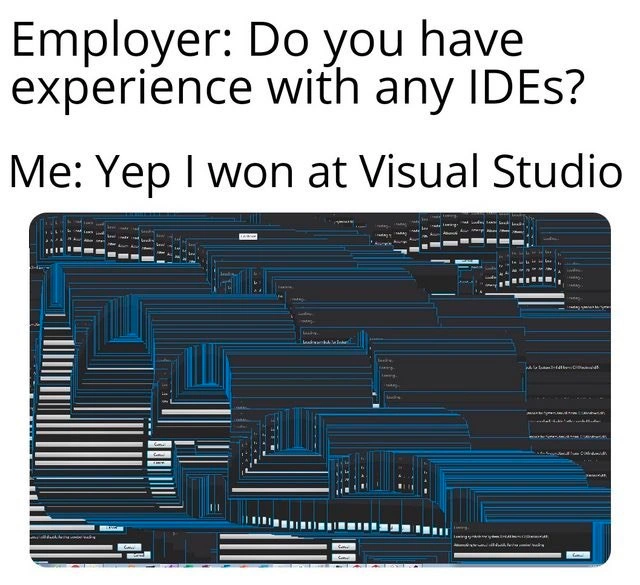
In the meme’s image, we see Visual Studio overwhelmed by hundreds of pop-up windows. These pop-ups are called dialog boxes – the little windows that usually say “Error: [some message]” with an OK or Cancel button. Normally, you might see one if something goes wrong, so you can acknowledge it. But here, there are countless copies of the same dialog all over the screen, layered in a cascade. The operating system staggers each new window slightly, which is why they appear stepped diagonally across the screenshot. This isn’t normal behavior; it’s a visual sign that the program got stuck in a loop repeatedly opening the same error message. It’s as if Visual Studio hit an error, tried to alert the user, hit the same error again while handling it, and so on, creating an endless cycle of “Oops” messages. Eventually, the IDE would freeze up or crash because it’s too busy popping dialogs to do anything else. At that point, the only way to recover is to force the program to close. You can imagine how annoying this is: you can’t click them all closed fast enough – it’s like trying to kill a swarm of pop-up “bugs” on your screen. This kind of glitch is a programmer’s version of a horror story (and unfortunately a well-known developer pain point in debugging sessions).
Now, the text of the meme sets up a little joke scenario as a conversation:
Employer: Do you have experience with any IDEs?
Me: Yep I won at Visual Studio.
In a real job interview, “Do you have experience with IDEs?” is a straightforward question – they want to know if you’ve used tools like Visual Studio, IntelliJ, Eclipse, etc., to write code. A normal answer might be, “Yes, I’ve used Visual Studio for 3 years.” But here the person answers, “Yep, I won at Visual Studio.” Saying you “won” at an IDE is unusual – IDEs aren’t games, so you don’t typically win or lose using them. This immediately sounds funny because it implies the IDE was some kind of challenge or competition. The second part of the meme (the image) reveals what they mean: they “won” by effectively defeating Visual Studio, making it crash and surrender. It’s like they’re bragging that they outsmarted or overpowered the software. Of course, crashing your tools isn’t something you’d brag about in a serious context, but as humor, it works because it’s unexpected and relatable to developers who’ve seen IDEs act up.
To a newer developer or someone not familiar with Visual Studio, here’s why this is funny: Developers sometimes encounter bugs or crashes in the tools they use. Visual Studio, being so complex, can sometimes freeze or produce bizarre issues – like opening a never-ending stream of error windows – especially if you do something it doesn’t expect or if a plugin (an add-on) misbehaves. It’s a bit like making your car’s onboard computer freak out by pressing too many buttons at once. You typically want software to be stable, but when it’s not, developers cope by joking about it. The phrase “I won at Visual Studio” is a way to turn frustration into a joke. It suggests, “This IDE was so hard to use at times, it felt like a game I had to beat. And I beat it so hard that it crashed!” 😄 It’s developer humor and definitely a job_interview_joke – you wouldn’t literally tell an employer you made their favorite tool crash unless you were sure they’d get the joke.
Let’s clarify a few terms here:
- IDE (Integrated Development Environment): A software application that consolidates basic tools required for software testing and writing. Instead of using a separate text editor, compiler, debugger, etc., an IDE like Visual Studio provides all of that in one place with a graphical interface. It often includes features like code suggestions, visual designers, and integrated version control. This all makes a developer’s work easier (that’s the DeveloperExperience goal), but it also means the IDE is doing a lot under the hood.
- Visual Studio: A very powerful (and somewhat heavy) IDE by Microsoft. Developers use it to build applications, particularly with the .NET framework, C#, C++, and more. It has a reputation for being feature-rich but also sometimes slow to start and memory-hungry, especially when working on large projects or with many extensions (plugins) installed. Newer versions have improved, but old-timers remember the days of Visual Studio getting bogged down.
- Dialog Window (Dialog Box): A small pop-up window that asks for input or shows information. In Windows applications, when something goes wrong or needs confirmation, a dialog might appear. For example, “Are you sure you want to exit without saving?” or “Error: Something went wrong [OK].” These are usually modal, meaning you have to deal with them (click OK/Cancel) before you can return to the main window behind them. Imagine, then, if an application keeps spawning modal error dialogs one after another — you get stuck because each dialog prevents you from doing anything else until it’s closed.
- Crash: When an application stops working properly and exits or freezes. In this meme, Visual Studio essentially crashed (got into a non-recoverable state) because so many error windows opened that it could no longer function. Crashing might lose your unsaved work, and it definitely interrupts what you were doing. It’s one of the biggest frustrations in software development: not only can your own code have bugs, but the tools you use can have bugs too!
To connect it to a simple experience: have you ever used a program that suddenly opened tons of windows or browser tabs and wouldn’t stop? That’s similar to what’s shown here. It’s like a glitch. In coding, if you accidentally write an infinite loop (a loop that never ends), it can cause all sorts of havoc. For example, if a program kept showing a message box in an infinite loop, it would look something like this:
// Warning: This code will create infinite pop-up windows if run.
while (true) {
System.Windows.Forms.MessageBox.Show("Oops! Something went wrong.");
}
Running that snippet would keep opening a new message box saying “Oops! Something went wrong.” until the program is forced to stop. Now, Visual Studio itself obviously isn’t supposed to do that, but if a part of it or an extension accidentally had a similar bug, you’d see exactly what the meme shows: infinite dialog windows cluttering the screen. It’s a classic visual_studio_glitch moment.
So, when the person says “I won at Visual Studio,” they’re joking that they’ve pushed this powerful IDE to its breaking point. It’s a lighthearted way to say, “Yeah, I’ve used that IDE a lot – enough to make it cry uncle.” This is a form of ide_crash_humor. The window_cascade_effect in the image is both funny and painful to anyone who’s experienced it. It’s funny in retrospect because it looks absurd (so many windows!), but it’s painful because if it happened while you were working, you’d probably be groaning or swearing at your computer. The meme turns that pain into a laugh by framing it as a win. After all, if your software tool crashes, you can either get mad or joke that you must be too good for it. Developers often choose humor as a coping mechanism. And in an interview context, cracking a joke like that can break the ice – it shows you’re seasoned enough to have encountered real-world problems and have a sense of humor about them. Just make sure your interviewer has a tech background, or they might be very confused by the idea of “winning” at an application!
In summary, this meme is relatable developer humor. It uses the idea of an interview question to deliver a punchline about causing an IDE (specifically Visual Studio) to crash with an onslaught of error dialogs. It’s saying: “Yes, I know IDEs – in fact, I’ve used Visual Studio so intensively that I’ve seen it go completely haywire. That’s how experienced I am!” Of course, it’s a joke – normally you’d want to show you can use an IDE effectively, not break it. But by exaggerating the scenario, it highlights both the power and the occasional fragility of these complex software tools. For anyone who has spent long hours coding, the image of an IDE imploding in a sea of error messages is both nightmare fuel and a quirky badge of honor. It’s the kind of story developers share over coffee: “Remember that time Visual Studio spawned 200 error dialogs and crashed? Yeah, that was wild – I guess I won that round.”
Level 3: Cascading Failure
This meme hits home for veteran developers who’ve wrestled with Visual Studio and other heavy IDEs. It humorously frames a crash as a victory, which is a tongue-in-cheek twist only a battle-scarred coder could love. Visual Studio is a massive, feature-packed Integrated Development Environment – practically an entire tech ecosystem in one application. When it misbehaves, it can misbehave spectacularly. The screenshot shows exactly that: the IDE drowning in hundreds of overlapping dialog boxes. Each little window is likely an error message popping up again and again in an unstoppable loop. This kind of infinite dialog window glitch is the stuff of developer nightmares (and dark humor): it suggests some bug triggered a cascade of modal error dialogs. In a modal loop, each error message might be spawning another error, trapping the UI in a cascading failure. The result? A dense staircase of blue-grey pop-ups that render the IDE utterly unusable. Seasoned devs immediately recognize this as a bad day at the office – maybe a runaway extension or a recursive exception in the depths of Visual Studio’s plumbing.
Why is this funny to an experienced developer? Because it’s relatable in a twisted way. It satirizes the notion of “beating” a software tool: “I won at Visual Studio” implies the IDE gave up before the developer did. It’s like treating Visual Studio as a final boss in a video game – and the boss rage-quits by crashing. 😅 In reality, when Visual Studio hiccups like this, it’s a major developer pain point. You’re probably in the middle of debugging or writing code, and suddenly the IDE spawns an army of error messages. You can’t even click them fast enough to see what went wrong. The only bug fix in that moment is to open Task Manager and mercilessly slay end the devenv.exe process. Every senior dev has done the “Task Manager tango” when an IDE or build tool froze at the worst time. So the meme’s punchline is a sarcastic brag – “winning” by forcing the mighty Visual Studio to its knees. It pokes fun at Microsoft’s flagship IDE for being so complex that you can accidentally break it. There’s an underlying critique of bloat and instability: DeveloperExperience (DX) suffers when your primary tool crashes from a glitch. Many of us have learned the hard way to save your work often, because a big IDE can go down in flames without warning. The meme format (a fake job interview Q&A) cleverly sets up the joke. In an interview, you’d normally boast about mastering an IDE, not crashing it. By claiming this “win,” the speaker shows off a cynical sense of humor and hints that they’ve spent enough hours with Visual Studio to see it at its worst. It’s a badge of honor only a developer would understand: I’ve pushed my tools to the breaking point and lived to tell the tale.
From an engineering perspective, this scenario also highlights how bugs can manifest in graphical form. The window cascade effect in the screenshot isn’t just random; Windows OS will offset new windows slightly down-right, causing that stair-step pattern. Seeing hundreds of offset dialogs means some loop went wild – possibly an error handler throwing an error inside itself, leading to recursive popup hell. It’s a comically exaggerated example of a software bug in action. The humor lands because it transforms a frustrating debugging headache into an absurd achievement. In reality, nobody wants their IDE to implode, but if it does, you might as well claim the “high score.” The meme resonates with developers who have been there: when your tools fight back, sometimes you console yourself by joking that at least you didn’t crash – the machine did. It’s the kind of grim, knowing laughter shared by those who have seen an IDE go off the rails at 3 AM. VisualStudioIDE, with all its power, can still fall victim to an infinite loop or resource exhaustion, just like any other app. The meme holds up a funhouse mirror to the relatable dev experience of dealing with such bugs in software – we laugh because otherwise we might cry. In short, “winning” at Visual Studio by crashing it is the ultimate developer humor flex: a playful jab at the tools we use and the glitchy adventures we survive while coding.
Description
The meme has two lines of bold black text on a white background: “Employer: Do you have experience with any IDEs?” followed by “Me: Yep I won at Visual Studio”. Beneath the caption is a rectangular screenshot showing Visual Studio completely overwhelmed by hundreds of identical dialog boxes, each slightly offset so they cascade into a dense blue-and-grey staircase pattern. The overlapping windows make the IDE unusable, humorously suggesting the user has “beaten” the tool by forcing it into a graphical meltdown. Technically, it riffs on how large, feature-rich IDEs like Visual Studio can freeze or spawn endless error dialogs, a pain point senior developers know all too well during debugging or heavy plugin use
Comments
6Comment deleted
I once installed ReSharper, Git Extensions, and the Azure workload - the resulting modal-dialog cascade in Visual Studio was the most accurate visualization of our microservice dependency graph I’ve ever seen
The same developer who achieves 100% code coverage also achieves 100% screen coverage - both equally impressive metrics that tell you nothing about actual quality
Ah yes, the classic interview power move: demonstrating IDE mastery by achieving a window layout so Byzantine that even the Task Manager would file for workers' compensation. Nothing says 'senior engineer' quite like treating Visual Studio's docking system as a personal Tetris challenge where every piece is a Solution Explorer and the only winning move is Alt+F4
True VS mastery: Your docked windows have achieved escape velocity, leaving mere mortals orbiting the taskbar
Visual Studio ‘victory’ is when the Win32 message pump reenters, spawning a modal dialog hydra, and you end up debugging your IDE more than your app
I didn’t just use Visual Studio - I beat the endgame: a VSIX triggering COM reentrancy on the STA thread and spawning 400 modals