Skip to content
DevMeme
4863 of 7435
The Futile Quest for a Proper USB-C Data Cable
Hardware Post #5324, on Aug 4, 2023 in TG

The Futile Quest for a Proper USB-C Data Cable

Why is this Hardware meme funny?

Level 1: The Slow Race Car

Imagine you have a toy race car that looks really shiny and fast on the outside. You ask the toy maker, “Can this car go super fast, or does it just have a normal slow engine?” The maker doesn’t really get your question and just smiles and says, “Don’t worry, it’s a good car.” So you take this cool-looking race car and put it on the track, expecting it to zoom like a rocket. But when you press “go,” it putters along as slowly as your old regular toy car. It turns out the car only had a basic little engine inside, not the speedy engine you hoped for. You feel disappointed because everything about it looked like it was going to be high-performance, but it wasn’t. In the meme, the USB-C cable is like that toy car. It looked like a fancy new cable that should be really fast for moving data, but inside it was basically an old slow cable. The person in the story tried to make sure they were getting the right cable (just like asking about the car’s engine), but the seller didn’t understand and just said “It’s good.” The funny-but-sad ending is when they actually use it, the cable only works at slow speed – just like the race car that only drives slow. The feeling is a mix of “Well, that was a waste!” and a bit of “I knew something was off.” It’s funny in a cartoonish way because we can all picture being excited about a new thing, only to find out it doesn’t do what we expected, leaving us shaking our head with a little grin.

Level 2: Good Cable, Bad Cable

Let’s break down what’s happening in simpler terms. We have a USB-C cable – that’s the modern oval-shaped cable that you can plug in either way (no more flipping the connector 3 times like with older USB!). USB-C is just the connector shape; what really matters is what USB standard the cable supports. The meme jokes about the difference between a cable that can do USB 3.0 data versus one that’s basically for power (charging) and only does USB 2.0 speeds. USB 3.0 (now also called USB 3.1 Gen1 or USB 3.2 Gen1 in various rebrandings) is much faster for data: it can transfer up to about 5 Gbps (gigabits per second). In contrast, USB 2.0 tops out at 480 Mbps (megabits per second). In plain numbers, that’s over 10 times faster with USB 3. So, if you’re connecting something that needs to move a lot of data – say, a capture card for video – you really need a cable that supports those higher speeds. A capture card is a device that takes video from one source (like a game console or a camera) and sends it to your computer so you can record or stream it. High-quality video, especially HD or 4K, requires a high bandwidth connection to transfer all that information quickly. If the connection falls back to USB 2.0, the pipe is too narrow: the video might be low quality, laggy, or not work at all for that purpose.

Now, not all USB-C cables are built the same on the inside. Some are fully featured: they have all the wires needed for power and high-speed data. Others are “power-only” or “charging” cables, which might only include the wires for power and just a pair for basic USB 2.0 data (enough for things like a keyboard, mouse, or just to let a phone sync small amounts of data). Manufacturers sometimes skimp on the wiring to save money, or they assume many customers only care about charging their phone. This leads to a lot of cable_spec_confusion. Two cables might look identical from the outside – same USB-C connectors – but one can transfer a whole movie in a few seconds (USB3 speeds) while the other struggles to send even a photo quickly (USB2 speeds). Ideally, a good USB-C data cable will be labeled with something like “SS 10” (SuperSpeed 10 Gbps) or have a USB trident symbol with a number, but not every brand follows that, and the naming (USB 3.2 Gen2x1… what?!) can make anyone’s head spin.

In the meme, the person tried to be proactive: they literally asked the cable’s manufacturer, “Is this for data or just power?” That’s a straightforward question, but the manufacturer’s support didn’t understand it – possibly they didn’t know the technical details of their product, or maybe there was a language barrier. The user even attempted to explain with an illustrated diagram showing USB 3.0 capable wiring vs. a power-only setup – basically they drew out the inside of the cable to say “See these extra wires? I need those!” This is funny because it’s like a customer teaching the seller about their own product. The support person just laughed and said, “It’s a good cable, ma’am,” which isn’t a technical answer at all. They basically dodged the question, perhaps not realizing why it mattered. From the user’s perspective, being told “it’s a good cable” is meaningless – good for what? For charging a phone, perhaps yes. But for using a high-bandwidth capture_card that needs USB3? Nope. When the user plugs in the capture card with this new cable, the device only connects as USB 2 – meaning the computer confirms it’s using the older, slower USB2 mode. It “silently downgrades” because there’s no big alert; the setup just doesn’t perform as expected.

This is a prime example of a compatibility issue that causes developer pain points in real life. Imagine you’re excited to use a new gadget, you get what you think is a proper cable for it, and then the thing only works in a limited way because of that cable. It’s frustrating! In developer or tech circles, this kind of humor is relatable because many of us have been in a similar spot. Maybe you tried to use a high-resolution USB-C monitor and got no display because your cable was charge-only. Or you bought a fast external SSD, but it was transferring files super slowly until you realized the cable was the culprit. It all boils down to knowing that with hardware and tooling, the details (like which USB generation a cable supports) really matter. The meme draws a little cartoonish scenario of how one might try to clarify those details and still end up defeated by a simple but critical misunderstanding. After all, a cable might be “good” in build quality or for charging, but if it’s not the right kind of good (meaning proper support for the needed data rate), a developer’s task can come to a grinding halt.

Level 3: Lost in Tech Translation

This meme nails a painfully familiar scenario for experienced devs and tech enthusiasts: compatibility issues hiding in plain sight. The protagonist just wanted a high-quality USB-C cable to connect a data-heavy device (a video capture card). That’s a pretty common task in modern development or content creation – you plug in hardware expecting it to just work. The humor (tinged with frustration) comes from the absurd communication gap between the knowledgeable user and the clueless manufacturer support. When the user asks, “Is this cable for data or just power?” and the manufacturer literally doesn’t understand the question, every seasoned engineer’s eyebrows raise. It’s an immediate red flag – we’ve all dealt with support reps who don’t grok the technical nuance of their own product. Here the nuance is critical: USB-C cables are not all equal, and the user is specifically worried about whether the cable supports USB3 vs USB2 data rates. The manufacturer’s response? Laughing and insisting “it’s a good cable, ma’am.” That patronizing non-answer is both funny and infuriating. They might as well have said, “Don’t worry your pretty head about the details.” For anyone who’s tried to explain a tech spec to a sales rep or non-technical manager, this hits home as classic developer frustration. You can practically hear the collective groan from the DevOps/Hardware team: Oh no, they don’t even know what they’re selling.

The meme’s greentext storytelling (each line with a “>”) mirrors how one might recount a tech horror story on an online forum, drip-feeding the irony. Every line escalates the facepalm: buying the shiny new cable (full of hope), trying to clarify its specs (due diligence), breaking out a full diagram to educate the seller (going above and beyond – also a hilarious image: a determined developer drawing USB pinouts or bandwidth charts to make their point), and getting dismissively laughed off. By the time we read “> plug the capture card in – > USB 2”, it’s a mic-drop moment. Reality ensues: the capture card registers on the bus, and the computer likely shows it connected at High Speed (USB 2.0) instead of SuperSpeed. The high-end device is now choked to 1/10th of its needed throughput. If this were a live-streaming setup, the developer’s probably staring at a slideshow instead of smooth video. It’s tragicomedy for anyone who’s spent hours debugging a “slow peripheral” before discovering the cable was the culprit.

Industry veterans see layers of satire here. First, the Tooling frustration: a simple cable – part of your basic hardware toolkit – ends up being the weakest link that derails the whole project. It’s reminiscent of deploying a cutting-edge server only to find out the network switch is 100 Mbit, or writing optimized code that stalls because of an I/O bottleneck. Second, it pokes fun at the confusing state of USB standards and labeling. We finally got a universal connector in USB-C, and yet the spec confusion got worse in some ways. There are “USB-C” cables that support Thunderbolt 3, others that only do USB 2 + charging, some do USB 3 at 5 Gbps, others at 10 or 20 Gbps, some carry 100W power, some only 15W… the list goes on. Without clear markings, buying a new cable becomes a guessing game – a sort of Russian roulette of functionality. No wonder the user in the meme felt the need to “pull out a full illustrated diagram” – it’s a tongue-in-cheek way to say I had to literally educate the seller on how their product works. That’s both hilarious and a sad commentary on vendor communication gaps.

For developers in particular, this scenario is relatable humor because it embodies a common pain point: when tooling or infrastructure doesn’t meet advertised specs, it can waste hours of our time. In meetings we advocate for “best practices” and using the right equipment, but out in the field you might get a cable that looks right and a vendor that says it’s fine – yet your Developer Experience suffers as everything crawls. The meme also subtly highlights the emotional rollercoaster: the initial optimism (“new gear, yay!”), the perplexity at vague answers (“why don’t they just specify the USB version?”), the effort to make oneself understood (breaking out diagrams – effectively turning into the Enthusiastic Educator for the manufacturer), and finally the crushing disappointment of “USB 2”. It’s the perfect storm of DeveloperPainPoints: technical ambiguity, poor documentation/communication, and wasted potential in your hardware. And of course, after the fact, it’s a little funny – in that “I can’t believe that just happened” way – which is why it works so well as tech humor. Seasoned devs might chuckle and then immediately recall a time they too were burned by an almost right piece of hardware. As the saying in IT goes, “check the cables” – a tongue-in-cheek reminder that even the most relatable high-tech problem might boil down to a humble wire not doing its job. Here, the twist is that the cable was brand new but still “downgraded” the connection, proving once again that in tech, as in life, looks can be deceiving.

Level 4: SuperSpeed Mirage

At the hardware signaling level, USB Type-C can be deceptively complex. A single USB-C cable might carry blazing-fast USB 3.0/3.1 Gen1 data (branded SuperSpeed, 5+ Gbps) – but only if it has the proper internal wiring. High-speed USB 3.x communication uses additional differential pairs of wires (twisted copper lanes with strict shielding) separate from the legacy USB 2.0 lines. In a fully specced cable, there are dedicated SuperSpeed lanes for data: typically four extra wires (two for transmit, two for receive) that enable those multi-gigabit transfers. However, a cheap or “charge-only” USB-C cable often omits these high-frequency copper pairs to cut costs, leaving only the basic USB 2.0 data wires and power lines connected. The result? The host and device negotiate the link, detect the missing SuperSpeed path, and seamlessly fall back to USB 2.0’s slower 480 Mbps mode. This fallback is automatic and silent – there’s no big warning, the device just operates at the lower throughput. Under the hood, the system’s USB controller essentially says, “Hmm, no SuperSpeed connection available – engaging High Speed mode.” It’s like a highway that suddenly narrows from four lanes down to one: the traffic (data) is forced to slow to legacy speeds.

From an engineering perspective, this is a pragmatic design: maintain backward compatibility by always having those USB2 D+ and D− lines, so even the shoddiest cable still supports basic communication. But it creates a SuperSpeed mirage – everything appears modern (the USB-C connectors are symmetrical and shiny, the cable might even be thick and robust-looking), yet the performance reverts to decade-old standards. The meme’s punchline “> USB 2” highlights this blunt reality. The capture card likely enumerated as a USB 2.0 device because the cable physically lacked the SuperSpeed wires or proper USB-IF certification to carry the high-bandwidth signal. This means the capture device’s data path was capped at ~0.48 Gbps instead of the ~5 Gbps (or more) it needed for high-res video. It’s a classic hardware bottleneck scenario: the bandwidth of the whole chain is only as good as its weakest link – in this case, the cable. The USB-C specification actually anticipates this in theory (there are supposed to be logos or electronically marked cables indicating capabilities), but in practice many cables aren’t clearly labeled. There’s even an entire industry of USB-C cable testers and engineers like Google’s Benson Leung who famously reviewed cables for compliance because so many didn’t follow the spec. Fundamentally, the humor here is rooted in a technical gotcha: the elegant Type-C port was meant to simplify life by being universal, yet it introduced a hidden hierarchy of cable capabilities. The meme captures that facepalm moment when the lofty promise of one-cable-for-everything meets the gritty reality of signal integrity and cost-cutting. It’s a hardware low-level lesson: if the physical layer isn’t up to par, all the fancy protocols in the world can’t save you. In other words, even the best Developer Experience (DX) is at the mercy of physics and proper wiring – a hard truth wrapped in a joke about a “good” cable gone bad.

Description

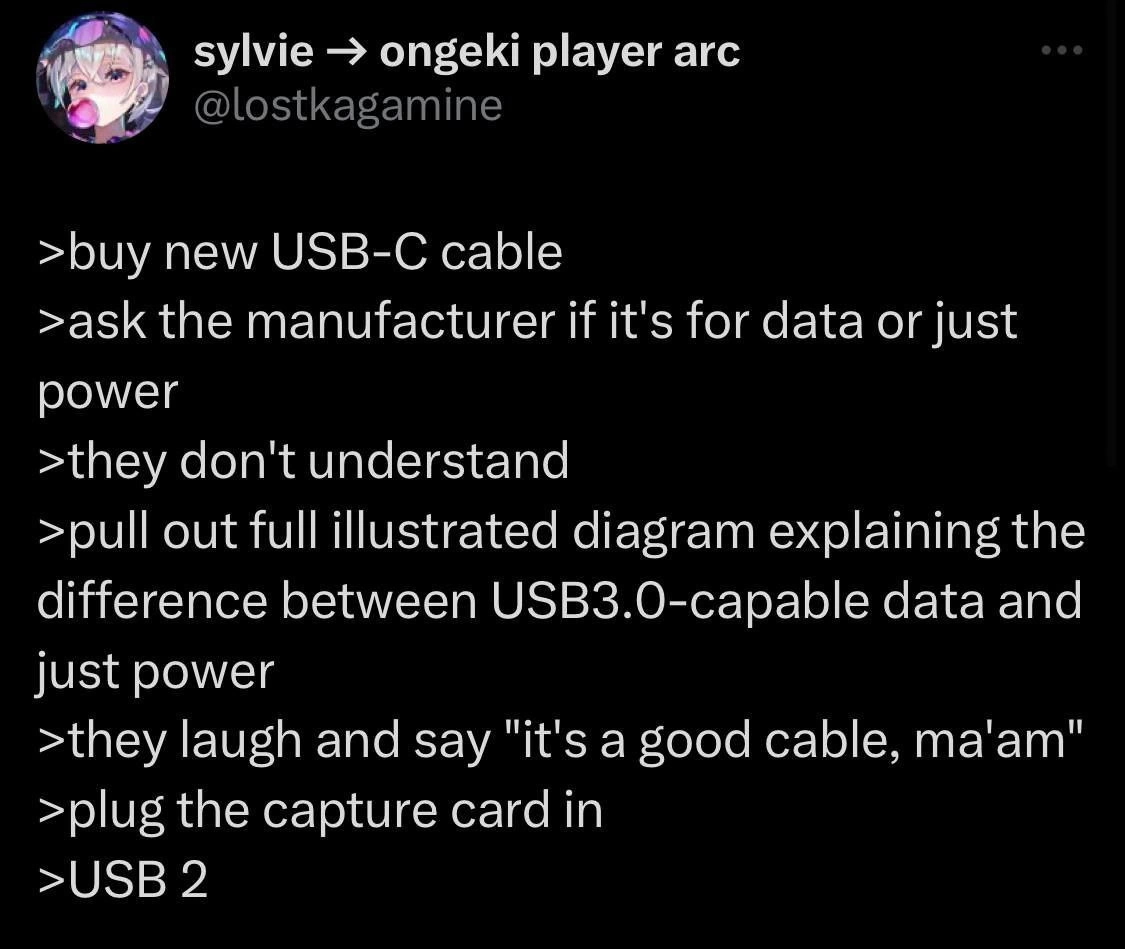
This image is a screenshot of a tweet in dark mode from the user '@lostkagamine'. The tweet is written in a 'greentext' story format, where each line begins with a '>' character. The story humorously details the frustrating experience of trying to purchase a new USB-C cable. The narrator recounts asking the manufacturer if the cable is for data transfer or just for power, but the manufacturer doesn't understand the question. The narrator then shows them an illustrated diagram explaining the difference between a USB 3.0-capable data cable and a simple power cable, to which the manufacturer laughs and dismissively replies, 'it's a good cable, ma'am.' The punchline comes in the last two lines, where the narrator plugs a capture card in and discovers the cable is only USB 2.0. This meme is highly relatable for tech-savvy individuals who understand the frustrating lack of clear standards and labeling in the USB-C cable market, where functionally different cables can look identical. It highlights the pain of dealing with vendors who are ignorant of the technical specifications of their own products


Comments

7
Anonymous ★ Top Pick The USB-IF really missed the chance to call the spec 'USB-Schrödinger,' where a cable is simultaneously for high-speed data and 5V charging until you plug it in and the waveform collapses into disappointment
  1. Anonymous ★ Top Pick

    The USB-IF really missed the chance to call the spec 'USB-Schrödinger,' where a cable is simultaneously for high-speed data and 5V charging until you plug it in and the waveform collapses into disappointment

  2. Anonymous

    USB-C: 24 pins of theoretical glory, but the vendor shipped the Conway’s-Law version - only the power team made it into prod, so my capture card’s stuck at USB 2

  3. Anonymous

    USB-C: the only standard where you need a PhD in electrical engineering to buy a cable, but still end up using the USB 2.0 port because at least you know what you're getting

  4. Anonymous

    The USB-C specification is Schrödinger's cable: simultaneously capable of 40Gbps Thunderbolt and 5V/0.5A charging until you actually need it for a capture card, at which point it collapses into USB 2.0. The real tragedy isn't the manufacturer's confusion - it's that after 25+ years of USB standards, we've somehow made cables *more* confusing by making them all look identical while having wildly different capabilities. At least with USB-A, you could tell a USB 3.0 port by the blue plastic; now you need a PhD in electrical engineering and a multimeter to buy the right cable

  5. Anonymous

    USB-C is the REST API of hardware: identical endpoint, undocumented semantics; “good cable” returns 200 OK with a USB 2 payload

  6. Anonymous

    USB3 diagram for a USB2 card: hardware's premature optimization, dev's eternal regret

  7. Anonymous

    USB‑C: VBUS+GND and D+/D− only - no SuperSpeed pairs, no e‑marker - marketing calls it a “good cable”; your 4K capture card calls it USB 2

Use J and K for navigation