Kubernetes: Where Linux, iptables, and systemd collide in unapologetic chaos
Why is this Containerization meme funny?
Level 1: House of Cards
Imagine you’re organizing a big school play in a gym. You have three important things: the venue (the gym itself – think of this as Linux, the foundation for everything), the electricity and lights (that’s like systemd, which “switches on” all the equipment and microphones), and the security guard at the door (that’s like iptables, controlling who comes in or out). Now, the play (our equivalent of Kubernetes running apps) can only go well if all three of those things are in place. If the lights and sound system won’t turn on because the power switch failed (systemd issues), the play can’t start – nothing starts. If the security guard didn’t show up (firewall off), random people might wander in and out, or actors might even leave mid-play – the event isn’t safe or controlled, basically nothing is secured. And if the gym itself has a problem – say the doors are stuck or the floor is unstable (a big Linux OS problem) – then people can’t get in to see the play or the whole show might collapse, meaning nothing is accessible to the audience. Kubernetes is like trying to run this big complex play: it needs the venue, the power, and security all together. The meme jokes that Kubernetes is where all these things collide, sometimes chaotically. In simple terms, it’s funny because it’s true: if any one of those pieces breaks, the whole show can fail spectacularly. People who work with Kubernetes have seen how a tiny problem in one layer can stop everything, and sometimes you just have to laugh at how fragile that balancing act can be – like a house of cards where pulling out one card (be it the OS, the network, or the startup system) makes the whole stack tumble down.
Level 2: Under the Kubernetes Hood
Let’s break down the pieces of this joke in a more straightforward way. Kubernetes is a system for running software in containers across many machines. Think of it as an orchestra conductor for applications: it tells containers when to start, where to run, and how to communicate. But behind that conductor’s baton, there are some very real instruments playing – and those are Linux, iptables, and systemd. This meme basically says: “Hey, Kubernetes relies on these three big things, and if any one of them goes wrong, it’s trouble.”
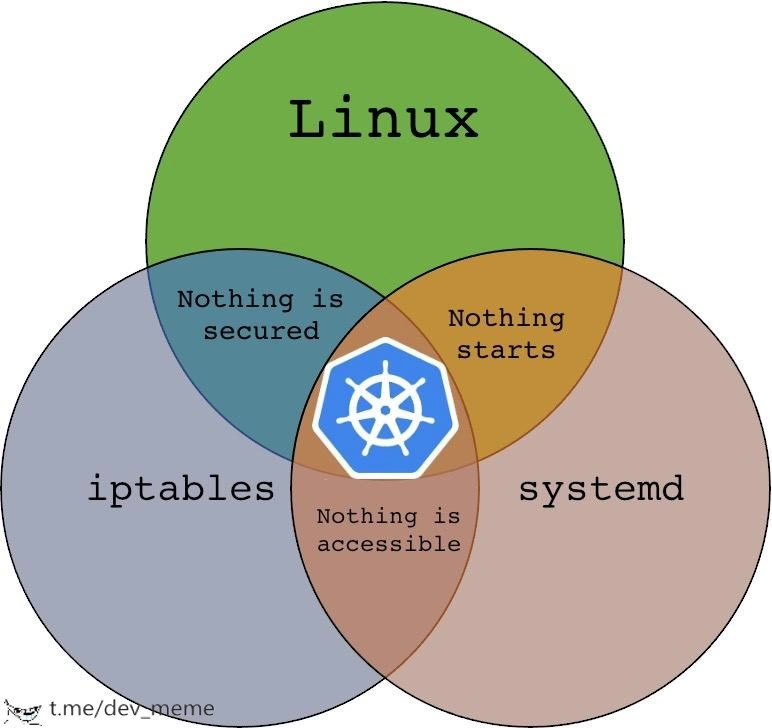
Linux: This is the operating system at the base of nearly all Kubernetes deployments (especially if you run containers in the cloud or on servers). Linux provides the environment in which containers live. It has features like namespaces (which isolate processes so each container thinks it has its own filesystem or its own network, separate from others) and cgroups (which limit how much CPU or memory a container can use). When we talk about containerization, we really mean Linux is isolating apps for us. Without Linux working correctly, containers won’t run because containers are Linux processes under the hood. In the meme’s Venn diagram, Linux is the big green circle, representing that foundational layer.
iptables: This is a tool in Linux that controls the firewall and routing of network traffic. It’s like a very strict traffic cop inside the Linux kernel that says “this packet can go here” or “DROP that packet, it’s not allowed.” Kubernetes uses iptables to set up networking rules for containers. For example, when you create a Service in Kubernetes (to expose an application), Kubernetes will add iptables rules so that any traffic coming to the cluster’s IP address for that Service gets redirected to the right container/pod. The tag IPTablesChains refers to how iptables organizes rules into groups called chains. Kubernetes creates its own chains of rules (with names starting with
KUBE-...) to manage all that routing. If those rules aren’t in place or get messed up, parts of your app become unreachable. The meme’s blue circle is iptables, and one overlap joke “Nothing is accessible” directly relates to what happens if iptables doesn’t do its job – users can’t access the service, network requests don’t reach their destination. It’s like having an unplugged network cable: everything else might be fine, but no one can get through.systemd: This is the init system (the first process that starts when Linux boots, which then starts all other processes according to a plan). systemd is responsible for launching and managing services. Services (or SystemdServices) are things like “start the web server” or “start the database” automatically on boot. In a Kubernetes context, if you’ve set up a cluster manually or using something like kubeadm, systemd will be what starts the kubelet (the main Kubernetes agent on a node) and perhaps the container runtime (like Docker or containerd). If systemd has a problem – say the service file has a typo, or it tries to start things in the wrong order – then your containers or Kubernetes components won’t start up at all. The meme’s brown circle is systemd, and where it overlaps with Linux in the diagram it says “Nothing starts.” That’s exactly the scenario when systemd fails: your machine is up (Linux is running), but none of the apps or containers launch as they should, so effectively nothing really gets going. You might have encountered this as a junior dev the first time you set up a Linux server: if you didn’t enable a service via systemd, you reboot and surprise! it didn’t come back online. In Kubernetes, imagine rebooting a node and forgetting to enable the kubelet service – none of that node’s pods will come back after restart, i.e., nothing starts on that machine.
Now, all three of these (Linux, iptables, systemd) have to work together when you run Kubernetes. That little Kubernetes wheel logo sitting in the center of the Venn diagram? It means Kubernetes is using all of these at once. And each pair of overlapping circles had a phrase about what breaks if one piece is missing. Let’s translate those overlaps in plain terms:
- Linux + iptables but no systemd = “Nothing is secured”: This might sound a bit odd at first (wouldn’t a firewall mean things are secure?). What it implies is if your OS is up and firewall is running, but your service manager isn’t launching the security services or apps, you might actually be less secure than you think. For instance, imagine the firewall is up, but the process that loads the latest security rules didn’t run. Or the OS is up, but your app that requires a firewall rule isn’t started – so effectively, either things are wide open or the security measures are incomplete. In newbie terms: just having a firewall doesn’t secure anything if the rest of the system (like the processes meant to enforce policy) aren’t running.
- Linux + systemd but no iptables = “Nothing starts”: Here, your OS is up and systemd is trying to start services, but the firewall is off or blocking things it shouldn’t. A common newbie experience: “My web service is running, but I can’t connect to it from my laptop.” Why? The firewall was blocking the port – so from your perspective, it’s as if the web service never started working. In Kubernetes, if the firewall’s off or misconfigured, pods might launch (so technically things did start) but they can’t reach each other or be reached by users, which feels like a total failure. So in a sense, nothing (usable) starts.
- iptables + systemd but no (fully functioning) Linux = “Nothing is accessible”: If you have firewall rules and systemd services set up, but something in the OS is fundamentally wrong (imagine the network interface is down, or a required kernel feature is missing), then even though services are running, they can’t be accessed. It’s like having a running car engine (service) and open roads (firewall rules) but no wheels on the car – it’s not going anywhere. For a junior DevOps person, this could be something like forgetting to enable IP forwarding in Linux when setting up Docker or Kubernetes. Docker might be running (systemd OK), and iptables rules are in place, but without IP forwarding, containers can’t actually communicate outside their host. So everything looks configured but nothing is reachable from the outside – hence “nothing is accessible.”
Seeing all this, you can probably relate to why DevOps engineers find the meme funny (in a facepalm kind of way). It’s pointing out that Kubernetes, which is a cutting-edge technology, still depends on these classic layers. And each of those layers has its own learning curve and failure modes. If you’re new to Kubernetes, you might not realize at first that under the hood, when you deploy a container:
- Linux is doing the heavy lifting to isolate that container’s environment.
- iptables is being quietly manipulated to connect that container to the network (and also to secure it, by restricting which ports can talk where).
- systemd is keeping the whole node’s services alive (and was responsible for starting Kubernetes itself on that node).
Containerization in practice means you, as a developer or operator, sometimes have to be a bit of a Linux expert, a bit of a network admin (for iptables), and comfortable with systemd configuration. The meme is essentially a wink to that fact. It’s tagged as DevOpsHumor because only someone who’s wrangled with these systems will fully “get” why those specific phrases are in each overlap. It’s the kind of humor that after a long outage caused by a tiny firewall typo or a mis-ordered boot dependency, an engineer might post to a team chat to say, “haha, this is what we just went through, folks.” In summary, under the Kubernetes hood there’s a lot going on, and if any part misbehaves, it can feel like the whole thing just falls apart. Understanding this stack is part of the journey for junior DevOps engineers, and eventually you learn to check all three when things go wrong – because as this meme jokes, any of them can be the culprit when you least expect it.
Level 3: The Unholy Trinity
This meme elicits a knowing groan from seasoned DevOps and SRE folks because it encapsulates the trifecta of headaches in modern server infrastructure: Linux, iptables, and systemd. These three are individually powerful and a bit infamously complex; together, they can become an unholy trinity of troubleshooting nightmares. The Venn diagram humorously labels each pairwise overlap with a failure scenario that many of us have actually experienced:
“Nothing is secured” (Linux + iptables, but no systemd): Imagine a server that’s technically up (the Linux OS is running) and you’ve got firewall rules (iptables) in place, but none of your managed services or applications have started because systemd failed or was mis-configured. Your firewall might be configured, but what is it even protecting if your apps aren’t running? It’s a paper tiger – the appearance of security (the firewall) but no actual service behind it, or worse, the important security services (like an intrusion detector or Kubernetes network policy agent) didn’t launch. This label pokes fun at scenarios where we have an OS and firewall but due to init problems, key security processes or updates never kick in. In Kubernetes context, think of a node that booted up with iptables rules from last time, but the kubelet and kube-proxy (usually started via systemd) didn’t come up. The result? Stale or default firewall rules and no container workloads running – effectively nothing is truly secured or serving users. It’s that eerie feeling of “the lights are on but nobody’s home.”
“Nothing starts” (Linux + systemd, but no iptables): Here we have a running OS and the init system is eagerly starting services, but if the firewall (iptables) isn’t configured or is mis-configured, a lot can go wrong. The phrase “Nothing starts” reflects those painful incidents where services hang or fail during startup because of network issues. For example, consider a Kubernetes control plane node where systemd starts the API server and etcd just fine, but the iptables rules that route traffic between cluster components are missing – suddenly the API server might not be able to communicate with etcd or nodes. From the outside, it looks like the service never really came up (“nothing starts responding”). Another common scenario: systemd might start a service that expects certain ports to be accessible or certain connections to succeed. If iptables is blocking those (say, an overly strict firewall that wasn’t opened for the app), the service might timeout on startup or crash. Many of us have scratched our heads wondering “why isn’t my app coming up?” only to realize later that an iptables rule was preventing it from contacting a critical dependency on startup. In a Kubernetes node, if iptables isn’t set to allow traffic between pods or nodes (for instance, if the FORWARD chain policy is DROP by default), containers might fail their readiness or liveness checks – effectively nothing (really) starts in the cluster because the networking isn’t allowing it.
“Nothing is accessible” (iptables + systemd, but no healthy Linux): This overlap highlights the case where you’ve got a firewall and the init system, but something’s fundamentally wrong at the OS level – perhaps a kernel misconfiguration or missing component – so the system is up in name, but you can’t actually reach any service. This is reminiscent of those times when all the services say “running (exited)” in systemd and iptables is technically up, yet the server might as well be on Mars. In Kubernetes terms, consider when the node’s network stack is misconfigured: e.g. systemd started all the Kubernetes services, iptables rules are in place, yet maybe the Linux routing or interface isn’t set up, so no real traffic flows. One real-world example: if the Linux kernel’s forwarding or bridge settings (like
net.bridge.bridge-nf-call-iptables) aren’t enabled, containers can’t communicate outside their host – everything is isolated. You have pods running and firewall rules set, but from a user’s perspective nothing is accessible. Or picture a scenario outside Kubernetes: systemd started your web server, and iptables is allowing traffic on port 80, but because of an OS issue (say SELinux or a missing network driver), the outside world still can’t reach it. All the pieces seem in place, yet no connections succeed. Those situations are the ultimate frustration: you’re staring at logs and configs – “it says it’s running, the firewall says it’s open... but it’s not working!”
In the center of the Venn diagram sits the Kubernetes helm wheel logo, implying Kubernetes is the wild intersection of all three. And that’s spot on – Kubernetes is where Linux, iptables, and systemd all have to work together. It’s funny because anyone who’s deployed Kubernetes has dealt with all of these layers and the bizarre bugs that arise from their interaction. DevOps teams joke that Kubernetes is like “Distributed Systems 101 meets Linux Gotchas”. For instance, an upgrade in one component can cascade: upgrade Linux kernel for a patch -> it changes iptables module behavior -> suddenly your carefully tuned kube-proxy rules behave differently and half your microservices can’t talk. Or someone hardens the OS security (Linux) by turning on a stricter firewall or SELinux policy -> systemd might start failing to spawn containers, or pods start crashing because they can’t access what they need. The meme resonates because it’s DevOps humor born from pain: each phrase “Nothing is secured/starts/is accessible” reflects a real outage or incident cause that engineers have seen.
To make it more concrete, let’s recount a typical on-call nightmare that hits too close to home: It’s 3 AM, you get an alert that an application is down. You discover that after a reboot, Docker didn’t start (Nothing starts) because systemd tried to begin Docker before the network was ready. Fine, you fix the systemd service ordering and get Docker/Kubelet running. Now containers are coming up, but users still can’t reach the app. Turns out the reboot also reset iptables to a default deny policy (Nothing is accessible) – the kube-proxy rules that allow traffic to your service didn’t persist. You correct that, but then a security scan shows the database had been wide open during that time because the intended iptables rules weren’t in effect until you fixed them (Nothing is secured!). In one incident, you’ve inadvertently experienced all three overlaps of the diagram. Site Reliability Engineers exchange war stories exactly like this. Kubernetes is powerful, but when something goes wrong deep down, you end up troubleshooting everything from SystemdServices (systemctl status kubelet… why aren’t you starting?) to IPTablesChains (iptables -L… who wiped our rules?) and Linux kernel settings (sysctl… why are packets being dropped?).
To really underscore the point: a single-line mistake in one layer can break the whole stack. For example, consider an admin who, in an attempt to tighten security, runs:
# A single firewall rule can ruin the cluster's day:
iptables -P FORWARD DROP
# This sets the default forwarding policy to DROP – suddenly pods can't talk to each other or the internet.
In a Kubernetes cluster, that one liner is catastrophic: inter-pod networking relies on forwarded packets, and now those are all blocked. Immediately, nothing is accessible between your microservices. Or imagine someone disables the systemd service for kubelet on boot – the machine restarts and kubelet never comes up. All the containers on that node stay down (nothing starts). Or a misconfigured Linux kernel parameter leaves a hole in security or prevents container networking – nothing is secured or reachable properly. These anecdotes aren’t hypothetical; they’re taken from real incidents and hard-learned lessons.
Why is fixing these issues harder than it looks? Because in a live system you might not even know which layer is the culprit at first. Kubernetes issues often masquerade as mysterious application errors (“why can’t my service connect to that other service?”) that send you down the rabbit hole. You’ll check the app code, then the container logs, then realize the app is fine but its network traffic isn’t leaving the node. Is it a Kubernetes network policy? An iptables rule? Perhaps the node’s routing table? Or did systemd not start the network plugin? This cross-layer debugging is daunting. It’s the classic leaky abstraction scenario: Kubernetes is supposed to abstract away infrastructure, but when it leaks, it really leaks – you’re suddenly recalling Linux sysadmin 101 and network theory you didn’t think you’d need at 4 AM. Senior engineers recognize this pattern immediately, which is why the meme hits a nerve and a laugh; it satirizes the idea that Kubernetes “simplifies deployment”. Sure, it does… until something breaks, then you have all the complexity of containers, plus all the complexity of servers. As one bitter joke goes, “Kubernetes didn’t eliminate ops problems, it just redistributed them into YAML and the underlying cloud.”
Historically, it took a lot for these three technologies to mature and become the default stack. Linux has been hardened for decades, but containerization (namespaces/cgroups) only became stable in the last 10-15 years. iptables (netfilter) has been around a long time too, replacing older ipchains, and it wasn’t really designed with something like Kubernetes in mind – we kind of bent it to our will to handle thousands of dynamic rules. And systemd? When it was introduced, it was controversial; it’s extremely powerful (parallel startup, unifying configuration of services, timers, mount points, etc.), but early on it had bugs and a steep learning curve. Even now, many admins have at least one systemd horror story (like a race condition that meant a critical service didn’t start on boot because of a missing dependency declaration). Kubernetes arrived and said: “I assume the OS works, I assume networking works, I assume services start reliably – and I’ll build on that.” 😅 Cue the nervous laughter from DevOps engineers, because those assumptions sometimes don’t hold, and when they don’t, Kubernetes falls over in spectacular fashion.
In essence, this meme is both a joke and a badge of shared experience. It says: Containerization isn’t just fancy tech in a vacuum – it’s built on real, gritty layers of computing, and those layers can and will interfere with each other. For a junior dev encountering this stack, it’s a wake-up call that deploying software is a full-stack endeavor, from hardware all the way to application, with Linux, firewalls, and init systems in between. For the seasoned pro, it’s a bit of dark humor: “Been there, debugged that… and I have the battle scars in my runbook to prove it.”
Level 4: Chains & Cgroups & Units, Oh My!
At the deepest technical level, Kubernetes is essentially a grand orchestration built on intricate Linux internals. It’s where low-level kernel mechanics, network packet filtering, and service management all intersect. Kubernetes wouldn’t exist without Linux’s container primitives like namespaces and cgroups (control groups). Each containerized app is really just a Linux process isolated by namespaces (for filesystem, processes, etc.) and limited by cgroups (for CPU, memory, etc.). The Kubernetes node agent (the kubelet) uses these features to carve out mini-sandboxes on a host. But here’s the kicker: these containers still share the same Linux kernel, so if a kernel setting or module (say for networking) is off, it impacts all containers. Kubernetes is often called a “distributed OS,” but it piggybacks on the actual OS under the hood – and that’s where a lot of complexity lies.
Now throw iptables into this mix. iptables is the Linux kernel’s built-in firewall and packet routing system (part of the netfilter framework). Kubernetes leans heavily on iptables to route traffic for Services and Pods. Ever wonder how a request finds the right container in a cluster? By programmatically adding dozens (even hundreds or thousands) of iptables rules across every node. Kubernetes (specifically the component kube-proxy) creates iptables chains like KUBE-SERVICES and KUBE-FW-XXXX to direct packets: cluster IPs, node ports, load-balanced services – all handled by netfilter magic. This is powerful but also means your cluster’s networking is at the mercy of kernel packet filtering logic and rule ordering. At a theoretical level, this resembles a complex state machine distributed across all nodes: each node’s firewall rules must be in a consistent state for the whole cluster network to function. If one node’s iptables rules are even slightly out of sync (say, due to a delayed update or a crashed kube-proxy), you get weird anomalies – some pods accessible, others mysteriously black-holed. We’re talking about emergent behavior that’s downright chaotic, akin to a three-body problem in physics: three or more dynamic systems (compute, networking, init) gravitationally tugging at the cluster’s state. There’s no simple closed-form solution to predict what happens in every failure scenario.
Meanwhile, systemd is the Linux init system that replaces the old “init” (SysV) and brings a declarative, parallel approach to launching services. On a Kubernetes node (which might be a standard Ubuntu/CentOS machine), systemd starts critical services like docker.service or containerd.service (the container runtime), kubelet.service (the Kubernetes node agent), perhaps flanneld.service (a network overlay) or other components. systemd has its own complex dependency graph and target states (e.g. “network-online.target” to ensure networking is up before starting certain services). If these dependency directives aren’t perfectly in order, you get race conditions: e.g. kubelet might attempt to start before the network is truly ready or before the firewall rules are restored, leading to failures or weird startup hangs. systemd itself uses cgroups (in fact, it can run each service in a cgroup slice for resource accounting), which means it’s managing resources in parallel to Kubernetes. It’s like two chefs in one Linux kitchen: Kubernetes dynamically slicing up resources for containers, and systemd slicing up for services – if they’re not coordinated (for instance, mismatch between systemd’s cgroup driver and Kubernetes’ expected cgroup driver), nothing will run right. Advanced users might recall the transition from cgroups v1 to cgroups v2 – if the kubelet and systemd weren’t configured to use the same cgroup version, containers simply wouldn’t start or were not constrained correctly, causing cluster chaos.
So in this Venn diagram of Linux, iptables, and systemd, the center (where all three overlap) is Kubernetes – basically a meta-system that requires all these subsystems to work in harmony. The humor hides some heavy truth: we have a stack of abstractions, and per the Law of Leaky Abstractions, issues in these lower layers inevitably bubble up. You can’t fully reason about Kubernetes without understanding kernel networking (iptables rules and conntrack states), process supervision (systemd units and logs), and core Linux configuration (sysctls, SELinux, etc.). In academic terms, think of it as a form of emergent complexity: combining three complex systems doesn’t just add difficulty – it multiplies it. There’s a parallel to distributed systems theory here: much like the CAP theorem shows trade-offs among consistency, availability, and partition tolerance, a Kubernetes cluster juggles security, connectivity, and process management – but you can’t effortlessly have perfection in all three at once. Fundamental constraints (like network throughput limits, process race conditions, and kernel security overhead) mean trade-offs and failure modes are inevitable. It’s a kind of theoretical inevitability that something’s gotta give. Kubernetes tries to abstract these away (you just declare YAML and expect the app to run), but when something breaks, that abstraction shatters and you’re suddenly debugging iptables rules or systemd journal logs at 2 AM. In short, the meme’s “unapologetic chaos” isn’t just humor – it’s practically a miniature study in operating system design and distributed complexity all colliding.
Description
The image is a three-circle Venn diagram. The green top circle is labeled “Linux,” the blue left circle is labeled “iptables,” and the brown right circle is labeled “systemd.” Their pairwise overlaps contain black monospace text: between Linux and iptables it says “Nothing is secured,” between Linux and systemd it says “Nothing starts,” and between iptables and systemd it says “Nothing is accessible.” In the small central area where all three circles overlap is the Kubernetes wheel-helm logo, implying that Kubernetes depends on all three layers simultaneously. The meme humorously highlights the operational pain points DevOps teams face when Kubernetes, firewall rules, and the Linux service manager interact - if any one layer misbehaves, security, startup, or network reachability breaks

Comments
25Comment deleted
Kubernetes: finally a way for systemd, iptables, and the Linux kernel to fail atomically - now with YAML so you can code-review the outage
After 15 years in the industry, you realize the real CAP theorem is: Consistency (iptables rules), Availability (systemd services), and Partition tolerance (Kubernetes networking) - and just like the original, you can only pick two before your cluster decides to teach you about distributed systems the hard way
Kubernetes: where you combine three different ways things can break and somehow convince management it's 'cloud native architecture.' The real genius is that when nothing works, you can blame Linux, iptables, systemd, or all three simultaneously - perfect plausible deniability for your 3 AM pager alerts
iptables + systemd: the overlap guaranteeing eternal job security for grey-bearded admins
Ops CAP theorem: with Linux, systemd, and iptables you may choose one of secure, starts, or accessible - Kubernetes automates choosing none
Running K8s is realizing kube-proxy’s iptables mode, systemd’s After=network-online.target, and the forgotten sysctl net.bridge.bridge-nf-call-iptables can all be “correct” while every service remains unreachable
well I think systemd is useful as fuck. I like it. Comment deleted
+ Comment deleted
I like the core part, I like most of it's services, I hate that it's been pushed as a monolith. Comment deleted
idk about the monolith part, but I think the way it automatically starts and keeps alive services is pretty nifty. Also, systemctl is pretty handy. journald is kind of wack though. Comment deleted
Journald is actually better than alternatives, dig into the docs about the storage control and inner namespaces. The problem of the monolith is that outside of journald and udevd none of the additional components have to be a part of init process. Comment deleted
well is there a way to compile systemd without those components? Comment deleted
There isn't. There are semi-joke projects like uselessd which do exactly that Comment deleted
huh Comment deleted
iptables has been replaced by nftables years before k8s was even started Comment deleted
I want to be on the white area Comment deleted
use freebsd Comment deleted
TempleOS with UWP framework /s Comment deleted
Lmao this is the only sticker in that pack that doesn't say the n-word or other things. I WANT MORE Comment deleted
What is this blue thingie in the middle? Comment deleted
kubernetes I think Comment deleted
Fucking bam! Fucking bang! And on the production server it goes! Comment deleted
HTP) Comment deleted
Hydra trash party? Comment deleted
Я инженер, и моя голова, сразу забывает бесполезные слова i'm an engineer, and my head, instantly forgets about words with no sense! Comment deleted