When Ctrl+X turns a harmless list into unexpected data loss tears
Why is this IDEs Editors meme funny?
Level 1: Cut and Cry
Imagine you’re drawing a beautiful picture on a sheet of paper. It has all your favorite things drawn on it. Now, you decide you want to move one part of the drawing to a different spot on the paper. So you carefully cut out that part with scissors, holding the cut-out piece in your hand. But then, something bad happens: a gust of wind blows, and that little cut-out piece of paper flies away! You hadn’t taped it down anywhere yet, and now it’s gone. You look at your original paper and see a big empty hole where an important part of your drawing used to be. Uh-oh. You feel a lump in your throat because you worked hard on that and now it’s lost. A little tear might even come out because you’re so sad and frustrated at yourself for letting it slip away.
That’s exactly how a developer (someone who writes programs or text on a computer) feels in this meme. They had a list of items (like a little drawing made of words). They cut it out from where it was, planning to paste it somewhere else, but then it vanished before they could put it back down. It’s like losing that piece of your drawing in the wind. In the last part of the comic, the character is sitting there with a tear, feeling upset. It’s both a bit funny and a bit sad, because it shows how a tiny mistake (pressing the wrong key, like using scissors at the wrong time) can ruin something you were working on. We laugh because we all know that feeling: when you lose something important by accident and you can’t get it back, it’s hard not to cry at least a little!
Level 2: Missing Text Mystery
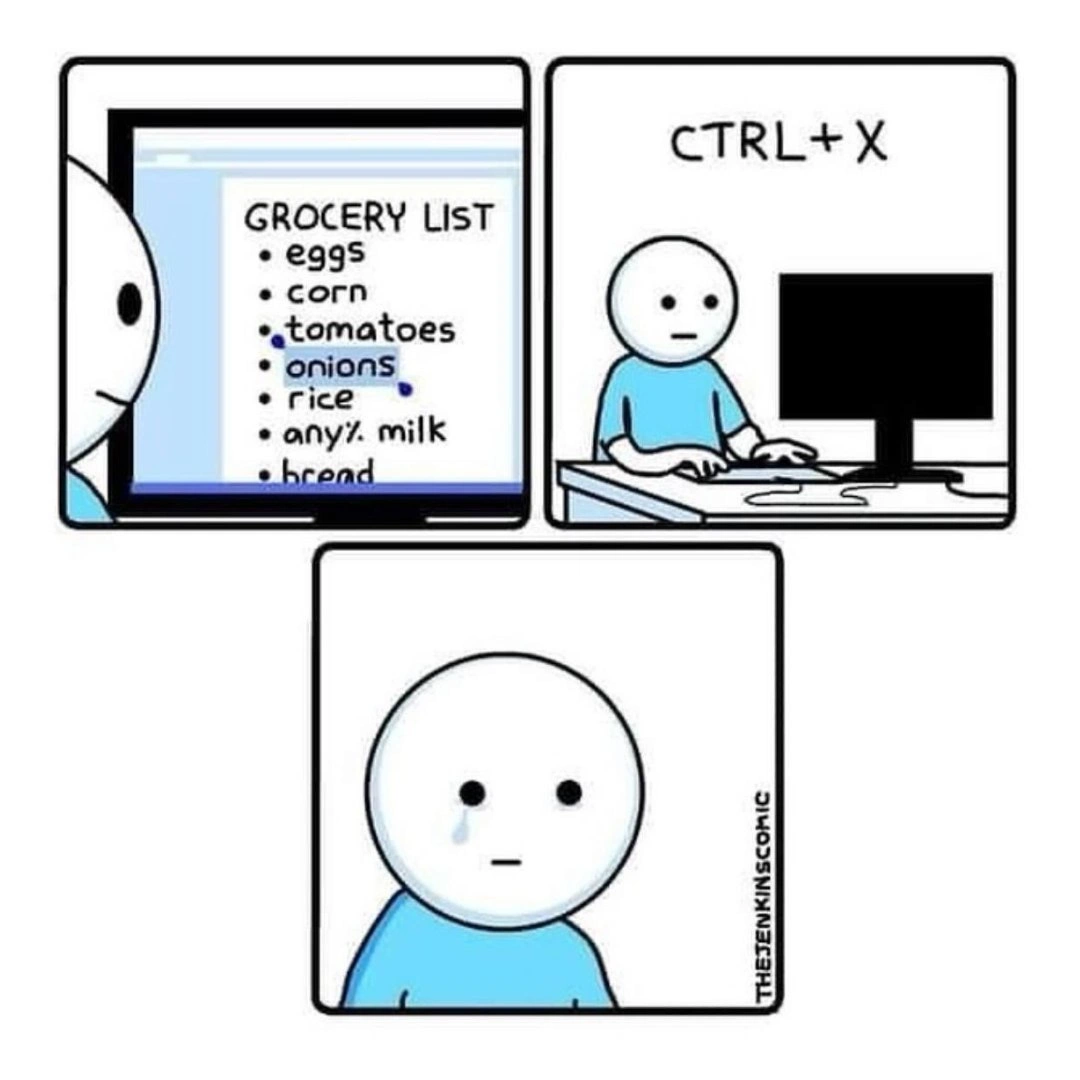
So, what exactly is happening in this comic and why is it a big deal? Let’s break it down in simpler terms. The comic shows a person working with a simple text file (the first panel with the Grocery List on the monitor). They have a list of items typed out: eggs, corn, tomatoes, onions, rice, any% milk, and a line for bread. In the second panel, the character hits Ctrl+X, and in the third panel we see a tear on their face because something went wrong. The joke here is about a common coding mistake (or really, an editing mistake) involving keyboard shortcuts and the computer’s clipboard.
Keyboard Shortcuts: Developers (and really all computer power-users) love shortcuts like
Ctrl+C,Ctrl+X, andCtrl+V. These are quick key combinations that copy, cut, and paste text. They’re part of our everyday toolkit to speed things up. Instead of clicking through menus like Edit -> Copy or Edit -> Paste, we just press these key combos. It becomes almost automatic, which is where muscle memory comes in: our fingers remember the motions even when our brain isn’t actively thinking about it.Ctrl+C vs Ctrl+X: The difference between these two is crucial.
Ctrl+Cmeans Copy. If you select some text (like "tomatoes") and pressCtrl+C, you make a copy of "tomatoes" in the clipboard, but the original text stays where it was. Think of it like photocopying a note – you have the original still on the page, and you have a copy in hand. On the other hand,Ctrl+Xmeans Cut (the "X" looks like scissors ☝️). If you select "tomatoes" and pressCtrl+X, it removes "tomatoes" from the file and puts it into the clipboard. It’s like cutting out a piece of paper from your notebook: the original spot is now blank (the text disappears from the file), and you’re holding that cut-out piece in your hand, planning to paste it somewhere else.The Clipboard: This is a part of your computer’s memory that temporarily stores whatever you last copied or cut. You can imagine it as an invisible clipboard or a little bucket that holds one thing at a time. When you press
Ctrl+CorCtrl+X, the selected text goes into that bucket. When you pressCtrl+V(Paste), the computer takes whatever is in the bucket and inserts it where you want. But here's the catch: the clipboard typically can only hold one thing at a time. If you copy or cut something new, it replaces the old thing in the clipboard. The old content is gone.
Now, let’s reconstruct the mystery of the missing list in the comic. The developer likely wanted to move the list (maybe into another file or another spot). They pressed Ctrl+X to cut it out. At that moment, the entire grocery list was removed from the document and stored in the clipboard. The document on screen is now empty (or at least the list part is). No problem so far – as long as they now press Ctrl+V somewhere, the list would paste there. But something happened that prevented the paste. Perhaps the person got distracted or made another action: maybe they accidentally pressed something else, or copied another bit of text without pasting the list first. For example, suppose right after cutting the list, they thought “Oh, I should copy this link from a webpage real quick” and hit Ctrl+C on a URL. If they did that, the clipboard would drop the grocery list (poof, it’s overwritten) and hold the URL now. The grocery list text is no longer stored anywhere – it’s gone from the file and no longer in the clipboard either. That’s accidental_cut trouble!
When the person in the meme realizes that their list is gone, it’s a moment of shock. If they've overwritten the clipboard or can't undo, they have no way to get those items back except retyping from memory. That’s why we see the tear. It’s like the face of someone thinking, “Did I really just lose all that?” It’s both funny and sad because it’s such a relatable developer mishap. Developer frustration often comes from these little errors that cause extra work.
For a newcomer or a junior dev, this scenario teaches a few valuable lessons about DeveloperExperience_DX and best practices:
Always know your Undo: Most editors and IDEs have an undo function (usually
Ctrl+Z). In many cases, if you accidentally cut something, you can immediately hitCtrl+Zand it will undo the cut, bringing your text back. In the comic, if our character had an undo available, that tear might have been avoided. But maybe they didn’t know, or maybe they closed the file before realizing. If you close some programs, the undo history can be lost along with the unsaved changes.Be careful with Cut vs Copy: If you only want to duplicate text, use copy (
Ctrl+C) so the original stays put. Use cut (Ctrl+X) only when you truly want to move something, and even then, be ready to paste it somewhere. Some developers actually develop a habit of doing two steps for safety: copy (Ctrl+C) then delete the original separately, just to avoid this exact situation of losing text. That’s because if you copy first, the text remains in place as a fallback until you confirm you pasted the copy somewhere else. This might seem slow, but it can save you when you’re editing something important.What if you mess up? Don’t panic! First, try the undo (
Ctrl+Z). If that’s not possible (for instance, if you already closed the editor or the program doesn’t support undo after save/close), check if you had the file under version control (like using Git). Version control is a system that keeps track of changes to your files (commonly used for source code). If the grocery list was a version-controlled file (not likely for groceries, but very common for code), you could retrieve the last saved version from there. If none of those safety nets exist, you might have to retype from memory. It’s a painful learning moment, but we’ve all been there.Clipboard management: You might not know, but modern operating systems and some editor tools offer clipboard history. For example, Windows has an optional feature (activated by pressing
Win + Vinstead ofCtrl+V) that shows a history of recent items you copied. If the developer in the comic had that enabled, they could possibly retrieve the grocery list even after copying something else. There are also third-party clipboard manager apps that keep a stack of copied texts. On Linux, there are multiple clipboards (like the selection vs clipboard buffers) and tools likexclipor clipboard ring buffers. Part of growing as a developer is discovering these tools to upgrade your workflow and avoid past mistakes. That said, not everyone uses them (or remembers to), so the single clipboard scenario is still very common.
This comic also touches on copyPasteCoding culture – the idea that a lot of programming involves copying and pasting code. Here it’s a twist: the developer probably wasn’t copying code from Stack Overflow this time, but the act of cutting/pasting text is second nature to us. With so much frequent copying and pasting, the chance of a mistake grows. It’s almost a rite of passage to one day hit the wrong shortcut and feel your stomach drop. The term accidental_cut perfectly describes it: you didn’t mean to delete that text, but one wrong press and it’s out of your document. The resulting feeling can be anything from mild annoyance to “Oh no, that was hours of work!” depending on what was lost. That emotional rollercoaster is why even a newbie can find this scenario both scary and darkly funny.
In simpler work terms, imagine you’re writing a report or an email. You cut a paragraph to move it elsewhere… then you copy something else or get distracted, and suddenly that paragraph is nowhere to be found. You’d probably be upset. For developers, even though we work with code and technical content, the feeling is the same. Losing stuff unexpectedly is frustrating! So the meme is a lighthearted way to say: "Hey, we’ve all done this goofy mistake. It’s okay to laugh (after the fact) and remember to save or undo next time." The presence of DeveloperHumor in this scenario turns a painful learning experience into a shared joke. In an office, a junior who accidentally loses code like this might be super worried, but a more experienced dev might pat them on the shoulder and say, "Yep, happened to me too. That’s how you learn to commit often and keep backups!"
One more simple detail: Notice the list had “bread” starting on the next line, just slightly visible. That suggests the list was incomplete or there was more text to come. The fact it was cut midway (with "bread" only half seen) implies the action was abrupt – like they highlighted everything including that partial line and hit cut. It’s a little visual cue of how sudden that deletion was. It’s the equivalent of selecting a big block of text (maybe more than you intended) and cutting it, leaving nothing but white space where your content used to be. We’ve all highlighted a bit too much by accident before hitting delete or cut. It just makes the scenario feel very true-to-life.
So, for a junior developer or someone new to coding: the takeaway is be mindful when using Ctrl+X. It’s powerful (it moves text), but with power comes the possibility of mishap. The clipboard is a temporary holding area – treat it with care. If something important is in your clipboard, try to paste it or save it somewhere as soon as possible. And always remember that if you do slip up, try “Undo” immediately. The faster you realize the mistake, the better chance you have to recover. If not… well, you might end up like our friend in the comic: with a blank look and a tear, making the best of a lesson learned the hard way. It’s all part of the developer experience journey!
Level 3: Cut to /dev/null
At the senior engineer level, this meme hits a painfully familiar note. In the first panel, a simple text file titled "GROCERY LIST" with items like "eggs", "corn", and "tomatoes" stands in for any piece of important text or code. By panel 2, our hapless stick-figure developer has pressed Ctrl+X – the keyboard shortcut for Cut. Instantly, the entire list is removed from the document and placed into the ephemeral clipboard. Panel 3 zooms in on the dev's blank stare as a single tear rolls down their cheek. Why the tears? Because they’ve just realized that their carefully written list (or imagine it was a block of code or a critical config file) is gone. This is a comic rendering of that oh-no moment every developer dreads: the accidental cut that led to data loss.
In technical terms, Ctrl+X is supposed to be followed by Ctrl+V (Paste) to relocate the text. But if anything goes wrong in between – say you meant to press Ctrl+C (Copy) but muscle memory betrayed you with Ctrl+X, or you cut the text and then overwrote the clipboard by copying something else – your original text is effectively dropped into a black hole. The clipboard in most systems is a single-slot buffer (like a tiny temporary storage). Each new copy or cut replaces whatever was there before. So if our friend cut the grocery list and then, for example, copied a URL or a error message, the grocery list is magically tragically gone. It’s as if the text was sent to /dev/null (a.k.a. the void where data disappears in Unix). No amount of hoping or pasting will bring it back, unless there’s an undo history or backup. Experienced devs have a term for that sinking feeling: ctrl_x_trauma.
The humor here is that this scenario is absurdly relatable. We've all been that developer at 2 AM refactoring code or updating a config file in an IDE, who hits the wrong shortcut and suddenly key lines vanish. There's that one frozen moment of horror – just like the blank-faced character – followed by either frantic scrambling (to hit undo, pray to the autosave gods) or the quiet, tearful acceptance that it's gone. The meme exaggerates it with a literal tear, but honestly, that’s only barely an exaggeration for some of us! It captures DeveloperFrustration in a nutshell: sometimes the tools meant to save time (like keyboard shortcuts) can backfire spectacularly. It’s gallows humor about how a tiny slip of the finger can lead to unexpected data loss.
From a seasoned developer’s perspective, this comic also hints at deeper lessons in DeveloperExperience (DX) and tool design. Why do such mistakes happen so often? One reason is muscle memory. We use these shortcuts hundreds of times a day. Ctrl+C and Ctrl+X are right next to each other on the keyboard (X and C keys are adjacent), and in the heat of the moment it's easy to hit the wrong combo without realizing. Muscle memory is powerful – it lets us work fast without thinking – but when muscle memory misfires, we might not notice until it's too late. By the time you realize you hit the cut shortcut, you might have already copied something else or closed the editor. That’s when the "harmless list" turns into "tears".
Another insight: many editors and IDEs historically provided only a single clipboard and a single undo stack for simplicity. Senior devs remember the bad old days when if you closed a document or the application crashed after cutting text, that text was irretrievably lost. Some modern tools have mitigations: for example, the OS-level clipboard on Windows 10+ and macOS can optionally keep a history of copied items, and some programmer’s editors (like Emacs or VIM) have multiple registers or a kill-ring that stores several recent cuts. In Emacs, for instance, each cut (kill) is appended to a list, so you can retrieve older clipboard entries (it's like a built-in clipboard history). Vim has named registers so you can cut into different buckets. But if you don’t explicitly use those features, you’re stuck with the default behavior. And the default for most of us is: one clipboard, one item, no mercy. So if you accidentally cut that 20-line configuration snippet and then copy something else or shut your laptop, poof – it’s gone. That’s the clipboard_overwrite nightmare.
This meme’s scenario might be a simple grocery list, but every senior dev reading it is thinking of a time they had something much more critical on the clipboard. Think of accidentally cutting out a chunk of source code during a frantic late-night debugging session. Perhaps you intended to move some code inside a function – Ctrl+X to cut it – but then a Slack message popped up and you copied an error log to share with a colleague. You come back to your code and hit paste… and what appears is that error log text, not your code. Your carefully written code block is no longer in memory. If your editor has already lost undo history (or you closed the file thinking "I’ll paste it later"), you’re sunk. You experience a moment of dumbfounded silence exactly like the comic character, followed by a creative outburst of language that fortunately only the rubber duck on your desk can hear. DeveloperHumor often comes from these shared painful lessons. We laugh to keep from crying – or in this case, we laugh with the crying stick-figure because “yep, been there, done that.”
The inclusion of “any% milk” in the grocery list is a tiny joke in itself. It hints the list’s author might be a gamer or programmer slipping into shorthand – "any%” is a term from video game speedrunning meaning “complete with any percentage of objectives.” It’s a playful way to say “I don’t care what kind of milk – just any percentage is fine.” Ironically, that little hint shows the person is a bit of a nerd, making it all the more on point that they’d use keyboard shortcuts even for editing a grocery list. And how do nerds typically learn not to lose data? Version control and backups! But who puts their grocery list under version control? (Maybe some ultra-nerds do — if only we could git commit -m "Add eggs and milk" our life tasks! 😅). Without version control, the only safety net is the editor’s undo or the OS clipboard history, and if those don’t save you, well... welcome to the club of Clipboard Catastrophes.
In short, at the experienced level this meme is funny because it magnifies a tiny, universal developer mistake and reminds us of the fragility of our tools. It’s a lighthearted nod to the fact that even in our high-tech world of cloud computing and AI, sometimes all it takes is one wrong keystroke (or one accidental_cut) to bring us to our knees. And yes, seasoned devs will chuckle, possibly while hovering a finger nervously over Ctrl+X thinking “there but for the grace of undo go I.” The single tear is the perfect touch – it’s almost melodramatic, but also totally accurate to the feeling. We’ve all shed that invisible tear when we realize we just consigned our hard work to the digital ether.
Description
Three - panel minimalist comic in blue-white line art. Panel 1 shows a monitor displaying a text file titled “GROCERY LIST” with bullet items: “eggs”, “corn”, “tomatoes”, “onions”, “rice”, “any% milk”, and the top of a cropped next line “bread”. Panel 2 has the same blank-faced stick-figure at a desk, hands on keyboard, a black monitor in front, and the caption “CTRL+X” floating above - implying they’ve just cut the entire list. Panel 3 zooms on the character’s expressionless face; a single tear rolls down the cheek, underscored by the vertical signature “THEJENKINSCOMIC”. Technically, the strip riffs on every engineer’s muscle-memory disaster: using Cut instead of Copy in an editor, overwriting the clipboard, and realizing your carefully curated data (or critical config) is irretrievably gone unless you have version control or undo history
Comments
10Comment deleted
Some call it Cut-and-Paste; veterans call it Schrödinger’s code - simultaneously deployed, deleted, and forever lost in the clipboard abyss
After 20 years in the industry, I've learned that the most dangerous production incident isn't a misconfigured Kubernetes cluster or a botched database migration - it's when your muscle memory for Ctrl+X kicks in while reviewing your spouse's grocery list, and suddenly you're explaining why the shopping app needs a proper undo buffer implementation
Every senior engineer has that muscle memory moment where CTRL+X fires before the brain catches up - and suddenly you're debugging why your grocery list just became a distributed systems problem with no rollback strategy. At least with production incidents, you have monitoring and backups; with your clipboard, you just have regret and the faint hope that CTRL+Z works across application boundaries
Tried Ctrl+X to remove onions from the list; turns out hard deletes still have observable side effects - my undo stack doesn’t roll back tear state
20+ YoE muscle memory: CTRL+X refactors your grocery list into commit-or-starve regret
Turns out the clipboard API isn't pure - Ctrl+X on "onions" triggers a non-idempotent side effect: tearStream++
Cutting onions? Comment deleted
Men would rather cut an onion than go to therapy Comment deleted
Men would rather cut an onion than go shopping Comment deleted
any% milk🗿 Comment deleted