Skip to content
DevMeme
5501 of 7435
The Anti-SATA Window Protest
Hardware Post #6029, on May 28, 2024 in TG

The Anti-SATA Window Protest

Why is this Hardware meme funny?

Level 1: The Cable Protest

It is like someone hanging a huge sign outside their window saying they hate a certain kind of phone charger. Most people walking by would be confused, but anyone who has wrestled with that charger in the dark would understand the rage immediately.

Level 2: Why SATA Annoys People

SATA stands for Serial ATA, a common way to connect hard drives and older 2.5-inch SSDs to a computer. It usually needs two things: a data cable to the motherboard and a power cable from the power supply. For a single desktop drive, that is simple enough. For many drives, cramped cases, servers, old cables, or repeated swaps, it can become irritating quickly.

NVMe is a newer storage protocol commonly used by fast SSDs, often installed directly into an M.2 slot on the motherboard. It can move data much faster because it uses PCIe lanes and was designed for flash memory rather than old spinning disks. The meme exaggerates a real preference: people who build or maintain computers often like NVMe because it is fast and tidy, while SATA can feel like cable-management punishment.

Level 3: Interface Rage Politics

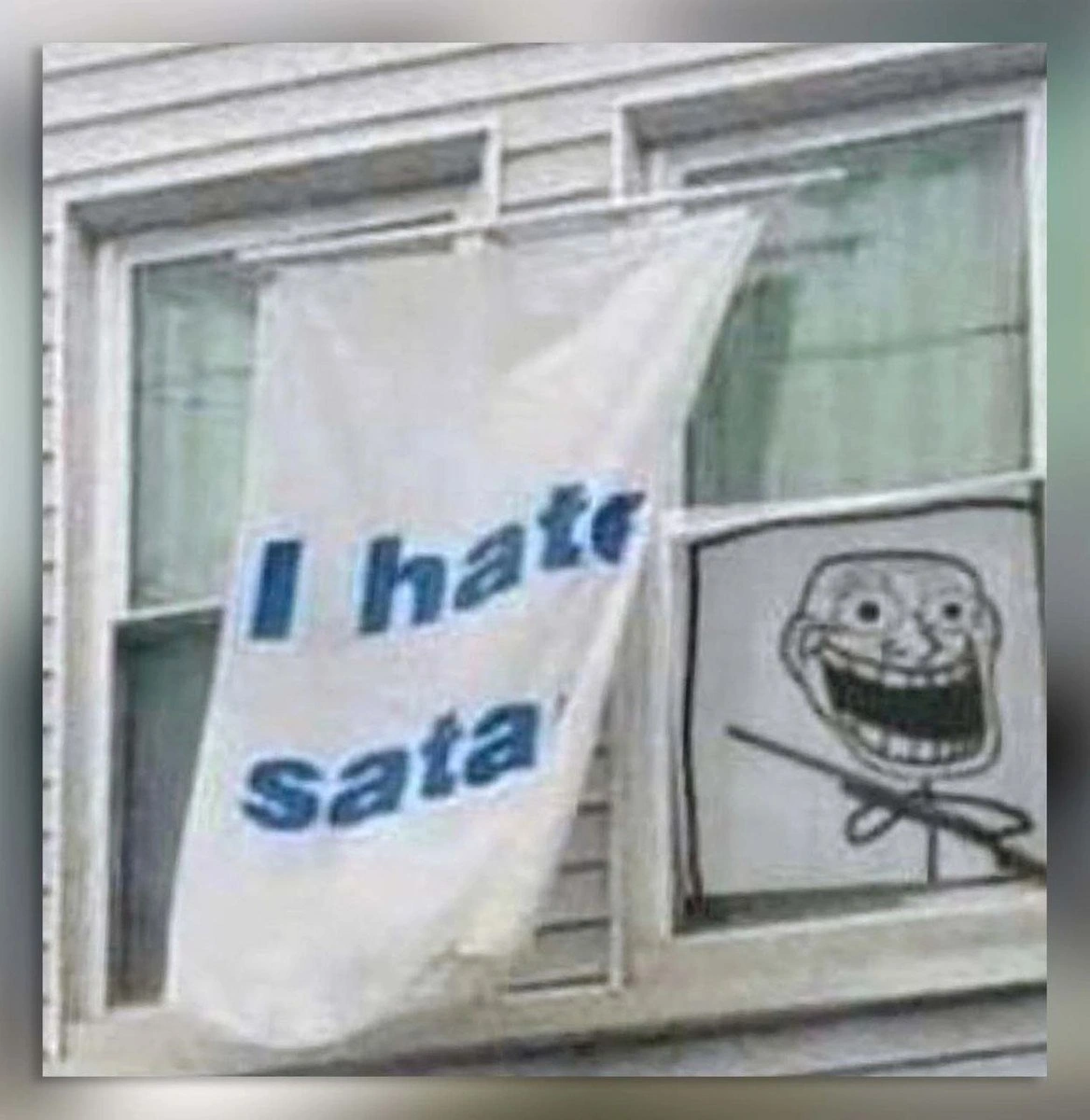
The visual comedy comes from scale mismatch. Someone has hung a large cloth sign out of a window to declare I hate sata, while a trollface grins from the neighboring pane like the official mascot of unnecessary escalation. Usually public banners announce political demands, rent strikes, union actions, or local disputes. This one is about a storage interface. That is exactly the kind of overreaction that becomes funnier if you have actually fought computer hardware.

SATA is not evil. It was a practical, long-lived standard, and for many hard drives it remains perfectly adequate. The joke is that hardware tradeoffs age badly in the hands of people doing upgrades, repairs, homelab builds, or sysadmin triage. A standard that was once clean and modern can become the thing standing between you and a neat build: narrow but fragile cables, awkward right-angle connectors, power splitters, drive cages, BIOS settings, hot-swap backplanes, and one mystery disk that disappears only when the case panel is closed.

NVMe made much of that feel luxurious by comparison: a small module, no separate data cable, no separate SATA power lead, and dramatically higher performance on systems with enough PCIe lanes. Of course, NVMe also brought its own nonsense: thermals, lane sharing, firmware bugs, boot support quirks, and motherboards whose slot diagrams look like a logic puzzle. Progress in hardware is mostly trading yesterday's sharp edges for tomorrow's sharper edges, but at least the new edges benchmark better.

Level 4: Queues Versus Cables

The banner's entire visible manifesto is I hate sata, and the post message adds the missing counterpoint: NVMe rules. That turns a blurry apartment-window protest into a surprisingly compact storage architecture rant. SATA was designed as the serial successor to parallel ATA, carrying storage commands over a cable-oriented link that made enormous sense for spinning disks and early SSDs. NVMe, by contrast, was designed for non-volatile memory attached over PCIe, where the bottleneck is no longer a mechanical arm slowly dragging itself across a platter like it has tenure.

The deep technical divide is not just "old connector bad, new connector good." SATA usually speaks through AHCI, a host controller interface shaped by hard-drive assumptions: limited command depth, relatively high software overhead, and an architecture that does not map cleanly onto many-core CPUs and very fast flash storage. NVMe was built around parallelism: many submission and completion queues, low-latency command paths, and a model that lets modern SSDs exploit PCIe bandwidth without pretending to be a polite little disk from 2006.

That is why this meme is funny to hardware and sysadmin people. The hatred is absurdly public, but the grievance is legible. If you have ever traced a flaky SATA power lead, knocked a data cable loose while closing a case, discovered a motherboard port disabled by a shared lane, or watched a fast SSD flatten against a SATA throughput ceiling, the window banner feels less like a joke and more like minutes from the last infrastructure meeting nobody wanted to attend.

Description

The image shows an apartment or office window with a large white banner hanging outside that reads "I hate sata" in blue letters. In the adjacent window pane, a hand-drawn trollface is taped up, grinning at the viewer. The visual joke is absurdly specific: someone is treating dislike of SATA, the storage interface and cable standard, as a public protest-worthy position. For engineers, the humor lands as hardware frustration elevated into street-level activism, especially for anyone who has fought fragile connectors, drive bays, or storage cabling.

Comments

19
Anonymous ★ Top Pick SATA is the only interface that can make a storage upgrade feel like debugging a loose handshake protocol with your fingertips.
  1. Anonymous ★ Top Pick

    SATA is the only interface that can make a storage upgrade feel like debugging a loose handshake protocol with your fingertips.

  2. @leklaanc 2y

    Agreed

  3. Deleted Account 2y

    nah man ise slot.

  4. @pixelsex 2y

    data is temporary, glory is forever

  5. @CcxCZ 2y

    It will die. There is MTBF but the curve is not linear. You get early faults with any vendor. Get yourself raid5 or equivalent at least if you want to keep the data.

    1. @giomasce 2y

      RAID is not for keeping data safe, but for keeping systems spinning. If you want to keep data safe then you need a backup.

      1. @SamsonovAnton 2y

        And you need to verify regularly that the backups you make are actually valid. 👌

      2. @CcxCZ 2y

        I mean sure. You better not be YOLO overwriting your important data in a way that can corrupt it irrevocably without having safe copies. But that is tangential to the storage device choice. Offsite backups, offline backups, etc. are certainly an option. RAID >1 is a type of erasure coding and that is certainly applicable to distributed backups too.

        1. @CcxCZ 2y

          Also important thing: on HDD you really want multiple copies. Because what the linked studies and whatnot don't cover is read errors - particularly due to magnetic record weakening over time and getting mangled by nearby writes. That's why every raid-like system has check&repair function you are supposed to utilize periodically. And sure, you could set up zfs with two copies on one disk. But at that point you will be much better off with more drives to also tolerate full failure of single drive. And at that point it's pretty much down to your storage and $/TB requirements. Which I haven't seen mentioned at all, but I also haven't read the full backlog.

  6. @CcxCZ 2y

    That's the thing. For drives dying of age after prolonged use there usually are signs that it needs replacing. For it dying early due to manufacturing faults not so much.

    1. @SamsonovAnton 2y

      No, they usually just die suddenly without correlation to any monitored SMART parameter (with the exception of temperature, which is not a characteristic of the drive itself, though). Age itself is also not a factor to worry about, unless you consider eternity; not to be confused with rewrite count of a solid-state drive.

    2. @SamsonovAnton 2y

      I once again recommend reading the large-scale study reports mentioned in earlier comment (and the preceding one) to get rid of all popular misconceptions regarding storage device reliability. Those were from HDD era, but I'm pretty sure that most (all?) of the conclusions apply to SSD as well, with the only exception of inevitable wearout.

      1. @CcxCZ 2y

        Poor choice of words on my side. Better would be: unlike gradual failure that *may* happen with prolonged use (even HDDs have been doing block relocation for a while now and that will certainly indicate drive failure if if keeps rising), in the early use failures there is not even that indication.

  7. @Exelution 2y

    For 100$ you can only count on hhd. Don't buy cheep chinese trash. Seagate or Toshiba. But remember, it will serve 10-20 years (depending how often use) and one day just crush. So if it important data, just buy 2 data storages, once 1 die, you have a backup already. I payed 200$ for data recovery from hhd, and it is very cheap, price for such procedure can be up to 500$

    1. @CcxCZ 2y

      And the results are very uncertain.

      1. @Exelution 2y

        thats for sure... last year of data has erased (

    2. dev_meme 2y

      For 100$ there’s a good chance of failure even within 3 years timeframe :(

  8. @JackOhSheetImSorry 2y

    Fuck SATA All my homie use PCI Express

  9. dev_meme 2y

    Stability and overall quality is among first compromised to make it cheaper 🥲

Use J and K for navigation