The Android Studio Installation Cycle
Why is this MobileDev meme funny?
Level 1: The Tool That Was Too Big
Imagine you got a giant robot to help you clean your room. You’re excited and say, “Wish me luck!” because it’s a really big, fancy robot. But as soon as you start it up, the robot is so huge and clumsy that it knocks over your chair, takes a long time to figure out where your toys are, and makes a lot of noise. You spend all day trying to get this robot to do the job, and by the next morning you’re tired and frustrated. In the end, you turn the robot off, put it back in its box, and just clean your room by yourself in less time. It’s funny because at first you were hopeful this big helper would make things easy, but it actually made everything harder. The person in the meme had the same experience with their computer tool: they installed a huge program to help make an app, but it was so complicated and slow that they gave up on it almost right away. We laugh at the story because we know how it feels to try something that’s supposed to help, only to discover it’s just too much trouble!
Level 2: Install Then Delete
Let’s break down what happened in simpler terms. Android Studio is an IDE – an Integrated Development Environment for writing Android apps. That means it’s a big application that includes everything a developer needs to build an app: a code editor, tools to design the user interface, a phone emulator (a virtual phone on your computer to test apps), and more. Sounds convenient, right? The catch is that all this convenience makes Android Studio a very large and heavy program in terms of computer resources.
In the tweet, the person was excited and wrote, “Installing Android Studio. Wish me luck.” They probably knew it might be a tricky setup. Android Studio has a reputation for being bulky and slow to set up. First, you have to download and install it (often a file over a gigabyte in size). Then, the first time you run it, it might prompt you to download the Android SDK (a big bundle of tools and libraries needed to build Android apps) and maybe other components like an emulator system image. It will also start indexing your project files – basically scanning and cataloguing everything in your code to enable features like auto-completion and error highlighting. Indexing can take a while, especially if you have a lot of files, and during that time the program can feel sluggish.
All of this can be overwhelming if you’re not prepared. Your computer might get very slow or even seem to freeze during this process, especially if you don’t have a lot of RAM (memory) or a fast disk. It’s common to hear your machine’s fans kick on loudly because the CPU is working hard. For someone just trying out Android development, this can be pretty frustrating – you could spend hours just getting things set up before you even write a single line of app code.
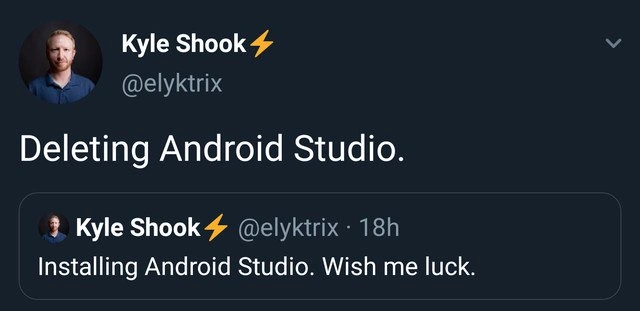
After about 18 hours of effort, the person gave up and posted, “Deleting Android Studio.” This is the punchline. It’s funny (in a painful way) to developers because many of us have been in a similar situation: a tool that’s supposed to help us ends up being so much trouble that we abandon it. It highlights a developer experience problem: if a development tool is too hard to install or makes your computer crawl, it’s giving a bad experience to the developer who just wants to be productive.
This story also touches on the ongoing IDE vs. text editor debate. Android Studio has tons of features (which is why it’s so heavy), but some developers prefer using lighter text editors (like VS Code, Atom, or even Vim) with a few plugins. They give up some of the advanced features in exchange for a simpler, faster setup. After experiences like this, you can see why a simpler tool might be appealing! In short, our poor developer tried to use a very big, complex program to do the job, ran into one obstacle after another, and decided it wasn’t worth it – all in less than a day. It’s a relatable tech joke about getting burned by a tool’s bloat (being overly large and slow) and complexity.
Level 3: Bloat Backlash
Seasoned developers smirk at this timeline of tweets:
Dev (18h earlier): “Installing Android Studio. Wish me luck.”
Dev (next day): “Deleting Android Studio.”
It’s an all-too-familiar story of IDE bloat and shattered optimism. Android Studio, the official IDE for Android development, is both powerful and notoriously heavy. This rapid reversal highlights a classic case of install-then-delete syndrome – a developer begins the software installation process of a big tool full of hope, only to abandon ship hours later when reality sets in.
Why the quick about-face? Android Studio is a beast of an application built on JetBrains’ IntelliJ platform, and it demands a lot from your machine. Launching it is like starting up a mini operating system dedicated to coding. It provides everything in one go: a smart code editor, drag-and-drop UI designer, an Android device emulator, built-in profiling tools, and the Gradle build system to compile apps. But each of these features comes at a cost – high CPU usage, heavy memory demands, and lots of disk space. The result: your computer’s fans whirring at full blast and a system struggling under the weight. The tweet’s author probably spent a chunk of those 18 hours watching endless updates and indexing progress bars, as his excitement drained away.
Long-time engineers call this the “IDE trade-off.” On one hand, you get rich features and integration; on the other, you endure slow startup times and frequent pauses as the IDE chews on your project. Developer experience (DX) suffers when an environment that’s supposed to boost productivity instead tests your patience. In the MobileDev world, this pain is amplified: as soon as you open Android Studio, it often insists on updating the Android SDK (huge downloads!), scanning every file for syntax errors, and launching that hungry Android emulator (which itself can gobble up gigabytes of RAM). No wonder our brave tweeter went from hopeful to fed-up so fast.
This meme pokes fun at a shared truth in developer culture: sometimes our tools feel like overkill. “Wish me luck” was half-joking – everyone in the room knows you’ll need luck (and a high-end PC) to get through an Android Studio install smoothly. By the next day, after wrestling with setup wizards and sluggish performance, even the most determined dev might hit “Uninstall.” It’s a humorous reminder that bigger isn’t always better in tooling. For some, this saga reaffirms why they prefer lightweight text editors over monolithic IDEs – fewer features can mean fewer headaches. Whether it was Eclipse back in the day or Android Studio now, ToolingFrustration is real when an IDE’s ambitions overflow and leave developers overwhelmed (and reaching for the uninstall button).
Description
A screenshot of a Twitter thread from user Kyle Shook (@elyktrix). The main tweet, displayed prominently, says 'Deleting Android Studio.'. Below it, a quoted tweet from the same user, posted 18 hours prior, reads 'Installing Android Studio. Wish me luck.'. The image captures a common and relatable cycle of frustration for mobile developers. The initial optimism of a fresh installation quickly sours due to the notoriously resource-heavy nature of Android Studio, long Gradle build times, configuration issues, and general bugginess, leading to the decision to uninstall it shortly after. It's a humorous take on the love-hate relationship developers have with their essential but often painful tools
Comments
7Comment deleted
Android Studio is the Schrödinger's cat of IDEs; it's both installing and being deleted at all times, and you don't know which state your sanity is in until you check your remaining RAM
Android Studio’s lifecycle on my laptop mimics a failed microservice: 90 minutes provisioning, 16 hours indexing, 2 seconds rm -rf, and a lifetime of swap-file trauma
After 15 years in the industry, you realize Android Studio's true purpose isn't mobile development - it's a distributed computing project where Google uses your machine to mine cryptocurrency while 'indexing' and 'building.' The actual IDE is just a clever cover story for why your 64GB RAM MacBook sounds like a jet engine trying to compile 'Hello World'
Android Studio: the only IDE where 'Wish me luck' and 'Delete' are separated by exactly one Gradle sync, three indexing cycles, and the realization that your 16GB of RAM was merely a suggestion, not a requirement
Android Studio install: 4GB download, 16GB footprint, infinite Gradle sync - truly the senior dev's Sisyphean boulder
Android Studio: where “Install” triggers a consensus protocol between AGP, Gradle, and your JDK - and “Delete” is the only operation that reaches quorum
Every senior knows “Installing Android Studio” is a three‑phase commit: download, index forever, rollback via uninstall