
Skip to content
DevMeme
2211 of 7435
CLI Precision: Expectation vs. Reality
CLI Post #2465, on Dec 18, 2020 in TG

CLI Precision: Expectation vs. Reality

Why is this CLI meme funny?

Level 1: Even Experts Use Erasers

Imagine you have a friend who is really good at writing on a chalkboard. People say, “Wow, they never make mistakes when writing on the board, their work is so neat!” That’s like the expectation in the top part of the meme – people think expert computer users never mess up when they type commands. But now picture this: you look a bit closer and notice your friend has a special magic eraser in their other hand. The moment they write a wrong letter, poof! they secretly wipe it away and fix it so fast that no one even sees the mistake. That’s the reality shown in the bottom part of the meme. In real life, even the best computer wizards set up little helpers to fix their tiny typing errors. It’s like having auto-correct for the command line. Instead of the computer saying “I don’t know what you mean” when they typo, they’ve taught the computer to understand what they meant to say. It’s funny because it reminds us that nobody’s perfect – even the experts take shortcuts and keep an “eraser” handy. The meme makes us smile, because we all secretly love little tricks that make life easier, even while everyone else thinks we’re doing everything perfectly on the first try!

Level 2: Bash Alias Basics

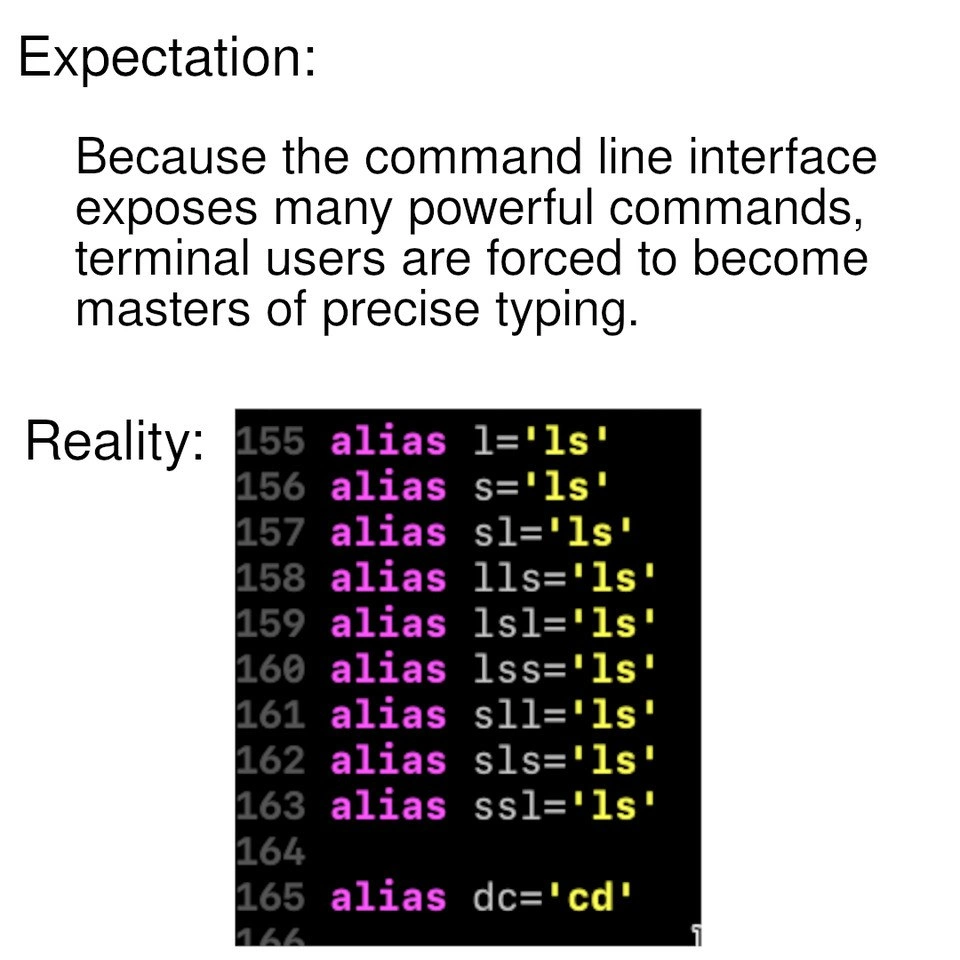
Let’s break down what’s happening in that terminal screenshot for those newer to the CLI world. The image shows a portion of a shell configuration, likely a file like ~/.bashrc or ~/.bash_aliases, where a user defines aliases. An alias in this context is basically a shortcut or an alternate name for a command (or set of commands). By writing alias sl='ls', the user is telling the shell: “Hey, whenever I accidentally type sl, just run ls instead, because that’s what I really meant.” In other words, aliases are a way to customize the command line to understand your personal quirks or preferences. This is part of shell scripting languages like Bash and Zsh – they allow you to extend and tweak how the command line behaves.

Why do this? Because the command line (the text-based interface where you type commands) typically doesn’t forgive typos. If you type sl (swapping the letters of ls by mistake), the shell will likely respond with an error like:

$ sl  
bash: sl: command not found

This can disrupt your flow, especially if you’re, say, quickly checking directory listings dozens of times a day. ls is one of the most common commands – it lists files and folders in the current directory. It's so short (just two letters) that you might think no one could mess it up, but in practice, when you’re in a hurry, it’s very easy to transpose or repeat characters. The snippet in the meme shows aliases for l, s, sl, lls, lsl, lss, sll, sls, ssl – basically a bunch of common typo patterns around ls. For example:

  • Typing sl instead of ls (letters out of order).
  • Typing lls or lsl (maybe pressing l twice or an extra key).
  • Typing sll or sls or lss (various doubles – perhaps you held one key too long).

By defining those, the user ensures any of those inputs will execute the ls command correctly, as if they had typed it right. They even did alias dc='cd' because sometimes in a rush you might type the letters of cd (the command to change directory) in reverse. It’s a clever little fix: cd is another super frequent command, and hitting d before c by accident (dc) would normally just confuse the shell. Now with the alias, dc is understood as the intended cd.

For a junior developer or someone new to the CLI, this is a peek into how real-world developers optimize their workflow. It’s not that they have supernatural typing accuracy – it’s that they anticipate mistakes and set up tools to handle them. This falls under Developer Experience (DX) or productivity hacks: small configurations that make the development environment more user-friendly. Using aliases for typos is like adding padding to sharp corners of a table – it prevents those little “ouch!” moments. And it’s not limited to fixing mistakes; often, aliases are used to shorten long commands (for example, alias gs='git status' to save time). In this meme’s case, though, the focus is humorously on self-correcting mistakes. The color coding in the screenshot (magenta for the word alias, yellow for 'ls' strings) is just a syntax highlight from an editor or terminal, indicating these lines are code. The numbers 155-164 on the left suggest this is part of a long list of aliases or configurations – meaning this user has a lot of custom tweaks! It’s common for experienced devs to carry around a personal dotfile (setup script) with dozens or even hundreds of lines of such aliases and functions to tailor their shell just the way they like it. When you’re new, you might feel pressure to remember and perfectly type every command, but as you gain experience, you realize it’s both okay and smart to let the computer do some remembering (or correcting) for you. After all, the computer doesn’t mind if we give it a few extra rules to make our lives easier.

So, in summary: the meme’s Expectation panel claims “terminal users must be precise typing masters” – implying a sort of strict discipline. The Reality panel shows the opposite: even pro users embrace human error by using simple shell scripting tricks (alias commands) to make the CLI more forgiving. It’s a lighthearted lesson that having a “sharp tool” like the CLI doesn’t mean you can’t put a comfy grip on it. In tech, as in life, everyone uses a cheat sheet or a safety net eventually!

Level 3: Shell Game of Typos

The top panel sets up the myth of the flawless CLI guru. It boldly claims that using a text-only Command Line Interface (CLI) forces you to become a master of precise typing. Any seasoned developer reading that likely smirks, because reality (as shown in the bottom panel) is far more pragmatic and a little cheeky. In practice, CLI power users are less like monkish typists and more like clever hackers of their own environment. They’ve rigged the game: instead of never making mistakes, they preemptively map their common mistakes to the right command using shell aliases. It’s the classic expectation vs reality gag turned technical. The expectation: terminal wizards with lightning accuracy. The reality: a .bashrc (shell config file) full of “just-in-case” shortcuts that catch your typos like a safety net. It’s like discovering the magic trick behind a magician’s flawless act – the audience assumed pure skill, but behind the scenes there’s a lot of strategic misdirection (or in this case, alias directives).

In the meme’s Reality panel (the code snippet), lines 155-164 show a colorful list of alias definitions. This seasoned user has basically declared war on the ls command typos by enumerating every conceivable slip of the fingers. They have:

alias l='ls'
alias s='ls'
alias sl='ls'
alias lls='ls'
alias lsl='ls'
alias lss='ls'
alias sll='ls'
alias sls='ls'
alias ssl='ls'
alias dc='cd'

In Bash (the Bourne Again Shell, a popular CLI shell scripting language), each alias X='Y' means “whenever I type X, interpret it as the command Y”. Here, Y is always 'ls' (the directory listing command) – so no matter if this user accidentally types l, s, sl, lls... it always runs ls as intended. They’ve even added alias dc='cd' to catch a common letter-swap when trying to cd (change directory). The sheer number of variants is hilarious and so relatable to experienced devs. Why? Because after the 500th time you mistakenly type sl instead of ls while in “the zone”, you'll do exactly what this person did: add a new alias and never break flow again. This is a prime example of developer ergonomics over purity. Instead of doubling down on personal typing discipline, many devs engineer their environment to be forgiving. It’s a subtle rebellion against the computer’s usual insistence on perfection – “If the shell won’t tolerate my fat-fingered mistakes by default, I’ll just bend the shell to my will.”

This hits a shared nerve in developer humor: the contrast between our lofty ideals and our scrappy, real-world solutions. Industry culture often glorifies the hardcore terminal ninja who writes config files with vim in a dimly lit room, never missing a keystroke. But the reality is even the best of us have bad days, clumsy moments, or simply value efficiency over ego. Aliases (and their cousins: shell functions, custom scripts, and plugins) are our secret sauce to look flawlessly efficient. It’s the same energy as using auto-complete or linting tools – not a crutch, but a force multiplier. Seasoned developers know that “working smarter, not harder” often means automating away common slip-ups. The meme nails this irony by showing how an ostensibly rigorous text interface becomes as forgiving as a smartphone’s autocorrect, once a power user configures it. It’s a gentle poke at the assumption that mastering tech means never erring; in truth, mastery often means knowing where you can safely cheat to make your life easier. And as every battle-scarred sysadmin knows, a well-placed alias at 3 AM production troubleshooting is worth its weight in gold. Why fight muscle memory when you can make muscle memory fight for you? This “Reality” panel is basically a confession that behind every seemingly infallible terminal wizard is a .bash_aliases file filled with tiny hacks and concessions to human error. It’s equal parts comforting and comical – even the pros embrace their DeveloperExperience_DX by tailoring tools to fit human habits, typos and all.

Description

A classic two-panel 'Expectation vs. Reality' meme about using the command-line interface. The 'Expectation' panel contains text stating, 'Because the command line interface exposes many powerful commands, terminal users are forced to become masters of precise typing.' The 'Reality' panel displays a screenshot of a shell configuration file (like a .bashrc or .zshrc) with syntax highlighting on a black background. It shows a long list of aliases created to catch common typos. Specifically, it lists numerous variations of mistyping the 'ls' command (e.g., 'l', 's', 'sl', 'lls', 'lsl') and aliases them all to the correct 'ls' command. It also includes an alias for 'dc' to 'cd'. The joke highlights that rather than achieving typing perfection, many developers pragmatically create a safety net of aliases to compensate for their frequent mistakes, a universally relatable form of personal automation for CLI users


Comments

13
Anonymous ★ Top Pick My shell config has more aliases than my codebase has functions. It's not a crutch, it's a highly optimized, personalized typo-correction engine
  1. Anonymous ★ Top Pick

    My shell config has more aliases than my codebase has functions. It's not a crutch, it's a highly optimized, personalized typo-correction engine

  2. Anonymous

    My dotfiles are basically a Bloom filter: any three-letter random walk on the home row resolves to ls - because even architects accept eventual consistency at the keyboard

  3. Anonymous

    After 20 years in the industry, I've learned that the mark of a senior engineer isn't perfect typing - it's having enough self-awareness to alias every possible permutation of 'ls' in your dotfiles, then version controlling them so your typos follow you across every machine you'll ever touch

  4. Anonymous

    After 20 years of terminal usage, I've finally achieved mastery: not by perfecting my typing, but by aliasing every possible permutation of 'ls' and 'cd' that my fingers might produce. My .bashrc isn't a configuration file - it's a comprehensive catalog of my motor cortex's failure modes. The real senior engineer move is accepting that your muscle memory will forever transpose 's' and 'l', and engineering around it rather than fighting it

  5. Anonymous

    Twenty years of CLI “precision” and my .zshrc implements Levenshtein<=1 error correction for ls - not typos, just high-availability directory listing

  6. Anonymous

    I preach strict API contracts, but my shell runs on eventual consistency: every permutation of 'ls' resolves to the same idempotent endpoint, with a DR alias of dc->cd

  7. Anonymous

    CLI mastery: aliasing every typo so precisely, your .bashrc rivals the federal registry in length

  8. @AmindaEU 5y

    but sl overlaps with sl

  9. @AmindaEU 5y

    to get a steam locomotive as the command says?

  10. @ynsgnr 5y

    Bruh just use thefuck package, it autocorrects cli

    1. @x_Arthur_x 5y

      Yes, it's wonderful

  11. @wizaral 5y

    ssl Finally

    1. Deleted Account 5y

      Finally ClosedSSL

Use J and K for navigation
