Skip to content
DevMeme
5556 of 7435
The Cutest Way to Leak Your SSH Private Keys
CLI Post #6098, on Jul 7, 2024 in TG

The Cutest Way to Leak Your SSH Private Keys

Why is this CLI meme funny?

Level 1: Handing Out House Keys

Imagine your friend asks you to show a picture of your cute pet cat. Instead of a photo, you accidentally hand them a copy of the key to your house. Whoops! Now your friend (and anyone else who saw that key) could get into your home anytime they want – definitely not what you intended, right? In this meme, the new developer did something just like that, but with a computer key. They mixed up a fun request (sharing a cat picture to describe yourself) with something very serious (sharing a secret key that acts like a password). It’s funny because it’s a silly mix-up involving the word “cat” and an adorable little kitten, but it’s also a big “uh-oh” moment – kind of like blurting out your secret hiding spot to the whole class by accident. The main idea is simple: don’t hand out your important secrets by mistake, even if someone online asks in a playful way. Keep your house keys to yourself and your cat pictures separate, and everyone stays safe and happy!

Level 2: Cat Command vs Pet Cat

Let’s break down the technical elements of this meme in simpler terms. It involves a few key concepts and a big misunderstanding:

  • SSH (Secure Shell): This is a protocol used to securely log into another computer (often a server) over a network. Think of it like a secure telephone line to another machine. Many developers use an SSH key instead of a password for convenience and security when logging in.
  • SSH keys: These come as a pair – a private key and a public key. Together, they’re like a padlock and key set for your digital house. The public key (often stored in a file like ~/.ssh/id_rsa.pub or id_ed25519.pub) is the padlock you put on the door – you can share that part openly, even post it on servers, and it won’t compromise security. The private key (in ~/.ssh/id_rsa or ~/.ssh/id_ed25519) is the actual key that opens the padlock – you never show that to anyone. In other words, the public key lets a server know “okay, this lock belongs to Alice,” and the private key is how Alice proves “I’m Alice, let me in.” If someone else gets your private key, it’s game over – they can pretend to be you.
  • The cat command: In Unix/Linux, cat is short for “concatenate,” and its job is straightforward – it reads a file (or multiple files) and outputs their contents. If you run cat secret.txt, you’ll see whatever’s inside secret.txt printed to your terminal. It’s commonly used to quickly view files or to pipe file content into other commands. The important thing: cat doesn’t discriminate. It will happily print any file’s contents, whether it’s a harmless text or your most sensitive secrets, as long as you have permission to read that file.
  • Intern: In a tech context, an intern is a junior team member, often a student or recent grad, getting practical experience. They’re still learning the ropes. Interns might not be familiar with all the company’s best practices or the dangerous pitfalls to avoid. Making mistakes is part of the learning process (unfortunately this mistake was a doozy).
  • Sensitive data exposure: This is a term from cybersecurity. It means revealing confidential info to people who shouldn’t have it. This could be anything from accidentally giving out your password, to leaving a database of user info open to the internet. In our case, the intern’s private SSH keys are sensitive data that got exposed.
  • Credential management: This refers to how you handle passwords, keys, tokens—basically any “credentials” that grant access to systems. Good credential management means keeping those secrets safe (encrypted storage, environment variables, secret managers) and never sharing them in plain text or hardcoding them where others can see. It’s a boring-sounding term, but it’s super important in day-to-day developer life.

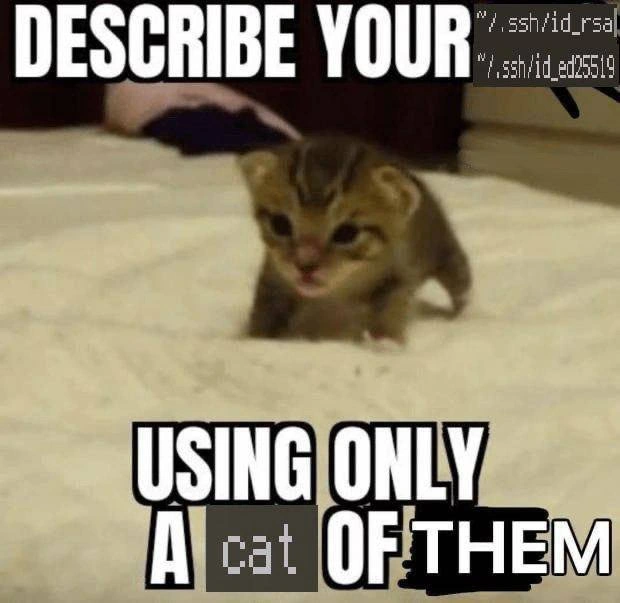
Now, what exactly happened in the meme? The text on the image says, “Describe your ___ using only a cat of them.” It’s mimicking a popular online prompt like “Describe your pet using only a picture,” but it sneakily replaced the word “picture” with the Unix command cat. So it was basically prompting someone to show something about themselves by using the cat command on it. Our unfortunate intern took this prompt literally and decided, “Hmm, what file describes me? Oh, my SSH keys identify me to other computers, I’ll use those!” They went ahead and ran cat ~/.ssh/id_rsa (and possibly the Ed25519 key too) and pasted the output into the group chat, thinking they were being clever or funny. In a sense, those key files do represent the intern (they’re like the intern’s ID card in the digital world), but sharing them is a huge mistake. It’s like oversharing on social media, but 100 times worse because it’s a security risk, not just embarrassment.

The meme uses the cute kitten in the background because normally when someone says “cat,” we think of the animal. The phrase “using only a cat” on the meme is a playful twist. We see a kitten, we see the word cat in a different font (to hint it’s the command-line tool), and our brains connect the dots: Oh, it’s a pun! The kitten itself is even blurred out, which pokes fun at the idea of “sensitive content.” Ironically, an actual kitten picture is about as non-sensitive as it gets (it’s just adorable fluff), whereas an SSH private key is extremely sensitive – yet the meme shows the opposite (censor the cat, not the keys!). This contrast is what makes tech folks smirk: it highlights how the intern completely inverted their priorities, protecting the wrong thing.

For a junior developer, the big lesson here is: always be careful when exposing the contents of files, especially in public or shared spaces. If someone asks you to show your “keys” or anything of that sort, double-check what they mean. Nine times out of ten, nobody will ever legitimately ask for your private SSH key – if they do, alarm bells should ring. In our story, no one actually asked for the intern’s keys; it was a joke prompt that got misinterpreted. Before running a command like cat on a file, think: “Should the contents of this file be kept secret?” If the answer is yes (for example, SSH keys, API tokens, passwords, configs with secrets), then do not dump it in a chat or anywhere public. Ask a teammate if you’re unsure. They’d rather answer a “silly” question about what a file is, than have to rush to fix a leak because you shared something you shouldn’t have.

In short, this meme is a humorous reminder: computers will do exactly what you tell them, so make sure you understand what you’re telling them to do. The intern learned the hard way that cat doesn’t mean a cute feline in this context – it means “print out my secret data.” It’s a mistake you can bet they (and anyone who saw it) won’t forget. So keep your keys secret and your cats in photos, and you’ll be just fine. 😸

Level 3: Cat’s Out of the Bag

For the senior engineers reading this, it’s a facepalm so loud you can practically hear it across the office. The meme’s caption – “Describe your ___ using only a cat of them” – riffs on a common social media prompt, but here it sets up an infosec nightmare. Instead of sharing a cute picture or fun fact, our eager intern opened a terminal and catted their SSH private keys straight into the company group chat. Yep, they literally exposed the contents of id_rsa and id_ed25519 for all their coworkers to see. This is the very definition of a security fail. Seasoned devs have seen variations of this rookie mistake before; it’s the stuff of on-call war stories and internal tech folklore. We laugh because it’s absurd, and we cringe because it’s plausible. The expression “the cat’s out of the bag” fits almost too perfectly – except in this case, the “cat” was the cat command, and what came out of the bag were highly sensitive keys that were never meant to see the light of day.

Let’s appreciate the meme’s style: it uses the classic Impact font macro format (big bold white text with a black outline, top and bottom). And the image chosen? An adorable, wobbly kitten on a bed. We’ve got a full LOLcats vibe going on here – the kind of wholesome meme image you’d see captioned with “I can haz cheeseburger?” back in the day. Only this time, the text is referencing a very un-wholesome situation for any IT department. The kitten is even pixelated, as if its tiny body contains classified intel that’s been censored. That’s a clever visual gag: the innocent kitten is blurred out like sensitive content, while the truly sensitive content (those SSH keys) was exposed with no filter whatsoever. The whole joke hinges on a pun with the word “cat” (a classic cat command pun for the Unix-inclined). One “cat” is an adorable pet, the other cat is a command that will happily dump your secrets to anyone watching. Seasoned devs see that juxtaposition and immediately know something comically disastrous is about to happen. It’s funny on the surface, but anyone who’s had to clean up after a private key leak winces a little behind their smile.

In a real-world scenario, the second an intern does something like this, you get a flurry of “did that really just happen?!” reactions. You can almost feel every senior engineer’s stomach drop in unison. There’s likely a scramble of direct messages and calls: “STOP! Delete that message right now!” followed by “Everyone who saw that, please forget it (and definitely don’t copy it)!” Of course, by the time it’s posted, the damage is done — that key is living in people’s scrollback history and chat logs. Here’s roughly what the team just witnessed popping up in their chat window:

$ cat ~/.ssh/id_rsa  
-----BEGIN RSA PRIVATE KEY-----  
MIIEpAIBAAKCAQEA7N4l5...  
[... dozens of lines of jumbled characters ...]  
-----END RSA PRIVATE KEY-----  

(Imagine this wall of gibberish showing up in your Slack channel — that’s the intern “describing” themselves, apparently.)

It’s a gut-dropping moment. This is as bad as accidentally posting your password in a public forum. The difference here is an SSH private key looks like random noise, so a newcomer might not realize they basically just shouted out the “keys to the kingdom.” Any person in that chat — if they were malicious or just curious — could copy those lines, save them to a file, and immediately act as that intern on any system where the key was authorized. No phishing required, no malware needed, just pure unforced error. It’s frightening how easy it is; one moment of naïveté can create a gigantic security hole. In security lingo, the moment those keys hit the chat, you’ve got a full-blown private key leak on your hands.

From the senior DevOps/SRE perspective, this is equal parts comedy and disaster. Comedy, because it’s such a ridiculous misunderstanding — an intern mixing up a fun “show your cat” prompt with a literal cat command output — complete with an actual kitten meme. Disaster, because now someone has to initiate incident response: revoke the exposed keys, generate new ones, update every server or service that trusted those keys, and do it fast. You can bet an emergency email or Slack thread with the Security team spun up immediately: “URGENT: Key leak by accident. We need to rotate credentials ASAP.” It’s a classic rookie mistake, but even the best of us have goofed up credentials at least once. The engineering managers will likely turn it into a teachable moment rather than a firing offense: a blameless post-mortem meeting where everyone collectively goes, “Alright, how do we prevent this in the future?” (while internally thinking “Let’s maybe restrict the interns’ access a bit until they get some training…”).

After the initial panic, this incident inevitably becomes team lore. The phrase “Remember the intern who cat’d their SSH keys into Slack?” will get chuckles and groans for years. It’s the kind of story senior engineers tell to new hires so they don’t feel too bad about their own early slip-ups. There might even be an unwritten rule added: “No sharing secrets, even if someone says the word ‘cat’!” The hapless intern, meanwhile, has certainly learned a career-defining lesson without any malicious breach actually occurring (we hope). They’ll never look at the cat command the same way again. And you can bet everyone involved will double-check next time a meme or joke starts floating around in the chat. In the end, we laugh because it’s so absurd — a cute kitten and a one-line Unix command nearly caused a company-wide credential rotation. It’s a prime example of how human error can poke holes in the best security, and why every tech team has that mix of horror and humor when these things inevitably happen. Sometimes, all you can do is shake your head, fix the problem, and later share the tale over a coffee or beer, saying, “Curiosity didn’t just kill the cat — it almost nuked our SSH setup!” and enjoy a relieved laugh together.

Level 4: Cryptographic Cat-astrophe

For seasoned security geeks, this scenario triggers an instant headache. SSH keys (like id_rsa using RSA, and id_ed25519 using elliptic-curve cryptography) are the cornerstone of remote authentication. They’re an asymmetric key pair: a public key you can share freely (like a padlock you put on servers), and a private key you guard fiercely (like the master key that opens those padlocks). The entire trust model of SSH hinges on the secrecy of that private key. It’s math magic: the private key can digitally sign a challenge and the public key verifies it’s really you, thanks to some beautiful number theory under the hood. But all that strong encryption and fancy modulus arithmetic mean nothing if you just go and print the secret key out for the world to see.

By literally running cat ~/.ssh/id_rsa (and its cousin id_ed25519), our hapless intern essentially published the secret prime numbers and curves that prove their identity. It’s a cryptographic catastrophe: the confidentiality of the key is utterly gone. In security terms, this is an irrecoverable breach – there’s no “undo” for a leaked private key. Anyone who grabbed that blob of text now possesses the exact cryptographic capability of the intern. With the private key in hand, an attacker doesn’t need to crack RSA or deploy a fancy exploit; they can simply authenticate as the intern anywhere that key was trusted. Why bother investing in quantum code-breaking or hunting zero-days when the key’s owner will just hand out the secret on a silver platter? It’s the ultimate shortcut for attackers — no brute force required, the key to the kingdom has been gifted to them. The integrity and authenticity guarantees of SSH are completely undermined because the protocol assumes only the legitimate user ever held that file.

Notice the meme shows two file paths, ~/.ssh/id_rsa and ~/.ssh/id_ed25519. That means the intern had two private keys – double the trouble. Modern setups often use Ed25519 keys for speed and security (small key, strong curve), but many devs keep an RSA key around for legacy systems. Regardless of algorithm, once the private part is exposed, its cryptographic strength (be it a 4096-bit RSA or an elliptic curve) becomes irrelevant; the secret’s out. It’s akin to posting the combination to a high-security safe on a public bulletin board. There’s a reason your .ssh folder has strict file permissions (chmod 600): it’s supposed to be accessible only by you. But the cat command? It will dutifully read and spit out every byte of any file you tell it to, no questions asked. The computer isn’t going to pause and say, “Hey, this looks like a private key, are you sure?” – it just does exactly what it’s told. As a result, the intern’s terminal cheerfully streamed out what should have been an unguessable secret into a chat window.

From a theoretical standpoint, this is a textbook example of security failing at the human layer. All the robust encryption algorithms, decades of research into unbreakable keys, and carefully designed SSH protocols can’t protect you from a user just giving away the secret. There’s an old infosec quip: “There’s no patch for human stupidity.” Harsh, but the point is that the weakest link is often the person, not the math. Here we see a basic OpSec (operational security) principle violated: a private key should never leave its secure container (except maybe encrypted for backup), and definitely shouldn’t be broadcast in plain text. If an adversary—or even an opportunistic colleague—on that chat saved the key, they can now impersonate the intern anywhere that key grants access. The only remedy is to revoke and replace that key everywhere it was used, essentially burning it and issuing a new one. This means updating authorized keys on servers, invalidating any active sessions, and praying that no one quietly used the exposed key before it was removed. It’s a dramatic chain reaction from one innocuous cat command. In summary, all the elegant math of RSA and Ed25519 was instantly defeated not by some genius cryptanalysis, but by the simple, literal act of an intern typing out their secret.

Description

A meme featuring a low-resolution image of a very small, cute tabby kitten walking on a bed. The image is overlaid with bold white text. The top text reads 'DESCRIBE YOUR'. Next to this, a black box with monospaced font displays two file paths: '~/.ssh/id_rsa' and '~/.ssh/id_ed25519', which are standard locations for SSH private keys. The bottom text reads 'USING ONLY A cat OF THEM', with the word 'cat' highlighted in a grey box. The humor is a multi-layered pun for a technical audience. It plays on the word 'cat' (the animal) and `cat`, the Unix command used to display the contents of a file. The joke implies that one should describe their SSH keys with a picture of a cat, while simultaneously referencing the catastrophic security mistake of running the `cat` command on a private SSH key file and exposing it

Comments

13
Anonymous ★ Top Pick Some developers use `cat` on their private keys; senior engineers just forward the email from the CISO to the entire team with the subject 'Today's security awareness training, brought to you by the new guy.'
  1. Anonymous ★ Top Pick

    Some developers use `cat` on their private keys; senior engineers just forward the email from the CISO to the entire team with the subject 'Today's security awareness training, brought to you by the new guy.'

  2. Anonymous

    Nothing says ‘team-player’ like submitting a pull request that doubles as an authorized_keys file for the entire internet

  3. Anonymous

    When you've been debugging production for 12 hours straight and realize the only way to view the SSH key is through 'cat' because someone forgot to install less, vim, or literally any other text editor - and the server's screaming just as loud as you are about the architectural decisions that led to this moment

  4. Anonymous

    When the PM asks for project documentation and you just `cat *.md > explanation.txt` because explaining your microservices architecture with 47 YAML files, 12 Terraform modules, and that one Bash script nobody dares to touch is somehow easier than writing actual prose. Bonus points if you include the SSH keys for 'completeness.'

  5. Anonymous

    Nothing like answering “describe yourself” with: cat ~/.ssh/id_rsa - instant personality leak, followed by a day of key rotation, bastion purges, and inventory updates

  6. Anonymous

    Describe your SSH keys using only a cat? Sure - cat ~/.ssh/id_rsa; enjoy the SEV‑1, global key rotation, and a sudden budget for FIDO2 tokens

  7. Anonymous

    chmod 644 on id_rsa: because nothing says 'enterprise lockdown' like inviting the internet to kitten-sit your prod cluster

  8. @ZgGPuo8dZef58K6hxxGVj3Z2 2y

    KekW

  9. @ZgGPuo8dZef58K6hxxGVj3Z2 2y

    Lmfao it doesn't delete all @sylfn

    1. @sylfn 2y

      lmao

  10. @eddsakey 2y

    Don't worry I don't have .ssh directory, I changed the path

    1. @Br1ket 2y

      Don't worry, my bros using telnet& rdp ಡ⁠ ͜⁠ ⁠ʖ⁠ ⁠ಡ

      1. @eddsakey 2y

        😁

Use J and K for navigation