Skip to content
DevMeme
6174 of 7435
Ironic Hard Drive Failure: A Seagate Drive's Last Stand
Hardware Post #6771, on May 20, 2025 in TG

Ironic Hard Drive Failure: A Seagate Drive's Last Stand

Why is this Hardware meme funny?

Level 1: The Final Joke

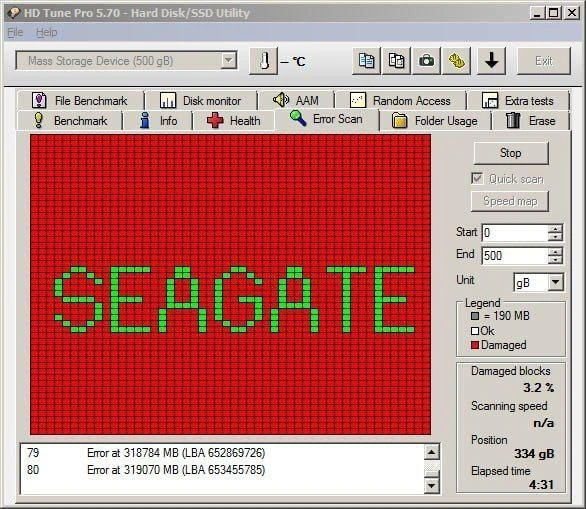
Imagine you have a huge colorful light-up billboard. One night, almost all the lights burn out – except the ones that just so happen to spell the company’s name. In real life that would be crazy and kind of funny, right? This meme is doing the same thing but with a hard drive. The hard drive is broken and most of its little memory spots are “burned out” (bad), shown in red. The only “lights” still on (shown in green) spell out “Seagate,” which is the drive’s brand. It’s like the hard drive’s goodbye message or final joke as it stops working: it used its last bit of strength to flash its own name.

Level 2: When Sectors Go Bad

Let’s break down what’s happening in this hard drive humor piece. We’re looking at an old-school Windows utility called HD Tune Pro that scans a disk for errors. It’s like a health check-up for your hard drive. The big grid of tiny squares represents different sections (or blocks) of the disk: green squares are good, healthy sectors, and red squares are bad sectors that can’t reliably hold data. Normally, you want to see a nice solid field of green. But here almost the whole field is red – which is very bad news – and the only green parts spell out “SEAGATE,” which is the brand of the drive. Essentially, the only data the drive can still read without errors happens to form the manufacturer’s name!

A sector is the smallest storage unit on a hard disk (typically 512 bytes or 4096 bytes). When a sector “goes bad,” it means the magnetic material on the disk platter at that spot can’t store data correctly anymore – often due to physical wear, dust, manufacturing flaws, or a head crash (when the read/write head touches the platter surface). Drives have spare sectors to replace a few bad ones, and S.M.A.R.T. (Self-Monitoring, Analysis, and Reporting Technology) keeps track of these issues internally. But once you see thousands of bad sectors (visualized here by all that red), it means the drive is failing catastrophically. The error list at the bottom (with specific addresses like LBA 652867926) shows where read errors occurred – basically listing the coordinates of the disk’s bad spots. A few isolated bad sectors can be managed or worked around, but an entire screen full of them (3.2% of a 500 GB drive, which is many millions of bytes) is beyond repair. It indicates the drive is on the brink of total data loss.

The humor comes from the pattern: it’s as if the failing drive chose to use its last good bits of storage to proudly display its brand one final time. Of course, in reality this pattern is likely staged or extremely coincidental; actual bad sectors tend to appear in clumps or randomly, not neatly spell words. But visually, it drives home the point – this Seagate drive is so far gone that it’s essentially writing out “Seagate” in a sea of errors. For a junior developer or someone new to hardware, the takeaway is: when a disk scan shows a lot of red (bad blocks), especially in cute shapes or words, your drive is basically toast. Immediately back up anything you can still read, stop trusting that disk, and replace it. Tools like HD Tune are handy for diagnosing disk problems, but once the situation is this dire, they’re more a confirmation of a hardware failure than a solution. In the field of IT, this kind of scenario is both a joke and a cautionary tale – funny to look at, but only because it’s not your data at stake (and if it is, you’re probably crying instead of laughing).

Level 3: Spinning Rust's Last Laugh

At first glance, this HD Tune error scan is a horror story in pixel form: a nearly solid red grid of failing sectors with only a cheeky arrangement of green survivors bravely spelling out SEAGATE. Seasoned storage engineers have a dark chuckle at this because it’s the hard drive’s morbid way of signing its own death certificate. In the world of spinning rust (mechanical hard drives), a sea of red blocks means the drive’s platter surfaces are trashed – countless sectors have gone bad. Seeing the manufacturer’s name literally etched in the last good sectors is like the drive saying, “Yep, it was me all along,” as it keels over. It’s a perfect lampoon of notorious failure modes: the device is failing so spectacularly that it “autographs” its demise.

Behind the humor lies the implicit trauma: any ops veteran who’s run overnight disk diagnostics recognizes this as the Red Sector of Death. You start an innocent error scan and suddenly the results look like a billboard for imminent data loss. That 3.2% Damaged blocks in the sidebar might sound small, but on a 500 GB drive it represents billions of bits gone bad – and the pattern indicates a head crash or surface defect so extensive that only an ironic logo-shaped patch of data remains readable. It’s as if the drive’s MTBF (Mean Time Between Failures) decided to drop to zero in the most theatrical way possible. The meme hits home because in real life, by the time bad sectors start spelling words, your night is ruined: you’re paging the on-call teammate, scrambling for backups (if you’re lucky enough to have them), and scheduling a panicked hardware swap.

This image also slyly references the reputation (fair or not) that Seagate drives have among some sysadmins for failing at inconvenient times. It’s a maintenance nightmare scenario with a punchline: the hardware itself is literally highlighting the brand to blame. In truth, no drive intentionally arranges its bad sectors to form words – random failure is rarely so creative. But the joke lands because it feels like something a jaded admin would hallucinate at 3 AM after the third server crash of the week. System failures have a way of turning cynical humor into a coping mechanism. So we laugh, wince, and double-check our backup logs. After all, when your disk starts drawing self-referential error art, it’s beyond troubleshooting – it’s time for a new drive and a stiff drink.

Description

A screenshot of the 'HD Tune Pro 5.70 - Hard Disk/SSD Utility' running an error scan on a 500GB mass storage device. The user interface, reminiscent of older Windows versions, displays a large grid representing the disk's sectors. The overwhelming majority of the grid is filled with red squares, which the legend on the right indicates are 'Damaged' blocks. Amidst this sea of red, a pattern of green squares, labeled 'Ok' in the legend, spells out the word 'SEAGATE' in large, pixelated letters. The scan is 3.2% complete, has been running for over four minutes, and the bottom pane logs specific read errors. The humor is deeply ironic and relatable to anyone who has experienced catastrophic hardware failure. It depicts a Seagate hard drive that has failed so completely that the only readable sectors left on it happen to form the manufacturer's own name, creating a grimly amusing piece of digital art from the wreckage


Comments

12
Anonymous ★ Top Pick Seagate's new feature: on-disk, sector-level branding that activates right as your data achieves total, irreversible entropy
  1. Anonymous ★ Top Pick

    Seagate's new feature: on-disk, sector-level branding that activates right as your data achieves total, irreversible entropy

  2. Anonymous

    When the last healthy sectors form a billboard for the vendor, your RPO has quietly downgraded to ‘pray the tape robot still works.’

  3. Anonymous

    The drive is literally spelling out its manufacturer's name in bad sectors - when your hardware develops brand loyalty so strong it starts tattooing itself with permanent damage. This is what happens when you tell Seagate drives about brand awareness KPIs

  4. Anonymous

    When your Seagate drive's only remaining contribution to humanity is spelling out its own name in the wreckage of 499.8GB of failed sectors - that's not brand loyalty, that's a cry for help. The drive literally became a tombstone with its manufacturer's name etched in the only surviving blocks. At least it maintained consistent branding until the very end; most legacy systems can't even claim that level of commitment

  5. Anonymous

    When HD Tune renders 'SEAGATE' in the only healthy sectors, that’s not branding - it’s SMART reminding you that RAID != backup and your RTO is now “prime shipping + ZFS resilver.”

  6. Anonymous

    Seagate's bad blocks: pixel-perfect branding that survives even total drive failure

  7. Anonymous

    When the surface map writes SEAGATE with the only healthy sectors, that’s your cue to test restores - RAID won’t save a disk that’s auditioning for ASCII art

  8. @TERASKULL 1y

    the text gets revealed like in those color changing heat-up cups

  9. @pooyabehravesh 1y

    I see no problem

  10. @Algoinde 1y

    👉 explode

  11. @nllk11 1y

    Nah. In my experience there was more faulty WDs then Seagates. At least if we speak about HDDs made before 2015

  12. dev_meme 1y

    I LOL'd.

Use J and K for navigation