
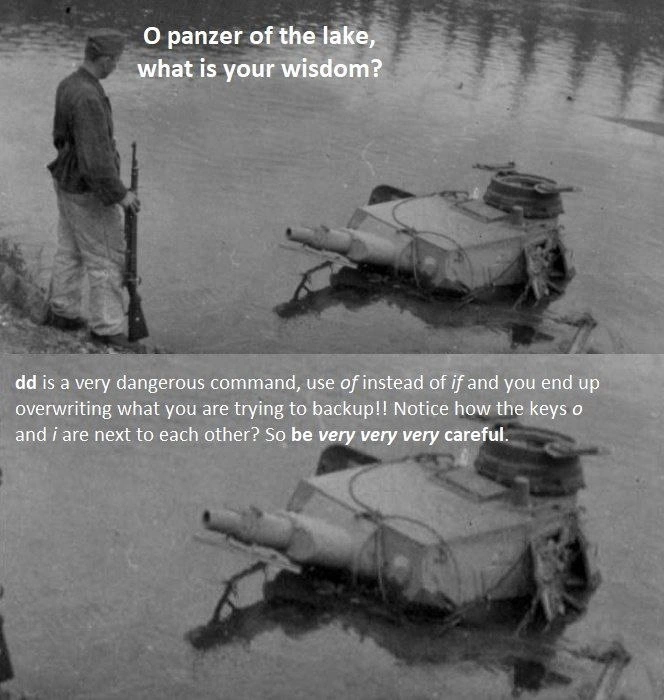
Panzer of the Lake's CLI Wisdom
Why is this CLI meme funny?
Level 1: Small Typo, Big Trouble
Imagine you have a really important storybook that you want to copy by hand into a blank notebook, so you won’t lose the story. You plan to carefully look at the storybook (the original) and write each word into the notebook (the backup). Now, think of a simple mix-up: what if instead of copying the storybook into the notebook, you accidentally start scribbling the blank notebook back onto the storybook? You’d end up with a ruined original story – and the notebook still empty. In real life, the dd command is like a powerful copying machine for computers, and typing one wrong letter is like that mix-up. The meme is joking that a tiny mistake (using the wrong letter) when telling the computer what to copy can take something you meant to save and wipe it out instead. It’s funny in a cautionary way: even a big strong tank (or a big powerful tool) has to be used very carefully, because a small error can cause a big problem. So the wise lesson is simple – be extra careful with important tasks, because one little slip can turn a good plan into a disaster!
Level 2: When Backups Backfire
At its core, this meme is a cautionary tale about the Unix dd command and how a tiny mistake can ruin your day. dd is a command-line tool used on Linux/Unix systems for making low-level copies of data. Think of it as a disk imaging or cloning utility: it can copy an entire hard drive or partition, byte for byte. You specify an input and an output, and dd dutifully transfers the data. The syntax uses if= to indicate the input file (the source you’re reading from) and of= to indicate the output file (the destination you’re writing to). For example, if you want to back up a disk to a file, you’d run something like:
dd if=/dev/sda of=/home/user/backup.img
This would read from the disk device /dev/sda (common notation for a hard drive) and write its contents to backup.img in your home directory. Here you intend to copy the disk into an image file as a backup. That’s great – if done correctly. The danger arises because a simple typo or swapping of those parameters can reverse the direction of the copy. If you accidentally write:
dd of=/dev/sda if=/home/user/backup.img
…you’ve now told dd to take the file backup.img and write it onto the disk /dev/sda. In other words, you’re copying from the backup file into your main drive. 😬 If that backup file was empty, or old, you just overwrote your drive with it. All the data you were trying to save would be wiped out or replaced with the wrong content. This is the nightmare scenario the meme is warning about: backing up in the wrong direction. The phrase “nuke your backups” in the title is hyperbole for destroying your data, and unfortunately dd will happily do exactly what you tell it to, even if it’s not what you intended.
The meme text calls dd “a very dangerous command,” and for good reason. On the command line (CLI), many powerful tools assume the user is careful. dd is powerful because it works at a very low level – it doesn’t care about files or folders; it just copies raw bytes. This means it can copy things like entire filesystems, boot records, etc., which normal file copy commands (cp, rsync) might not handle. But the flip side is that dd has no safeguards. It won’t ask “Are you sure?” if you are about to overwrite something. If dd is told to write to a device (like a drive), it will start doing so immediately, potentially erasing whatever was there. It’s a bit like a bulldozer: extremely useful for heavy tasks, but you better know which building you’re demolishing before you start the engine.
Now, why highlight the keys i and o being next to each other? On a QWERTY keyboard, I and O sit side by side. The meme points this out because it’s surprisingly easy to hit the wrong key by accident. When typing quickly, a person might write of= when they meant if= (or vice versa) just by hitting the adjacent key. It’s a simple typo, but with dd that small slip has huge consequences. Unlike writing an email where a typo just confuses a word, a typo in a shell command can change its meaning entirely. Here, swapping those letters switches what is input vs output. If you confuse the input and output in a backup, you’ll overwrite the wrong target. Essentially, you’d be copying in the opposite direction of what you intended, destroying the very data you wanted to save.
The meme’s format – a soldier asking a submerged tank for wisdom – is actually a popular internet meme style. It’s used to deliver unexpected advice or truths in a humorous way. In this case, the advice is very niche: it’s aimed at people who use Linux or Unix and do things like disk cloning and backups via the shell. It falls under SysadminHumor because system administrators (and advanced users) often use dd for tasks like making backups, copying drives, or recovering systems. They all learn at some point that you must double-check your dd commands. The text of the meme even emphasizes “be very very very careful,” reflecting just how cautious you learn to be after nearly messing up (or actually messing up) once.
For a junior developer or someone new to Linux, the key takeaways are:
ddis a tool for copying data at a very low level – commonly used for backups or writing disk images.- Always verify your
if=(input) andof=(output) when usingdd. They are small options but determine where data comes from and where it goes. - A one-letter typo can flip the meaning. If you swap the input and output, you might write data in the wrong place. There’s no “undo” for this kind of mistake; the data will be overwritten.
- There’s no prompt or warning.
ddwill not ask “Are you sure?” It will just execute, which is why it’s considered dangerous if you’re not absolutely certain. - Double-check device names too. (The meme specifically talks about
if/of, but similarly, if you choose the wrong device like/dev/sdbvs/dev/sda, you could wipe the wrong drive. It’s all about attention to detail in commands.)
In short, the meme is a funny reminder to be mindful when working with powerful shell commands. The soldier and tank image gives it a dramatic flair, as if this is ancient wisdom from a battle-hardened veteran. And in a sense, it is – many system admins have “battle” stories of data loss narrowly avoided or painfully experienced. The humor might make you smirk, but the lesson is very real: always be careful with dd (and any other command that can destroy data). One slip of the finger, one misplaced letter, and your backup strategy can literally backfire, leaving you with a sinking feeling – much like that poor tank in the lake.
Level 3: One-Letter Landmine
In this war-torn tableau, a submerged Panzer tank dispenses hard-earned sysadmin wisdom to a soldier: be extremely careful with the dd command. Seasoned Linux veterans immediately recognize the dark humor. dd is the classic Unix utility for low-level disk management – short for “convert and copy,” but often jokingly called the “Disk Destroyer.” Why? Because with dd one stray character can turn a routine backup into a total catastrophe. The meme highlights exactly that: a one-letter typo swapping if= and of= can flip your source and destination, causing you to overwrite the very data you meant to safeguard. It’s the command-line equivalent of friendly fire – a shellshock moment where you nuke your own backups due to a tiny finger fumble.
This image’s caption reads like an oracle of war giving a dire warning: “dd is a very dangerous command, use of instead of if and you end up overwriting what you are trying to backup!! Notice how the keys o and i are next to each other? So be very very very careful.” The humor (and horror) lands because anyone who’s managed Linux systems or storage devices knows how real this risk is. The CLI (Command-Line Interface) offers immense power – you can image entire disks, clone drives, create bootable USBs – but it’s unforgiving. There are no safety nets or “undo” buttons. With dd, the Unix philosophy of “sharp tools for skilled hands” is in full effect. The command assumes you know what you’re doing. If you mistakenly tell it the wrong thing, it will dutifully comply… even if that means devastating data loss.
Consider a typical scenario: you intend to back up a disk to an image file. The correct dd usage would be something like:
# Correct: copy disk to backup image
sudo dd if=/dev/sda of=~/backups/sda.img bs=4M
Here if=/dev/sda means input file equals the disk (source), and of=~/backups/sda.img means output file is an image on your backup drive (destination). But a simple slip – putting of where if should be – swaps the direction:
# Dangerous typo: 'of' used instead of 'if'
sudo dd of=/dev/sda if=~/backups/sda.img bs=4M
# Oops: This reads the backup and writes **onto** the disk, overwriting the original data!
That one-letter difference (of vs if) completely reverses the flow. Instead of copying from disk to file, you’re copying from the file onto the disk. If that backup file was empty or old, you’ve just wiped your live disk or reverted it to an outdated state. 😱 It’s every sysadmin’s nightmare: the backup operation that annihilates the very system it was supposed to protect.
The meme’s Panzer-in-the-lake imagery underscores the message. A tank is a powerful weapon, much like dd is a powerful tool in a sysadmin’s arsenal. But a sunken tank – a war machine drowned by misfortune – symbolizes a mission gone horribly wrong. Translation: even seasoned operators can end up like that tank if they’re careless with dd. The soldier asks, “O Panzer of the lake, what is your wisdom?” and the tank’s ghostly wisdom is a blunt warning about a specific pitfall only gray-beard admins and battle-scarred ops folks truly appreciate. The humor here is wry and grim: it takes a literal relic of war to emphasize the high-stakes danger of a single-character typo on the command line. Those who have been on the wrong end of a bungled dd command might chuckle (or cringe) at this meme, because it pokes at trauma only Systems Administration veterans share. It’s the kind of joke you laugh at with a wince, knowing exactly how such a slip-up feels at 3 AM when you realize you just overwrote something vital.
Why does this happen so often that it became meme-worthy? Partly because dd’s syntax is terse and old-school. It harks back to 1970s Unix design (its name even nods to IBM’s JCL DD – an ancient lineage). Unlike user-friendly commands (cp src dest), dd uses cryptic positional flags: if= (input) and of= (output). There’s no built-in “are you sure?” prompt when you’re about to overwrite data, since dd was built for automation and assumes you meant to do exactly what you typed. Combine that with the fact that i and o keys sit side-by-side on a QWERTY keyboard, and you have the perfect recipe for a one-keystroke disaster. It’s a design flaw or feature, depending on who you ask. The meme is basically the ghost of sysadmins past saying, “Trust me, double-check that command before you hit Enter. The keys might be adjacent, but an if/of mix-up separates a normal day from a call to your backup recovery plan.”
On a higher level, this meme satirizes the unsung discipline of backups and the peril of human error in the age of automation. Every company preaches good Backup Strategy and careful procedures, yet here we are – one typo away from self-inflicted downtime. It’s “funny” because it’s true: even the best of us can accidentally aim the barrel at our own foot. In the trenches of IT, people share these war stories (and memes) as a form of camaraderie. The Panzer of the lake warns us from experience: in the world of shell commands, typos can kill. The meme resonates as both a joke and a jarring lesson – the kind of wisdom you remember the next time you’re about to run a dd command in prod. As the cynical old-timers like to say, there are those who have overwritten the wrong disk with dd, and those who will. Consider this Panzer’s advice a friendly attempt to keep you out of that club.
Description
This is a two-panel meme using the 'Panzer of the Lake' format. The top panel features a black-and-white photo of a soldier with a rifle standing on the shore, looking at a tank turret submerged in the water. The text overlay reads, 'O panzer of the lake, what is your wisdom?'. The bottom panel shows the tank again, delivering its wisdom in a text overlay: 'dd is a very dangerous command, use of instead of if and you end up overwriting what you are trying to backup!! Notice how the keys o and i are next to each other? So be very very very careful.' The meme's humor comes from receiving a highly specific, critical piece of technical advice from a surreal, wise entity. The advice itself is a legendary piece of Linux/Unix folklore: the 'dd' command is a powerful disk-copying tool, but accidentally swapping the 'if' (input file) and 'of' (output file) parameters - an easy typo since 'i' and 'o' are adjacent on QWERTY keyboards - can catastrophically overwrite the source disk instead of the destination, leading to total data loss. It's a painful rite of passage for many system administrators and developers

Comments
14Comment deleted
Some learn about the `dd` `if`/`of` typo from a wise panzer in a lake. The rest of us learn it from a 3 a.m. incident ticket and a resume update
dd if=/dev/sda | ssh backup 'dd of=/dev/sda' - the only deployment pipeline where one missed i turns your DR site into a sunken relic
The dd command has earned its nickname 'disk destroyer' for good reason - it's the only tool where a single typo can turn your carefully planned backup strategy into an impromptu lesson in disaster recovery, all because some sadist at Bell Labs decided that 'if' and 'of' were perfectly reasonable parameter names despite 'i' and 'o' being keyboard neighbors
The panzer speaks truth from its watery grave - a fitting metaphor for the dd command, which has sent more data to the depths than any ransomware campaign. Senior engineers know that 'dd' doesn't stand for 'disk duplicator' but rather 'data destroyer,' especially at 3 AM when muscle memory swaps if= and of=. The real wisdom? Always triple-check your parameters, use dd with status=progress, and remember: the keys 'o' and 'i' being adjacent on QWERTY keyboards has caused more production incidents than any zero-day exploit. Some say the tank sank during WWII; others whisper it was a sysadmin who fat-fingered a dd command on the wrong block device
DD's if/of swap: keyboard neighbors plotting filesystem Armageddon since SVR4
dd isn’t a backup tool; it’s a wire-speed footgun - flip if= and of= and you’ll measure your RPO at disk throughput
If your DR plan hinges on remembering if vs of, you don’t have backups - you have a recurring postmortem
Holy shot, he's right Comment deleted
Just don't use dd Comment deleted
Do you guys know anybody mistaken like this?_. Comment deleted
I don't know, but that's easy. I and O are neighbors Comment deleted
I mean, I see the point, but never heard/read about this issue, while it's even mentioned in Wikipedia article about dd (at least Russian) Comment deleted
the problem is that dd is used so rarely that it doesn't really occur. At least that's my experience Comment deleted
I have a habit to twice-check my dd command before execution Comment deleted

