The Overkill PC for Writing HTML
Why is this Hardware meme funny?
Level 1: Rocket to the Grocery Store
Imagine your friend gets the most powerful computer in the world – it’s super expensive, super fast, with all the fancy bells and whistles. They’re really proud and showing it off, just like someone bragging about a new sports car or a rocket ship. Now you ask, “Wow, it’s so powerful! What amazing thing are you going to do with it?” And your friend replies, “I’m just going to write a simple webpage.”
That answer is like saying you bought a rocket ship but only plan to fly it to the grocery store down the street. 🛒🚀 It’s a silly mismatch. You don’t need something that fancy to do such a simple task. Writing a basic webpage (just some text for a website) is an easy job – kind of like a little errand – and the friend has a giant, powerful machine – kind of like a race car or rocket – to do it. The joke makes us laugh because the tool is way too powerful for the job. It’s funny in the same way it’d be funny to see someone use a huge hammer to tap in a tiny thumbtack. You’d think, “Why in the world would they use that when a small tool would do?”
So the meme is basically teasing that friend for using a massive high-tech laptop for something you could do on almost any computer. It’s showing off something big, then delivering a totally unexpected, simple answer. Even if you don’t know the tech terms, you can feel how over-the-top it is. That contrast – super fancy machine vs. super basic task – is what makes it so humorous and easy to understand.
Level 2: Beast Hardware, Basic HTML
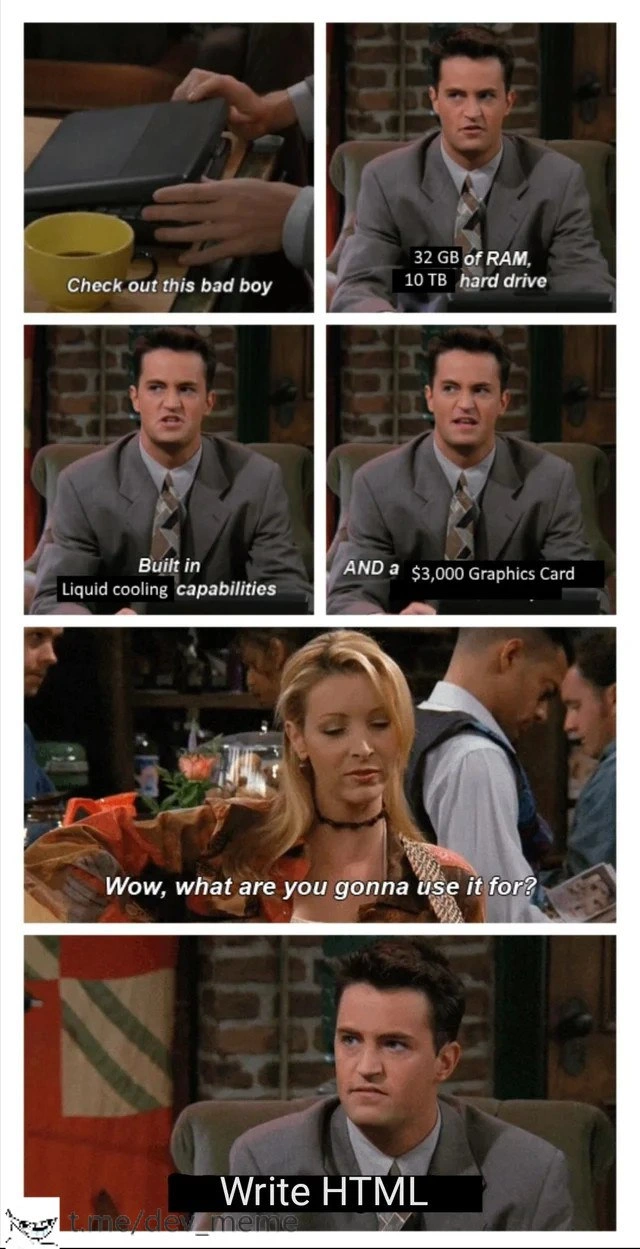
Let’s break down the joke in simpler terms. The meme shows a scene from Friends where Chandler is proudly showing off a laptop. The captions have been changed to tech specs, turning Chandler into a bragging developer. He’s essentially saying, “Check out this bad boy!” and listing insane computer specifications. Then Phoebe (the friend listening) asks, “Wow, what are you gonna use it for?” expecting something huge. Chandler’s answer: “Write HTML.”
Now, what do all those specs mean, and why is it funny? Here’s what he bragged about, in real-world terms:
32 GB of RAM – RAM stands for Random Access Memory, which is like a computer’s short-term working memory. 32 gigabytes is a lot of memory (gigabytes, or GB, measure how much data it can hold – 32 GB is tens of billions of bytes). With 32 GB RAM, you can have many heavy programs open at once or run big applications (like video editing software, virtual machines, or modern 3D games) very smoothly. Most regular tasks (browsing, simple coding, watching videos) use only a few GBs or less. For writing HTML, you might only use a few hundred megabytes at best, so 32 GB is extreme overkill. It’s like having a giant desk where you only use one notebook-sized corner of it.
10 TB hard drive – A hard drive is the computer’s long-term storage, where all your files, documents, and software live. TB means terabytes. 1 TB is about 1000 GB, so 10 TB is enormous (about 10,000 GB!). That’s enough space to store millions of songs or thousands of high-definition movies. A simple HTML webpage file might be just a few kilobytes (KB) in size (a KB is 1/1,000,000th of a GB). In web development, even if you add images and resources, a basic site could be a few megabytes (MB). 10 TB is so large that a web developer writing basic pages would struggle to fill even a tiny fraction of it. It’s like having a huge warehouse to store one little pamphlet.
Built-in liquid cooling – Computers get hot when they work hard, especially the processor (CPU) and graphics card (GPU). Most laptops and desktops use fans and heat sinks (metal blocks) to cool down. Liquid cooling is a fancier cooling system where liquid (usually water with special coolant) circulates through tubes to absorb heat, much like a car’s radiator. This is usually found in high-performance custom PCs or servers that run very hot. Hearing “built-in liquid cooling” in a laptop is crazy – it implies this laptop is designed for serious heat-generating workloads (like intense gaming or heavy computations) where normal fans aren’t enough. For writing HTML, the computer isn’t going to heat up much at all (it’s like idling). So having liquid cooling for such a light task is comically unnecessary – like installing a firehose in your kitchen to put out the candles on a birthday cake.
$3,000 Graphics Card – The graphics card (GPU) is a special processor for handling graphics and visuals. High-end GPUs, especially one costing $3,000, are top-of-the-line (think of something like an NVIDIA GeForce RTX Titan or Quadro in that era). These are used for things like high-detail 3D games, virtual reality, 3D modeling, or crunching data for machine learning. They can render complex scenes and do millions of calculations in parallel. But when you write HTML, you’re usually just typing text. There are no heavy graphics to render in a simple webpage’s code. A browser displaying a basic HTML page with some text and maybe a picture hardly uses the GPU at all. It’s equivalent to having a race car engine in a bicycle. The GPU isn’t going to be challenged by anything in a plain HTML file – it will mostly stay idle.
After hearing all those impressive specs, Phoebe (and the audience) expects that this powerful laptop will be used for something huge – maybe designing a video game, editing 4K movies, or running a big website or scientific simulation. Writing HTML, though, is the task of creating the structure of web pages using plain text markup. It’s essentially typing out lines like:
<!DOCTYPE html>
<html>
<head>
<title>My Cool Page</title>
</head>
<body>
<h1>Hello, World!</h1>
<p>This is a basic webpage.</p>
</body>
</html>
This little example above is a simple HTML page. It displays a “Hello, World!” heading and a short paragraph. You could create and view that page on a computer from 20 years ago, or even on a cheap smartphone, and it would work fine. Writing HTML doesn’t require much computing power at all – it’s more about your knowledge and creativity than the machine’s strength. So, when the guy says he’s going to use his overkill hardware rig just to write HTML, it’s funny because it’s such a huge mismatch between the tool and the job.
Think of it this way: front-end web development (like making basic web pages with HTML, CSS, and maybe a little JavaScript) is important, but coding a simple page isn’t a heavy-duty task for a computer. It’s an example of frontend minimalism in terms of requirements – you can do it on almost any machine. Many beginner coders start on ordinary laptops or even old computers and do just fine building websites. You don’t need a 32 GB RAM, liquid-cooled monster for that. In fact, this meme probably resonates with junior devs who might have wondered, “Do I need an expensive computer to start coding?” The answer is usually no for learning the basics.
The humor here is also a bit of relatable humor for anyone who’s ever bought something high-end and then didn’t fully use it. In the developer world, some people get super excited about custom-built PCs or the latest MacBook Pro and justify it by saying it will help them code better or faster. In reality, if all you’re doing is editing text for a web page, almost any computer could handle that. It’s not about shaming having good gear – it’s just playfully pointing out the overkill. It’s as if our friend got a Lamborghini and is only driving it in a quiet neighborhood at 20 mph. The meme uses Chandler’s serious face and Phoebe’s question to set up that punchline perfectly. You don’t need to know Friends to get it, but if you do, it adds an extra layer of Chandler-esque comic timing.
So, if you’re a newcomer to web development: don’t worry, you don’t need such a crazy laptop to start writing HTML! A basic PC or even an old laptop would do the job. The joke is showing an extreme, silly scenario to get a laugh. It’s highlighting the gap between what that hardware is capable of (which is a lot) and what it’s actually used for (something very simple). That huge gap is what makes it funny and easy to get – even if you’re not a tech expert yet, you can imagine how unnecessary that fancy computer is for a little HTML file.
Level 3: Liquid-Cooled "Hello, World!"
The meme serves up some classic hardware humor by flaunting an absurdly overpowered laptop for a trivial task. In the panels (using a scene from Friends as a template), the character proudly lists off monster specs: 32 GB of RAM, a 10 TB hard drive, built-in liquid cooling, and a $3,000 graphics card. These specs are the kind that hardcore gamers, 3D designers, or machine learning engineers drool over. A seasoned developer reading this immediately recognizes these as top-tier, expensive components – the kind of overkill hardware you'd find in a high-end gaming rig or a server, not your everyday web development machine. The punchline? When asked what he's going to do with this beast, he deadpans: "Write HTML."
This mismatch is hilarious to anyone experienced in tech. It's like bragging about owning a rocket ship and then saying you'll use it to deliver mail. HTML (HyperText Markup Language) is about as basic as it gets in web development – essentially just formatting text for a webpage. It’s a core part of frontend work, but writing HTML is not computationally intensive at all. Even a 15-year-old hand-me-down laptop could handle simple HTML editing without breaking a sweat. So hearing someone with a liquid-cooled, spec’d-out powerhouse say they’ll use it for plain HTML is pure comedic over-engineering gold.
Why is this so relatable among developers? Because it pokes fun at a common tendency: tech folks often over-engineer or overspend on gear for bragging rights or future-proofing. We’ve all known that one developer who built a water-cooled desktop with dual GPUs just to run an IDE and Chrome. Here, the meme exaggerates that to an extreme. Liquid cooling in a laptop is almost unheard of (a few exotic gaming laptops attempt it with clunky radiators – it’s a brag-worthy feature for sure). Liquid cooling is usually needed when a CPU/GPU runs so hot under heavy load that fans aren't enough. But writing HTML files is a lightweight task; the CPU usage and heat would be minimal. In other words, the coolant might stay cooler than the coffee on the table.
The inclusion of a $3,000 graphics card (GPU) is another layer of the joke. High-end GPUs are used for rendering ultra-high-definition graphics, VR, or training neural networks – none of which are involved in typing out HTML tags. A senior dev might chuckle thinking: "Are you planning to render the <div> tags in real-time 3D?" The GPU will likely be idle, twiddling its silicon thumbs while our friend here types out a basic webpage. The 32 GB of RAM and 10 TB storage are similarly over-the-top for the stated use. Modern web pages can get bloated, but not to the tune of tens of gigabytes of active memory. Unless our guy plans to open 500 browser tabs of development docs (looking at you, Chrome 😜), most of that RAM will go unused. And 10 TB of space? You could host millions of HTML files on that! It’s a tongue-in-cheek reminder that raw specs alone don't make a project impressive – what you do with them matters.
For veteran developers, there's an extra layer of nodding and smirking here. This scenario hints at the infamous pattern of spec flexing – showing off hardware as a status symbol. In developer culture (and especially on forums and at meetups), people love to boast about their rig: “I just got 64GB RAM and the latest RTX GPU for my dev machine.” It’s fun and indulgent, but often our actual work (writing code, which is essentially writing text) doesn’t need that horsepower. The meme plays on this contrast. It’s relatable humor because many in the industry have seen or done something similar: like deploying a full Kubernetes cluster to host a simple blog, or using a heavyweight framework for a one-page site. The overengineering trope always gets a laugh because it’s both ridiculous and truth-adjacent.
In essence, the meme is a light-hearted jab at our inner tech enthusiast: the part of us that loves shiny new toys and massive numbers, even if our day-to-day tasks are pretty simple. A senior dev appreciates the irony that we could be running a NASA-grade machine to do the digital equivalent of jotting down a note. It’s not mocking HTML or front-end work – it’s poking fun at using a sledgehammer to crack a nut. And frankly, it’s a DeveloperHumor reality check: before you splurge on that next-gen workstation “for coding,” remember this meme and ask – are you solving complex GPU-accelerated simulations, or just centering a <div>? 😅
Description
This is a six-panel meme using a scene from the TV show 'Friends' featuring characters Chandler and Phoebe Bing. In the first four panels, Chandler excitedly shows off his new powerful laptop, listing its impressive specifications with subtitles: 'Check out this bad boy,' '32 GB of RAM, 10 TB hard drive,' 'Built in Liquid cooling capabilities,' and 'AND a $3,000 Graphics Card.' The fifth panel shows Phoebe looking unimpressed and asking, 'Wow, what are you gonna use it for?'. The final panel cuts back to Chandler, who looks down with a deadpan expression and admits, 'Write HTML.' The humor lies in the extreme anticlimax and the massive overkill of using a high-performance, gaming-grade machine for a task as lightweight as writing HTML. It's a relatable joke for many developers who desire powerful hardware that far exceeds the requirements of their daily coding tasks, especially in fields like web development. A small watermark for 't.me/dev_meme' is in the bottom left corner

Comments
7Comment deleted
To be fair, after you run 'npm install' on a modern frontend project and spin up the webpack dev server, you might actually need that liquid cooling just to edit a div
“Sure it’s only HTML - until ‘npm start’ spins up Docker Desktop, a local Kubernetes cluster, three Electron wrappers and Chrome with 80 tabs; 32 GB and liquid cooling are just how you hit ‘save’ without thermal throttling.”
It's like watching your infrastructure team provision a Kubernetes cluster with 100 nodes, auto-scaling groups, and multi-region failover... to host a static landing page that gets 12 visitors a month. But hey, at least the HTML will render at 240 fps!
The eternal paradox of senior engineering: You finally have the budget for a liquid-cooled beast with enough RAM to hold the entire DOM in memory, but you're spending your day writing semantic HTML5 that would run perfectly fine on a Raspberry Pi. At least your `<div>` tags will render at 240fps
16GB RAM and a $5K GPU idling while node_modules balloons bigger than the app itself
32GB RAM, 10TB disk, $3k GPU - to write HTML; because “HTML” now ships with Docker, a million‑line React monorepo, 12GB of node_modules, and Chrome pretending it’s a game engine
In 2025, “writing HTML” means keeping 80 Chrome tabs, an Electron IDE, Docker, and a hot-reload dev server alive - so yes, the $3k GPU is for rendering Slack at 144 Hz