Skip to content
DevMeme
3293 of 7435
A Study in Latency: From Nanoseconds to Corporate Bureaucracy
Performance Post #3617, on Aug 30, 2021 in TG

A Study in Latency: From Nanoseconds to Corporate Bureaucracy

Why is this Performance meme funny?

Level 1: Lightning vs Snail

Imagine you have a super-fast robot friend. This robot can do something like grab a cookie from the kitchen faster than you can blink. It’s almost like magic — one moment it’s here, the next moment it’s already back with the cookie. That’s how quick things like a computer’s memory or CPU can be, measured in teeny tiny moments called nanoseconds and microseconds. They’re like the speed of lightning in the computer world. ⚡️

Now, think of something really slow and boring – like waiting for a snail to crawl across a big yard, or waiting a whole month for your birthday to come. That’s the kind of slowness the joke points to when it says it will take 28 days to do a simple task (like stopping those pesky emails from a company). It’s a bit like if you asked a company, “Hey, please stop sending me that magazine,” and they reply, “Sure… we’ll do that in about a month.” It sounds silly, right? You might think, “But you could stop it right now if you wanted!” Exactly. The meme is funny because it’s comparing these two extremes: one side is incredibly fast (the robot-fast computer doing things in a split second), and the other side is incredibly slow (the human or company taking ages to do something very simple). It’s like our lightning-fast robot friend versus a snail when it comes to getting things done.

Why do we laugh at this? Because it feels so true! In real life, computers and technology often work super fast, yet sometimes dealing with people or companies feels super slow. It’s the contrast that’s amusing. It’s as if you could run a mile in one minute (wow!) but then you have to wait an hour for the bus to take you home for no good reason. You’d be like, “Hmmm, something’s not right here!” In the same way, the meme is showing that in the tech world, sometimes the slowest part isn’t the machines at all – it’s the people processes. And that big, big difference – lightning vs snail – is what makes it funny and easy to understand.

Level 2: Microseconds vs Meetings

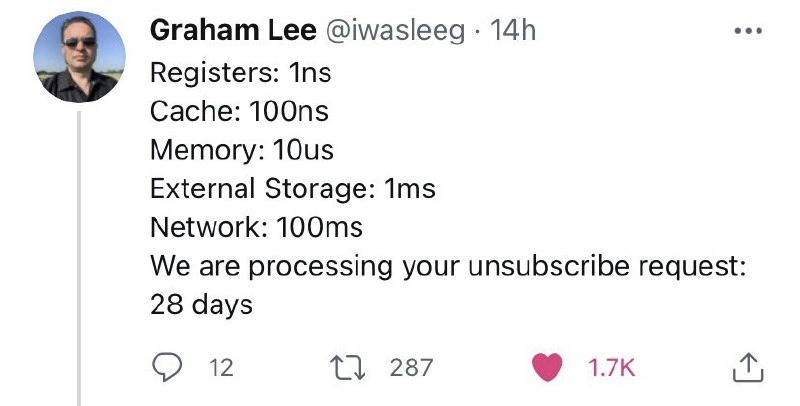
Let’s break down what’s being listed in this joke, in case you’re newer to these concepts. The tweet is essentially comparing the speed of different things:

  • Registers (1 ns): A register is a tiny bit of storage inside the CPU itself. Think of it as the CPU’s own notepad for immediate calculations. When the CPU does arithmetic or logic, it stores numbers in registers. Accessing a register is extremely fast – on the order of 1 nanosecond. A nanosecond is one billionth of a second (0.000000001 seconds). To give a sense of how tiny that is: in one nanosecond, a beam of light or an electrical signal barely travels a few inches. So 1 ns is basically the speed of a basic operation in the processor. It’s almost instantaneous from a human perspective.

  • Cache (100 ns): A cache is a special high-speed memory located very close to the CPU cores (often on the same chip). Computers use caches to store copies of frequently accessed data so that if you need that data again, you don’t have to go all the way out to the slower main memory. The tweet says 100 ns for cache, which might specifically refer to a slower cache (like an L3 cache or a miss that has to reach slightly farther). Typically, the fastest cache (L1) might be only ~1–4 ns, but slower caches or a chain of events might be ~100 ns. In simple terms: if the CPU can’t find data in the very fastest memory (registers or first-level cache), it next checks slightly bigger but slower caches. 100 ns (100 billionths of a second) is still incredibly fast – that’s 0.0000001 seconds – but in the computer’s own timeframe, it’s noticeably slower than 1 ns. You can imagine cache as the CPU’s tiny fridge of snacks: if what you need is in there, great, you get it quickly, maybe 100 ns worst-case. If not, you have to go to the grocery store (main memory), which takes longer…

  • Memory (10 μs): Here memory means the main memory (RAM) of the system. This is where all running programs keep their data and instructions when they’re in use. The tweet gives 10 microseconds. A microsecond (μs) is one millionth of a second (0.000001 s). So 10 μs = 0.00001 seconds. In context, that is about 100 times slower than the 100 ns cache access above. Why is main memory slower? Because it’s not on the CPU chip – it’s on separate chips usually a few inches away, connected by wires. Also, RAM technology (DRAM) isn’t as fast as the tiny SRAM used in caches. When the CPU needs something from RAM, it has to send a request over the memory bus, wait for the memory chip to retrieve it, and come back. That takes several nanoseconds, actually often tens of nanoseconds to a hundred, but the number can blow up if the CPU is doing other things or if there’s contention. 10 μs might be a bit of an exaggeration for a typical single RAM access (in many cases it can be under 1 μs), but it could represent, say, a whole memory page fetch or a scenario where the CPU has to wait because it missed caches and had other delays. The key point: main memory is much slower than cache or registers, which is why having caches is so important for performance.

  • External Storage (1 ms): This refers to reading from storage like an SSD (Solid State Drive) or a hard disk. 1 millisecond (ms) is one thousandth of a second (0.001 s). That’s 1000 μs, or about 100x slower than the 10 μs memory access above. If the system needs to fetch something from disk (say, a file on your drive that isn’t already loaded in memory), it’s going to take orders of magnitude more time than fetching from RAM. With modern SSDs, sometimes a random read can be a fraction of a millisecond (maybe 0.1–0.5 ms), but many will average around 1 ms for a lot of workloads – and hard drives are typically even slower (because they have moving parts and might take ~5-10 ms just to position the disk head). So “external storage: 1 ms” is a ballpark to illustrate that persistent storage is slow relative to RAM. In the computer’s perspective, 1 ms is an eternity – your CPU could execute millions of instructions in the time it takes to get one piece of data from disk. Imagine you double-click a program and it has to load a bunch of files: that’s why there can be a noticeable delay, because reading from disk, even a fast SSD, introduces these millisecond-scale waits.

  • Network (100 ms): This means doing something over a network, like sending a request to a server across the internet and getting a response, which might take around 100 milliseconds (0.1 seconds). Networks are even slower because now we’re leaving your local machine entirely. The data might travel hundreds or thousands of miles through fiber optic cables, go through multiple routers, and wait in line behind other traffic. 100 ms is a common estimate for, say, fetching a simple web page from a distant server or an API call to a service that’s not nearby. Sometimes it’s faster (tens of ms on a good connection to a nearby server), sometimes it’s slower (hundreds of ms or more if the server is on another continent or under heavy load). But this number gives a sense that, compared to anything happening within one computer, going out over the network is really slow. At 100 ms, you might start to feel the delay as a human (for example, 100 ms ping in an online game is noticeable to players). For the computer, 100 ms is huge – it could have executed billions of operations in that time. So network calls are often the biggest factor in performance of distributed applications, and developers use strategies like caching, asynchronous calls, or parallel requests to hide that latency.

At this point in the list, we’ve climbed from the very fast (1 ns registers) to pretty slow (100 ms network calls). Each step was a bigger and bigger delay, generally by a factor of around 100× or so at each level. This reflects a real concept in computer systems: the farther away you go for data (in terms of layers of abstraction or physical distance), the longer it takes. Think of it like levels of a hierarchy or a ladder of latency. This is why as a programmer or engineer, you try to do things in the fastest layer possible (compute in registers, reuse cached data, keep things in memory) and avoid going to slower layers unless necessary.

Now, the tweet throws in the final comparison: “We are processing your unsubscribe request: 28 days.” This suddenly jumps from 100 milliseconds to 28 days, which is an enormous leap. Let’s clarify what that means: when you click “unsubscribe” on some marketing emails or newsletters, you often get a confirmation message. Sometimes it will say something like “You have been unsubscribed,” but other times (especially with larger or older companies) it says something like “We have received your request to unsubscribe. Please allow X days for this to take effect.” In the worst cases, X can be as high as 28 days (which is four weeks, essentially a month). That’s 2,419,200 seconds – a far cry from the fractions of a second we’ve been discussing so far! There’s no technical reason it should take that long to stop sending emails; this delay is usually due to company policy or how their systems are set up. Maybe their email list is only updated once a month in a big batch job, or perhaps, as a not-so-customer-friendly tactic, they intentionally wait to see if you’ll change your mind or just to squeeze in a last few marketing emails. In any case, “28 days” here stands for “ridiculously slow in a corporate, non-technical way.”

For a new developer, the humor here is how out-of-place that last line is compared to the others. All the earlier items (ns, μs, ms) are technical speeds. Suddenly “28 days” is something a human would say — specifically, a corporate representative or a system email to a user. It’s like mixing two different worlds: one is the computer’s world (where things happen blindingly fast), and the other is the business world (where even simple actions can get bogged down by approvals, schedules, or outdated processes). The meme points out that contrast. It’s essentially saying: “Computers are so fast that we measure things in billionths of a second, yet a company might take a month to do something as simple as remove you from their mailing list.” That’s both funny and a bit absurd.

To put “28 days” in perspective: one day has 24 hours, so 28 days is 672 hours. That’s 4 weeks waiting for an action that, technically, a server could handle with a single database update in maybe 0.002 seconds. It highlights a kind of inefficiency or drag that’s not due to technology but due to human or organizational factors. As a junior developer, you’ll encounter scenarios where the technology can easily do something quickly, but the process around it (maybe code reviews, or ticket approvals, or in this case fulfilling an unsubscribe request) introduces a huge delay. It’s a classic “slow path” that isn’t about the code at all.

Let’s quickly recap the list in a clearer way to see the scale of times:

Operation Typical Latency
CPU register access ~1 ns (nanosecond)
L1/L2 cache hit ~100 ns (nanoseconds)
Main memory access (RAM) ~10 μs (microseconds)
External storage read (SSD/HDD) ~1 ms (millisecond)
Network round trip (internet) ~100 ms (milliseconds)
Email unsubscribe processing 28 days (around 2.4 million seconds!)

As you move down that table, each step is vastly slower than the one before it – and the last step jumps into an entirely different realm of slowness. The joke is pretty apparent when laid out like this. It’s comparing apples to oranges in terms of why they’re slow: registers, caches, etc., are slowing down because of physics and engineering limits, whereas “28 days to unsubscribe” is slow because of organizational lag (meetings, policies, maybe someone’s manual approval queue — basically bureaucratic slow paths).

For a junior dev or someone just getting into tech, this meme is a bit of playful tech humor that also teaches a lesson: sometimes the non-technical delays dwarf anything in the technical domain. It’s a reminder that optimizing your code or system is great, but the user’s experience can still be affected by things like company procedures or cross-team workflows. In a way, it’s an invitation to be aware of the bigger picture. And on the lighter side, it’s just funny to see such a huge number (“28 days”) listed right after tiny numbers like “100 ms” — it exaggerates reality to make the point. It’s like saying, “Here’s the computer’s idea of slow, and here’s the company’s idea of slow.” Spoiler: the company’s idea of slow is way slower!

Level 3: Nanoseconds to Nonsense

At this level, any experienced engineer or tech professional can immediately appreciate the joke. It’s the absurd juxtaposition of two worlds: the blistering speed of computer hardware versus the sluggish crawl of corporate bureaucracy. The tweet by Graham Lee lists a classic set of memory hierarchy latencies – registers, caches, memory, external storage, network – each with a representative time. Those first five items are a familiar litany to many of us who have tuned code or read about performance: they increase stepwise by factors of roughly 100 or 1000, going from the fast path inside the CPU to progressively slower layers. Every senior developer has seen some version of these numbers (often in a cheat-sheet titled “Latency Numbers Every Programmer Should Know”). Seeing them in a Twitter format already tickles that part of the brain that recalls countless performance tuning discussions.

And then comes the punchline: “We are processing your unsubscribe request: 28 days.” Bam! This breaks the pattern in a hilarious way. Instead of another technical layer (like maybe “Tape backup: 1s” or something), it jumps to a corporate process with a ridiculously large latency. The previous jump, from network at ~100 ms to anything else, might be expected to be maybe seconds or minutes for some extreme case (like a user waiting on a slow database query). But 28 days? That’s five orders of magnitude beyond even the slowest typical computer operation in the list. This deliberate over-exaggeration drives the humor home: the slowest part of a system isn’t the technology at all, it’s the humans and organizations running it. We often joke in the industry that “the bottleneck is always people” or that no matter how much you optimize code, you can’t optimize a “manager’s approval process”. This tweet nails that sentiment.

Why 28 days specifically? It’s a familiar figure to anyone who’s tried to unsubscribe from certain marketing emails or mailing lists. Plenty of companies include a fine-print note saying something like, “Please allow up to 28 days for your unsubscribe request to be processed.” It’s an absurdly long time in the era of automated everything. As developers, we know that technically, removing someone from an email list is as simple as updating a database record or flipping a flag – an operation that databases handle in milliseconds at most. The email system could stop sending to you almost immediately. So the 28-day delay isn’t due to computing limits; it’s an intentional delay by the business, likely for marketing reasons or outdated processes. In some jurisdictions, legislation like CAN-SPAM (in the US) or similar laws elsewhere might give companies a legal window (e.g., 10 business days or such) to comply with unsubscribe requests. Many businesses, in practice, take as long as they’re allowed – possibly hoping to squeeze in one last newsletter or promotion before they have to let you go. So from a cynical engineering perspective, that “We are processing your request” message really reads as, “We received your request but we’re going to drag our feet, because marketing.” It’s a perfect example of a bureaucratic slow path: there’s no technical necessity for it to be that slow, except internal policy or sometimes incompetence or legacy systems.

This resonates strongly with developers who live and breathe in nanoseconds and microseconds when optimizing code. We pride ourselves on latency optimization – we use caches to avoid going to main memory, we batch disk I/O to avoid expensive seeks, we put data in memory to avoid network calls. We talk about tail latencies and get frustrated if a web request takes 500 ms instead of 100 ms. So it’s almost painful (in a darkly funny way) to confront the reality that a simple unsubscribe from emails – a single click by a user – might result in them still receiving emails for four more weeks! That’s over 2 million times longer than that 100 ms network round trip that felt slow. It’s like sprinting to build a high-performance system, only to hand off one step to a snail-paced process at the very end. As a senior dev, you can’t help but chuckle and shake your head: so much for end-to-end optimization. This is a prime example of where corporate culture and policies completely trump technological speed. The meme highlights a truth we often encounter in real projects: you can optimize the code and hardware as much as you want, but if a human or organizational checkpoint is in the flow, it can become the dominating latency. Deploy a microservice in 0.2 seconds? Cool, but wait 2 weeks for the change approval meeting. Write an algorithm that processes data in minutes? Great, but the sign-off or compliance review might add months. In performance terms, the unsubscribe process is the “slowest link” in the chain that defines your total response time, and it’s orders of magnitude slower than anything else.

The humor also taps into the shared frustration developers and users feel. Everyone has clicked “unsubscribe” expecting maybe at most a day’s delay (or ideally immediate removal), only to see that message about 28 days and groan. It’s relatable humor in tech circles: we joke that maybe the request is being handled by a sloth in the mailroom, or that it’s being processed by an ancient COBOL batch job that runs once a month on a mainframe in the company’s basement. (Honestly, that’s not impossible in some enterprises!). The contrast between 1 ns and 28 days is so exaggerated that it highlights the absurdity beautifully. It’s that classic tech irony: we can send a message across the globe in the time it takes you to sneeze, but try to get off a corporation’s mailing list and you might as well send a carrier pigeon.

In summary, the tweet’s comedic impact comes from exposing the gap between how fast our hardware can operate versus how slow our corporate processes can be. Every senior engineer who has battled for microseconds of performance gets the punchline: sometimes the biggest latency isn’t in the silicon or the network – it’s in the bureaucracy. The meme is a tongue-in-cheek reminder that technology problems and people problems operate on totally different time scales. And no amount of CPU cycles or faster RAM will fix a “please wait 28 days” message that stems from business (mis)management. That’s why this simple screenshot draws so many likes and retweets – it calls out a truth we’ve all noticed, in a format that cleverly bridges technical exactitude (“1 ns registers”) with corporate nonsense (“28 days to unsubscribe”). It’s relatable, a bit cathartic, and definitely a nod-and-smirk moment for those of us in the industry.

Level 4: Speed of Light vs Paperwork

At the fundamental level of computer architecture, the time scales we deal with are mind-bendingly small. A modern CPU's register access happening in about 1 nanosecond (ns) is essentially as fast as it gets in computing – on the order of one clock cycle. In 1 ns, light itself can travel only around 30 centimeters. That’s how physically close and optimized these operations are: the ALU (Arithmetic Logic Unit) can grab data from a register almost instantly because the register is part of the processor's core. Move a little further out to the CPU cache (fast on-chip memory), and you’re around 100 ns for a miss that might hit in a lower-level cache. This is still incredibly quick, but the delay is ~100× longer than a register – an eye blink for humans, but an eternity for a 3 GHz CPU that could execute 300 instructions in that time. This gap arises from physical distance and electronics: caches sit a few millimeters away on the chip, and even at ~half the speed of light in silicon, those extra circuits and cache management logic cost dozens of clock cycles. Hardware engineers incorporate cache hierarchies (L1, L2, L3 caches) to bridge this speed difference, creating a fast-path for frequently used data.

Now step further out to main memory (RAM), and you're in the realm of ~10 microseconds (μs) for a random access that isn’t already cached. That’s about 100× slower again. Why so much slower? Because the CPU has to reach off-chip to the DIMMs on the motherboard. The request travels along the memory bus, the memory modules have to activate the right row/column (in case of DRAM, with its own internal charge capacitor delays), then data travels back. Electrical signals schlepping over a PCB and waiting on a DRAM cell's charge can’t keep up with a 4 GHz CPU – it’s like the CPU is impatiently tapping its foot billions of times per second waiting for data to arrive from dynamic RAM. This is known as the memory hierarchy in action – each level bigger and farther, hence slower. Computer architects talk about the “memory wall,” the point where memory speed becomes the limiting factor for CPU performance. We’ve added pipelining, out-of-order execution, and speculative execution so CPUs can do other work while waiting, but fundamentally, going out to main memory incurs that ~10 μs cost.

Next, consider external storage like an SSD or hard drive. The tweet’s list says 1 millisecond (ms), which is ~$10^5$ times slower than a register. With an SSD, 1 ms is a reasonable ballpark for a random read (a few hundred microseconds to a couple milliseconds). If it were a spinning hard disk, average seek + rotational latency might be ~5–10 ms or more. Even with no moving parts, persistent storage is slower because it’s designed for capacity, not nanosecond response – it goes through controllers, I/O buses (like SATA, NVMe over PCIe), and often has to fetch larger blocks of data. The operating system might buffer and schedule disk operations, adding overhead. It’s the classic trade-off: you can store gigabytes or terabytes of data, but accessing a random chunk isn’t instant. Still, in under a few milliseconds, an SSD can deliver data – astonishing when you think in human terms, but our performance mindset sees it as yet another step down the latency ladder.

Finally, stretch out to the network: around 100 ms for a typical internet request. Here we’re often literally up against the speed of light (or more accurately, speed of signals in fiber which is about 2/3 the speed of light). If you send a packet from New York to London and back (round trip), the physics alone impose a lower bound of tens of milliseconds. Add routing, switching delays, and processing on the remote server – 50–100 ms is common for a cross-continent round trip. In networking terms, 100 ms is a decent latency for say fetching a small web resource from a faraway server. It’s a blink of an eye for a person, but an eternity compared to a CPU cycle. Protocol overhead (TCP handshakes, SSL negotiation) and network congestion can introduce extra delays, but by and large, network latency is dominated by distance and the numerous hops your data takes. This is why performance engineers obsess over CDNs and edge computing – to bring data physically closer and shave milliseconds. We’ve optimized so much in hardware and network protocols to reduce these delays because responsiveness matters.

Now, the zinger: “We are processing your unsubscribe request: 28 days.” This isn’t a hardware operation at all – it’s a bureaucratic process. And from a pure computing perspective, 28 days is ludicrously, hilariously slow. Let’s put that in the same scale: 28 days is about 2.4 million seconds. Compare that to 1 ns (0.000000001 s) – the unsubscribe process in this joke is on the order of $10^{15}$ times slower than a register access. That’s a quadrillion times difference! If a 1 ns register operation were scaled up to one second, then a proportional “28 days” operation would take on the order of 30 million years. Yes, you read that right – tens of millions of years. Even the age of dinosaurs wouldn’t bridge that gap. Of course, unsubscribing from an email list isn’t constrained by physics or technology the way our hardware operations are; it’s slow purely because of human factors and corporate decisions. We’ve essentially hit a “bureaucracy wall” beyond the memory wall – no amount of caching or CPU pipelining can speed up an office’s internal policy that says “hold onto unsubscribe requests and process them in a monthly batch”. The contrast is stark: in the time it takes for a company to honor your request to stop emails, a computer could literally execute trillions upon trillions of operations. The laws of physics make networking or memory access non-zero, but the laws of corporate marketing introduce delays that are far more egregious. The meme deftly pits the absolute limits of hardware speed against the glacial pace of paperwork and procedure. The result? A scathing, geeky commentary on how tech moves at gigahertz while corporate processes move at, well, Gantt chart speeds. Even relativity can’t save you from the slowness of an email unsubscribe_delay once “process” and “policy” get involved – it’s a different universe of latency outside the domain of silicon and into the realm of red tape.

Description

This image is a screenshot of a tweet from user Graham Lee (@iwasleeg). The tweet humorously contrasts the incredibly fast speeds of computer operations with the infuriatingly slow pace of corporate processes. It lists a hierarchy of typical computer latency numbers, each an order of magnitude slower than the last: 'Registers: 1ns', 'Cache: 100ns', 'Memory: 10us', 'External Storage: 1ms', and 'Network: 100ms'. The punchline is the final entry: 'We are processing your unsubscribe request: 28 days'. The joke lies in the absurdly massive leap in time, highlighting how some user-hostile business practices (like making it difficult to unsubscribe) create delays that are astronomically longer than any technical limitation. For senior engineers, it’s a relatable jab at 'dark patterns' in UX and the often-unseen business or legacy system bureaucracy that artificially slows down simple requests, making even the slowest network call look instantaneous by comparison

Comments

7
Anonymous ★ Top Pick Our system's p99 latency is 50ms, but the ticket to get a new environment variable approved has a p99 of two sprints and a VP sign-off
  1. Anonymous ★ Top Pick

    Our system's p99 latency is 50ms, but the ticket to get a new environment variable approved has a p99 of two sprints and a VP sign-off

  2. Anonymous

    Turns out the unsubscribe endpoint is backed by a human-powered Raft cluster - leader election happens at the monthly marketing meeting, so 28 days is the happy-path latency

  3. Anonymous

    The only thing slower than our unsubscribe process is the approval chain for removing the technical debt that makes it take 28 days - which ironically requires unsubscribing from 47 different JIRA notification streams

  4. Anonymous

    Ah yes, the classic architectural pattern: O(1) for CPU operations, O(n) for disk I/O, and O(fuck_you) for unsubscribe requests. It's fascinating how we've optimized cache coherency protocols to nanosecond precision, yet somehow 'UPDATE users SET subscribed=false WHERE email=?' requires a 28-day batch job running on a Pentium II in the legal department's basement. Really makes you appreciate those GDPR fines - turns out the only thing faster than L1 cache is regulatory compliance when the penalties hit 4% of global revenue

  5. Anonymous

    Registers: ns, cache: ns, RAM: us, disk: ms, network: 100ms, unsubscribe: 28 days - turns out the slowest layer in the stack is incentives

  6. Anonymous

    Registers access in 1ns; unsubscribes in 28 days - proof that the real distributed bottleneck is the marketing backlog, not CAP theorem

  7. Anonymous

    Unsubscribe is a distributed transaction across three CRMs, a legacy ESP, and Legal’s monthly batch job - eventual consistency measured in billing cycles

Use J and K for navigation