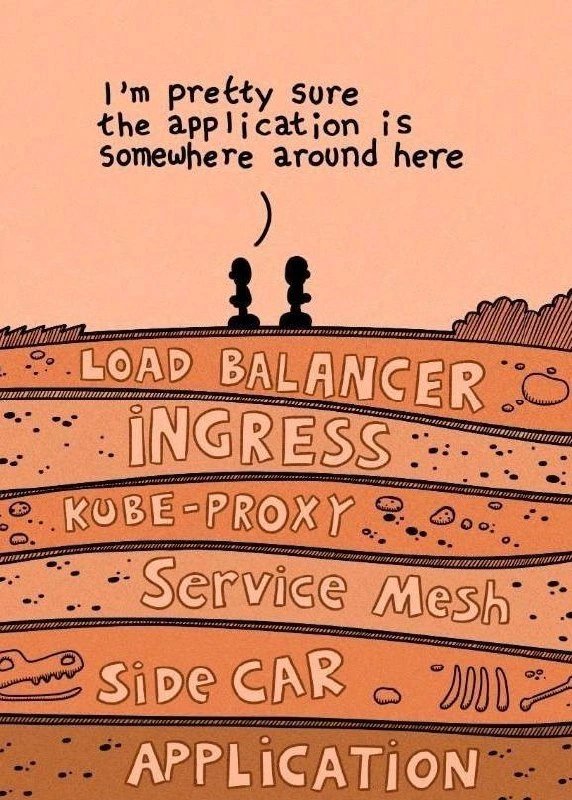
The Archaeological Dig for a Cloud-Native Application
Why is this Containerization meme funny?
Level 1: Buried Treasure
Imagine you built a cool toy castle (your application), but then you covered it with a bunch of boxes and wrappers. First, you put a big box around it (that’s like a load balancer). Then you wrap that box in another box with special labels on it (that’s an ingress with rules). Then you put that on a tray that has little tunnels leading to your castle (think of the tray as the kube-proxy connections). After that, you even cover everything with a safety blanket and some bubble wrap for good measure (those are like the service mesh and sidecar layers protecting and managing your toy). Now your friend comes over and wants to see the cool castle. They look at this pile of boxes, wrappers, trays, and blankets and say, “I’m pretty sure the castle is somewhere in there!” They have to unwrap layer after layer to finally get to the toy. It’s a bit funny and a bit frustrating, right?
This meme is joking that in today’s tech world, finding where the actual app is running is like a little treasure hunt. We add so many protective and helpful layers around our “treasure” (the app) that it feels like digging into the ground to find buried treasure. The emotion here is a mix of amusement and mild exasperation – it’s funny because it’s true! Even though all those layers serve a purpose (just like wrapping a toy keeps it safe and sound), sometimes you just want to quickly get to the toy and play. The picture showing people digging through earth layers is like saying “Our code is down there somewhere, under all this stuff we set up to help it.” Anyone who’s tried to troubleshoot a complicated setup knows the feeling. In simple terms: we often hide our important thing (the app) under many other things (networking tools), and then we have to dig through it all to reach what we actually want. It’s like playing hide-and-seek with your own application!
Level 2: Layers on Layers
For a newcomer to Kubernetes or cloud infrastructure, seeing all these terms can be confusing. Let’s decode each layer in simpler terms, connecting them to something you might have experienced early in your DevOps journey:
Load Balancer: This is like a traffic cop at the entrance of a city. In cloud deployments, a load balancer gets a public IP address and listens for incoming requests from users. Its job is to distribute those requests across multiple servers or instances so that no single machine gets overwhelmed. For example, if you have 5 replicas of a web service running in a cluster, the load balancer will ensure each of them gets some of the incoming requests. In Kubernetes, if you set a Service to type
LoadBalancer, your cloud provider (say AWS or Azure) will actually spin up an external load balancer for you. Without a load balancer, your application would have no easy way to handle more than one server or to provide high availability. ContainerOrchestration platforms rely on these to present a single face to the outside world even though under the hood there might be many containers.Ingress: Think of the ingress as the smart receptionist for your application cluster. If the load balancer is the front door, the Ingress is the person at the front desk who directs visitors to the right office or department. When multiple services (microservices) are running in a cluster, you need rules to decide which traffic goes where. An ingress resource in Kubernetes is basically a set of rules (like “requests to
/loginshould go to the login-service” or “requests toapi.customer.comshould go to the customer-service”). The ingress controller (like an Nginx controller or Traefik) implements these rules. For someone new, the ingress might be the first time you realize “Oh, just deploying my app container isn’t enough — I have to explicitly configure the routes for external traffic!” It introduces you to cloud native thinking: everything is an object you configure, rather than a manual step. The ingress is often where you deal with things like domain names, TLS/SSL (for HTTPS), and load balancing policies at the HTTP layer. Remember that moment in your first Kubernetes deployment when you expose a Service and then wonder, “Why can’t I access it on the browser?” The answer was probably “you need an Ingress” (or a NodePort, but that’s another story). Ingress is that missing puzzle piece that routes external traffic into the cluster correctly.kube-proxy: This one operates behind the scenes, so as a beginner you might not interact with it directly, but it’s crucial. kube-proxy runs on every Kubernetes node (a node is like a VM or machine in the cluster). Its job is to make services work. In Kubernetes, a Service is a stable way to refer to a dynamic group of pods. Pods (which hold your containers) come and go, IPs change, but a Service has a stable IP or DNS name. How does traffic to that stable IP reach the right pod? That’s kube-proxy’s doing. It sets up low-level networking rules so that when something hits the Service IP, the kernel knows how to forward it to one of the pods backing that service. Kube-proxy uses either Linux iptables or IPVS rules to do this. If you’re a junior dev, you might have first noticed kube-proxy when you listed system pods (
kubectl get pods -n kube-system) and wondered what it is. It’s one of those things that “just works” until it doesn’t. For example, if you ever mis-label your pods or your Service selector doesn’t match any pods, kube-proxy will faithfully route traffic to… nothing. Then your app seems down. The fix is often, “Oops, label mismatch, let me fix my Service or Deployment labels.” That’s a classic newcomer mistake that effectively means the kube-proxy layer wasn’t connecting your layers because of a config mix-up.Service Mesh: A service mesh is like an internal traffic management system for your microservices. If the load balancer and ingress handle getting traffic into the cluster, the service mesh handles traffic between the services inside the cluster. When you have lots of microservices (A talks to B, B talks to C, etc.), you start wanting features like observability (knowing what’s calling what and how often), retry logic (if a call to B fails, automatically try again), circuit breaking (stop calling B for a little while if it’s consistently failing, so it can recover), and encryption (make sure service-to-service communication is secure via mTLS). You could implement all that in each service’s code, but that’s tedious and inconsistent. Enter the service mesh: it provides those features at the infrastructure layer, so app developers don’t have to reinvent them. A service mesh usually consists of a control plane (a central brain coordinating things) and a data plane (the proxies that actually handle the calls). For example, Istio is a popular service mesh. When a newcomer encounters service mesh, it can be bewildering: “Wait, I already have Kubernetes Services, why do I need a mesh?” The simple answer is: Kubernetes ensures delivery of traffic, but a mesh gives you control and insight over that traffic’s behavior. It’s more advanced and often introduced in larger systems where just having connectivity isn’t enough; you want smart handling of calls.
Sidecar: The sidecar pattern is an architectural design where you pair a helper process alongside the main application. In Kubernetes, this usually means an extra container in the same pod as your application container. Because they share the pod, they share the network namespace and can intercept network calls. In context of a service mesh, the sidecar is typically a proxy like Envoy. The reason it’s called a sidecar (like the little passenger cart attached to a motorcycle) is that it’s not part of your app per se, but it travels along with it, augmenting its capabilities. For someone learning this, the idea that each of your pods might actually be running two containers (your app + a sidecar) can be surprising. You might notice this when you do
kubectl get podsand see 2/2 containers in a pod instead of 1/1. The sidecar in a service mesh will automatically handle sending out requests and receiving responses on behalf of your app. It’s like a translator or a bodyguard for your service. If you’re new, think of it this way: instead of your code making a direct HTTP call to another service, it will actually be talking to this sidecar on localhost, and the sidecar forwards the request to the destination service’s sidecar, and then to that actual service. All this happens transparently via some fancy networking setup. The benefit is your app gets all those reliability and security features without knowing about them. The downside (and what the meme jokes about) is that now there’s yet another thing between your app and the outside world.Application: Finally, the star of the show, hidden at the bottom. This is the code you wrote – your application running in a container. In a containerized environment, your app is packaged with its dependencies and runs in an isolated unit (the container). Kubernetes schedules it into a pod, possibly alongside a sidecar. As a junior developer or someone new to deployment, this is usually where you start: “I have my app; I just want it to run and be reachable.” Everything else above ends up being the necessary plumbing to make that happen in a scalable, reliable way. It can be a bit deflating to realize how much infrastructure is needed just to serve your app to the world! But each piece has a purpose. Nonetheless, it’s easy to sympathize with the meme – the app is doing the real work (serving users, processing data), yet you sometimes feel it’s buried under all the infrastructure you must set up.
To put these pieces together, let’s follow a simple scenario a junior dev might encounter: You deploy your first containerized web application on Kubernetes. You create a Deployment for your app and expose it with a Service. You try to hit the app from your browser… and nothing happens. A senior engineer points out, “No, you can’t directly hit a ClusterIP Service from outside. You need an Ingress and probably a LoadBalancer.” So you add an Ingress resource with a rule for your app, and maybe set your Service type to LoadBalancer so that it gets an external IP. Now the request flow from your laptop’s browser goes: Browser ➔ Load Balancer ➔ Ingress ➔ Service (via kube-proxy) ➔ Pod (sidecar intercepts) ➔ Application. Finally it works! Later, if your company adopts a service mesh for all the cool telemetry and traffic control, you’ll inject sidecars and then you might find yourself learning how Envoy config works or why your sleep test pod can’t reach the service until you enable mesh ingress gateways. It’s a lot to take in.
Key terms defined in simpler words: A load balancer is just a distributor of network requests, an ingress is a smart router at the cluster boundary, kube-proxy is a built-in traffic forwarder inside the cluster, a service mesh is an internal traffic management system using many proxies, a sidecar is one of those proxy helpers inserted next to your app, and the application is, well, the actual program you wrote. Modern microservice architectures and containerization practices bundle all these so that large systems run efficiently and can be managed, but it sure is a lot of moving parts. This meme humorously lists them like layers of earth you must dig through, which is exactly how it can feel when you’re new and trying to understand “Why can’t I just call my app directly?”. It’s a rite of passage in DevOps learning: discovering that “deploying an app” actually means configuring a bunch of infrastructure around it. Don’t worry, with time you’ll know these layers like the back of your hand, and you’ll even chuckle at jokes like this because you’ve lived it!
Level 3: Kubernetes Archaeology
DevOps Engineer A: “I’m pretty sure the application is somewhere around here.”
DevOps Engineer B: "Time to start digging through these layers…"
In this scene, our two silhouetted figures are like archaeologists at a dig site, except they’re DevOps engineers unearthing layers of a Kubernetes deployment. The humor hits home for experienced engineers because modern cloud-native applications often feel buried under layered infrastructure. Each label in the cartoon – LOAD BALANCER, INGRESS, KUBE-PROXY, SERVICE MESH, SIDECAR – represents a component that incoming traffic passes through before it reaches the actual application. If you’ve ever tried to debug a microservice that “just isn’t responding,” you’ve likely had to inspect each of these layers, one by one, to find where the request is getting lost. It’s a DevOps humor classic: a punchline about Deployment pain points that comes from lived experience.
Let’s break down the scenario that the meme is riffing on. Imagine a user’s request coming in from the wild Internet. First stop: a Load Balancer. This could be a cloud load balancer (like AWS ELB or GCP Cloud Load Balancing) or a software LB (like HAProxy or NGINX) at the cluster’s edge. Its job is to distribute incoming traffic across multiple instances or nodes. It might use some load balancing algorithm – round-robin, least connections, etc. – to decide which server should handle the request. So already, before hitting our app, the request is handled by a layer of infrastructure.
Next, the request hits the Ingress controller. In Kubernetes, an Ingress is like a smart router at the entrance of the cluster. It reads rules (hostnames, URL paths) and decides which service the traffic should go to. Think of it as the doorkeeper that says “Oh, you want /api/users on host myapp.example.com? That actually should go to the users-service over here.” Under the hood, an ingress controller is often implemented with yet another proxy (common ones are nginx-ingress, Traefik, or cloud-specific controllers). So this is the second layer: a dedicated routing brain that knows how to get traffic to the right place inside the cluster. If something is misconfigured here (say the path rule is wrong), your app is essentially inaccessible—the request won’t even find the correct door.
Now suppose the request has been handed off to the right Kubernetes Service (e.g., users-service). Kubernetes Services provide a stable IP and name for a group of pods (your actual application instances), and that’s where kube-proxy comes in. kube-proxy is a component that runs on every node in the cluster. It implements the Service abstraction, typically by programming iptables rules or IPVS routes in the kernel. What it means practically is: when the ingress passes traffic to users-service (ClusterIP address), kube-proxy intercepts that and forwards it to one of the actual pod IPs where the Users application is running. This is the third layer: an internal cluster networking hop. It’s not a “proxy” in the user-space sense for every packet (unless using userspace mode, which is rare now), but logically it’s another forwarding layer. Problems here might include misconfigured services, a pod not being registered as ready (so not in the endpoints list), or funky network policies blocking traffic. Many a time, developers have exclaimed “Why isn’t my pod getting traffic?!” only to realize they forgot to update a Service or the labels don’t match, essentially losing the request in this kube-proxy forwarding layer.
But we’re not done! Let’s say the request successfully reaches the node and is about to hit the application’s pod. In a Service Mesh environment, the traffic is transparently hijacked by a sidecar proxy sitting alongside the application container. Service Meshes (like Istio with Envoy, or Linkerd) inject a sidecar container in each pod to handle network communication for the app. This sidecar is like the app’s wingman: it can encrypt and decrypt messages (mTLS for security), do retries, collect metrics, and apply fancy routing rules (like A/B testing or traffic shaping). In the meme, Service Mesh is the fourth layer and Sidecar the fifth layer, but really they work in tandem: the “mesh” is the whole system of sidecars + control plane. The meme separates them to emphasize how even within the pod you’ve got layers: your app is now indirectly talking to the network through a local proxy. If the service mesh configuration is off (say a destination rule or circuit breaker is mis-set), your request might die in the sidecar without the application ever seeing it. This is a very real scenario – e.g., an overly strict policy in Istio can block traffic, and developers often end up scratching their heads until they remember “Oh right, the mesh policy is denying this call”. More layers, more places for things to go wrong.
Finally, beneath all those sedimentary layers, lies the Application itself – the actual business logic, the code that the developer wrote and containerized. It’s almost anticlimactic to find it at the bottom of this deep stack. The cartoon shows the word “APPLICATION” practically as bedrock, implying that by the time we get to the actual code, we’ve dug through so much cloud native complexity it’s as if we’ve gone through geological epochs of debugging. In a traditional setting (say, a good old LAMP stack running on a single VM), a client request could hit your app directly or maybe pass through one proxy at most. In contrast, a microservice architecture on Kubernetes introduces this layer cake of complexity.
The joke resonates with anyone who’s spent late nights troubleshooting a Kubernetes deployment. The dialogue might go something like:
- Developer: “The app is down! Our customers can’t reach it.”
- SRE: “Alright, is the app container crashlooping or something?”
- Developer: “No, the pod is running fine.”
- SRE: “Hmm, maybe the service mesh sidecar is misbehaving… Or the ingress isn’t routing properly… Did we update the TLS cert on the load balancer?”
- Developer: groans “We have to check everything now, don’t we?”
It’s a comical albeit painful reality: you often end up spelunking through logs and configs at each layer. Check the load balancer (is it pointing to the right ingress IP?), check the ingress (are the rules correct? Did the new TLS certificate get applied?), check kube-proxy and service (are the endpoints updated? Any NetworkPolicy blocking ports?), check the service mesh (did someone apply a traffic policy or a destination rule that affects this service?), check the sidecar proxy logs (are requests making it through?), and then check the application’s own logs. At 3 AM, this feels like digging through rock with a toothbrush, discovering one layer at a time like fossils of past decisions and configurations. Each layer could have its own YAML config or dashboard, and each might be owned by a different team or require a different toolkit to inspect. No wonder the silhouetted engineers in the meme are uncertain – the application is somewhere below, but getting to it is an expedition.
Historically, this predicament arose as we scaled out software architecture. We went from monoliths (one big application, fewer network hops) to microservices (many small applications, lots of network calls). Kubernetes and container orchestration made it easier to run these microservices reliably, but to do so, it introduced new abstractions (Services, Ingresses, etc.). Then, to manage traffic between all these moving parts, we added service meshes for reliability and observability. Each step was logical – even necessary – for operating large distributed systems. However, the end result is that a simple “Hello, world” web app in a large company might sit behind a fortress of infrastructure.
This layering also hints at DevOps/SRE culture changes. A developer can’t just be a coder; they need to be part-archaeologist, understanding networking and infrastructure to truly know how their application runs in production. It’s a shared pain point and hence a source of shared laughter. The meme exaggerates it slightly (not all deployments have every one of these layers), but it’s close enough to truth to elicit a knowing chuckle. In some environments, you indeed have an external load balancer, fronting an ingress controller, routing to a Kubernetes Service, going through kube-proxy, then an Istio sidecar, before the app finally gets the request. It feels like deploying code into a deep, layered abyss and hoping nothing in that stack of plates cracks.
To put it succinctly, the meme is funny to DevOps folk because it captures the absurdity of having to “dig” through so many modern cloud components just to reach the darn app. It’s a playful jab at cloud_native_complexity. It reminds us that while all these layers (load balancers, ingress controllers, service meshes) provide powerful capabilities — global routing, resiliency, security, monitoring — they also can make the simple act of finding the application or diagnosing an issue an epic quest. Seasoned engineers have come to accept that “It’s never just the app’s fault; you have to check the whole stack.” The phrase “somewhere around here” perfectly encapsulates that slightly overwhelmed feeling when you suspect the bug or bottleneck could be hiding in any one of those layers, but not sure which. Container orchestration and infrastructure as code brought tremendous power, yet sometimes we long for the simplicity of just ssh-ing into a box running our app directly. The ground we’re standing on is higher than ever (thanks to all these layers of sediment), and we’ve almost forgotten what the bare earth (the raw application) even feels like. This meme winks at that reality with a geology gag that any Kubernetes wrangler will appreciate.
# Example of the "geological" YAML layers you might configure for a simple web app in Kubernetes:
apiVersion: v1
kind: Service
metadata:
name: my-app-service
spec:
type: ClusterIP # Internal service to group pods
selector:
app: my-app
ports:
- port: 80 # Service port
targetPort: 8080 # Pod's container port
---
apiVersion: networking.k8s.io/v1
kind: Ingress
metadata:
name: my-app-ingress
spec:
rules:
- host: myapp.example.com
http:
paths:
- path: /
pathType: Prefix
backend:
service:
name: my-app-service # Points to the Service above
port:
number: 80
# (Behind the scenes: a cloud Load Balancer directs traffic to this Ingress,
# the Ingress routes to the Service, kube-proxy sends to a Pod,
# and a sidecar in the Pod might intercept before the app.)
(The YAML above is a peek at two of the layers: an Ingress and a Service. In a real setup, there’d also be deployment configs for the app and maybe Istio DestinationRules or VirtualServices for the mesh – more layers of “sediment” in our geological stack!)
Level 4: Proxies All the Way Down
At the most abstract level, this meme pokes fun at the cascade of network abstractions that modern cloud deployments introduce. It’s a nod to the classic notion of “turtles all the way down,” but here it’s proxies and layers all the way down. Each layer (Load Balancer, Ingress, kube-proxy, Service Mesh, Sidecar) is an abstraction meant to solve a specific problem in a distributed system. However, according to the Law of Leaky Abstractions, every abstraction will eventually expose the messy details beneath when things go wrong. So when a request fails or performance tanks, an engineer must peel back each layer to find the root cause. This turns debugging into an archaeological dig through the stack.
From a theoretical perspective, this reflects a tension in distributed computing: we add layers to manage complexity, but each layer accumulates incidental complexity of its own. The meme’s geological strata metaphor hints at system layering akin to the OSI model, except here we’ve added extra sediment on top of the transport layer in the form of cloud-native infrastructure. There’s a bit of irony: early internet design followed the end-to-end principle (keep the network simple, push complexity to the endpoints), but cloud-native architecture flips this around. We push more logic into the network fabric (for traffic shaping, security, discovery), making the “pipes” smarter but also thicker.
Mathematically, you can think of each added component as adding to the probability of failure and latency. If each layer has reliability $R_i$, the overall reliability $R_{total}$ is roughly the product of all $R_i$ (since a failure at any layer breaks the request). More layers $\rightarrow$ more points of failure:
$$ R_{\text{total}} = R_{LB} \times R_{Ingress} \times R_{proxy} \times R_{mesh} \times R_{app} $$
Even if each component is highly reliable (say 99.9%), chaining many yields a lower overall reliability. The same goes for latency: total latency is the sum of time spent at each hop. This is why seasoned engineers joke that microservices trade monolithic complexity for network complexity. Each function is small and isolated (microservice architecture’s promise), but coordinating them requires a gauntlet of networking, routing, and policy layers. In theoretical terms, distributed systems introduce problems like network latency, partial failures, and concurrency concerns that simply don’t exist in a single-process monolith. We build layers like service meshes and proxies to mitigate those distributed systems challenges (retrying failed calls, load balancing to handle CAP theorem trade-offs, etc.), but by doing so we’re essentially re-introducing a different kind of complexity. It’s a real-world demonstration of the fundamental trade-off: you can simplify each component by offloading responsibilities, but you can’t eliminate complexity — you merely shift it around. The meme humorously visualizes that shifted complexity as a literal pile of layers burying the actual app. Any senior engineer who has spelunked through a production Kubernetes cluster can relate: the simple sounding act of “calling an application” now involves traversing a labyrinth of infrastructure. It’s proxies on top of proxies, all the way down to your code.
Description
A cartoon illustration with a warm, orange and brown color palette depicting a cross-section of the earth, akin to a geological or archaeological dig site. At the very top, on the surface, stand two small, black, silhouetted figures. A speech bubble from one of them reads, "I'm pretty sure the application is somewhere around here". The ground below is stratified into multiple layers, each with a label in a bold, stylized font. From top to bottom, the layers are: 'LOAD BALANCER', 'INGRESS', 'KOBE-PROXY' (a likely typo for kube-proxy), 'Service Mesh', 'SIDE CAR', and finally, at the deepest level, 'APPLICATION'. To enhance the archaeological theme, the layers contain small rocks and fossils, including a crocodile-like skeleton in the 'SIDE CAR' layer. The meme humorously illustrates the profound complexity and numerous layers of abstraction in modern cloud-native infrastructure, particularly within a Kubernetes ecosystem. It satirizes the feeling that the actual application code is buried so deep beneath networking and proxy layers that troubleshooting or even comprehending the request flow feels like an excavation

Comments
9Comment deleted
We've added so many layers of abstraction that our main troubleshooting tool is now a ground-penetrating radar, and we still can't find the application
Modern archaeology: carbon-date the Sidecar layer; if it predates your Istio upgrade, keep digging - somewhere beneath the service-mesh fossils lies the business logic you bill for
Remember when deploying meant FTP'ing files to a server? Now we need a PhD in distributed systems just to find where our 'Hello World' app is actually running beneath the sedimentary layers of service meshes, sidecars, and seventeen different proxy implementations
After adding Istio, Linkerd for redundancy, three ingress controllers (just in case), and a service mesh to monitor the service mesh, the senior architect finally located the actual application logic: a 47-line Python script that could have run on a Raspberry Pi. The monthly AWS bill, however, suggests otherwise
After our platform hardening, traceroute reads like a table of contents: load balancer -> ingress -> kube-proxy -> sidecar -> app, with latency measured in abstraction layers
K8s networking: Where your app isn't missing - it's just seventh in line behind a conga of proxies
Kubernetes archaeology: to reach the app you dig through LB → Ingress → kube‑proxy → service mesh → sidecar; by the time “Hello, world” arrives, TLS has terminated twice and the trace looks like a geological core sample
This is what happens when you ask people with *zero CS background* to handle infrastructure. Comment deleted
It's just a typical cloud. Comment deleted