
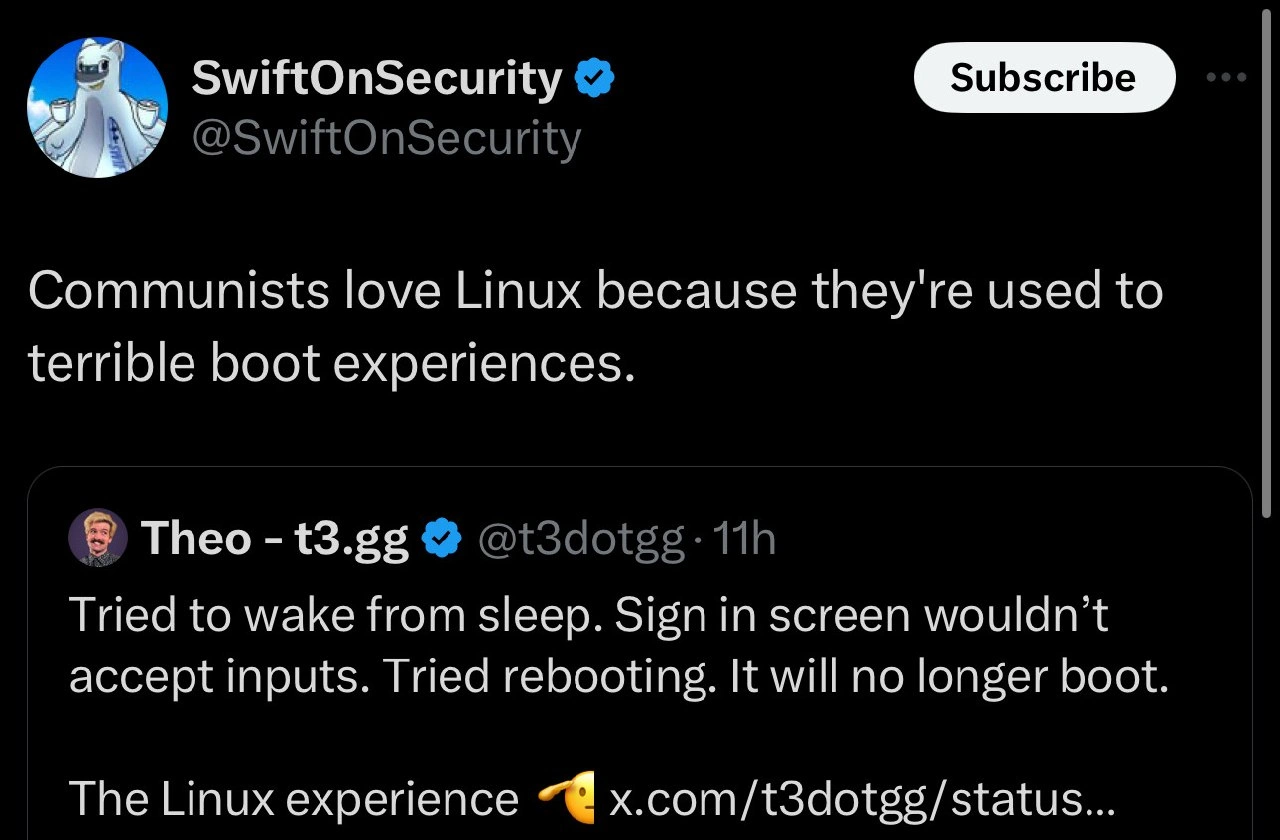
The classic Linux desktop boot experience, with a political twist
Why is this OperatingSystems meme funny?
Level 1: Terrible Boot Experience
Imagine you have a car that sometimes doesn’t start in the morning. One day, you turn the key to wake it up — the lights on the dashboard come on, but the steering and pedals don’t work at all. So you decide to restart the car. But after turning it off and on, now the car won’t even start; it just makes a weird sound and dies. Frustrating, right? This meme is joking that using Linux (a kind of computer system) can be a bit like having that trouble-prone car. It humorously says that only someone who’s already used to a lot of inconvenience (the joke picks on “communists” as people who might be used to things not working smoothly in life) would love an experience like this. In simple terms, it’s funny because it takes a painful situation — a computer that won’t start properly — and exaggerates that you’d have to be a special kind of person to put up with it happily. It’s like saying, “Wow, this thing is so unreliable, you’d have to be really patient (or maybe a bit crazy) to enjoy it!” Everyone who’s had a device fail on them can relate to that feeling. The meme uses this over-the-top comparison to make us laugh about something that would otherwise make us want to pull our hair out.
Level 2: Penguin Problems
Let’s break down what’s happening in this meme in plain technical terms. Linux is an open-source operating system (its mascot is a penguin named Tux) that developers and sysadmins often use on their personal computers and servers. It’s powerful and customizable – but it also has a reputation for occasionally being tricky, especially on desktop/laptop hardware not specifically made for it. A common frustration is when your computer “won’t boot” (meaning it won’t start up properly into the OS). The tweet referenced describes a scenario many have faced: you close your laptop (it goes to sleep to save power), later you open it (it should wake up), but the login screen that appears is unresponsive – your keyboard and mouse inputs do nothing, almost like the computer is frozen except the display is on. This is a bug (an error in software or drivers). Maybe a piece of hardware didn’t wake up correctly or a software process got stuck.
When the user says they “tried rebooting” and now “it will no longer boot,” that means after forcing the computer to restart, the system can’t load into Linux at all. Imagine seeing a black screen with some scary white text, or maybe a menu that doesn’t lead anywhere. This is where the bootloader comes in. A bootloader (for Linux, often GRUB) is a small program that runs right after you power on, which finds the Linux system on the disk and starts it. If something in the previous failed wake-up messed with important system files or settings, the bootloader might not find what it needs, or the OS might crash immediately. One common Linux boot error is a kernel panic – essentially the Linux kernel (the core of the OS) saying “I encountered a fatal problem and must stop.” That’s like the Linux version of Windows’ Blue Screen of Death. It can happen for many reasons: a driver (which is software that controls a specific piece of hardware like your graphics or keyboard) might have been in a bad state from the failed wake and now can’t initialize properly on boot, or a critical file got corrupted when the computer hung and was powered off abruptly. This leaves the user staring at a screen full of text or a prompt they don’t know how to use. It’s the ultimate Debugging_Troubleshooting headache because you might have to dig into recovery modes, use command-line tools, or even reinstall parts of the OS to fix it.
Now, why is this funny (at least to some of us)? SwiftOnSecurity’s tweet jokes that “Communists love Linux because they’re used to terrible boot experiences.” It’s a hyperbole (an exaggeration) to make a point. The idea is that using Linux, especially when it goes wrong like this, can be frustrating and requires patience and grit – much like the stereotypical hardships one might joke about under a strict communist regime (think of waiting in long lines for basic goods or using old, malfunctioning equipment). It’s poking fun by saying: who could love an OS that sometimes behaves like this? – Only someone who already expects things to be difficult! Of course, that’s not literally true; many people love Linux despite these problems, not because they enjoy suffering. But tech folks often bond over shared pain points with humor. We call these “Linux problems” or here, “The Linux experience 🤌” as Theo (t3dotgg) puts it. The pinch-hand emoji 👌 (often used to mimic an Italian chef kiss gesture) adds a sarcastic flair, as if this broken-boot situation is the pièce de résistance of Linux life. In other words, “ah, perfection – this is exactly the kind of crazy problem we deal with on Linux!” It’s an in-joke among developers and IT people.
For a junior developer or someone new to Linux, the key takeaways are: operating systems can sometimes fail to start due to software bugs or misconfigurations. Linux gives you lots of control, but with great power comes the occasional headache of things not working out-of-the-box. Debugging such an issue might involve checking a lot of technical details (boot settings, log files, drivers). The humor is a bit self-deprecating: we’re laughing at our own misfortune. If you’ve just started using Linux and something like this happens, don’t feel too bad – even the pros deal with it and have made memes about it!
Level 3: Bootloader Blues
For many experienced developers and sysadmins, this meme hits a nerve – and a funny bone – because it satirizes the debugging frustration they know all too well. We’ve all had that one machine that refuses to boot after a seemingly innocent change or, as in this case, after simply waking up from sleep. The embedded tweet recounts a classic tale: suspend the laptop, try to wake it, the login screen appears but keyboard and mouse do nothing. You’re locked out of your own session. Fine – you hold the power button and reboot (when in doubt, turn it off and on again, right?). Except now, instead of a friendly login, you’re greeted with… a black screen. Or a weird BIOS message. Or GRUB saying it can’t find the OS. Your system has essentially said “Nope, I live here now in the void.” This progression from minor annoyances to major failure is darkly comic because it’s painfully common in the Linux desktop world – a world of OperatingSystems quirks and edge-case bugs.
The top tweet from SwiftOnSecurity quips: “Communists love Linux because they’re used to terrible boot experiences.” This is tongue-in-cheek, blending tech humor with a socio-political jab. The joke exaggerates that only someone habituated to hardship (imagine stereotypical images of communism: waiting in lines, rationed goods, unreliable old state machinery) would find the notoriously finicky parts of Linux normal or acceptable. It’s absurd and a bit spicy: Linux isn’t literally related to communism, of course, but there’s a grain of truth in the humor. Linux can test your patience, especially when dual-booting or installing on random hardware. Seasoned Linux users often wear these scars with pride — “I survived a Gentoo install in 2005” or “I fixed a bootloader at 3 AM via Live CD.” The meme playfully implies that enjoying Linux might require a strange tolerance for pain, akin to enduring an austere regime.
Technically, what could have caused “It will no longer boot” after a failed wake? Veteran devs can reel off a list of culprits from experience: maybe the bootloader configuration got borked (GRUB sometimes needs to be reinstalled if disk order changes or an update was mid-flight), or the kernel that was running had a meltdown saving state. Perhaps the filesystem was still mounted when the system froze, and the forced reboot left some critical system files in limbo (leading to a corrupt fsck on startup). There’s even the chance that a recent update (new kernel, new GPU driver) didn’t finalize correctly; the suspend/resume ordeal was just the spark that ignited the powder keg. And then there’s hardware fun: certain laptops just don’t handle Linux suspend well – BIOS issues, unsupported device drivers – so they end up in a wedged state, unable to hand control back to the OS on wake. Power cycling a half-suspended system is like yanking a stuck drawer; sometimes it jostles things back into place, but sometimes the whole bottom falls out.
The humor lands because anyone who has administered Linux has a mental library of “terrible_boot_experience” war stories. We chuckle (perhaps with a tear in the eye) at SwiftOnSecurity’s quip because it’s an exaggerated but relatable characterization. Yes, Linux gives you freedom, open-source goodness, a penguin mascot, and the ability to run on a toaster… yet it also occasionally gives you a boot failure that makes you question all your life choices. The Linux folks often joke “The Year of Desktop Linux” is always just around the corner, ironically highlighting that it’s never quite user-friendly enough for the masses. Issues like this – suspend/resume bugs and mysterious bootloader errors – are exactly why. It’s not that other operating systems never have boot problems (Windows updates that brick systems, anyone?), but Linux being DIY by nature means when things go south, you are the tech support. The meme’s final line, “The Linux experience 🤌”, accompanied by that emoji, perfectly seasons the joke with sarcasm: it implies these foibles are an integral part of the authentic Linux desktop adventure, almost something to be proud of. It’s the chef’s kiss of troubleshooting nightmares, and we laugh because if we didn’t, we might just cry.
Level 4: Arcane Boot Rituals
Deep within a Linux system’s guts, the boot process is an intricate dance between firmware, bootloaders, and the kernel. When you power on a machine, the BIOS/UEFI firmware performs hardware checks (POST) and then hands off to a bootloader (like GRUB – the Grand Unified Bootloader). GRUB’s job is to find and load the Linux kernel into memory along with an initramfs (a temporary root filesystem), then jump to the kernel’s entry point. At this low level, even tiny misconfigurations can derail the whole show. If the bootloader can’t find the kernel or the initrd file, you might end up at a sparse grub rescue> prompt staring at a blinking cursor. It’s the digital equivalent of a ritual gone wrong – one incantation (config line) off and nothing conjures to life.
From the kernel’s perspective, a "terrible boot experience" often means it hit a fatal error early on. A bad driver or missing dependency can cause a kernel panic (the Linux equivalent of a Windows Blue Screen). A kernel panic is essentially the kernel throwing up its hands and halting, usually printing a stack trace or error like:
Kernel panic - not syncing: VFS: Unable to mount root fs on unknown-block(0,0)
This cryptic message indicates the kernel couldn’t find or mount the root filesystem (perhaps the disk got renumbered or the drive module didn’t load). To a seasoned systems engineer, lines like these are the runes of arcane boot failures. They tell us which stage of boot got messed up. Maybe the init system (like systemd) never got invoked, or some hardware driver crashed the party. On Linux, most drivers run in kernel space (a hallmark of a monolithic kernel design). That boosts performance but means a flaky GPU or ACPI driver can bring down the whole OS during boot or resume.
Speaking of ACPI (Advanced Configuration and Power Interface): this is firmware voodoo that handles power states like sleep (suspend to RAM) and wake-ups. If a machine “tried to wake from sleep” but froze, it’s often an ACPI/driver quirk. The CPU, devices, and OS must restore from a low-power state (S3 sleep state) and if any device firmware doesn’t play along (say, a buggy touchpad driver or a USB controller that doesn’t reinitialize), the resume can hang. Perhaps the login screen appeared but input devices (keyboard, trackpad) were dead because their driver didn’t resume – so no keys or clicks register. Now a frustrated user assumes something’s wrong and force-reboots the machine. But Linux wasn’t done with its resurrection ritual! The sudden reset might leave things in an inconsistent state. For instance, a filesystem journal might flag corruption due to the abrupt power cycle or an in-progress kernel upgrade got interrupted. Thus, the next boot could either hang (waiting on something that’s broken) or drop into a minimal initramfs shell for emergency recovery. That’s how a simple failed wake-up spirals into “it will no longer boot.”
Under the hood, Linux recovery from such scenarios often demands geeky procedures: mount the drive via a Live USB, chroot into the system, check logs (journalctl -xb can show boot errors), maybe regenerate initramfs or reinstall GRUB. This meme tickles OS veterans because they’ve danced this dance at ungodly hours. The phrase “The Linux experience 🤌” accompanied by that pinched-fingers emoji captures the perverse elegance of these pain points – as if a chef is kissing their fingers saying “mwah, perfect!” after describing a catastrophic boot failure. It’s a sardonic celebration of how debugging a Linux system can feel like solving a Rubik’s cube that occasionally catches fire. Only those deeply initiated (or slightly masochistic) find charm in these arcane boot rituals.
Description
A screenshot of a tweet from the user 'SwiftOnSecurity' (@SwiftOnSecurity) on the X platform, displayed in dark mode. The tweet reads: 'Communists love Linux because they're used to terrible boot experiences.' This is a quote-tweet of a post from 'Theo - t3.gg' (@t3dotgg), which details a common Linux desktop frustration: 'Tried to wake from sleep. Sign in screen wouldn't accept inputs. Tried rebooting. It will no longer boot. The Linux experience 🤌'. The meme's humor stems from the combination of a relatable technical problem with a sharp political pun. Theo's tweet captures the infamous fragility of Linux desktop environments, where basic operations like waking from sleep can lead to catastrophic, unbootable states. SwiftOnSecurity's commentary adds a layer of dark humor, equating the technical 'boot experience' with the oppressive political 'boot' associated with communist regimes, creating a joke that resonates with developers who are familiar with both Linux's quirks and cynical political commentary

Comments
27Comment deleted
The five stages of Linux desktop grief: denial that it's broken, anger at Xorg, bargaining with GRUB, depression when you chroot, and acceptance that you're reinstalling Arch this weekend
Linux suspend is my favorite distributed system: systemd assumes the kernel has the lock, the kernel assumes ACPI has the lock, and the BIOS is in read-only mode - eventual consistency is achieved at the grub-rescue prompt
After 20 years in the industry, I've learned that Linux boot issues are like distributed systems - they work perfectly until you actually need them, then suddenly you're debugging why your laptop won't wake from sleep while your Kubernetes cluster is somehow still running flawlessly on the same kernel
The Linux desktop experience: where 'suspend to RAM' is really 'suspend to prayer' and every kernel update is a game of Russian roulette with your bootloader. At least when Windows breaks, you get a friendly blue screen - Linux just leaves you staring at a blinking cursor, contemplating your life choices and whether that Arch installation was really worth the street cred
Linux laptops: Sleep makes libinput forget you, reboot makes GRUB forget your root UUID, and the postmortem lives in journald on the filesystem you can’t mount
Linux teaches full-stack the hard way: when resume fails, your debugger becomes UEFI -> GRUB -> initramfs -> systemd -> display manager, and the root cause is a race between ACPI and Wayland
Linux boot: systemd's five-year plan, where one bad module mount starves the entire userspace
I mean… https://github.com/Soviet-Linux Comment deleted
That's what Linux and Path of Exile have in common - they show the barrier of entry early😁 Comment deleted
I've seen the original thread from theo, oh my god. this was obnoxiously terrible and hilarious at the same time. is this really the state of web andys nowadays? Comment deleted
as a Linux user I had the same experience with Windows ;) Comment deleted
Linux users are so hardcore, they can even break a Windows boot Comment deleted
😆 Comment deleted
And also fix it Comment deleted
It happened to me yesterday, then I realized I can't even get into the bios settings, afterwards I realized I shouldn't have enabled chinese fast boot setting (which ignores any peripherals lol), so I had to remove and re-insert RAM to get into bios and disable that shit, so the point is: it's not linux, it's you're an idiot that likes to play around and doesn't like reading manuals Comment deleted
Real Comment deleted
MSI bios moment🤪 Comment deleted
So you didn't read his message either? Comment deleted
Your opinion was declined then Comment deleted
It's not an opinion, just a dumb story of a dumb person though Comment deleted
I am just trolling lmfao Comment deleted
what do you mean by chinese fast boot 🤔 Comment deleted
Skill issue Comment deleted
Penguins are hatched. Why do they have belly buttons? Comment deleted
Don't know, would have to inspect them a little closer 🤗 Comment deleted
https://www.tumblr.com/alpine-official/753000993394999296/i-use-linux-as-my-operating-system-i-state Comment deleted
I had so much more problems with windows than with linux :D No matter what i do, my pc keeps crashing with the blue screen Comment deleted

